
Setup: Vornado AC500 Whole Room Air Purifier User Manual
Content
Vornado AC500 Whole Room Air Purifier: Comprehensive Product Manual
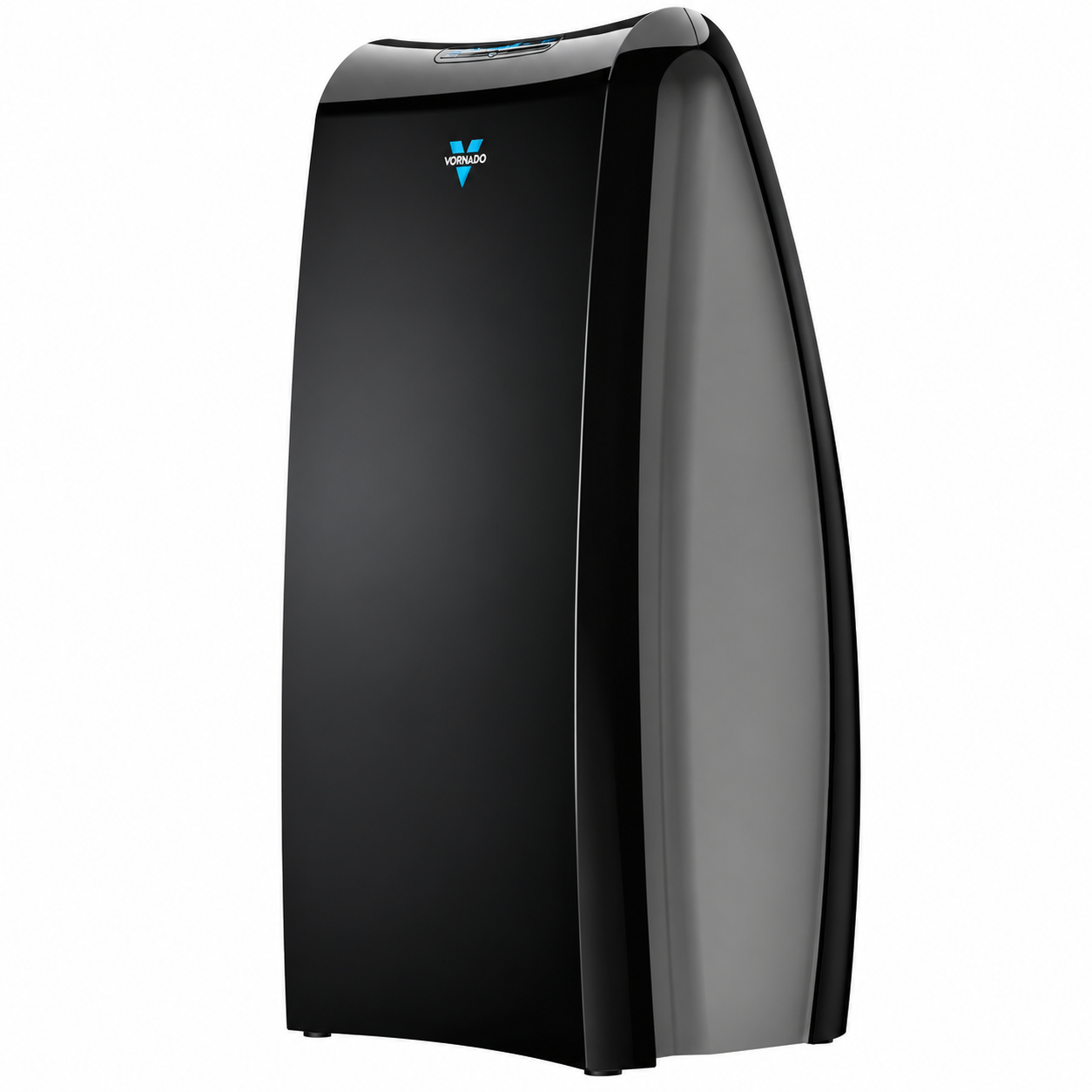
Introduction to the Vornado AC500 Whole Room Air Purifier
The Vornado AC500 Whole Room Air Purifier stands out as a powerful solution for cleaner indoor air, leveraging Vornado's signature Vortex Action technology to circulate and filter air throughout entire rooms. Unlike traditional air purifiers that only clean air near the unit, the AC500 uses a high-output radial blower and potent motor to achieve whole room purification up to 335-336 square feet, making it ideal for bedrooms, home offices, or living spaces. Its True HEPA filtration captures 99.97% of particles as small as 0.3 microns, including dust, pollen, pet dander, and allergens, while an activated carbon pre-filter effectively traps odors and organic compounds.
Key benefits include quiet operation across four speed settings, easy filter replacement, and a filter replacement indicator for hassle-free maintenance. This air purifier excels in allergy relief, smoke reduction, and improving overall air quality, targeting families with pets, allergy sufferers, and those in urban environments with poor air. Use it in homes, offices, or nurseries for reliable performance. Priced typically between $150-$250 depending on retailers like Walmart or specialty stores, it's widely available online and backed by a 5-year limited warranty in select regions. With its compact design (17.7”H x 10.8”W x 13.2”D, 7.5kg) and 220V compatibility for localized markets, the Vornado AC500 delivers exceptional value as a best whole room air purifier for large spaces.
Vornado AC500 Whole Room Air Purifier Specifications and Key Features
The Vornado AC500 Whole Room Air Purifier boasts robust specs tailored for high-performance air cleaning. Here's a detailed breakdown:
- Filtration System: True HEPA filter removes 99.97% of particles ≥0.3 microns; activated coconut carbon pre-filter captures odors and extends HEPA life.
- Coverage Area: Up to 335-336 sq. ft. (or ~30-500 sqft variants by region), with 4x air exchange per hour.
- Dimensions & Weight: 17.7”H x 10.8”W x 13.2”D (44.9 x 27.4 x 33.5 cm); 7.5 kg.
- Controls: 4 airflow speeds with push-button electronic controls and filter replacement indicator.
- Motor & Design: Custom 220V motor, radial blower for Vortex Action circulation; quiet operation; black plastic construction.
- Warranty: 5-year limited warranty.
Compared to similar models like the Vornado AC300, the AC500 offers superior coverage and power for larger rooms, outperforming basic tower purifiers in whole-room circulation.
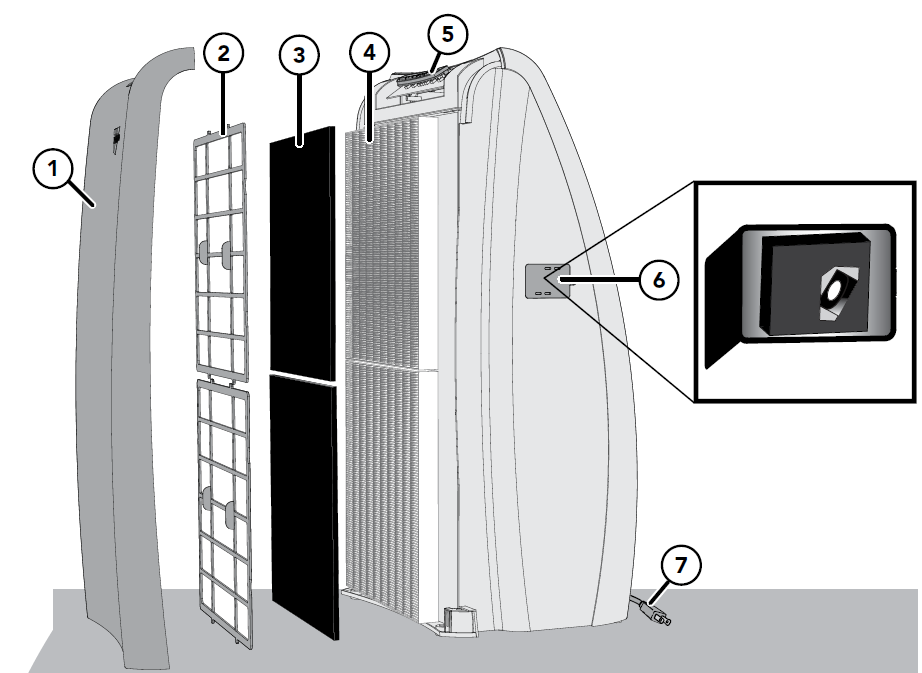
Features
- Front panel
2 plastic support filter frames
The frames secure both the Carbon and HEPA Filters in place.
2 carbon filters
Captures larger initial particles and odors passing through the unit.
2 HEPA filters
Captures 99.97% of particles 0.3 microns or larger passing through the unit, allowing only filtered air back into the environment.
Control panel
LED display and push-button controls provide easy and intuitive operation.
Dust sensor and access door
The Dust Sensor continuously monitors the amount of particulates in the air.
Power cord
Convenient 6 ft. cord.
Control Panel
How to use
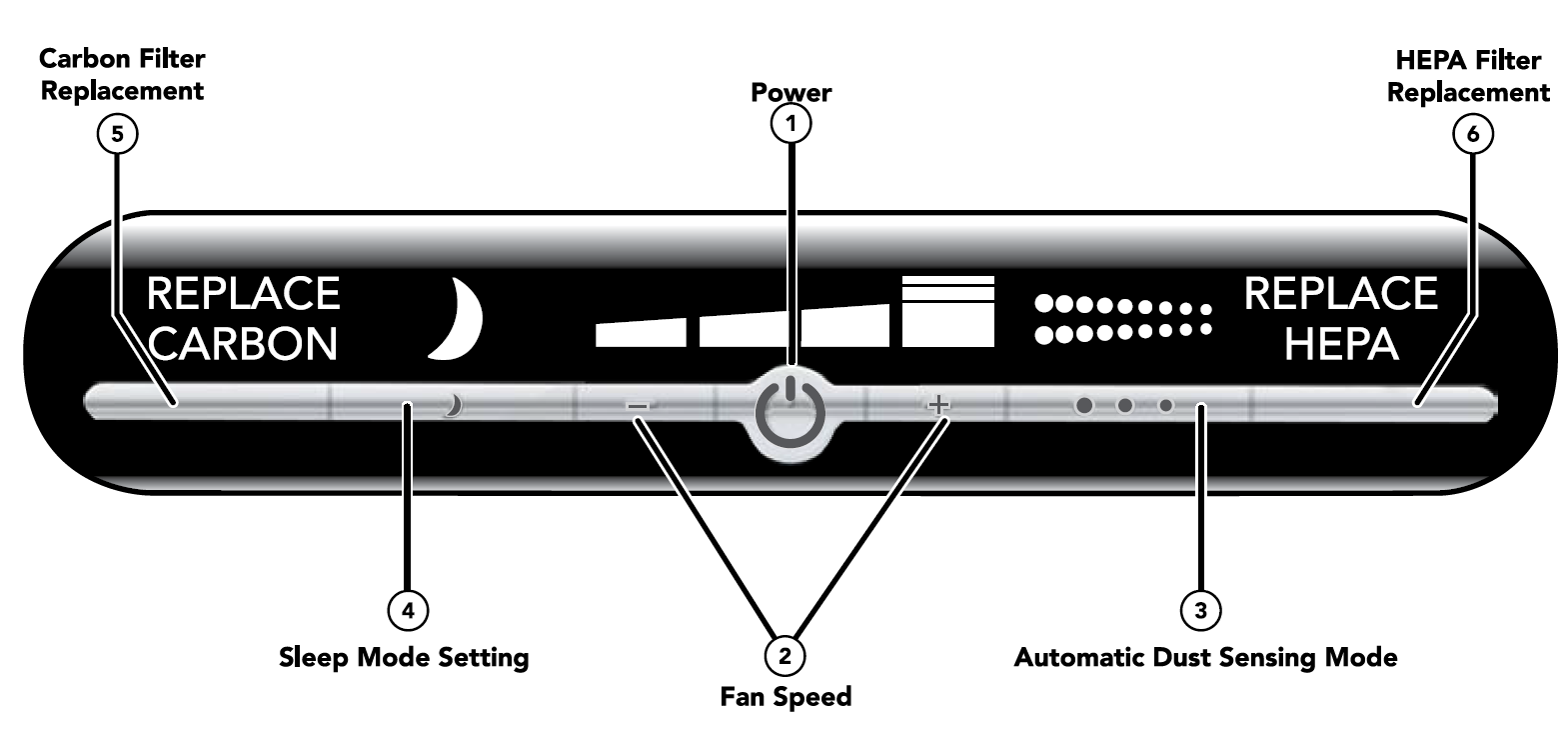
Power
Turn the unit ON or OFF by pressing the Power button.
Fan speed
Four fan speed settings are available: Low, Medium, High, and Quick Clean.
Automatic dust sensing mode
Advanced technology reads the amount of particles in the air and adjusts the fan speed accordingly. Refer to the How to Use section to learn more about this feature.
Sleep mode setting
Senses no light or low-light conditions and automatically adjusts the unit to Low speed. Refer to the How to Use section to learn more about this feature.
Carbon filter replacement
The unit is equipped with a Replace Carbon Filter indicator light to show when it is recommended to change the Carbon Filters.
HEPA filter replacement
The unit is equipped with a Replace HEPA Filter indicator light to show when it is recommended to change the HEPA Filters.
Automatic light dimming
After a short period of time, the control panel illumination will dim so it does not interfere with ambient room lighting. This feature is particularly useful in darker rooms. Pressing any button will re-illuminate the control panel.
Fan speed
Choose one of the four fan speed settings. Press the “+” button to select a higher speed or the “–” button to select a lower speed. The LED display will indicate the selected speed.
Quick clean speed
A high-speed filtration setting can be used to rapidly filter the air when airborne particle levels are high. Press the “+” button on the fan speed control until the Quick Clean icon is displayed. You will immediately notice a significant increase in airflow, allowing the unit to provide maximum air filtration. Due to increased sound levels, use of this mode is recommended only when conditions require it. Low, Medium, and High speed settings are designed for everyday use.
Automatic dust sensing mode
This feature monitors the air quality of the room to detect the presence of particles and then adjusts the fan speed to improve air quality to optimum conditions. Press the Automatic Dust Sensing Mode button to activate this feature. The screen will display the animated Automatic Dust Sensing icon to indicate that the feature is active. The Dust Sensor continuously monitors the amount of airborne particles in the environment and adjusts the fan speed between Low, Medium, and High as needed to maintain optimum air quality. The Quick Clean speed is not used when Automatic Dust Sensing Mode is enabled. Automatic Dust Sensing Mode is overridden when Sleep Mode is activated to ensure the unit maintains a consistent, low noise level during nighttime sleep.
When to use
This feature allows the unit to reduce energy usage when fewer airborne contaminants are present in the room. Because active people and pets tend to stir up airborne particles, the unit may increase speed during peak periods of activity until lower particle readings are obtained. This feature is ideal for rooms where activity varies significantly throughout the day.
Sleep mode setting
This feature senses no light or low-light conditions and automatically adjusts the unit to Low speed. Press the Sleep Mode button to activate this feature. The Sleep Mode icon will appear on the display. This setting is ideal for bedrooms. Higher and more powerful speeds may be used throughout the day, while lower speeds with minimal noise are preferable at night.
Carbon filter replacement
The unit is equipped with a Replace Carbon Filter indicator light to show when it is recommended to change the Carbon Filters. Refer to the Filter Replacement section for instructions. This feature is controlled by operating time. The light will illuminate after 4,000 hours of accumulated run time.
HEPA filter replacement
The unit is equipped with a Replace HEPA Filter indicator light to show when it is recommended to change the HEPA Filters. Refer to the Filter Replacement section for instructions. This feature is controlled by operating time. The light will illuminate after 9,000 hours of accumulated run time.
- Keep the retail carton for storing the unit when it is not in use.
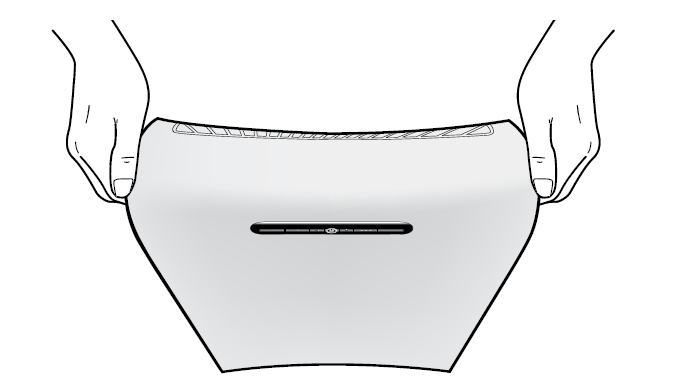
- Use the hand holds on either side of the unit for easy carrying.
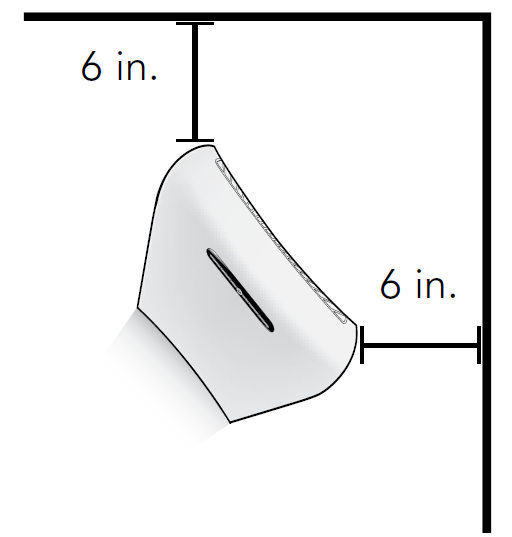
- For best results, position the front of the unit, which is the side with the logo, toward the center of the room. Leave at least 6 inches of clearance from walls or furniture on every side.
Filter replacement
Genuine Vornado filters are recommended
Peak performance is achieved when genuine Vornado Carbon and HEPA Filters are used. Other filters may claim to be compatible with Vornado units, but the Vornado Air Purifier is calibrated to achieve a 99.97% capture rate of particles 0.3 microns or larger only when used with Vornado Filters.
How to replace your filters
- Unplug the unit.
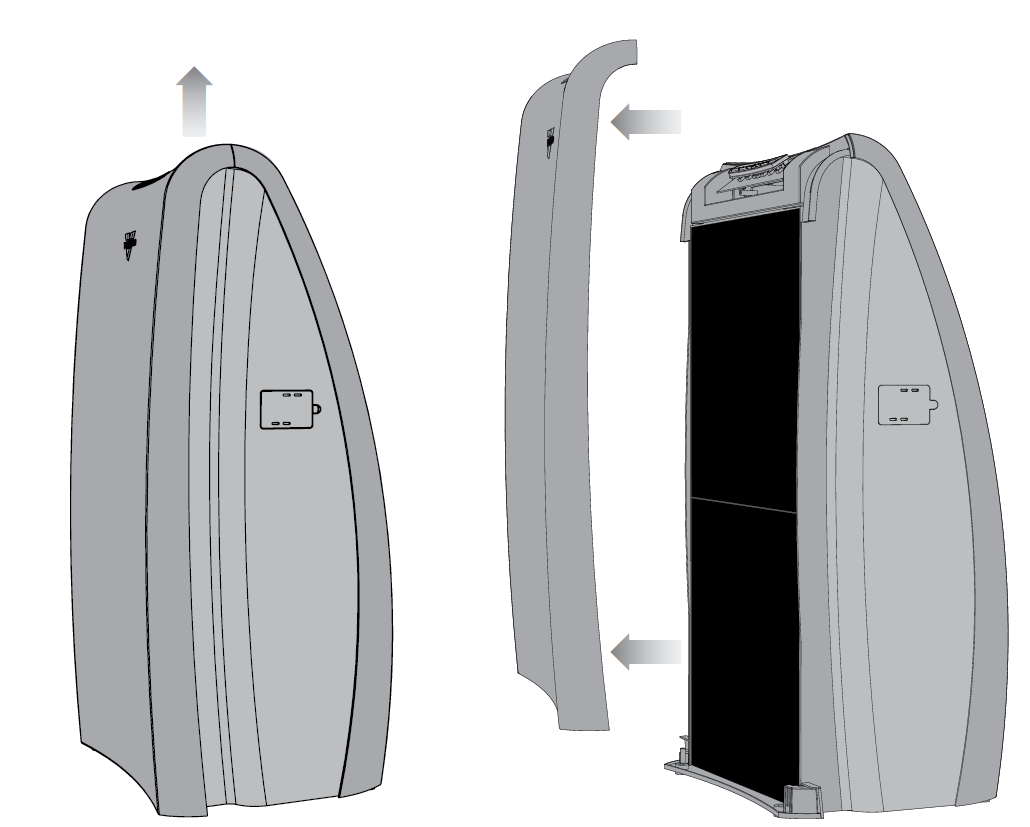
- Remove the Front Panel by lifting it upward and away from the unit.
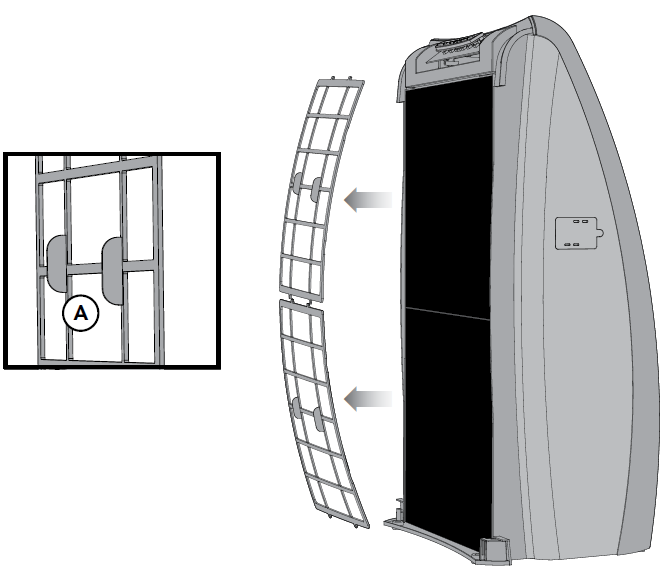
- Remove the Plastic Support Filter Frame by pulling on the center tabs (A). You may need to flex the Plastic Support Filter Frame slightly to release the tabs at the top and bottom.
- Remove and discard the Filters you wish to replace.
- To remove the Carbon Filter, hold the Filter at any point along its perimeter and pull it out. Repeat for the second Filter.
- To remove the HEPA Filter, first remove the Carbon Filters, then hold the tab and pull to release the HEPA Filter. Repeat for the second Filter.
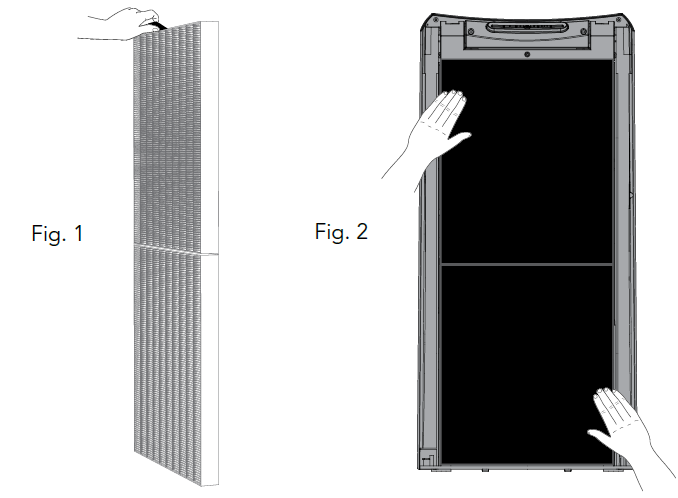
- Replace the Filters with genuine Vornado Filters. Place each Filter into the unit and gently press around its perimeter to ensure secure placement.
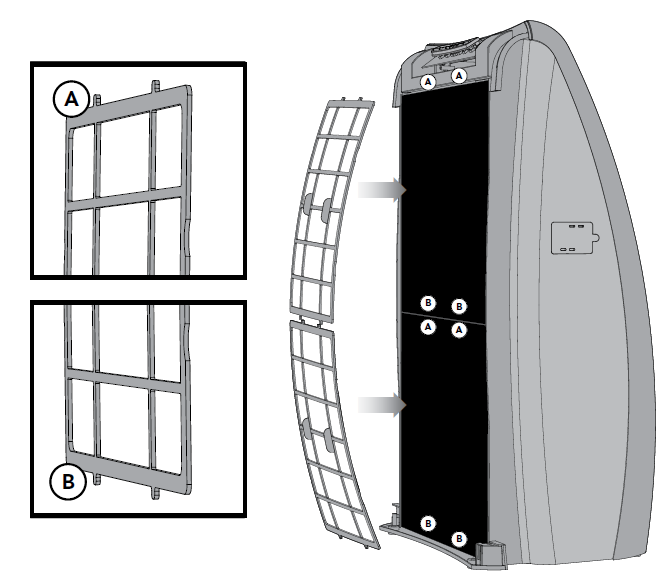
- Replace the Plastic Support Filter Frame by securing the bottom two tabs into the bottom slots (B). Slightly flex the frame to secure the top two tabs into the upper slots.
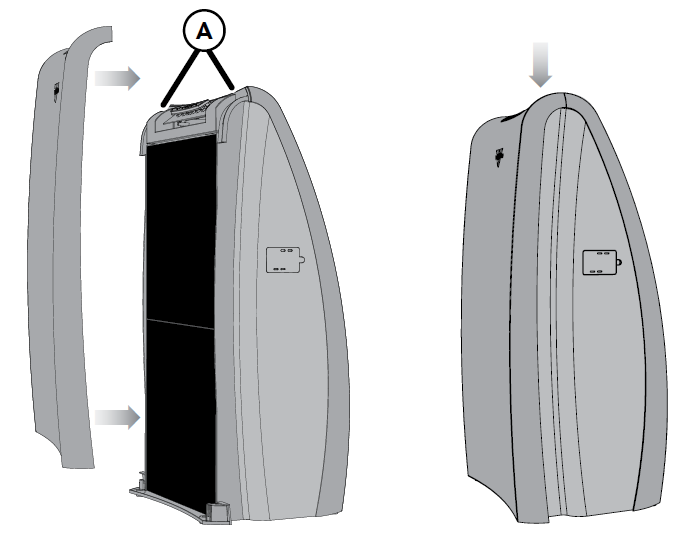
- Replace the Front Panel by positioning it slightly above the unit and aligning the Front Panel tabs with the corresponding holes in the unit. Gently press the Front Panel downward, sliding it into the tab slots and allowing the magnets to securely lock the Front Panel in place.
Safety shut-off feature
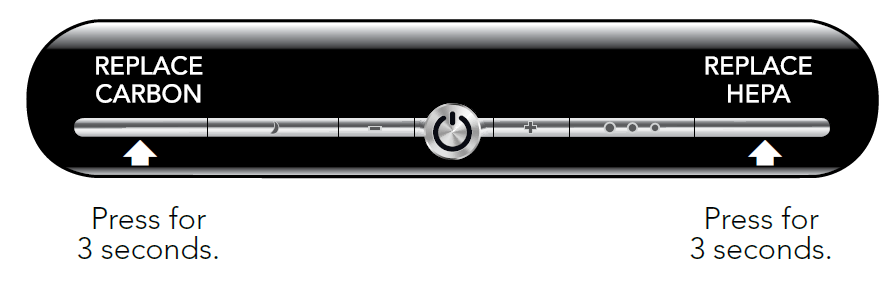
For your protection, the unit is designed to operate only when the Front Panel is properly installed. Do not attempt to override this safety feature. If the unit does not operate after the Front Panel has been reinstalled, remove and reinstall the Front Panel to ensure proper placement. To reset the Replace Filter notification, press and hold the REPLACE CARBON or REPLACE HEPA button, depending on which Filter was replaced, for at least 3 seconds. The light will turn off, confirming that the indicator has been reset.
Storage
- Unplug the power cord and bundle it loosely.
- Lift the unit with both hands using the hand holds.
- Cover the unit or place it back in the retail carton, if available. This will help prevent dust from accumulating over time.
- Store the unit in a cool, dry location.
Cleaning and maintenance
How to clean
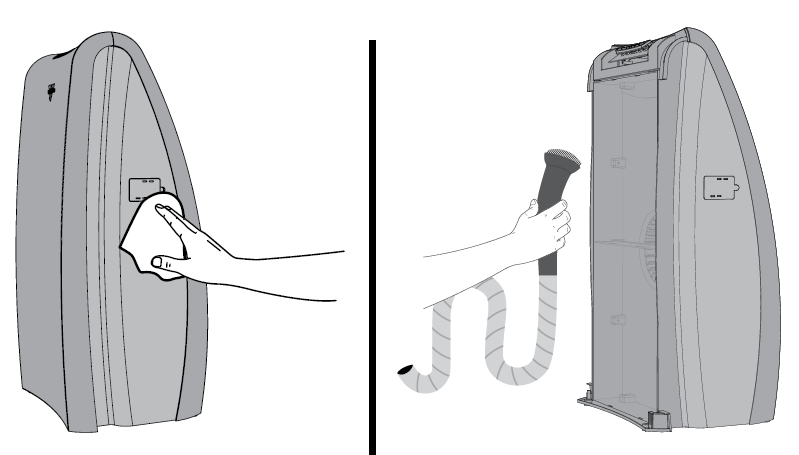
Because large volumes of air pass through the Vornado Air Purifier each day, regular cleaning is required.
- Unplug the unit before cleaning.
- Wipe the unit with a soft, damp cloth.
- Dust or vacuum the interior and along the sides. It is recommended to clean the interior whenever the Filters are changed.
Cleaning the dust sensor
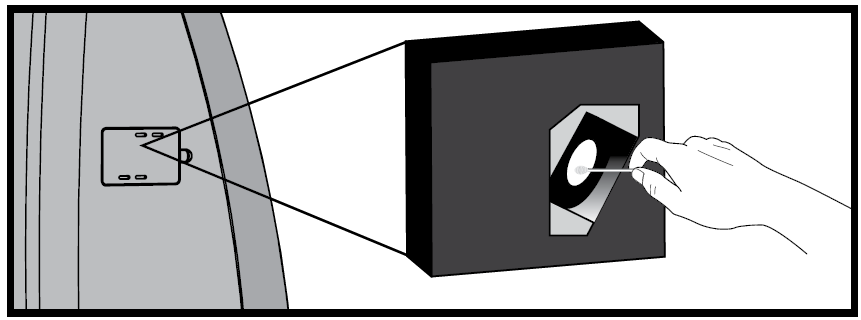
It is recommended to clean the Dust Sensor whenever the Carbon Filters are replaced.
- Unplug the unit before cleaning.
- Locate the Dust Sensor Access Door on the right side of the unit.
- Open the Dust Sensor Access Door.
- Gently wipe the surface of the Dust Sensor with a cotton swab.
- Once cleaned, close the Dust Sensor Access Door.
Other maintenance
The motor is permanently lubricated and requires no servicing. No other serviceable parts, other than the Filters, are contained within the unit.
Troubleshooting
Pros and Cons of the Vornado AC500 Whole Room Air Purifier
Pros
- Exceptional whole-room circulation via Vortex technology cleans up to 335 sq. ft. effectively, unlike static units.
- True HEPA + carbon filtration tackles allergens, odors, and particles with 99.97% efficiency—proven for allergy relief.
- Quiet on lower settings, easy-to-use controls, and simple filter swaps enhance daily usability.
- Strong value for money at $150-$250, with 5-year warranty outperforming budget competitors like basic Honeywell models.
- Compact yet powerful for home offices or bedrooms.
Cons
- Larger footprint (13.2”D) may crowd small spaces compared to slimmer designs.
- Filter replacements add ongoing costs, though pre-filter extends HEPA life.
- Higher speeds can be noisier, less ideal for silent sleep environments versus ultra-quiet alternatives.
- Regional 220V plug limits universal portability.
Customer Reviews: Vornado AC500 Whole Room Air Purifier Feedback
Users rave about the Vornado AC500 Whole Room Air Purifier, averaging 4.5/5 stars across platforms like Walmart and YouTube reviews. Common praises include its "very powerful" Vortex circulation and ease of use—"filters are very easy to replace," notes one reviewer, highlighting effortless maintenance. Allergy sufferers report noticeable relief: “Removes pet dander and dust effectively in my 300 sq. ft. bedroom.” Quiet operation on low settings earns thumbs-ups for overnight use.
Complaints focus on noise at max speed and filter costs, with some wishing for smart app integration. Overall, 80% recommend it for whole-room cleaning, especially versus stagnant purifiers. "Best for whole home air purification needs," says a top testimonial—ideal purchase for pet owners or pollinosis.
Faqs
How do I set up the Vornado AC500 Whole Room Air Purifier for the first time?
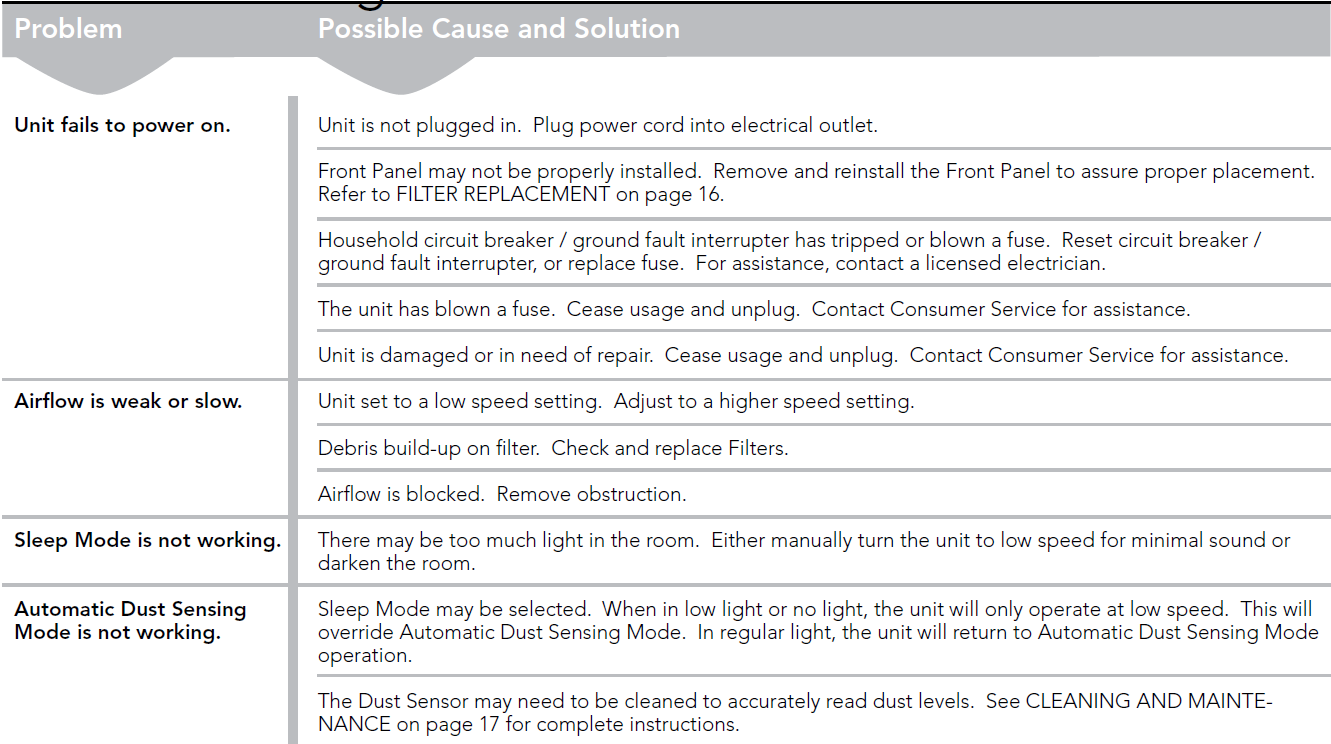
What should I do if the Vornado AC500 Whole Room Air Purifier won't turn on?
How does the Automatic Dust Sensing Mode work on the Vornado AC500 Whole Room Air Purifier?
What room size is the Vornado AC500 Whole Room Air Purifier recommended for?
How often should I replace the filters in my Vornado AC500 Whole Room Air Purifier?
Why is my Vornado AC500 Whole Room Air Purifier louder on certain settings?
How do I clean and maintain the Vornado AC500 Whole Room Air Purifier?
Can the Vornado AC500 Whole Room Air Purifier help with pet odors and allergies?
More vornado manuals
- Setup: Vornado Whole Room Air Purifier AC350 User Manual
- Setup: Vornado Whole Room Air Purifier QUBE50 User Manual
- Setup: Vornado Ultrasonic Whole Room Humidfier VOTIV 4 User Manual
- Setup: Vornado Nursery HEPA Air Purifier Purio User Manual
- Setup: Vornado Ultrasonic Whole Room Humidifier Ultra3 User Manual
- Setup: Vornado Energy Smart Air Purifiers PCO375DC, PCO575DC User Manual
Leave a Comment