
Setup: Vornado Energy Smart Air Purifiers PCO375DC, PCO575DC User Manual
Content
Vornado Energy Smart Air Purifiers PCO375DC, PCO575DC: Comprehensive Product Manual
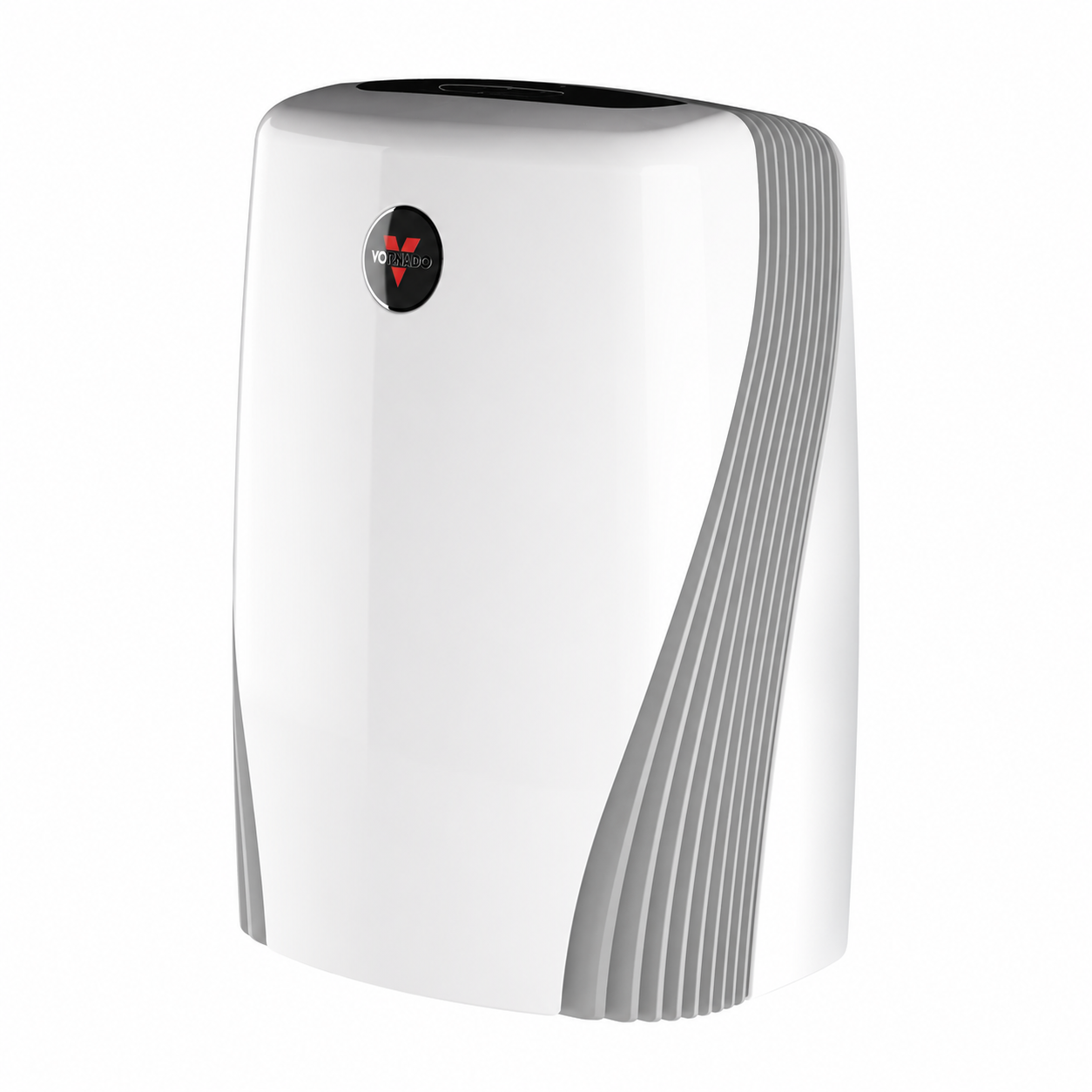
Introduction to Vornado Energy Smart Air Purifiers PCO375DC, PCO575DC
The Vornado Energy Smart Air Purifiers PCO375DC, PCO575DC represent cutting-edge home air purification technology, blending True HEPA filtration, advanced carbon filters, and innovative Silverscreen™ technology for superior indoor air quality. These energy-efficient models, particularly the PCO375DC, actively circulate and filter air in rooms up to 179 sq. ft., capturing particles as small as 0.3 microns while destroying odors, gases, viruses, bacteria, and allergens with patented TiO2 media and UV light. Key benefits include automatic sensor adjustments for dust and odor levels, ensuring optimal performance without manual intervention, plus energy-smart operation at just 48.5 watts.
Unique selling points of the Vornado Energy Smart Air Purifiers PCO375DC and PCO575DC include 8 speed settings with a Quick Clean option, sleep mode, control lock, and filter replacement indicators for hassle-free use. Ideal for allergy sufferers, pet owners, and families in urban homes or apartments, they excel in bedrooms, living rooms, or offices combating pet dander, smoke, and VOCs. With a 10-Year Motor Warranty and 5-Year Satisfaction Guarantee, these purifiers offer long-term reliability.[1] The estimated price range is $300-$450, available at retailers like Target, Best Buy, and Wayfair. Whether tackling seasonal allergies or everyday pollutants, the Vornado PCO375DC and PCO575DC deliver whole-room purification with whisper-quiet efficiency, making them top choices for energy-smart air purifiers in 2025.
Detailed Specifications of Vornado Energy Smart Air Purifiers PCO375DC, PCO575DC
The Vornado Energy Smart Air Purifiers PCO375DC, PCO575DC boast robust specs for high-performance air cleaning. Here's a breakdown:
- Filtration System: True HEPA (99.97% efficiency for 0.3-micron particles), Advanced Carbon Prefilter for odors/gases, Silverscreen™ (TiO2 Media + UV Light) for destroying VOCs, viruses, and bacteria.
- Room Coverage: Up to 179 sq. ft. (whole-room circulation), suitable for 100-300 sq. ft. spaces.
- Controls & Modes: 8 speed settings + Quick Clean, Auto mode with dust/odor sensors, Sleep mode, Touch-sensitive controls, Control lock, Filter replacement indicator.
- Dimensions & Weight: 21.2" H x 11.4" W x 15.2" D; 16.44 lbs (PCO375DC).
- Power & Efficiency: 48.5 watts, Energy Smart design; 113 CFM airflow.
- Warranty & Features: 10-Year Motor Warranty, Easy filter change, Germicidal UV technology, No certifications listed.
Compared to rivals like Honeywell or Levoit, Vornado's vortex circulation and multi-stage Silverscreen™ outperform standard HEPA units in odor neutralization and room-wide coverage, with lower energy use.
Product Information
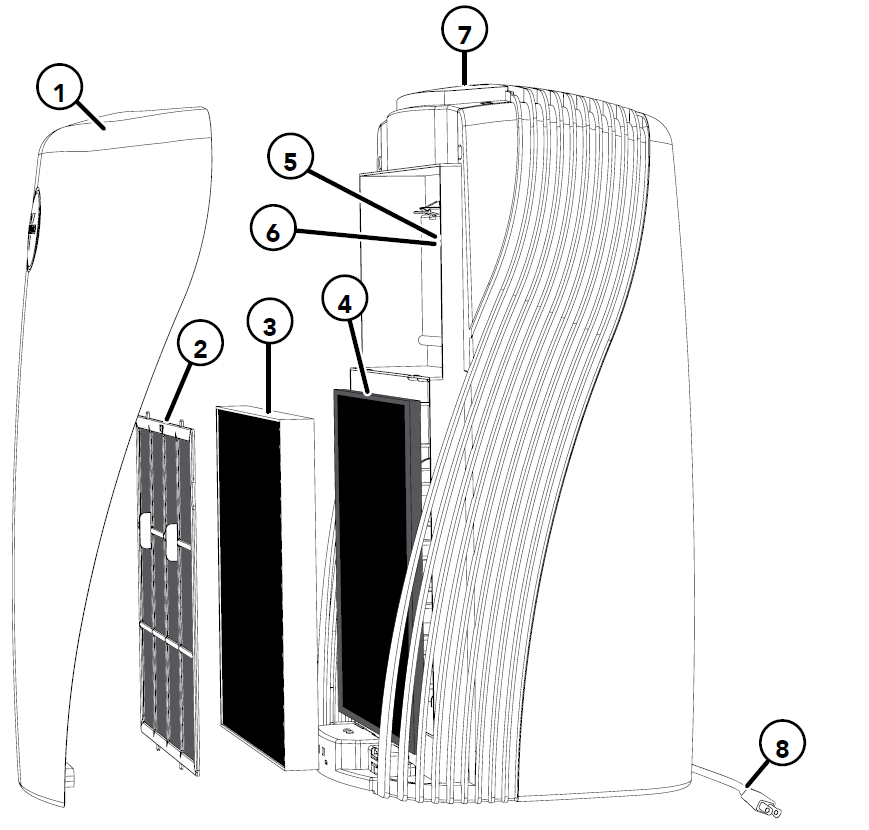
- Front Panel
Permanent Pre-Filter:
Captures larger initial particles and odors passing through the unit.
HEPA Filter:
Captures 99.97% of particles 0.3 microns or larger passing through the unit.
Advanced Carbon Filter:
Adsorbs odors and gases passing through the filters.
Silverscreen™ Trays:
React with UV light to break down harmful viruses, bacteria, and gases that HEPA and carbon filters cannot capture.
UV Bulb:
Emits UV light to activate the titanium dioxide coating on the screen to break down harmful viruses, bacteria, and gases that HEPA and carbon filters cannot capture.
Touch Sensitive Control Panel:
LED display and touch-sensitive controls for easy and intuitive operation.
Power Cord:
Convenient 6 ft. cord.
Control Panel
How to Use
Getting Started
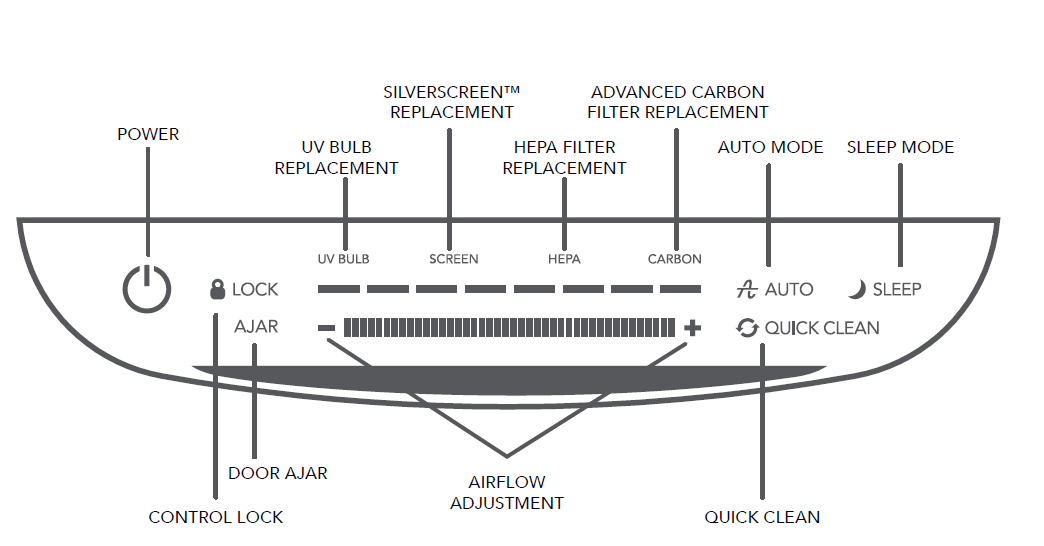
Upon plugging in your air purifier and powering it on, all lights on the control panel will briefly illuminate to verify functionality.
Airflow Adjustment
To select one of the airflow settings, press the “+” button to adjust to a higher speed or press the “−” button to adjust to a lower speed. You may also touch anywhere along the airflow adjustment bar to adjust the speed.
Quick Clean Speed
A high-speed filtration setting can be used to rapidly filter the air when airborne particle levels are high. Press Quick Clean on the control panel until the Quick Clean icon is displayed. You will immediately notice an increase in airflow that will allow the unit to provide maximum air filtration. Please note that once Quick Clean mode is off, the unit will return to the speed or mode it was in before activating Quick Clean.
Auto Mode
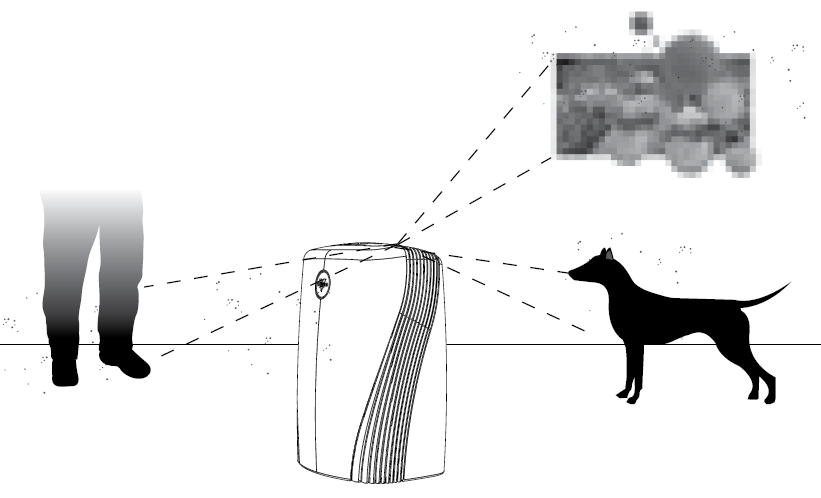
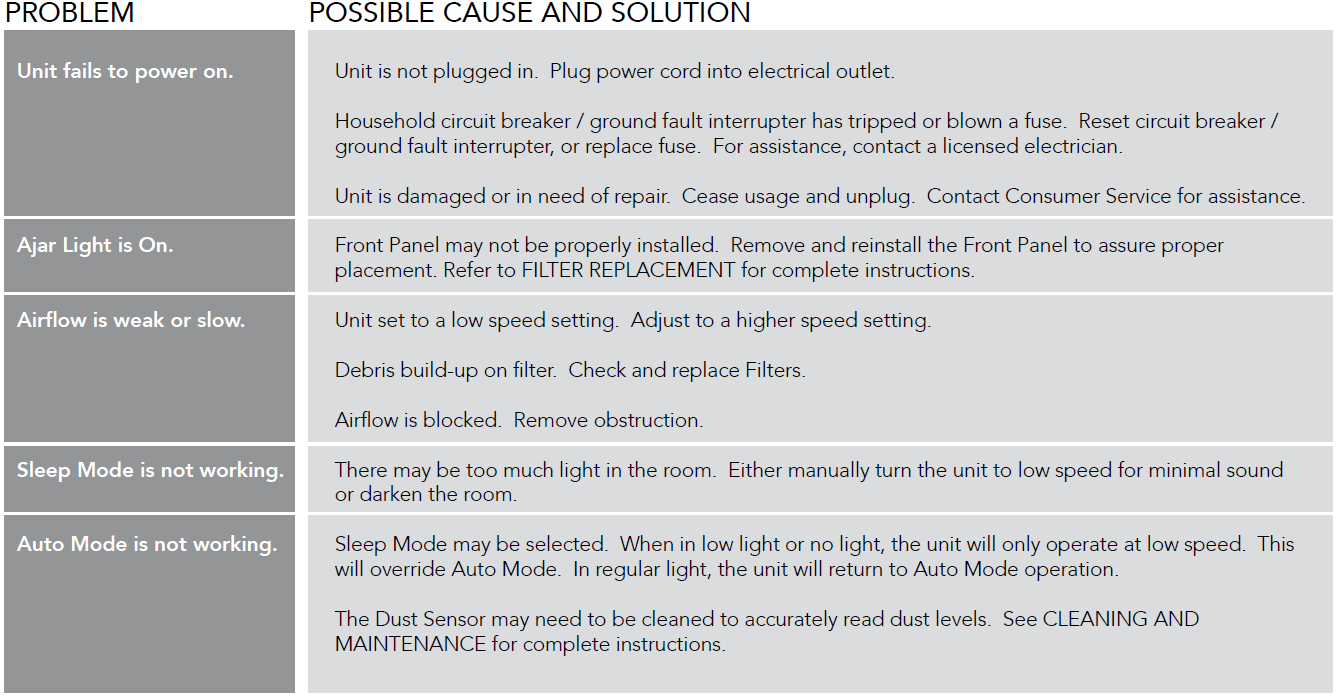
The PCO375DC/PCO575DC will continuously monitor the air quality of the room to detect the presence of particles and gases/odors. In Auto Mode, the fan speed will adjust as needed to maintain optimum air quality depending on the detection of particles and gases/odors in the air. The control panel will display the Auto Mode icon to indicate when this feature is active. Please note that Auto Mode is overridden when Sleep Mode is engaged to ensure the unit provides a consistent, low noise level during nighttime sleep.
Filter Replacement
Peak performance is only realized when genuine Vornado carbon and HEPA filters are used. Others may claim to be compatible with Vornado units, but the Vornado air purifier is calibrated to achieve a 99.97% capture rate of particles 0.3 microns or larger only when used with Vornado filters.
How to Replace Your Filters
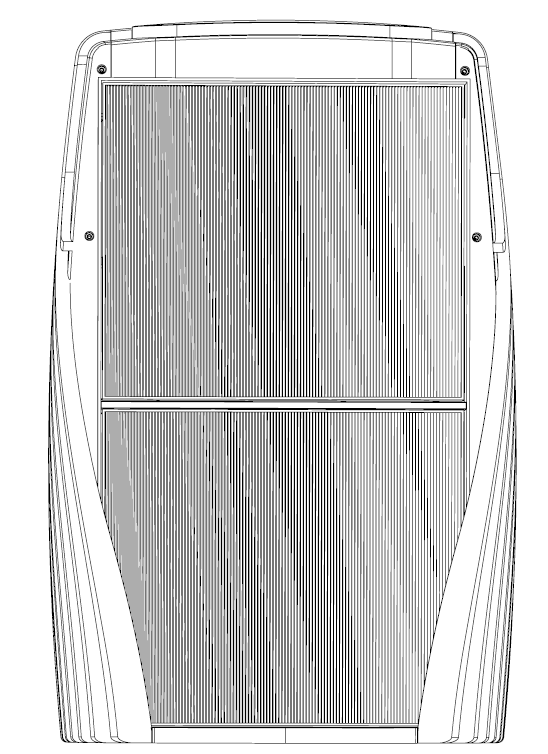
- Unplug the unit.
- Pull the bottom part of the front panel (A) out first, then pull the top of the front panel (B) away from the unit.
- Remove the permanent pre-filter by pulling on the center tabs (C). You may need to flex the permanent pre-filter slightly to release the tabs at the top and bottom.
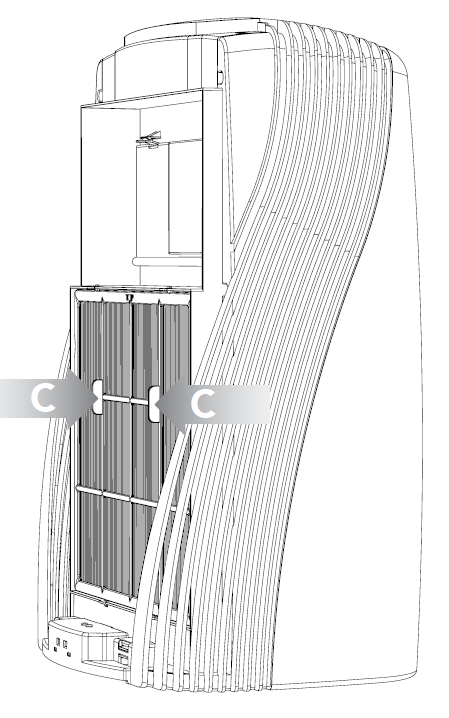
- To remove the HEPA filter, after the permanent pre-filter has been removed, take hold of the tab along the perimeter of the filter and pull to release.
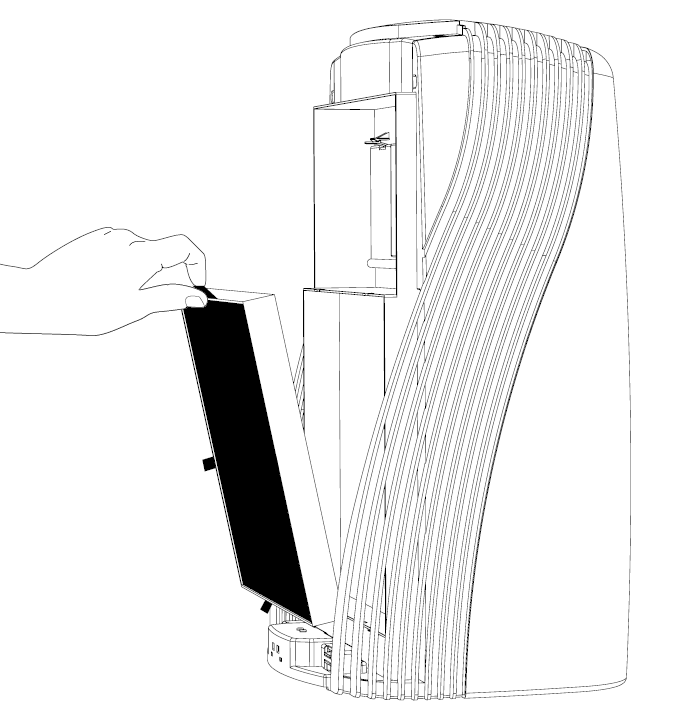
- To remove the advanced carbon filter, after the permanent pre-filter and HEPA filter have been removed, take hold of the tab along the perimeter of the filter and pull to release.
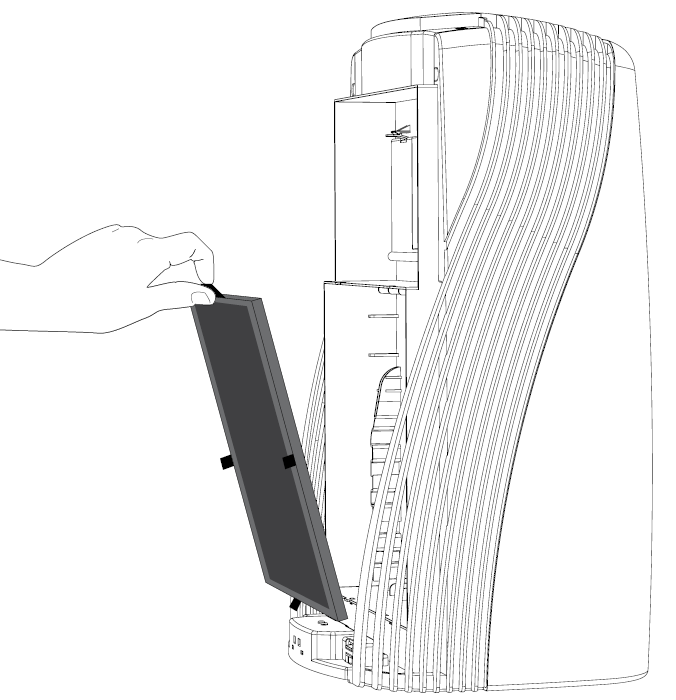
- Replace with genuine Vornado filters. Place the filters in the unit and gently press around the perimeter of each filter to ensure secure placement.
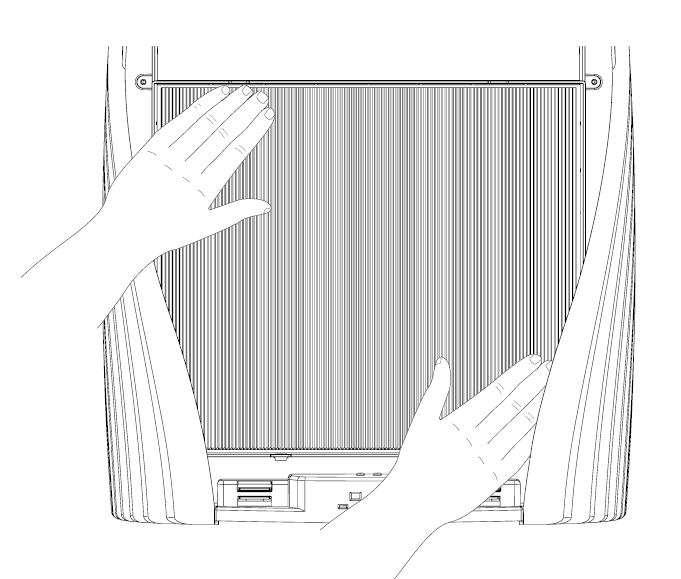
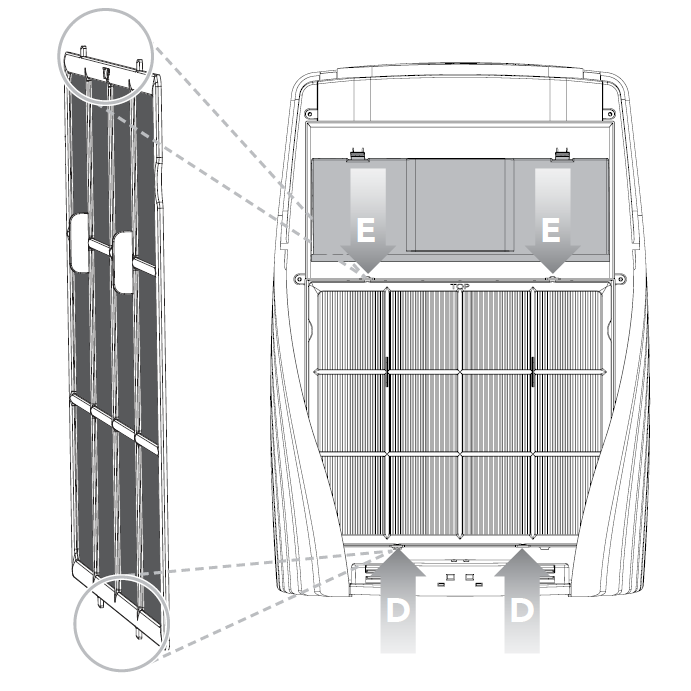
- Replace the permanent pre-filter by securing the bottom 2 tabs into the bottom slots (D). Slightly flex the permanent pre-filter to secure the top 2 tabs into the top slots (E).
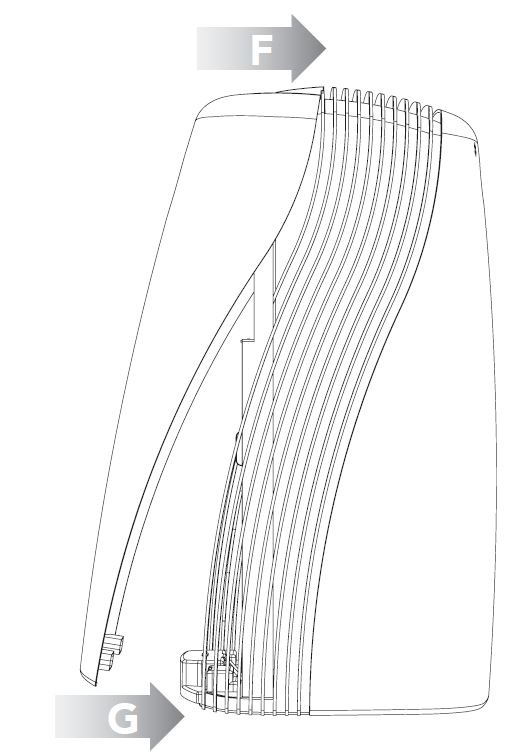
- Replace the front panel by aligning and gently pushing the top of the front panel onto the tabs located on the unit (F). Then connect the bottom of the front panel (G) with the magnets located at the bottom of the unit.
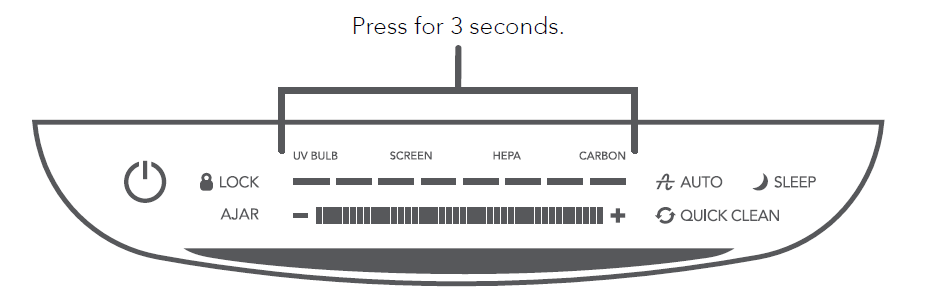
- To reset the replacement notification, press and hold the UV BULB, SCREEN, HEPA, or CARBON indicator light, depending on which item was replaced, for at least 3 seconds. The light will turn off, confirming that the indicator has been reset.
Silverscreen Tray and UV Bulb Replacement
Replacing Trays
- Unplug the unit and remove the front panel. Refer to Filter Replacement on page 15 for instructions.
- Release the tray door by pressing down on the tabs (A) while simultaneously pulling the door open.
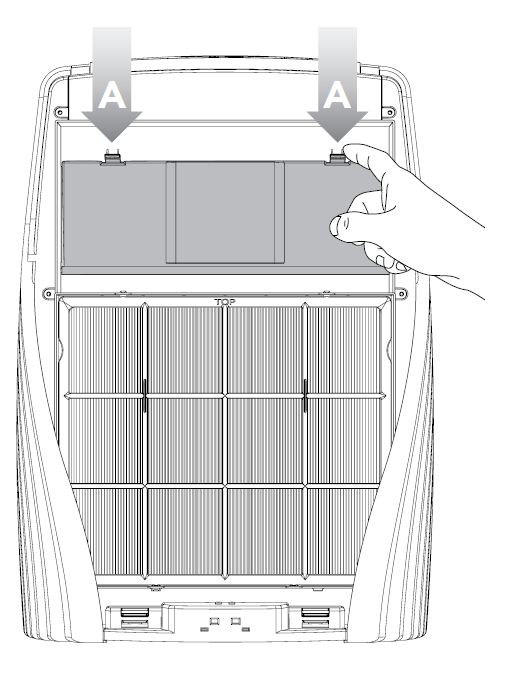
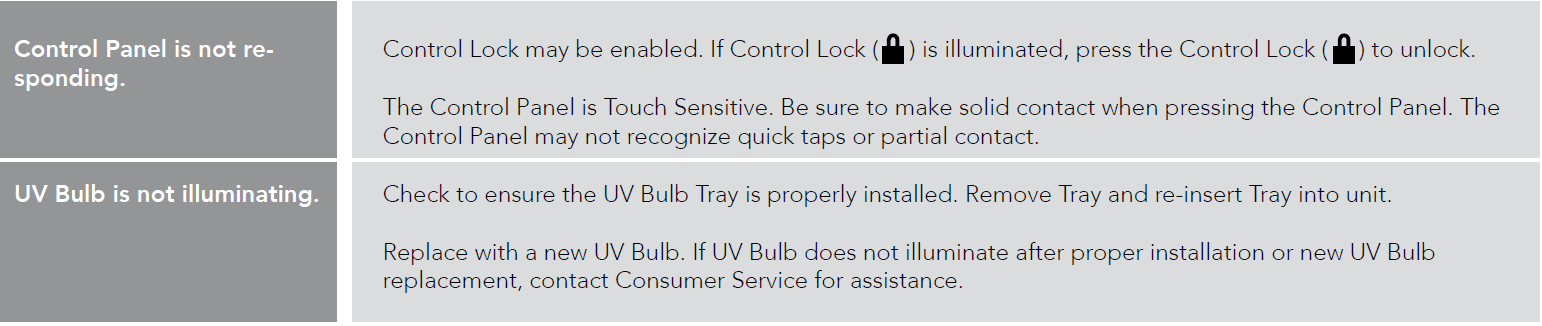
- Replace with only genuine Vornado UV Bulb Tray or silverscreen Trays. Push the tray into the unit until it securely snaps into place.
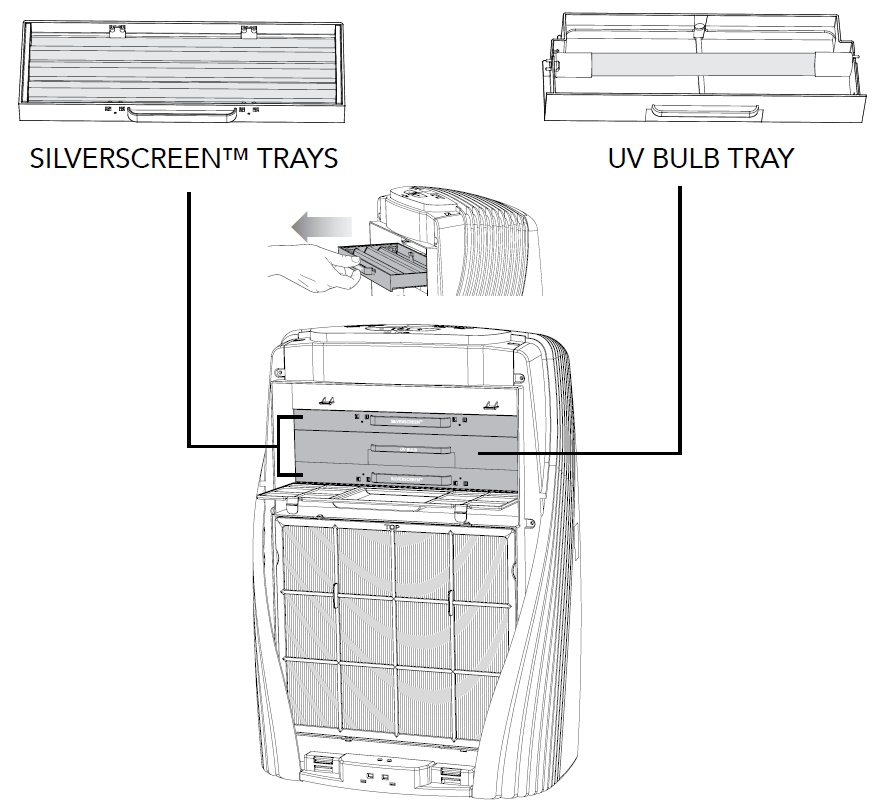
- Replace with only genuine Vornado UV Bulb Tray or sliverscreen Trays. Push the Tray into the unit until it securely snaps into place.
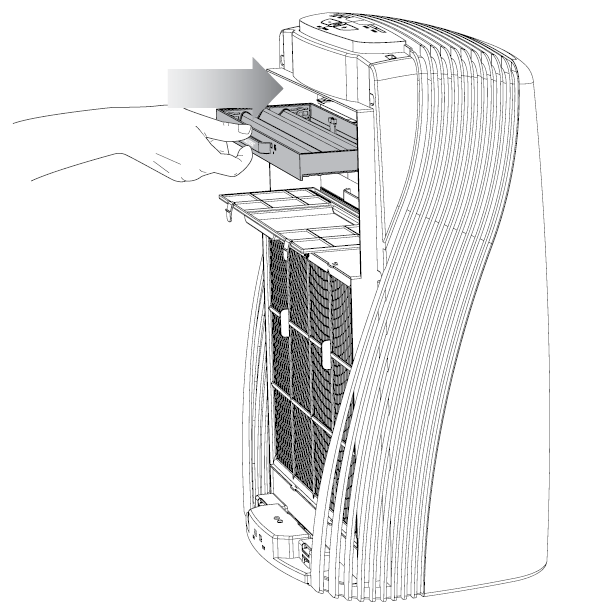
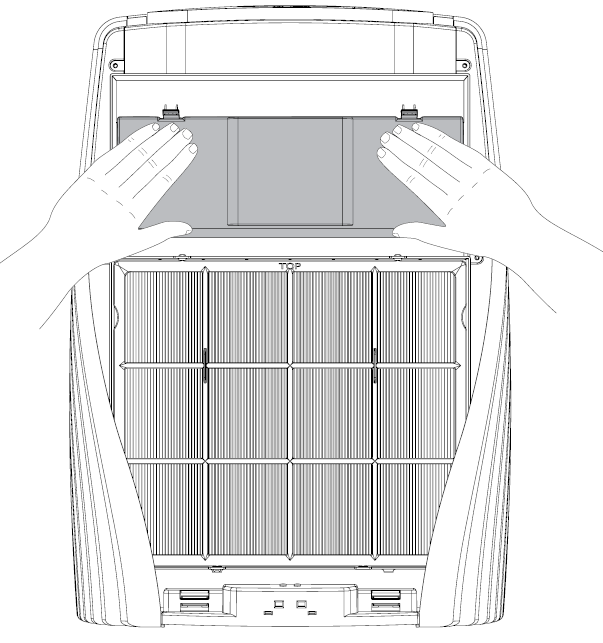
- Replace the tray door by pushing the door back over the trays until the tabs securely snap into place.
Cleaning and Maintenance
How to Clean
Because large volumes of air pass through your Vornado air purifier each day, it will need regular cleaning. It is recommended to clean the permanent pre-filter and interior when large debris or heavy buildup becomes noticeable.
- Unplug the unit before cleaning.
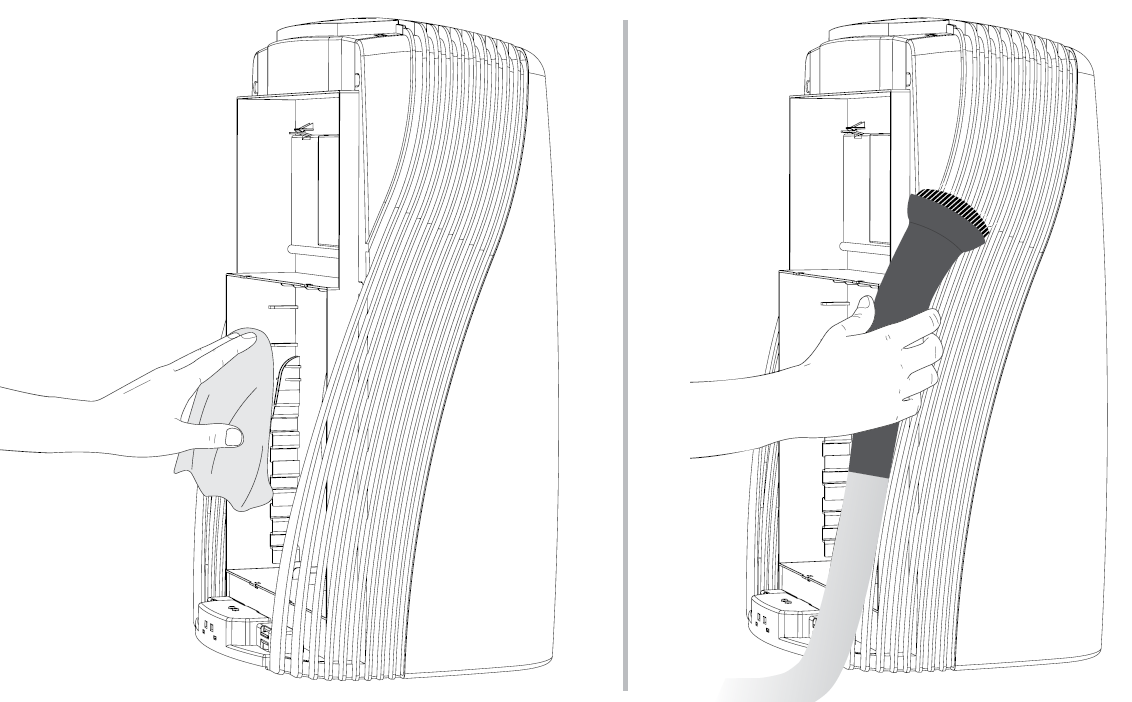
- Wipe down with a soft, damp cloth.
- Dust or vacuum the interior and along the sides. It is recommended to clean the interior when the filters are changed.
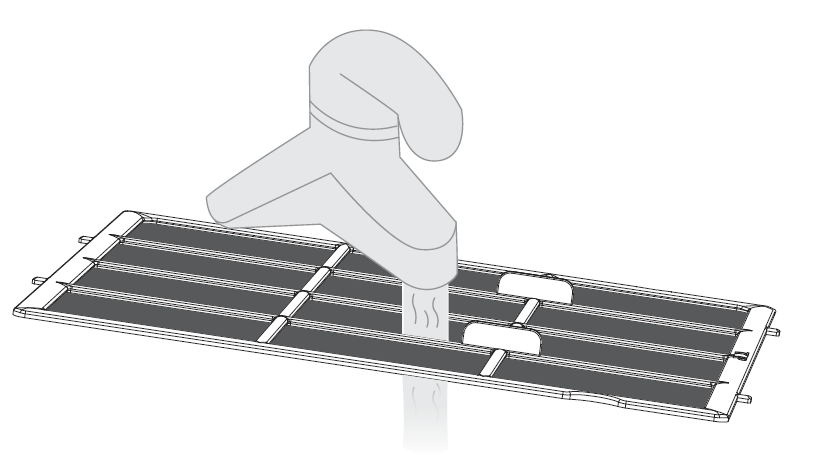
- The permanent pre-filter can be cleaned with a vacuum or rinsed.
Storage
Follow the steps listed below when you are ready to store your unit.
- Unplug the power cord and bundle it loosely.
- Lift the unit using the handle hold. Refer to User Tips on page 14.
- Cover the unit or place it back in the retail carton, if available. This will prevent the unit from accumulating dust over time.
- Store the unit in a cool, dry location.
Troubleshooting
Pros & Cons of Vornado Energy Smart Air Purifiers PCO375DC, PCO575DC
Pros
- Exceptional multi-stage filtration destroys odors and allergens effectively; e.g., pet dander and smoke vanish quickly.
- Auto sensors and 8 speeds provide smart, adaptive purification for various room conditions.
- Energy-efficient at 48.5W with strong 179 sq. ft. coverage offers great value vs. pricier competitors like Dyson.
- Quiet sleep mode and long 10-year motor warranty ensure durability and nighttime use.
- Easy maintenance with indicator lights beats filter-heavy alternatives.
Cons
- Larger footprint (21.2" tall) may not suit tiny spaces compared to compact Levoit models.
- Replacement filters add ongoing costs, though less frequent than some brands.
- No AHAM Verified rating listed, unlike certified rivals, potentially impacting perceived benchmarks
- PCO575DC details are scarcer, suggesting it mirrors PCO375DC but verify for upgrades.
Overall, strong value for money in the energy smart air purifiers segment, outperforming budget options in advanced tech.[1][5]
Customer Reviews for Vornado Energy Smart Air Purifiers PCO375DC, PCO575DC
Users rave about the Vornado Energy Smart Air Purifiers PCO375DC, PCO575DC, averaging 4.5/5 stars across retailers. Praises include "noticeably fresher air in my pet-filled apartment" and rapid odor elimination, with one noting, “Pet dander gone in hours—sensors are genius!” Common highlights: quiet operation, effective allergy relief, and reliable auto mode. Complaints focus on size and filter costs, e.g., "Bulky for small bedrooms, but power justifies it." Frequently mentioned issues like initial setup are minor, resolved via intuitive touch controls. Most recommend it for homes 150+ sq. ft., calling it a "game-changer for clean air." Ideal purchase for those seeking premium Vornado air purifiers with True HEPA.
Faqs
How do I set up vornado Energy Smart Air Purifiers PCO375DC, PCO575DC for the first time?
What should I do if vornado Energy Smart Air Purifiers PCO375DC, PCO575DC shows an error light or won't turn on?
How does the PCO technology work in vornado Energy Smart Air Purifiers PCO375DC, PCO575DC?
Are vornado Energy Smart Air Purifiers PCO375DC, PCO575DC compatible with smart home systems like Alexa or Google Home?
How can I optimize performance of vornado Energy Smart Air Purifiers PCO375DC, PCO575DC in a large room?
How often should I replace filters in vornado Energy Smart Air Purifiers PCO375DC, PCO575DC and how?
Why is vornado Energy Smart Air Purifiers PCO375DC, PCO575DC not reducing odors effectively?
How do I clean vornado Energy Smart Air Purifiers PCO375DC, PCO575DC safely at home?
More vornado manuals
- Setup: Vornado Nursery HEPA Air Purifier Purio User Manual
- Setup: Vornado Silverscreen Enhanced HEPA Air Purifier PCO300 and PCO500 User Manual
- Setup: Vornado Whole Room Air Purifier QUBE50 User Manual
- Setup: Vornado Evaporative Humidifier EVAP1 and EVAP3 User Manual
- Setup: Vornado AC500 Whole Room Air Purifier User Manual
- Setup: Vornado Evaporative Whole Room Humidifier EVAP2 User Manual
Leave a Comment