
Setup: Vornado Oscillating Tower With Stand Atom 1S User Manual
Content
Introduction — Vornado Oscillating Tower With Stand Atom 1S
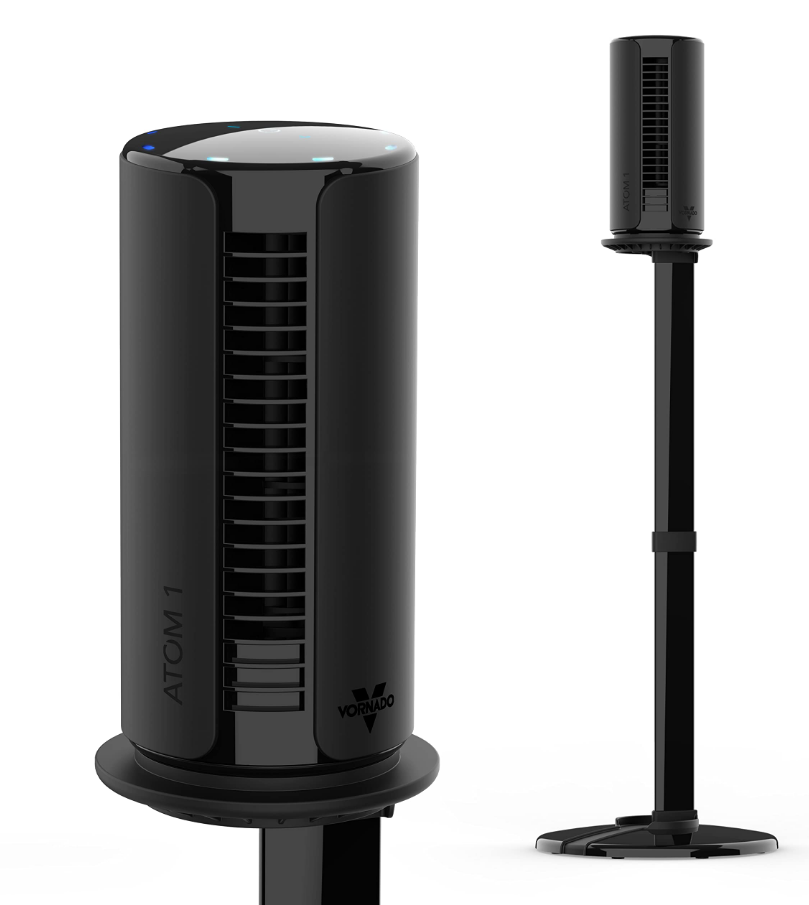
Vornado Oscillating Tower With Stand Atom 1S is a compact, space‑saving tower circulator designed to deliver targeted airflow in bedrooms, home offices, dorms, and small living spaces. The Atom 1S pairs Vornado’s airflow-focused vortex technology with an adjustable, removable stand and oscillation to move air farther and more evenly than a typical small desk fan. This model emphasizes quiet operation, four speed settings, and customizable oscillation angles to suit sleeping, working, or everyday comfort needs.
Key benefits and unique selling points include a small footprint with a taller 40‑inch standing profile when the removable stand is attached, touch/illuminated controls for easy operation, up to 360° adjustable oscillation for whole‑room coverage, and energy‑efficient performance that competes with similarly priced compact tower fans. The unit targets apartment dwellers, home office workers, students, and anyone who needs adjustable directional airflow without a bulky tower fan.
Typical use cases are improving personal comfort at a desk, creating cross‑room circulation to assist HVAC, white‑noise support for sleep, and portable spot‑cooling. Estimated retail price typically ranges from about $30 to $60 depending on retailer and promotions, and the Atom 1S is commonly available through major retailers and home‑improvement stores that carry Vornado products.
Specifications — Technical Details and Performance
- Model: Vornado Atom 1S (Oscillating Tower With Stand Atom 1S)
- Height: Approximately 40 inches with stand attached; compact desktop profile without stand.
- Speeds: 4 speed settings for fine control of airflow.
- Oscillation: Customizable oscillation up to 360° (adjustable sweep angles) for wider coverage.
- Controls: Illuminated touch controls (or tactile buttons depending on retail model) for speed and oscillation selection.
- Power source: Plug‑in AC power (standard household voltage).
- Noise / Quiet setting: Built‑in quiet/low noise setting for night use and sleep support.
- Build & weight: Lightweight, portable design — assembled weight around 1.5–2 lb range for easy relocation.
- Performance benchmarks: Designed for targeted room circulation rather than whole‑house cooling; effective at creating a directed breeze across 6–12 ft distances and improving perceived comfort when placed in a doorway or near seating/desk areas.
- Safety: Stable base with removable stand; grille and motor enclosure meeting typical consumer safety standards
Comparison with similar products: Versus mini desk fans, the Atom 1S provides taller reach and oscillation for broader coverage; compared with full‑size tower fans, it is more compact and energy‑efficient but delivers less raw CFM and lower whole‑room circulation capacity.
FEATURES
- FINGER-FRIENDLY DESIGN
Resists curious fingers - GESTURAL TOPCH-SENSITIVE CONTROLS
Simple controls with a sleek aesthetic - MULTIPLE SPEEDS
4 speed settings for every comfort level. - ADJUSTABLE OSCILLATION
900/1800/2700/3600 or infinite oscillating airflow. - DC MOTOR
Quiet and energy efficient. - AUTO DIMMING DISPLAY
Reduces light pollution. - SILICONE FEET
Non-marking feet added for stability - STAND
- 30" Stand / Base
- Use stand only as intended.
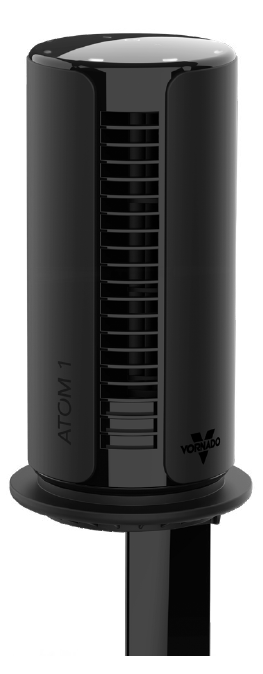
STAND ASSEMBLY
- Assemble one base plate (A) to the base mount (B). Press together until flush.
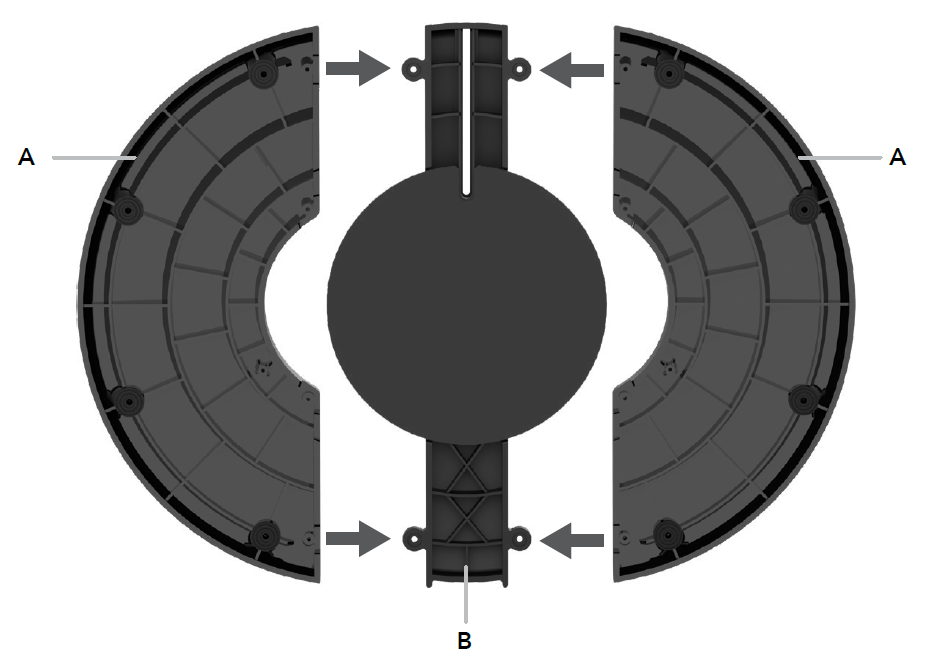
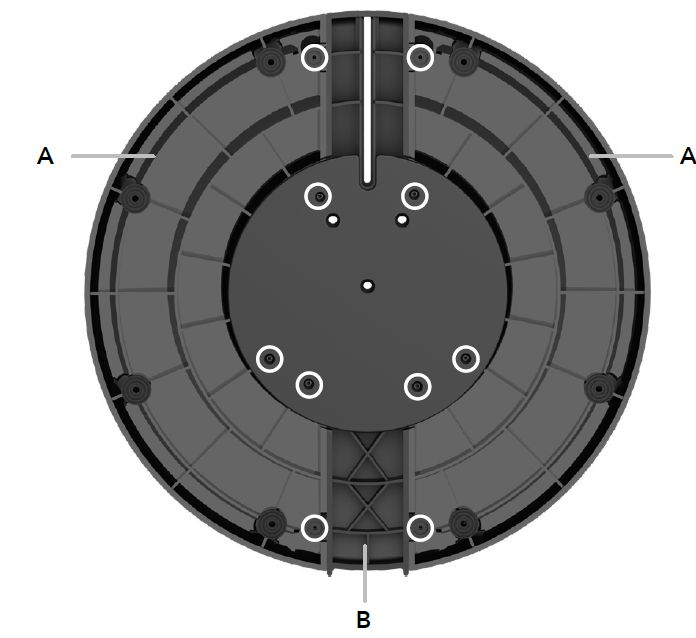
- Using (5) five screws provided, secure the base plate (A) to the base mount (B).
- Repeat on the other side so that all (10) ten screws are installed.
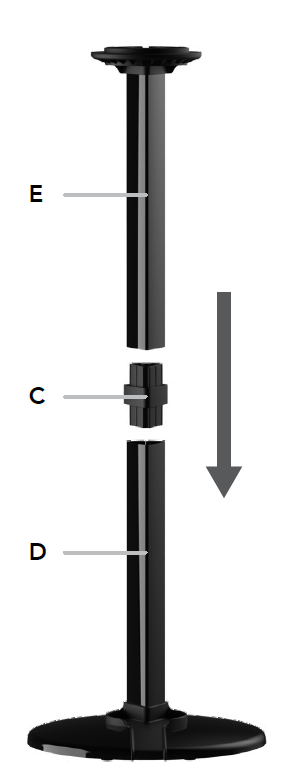
- Insert collar plug (C) into the top of the lower post (D) attached to the stand assembly.
- Then insert the upper post (E) onto the collar plug.
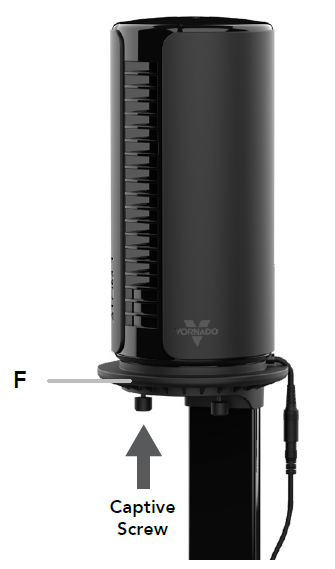
- Attach your ATOM 1S onto the mount tray (F) using the (3) three captive screws.
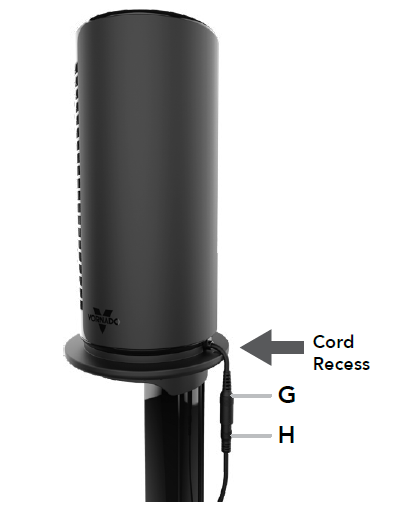
- Insert the DC power adapter cord connector (G) into the DC receiver (H) located at the back of the product. Route the power cord through the recess on the back of the mount tray.
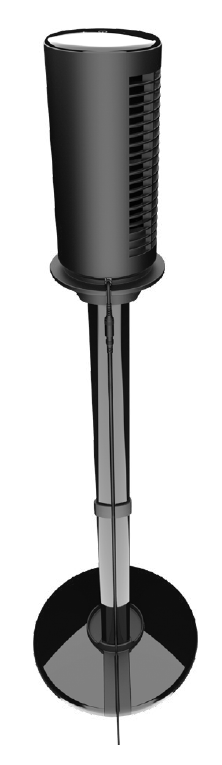
- Feed the power cord into the recess on the back side of the stand. Plug the power cord into a power outlet.
HOW TO USE
- Touch ( ) to power ON or OFF. Your circulator returns to the last saved memory setting.
- Select desired speed by pressing -/+. Speed is indicated by the number of white LEDS as shown on the display.
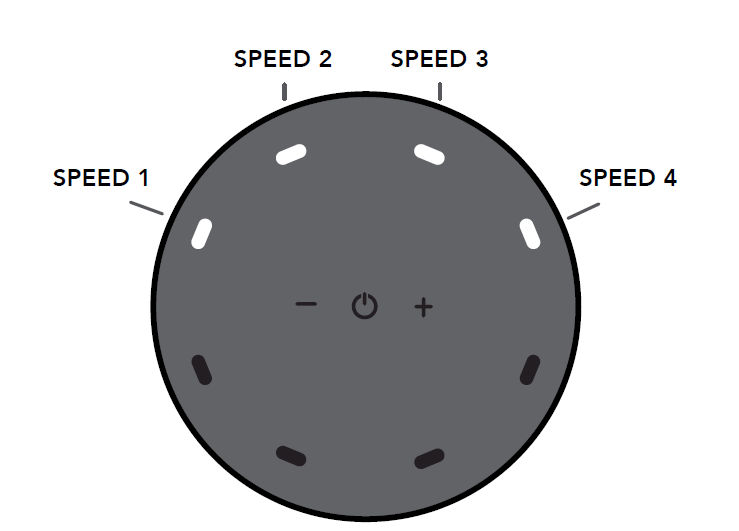
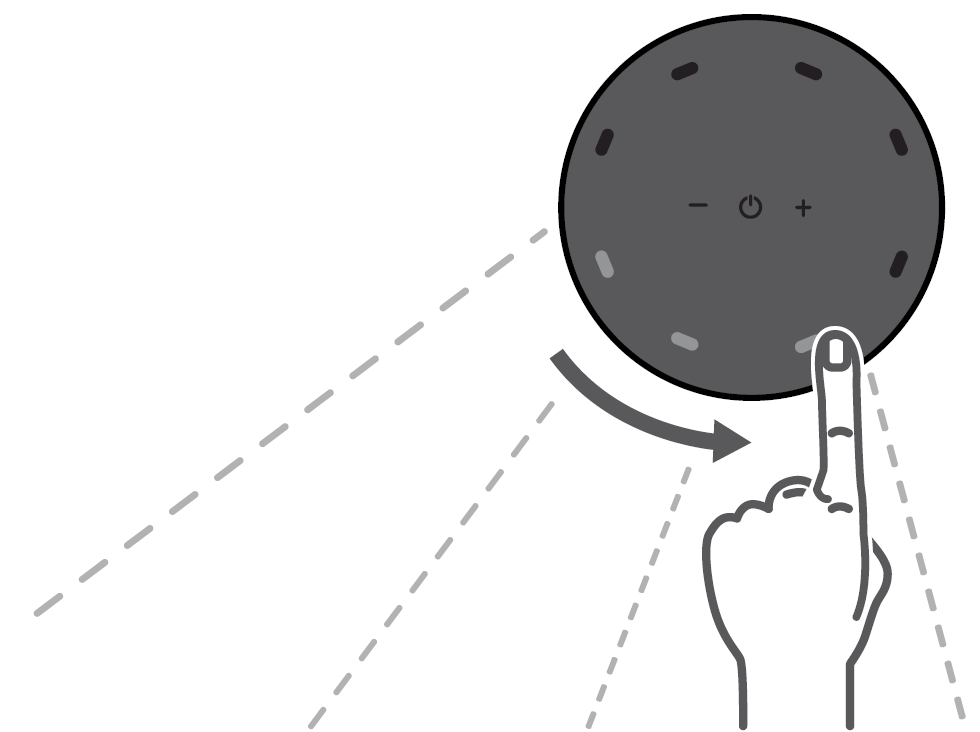
- Swipe any area along the control panel perimeter to turn ON oscillation and select desired oscillation angle and direction of airflow. Select 90°/180°/270°/360° or infinite 360° oscillating airflow in either direction. The oscillation angle and direction of airflow are indicated by the blue LEDS as shown on the display.
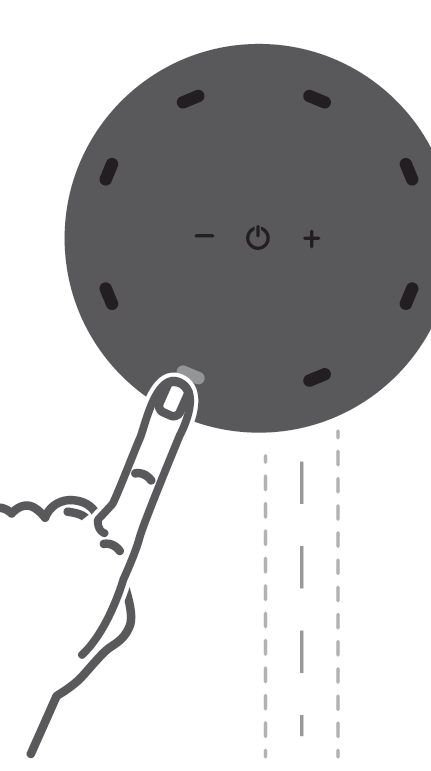
- Press and hold any LED along the control panel perimeter for 2 seconds to turn OFF oscillation.
- Double tap at any area along the control panel perimeter for targeted airflow. The airflow will then point where directed.
CLEANING
Because your ATOM 1S moves a substantial amount of air, it will need regular cleaning. The fan has no user-serviceable parts inside and cannot be opened for cleaning. Never clean the product in any manner other than instructed in this owner's guide.
- Power off and unplug the unit before cleaning.
- Dust or wipe the circulator and stand with a damp cloth.
- Use the brush attachment on your household vacuum cleaner to vacuum any accumulated dust.
STORAGE
During the off-season or after extended periods of non-use, you may choose to store your circulator. To ensure the long life of the product, it is recommended to store your circulator by following these instructions:
- Unplug the power cord and bundle loosely.
- Cover, or place back in retail carton if available. This prevents the circulator from accumulating dust over time.\
- Store the circulator in a cool and dry location.
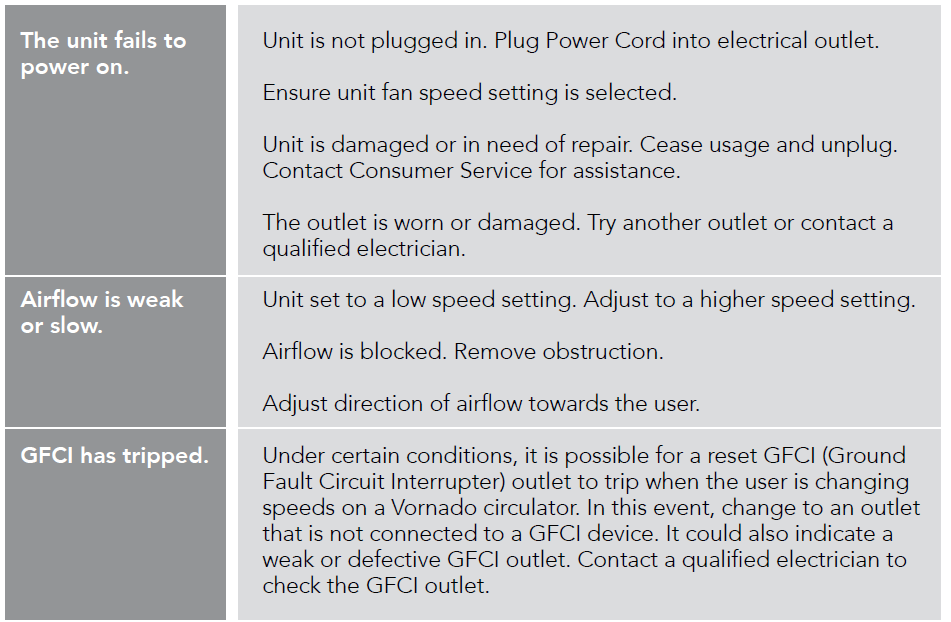
TROUBLESHOOTING
Pros & Cons — Balanced Assessment
- Pros — Compact power and adjustable coverage: Four speeds and up to 360° oscillation allow flexible airflow patterns in small rooms, making it ideal for desks or bedside use.
- Pros — Space‑saving and portable: Removable stand converts between desktop and standing modes, saving space and increasing versatility when moving between rooms.
- Pros — Quiet operation: Dedicated quiet/low noise mode is suitable for sleep or focused work, giving it an edge over louder small fans.
- Cons — Not a whole‑room replacement: Despite effective targeted airflow, it cannot match larger tower or HVAC systems for whole‑room cooling; expect optimal results for spot cooling and circulation only.
- Cons — Basic feature set: Lacks advanced features found on premium towers (timers, smart connectivity, HEPA filters); buyers wanting smart home integration should consider higher‑end models.
- Value for money: Given its typical price range (~$30–$60), the Atom 1S provides good value for users seeking a quiet, adjustable, portable tower circulator without premium extras.
Customer Reviews & Ratings — What Owners Say
Aggregate retailer data shows generally positive feedback with average ratings commonly in the 4.0–4.6 star range depending on seller, reflecting satisfaction with design and airflow for the size and price point.
- Common praises: Users frequently highlight the compact footprint, effective targeted airflow, quiet operation for bedroom use, and ease of switching between desktop and stand modes.
- Common complaints: Some reviewers note the unit is underpowered for large rooms and wish for extra features like a timer or remote control; a minority report concerns about durability after extended use.
- Sample ratings: Typical listings show many 4–5 star testimonials (e.g., “Great for my office — quiet and strong for its size”) balanced by a few 1–2 star reviews citing insufficient power for larger spaces.
- Purchase recommendation: Recommended for buyers who need an affordable, quiet, and versatile tower circulator for spot cooling or to augment HVAC; not recommended as a full replacement for larger tower fans in open‑plan rooms.
SEO & Keywords Included
The content integrates the primary keyword vornado Oscillating Tower With Stand Atom 1S naturally across headings and body text to support search ranking and voice queries, along with related keywords such as compact oscillating tower fan, portable tower circulator, quiet bedroom fan, removable stand tower fan, and long‑tail phrases like best compact oscillating tower fan for small rooms.
Faqs
How do I set up my vornado Oscillating Tower With Stand Atom 1S for the first time?
What should I do if the vornado Oscillating Tower With Stand Atom 1S doesn't turn on?
Why is my vornado Oscillating Tower With Stand Atom 1S making unusual noises during oscillation, and how can I fix it?
How do I optimize airflow and cooling performance with my vornado Oscillating Tower With Stand Atom 1S?
Can I use the vornado Oscillating Tower With Stand Atom 1S with a smart plug or voice assistant?
How often should I clean and perform maintenance on the vornado Oscillating Tower With Stand Atom 1S to prevent problems?
What replacement parts or accessories are compatible with the vornado Oscillating Tower With Stand Atom 1S?
How do I troubleshoot intermittent oscillation or a stuck oscillation on my vornado Oscillating Tower With Stand Atom 1S?
More vornado manuals
- Setup: Vornado Oscillating Tower Circulator ARA User Manual
- Setup: Vornado Personal Tower Circulator Atom 1 User Manual
- Setup: Vornado Tower Circulator Airbar 4 & Airbar 6 User Manual
- Setup: Vornado Oscillating Tower Circulator Atom 2 AE User Manual
- Setup: Vornado Air Circulator Models 533DC User Manual
- Setup: Vornado Low Profile Air Circulator With Vertical Oscillation AXL User Manual
Leave a Comment