
How to Use: Vtech Kidizoom Smart Watch DX4 User Manual
Content
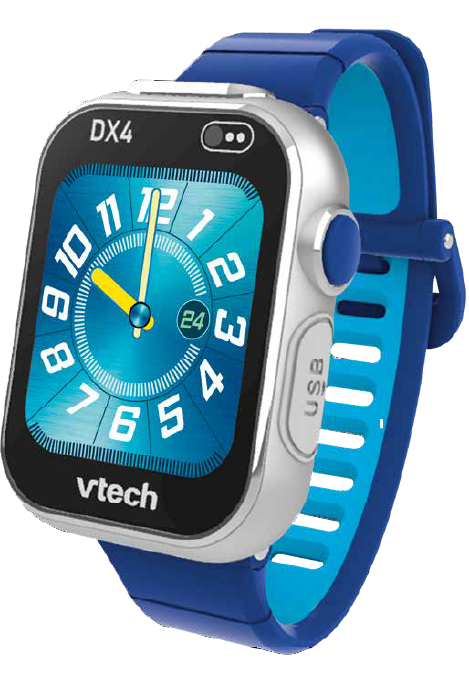
VTech Kidizoom Smart Watch DX4
Introduction
The VTech Kidizoom Smart Watch DX4 is a cutting-edge wearable device designed specifically for children aged 4 and up, blending fun with learning in a stylish, durable package. This smartwatch stands out with its dual cameras, allowing kids to capture photos and videos with creative effects, a large 1.69-inch high-resolution color touchscreen, and over 50 customizable clock faces,s including digital, analog, and 3D designs. Its splash-proof metal body and a fashionable double-color silicone strap ensure it can keep up with active kids while offering a premium look and feel.
The watch is pre-loaded with interactive games, activity challenges, a pedometer, and a music player, encouraging physical activity and creativity. Language options include English, Spanish, and French, making it accessible for diverse users. With a rechargeable lithium-ion battery and USB charging cable included, the device offers convenience and eco-friendly use. Typically priced between $50 and $70, the Kidizoom Smart Watch DX4 is widely available through major retailers and online platforms, making it an excellent gift for birthdays or holidays.
PRODUCT SPECIFICATIONS
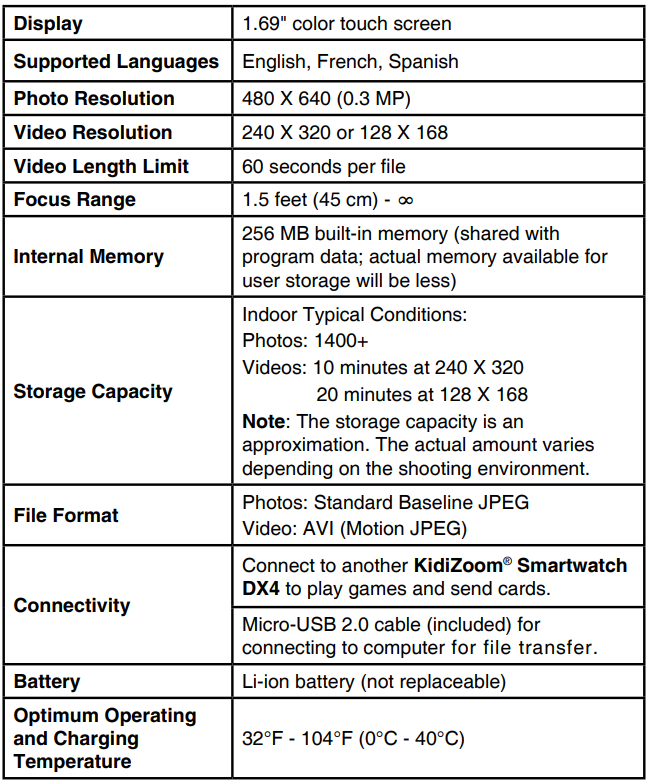
Compared to similar kids' smartwatches, the DX4 offers a larger screen and enhanced UI with more icons on the home menu, richer gaming interfaces, and a premium metal body, distinguishing it from models like the D, X3, which have a smaller 1.44-inch screen and fewer on-screen functions.
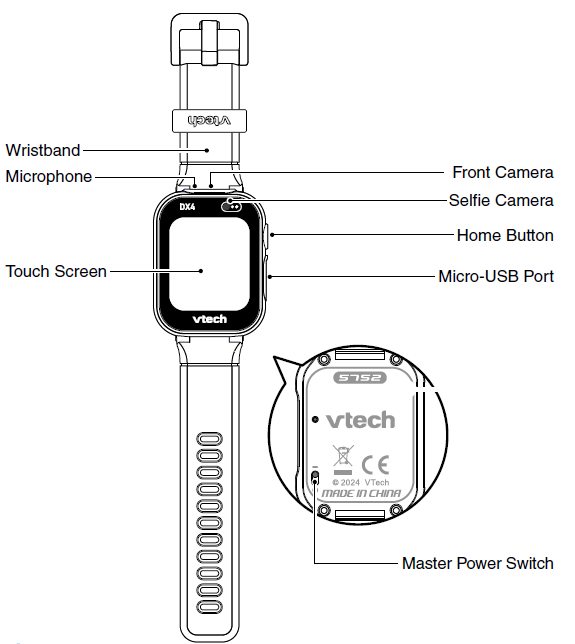
- Home Button
- From Clock Mode:
- Press this button to display the home menu to choose other activities.
- Hold down this button for two seconds to turn the screen off.
- From the Home Menu:
- Press this button to display the clock screen.
- In other activities:
- Press this button to return to the previous screen.
- From Clock Mode:
- Micro-USB Port
Connect to your computer with the included Micro-USB Cable to transfer files and charge the watch.
INCLUDED IN THE PACKAGE
- KidiZoom® Smartwatch DX4
- Micro-USB cable
- Quick Start Guide
WARNING
All packing materials, such as tape, plastic sheets, packaging locks, removable tags, cable ties, cords, and packaging screws, are not part of this toy and should be discarded for your child's safety.
NOTE
- Please save this Instruction Manual as it contains important information.
- The battery in this product must not be disposed of with household waste. This battery is recyclable. Please follow your local recycling regulations.
WARNING
Prolonged wearing of any watch can cause skin irritation for some people. Clean the watch band regularly by wiping it with a damp cloth. Be careful not to get the watch wet, as this could damage the unit. Do not use soaps or household cleaners, as they can get trapped under the band and irritate the skin. Always dry the band before putting it back on. Irritation can also occur if the band is too tight or too loose. If redness, swelling, itchiness, or any other irritation occurs, remove the watch and consult a doctor.
GETTING STARTED
MASTER POWER SWITCH
When you use KidiZoom® Smartwatch DX4 for the first time, slide the Master Power Switch (located on the underside of the watch) to the On position, using a small tool such as a paper clip if necessary. Fully charge the watch before first use.
A full charge will take about 3 to 4 hours.
When the Master Power Switch is set to the Off position, the unit will not function, and the battery will not charge. Only move the switch to the Off position if the watch will not be in use for an extended period of time.
Note: It is not necessary to switch off the watch in daily use. Once the Master Power Switch is off, the watch will stop functioning. After it is turned on again, the time and date will have to be reset.
BATTERY RECHARGING
- Note: Adult operation required.
- The watch should be fully charged before first use. To do so correctly, please follow these steps:
- Make sure that the Master Power Switch is set to the On position before charging.
- Pull up the rubber cover of the Micro-USB Port on the side of the watch.
- Insert the included Micro-USB Cable (small end) into the Micro-USB Port on the watch.
- Insert the large end of the Micro-USB Cable into a USB port on your power adapter.
- Once the connection is successful, you will see a battery recharging symbol appear on the watch screen.
- Check the charging progress regularly throughout recharging.
- When the battery is fully charged, a check mark will appear on the battery icon, and then the screen will automatically turn off. You may then disconnect your fully charged watch from the power adapter.
BATTERY LIFE
The time the battery lasts between charges depends on the play. Like other electronic devices, more frequent usage will drain the battery more quickly. Some activities are more demanding on the battery, such as the pedometer and taking photos, and videos. The remaining battery capacity will appear in the top right corner of the Home menu screen. When the battery level is low, recharge the battery before further use. When the battery level is too low, the watch will not turn on until it is recharged.
Battery Times for Reference
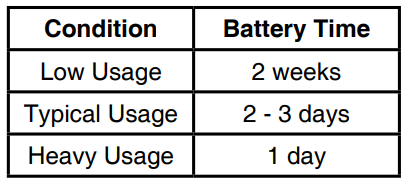
Note: The above battery time assumptions are based on the screen display set to turn off when not in use. Please see the Settings section for more details about this option.
Battery Maintenance
Charge the battery regularly to keep it operating at optimum performance, even when the watch isn’t regularly in use. For example, charge the watch at least once every six months. Slide the Master Power Switch to the Off position if the watch will not be in use for an extended period of time.
The batteries within this toy are permanently encased. Before giving this toy to a child,d make sure there are no signs of damage. Regularly check the toy and dispose of it immediately if there are any signs of damage. Do not dispose of the toy in a fire, as the batteries may leak and explode. Keep batteries safely out of children’s reach before disposing of them via a safe disposal system.
SPLASH-PROOF FOR EVERYDAY PLAY
- Do not put under running water.
- Do not submerge in water. Not suitable for showering, bathing, or swimming.
- Keep the rubber cover over the Micro-USB Port closed tightly while it is not in use in order to prevent possible water damage.
CARE & MAINTENANCE
- Keep the rubber cover over the Micro-USB Port closed tightly when not in use to prevent dust or water damage.
- Keep the watch clean by wiping it with a slightly damp cloth.
- Keep the watch out of direct sunlight and away from direct heat sources.
- Do not drop the watch on a hard surface, expose it to moisture, or immerse it in water.
- Keep the lens clean. If the pictures taken are blurry, it could be because there is dust or dirt on the lens. You can clean the lens by:
- Blowing on the lens.
- Gently wipe the lens with a soft, dry cloth.
WARNING
A very small percentage of the public, due to an existing condition, may experience epileptic seizures or momentary loss of consciousness when viewing certain types of flashing colors or patterns.
While the KidiZoom® Smartwatch DX4 does not contribute to any additional risks, we do recommend that parents supervise their children while
they play games. If your child experiences dizziness, altered vision, disorientation, or convulsions, discontinue use immediately and consult your doctor. Please note that close-range focus on or handling of a KidiZoom® Smartwatch DX4 as a game controller for a prolonged period of time may cause fatigue or discomfort. We recommend that children take a 15-minute break for every hour of play.
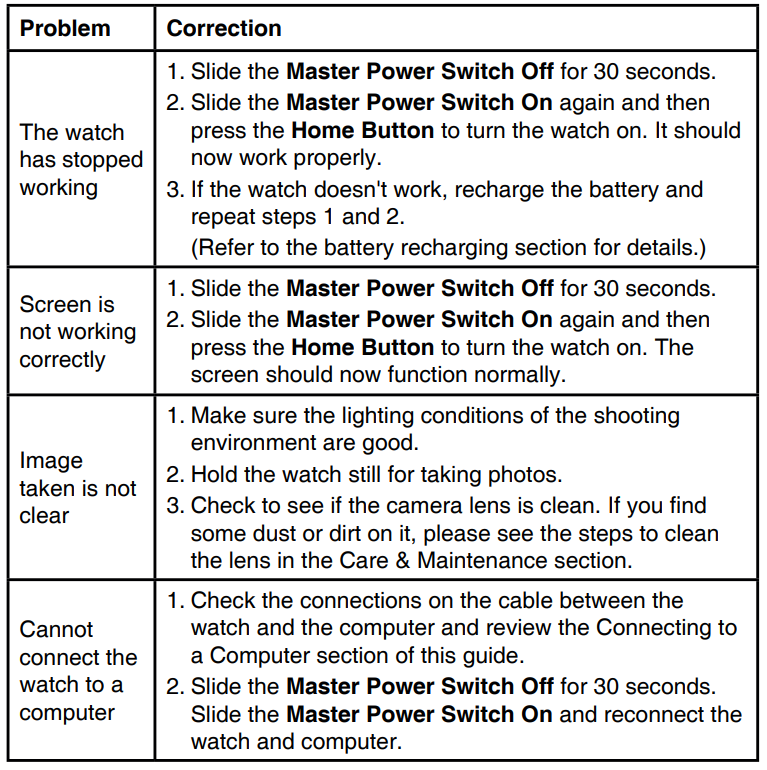
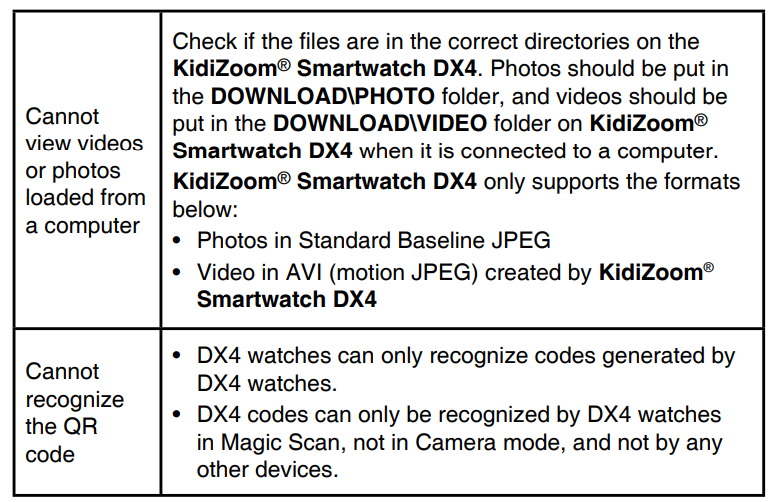
Troubleshooting TVTechech Kidizoom Smart Watch DX4
Pros & Cons of the VTech Kidizoom Smart Watch DX4
- Pros:
- Large, crisp 1.69-inch touchscreen ideal for kids' usability and interaction
- Dual cameras with creative filters boost children’s creativity and photo/video fun
- Durable, splash-proof metal body with stylish double-color strap suitable for everyday wear
- Wide variety of games and educational activities promoting learning and physical movement
- Multi-language support (English, Spanish, French) enhances accessibility
- Rechargeable battery with relatively long standby time (up to two weeks on light use)
- Cons:
- The battery may not last a full day with heavy gaming or camera use
- Splash-proof but not waterproof — must be removed for swimming or bathing
- Limited storage (256 MB) restricts the number of videos/photos saved at high resolution
- Micro-USB charging is slower compared to modern USB-C standards
Overall, the VT VTechidizoomm Smart Watch DX4 offers excellent value for its price range, outperforming its predecessor (DX3) and many competitor kids’ smartwatches by combining entertainment, learning, and durability in one package[6][7].
Customer Reviews of the VTech Kidizoom Smart Watch DX4
Users consistently praise the VTech Kidizoom Smart Watch DX4 for its vibrant screen, fun camera features, and engaging educational games. Parents appreciate how it encourages children to be active with pedometer challenges and interactive games, while kids love customizing clock faces and capturing photos with special effects. Star ratings often hover around 4 to 4.5 stars out of 5.
Common complaints include the battery life not lasting a full day under heavy use and the watch's splash-proof limitation, requiring removal during water activities. Some users note that the limited memory can fill quickly if many videos are recorded. However, most reviewers recommend the watch as a durable, fun, and educational gift for young children, especially those aged 4 to 12 years[1][4][7].
Faqs
How do I set up the vtech Kidizoom Smart Watch DX4 for the first time?
What should I do if my vtech Kidizoom Smart Watch DX4 stops working or freezes?
How can I fix blurry or unclear images taken with the vtech Kidizoom Smart Watch DX4 camera?
Is the vtech Kidizoom Smart Watch DX4 compatible with all computers for file transfer?
How do I maintain and care for my vtech Kidizoom Smart Watch DX4 to ensure longevity?
What features make the vtech Kidizoom Smart Watch DX4 suitable for kids?
Why won’t the touchscreen on my vtech Kidizoom Smart Watch DX4 respond, and how can I fix it?
How often should I charge the vtech Kidizoom Smart Watch DX4, and can I leave it plugged in overnight?
More vtech manuals
- Vtech Go Go Smart Wheels Zig-Zag Raceway User Guide
- Vtech Genius Notebook Laptop & Monitor User Manual
- Vtech Gallop & Rock Learning Pony Toy Instruction Manual
- Specifications: Vtech Digital Audio Monitor AM706-1W User Manual
- Installation: Vtech Digital Audio Monitor DM221 Instruction Manual
- Vtech Video Monitor Camera VM350-2 User Guide | Operations
Leave a Comment