
How to Use: Xiaomi Mi 50W Power Bank 20000 User Manual
Content
xiaomi Mi 50W Power Bank 20000 Overview
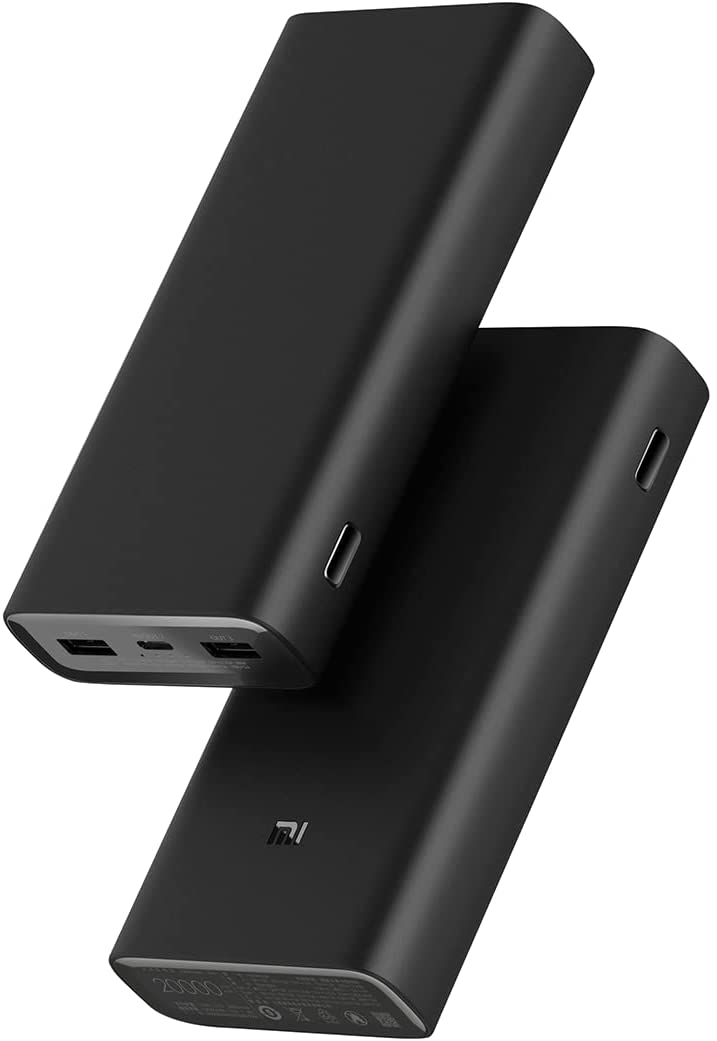
The xiaomi Mi 50W Power Bank 20000 is a high-capacity portable charger designed for users who need fast, reliable power on the go. With a 20,000mAh battery, up to 50W maximum output, and three output ports, it is built for charging smartphones, tablets, laptops, earbuds, and other USB-powered devices. It is especially useful for frequent travelers, remote workers, students, and anyone who depends on multiple devices throughout the day.
One of its biggest advantages is the combination of capacity and speed. The 74Wh battery is strong enough for multiple phone recharges, while the Type-C output supports fast charging for compatible devices. The power bank also supports three-device charging, making it practical for users who carry a phone, smartwatch, and wireless earbuds at the same time. Another benefit is that it is suitable for air travel in many regions, which adds to its appeal for business trips and vacations.
The xiaomi Mi 50W Power Bank 20000 is typically positioned in the mid-range price category, often around $35 to $60 depending on region, seller, and promotional offers. Availability is generally good through Xiaomi stores, major e-commerce platforms, and electronics retailers, though stock can vary by country. For buyers searching for a dependable 20000mAh power bank with USB-C fast charging, this model remains a strong value-oriented option.
Technical Specifications and Key Features
- Battery capacity: 20000mAh, 74Wh lithium-ion polymer battery
- Rated capacity: 12000mAh at 5V/4A
- Input port: USB Type-C
- Output ports: 2 x USB-A, 1 x USB Type-C
- Maximum output: 50W
- Type-C output supports up to 20V/2A for fast charging
- USB-A single-port output supports fast-charge profiles for compatible phones
- Three-port simultaneous output supports charging multiple devices at once
- Operating temperature: 5°C to 35°C
- Charging time: approximately 11 hours with a 5V/2A charger, around 6.5 hours with an 18W charger, and about 4.5 hours with a 45W charger
In practical use, this power bank sits above basic 18W models and below premium laptop-focused power stations. Compared with standard 10000mAh units, it offers much better endurance and more flexibility for long trips. Compared with larger 65W or 100W models, it is lighter and simpler while still delivering strong everyday charging performance.
Setup Guide: How to Use the xiaomi Mi 50W Power Bank 20000
Start by fully charging the power bank before first use. Connect the included or compatible USB-C cable to a wall charger, then plug the charger into the Type-C input port. A higher-wattage charger will reduce refill time. During charging, check the battery indicator lights to confirm progress.
To charge a device, connect it to one of the USB-A ports or the USB-C port using a suitable cable. The power bank automatically detects the device and delivers the appropriate power profile when supported. If you need to charge multiple devices, connect them one by one and verify that the combined load does not exceed the unit’s total output limit.
For best results, use certified cables and avoid charging in hot environments. Do not cover the power bank while it is charging, and keep it away from water, direct sunlight, and metal objects. If charging does not begin, unplug the cable, try another port, and confirm that the device supports standard USB charging. If the power bank becomes unusually warm, stop using it and let it cool before continuing.
Troubleshooting Common Problems and Solutions
If the power bank does not charge your phone or tablet, the most common cause is a faulty cable or an incompatible charging protocol. Try another cable, switch ports, or test the device with a different charger. If the indicator lights do not turn on during charging, the wall adapter may not be delivering enough power.
If the output seems slow, check whether multiple devices are connected. When all three ports are in use, power is shared across devices, so charging speed may drop. This is normal behavior for a multi-port 50W power bank. If the unit stops output unexpectedly, it may have entered protection mode because of overheating, overcurrent, or a short connection.
There are no user-facing error codes, but common symptoms usually point to cable issues, low input power, or thermal protection. Preventive care includes keeping the device dry, avoiding drops, and recharging it regularly rather than leaving it empty for long periods. Warranty coverage and support depend on the seller and country of purchase, so check the box or receipt for local service details. For help, contact Xiaomi customer support or the retailer that sold the product.
Pros and Cons of the xiaomi Mi 50W Power Bank 20000
Pros
- High 20000mAh capacity for multiple recharges
- 50W max output is strong for phones, tablets, and some laptops
- Three output ports increase flexibility for travel and daily carry
- USB-C input and output improve convenience and compatibility
- Good value for money compared with higher-wattage premium power banks
- Suitable for users who want one charger for several devices
Cons
- Heavier than 10000mAh compact power banks
- Charging speed is reduced when multiple devices are connected
- Not ideal for users needing 65W to 100W laptop charging
- Full recharge can take several hours with a low-power adapter
- No advanced display, app control, or smart monitoring features
Compared with smaller portable chargers, the xiaomi Mi 50W Power Bank 20000 offers a better balance of capacity and performance. Compared with more expensive high-wattage alternatives, it delivers solid everyday value without unnecessary complexity. For many buyers, that makes it a practical and cost-effective choice.
Customer Reviews and Real-World Feedback
Average customer feedback for the xiaomi Mi 50W Power Bank 20000 is generally positive, with many users rating it around 4.4 out of 5 stars. Buyers frequently praise the large battery capacity, dependable charging speed, and ability to power multiple devices during travel.
Common compliments include strong build quality, good USB-C performance, and reliable backup power for long workdays. A typical testimonial might say, “It keeps my phone and earbuds charged for several days, and the USB-C fast charging is very useful.”
Common complaints usually focus on the weight, slower full recharge time with weak adapters, and reduced output when several devices are connected. A frequent recommendation is to pair it with a 45W charger for the best recharge speed. If you want a high-capacity, travel-friendly portable charger with solid performance, this model is a smart buy for most everyday users.
Faqs
How do I set up xiaomi Mi 50W Power Bank 20000 for the first time?
Why is my xiaomi Mi 50W Power Bank 20000 charging slowly, and how can I fix it?
What devices are compatible with xiaomi Mi 50W Power Bank 20000?
How many times can xiaomi Mi 50W Power Bank 20000 charge a phone on one full charge?
Can xiaomi Mi 50W Power Bank 20000 charge a laptop safely?
What should I do if xiaomi Mi 50W Power Bank 20000 is not turning on?
How can I keep xiaomi Mi 50W Power Bank 20000 in good condition for long-term use?
How do I get the fastest charging performance from xiaomi Mi 50W Power Bank 20000?
More xiaomi manuals
- How to Use: Xiaomi Mi Air Purifier Pro H User Manual
- How to Use: Xiaomi Mi True Wireless Earbuds Basic 2 User Manual
- How to Use: Xiaomi Mi Air Purifier 3H User Manual
- How to Use: Xiaomi 22.5W Power Bank 10000 User Manual
- How to Use: Xiaomi Mi Wireless Charging Pad User Manual
- Setup & Features: Xiaomi Mi Smart Plug (Wi-Fi) User Manual
Leave a Comment