
How To Use: Xiaomi Redmi Note 11 Pro 5G Smartphone Owner Manual
Content
Redmi Note 11 Pro 5G Smartphone
Introduction
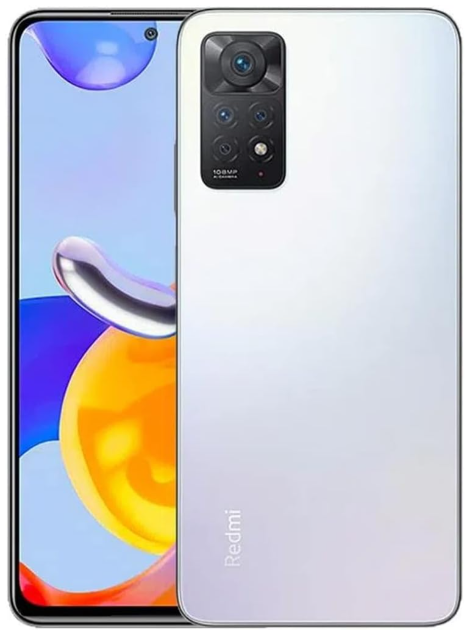
The Xiaomi Redmi Note 11 Pro 5G is a powerful mid-range smartphone launched in early 2022, designed to offer premium features without the premium price tag. Equipped with a smooth 6.67-inch AMOLED display boasting a 120Hz refresh rate, this device ensures vibrant visuals and fluid interactions, ideal for gaming, streaming, and everyday use. At its core lies the efficient Qualcomm Snapdragon 695 5G processor, enabling fast performance and seamless multitasking, complemented by up to 8GB of RAM and storage options reaching 128GB. This smartphone comes packed with a massive 5000mAh battery that supports 67W turbocharging, promising all-day usage and rapid recharge times. The highlight is its exceptional 108MP main camera that delivers pro-grade photography, perfect for capturing crisp and detailed photos. Launched globally with an estimated price range of around $300-$350, the Redmi Note 11 Pro 5G caters to tech enthusiasts and budget-conscious consumers seeking 5G connectivity and robust specifications in one package.
Detailed Specifications
The Redmi Note 11 Pro 5G features a 6.67-inch Full HD+ AMOLED display with a 120Hz refresh rate and a peak brightness of 1200 nits, protected by Corning Gorilla Glass 5 for durability. Powered by the Snapdragon 695 octa-core processor clocked up to 2.2GHz, it supports 5G networks and provides smooth performance. It comes with LPDDR4X RAM options of 6GB or 8GB and UFS 2.2 storage variants of 64GB or 128GB. The quad-camera setup includes a 108MP main sensor, an 8MP ultra-wide, a 2MP macro, and a 2MP depth sensor, while the front hosts a 16MP selfie camera. Other features include a large 5000mAh battery with 67W fast charging, dual stereo speakers, a side-mounted fingerprint sensor, an IR blaster, and MIUI based on Android 11 out of the box.
Important Safety Information
Read all safety information below before using your device:
- Use of unauthorized cables, power adapters, or batteries can cause fire, explosion, or pose other risks.
- Use only authorized accessories that are compatible with your device.
- This device’s operating temperature range is 0°C to 40°C. Using this device in an environment outside of this temperature range may damage the device.
- If your device is provided with a built-in battery, to avoid damaging the battery or the device, do not attempt to replace the battery yourself.
- Charge this device only with the included or authorized cable and power adapter. Using other adapters may cause fire, electric shock, and damage the device and the adapter.
- After charging is complete, disconnect the adapter from both the device and the power outlet. Do not charge the device for more than 12 hours.
- The battery must be recycled or disposed of separately from household waste. Mishandling the battery may cause fire or explosion. Dispose of or recycle the device, its battery, and accessories according to your local regulations.
- Do not disassemble, hit, crush, or burn the battery. If the battery appears deformed or damaged, stop using it immediately.
- Do not short-circuit the battery, as this may cause overheating, burns, or other injury.
- Do not place the battery in a high-temperature environment.
- Overheating may cause an explosion.
- Do not disassemble, hit, or crush the battery, as this may cause the battery to leak, overheat, or explode. Do not burn the battery, as this may cause fire or explosion.
- If the battery appears deformed or damaged, stop using it immediately.
- User shall not remove or alter the battery. Removal or repair of the battery shall only be done by an authorized repair center of the manufacturer.
- Keep your device dry.
- For AC/DC adapters, the socket-outlet shall be installed near the equipment and shall be easily accessible.
Safety Precautions
- Observe all applicable laws and rules restricting the use of mobile phones in specific situations and environments.
- Do not use your phone at petrol stations or in any explosive atmosphere or potentially explosive environment, including fueling areas, below decks on boats, fuel or chemical transfer or storage facilities, or areas where the air may contain chemicals or particles such as grain, dust, or metal powders. Obey all posted signs to turn off wireless devices such as your phone or other radio equipment. Turn off your mobile phone or wireless device when in a blasting area or in areas requiring “two-way radios” or “electronic devices” to be turned off to prevent potential hazards.
- Do not use your phone in hospital operating rooms, emergency rooms, or intensive care units. Always comply with all rules and regulations of hospitals and health centers. If you have a medical device, please consult your doctor and the device manufacturer to determine whether your phone may interfere with the device’s operation. To avoid potential interference with a pacemaker, always maintain a minimum distance of 15 cm between your mobile phone and the pacemaker. This can be done by using your phone on the ear opposite to your pacemaker and not carrying your phone in a breast pocket. To avoid interference with medical equipment, do not use your phone near hearing aids, cochlear implants, or other similar devices.
- Observe all aircraft safety regulations and turn off your phone on board aircraft when required.
- When driving a vehicle, use your phone in accordance with relevant traffic laws and regulations.
- To avoid being struck by lightning, do not use your phone outdoors during thunderstorms.
- Do not use your phone to make calls while it is charging.
- Do not use your phone in places with high humidity, such as bathrooms. Doing so may result in electric shock, injury, fire, and charger damage
Security Statement
Please update your phone’s operating system using the built-in software update feature, or visit any of our authorized service outlets. Updating software through other means may damage the device or result in data loss, security issues, and other risks.
Legal Information
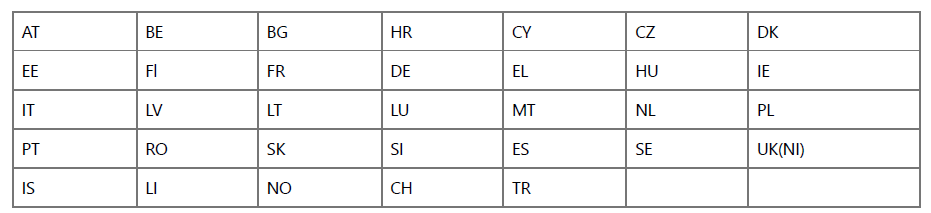
This device may be operated in all member states of the EU. Observe national and local regulations where the device is used. This device is restricted to indoor use only when operating in the 5150 to 5350 MHz frequency range in Hong Kong and the following countries:
FCC Regulations
This mobile phone complies with part 15 of the FCC Rules. Operation is subject to the following two conditions: (1) This device may not cause harmful interference, and (2) this device must accept any interference received, including interference that may cause undesired operation. This mobile phone has been tested and found to comply with the limits for a Class B digital device, pursuant to Part 15 of the FCC Rules. These limits are designed to provide reasonable protection against harmful interference in a residential installation.
This equipment generates, uses,, and can radiate radio frequency energy and, if not installed and used in accordance with the instructions, may cause harmful interference to radio communications.
However, there is no guarantee that interference will not occur in a particular installation. If this equipment does cause harmful interference to radio or television reception, which can be determined by turning the equipment off and on, the user is encouraged to try to correct the interference by one or more of the following measures:
- Reorient or relocate the receiving antenna.
- Increase the separation between the equipment and receiver.
- Connect the equipment into an outlet on a circuit different from that to which the receiver is connected.
- Consult the dealer or an experienced radio/TV technician for help..
Troubleshooting
Common issues with the Redmi Note 11 Pro 5G may include battery drain, connectivity glitches, or app crashes. To resolve battery issues, ensure background apps are closed and optimize battery settings via MIUI’s Battery Saver mode. If you face 5G or Wi-Fi connectivity problems, toggle airplane mode on and off or restart the device. For app crashes, clear cache data or reinstall the problematic apps. Screen responsiveness issues can often be fixed by cleaning the display or performing a soft reset. Always avoid exposing the phone to extreme temperatures or moisture. If persistent problems occur, a factory reset can be performed as a last resort, but backing up data beforehand is recommended.
Pros & Cons
Pros
- Stunning 6.67-inch AMOLED display with 120Hz refresh rate
- Powerful Snapdragon 695 5G processor for smooth performance
- 108MP pro-grade main camera for high-resolution photography
- Large 5000mAh battery with fast 67W charging support
- Solid build quality with Gorilla Glass 5 protection
- Dual stereo speakers and d IR blaster for enhanced multimedia
- Multiple RAM and storage configurations
Cons
- No official IP water or dust resistance rating
- MIUI can have bloatware and ads in the system apps
- Camera performance can struggle in very low light conditions
- No wireless charging support
Customer Reviews and Common Complaints
Customers praise the Redmi Note 11 Pro 5G for its excellent display, fast charging, and reliable performance at a budget-friendly price. Many highlight the camera’s high megapixel count as a strong point for mobile photography enthusiasts. However, some users report occasional lag during heavy multitasking and feel that MIUI’s pre-installed apps and ads disrupt the experience. Battery life generally receives positive feedback, though a few mention that the phone heats up slightly under extended gaming sessions. Overall, it is regarded as a great value device for 5G connectivity and multimedia use.
Faqs
What makes the Xiaomi Redmi Note 11 Pro 5G display stand out?
How fast is the charging on the Redmi Note 11 Pro 5G?
Does the Redmi Note 11 Pro 5G support 5G networks globally?
Can the Xiaomi Redmi Note 11 Pro 5G handle gaming well?
What camera features are included in the Redmi Note 11 Pro 5G?
Is the Redmi Note 11 Pro 5G protected against screen damage?
How much RAM and storage options are available for the Redmi Note 11 Pro 5G?
Does the Redmi Note 11 Pro 5G come with wireless charging?
What software does the Xiaomi Redmi Note 11 Pro 5G run on?
Are there any common issues reported by Redmi Note 11 Pro 5G users?
Tags
More xiaomi manuals
- Setup & Features: Xiaomi Mi Smart Plug (Wi-Fi) User Manual
- Xiaomi Steel Gun Bluetooth Speaker 2 User Manual
- How to Use: Xiaomi Mi Wireless Charging Pad User Manual
- Xiaomi Mi TV Stick 4K Streaming User Manual
- How to Use: Xiaomi 22.5W Power Bank 10000 User Manual
- Xiaomi Note 4 Phone User Manual | Complete Specs & Features
Leave a Comment