
Setup: Yamaha PORTATONE PSR-170 Portable Electronic Keyboard User Manual
Content
Yamaha PORTATONE PSR-170 Portable Electronic Keyboard
Introduction
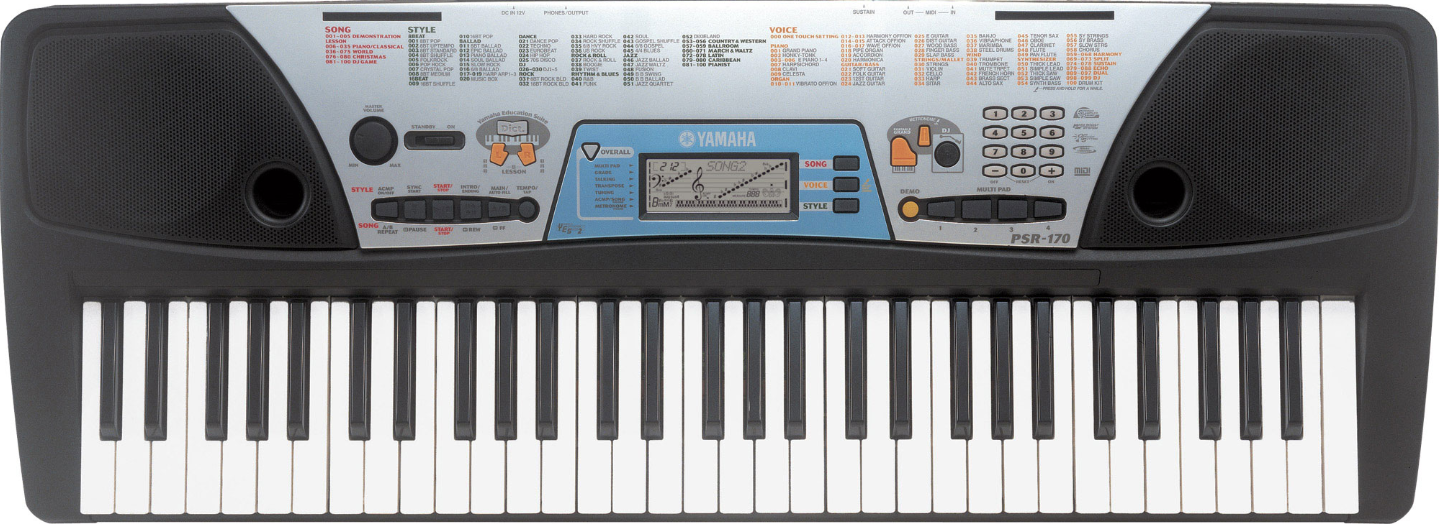
The Yamaha PORTATONE PSR-170 Portable Electronic Keyboard is a versatile and user-friendly instrument designed to inspire musicians at every skill level, from beginners to intermediate players. Featuring 61 full-sized, touch-sensitive keys, this keyboard offers a dynamic playing response that enables expressive performances. It is packed with 100 high-quality preset voices, allowing users to explore diverse instrument sounds, from grand pianos to brass, strings, and more, suitable for multiple music genres.
One of its standout features is the Yamaha Education Suite (YES), which provides interactive lessons and practice tools tailored for beginners, helping them learn at their own pace with guided support. Additionally, with 100 accompaniment styles and built-in rhythms, the PSR-170 enables users to create rich backing tracks, perfect for solo practice, live gigs, or casual play. Its compact, lightweight design enhances portability, making it ideal for home use, music classes, or on-the-go performances.
Priced in an affordable range, typically between $150 to $250 depending on the retailer and availability, the Yamaha PSR-170 offers excellent value for money. It is widely available through online marketplaces and music retailers, often bundled with accessories like power supplies or sustain pedals. Its combination of ease-of-use, sound variety, and educational features makes it an excellent choice for those starting their musical journey or seeking a portable keyboard for casual and semi-professional use.
Specifications
- Keyboard
61 standard-size keys (C1 - C6) - Display
Large multi-function LCD (backlit) - Setup
STANDBY/ONMASTER VOLUME : MIN-MAX - Panel controls
Overall, SONG, VOICE, STYLE, DEMO, POTABLE GRAND, DJ, METRONOME, Dict., L, R, TEMPO/TTAP numeric keypad (0 - 9, +,-) - Voices
100 panel voices (max. polyphony: 16) - Effects
Dual (Included in Voice) , Harmony/Echo (Included in Voice, Split (Included in Voice), Sustain - Auto Accompaniment
100 styles- Finge ring: Multi Fingering
- Sections: Intro, Main A, B, Ending, Fill
- Overall controls
Multi Pad, Grade, Talking, Transpose, Tuning, Accompaniment Volume, Song Volume, Metronome Volume - Style controls
Acmp On/Off, Sync-Start, Start, Stop, Intro/Ending, Main A , B (Auto Fill) - Song controls
Start, Stop, Pause, A-B Repeat, Fast Forward, Rewind, Melody Voice Change - One Touch Setting
1/style, 1/song - Multi Pads
4 pads x 10 banks - Yamaha Education Suite
Dictionary, Lesson 1-4 - Preset songs
100 songs - Amplifier
2.0W + 2.0W - MIDI
IN/OUT - Auxiliary jacks
PHONES/OUTPUT, DC IN 12V, MIDI IN/OUT, SUSTAIN - Speakers
10cm x 2 - Power consumption
VL/CSA 6-8W, CE7.5W (when using PA-3B power adaptor) - Power supply
- Adaptor: Yamaha PA-3B AC power adaptor
- Batteries: Six “D” size, R20P(LR20) or equivalent batteries
- Dimensions
931 x 348.8 x 127.9 mm(36-2/3" x 13-3/4" x 5-1/16") - Weight
4.4kg (9 Ibs., 11 oz.) - Supplied accessories
Music Stand, Owner’s Manual, Song Book - Optional accessories
- Headphones: HPE-150
- AC power adaptor: PA-3B
- Keyboard stand: L-2L, L-2C
Specifications and descriptions in this owner’s manual are for information purposes only. Yamaha Corp. reserves the right to change or modify products or specifications at any time without prior notice. Since specifications, equipment,nt or options may not be the same in every locale, please check with your Yamaha dealer.
Panel Controls and Terminals
Front Panel
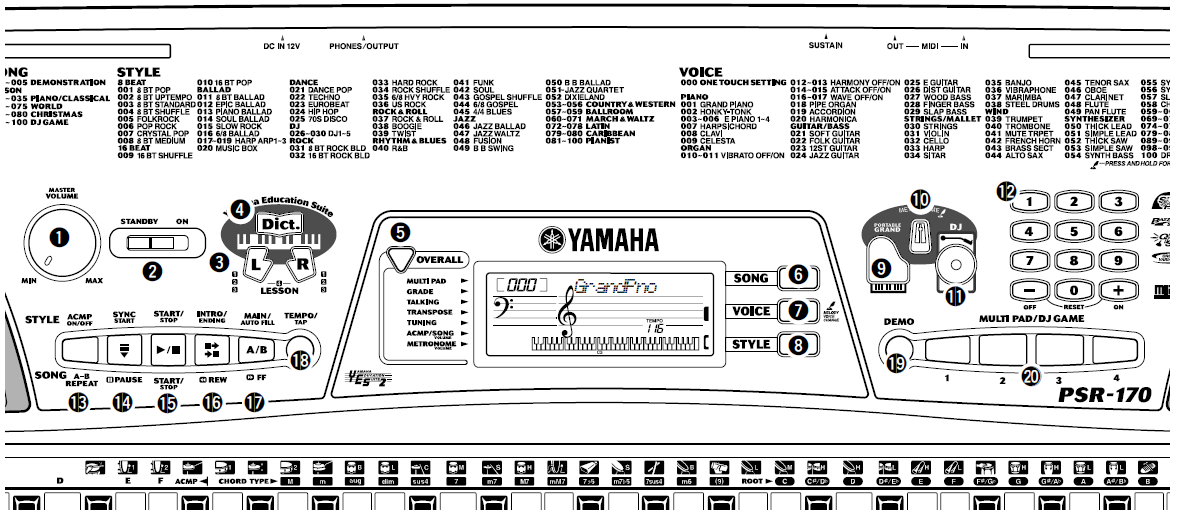
- [MASTER VOLUME] dial
This determines the overall volume of the PSR-170. - Power switch ([STANDBY/ON])
- LESSON [L] (Left) and [R] (Right) buttons. Ons These call up the Lesson exercises for the corresponding hand (left or right) for the selected song. (See page 35.)
- [Dict.] (DICTIONARY) button
This calls up the Dictionary function (See page 41). - [OVERALL] button
This is for selecting the various “overall” functions. (See page 21.) - [SONG] button
This is for enabling song selection. (See page 29.) - [VOICE] button
This is for enabling voice selection. (See page 23.) Holding down this button calls up the Melody Voice Change function. (See page 30.) - [STYLE] button
This is for enabling style selection. (See page 42.) - [PORTABLE GRAND] button
This instantly calls up the Grand Piano voice, plus a special piano song and style. (See page 20.) - [METRONOME] button
This turns the metronome on and off. (See page 20.) - [DJ] button
This instantly calls up a special DJ voice, s singing,, and style. (See page 22.) - Numeric keypad, [+/ON] and [-/OFF] buttons
These are used for selecting songs, voices, and styles. (See page 24.) They are also used for entering values and adjusting or making certain settings. - [ACCOMPANIMENT ON/OFF]([A-B REPEAT]) button
When the Style mode is selected, this turns the auto accompaniment on and off. (See page 43.) When the Song mode is selected, this controls the A-B Repeat function. (See page 33.) - [SYNC START] ([ PAUSE]) b..Buttonn When the Style mode is selected, this turns the Sync Start function on and off. (See page 44.) When the Song mode is selected, this alternately pauses and starts song playback. (See page 32.)
- [START/STOP] button
When the Style mode is selected, this alternately starts and stops the auto accompaniment. (See page 43.) When the Song mode is selected, this alternately starts and stops song playback. (See page 32.) - [INTRO/ENDING] ([ REW]) button
When the Style mode is selected, this is ucontrolon-trol the Intro and Ending functions. (See page 45.) When the Song mode is selected, this is used to rewind during song playback. When song playback is stopped, it is used to reverse to specific measure numbers in the song. (See page 32.) - [MAIN/AUTO FILL] ([ FF]) button
When the Style mode is selected, this is used to change auto accompaniment sections and control the Auto Fill function. (See page 46.) When the Song mode is selected, this is used to fast-forward during song playback. When song playback is stopped, it is used to advance to specific measure numbers in the song. (See page 32.) - [TEMPO/TAP] button
This button allows you to tap out the tempo and automatically start a selected song or style at that tapped speed. (See page 44.) It is also used to call up the Tempo setting, letting you set the Tempo with the numeric keypad or [+]/[-] buttons. (See page 31.) - [DEMO] button
This is used to play the Demo songs. (See page 18.) [MULTI PAD/DJ GAME] buttons
These are used to automatically play pre-programmed musical phrases. (See page 51.)
These are also used to play the DJ GAME. (See page 22.)
Rear Panel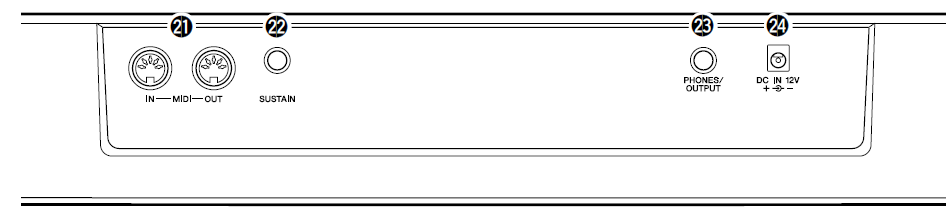
- MIDI IN, OUT terminals
These are for connection to other MIDI instruments and devices. (See pages 9, 52.) - SUSTAIN jack
This is for connection to an optional FC4 or FC5 Footswitch. (See page 9.) - PHONES/OUTPUT jack
This is for connection to a set of stereo headphones or to an external amplifier/speaker system. (See page 9.) - DC IN 12V jack
This is for connection to a PA-3B AC power adaptor. (See page 8.)
Setting Up
This section contains information about setting up your PSR-170 for playing. Make sure to read this section carefully before using the instrument.
Power Requirements
Although the PSR-170 will run either from an optional AC adaptor or batteries, Yamaha recommends the use of an AC adaptor whenever possible. An AC adaptor is more environmentally friendly than batteries and does not deplete resources.
Using an AC Power Adaptor
- To connect your PSR-170 to a wall socket, you will need the optionally available Yamaha PA-3B Power Adaptor. Use of other AC adaptors could result in damage to the instrument, so be sure to ask for the right kind.
- Make sure that the [STANDBY/ON] switch of the PSR-170 is set to STANDBY. Connect one end of the adaptor to the DC IN 12V jack on the rear panel of your PSR-170, and the other end to a suitable electrical outlet.
Using Batteries
Inserting Batteries
Turn the instrument upside-down and remove the battery compartment lid. Insert six 1.5-volt “D” size, R20P (LR20) or equivalent batteries as shown in the illustration,, making sure that the positive and negative terminals are properly aligned, and replace the lid.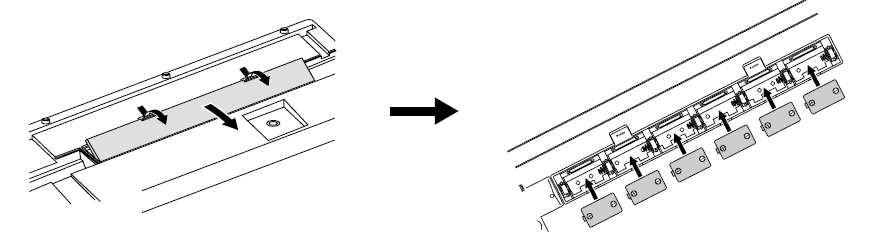
- When the Batteries Run Down
When the batteries run low and the battery voltage drops below a certain level, the PSR-170 may not sound or function properly. As soon as this happens, replace them with a complete set of six new batteries.
Turning On the Power
With the AC power adaptor connected or with batteries installed, simply move the STANDBY switch until it is set to the ON position. When the instrument is not in use, be sure to turn the power off.
.png)
Accessory Jacks
- Using Headphones
For private practicing and playing without disturbing others, connect a set of stereo headphones to the rear panel PHONES/OUTPUT jack. Sound from the built-in speaker system is automatically cut off when you insert a headphone plug into this jack. - Connecting a Keyboard Amplifier or Stereo System
Though the PSR-170 is equipped with a built-in speaker system, you can also play it through an external amplifier/speaker system. First, make sure the PSR-170 and any external devices are turned off, then connect one end of a stereo audio cable to the LINE IN or AUX IN jack(s) of the other device and the other end to the rear panel PHONES/OUTPUT jack on the PSR-170. Using a Sustain Footswitch
This feature lets you use an optional footswitch (Yamaha FC4 or FC5) to sustain the sound of the keyboard voice. This is used in the same way as a damper pedal on an acoustic piano — press and hold down the footswitch as you play the keyboard to sustain the sound.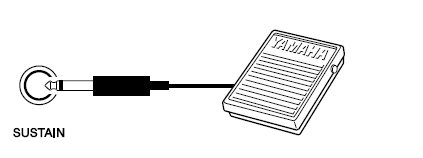
Using the MIDI Terminals
The PSR-170 also features MIDI terminals, allowing you to interface the PSR-170 with other MIDI instruments and devices. (For more information, see page 52.)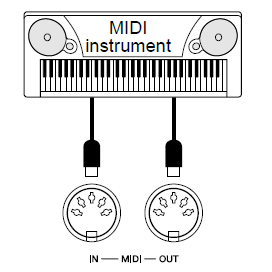
Music Stand
Insert the bottom edge of the included music stand into the slot located at the top rear of the PSR-170 control panel.
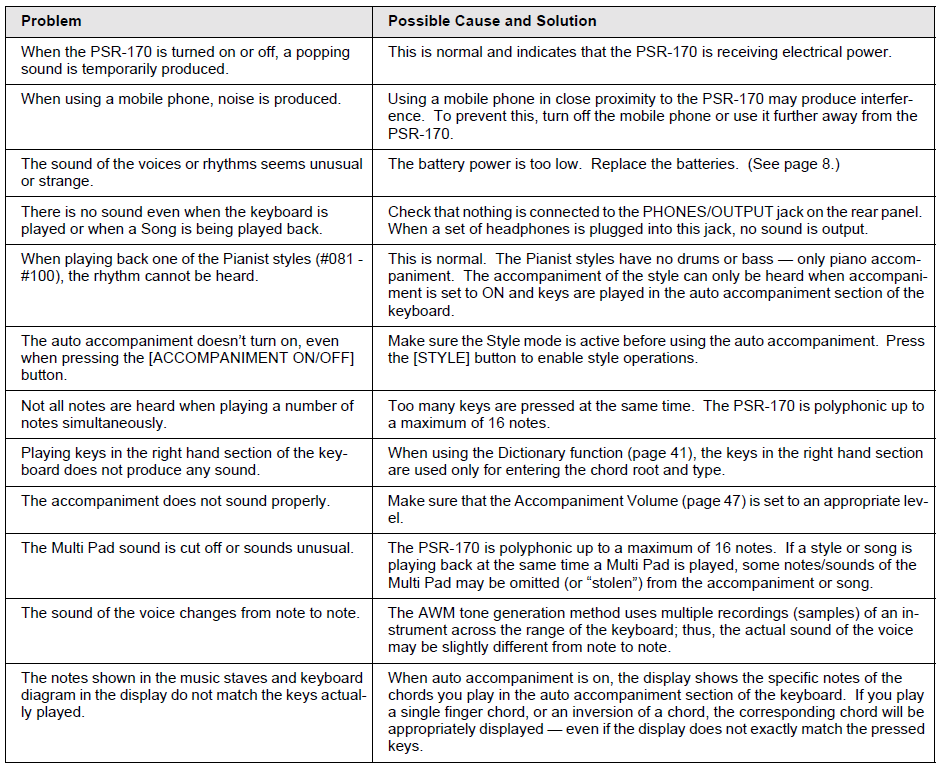
Troubleshooting
Limited Warranty
90 DAYS LABOR 1 YEAR PARTS
Yamaha Corporation of America, hereafter referred to as Yamaha, warrants to the original consumer of a product included in the categories listed below, that the product will be free of defects in materials and/or workmanship for the periods indicated. This warranty applies to all models included in the following series of products:
PSR SERIES OF PORTATONE ELECTRONIC KEYBOARDS
If during the first 90 days that immediately follow thefollow the purchase date, your new Yamaha product covered by this warranty is found to have a defect in material and/or workmanship, Yamaha and/or its authorized representative will repair such defect without charge for parts or labor.
If parts should be required after these 90 days, but within the one-year period that immediately follows the purchase date, Yamaha will, subject to the terms of this warranty, supply these parts without charge. However, charges for labor, and/or any miscellaneous expenses incurred are the responsibility. Yamaha reserves the right to utilize reconditioned parts in repairing these products and/or to use reconditioned units as warranty replacements.
THIS WARRANTY IS THE ONLY EXPRESS WARRANTY WHICH YAMAHA MAKES IN CONNECTION WITH THESE PRODUCTS. ANY IMPLIED WARRANTY APPLICABLE TO THE PRODUCT, INCLUDING THE WARRANTY OF MERCHANTABILITY, IS LIMITED TO THE DURATION OF THE EXPRESS WARRANTY. YAMAHA EXCLUDES AND SHALL NOT BE LIABLE IN ANY EVENT FOR INCIDENTAL OR CONSEQUENTIAL DAMAGES.
Some states do not allow limitations that relate to implied warranties and/or the exclusion of incidental or consequential damages. Therefore, these limitations and exclusions may not apply to you.
This warranty gives you specific legal rights. You may also have other rights which vary from state to state.
CONSUMERS RESPONSIBILITIES
If warranty service should be required, the consumer must assume certain responsibilities:
- Contact the Customer Service Department of the retailer selling the product, or any retail outlet authorized by Yamaha to sell the product,, for assistance. You may also contact Yamaha directly at the address provided below.
- Deliver the unit to be serviced under warranty to: the retailer selling the product, an authorized service center, or to Yamaha with an explanation of the problem. Please be prepared to provide proof of purchase date (sales receipt, credit card copy, etc.) when requesting service and/or parts under warranty.
- Shipping and/or insurance costs are the consumer's responsibilityUnits shipped for service should be packed securely.
Repaired units will be returned PREPAID if warranty service is required within the first 90 days.
IMPORTANT: Do NOT ship anything to ANY location without prior authorization. A Return Authorization (RA) will be issued that has a tracking number assigned, which that will expedite the servicing of your unit and provide a tracking system if needed. - Yowner'sThe s manual contains important safety and operating instructions. It is your responsibility to be aware of the contents of this manual and to follow all safety precautions.
EXCLUSIONS
This warranty does not apply to units whose trade name, trademark, and/or ID numbers have been altered, defaced, exchanged, removed, or to failures and/or damages that may occur as a result of:
- Neglect, abuse, abnormal strain, modification, or exposure to extremes in temperature or humidity.
- Improper repair or maintenance by any person who is not a service representative of a retail outlet authorized by Yamaha to sell the product, an authorized service center, or an authorized service representative of Yamaha.
- This warranty applies only to units sold by retailers authorized by Yamaha to sell these products in the U.S.A., the District of Columbia, and Puerto Rico. This warranty is not applicable in other possessions or territories of the U.S.A. or in any other country.
Pros & Cons of the Yamaha PORTATONE PSR-170 Portable Electronic Keyboard
- Pros:
- Touch-sensitive 61 keys: Provides expressive control and a realistic piano feel, beneficial for developing finger dynamics.
- Rich sound library: With 100 preset voices and 100 accompaniment styles, users can explore various musical genres and styles.
- Beginner-friendly Yamaha Education Suite: Interactive lessons and built-in songs simplify learning and practice progression.
- Portability: Lightweight and compact, weighing about 12 lbs, suitable for transport to lessons, gigs, or home use.
- MIDI compatibility: Allows connection to other MIDI devices for expanded studio or performance setups.
- Cons:
- Limited advanced features: Lacks some high-end controls like weighted keys or extensive sound editing found in professional keyboards.
- Basic built-in speakers: Suitable for personal use but may require external amplification for larger venues.
- Design dated: Released in 2002, its interface and LCD may feel less modern compared to newer models.
- No touch display: Navigation relies on buttons and a small LCD, which can be less intuitive.
- Value for Money: The Yamaha PORTATONE PSR-170 offers a compelling balance of features and affordability, especially compared to entry-level keyboards with fewer voices or keys. It's ideal for students or casual players who want authentic touch response and a broad sound palette without heavy investment.
Customer Reviews and Feedback on the Yamaha PORTATONE PSR-170 Portable Electronic Keyboard
Users generally praise the Yamaha PORTATONE PSR-170 Portable Electronic Keyboard for its sound quality and the realistic feel of its touch-sensitive keys, making it a popular choice among beginners and hobbyists. The Yamaha Education Suite has been commended for providing effective, easy-to-follow lessons that accelerate the learning process. Many reviewers also appreciate its portability and the variety of accompaniment styles.
Common complaints include the dated design and limited speaker power, prompting some users to recommend pairing the keyboard with external speakers for better sound projection. Some advanced players find the keyboard lacking in customization and professional features,, but acknowledge its suitability for its targeted audience. Overall, the PSR-170 receives an average rating of 4 out of 5 stars, with many customers recommending it as an excellent first keyboard or portable practice instrument.
Purchasers frequently highlight its reliability and the value it offers for its price point, making it a favored option in the entry-level portable keyboard market.
Faqs
How do I set up the Yamaha PORTATONE PSR-170 Portable Electronic Keyboard for the first time?
What should I do if my Yamaha PORTATONE PSR-170 Portable Electronic Keyboard is not working properly?
Can I use the Yamaha PORTATONE PSR-170 Portable Electronic Keyboard with MIDI devices?
How do I optimize the performance of my Yamaha PORTATONE PSR-170 Portable Electronic Keyboard?
What are the key features that make the Yamaha PORTATONE PSR-170 Portable Electronic Keyboard different?
How often should I maintain my Yamaha PORTATONE PSR-170 Portable Electronic Keyboard?
Can I use the Yamaha PORTATONE PSR-170 Portable Electronic Keyboard with external speakers or headphones?
How do I troubleshoot sound issues with my Yamaha PORTATONE PSR-170 Portable Electronic Keyboard?
More yamaha manuals
Leave a Comment