
Yealink CP700 USB Speakerphone User Manual
Content
Yealink CP700 USB Speakerphone Review and User Manual
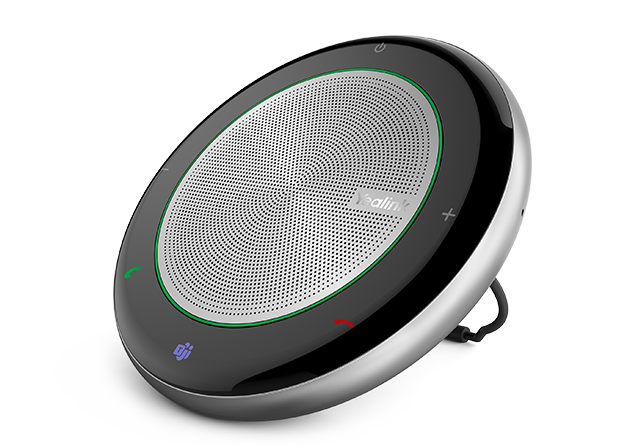
The Yealink CP700 USB Speakerphone is a portable, professional-grade conference speakerphone designed for personal workspaces, small meeting rooms, and hybrid workers who need clear audio without bulky equipment. It combines USB and Bluetooth connectivity, making it easy to connect to laptops, tablets, and smartphones for calls, meetings, and remote collaboration. With a compact design, dual noise-canceling microphones, 360-degree voice pickup, and full-duplex audio, it delivers a strong balance of convenience and performance for everyday business use.
This model is especially appealing to remote employees, frequent travelers, home office users, and small teams that rely on Zoom, Microsoft Teams, and other UC platforms. The Yealink CP700 USB Speakerphone is also practical for quick plug-and-play setup, since it is built for fast deployment with minimal configuration. Its rechargeable battery, lightweight body, and touch controls make it easy to move from desk to desk or carry in a laptop bag.
In terms of price, the Yealink CP700 USB Speakerphone typically falls in the mid-range portable speakerphone category, with estimated pricing around $85 to $130 in many markets depending on whether it includes a dongle, retailer discounts, and regional availability. It is widely available through online electronics retailers, business hardware resellers, and major marketplaces. For users looking for a compact conference speaker with dependable call quality, the CP700 remains a popular choice thanks to its strong feature set and travel-friendly design.
Technical Specifications for Yealink CP700 USB Speakerphone
- Connectivity: USB 2.0 and Bluetooth for flexible use with PCs, tablets, and smartphones.
- Microphones: Dual omnidirectional microphone array with 360-degree voice pickup.
- Pickup range: Up to about 1.5 meters, making it suitable for small huddle spaces.
- Audio technology: Full-duplex communication, noise reduction, and echo cancellation for natural conversation.
- Speaker output: 5W peak output with wideband voice performance for clear speech.
- Battery: Rechargeable lithium polymer battery with up to 9 to 10 hours of talk time.
- Charging: Approximate charging time is about 3 hours.
- Weight: Around 220 grams, making it highly portable.
- Controls: Touch buttons for call answer/end, volume, mute, and voice assistant functions.
- Platform support: Commonly used with Microsoft Teams, Zoom, and other UC applications.
Compared with similar portable conference speakerphones, the Yealink CP700 USB Speakerphone stands out for its combination of Bluetooth flexibility, compact size, and business-focused voice optimization. It is lighter and easier to carry than many desk-based conference units, while offering stronger microphone performance than basic laptop audio or standard Bluetooth speakers.
Troubleshooting Yealink CP700 USB Speakerphone Problems
If the speakerphone is not detected, first confirm that the USB cable is firmly connected and that the correct audio device is selected in your operating system or meeting app. If Bluetooth pairing fails, reset the pairing list and try reconnecting from scratch, keeping the device within a few feet during setup. Low volume or distorted sound is often caused by incorrect audio settings, so check both system volume and application volume before testing again.
Common issues such as echo, background noise, or unstable voice pickup are usually reduced by placing the unit on a flat surface and keeping phones, fans, and keyboards farther away. If the battery drains too quickly, fully charge the unit and avoid leaving it in extreme heat. Some users may see generic device warnings rather than dedicated error codes; in those cases, reinstalling the audio driver, restarting the host device, or switching USB ports often resolves the problem.
Preventive care includes regular charging, safe cable storage, and firmware updates when available. The CP700 is generally covered by a 24-month warranty, though warranty terms may vary by seller and region. For support, check the official Yealink support channels or contact the retailer where the device was purchased for setup help, replacement guidance, or warranty claims.
Pros and Cons of Yealink CP700 USB Speakerphone
Pros
- Compact and lightweight design that is ideal for travel and hybrid work.
- USB and Bluetooth connectivity provide flexible device compatibility.
- Dual microphones with 360-degree pickup improve voice clarity in small meetings.
- Full-duplex audio helps conversations sound natural without awkward interruptions.
- Good battery life for a portable conference speakerphone, especially for daily calls.
- Easy setup makes it a strong value for home office users and small teams.
Cons
- Best suited for small rooms rather than larger conference spaces.
- Some buyers prefer a stronger speaker output for louder environments.
- Bluetooth performance can vary depending on the host device and surroundings.
- Pricing is higher than basic consumer speakerphones, though the business features justify the cost for many users.
Overall value for money is strong if the goal is a portable meeting device with reliable business audio. Compared with cheaper alternatives, the Yealink CP700 USB Speakerphone offers better call-focused tuning, while larger models may deliver wider room coverage at the expense of portability.
Customer Reviews of Yealink CP700 USB Speakerphone
Customer feedback is generally positive, with many users praising the clear voice pickup, simple setup, and compact design. Average user ratings in public listings often land around 4 to 4.5 stars, especially among remote professionals who use it for daily video calls. A common testimonial theme is that it “sounds much better than a laptop microphone” and makes meetings feel more professional.
Frequent complaints include limited performance in larger rooms, occasional Bluetooth pairing frustration, and a desire for louder speaker output. The most satisfied buyers are usually those who need a personal or small-group speakerphone rather than a full boardroom solution. For most home office and travel use cases, the Yealink CP700 USB Speakerphone is widely recommended as a practical, dependable purchase.
Faqs
How do I set up the Yealink CP700 USB Speakerphone for the first time on a laptop or desktop?
Why is my Yealink CP700 USB Speakerphone not being detected by Windows or Mac?
Can the Yealink CP700 USB Speakerphone work with Zoom, Microsoft Teams, and Google Meet?
What should I do if the Yealink CP700 USB Speakerphone sound is too low or too loud?
How do I improve microphone pickup and call clarity on the Yealink CP700 USB Speakerphone?
Does the Yealink CP700 USB Speakerphone support Bluetooth, and when should I use it?
What are the best ways to optimize the Yealink CP700 USB Speakerphone for conference rooms?
How should I clean and maintain the Yealink CP700 USB Speakerphone for long-term use?
Tags
More yealink manuals
Leave a Comment