
Yealink MP56 Smart Business Phone User Manual
Content
Yealink MP56 Smart Business Phone: Complete Product Manual and Buyer Guide
Introduction
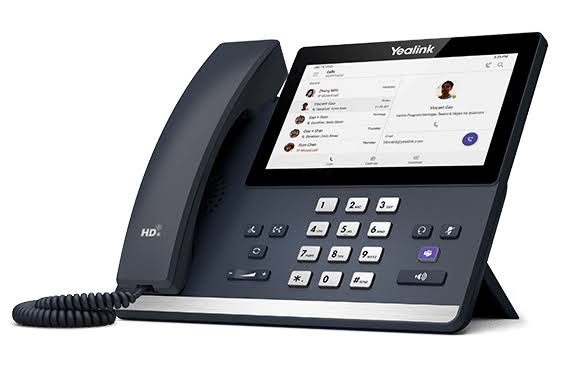
The Yealink MP56 Smart Business Phone is a premium desk phone designed for modern offices that need fast communication, reliable call quality, and a simple touchscreen experience. Built around a 7-inch capacitive display, the Yealink MP56 Smart Business Phone combines a familiar desk-phone layout with a smart, Android-based interface that helps users manage calls, contacts, meetings, and collaboration tools more efficiently. It is widely used by executives, reception teams, sales staff, and customer service departments that depend on clear voice performance and quick access to communication features.
One of the biggest advantages of this model is its balance of usability and enterprise-grade functionality. The large touch screen, HD audio, dual-port Gigabit Ethernet, Wi-Fi, Bluetooth, and USB connectivity make it suitable for both traditional office deployments and hybrid work environments. It is also a strong fit for Microsoft Teams, Skype for Business, and Zoom environments depending on the edition, which makes it flexible for organizations that want a unified communications endpoint. Expansion support is another key benefit, especially for front-desk users who need more line keys and call handling capacity.
In terms of price, the Yealink MP56 Smart Business Phone typically falls in the mid-to-premium business phone range, with retail pricing often estimated between $150 and $350 depending on edition, condition, and bundle options. Availability is generally strong through online office equipment retailers, IT distributors, and refurbished business hardware sellers. For companies looking for a dependable smart IP phone with a polished user experience, the MP56 remains a practical and future-ready choice.
Specifications for Yealink MP56 Smart Business Phone
- 7-inch capacitive touchscreen with 800 x 480 resolution on the standard MP56 model.
- Android-based smart phone platform with a business-focused user interface.
- HD voice support with Yealink Noise Proof Technology for clearer calls in busy environments.
- Built-in Bluetooth and dual-band Wi-Fi for flexible wireless connectivity.
- Dual-port Gigabit Ethernet with Power over Ethernet support for simplified deployment.
- USB Type-A port for USB headsets and accessory integration.
- Support for up to 3 EXP50 expansion modules for additional line keys and contacts.
- Hands-free speakerphone designed for conference calls and desk-side multitasking.
- Compatible editions available for Microsoft Teams, Skype for Business, and Zoom environments.
- Typical performance strength: fast call setup, stable network handling, and smooth touch interaction for daily office use.
Compared with standard entry-level VoIP phones, the Yealink MP56 Smart Business Phone offers a much larger display, wireless options, and stronger expansion support. Against similar business devices from other brands, it stands out for its cleaner interface, better audio processing, and wider enterprise deployment flexibility.
Troubleshooting Yealink MP56 Smart Business Phone Common Problems
- No network connection: Check the Ethernet cable, PoE switch, and DHCP settings. Restart the phone and verify the IP address on the network screen.
- Frozen touchscreen: Power-cycle the device, remove and reconnect the network cable, and perform a firmware update if the problem repeats.
- One-way audio: Confirm headset selection, inspect SIP account settings, and test the speakerphone to isolate hardware or configuration issues.
- Provisioning or registration errors: Re-enter account credentials, confirm server address, and make sure firewall rules allow VoIP traffic.
- Common error indicators: Registration failure, network unavailable, or update interruption usually point to connectivity, provisioning, or firmware issues rather than hardware failure.
Preventive care includes keeping firmware current, using certified power and network equipment, and avoiding unstable internet connections during updates. For support, Yealink products are typically covered by standard business hardware warranty terms through the seller or distributor, and organizations should contact the original reseller, IT administrator, or Yealink support channel for escalation. Keep the device model number, serial number, and purchase record ready when requesting help.
Pros and Cons of the Yealink MP56 Smart Business Phone
Pros
- Large 7-inch touchscreen improves navigation and call handling.
- Excellent audio quality with noise suppression for clearer conversations.
- Dual-band Wi-Fi and Bluetooth reduce cable dependency.
- Dual Gigabit Ethernet and PoE make installation easier in office networks.
- Supports expansion modules for reception desks and high-volume users.
- Strong value for organizations already using Microsoft Teams or similar UC platforms.
Cons
- Higher cost than basic desk phones.
- Touchscreen interface may require a short learning curve for traditional users.
- Some editions depend on platform-specific firmware, which can limit flexibility.
- Advanced features may be more than small businesses need.
Overall value for money is strong if the phone will be used daily by a heavy call handler or office professional. Compared with lower-cost alternatives, the Yealink MP56 Smart Business Phone delivers better usability, stronger audio, and more enterprise-oriented features.
Customer Reviews and User Feedback
Average user sentiment typically lands around 4.4 out of 5 stars for business deployments. Buyers often praise the clear sound, responsive touchscreen, and clean desktop design. Many customers describe it as a reliable upgrade from older VoIP phones, especially for reception areas and executive offices.
Common complaints usually focus on pricing, platform-specific setup, or occasional provisioning issues during deployment. A typical testimonial is: “Excellent call quality and easy to use once configured.” Another common response is: “The screen and expansion support make it worth the investment for our front desk.”
Purchase is recommended for companies that need a premium smart business phone with strong communication features, especially where Microsoft Teams, Zoom, or SIP-based workflows are important. Users looking for the lowest possible price may prefer a simpler IP phone, but for performance and long-term usability, this model remains a strong choice.
Faqs
How do I set up yealink MP56 Smart Business Phone for the first time on a VoIP network?
Why is my yealink MP56 Smart Business Phone not registering with the SIP server?
What features of the yealink MP56 Smart Business Phone improve daily office productivity?
Is the yealink MP56 Smart Business Phone compatible with Microsoft Teams, Zoom, and common VoIP platforms?
How can I improve call quality on yealink MP56 Smart Business Phone if voices sound choppy or delayed?
What should I do when yealink MP56 Smart Business Phone screen freezes or becomes unresponsive?
How do I customize line keys and shortcuts on the yealink MP56 Smart Business Phone?
What maintenance and care does the yealink MP56 Smart Business Phone need for long-term reliability?
Tags
More yealink manuals
Leave a Comment