
Setup: Yolin YL81F Electric Bike Display User Manual
Content
Yolin YL81F Electric Bike Display
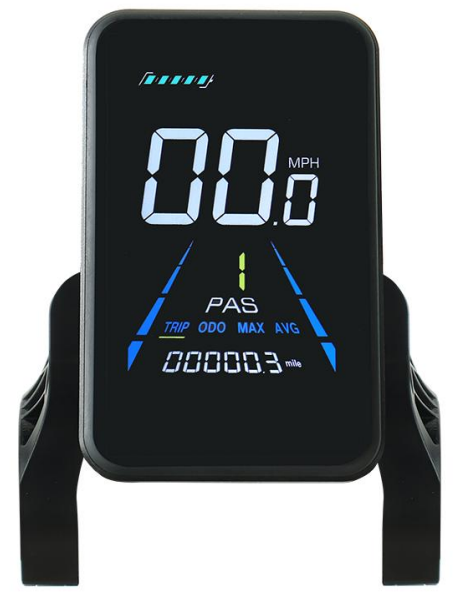
Introduction
The Yolin YL81F Electric Bike Display is a smart LCD interface designed specifically for electric bicycles, offering riders a comprehensive way to monitor and control their e-bike’s performance. Manufactured by Tianjin Yolin Technology Co.,, Ltd., this display stands out with its user-friendly operation, clear screen readability, and versatile functionality. It caters excellently to daily commuters, casual riders, and e-bike enthusiasts who seek precise riding information and customizable settings to enhance their cycling experience.
Key benefits of the YL81F include real-time display of speed, pedal assist levels, battery status, and mileage, combined with advanced features such as walk assist mode, lighting control, and error diagnostics. This display supports a wide voltage range (24V, 36V, and 48V), ensuring compatibility with most common e-bike batteries. The device is also known for its low power consumption, protecting battery life when not in use with an automatic shutdown after 10 minutes of inactivity.
With an estimated price range of $40 to $70 depending on the retailer, the yolin YL81F is widely available through various online platforms and e-bike accessory stores. Its compact design and straightforward installation further appeal to users looking for an affordable yet feature-rich display upgrade for their electric bicycles.
Specifications of the Yolin YL81F Electric Bike Display
- Product Name and Model Number: SmarLCDay for electric bicycle; Model: YL81F.
- 24V/36V/48V power supply
- Display rated current 15mA
- Display maximum current 30mA
- Shutdown leakage current <1uA
- Supplied current to the controller 50mA
- Operating temperature -20~60℃
- Storage temperature -30 to 70°C
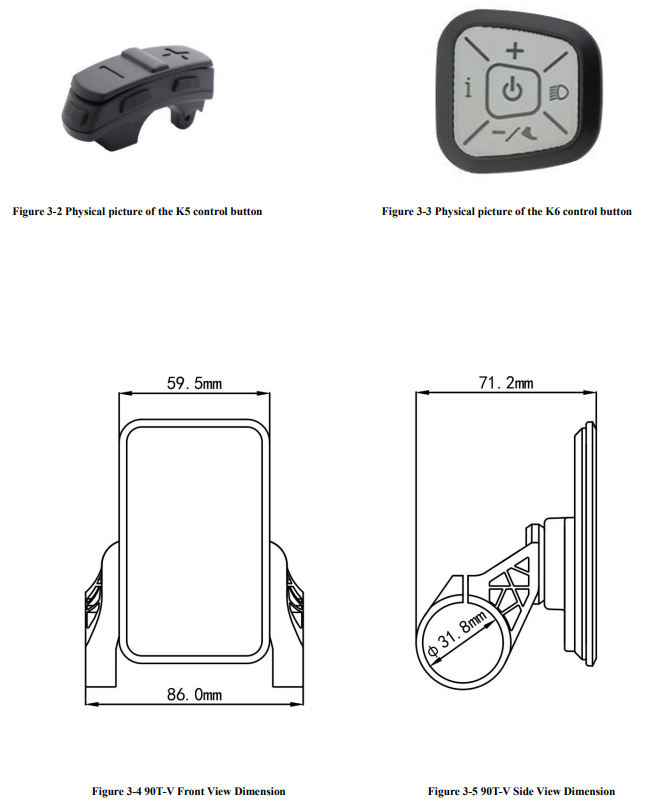
Appearance and Size
Figure 3-1 Physical picture of the YL81F display
Function overview and Functional areas
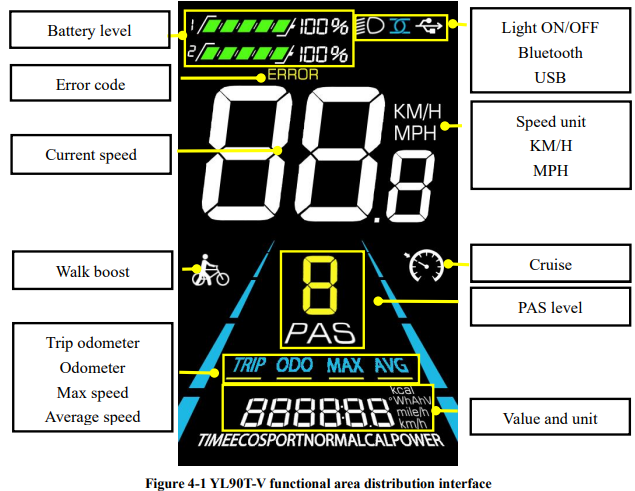
Functional overview
The YL81F display offers a variety of features to suit your riding needs, including:
- Battery level indicator
- Pedal assist (PAS) level indicator
- Speed (current speed, maximum speed, average speed)
- Mileage display (single and total mileage)
- Walk boost mode
- Light ON/OFF
- Error code indicator
- Motor power indicator (optional)
- USB connection indicator (optional)
- Cruise control indicator (optional)
- Bluetooth connection indicator (optional)
- Personalized parameter settings (e.g., wheel diameter, speed limit, battery power setting and PAS parameter setting, password setting, controller current limit setting, etc.).
- Factory default parameter recovery function
Functional areas
Precautions
Pay attention to all the general operating instructions when using the products,, and do not plug and unplug the display while it is powered on.
- Avoid bumping the display as much as possible.
- Please do not change the parameter settings at will; otherwise, normal riding cannot be guaranteed.
- If the display does not work properly, please send it to the repair center as soon as possible.
- There may be differences between the physical products and this manual due to a normal upgrade. Please refer to the physical products.
Error Code Definition
Schedule 1: Error Code Definition
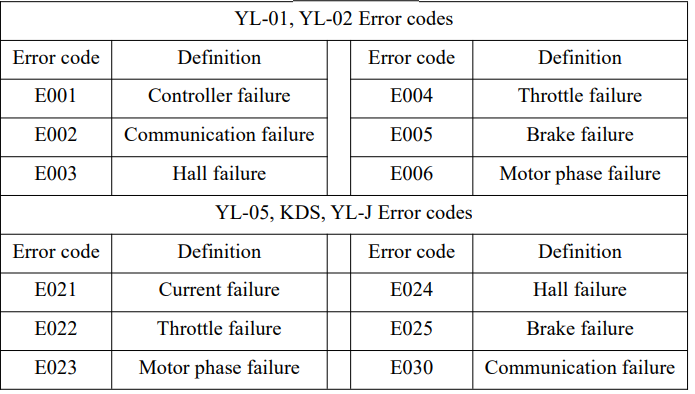
Schedule 2: Error Code Definition
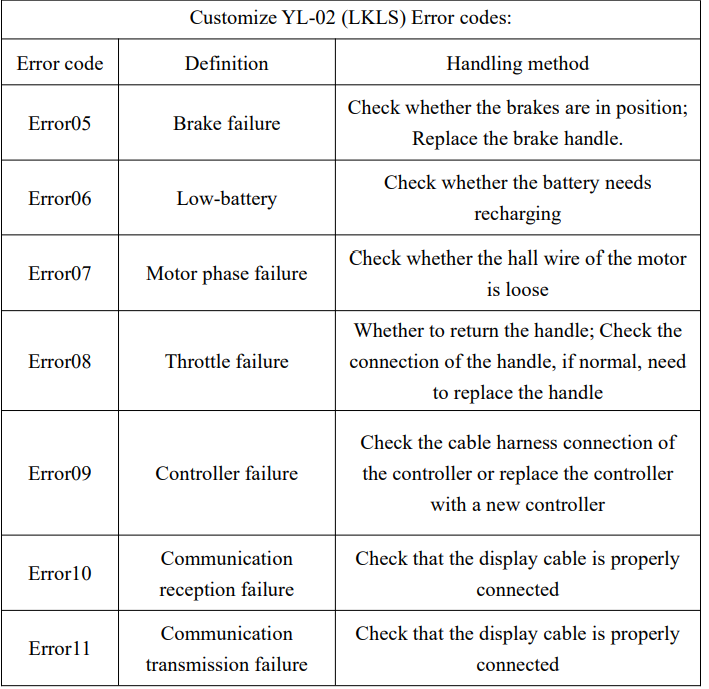
Troubleshooting the yolin YL81F Electric Bike Display
Common issues that users might encounter with the yolin YL81F display include the screen not powering on, error codes appearing, and unresponsive buttons. Below are typical problems with solutions:
- Display won’t power on: Check if the bike battery is charged and properly connected. Confirm that the display’s power cable is securely attached. Verify that the controller is powered.
- Error Codes: The display shows error codes to diagnose system faults. For example, E1 indicates a motor hall sensor fault, and E2 signals a brake error. Consult the user manual for the full error code list and corrective actions.
- Buttons not responding: Ensure buttons are not stuck or damaged. Try cleaning around the buttons to remove dust or debris.
- Battery level is inaccurate: Reset parameters or recalibrate the battery sensor through the personalized settings menu.
Preventive measures include regular cleaning of the display and connectors, avoiding exposure to extreme temperatures beyond the operating range, and ensuring firmware updates if available from the manufacturer. The yolin YL81F typically comes with a 12-month warranty from authorized sellers. For further support, contact Tianjin Yolin Technology Co.,, Ltd. customer service through their official website or the retailer from whom the display was purchased.
Quality Assurance and Warranty
Warranty info
- Yolin will offer a limited warranty for any failure caused by the product defects under normal use during the warranty period.
- The product is warranted for 12 months from the date out of manufacture.
Warranty does not cover
- The shell is opened.
- The connector is damaged.
- Scratches on the appearance after the product is out of the factory.
- Scratched or broken wires
- Failure or damage caused by force majeure (e.g.,, fire, earthquake, etc.) or natural disaster (e.,g. lightning strike, etc.)
- Out of warranty period.
Wire connection diagram
Standard wire connection sequence
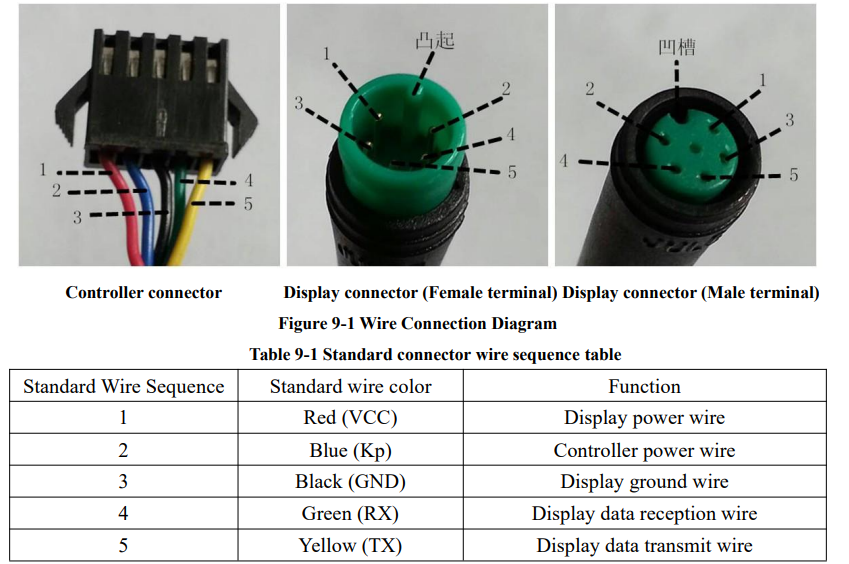
Some models are equipped with waterproof connectors,ors, and the color inside the wires can not be seen.
Pros & Cons of the yolin YL81F Electric Bike Display
- Pros:
- Wide voltage compatibility (24V/36V/48V) suits most e-bikes
- Rich features,, es including PAS levels, mileage tracking, and walk assist mode
- Low power consumption with automatic shutdown to conserve battery
- Customizable settings enable a tailored riding experience
- Compact, lightweight design (approx. 153g) with clear LCD screen
- Competitive price offering excellent value for money
- Cons:
- Some users report difficulty accessing advanced settings without detailed manual guidance..
- Lack of backlit buttons can make nighttime operation less convenient
- Optional features like Bluetooth and cruise control depend on specific e-bike system compatibility
- Installation may require basic technical knowledge for wiring and parameter setup
Customer Reviews of the yolin YL81F Electric Bike Display
Users generally praise the yolin YL81F Electric Bike Display for its reliability and clear information presentation, awarding it an average rating of 4.3 out of 5 stars. Common positive feedback highlights the intuitive interface and accurate speed and battery readings. One user noted, “The display helped me easily monitor my ride stats and improve battery management.”
Some buyers mention minor complaints such as initial setup complexity and occasional screen freezing, which were resolved with firmware resets or professional assistance. Another frequent comment is about the insufficient backlight for button labels during low-light conditions.
Overall, it is recommended for riders seeking an affordable, versatile display to upgrade their electric bike dashboard, with many reviewers advising new users to carefully follow the manual for optimal configuration and usage.
Faqs
How do I set up the yolin YL81F Electric Bike Display for the first time?
What should I do if the yolin YL81F Electric Bike Display is not turning on?
How can I interpret error codes displayed on the yolin YL81F Electric Bike Display?
Is the yolin YL81F Electric Bike Display compatible with dual motor setups?
What are the key features of the yolin YL81F Electric Bike Display that enhance riding experience?
How can I optimize battery life while using the yolin YL81F Electric Bike Display?
What maintenance is required to keep the yolin YL81F Electric Bike Display functioning properly?
How do I use the walk boost mode on the yolin YL81F Electric Bike Display safely?
More yolin manuals
Leave a Comment