
Zte Grand-X View 3 Tablet User Manual
Content
ZTE Grand X View 3 Tablet Manual and Product Overview
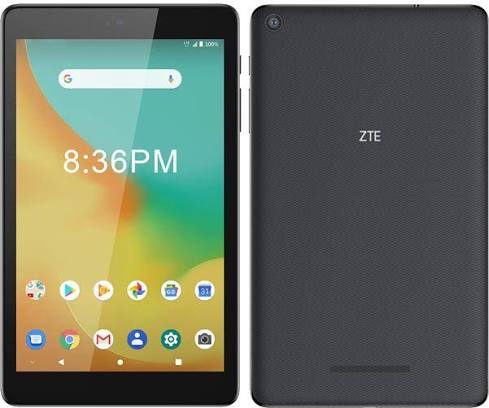
The ZTE Grand X View 3 Tablet is an affordable 8-inch Android tablet designed for everyday media use, light productivity, and casual browsing. Built around a Snapdragon 425 processor, 2GB of RAM, and 16GB of internal storage, it focuses on practical essentials rather than premium performance. The device is a strong fit for users who want a simple tablet for streaming video, reading, web browsing, video calls, and light app use without paying flagship prices.
One of the main selling points of the ZTE Grand X View 3 Tablet is its balanced feature set for budget buyers. It includes an 8-inch HD+ IPS display, dual front speakers, a USB Type-C port, a 3.5mm headphone jack, and LTE connectivity on supported models. The compact design and 370g weight make it easy to carry, while the 4600mAh battery is built for all-day casual use. This makes it especially appealing for students, families, and users who need a secondary travel tablet or a simple media device.
At launch and in secondary marketplaces, the estimated price range has typically fallen in the budget category, often around $40 to $100 depending on condition, carrier lock status, and seller. Availability is now mostly through resale channels and refurbished listings rather than mainstream retail, which is common for older Android tablets. If you are searching for an inexpensive Android tablet with basic LTE support and a manageable size, the ZTE Grand X View 3 Tablet remains a practical option.
ZTE Grand X View 3 Tablet Specifications and Key Features
- Display: 8.0-inch IPS capacitive touchscreen, 1280 x 800 HD+ resolution, about 189 ppi
- Processor: Qualcomm Snapdragon 425 quad-core 1.4 GHz
- Graphics: Adreno 308 GPU
- Memory: 2GB RAM
- Storage: 16GB internal storage
- Expandable storage: microSD support up to 128GB
- Rear camera: 8MP autofocus camera
- Front camera: 5MP fixed-focus camera
- Battery: 4600mAh lithium-ion battery
- Operating system: Android P
- Connectivity: Wi-Fi 802.11 b/g/n, Bluetooth 4.2, USB Type-C 2.0
- Mobile support: LTE on supported variants, plus UMTS compatibility
- Audio: Dual front speakers and 3.5mm headphone jack
- Dimensions: 210 x 125 x 8.7 mm
- Weight: about 370g
In real-world use, the tablet is best suited for streaming, social apps, reading, and light productivity rather than heavy multitasking or gaming. Compared with newer budget tablets such as the Samsung Galaxy Tab A9, the ZTE Grand X View 3 Tablet offers older hardware, less RAM, and lower storage, but it can still be appealing if LTE support and low cost matter more than performance.
Pros and Cons of the ZTE Grand X View 3 Tablet
Pros
- Affordable entry point for users who need a basic Android tablet
- Compact 8-inch size makes it easy to hold for reading and travel
- USB Type-C charging is more convenient than older micro-USB designs
- Dual front speakers improve video and media playback
- microSD expansion helps offset the limited 16GB base storage
- LTE support on compatible models adds flexibility for mobile use
Cons
- 2GB RAM limits multitasking and heavier apps
- 16GB storage fills quickly after system files and app installs
- Display resolution is modest compared with newer tablets
- Older Snapdragon 425 chip is not ideal for demanding games
- Availability is mostly limited to refurbished or used listings
- Not the best choice if you want long-term software support
For value for money, the tablet makes sense only if the price is low and the buyer understands its limits. For a similar budget, newer alternatives usually offer better speed, storage, and display quality, while the ZTE Grand X View 3 Tablet stands out mainly for its simple design, LTE option, and low-cost resale value.
Customer Reviews and Real-World Feedback
Average user sentiment for the ZTE Grand X View 3 Tablet is generally mixed-to-positive, with many buyers giving it around 3.5 to 4 stars for basic everyday tasks. Users often praise its lightweight feel, decent battery life, and easy setup for browsing, video playback, and reading. One common compliment is that it works well as a “simple family tablet” or a “backup device for travel.”
Common complaints focus on limited RAM, small storage, and performance slowdowns when multiple apps are open. Some users also note that the tablet is best suited for light use rather than gaming or advanced productivity. A typical review theme is: “Great for the price if you only need the basics.” Buyers who want a budget tablet for streaming, ebooks, and web use are usually the most satisfied.
Purchase recommendation: choose this model only if you find it at a strong discount and want an inexpensive Android tablet with basic LTE support. If you need a faster chipset, more storage, or a sharper display, a newer budget tablet will be the better long-term choice.
Faqs
How do I set up the zte Grand-X View 3 Tablet for the first time?
Why is my zte Grand-X View 3 Tablet running slowly, and how can I improve performance?
What should I do if the zte Grand-X View 3 Tablet does not charge properly?
How much storage does the zte Grand-X View 3 Tablet have, and can I expand it?
Which apps and accessories are compatible with the zte Grand-X View 3 Tablet?
How do I improve battery life on the zte Grand-X View 3 Tablet?
What should I do if the zte Grand-X View 3 Tablet freezes or stops responding?
How should I clean and maintain the zte Grand-X View 3 Tablet for long-term use?
More zte manuals
Leave a Comment