
Setup: Aiwa AT-X80PANC ANC TWS Headphones User Manual
Content
AIWA AT-X80PANC ANC TWS Headphones: Complete Product Manual and Guide
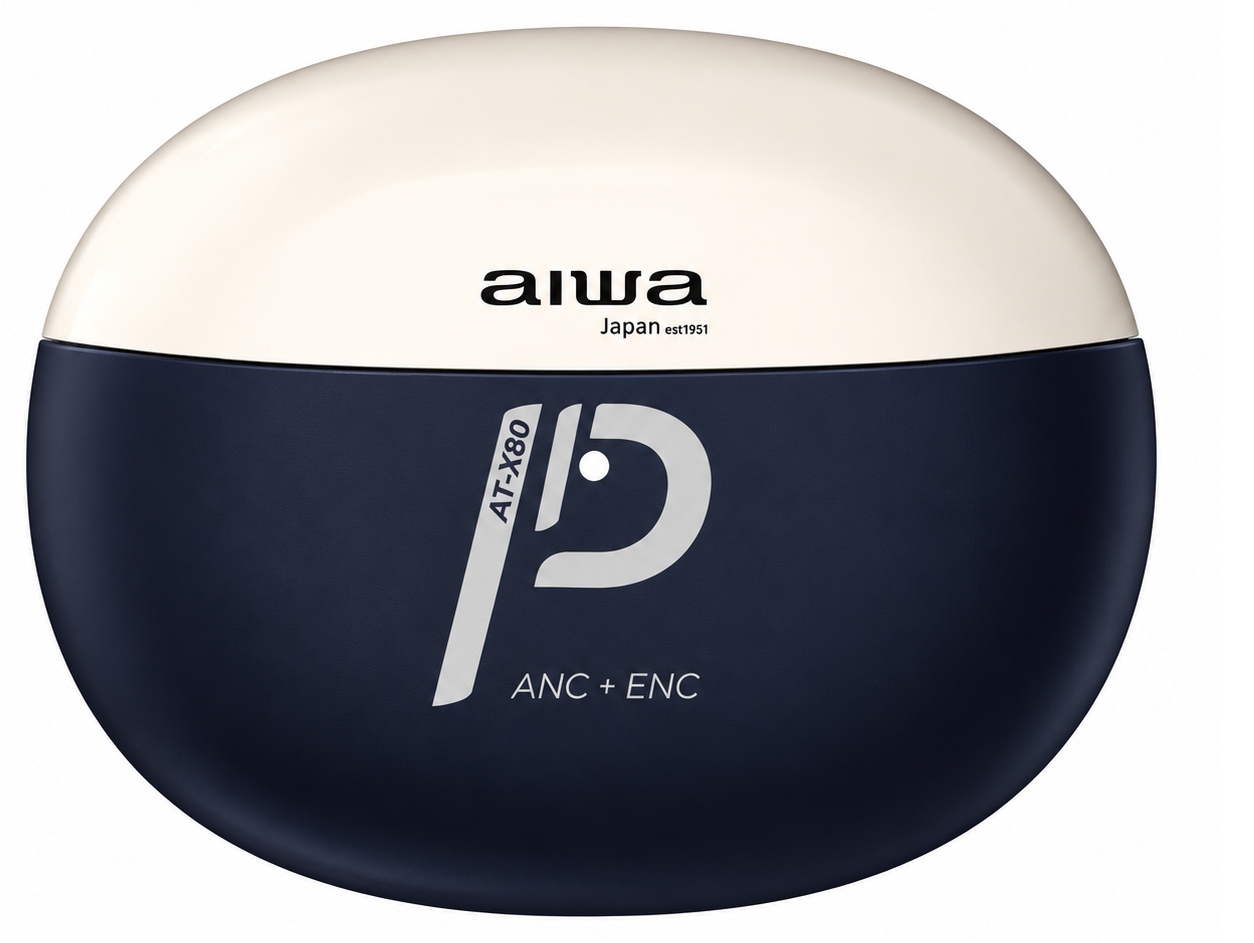
Introduction to AIWA AT-X80PANC Active Noise Cancelling Earbuds
The AIWA AT-X80PANC ANC TWS Headphones represent a significant advancement in affordable true wireless audio technology, combining active noise cancellation with practical everyday usability. These wireless earbuds are engineered for users who demand professional-grade noise reduction without compromising on comfort or audio quality. The AIWA AT-X80PANC brings Japanese audio engineering to the mid-range market segment, making premium features accessible to a broader audience.
Designed for professionals, commuters, students, and casual listeners, the AIWA AT-X80PANC ANC TWS Headphones deliver exceptional value in their price category. Whether you're navigating busy office environments, traveling on public transportation, or simply seeking uninterrupted focus during work sessions, these earbuds provide the noise isolation you need. The product combines active noise cancellation technology with intuitive controls and extended battery life, making it a practical choice for those seeking reliable wireless audio solutions.
The AIWA AT-X80PANC is positioned at an accessible price point, typically retailing around ₹7,999 in the Indian market, making it competitive within the premium budget segment. This price positioning reflects the device's balanced approach to features and performance, offering genuine active noise cancellation technology at a fraction of flagship competitor pricing. Availability extends across major retail channels and online marketplaces in India and select international markets.
Understanding the AIWA AT-X80PANC ANC TWS Headphones' technical foundation helps users maximize their investment. The device operates on Bluetooth V5.2, ensuring contemporary connectivity standards and improved range compared to older protocols. Audio output reaches 110dB±3dB sensitivity with 322±15% impedance at 1kHz, delivering consistent audio performance across various source devices. The earbuds support AAC and mSBC audio decoding formats, compatible with most modern smartphones and audio devices.
Power specifications include 51V rated voltage with 3mW rated power consumption, optimizing battery efficiency for extended listening sessions. Frequency response spans 20Hz to 20kHz, covering the full audible spectrum for comprehensive audio reproduction. The IPX5 rating indicates protection against water jets from any direction, though these earbuds aren't suitable for submersion in water.
Detailed Technical Specifications
- Model Number: AT-X80PANC
- Earphone Type: Active Noise Cancelling True Wireless Stereo
- Bluetooth Version: V5.2
- Audio Decoding: AAC, mSBC
- Noise Reduction: 23-25dB
- Sensitivity: 110dB±3dB
- Impedance: 322±15% at 1kHz
- SPL Maximum: ≥104dB
- Frequency Response: 20Hz-20kHz
- Rated Voltage/Current: 5V/1A
- Rated Power: 3mW
- IP Rating: IPX5 (Water-resistant)
- Battery Type: Lithium-ion
- Playback Time: Up to 16 hours with charging case
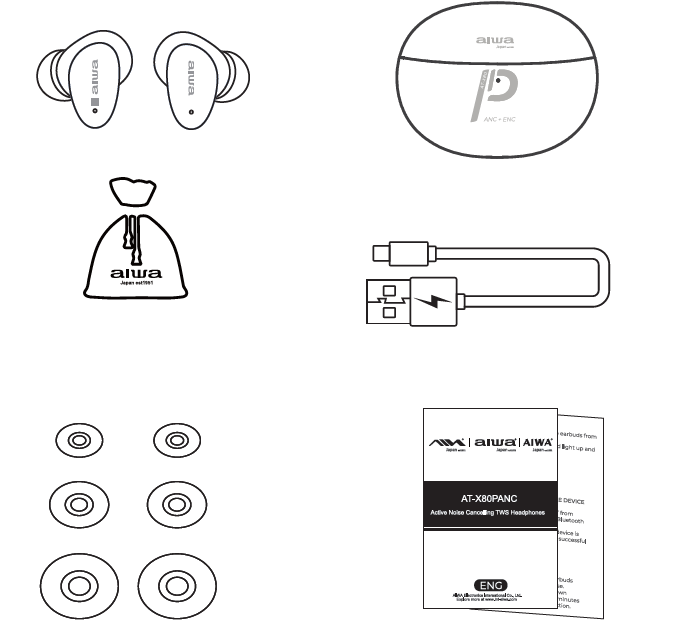
- Accessories Included: Cotton-linen blend fabric pouch, charging cable, multiple silicone earbud tips
Parts
- Wireless Headphones
- charging case
- Cotton-Linen Blend Fabric Pouch
- USB TYPE-C charging cable
- Silicone Ear-Tips
- user's manual
Key Features and Unique Selling Points
The AIWA AT-X80PANC ANC TWS Headphones distinguish themselves through several standout capabilities. Active Noise Cancellation with 23-25dB noise reduction effectively minimizes environmental distractions, while Environment Noise Cancellation technology ensures clear communication during calls. The earbuds feature Bluetooth 5.2 connectivity for stable, lag-free pairing with multiple devices, complemented by true wireless technology that eliminates cable constraints entirely.
Build quality emphasizes comfort and durability. The earbuds incorporate eco-friendly material earplugs designed for extended wear without discomfort, even during full workdays. IPX5 waterproof certification provides protection against sweat and light water exposure, making these headphones suitable for active use. A cotton-linen blend fabric pouch ensures safe storage and portability, while the charging case delivers up to 16 hours of total playback time when fully charged.
Setup and Getting Started with AIWA AT-X80PANC
Initial Pairing Instructions
Begin by charging the AIWA AT-X80PANC ANC TWS Headphones fully using the included USB charging cable. Place both earbuds in the charging case and connect the case to a power source. LED indicators will show charging status. Once fully charged, remove the earbuds from the case and they will automatically enter pairing mode.
Access your device's Bluetooth settings and search for available wireless devices. The AIWA AT-X80PANC should appear as "AIWA AT-X80PANC" in the available devices list. Select this device to establish the connection. The earbuds will emit an audio confirmation indicating successful pairing. After initial pairing, the earbuds will automatically connect to previously paired devices when powered on.
Wearing and Fitting the Earbuds
Proper fit proves essential for maximizing noise cancellation effectiveness and comfort. The package includes multiple silicone tip sizes—experiment with different sizes to find the most comfortable fit that creates a secure seal in your ear canal. Insert each earbud at a slight angle, twisting gently until it sits securely. The correct fit should feel snug but not uncomfortable, and should remain stable during movement and head turning.
Ensure the earbud orientation matches your ear, with the outer surface facing outward. The in-ear design creates a natural seal that provides both passive noise isolation and ensures the active noise cancellation microphones function optimally.
Using Active Noise Cancellation Features
The AIWA AT-X80PANC ANC TWS Headphones feature dedicated active noise cancellation that reduces ambient noise by 23-25dB. To activate ANC, use the touch controls on the earbuds—typically a specific tap pattern toggles active noise cancellation on and off. When enabled, you'll notice a subtle reduction in background noise, though the in-ear design's passive seal contributes significantly to overall noise isolation.
Note that active noise cancellation consumes additional battery power. For extended battery life during non-critical listening, disable ANC and rely on the earbuds' passive isolation. The Environment Noise Cancellation technology automatically activates during calls, ensuring microphones capture your voice clearly while minimizing background noise transmission to the other party.
Product Usage Guide
Power On
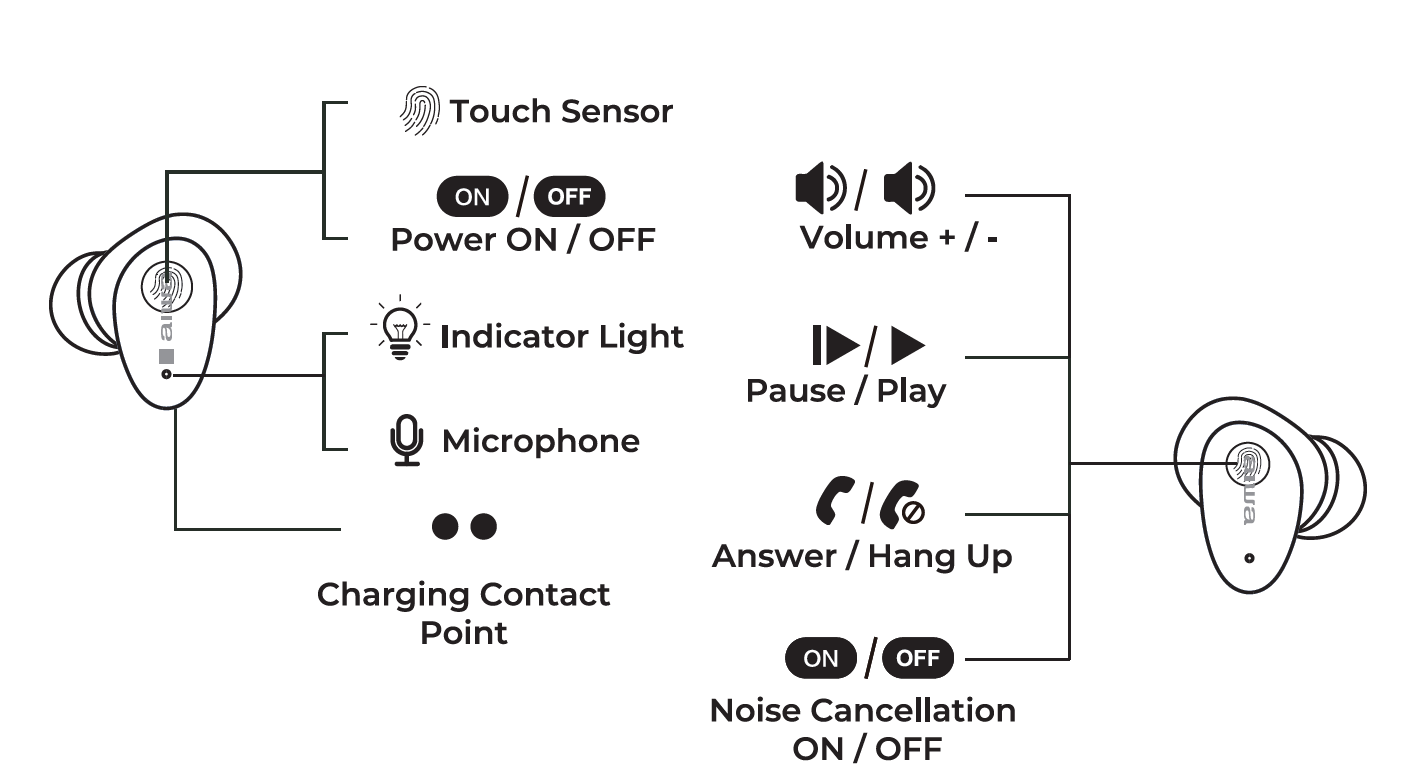
Automatic Power On: When the charging case is opened, the earbuds will automatically turn on. The blue indicator light will remain on for 3 seconds while the earbuds enter pairing mode. The red and blue lights on the primary earbud will flash alternately, while the secondary earbud will show no indicator light.
Manual Power On: Press and hold the multifunction button on either earbud (left or right) for 3 seconds to turn it on. The blue indicator light will remain on for 3 seconds while the earbuds search for a connection. The red and blue lights on the primary earbud will flash, while the secondary earbud will show no indicator light.
Power Off
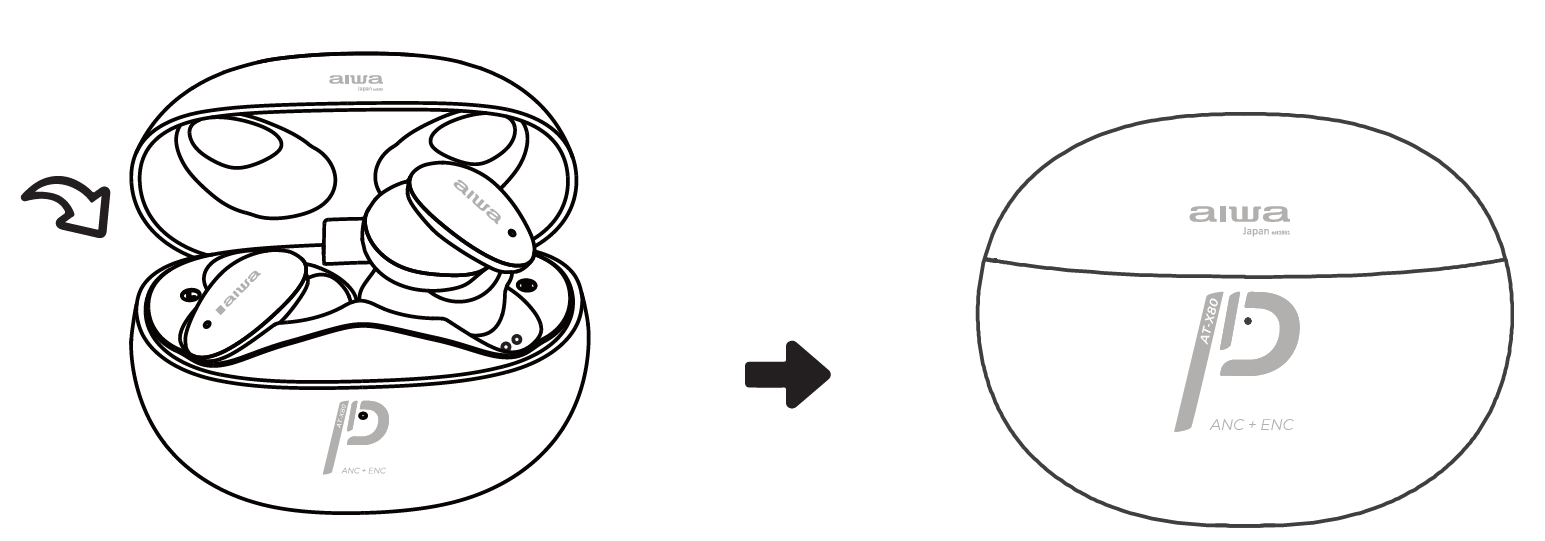
- Automatic Power Off: Place the left and right earbuds into the charging case. The green indicator light will flash once to confirm proper charging contact. Close the charging case lid, and the earbuds will automatically turn off.
- Manual Power Off: Press and hold the multifunction button on either earbud for 8 seconds to turn it off.
- Automatic Shutdown: The earbuds will automatically turn off after approximately 5 minutes without a Bluetooth connection.
Music Control
- Play/Pause: Tap the touch sensor once.
- Next Song: Press and hold the right touch sensor for 2.5 seconds, then release.
- Previous Song: Press and hold the left multifunction button for 2.5 seconds, then release.
- Volume Up (+): Double-tap the right multifunction button.
- Volume Down (-): Double-tap the left multifunction button.
Mode Switching
- Noise Cancellation, Transparency, and Normal Modes: Press and hold the right touch sensor for 4 seconds to switch between Noise Cancellation, Transparency, and Normal modes.
- Game Mode and Music Mode: Press and hold the left touch sensor for 4 seconds to switch between Game Mode and Music Mode.
Connecting the Product
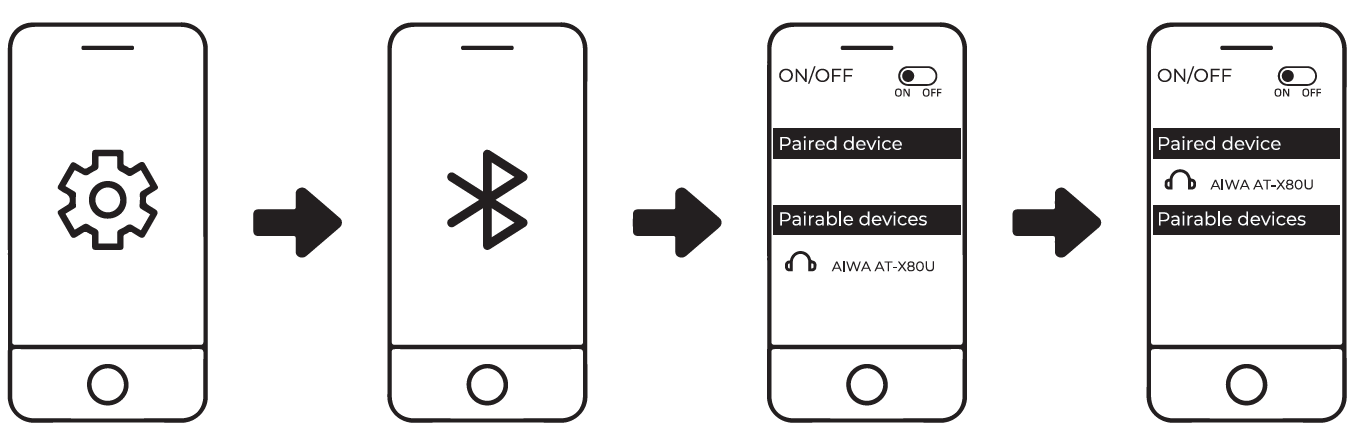
- Turn on Bluetooth (BT) on your mobile device.
- Open the charging case to automatically power on the earbuds.
- Search for "AIWA AT-X80PANC" in the Bluetooth settings of your mobile device.
- Select "AIWA AT-X80PANC" to establish the connection.
Battery & Charging
Earbuds Low Battery
When the earbuds have a low battery, the red indicator light will flash rapidly every 5 seconds for approximately 3 minutes. Place the earbuds into the charging case to recharge them.
Charging Case Low Battery
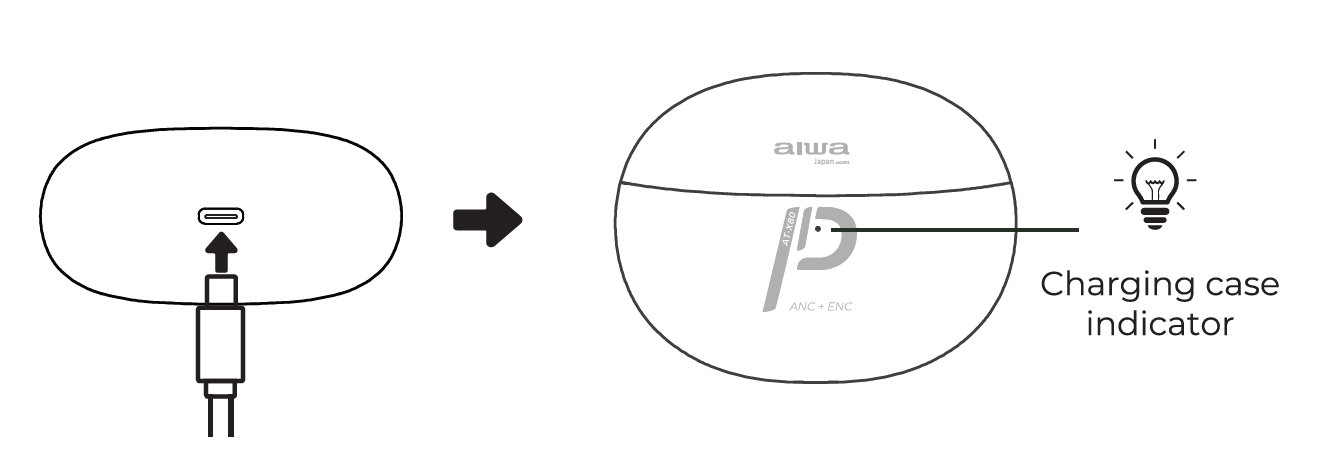
When the charging case battery is low, the orange indicator light will flash four times. Connect the charging case to a compatible 5V USB charger to recharge its battery.
Charging the Earbuds
Place the left and right earbuds into their respective compartments inside the charging case. The green indicator light will flash once to confirm proper placement. Close the charging case lid to begin charging. During charging, the green indicator light will remain illuminated for an extended period. The earbuds require approximately 1.5 hours to reach a full charge.
Charging the Charging Case
Connect the charging case to a compatible USB charger using the charging cable. The orange indicator light will flash while the case is charging. Once fully charged, the orange light will remain steadily illuminated. When the charging cable is disconnected, the orange indicator light will turn off. The charging case requires approximately 1.5 hours to reach a full charge.
Maintenance and Care Guidelines
Cleaning Your AIWA AT-X80PANC Earbuds
Regular cleaning maintains optimal performance and hygiene. Gently wipe the earbuds with a soft, dry cloth after each use to remove earwax and debris. For deeper cleaning, use a slightly damp cloth with distilled water, ensuring no liquid enters the charging contacts or speaker openings. Allow earbuds to air dry completely before placing them in the charging case.
Clean the silicone earbud tips separately by removing them from the earbuds and washing with warm soapy water. Rinse thoroughly and dry completely before reattaching. The charging case can be cleaned with a dry cloth, and the charging contacts should be wiped clean periodically to ensure reliable power transfer.
Storage and Protection
Always store the AIWA AT-X80PANC ANC TWS Headphones in the included cotton-linen blend fabric pouch when not in use. This protects the earbuds from physical damage, dust accumulation, and moisture exposure. Store the pouch in a cool, dry location away from direct sunlight and extreme temperatures. Avoid exposing the earbuds to temperatures below 0°C or above 45°C, as this may affect battery performance and electronic components.
Troubleshooting Common Issues
Connection Problems
If the AIWA AT-X80PANC ANC TWS Headphones fail to connect to your device, first ensure Bluetooth is enabled on your phone or computer. Forget the device from your Bluetooth settings and attempt re-pairing by placing the earbuds in pairing mode. If connection issues persist, fully charge the earbuds and restart your source device.
Audio Quality Concerns
If you experience reduced audio quality or one earbud sounds quieter than the other, verify that both earbuds are equally charged and that the silicone tips fit properly. Improper fit significantly impacts sound quality. Clean the speaker openings gently with a dry cloth to remove any debris blocking audio output.
Battery Issues
If the earbuds fail to hold charge, ensure the charging contacts on both the earbuds and case are clean and free of corrosion. Lithium-ion batteries degrade over time; if the AIWA AT-X80PANC ANC TWS Headphones no longer hold charge after 2-3 years of regular use, battery replacement may be necessary.
Comprehensive Pros and Cons Analysis
Advantages of AIWA AT-X80PANC ANC TWS Headphones
- Effective Noise Cancellation: The 23-25dB noise reduction rating successfully eliminates moderate environmental noise. Users report significant reduction in office background noise, traffic sounds, and ambient conversations, though the noise cancellation performs better against consistent low-frequency sounds than sudden loud noises.
- Extended Battery Life: The combination of individual earbud battery capacity and the charging case provides impressive total listening time. With up to 16 hours of playback available through the charging case, these headphones support full-day usage with minimal charging interruptions.
- Comfortable Design: The in-ear construction with silicone tips offers a snug, secure fit suitable for extended wear sessions. The ergonomic design distributes pressure evenly across the ear canal, reducing fatigue during all-day use. Users consistently praise the comfort level compared to competing models in this price range.
- Excellent Call Quality: The Environment Noise Cancellation technology ensures that microphone input remains clear and audible during voice calls and video conferences. Both incoming and outgoing audio remains loud and intelligible, making these earbuds practical for professional communication.
- Affordable Pricing: At approximately ₹7,999, the AIWA AT-X80PANC delivers active noise cancellation at a competitive price point, providing genuine value compared to premium alternatives costing twice as much.
Disadvantages and Limitations
- Limited Active Noise Cancellation Performance: While functional, the active noise cancellation works partially due to passive isolation from the in-ear design. Users report that the earbuds rely heavily on physical fit rather than true active cancellation, meaning earbud positioning significantly affects noise reduction effectiveness.
- No Companion App Support: Unlike premium competitors, the AIWA AT-X80PANC ANC TWS Headphones lack a dedicated mobile application. This means users cannot customize EQ settings, adjust bass/treble levels, or access advanced features through software control. Audio tuning remains fixed to factory presets.
- Latency Issues During Multimedia: The earbuds lack support for advanced audio codecs like aptX or LDAC. This limitation results in noticeable audio-video synchronization delays when gaming or watching videos, making these headphones less suitable for multimedia applications requiring precise timing.
- Bass-Forward Audio Profile: The AIWA AT-X80PANC emphasizes bass response, which appeals to some users but may disappoint those preferring balanced or treble-focused sound signatures. The punchy bass can occasionally overpower vocals in certain music genres.
- Limited Active Noise Cancellation Battery Savings: Users report that disabling active noise cancellation provides minimal battery extension due to the earbuds' overall power efficiency. The passive isolation from the physical design means active cancellation doesn't dramatically impact battery longevity.
Customer Reviews and User Feedback
Authentic User Experiences
Real users consistently praise the AIWA AT-X80PANC ANC TWS Headphones for their practical balance of features and affordability. Professional reviewers highlight the earbuds' strong call quality, noting that microphone performance exceeds expectations in this price category. Users working in office environments report satisfaction with the noise isolation capability, particularly for reducing background conversations and computer fan noise.
Common praise centers on comfort during extended use, with many users noting they can wear these earbuds throughout full workdays without discomfort. The battery life receives consistent recognition, with users appreciating the extended playback time between charges. Sound quality receives mixed but generally positive feedback, with bass enthusiasts particularly satisfied while others note the need for more balanced audio profiles.
Frequently Mentioned Concerns
Users frequently note that the active noise cancellation performs better than expected for the price but falls short of premium flagship models. The lack of companion app support frustrates users accustomed to customizable audio profiles. Some users report that latency during gaming and video playback becomes noticeable, recommending these earbuds primarily for music and calls rather than multimedia consumption.
A notable user segment mentions that proper earbud sizing proves critical for achieving the advertised noise reduction, requiring experimentation with different silicone tip sizes. Users unfamiliar with in-ear earbud fitting may initially experience suboptimal performance until they find the correct fit.
Purchase Recommendations
The AIWA AT-X80PANC ANC TWS Headphones suit professionals requiring reliable call quality, commuters seeking noise isolation, and students needing focus-enabling audio isolation. These earbuds represent excellent value for anyone prioritizing comfort and battery life over cutting-edge codec support. They're particularly recommended for users in the Indian market where pricing aligns with local purchasing power.
These headphones are less ideal for audiophiles seeking customizable audio profiles, competitive gamers requiring minimal latency, or users preferring neutral sound signatures. Those needing app-based EQ customization should consider alternatives with companion application support.
Comparing AIWA AT-X80PANC with Alternatives
The AIWA AT-X80PANC occupies a competitive position in the budget-to-mid-range active noise cancellation market. Compared to flagship models from premium brands, these headphones sacrifice app customization and advanced codec support but deliver practical noise cancellation at significantly lower cost. When compared to other budget ANC options, the AIWA AT-X80PANC excels in call quality and comfort but features less sophisticated active noise cancellation than some competitors.
For users prioritizing value, comfort, and call quality within a limited budget, the AIWA AT-X80PANC ANC TWS Headphones represent a sensible choice. Users seeking maximum audio customization or gaming-optimized latency should explore alternatives with companion app support and advanced codec compatibility.
Final Verdict: Is the AIWA AT-X80PANC Worth Buying?
The AIWA AT-X80PANC ANC TWS Headphones deliver genuine value within their price category, combining functional active noise cancellation with excellent call quality and extended battery life. For professionals, commuters, and students seeking reliable wireless audio without premium pricing, these earbuds represent a practical investment. The comfortable design, water resistance, and straightforward operation make them accessible to users of all technical skill levels.
The primary trade-offs involve limited app customization and latency during multimedia use. These limitations matter primarily to specific user segments rather than the general audience. For mainstream users prioritizing comfort, noise isolation, and value, the AIWA AT-X80PANC ANC TWS Headphones prove to be a worthwhile purchase that balances features effectively against affordability.
```
Faqs
How do I set up aiwa AT-X80PANC ANC TWS Headphones for the first time with automatic pairing?
What should I do if aiwa AT-X80PANC ANC TWS Headphones won't pair or connect to my phone?
How do I enable and use Active Noise Cancellation on aiwa AT-X80PANC ANC TWS Headphones?
Are aiwa AT-X80PANC ANC TWS Headphones compatible with Android, iOS, and other Bluetooth devices?
How can I optimize battery life and performance on aiwa AT-X80PANC ANC TWS Headphones?
How do I clean and maintain aiwa AT-X80PANC ANC TWS Headphones for IPX5 waterproof longevity?
Why is the sound quality or bass weak on my aiwa AT-X80PANC ANC TWS Headphones and how to fix it?
How do I reset aiwa AT-X80PANC ANC TWS Headphones to factory settings for troubleshooting?
More aiwa manuals
- Setup: Aiwa AT-X80D True Wireless Earphones User Manual
- Setup: Aiwa AT-X80P True Wireless Earphones User Manual
- Setup: Aiwa AT-X80X True Wireless Earphones User Manual
- Setup: Aiwa AT-H03 Edge True Wireless Earphones User Manual
- Setup: Aiwa AA-K21GC Gooseneck Spout Kettle User Manual
- Setup: Aiwa KF-H23 Wireless Headset User Manual
Leave a Comment