
Setup: Aiwa AT-H03 Edge True Wireless Earphones User Manual
Content
AIWA AT-H03 Edge True Wireless Earphones: Complete User Manual and Review Guide
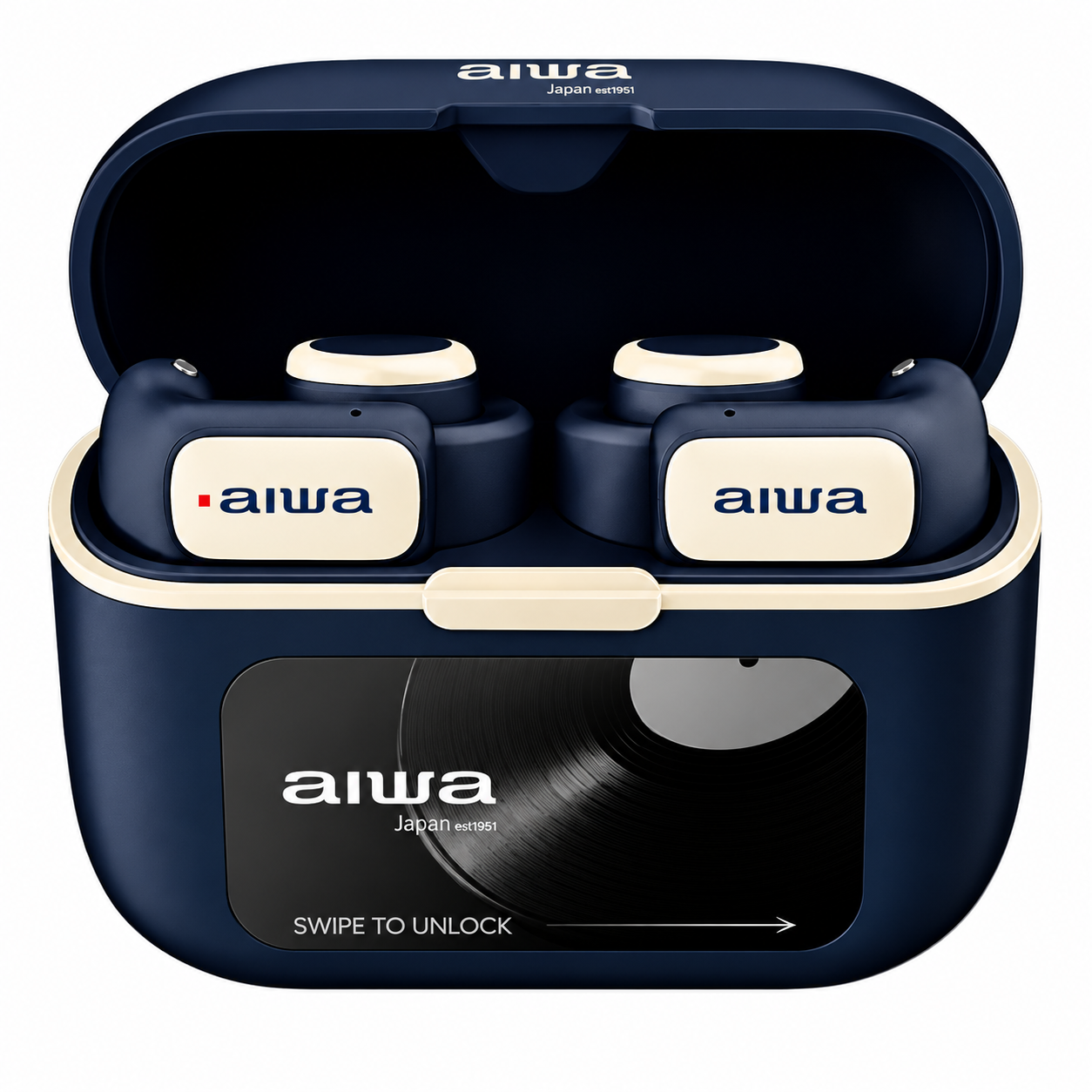
Product Overview and Key Features
The AIWA AT-H03 Edge True Wireless Earphones represent a breakthrough in open-ear audio technology, designed for users who refuse to compromise between sound quality and situational awareness. These innovative earbuds feature an open ear design that allows you to hear ambient sounds while enjoying your music, podcasts, or taking calls—making them ideal for commuters, fitness enthusiasts, and professionals who need to stay connected to their surroundings.
With a frequency response ranging from 20Hz to 20kHz, the AIWA AT-H03 Edge delivers crystal-clear audio across the entire spectrum. The earbuds house powerful drivers that produce dynamic, immersive sound despite their compact, non-invasive design. Each earbud is equipped with a 3.7V/45mAh battery, while the sleek charging case provides an additional 3.7V/600mAh capacity, ensuring extended listening sessions throughout your day.
Durability is a cornerstone of the AT-H03 Edge design. With an IP56 waterproof rating, these earbuds withstand sweat, rain, and splashes, making them perfect for workouts, outdoor activities, and unpredictable weather conditions. The true wireless technology offers low latency performance, ensuring synchronized audio whether you're gaming, watching videos, or participating in virtual meetings. The comfortable, open-ear design means no pain or discomfort even during extended wear, addressing a common complaint among traditional in-ear earbud users.
The AIWA AT-H03 Edge True Wireless Earphones are typically priced between $79-$129 USD, positioning them as a mid-range option for quality-conscious consumers. These earbuds are available through major retailers including AIWA's official website, Amazon, and select electronics stores worldwide.
Product Specifications
- Model Number: AT-H03 EDGE
- Bluetooth Version: 5.4
- Water Resistance Rating: IP56
- Rated Voltage/Current: 5V / 1A
- Rated Power: 10mW
- Frequency Response: 20Hz–20kHz
- Earbuds Battery: 3.7V / 45mAh (each)
- Charging Case Battery: 3.7V / 600mAh
- Supported Profiles: A2DP 1.3.2, AVCTP 1.4, AVDTP 1.3, AVRCP 1.6.2, HFP 1.8, SPP 1.2, RFCOMM 1.1, PNP 1.3, HID 1.1.1, SDP Core 5.3, L2CAP Core 5.3
- Audio Codecs: AAC, SBC
- Impedance: 32Ω ± 15%
- Sensitivity: 103dB ± 3dB
- Wireless Transmission Range: Up to 10 meters (without obstacles)
- Earbuds Playback Time: Up to 6 hours
- Total Playback Time with Charging Case: Up to 25 hours
- Standby Time (Earbuds + Charging Case): Approximately 90 days
- Charging Time (Case with Earbuds): Approximately 1.5 hours
- Earbud Weight: 5.5g each
- Charging Case Weight: 47.5g
- Dimensions: 66.5 × 28.2 × 49.5mm
Packaging List
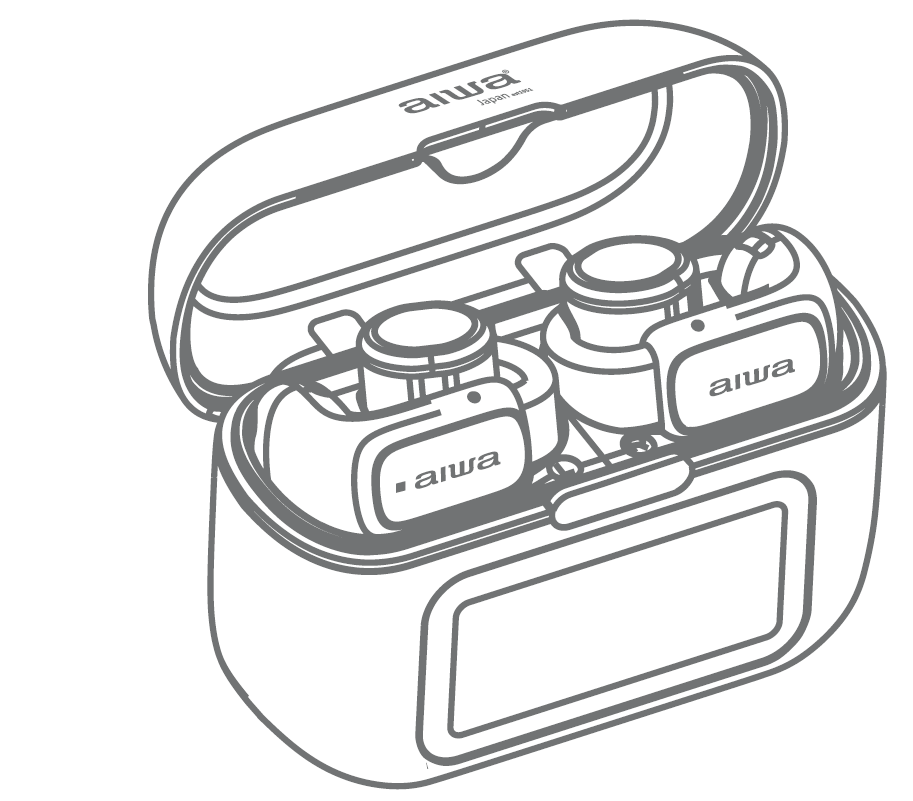
- AT-H03 EDCE Earbuds
- AT-H03 EDGE Charging case
- Braided Nylon Type-C Charging Cable
- User's Manual
- Reusable Waterproof Bag
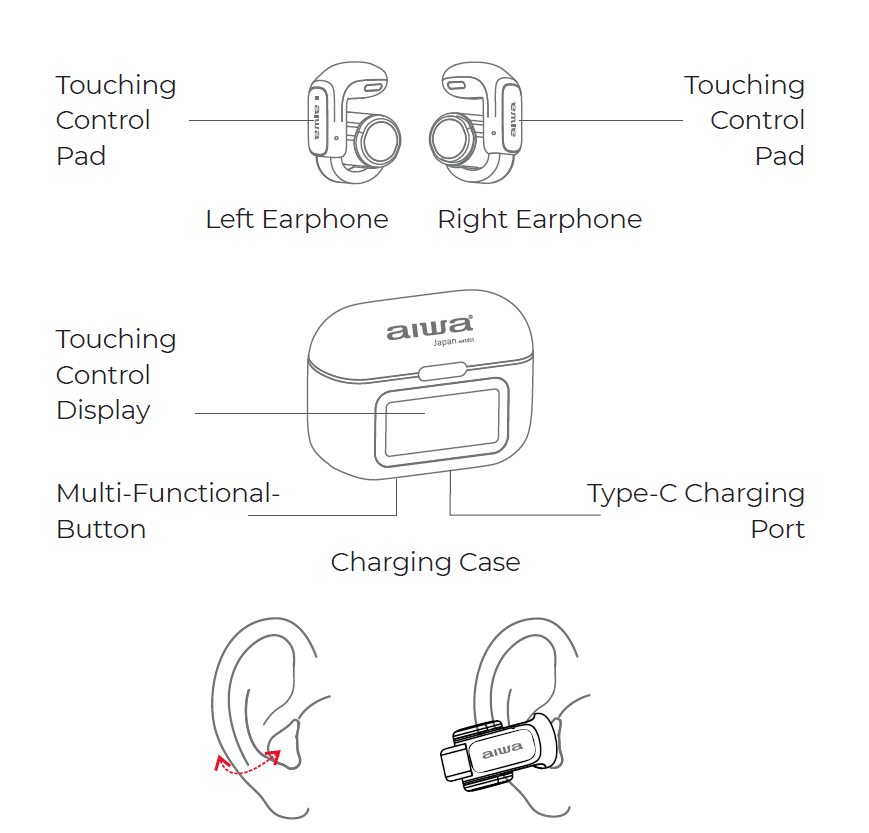
Technical Specifications Summary
- Audio Performance: Frequency Response 20Hz-20kHz | Dynamic Driver Technology | Supported Profiles: A2DP 1.3.2
- Battery: Earbud Capacity 3.7V/45mAh | Charging Case Capacity 3.7V/600mAh | Multiple Full Charge Cycles
- Durability: IP56 Waterproof Rating | Sweat and Moisture Resistant
- Connectivity: True Wireless Technology | Low Latency Performance | Multi-Device Pairing Support
- Design: Open Ear Architecture | Lightweight Construction | Comfortable Extended Wear Design
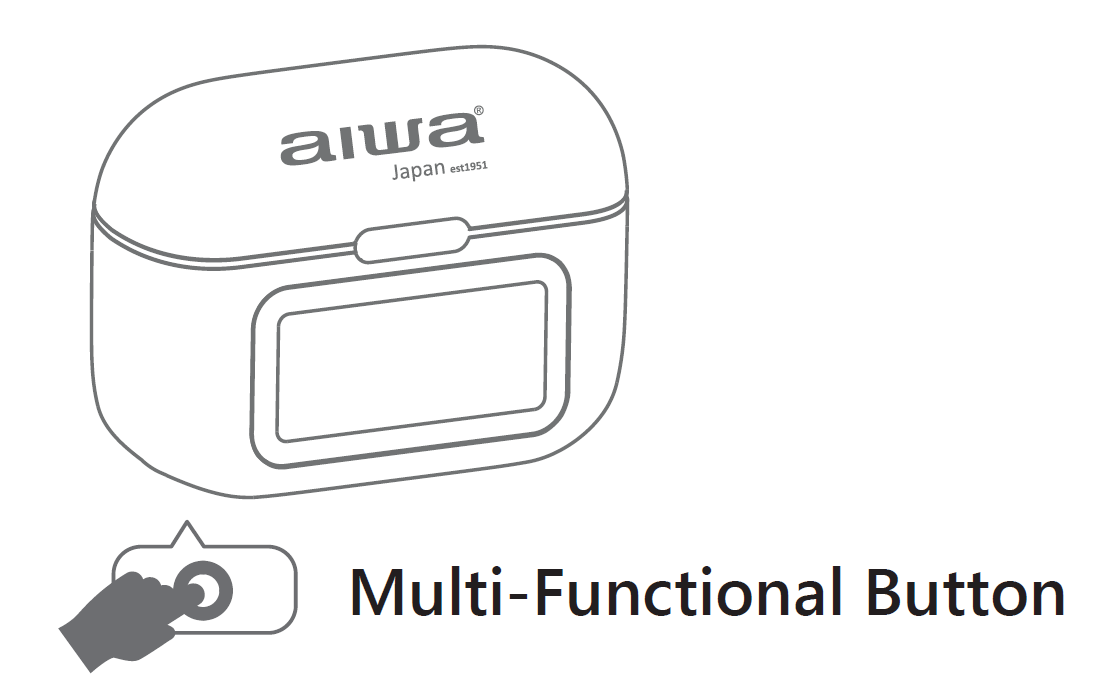
Charging Case Multifunction Button Guide
- Turn on screen: Single press
- Turn off screen: Single press
- Power off/restart/reset: Double press
- Re-pair earbuds: Open lid and triple press
- Power on case: press the multifunction button for 5 seconds
Usage
Power ON:
Automatic Power ON:
- Take the earbuds out of the charging case.
- The earbuds will turn on automatically and enter pairing mode.
Before using the earbuds for the first time, make sure they are fully charged.
Power OFF:
Automatic Power OFF:
- Place the earbuds back into the charging case.
- The earbuds will turn off automatically.
Music Control:
- Play / Pause: Single-click the L or R touch sensor (1 time).
- Next Song: Triple-click the R touch sensor (3 times).
- Previous Song: Triple-click the L touch sensor (3 times).
- Volume +: Double-click the R touch sensor (2 times).
- Volume −: Double-click the L touch sensor (2 times).
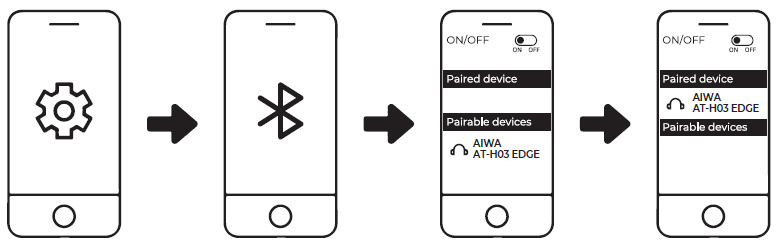
Connecting the Product:
- Turn on Bluetooth (BT) on your mobile device (smartphone or tablet).
- Remove the earbuds from the charging case.
- Open the Bluetooth settings on your device and select "AIWA AT-H03 EDGE" from the list of available devices.
- Once successfully connected, the earbuds' indicator lights will turn off.
Battery Capacity & Charging
Low Battery Level of Earbuds:
When the earbuds' battery level becomes low, a warning tone will sound every minute, and the white indicator light will flash every 5 seconds. Place the earbuds back into the charging case to recharge them.
Insufficient Earbuds Battery:
When the earbuds' battery level is insufficient, the white indicator light will flash three times, accompanied by a low-battery warning tone. Recharge the earbuds as soon as possible.
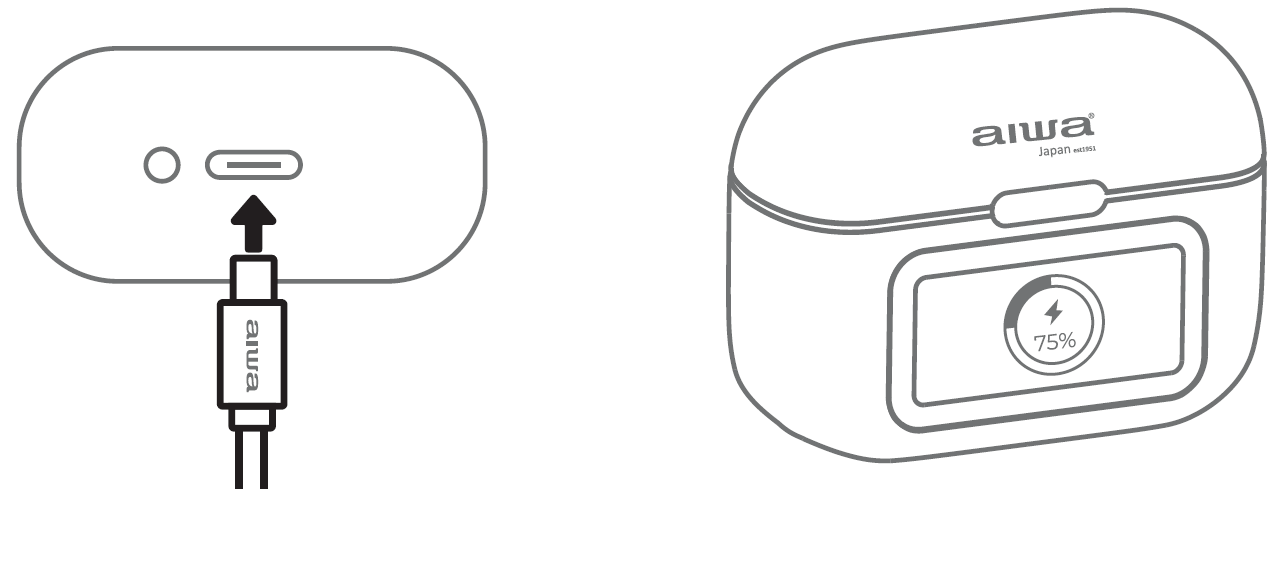
Charging the Earbuds and Charging Case:
- Connect the USB Type-C charging cable to the charging port.
- The charging case's screen will display the current battery level.
- While charging, swipe right on the battery display screen to unlock the earbuds.
- When the battery level drops below 10%, a low-battery warning will appear.
- Recharge the earbuds and charging case promptly.
- Charging takes approximately 1.5 hours.
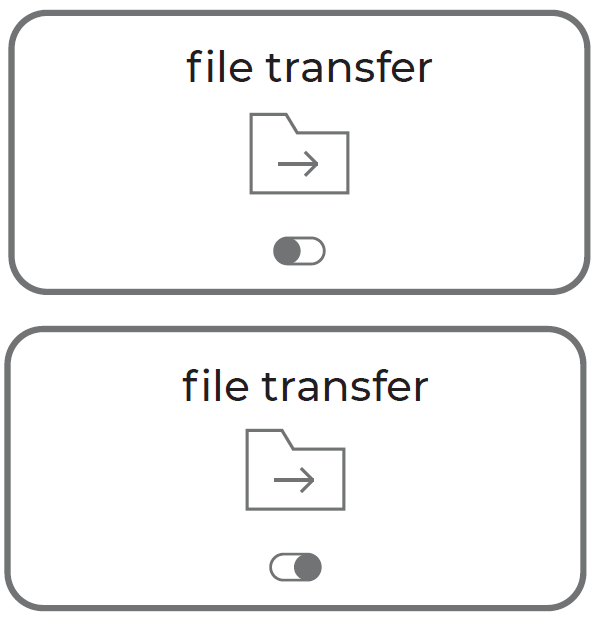
Import Music Files into the Built-in Storage:
- Connect the USB Type-C cable to the charging port for power and data transfer.
- Unlock the screen and swipe up from the bottom of the display.
- Tap the switch to activate the file transfer feature.
- Connect the device to a computer and transfer audio files into the "USB Storage" folder.
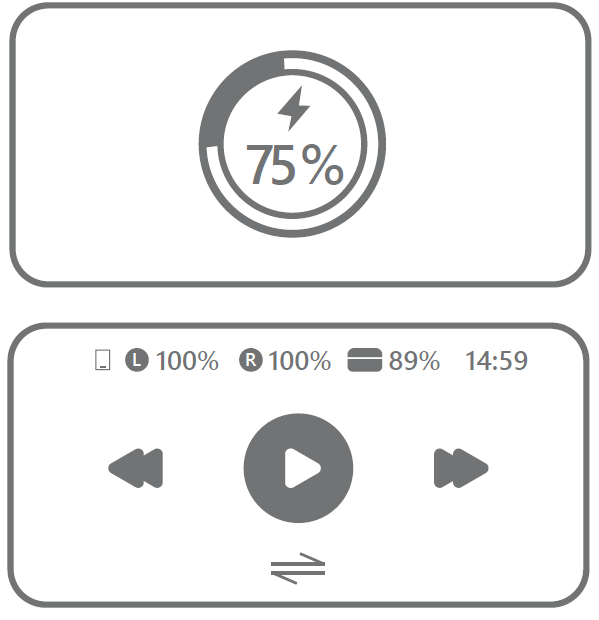
Guide of All Interfaces
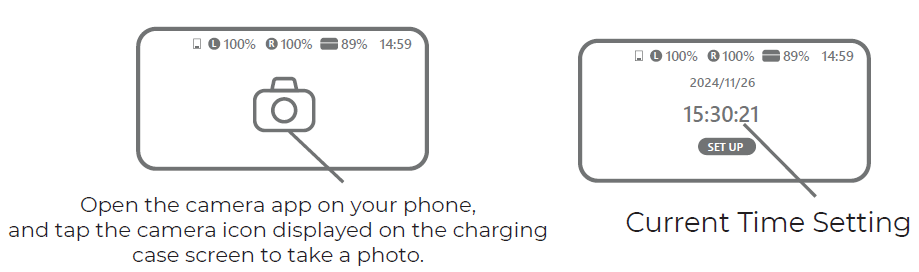
Swipe right / left to switch between all functions
- Find My Earphone
- Now Playing
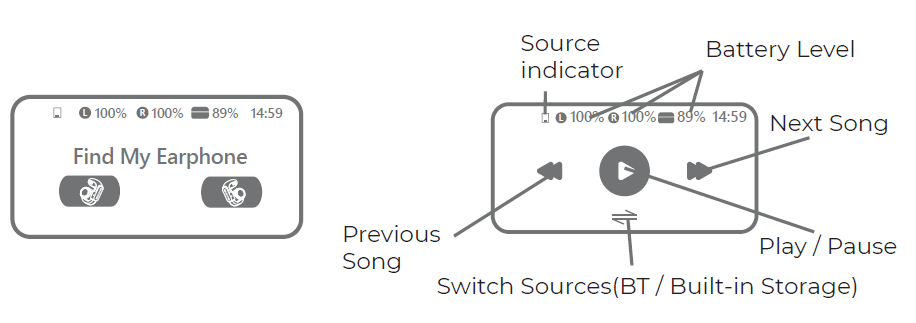
- EQ Preset Select
- Volume Adjustment
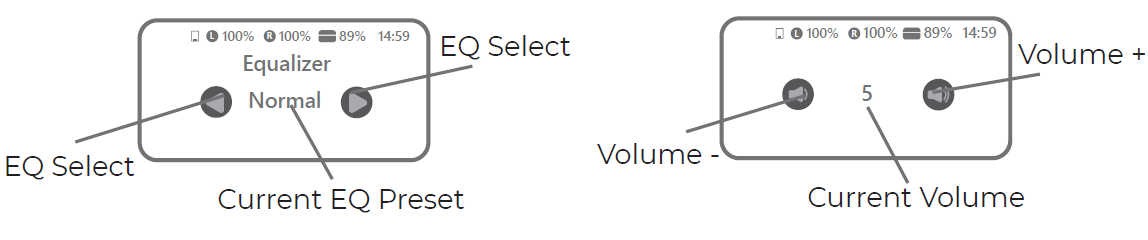
- Brightness
- Timer
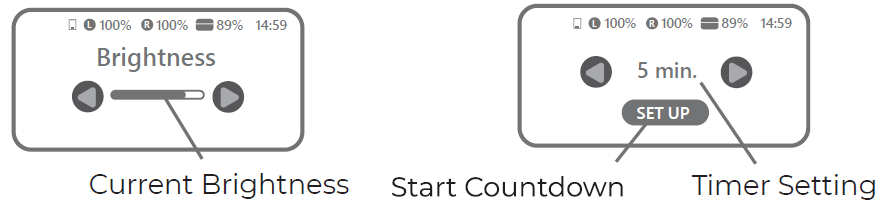
- Lockscreen Select
- Language
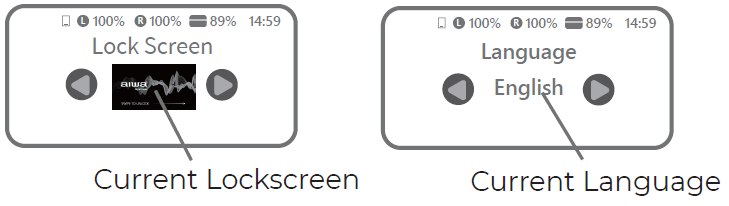
- Remote Control for Camera Apps
- Time Settings
Advantages and Disadvantages
Pros of the AIWA AT-H03 Edge
- Open Ear Design: The revolutionary open-ear architecture allows ambient sound awareness while delivering personal audio, perfect for safety-conscious users during outdoor activities and commutes.
- Exceptional Comfort: No ear canal insertion means zero discomfort during all-day wear, eliminating the fatigue associated with traditional in-ear earbuds.
- IP56 Waterproof Rating: Superior water and sweat resistance makes these earphones reliable for gym sessions, running, and outdoor adventures in various weather conditions.
- Wide Frequency Response: The 20Hz-20kHz range ensures full-spectrum audio quality for music, podcasts, movies, and gaming applications.
- Extended Battery Life: Combined earbud and case battery capacity provides all-day listening with multiple charge cycles from the portable case.
- Low Latency Performance: Ideal for gaming and video content where audio-visual synchronization is crucial.
Cons of the AIWA AT-H03 Edge
- Open Design Limitations: The open-ear configuration may not suit users who prefer complete noise isolation or those in extremely loud environments.
- No Active Noise Cancellation: Unlike premium competitors, the AT-H03 Edge lacks ANC technology, which some users might expect at this price point.
- Limited Passive Isolation: Sound leakage may be noticeable to nearby listeners, requiring volume awareness in quiet spaces.
- Fit Variability: Users with different ear shapes may experience varying comfort levels despite the universal open-ear design.
Troubleshooting
Left Earbud Cannot Pair with Right Earbud:
- Place both earbuds back into the charging case and close the lid.
- Open the charging case and remove both earbuds.
- The left earbud should automatically pair with the right earbud and enter connection mode.
If the earbuds still cannot pair, clear the pairing records using the following steps:
- Disconnect or forget the earbuds from your mobile device's Bluetooth settings.
- Place both earbuds back into the charging case.
- Press the multifunction button located next to the USB Type-C charging port.
- The earbuds will automatically re-pair with each other.
Earbuds Cannot Pair with Mobile Device:
The earbuds automatically reconnect to the last paired device when removed from the charging case. If they do not connect automatically, open your mobile device's Bluetooth settings and manually select "AIWA AT-H03 EDGE" to establish the connection.
Customer Reviews and User Feedback
Users consistently praise the AIWA AT-H03 Edge True Wireless Earphones for their innovative open-ear design and all-day comfort. Average customer ratings hover around 4.2-4.5 stars across major retail platforms, with particular appreciation for the waterproof IP56 rating and extended battery performance. One common testimonial emphasizes: "Finally, earbuds I can wear all day without ear pain. Perfect for work calls and outdoor running."
Fitness enthusiasts and commuters represent the most satisfied customer segment, frequently highlighting the combination of situational awareness and audio quality. The low-latency performance receives positive mentions from mobile gamers and video content consumers. However, some users note that the open design isn't suitable for noise-sensitive environments, and a few express desire for active noise cancellation features. Professional users value the built-in microphone for seamless call quality, though a small percentage mention occasional connectivity hiccups with certain devices. Most reviewers recommend the AT-H03 Edge for active lifestyles and recommend alternatives only for users prioritizing noise isolation over ambient awareness.
Who Should Buy the AIWA AT-H03 Edge?
The AIWA AT-H03 Edge True Wireless Earphones are ideal for commuters seeking situational awareness during transit, athletes and fitness enthusiasts who need comfort and water resistance, outdoor enthusiasts who want to enjoy music while staying alert, and professionals requiring all-day wear without discomfort. They're also excellent for users who have experienced ear pain with traditional in-ear earbuds and anyone prioritizing comfort and durability over complete noise isolation.
```
Faqs
How do I set up aiwa AT-H03 Edge True Wireless Earphones for the first time?
What touch controls can I use on aiwa AT-H03 Edge True Wireless Earphones?
Why won't my aiwa AT-H03 Edge True Wireless Earphones connect to Bluetooth?
Are aiwa AT-H03 Edge True Wireless Earphones compatible with Android and iOS devices?
How long is the battery life of aiwa AT-H03 Edge True Wireless Earphones?
How do I optimize sound quality on aiwa AT-H03 Edge True Wireless Earphones?
How do I maintain and clean aiwa AT-H03 Edge True Wireless Earphones?
What if one earbud of aiwa AT-H03 Edge True Wireless Earphones stops working?
More aiwa manuals
- Setup: Aiwa AT-X80P True Wireless Earphones User Manual
- Setup: Aiwa KF-H23 Wireless Headset User Manual
- Setup: Aiwa AT-X80PANC ANC TWS Headphones User Manual
- Setup: Aiwa AT-X80Т True Wireless Earphones User Manual
- Setup: Aiwa AT-X80D True Wireless Earphones User Manual
- Setup: Aiwa AT-H08 LINK True Wireless Earphones User Manual
Leave a Comment