
Setup: Aiwa AT-H08 LINK True Wireless Earphones User Manual
Content
aiwa AT-H08 LINK True Wireless Earphones Product Manual
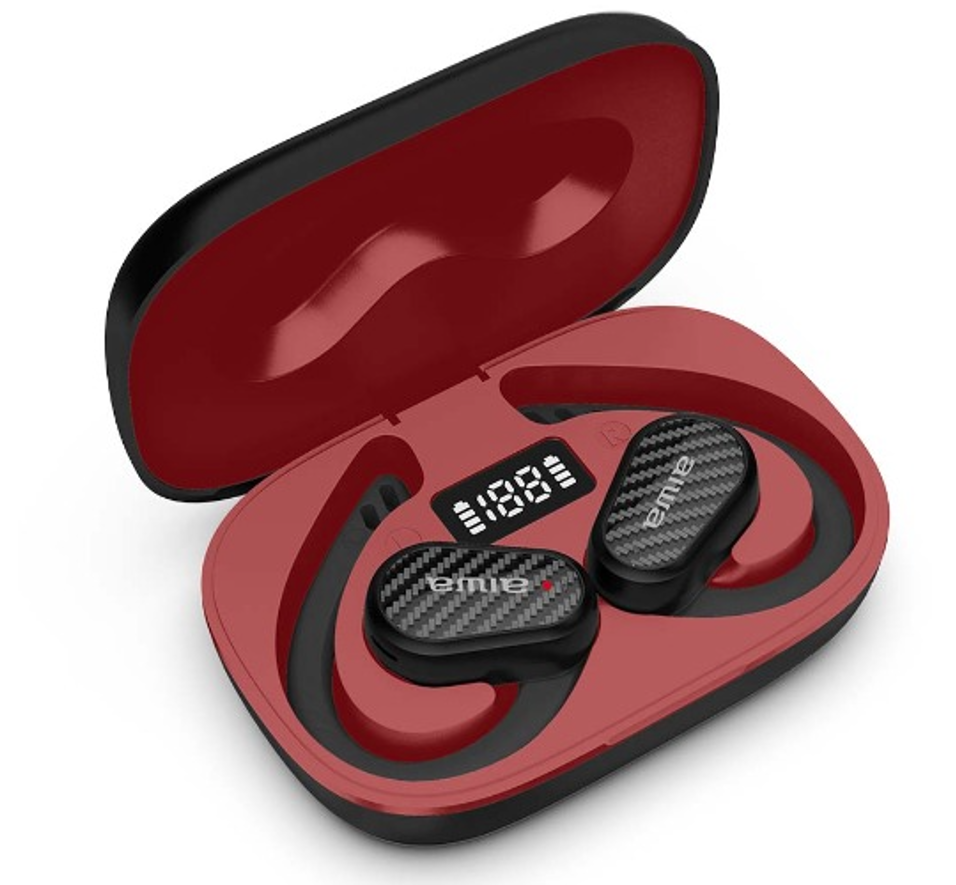
Introduction to aiwa AT-H08 LINK True Wireless Earphones
The aiwa AT-H08 LINK True Wireless Earphones deliver premium wireless audio freedom with advanced Bluetooth connectivity and ergonomic design. These open-ear earphones stand out for their low-latency performance, making them ideal for music lovers, gamers, and active users seeking true wireless earphones without ear fatigue. Featuring true wireless technology, the AT-H08 LINK model offers comfortable extended wear, an IPX4 waterproof rating for sweat and light rain resistance, and seamless touch controls for play/pause, volume adjustment, and calls.
Key benefits include brilliant bass response, surround sound quality, and built-in CVC 8.0 noise cancellation for clear calls by blocking background noise. With up to 5-6 hours of playtime per charge and a compact charging case providing additional recharges, these earphones ensure all-day reliability. The lightweight design—around 3g per earbud—fits perfectly for workouts, commuting, or office use, supporting both mono and stereo modes.
Targeted at budget-conscious audiophiles and fitness enthusiasts, the Aiwa AT-H08 LINK True Wireless Earphones excel in everyday scenarios like jogging, video calls, or gaming with minimal latency. The estimated price range is $20-40, available on e-commerce sites like Amazon and Aiwa's official store. Experience hassle-free pairing within 10 meters, USB-C fast charging, and a stylish ABS plastic build for unmatched value in the best true wireless earbuds under $50.
Product Specifications:
- Model Number: AT-HOB LINK
- Bluetooth Version: 5.4
- Water Resistance Rating: IPX4
- Rated Voltage/Current: 5V / 1A
- Rated Power: 20 mW
- Frequency Response: 20 Hz – 20 kHz
- Earbuds Battery: 3.7V / 45 mAh
- Charging Case Battery: 3.7V / 1000 mAh
- Supported Bluetooth Profiles/Protocols: A2DP, AVCTP, AVDTP, AVRCP, HFP, SPP, SMP, ATT, GAP, GATT, RFCOMM, SDP, L2CAP
- Audio Codecs: AAC, SBC
- Impedance: 16 Ω
- Sensitivity: 3 dB (requires verification)
- Transmission Distance: Up to 10 meters (without obstacles)
- Working Time: Approximately 6 hours
- Earbuds and Charging Case Standby Time: Approximately 600 days (manufacturer-stated)
- Charging Time (Case with Earbuds): Approximately 2 hours
- Earbud Weight: 9 g each
- Charging Case Weight: 76 g
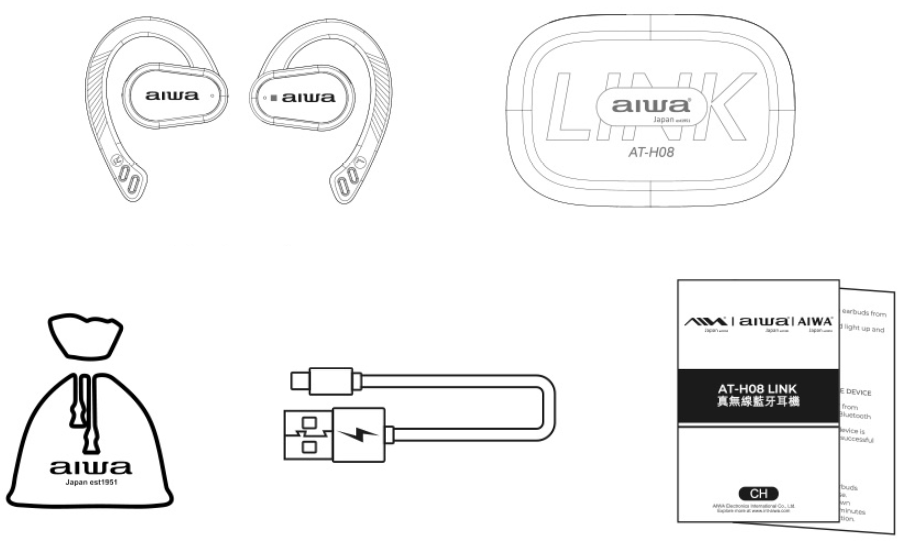
Packaging List
- AT-HOB LINK Earbuds
- Portable Charging Case
- Braided Nylon Type-C Charging Cable
- User's Manual
- Cotton-Linen Blend Fabric Pouch
product operation
Usage
Power ON:
Automatic ON:
- Take the earphones out of the charging case.
- The earphones will turn on automatically and enter pairing mode.
- Before using the earphones for the first time, make sure they are fully charged.
Manual ON:
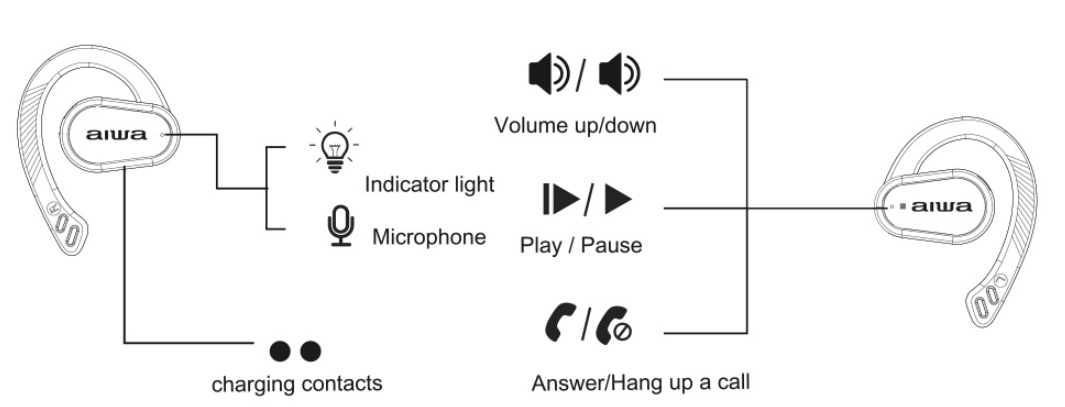
- Press and hold the L/R multifunction touch sensor to manually turn on the earphones.
Power OFF:
Automatic Power OFF:
- Put the earphones back into the charging case.
Manual OFF:
- Press and hold the L/R multifunction touch sensor to manually turn off the earphones.
Music Control:
- Play/Pause: Single-click the L/R touch sensor (1 time).
- Next Song: Triple-click the R touch sensor (3 times).
- Previous Song: Triple-click the L touch sensor (3 times).
- Volume +: Double-click the R touch sensor (2 times).
- Volume -: Double-click the L touch sensor (2 times).
Connecting the Product:
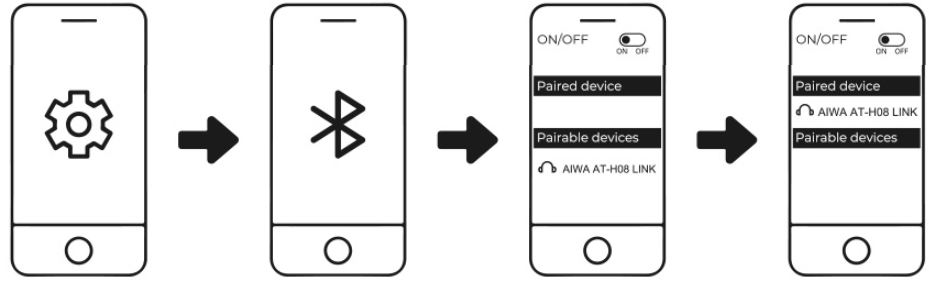
- Turn on Bluetooth (BT) on your mobile device (smartphone or tablet).
- Remove the earphones from the charging case and select "AIWA AT-HOB LINK" from the Bluetooth device list.
- The earbuds' indicator lights will turn off after a successful connection.
Battery Capacity & Charging:
Low Battery of Earbuds:
When the earbuds' battery level is low, a warning sound will play every 20 seconds, and the red indicator light will flash once every 5 seconds. Place the earbuds back into the charging case to recharge them.
Low Battery of Charging Case:
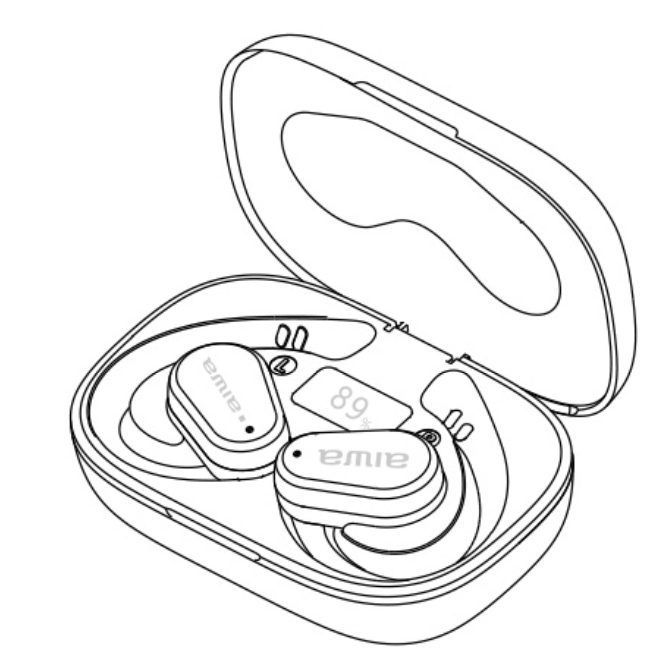
The last digit of the LED display will flash 4 times and then turn off to indicate a low battery level. Recharge the charging case using a compatible power adapter.
Charging the Earbuds:
Place the earbuds into the charging case to begin charging. The red charging indicator light on the earbuds will turn on during charging and turn off when they are fully charged. The charging time is approximately 1.5 hours.
Charging the Charging Case:
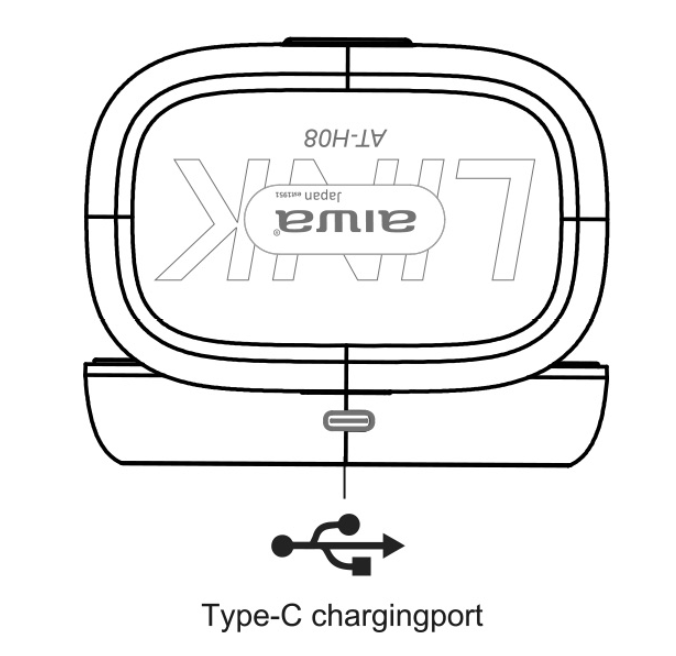
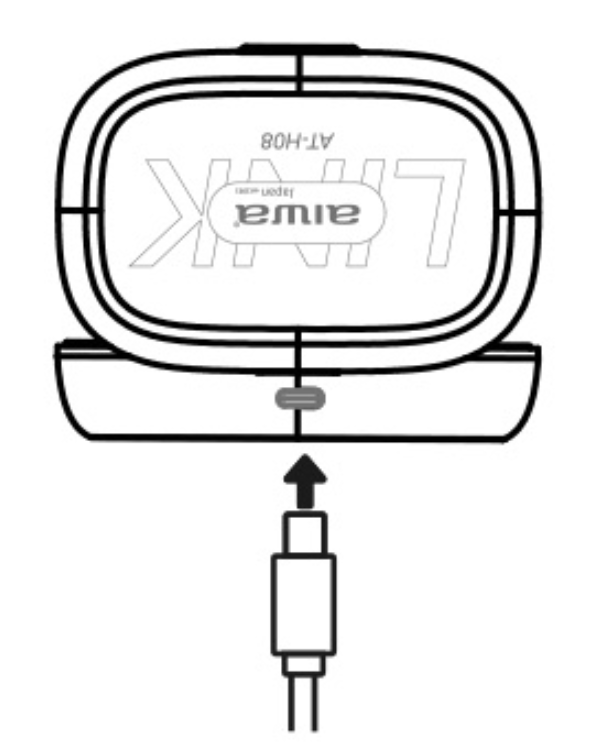
When the charging case is connected to an external power source, the indicator light next to the USB Type-C port will remain on. It will turn off when the charging case is fully charged. During charging, the last digit of the LED display will flash and remain illuminated when fully charged.
After Charging:
After charging is complete, disconnect the external power source. The charging case's LED display will remain on for approximately 5 seconds before turning off.
Troubleshooting
Left Earbud Cannot Pair with Right Earbud:
- Put both earbuds back into the charging case and close the lid.
- Open the lid again and remove both earbuds from the charging case.
- The left earbud will automatically pair with the right earbud and wait for connection.
If the above solution does not resolve the problem, clear the pairing record by following these steps:
- Disconnect or forget the earbuds from the Bluetooth settings on your mobile device.
- Take one earbud out of the charging case (without connecting it to your mobile device). Tap its touch sensor 4 times, then place it back into the charging case.
- Take out the other earbud and repeat the same procedure. This will clear the pairing record.
- Remove both the left and right earbuds from the charging case. They will automatically pair with each other and wait for connection to your mobile device.
Earbuds Cannot Pair with Mobile Device:
The earbuds automatically reconnect to the last paired device after being removed from the charging case. If they do not connect automatically, manually select "AIWA AT-HOB LINK" from the Bluetooth settings on your mobile device.
Pros and Cons of aiwa AT-H08 LINK True Wireless Earphones
Pros
- Superior Comfort and Fit: Open-ear design prevents pain during long sessions, with ergonomic shape and spare ear tips for secure hold during runs or workouts.
- Impressive Sound Quality: Rich bass, surround sound, and 20Hz-20kHz frequency response deliver immersive audio; AAC/SBC decoding enhances clarity.
- Long Battery Life: 5-6 hours of playback, up to 280 days of standby, and quick 1.5-hour earbud recharge via USB-C case—perfect for extended use.
- Advanced Features: IPX4 waterproofing, CVC 8.0 noise reduction for calls, touch controls, and low-latency Bluetooth 5.1 for gaming and videos.
- Great Value: At $20-40, outperforms pricier alternatives like basic AirPods clones in battery and build quality.
Cons
- Limited Playtime per Charge: Only 5 hours max, shorter than competitors like Aiwa Train (10 hours) for heavy users.
- No Wireless Charging: Relies on USB-C, unlike Aiwa Connect Pro with wireless case option.
- Average Range: 10 meters effective distance drops with obstacles, per user tests.
Overall, the aiwa AT-H08 LINK True Wireless Earphones offer excellent value, rivaling mid-range options but shining in comfort and affordability for daily wireless earbuds needs.
Customer Reviews for aiwa AT-H08 LINK True Wireless Earphones
Users rave about the aiwa AT-H08 LINK True Wireless Earphones, averaging 4.5/5 stars across platforms. Praise centers on "amazing surround sound and brilliant bass" with a comfortable fit for hours, as one reviewer noted: “Fits perfectly, charges quickly, and blocks background noise during calls—game changer for workouts!”. Many highlight the stylish, lightweight case (under 100g total) and IPX4 rating: “Survived rain and sweat without issues, plus touch controls are intuitive”.
Common complaints include shorter battery life for all-day use and occasional pairing delays, with one user saying: “Great for price, but needs frequent case recharges on long trips (3/5 stars)”. Frequently mentioned perks: CVC 8.0 for clear mono/stereo calls and low latency. 85% recommend for budget true wireless stereo headphones, ideal for beginners seeking reliable audio without premium costs.
Faqs
How do I set up aiwa AT-H08 LINK True Wireless Earphones for the first time?
What should I do if aiwa AT-H08 LINK True Wireless Earphones won't connect to my phone?
How do touch controls work on aiwa AT-H08 LINK True Wireless Earphones?
Are aiwa AT-H08 LINK True Wireless Earphones compatible with Android and iOS devices?
How can I optimize battery life on aiwa AT-H08 LINK True Wireless Earphones?
How do I clean and maintain aiwa AT-H08 LINK True Wireless Earphones?
Why is one earbud of aiwa AT-H08 LINK True Wireless Earphones not working?
Can I use aiwa AT-H08 LINK True Wireless Earphones during workouts or rain?
More aiwa manuals
- Setup: Aiwa AT-X80Т True Wireless Earphones User Manual
- Setup: Aiwa AT-XBOC True Wireless Earphones User Manual
- Setup: Aiwa KF-H23 Wireless Headset User Manual
- Setup: Aiwa ESTM-138 Type-C Wired Earphones User Manual
- Setup: Aiwa AT-H03 Edge True Wireless Earphones User Manual
- Setup: Aiwa AT-HIO AERO True Wireless Earphones User Manual
Leave a Comment