
Setup: Aiwa AT-X80Т True Wireless Earphones User Manual
Content
Aiwa AT-X80Т True Wireless Earphones Product Manual: Complete Guide and Review
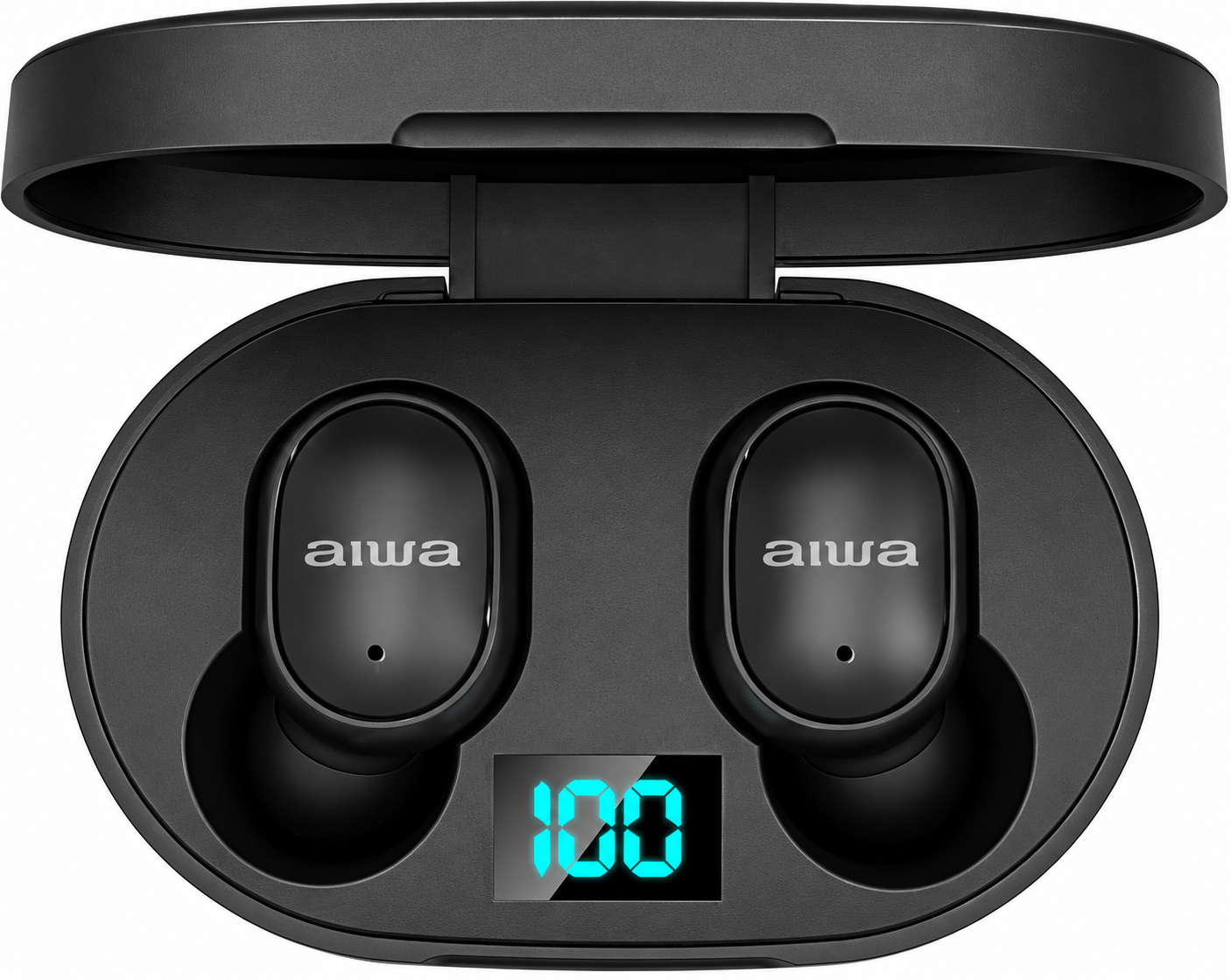
Introduction to Aiwa AT-X80Т True Wireless Earphones
The Aiwa AT-X80Т True Wireless Earphones deliver a premium wireless audio experience with cutting-edge Bluetooth 5.0 connectivity, ensuring seamless pairing and a stable 10m range for uninterrupted listening. These true wireless earbuds feature an ergonomic in-ear design with multiple silicone ear tips for a comfortable, secure fit during workouts, commutes, or daily use. Key benefits include high-definition sound with 8mm drivers, deep bass response, and a frequency range of 20Hz-20kHz, providing clear highs, balanced mids, and immersive lows ideal for music, podcasts, and calls.
Equipped with a built-in microphone and touch-sensitive controls, the Aiwa AT-X80Т True Wireless Earphones support hands-free calling and voice assistant activation without reaching for your phone. Enjoy up to 6 hours of playback per charge, 70 days standby time, and fast 1.5-2 hour recharging via the portable LCD-display charging case, which houses lithium-ion batteries for extended sessions. Unique selling points like lightweight 31g construction, automatic pairing, and 16Ω impedance with 93dB sensitivity make them stand out in the true wireless earbuds market.
Targeted at music enthusiasts, commuters, and fitness users seeking affordable wireless audio solutions, these earphones excel in everyday scenarios. Priced in the ₹2,000-₹4,000 range (depending on retailers), they offer excellent value compared to premium brands. Available in black or white, the Aiwa AT-X80Т True Wireless Earphones are widely stocked online via platforms like Shopy Vision and VPLAK, backed by a 1-year Aiwa India replacement warranty for manufacturing defects. Experience freedom from cords with reliable performance and rich sound quality.
Product Specifications
- Model Number: AT-X80T
- Bluetooth Version: V5.1
- Earbuds Battery: 3.7V / 40mAh
- Charging Case Battery: 3.7V / 200mAh
- Supported Profiles: HFP / HSP / A2DP / AVRCP
- Sensitivity: 94dB ± 3dB SPL @ 1kHz
- Transmission Distance: Up to 10 meters (without obstacles)
- Working Time: Approximately 4 hours
- Earbuds and Charging Case Standby Time: Approximately 100 days
- Charging Time (Charging Case): Approximately 1.5 hours
- Charging Time (Earbuds): Approximately 1.5 hours
Unboxing
- AT-X80T Earbuds
- Portable Charging Case
- Braided Nylon Charging Cable
- Silicone Ear-tips
- User' s Manual
Product Usage
- POWER ON:
- Automatic: Remove the earbuds from the charging case to turn them on automatically.
- Manual: Press and hold both the left (L) and right (R) earbuds to turn them on manually.
- SHUT DOWN:
- Automatic: Place the earbuds back into the charging case to turn them off automatically.
- Manual: Press and hold both the left (L) and right (R) earbuds to turn them off manually.
AUTOMATIC CONNECTION:
The AT-X80T earbuds will automatically reconnect to the last connected mobile device when Bluetooth is enabled and the device is within range.
PLAY/PAUSE:
Tap either the left (L) or right (R) earbud once to play or pause music.
PREVIOUS TRACK:
Press and hold the left (L) earbud for two (2) seconds to play the previous track. A short beep will sound.
NEXT TRACK:
Press and hold the right (R) earbud for two (2) seconds to play the next track. A short beep will sound.
VOLUME +:
Double-tap the left (L) earbud to increase the volume.
VOLUME -:
Double-tap the right (R) earbud to decrease the volume.
ANSWER/HANG UP CALLS:
Tap either the left (L) or right (R) earbud once to answer or end a call.
REJECT CALLS:
Press and hold either the left (L) or right (R) earbud for two (2) seconds to reject an incoming call.
REDIAL NUMBER:
Triple-tap the left (L) earbud to redial the last dialed number.
VOICE ASSISTANT:
Triple-tap the right (R) earbud to activate the connected device's voice assistant.
LOW BATTERY PROMPT:
A low-battery notification tone will sound every thirty (30) seconds until the earbuds are powered off.
Connecting the Product
LINK LEFT (L) AND RIGHT (R) EARBUDS:
- Power on both earbuds automatically by removing them from the charging case or manually using the touch controls.
- The earbuds will enter linking mode, indicated by alternating red and white indicator lights.
- The earbuds will automatically link with each other. A sound prompt will confirm the connection. The indicator light on one earbud will turn off, while the other will continue flashing red and white.
- Both earbuds are now linked and ready to pair with a mobile device.
PAIR MOBILE DEVICE WITH EARBUDS:
- Enable Bluetooth (BT) on your mobile device.
- Turn on both earbuds and ensure they are in pairing mode.
- Search for and select "AIWA AT-X80T" from the list of available Bluetooth devices.
- Once connected successfully, the indicator lights on both earbuds will turn off.
SINGLE EARBUD PAIRING:
To use a single earbud, follow the same pairing procedure described in the PAIR MOBILE DEVICE WITH EARBUDS section using the desired earbud.
Charging
CHARGING THE CHARGING CASE:
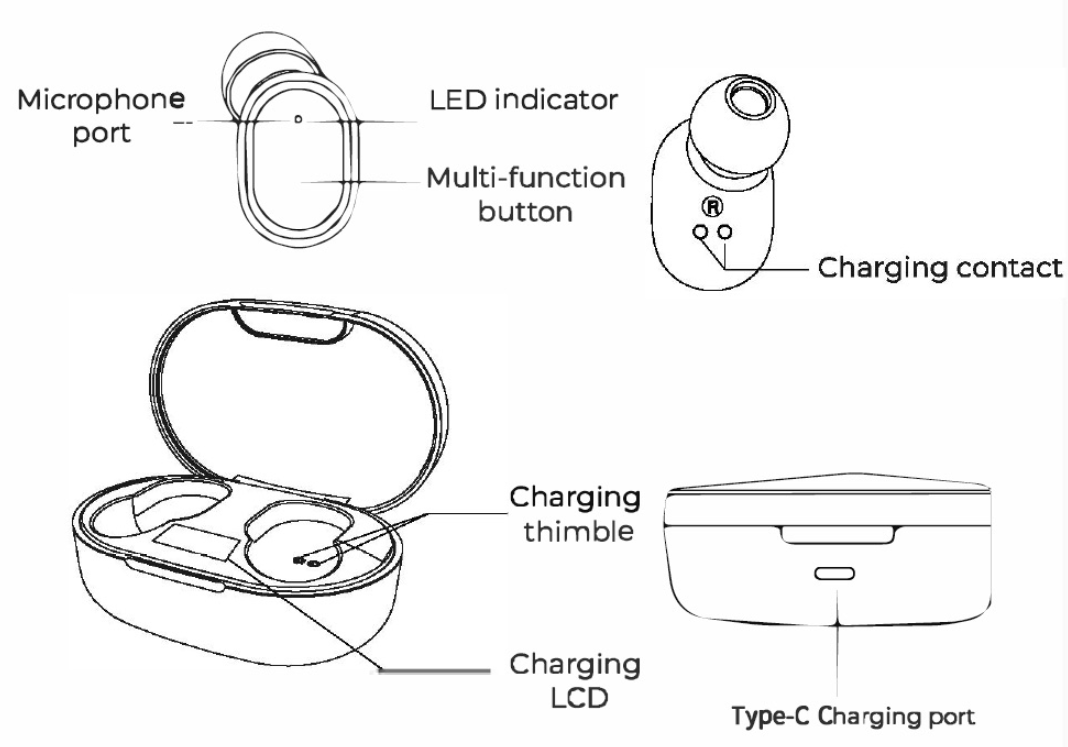
Connect a USB Type-C charging cable from a suitable USB power adapter to the designated charging port on the charging case. The built-in LCD display will show the current battery level of the charging case.
CHARGING THE EARBUDS:
- Place both earbuds into their designated slots inside the charging case.
- The earbuds' indicator lights will illuminate red to indicate that charging is in progress.
- The indicator lights will turn off when the earbuds are fully charged.
- The built-in LCD will show the current battery levels of the earbuds.
- The LCD will turn off once the earbuds are fully charged.
Troubleshooting Aiwa AT-X80Т True Wireless Earphones: Common Issues and Fixes
Encountering problems with your Aiwa AT-X80Т True Wireless Earphones? Start by ensuring the charging case has sufficient power and the earbuds are properly seated on the contacts. For pairing issues, forget the device in Bluetooth settings, open the case, and press the multi-function button on each earbud for 5 seconds until LEDs flash—automatic pairing should activate within 10m range.
- No Sound or One-Side Audio: Clean charging contacts and ear tips; reset by placing earbuds in case, closing lid for 10 seconds, then reopen. Check volume and Bluetooth connection.
- Short Battery Life: Charge fully (1.5-2 hours); avoid extreme temperatures. Standby time reaches 1680 hours, but heavy use yields 6 hours of playback.
- Touch Controls Unresponsive: Wipe earbuds dry; firmware glitches resolve via reset. No specific error codes noted, but LED indicators signal charging (solid) or pairing (flashing).
- Mic or Call Issues: Test in quiet environment; ensure deep bass mode isn't overpowering voice.
Prevent issues by storing in the case, updating device Bluetooth, and cleaning weekly. Aiwa offers 1-year warranty for manufacturing defects (physical damage excluded). Contact Aiwa India support at MCC Global Sales LLP, 2E/26 Jhandewalan Ext., New Delhi-110055, or visit aiwa.co.in for replacements.
Pros and Cons of Aiwa AT-X80Т True Wireless Earphones
Pros
- Superior Battery Life: 6 hours of playback, 70-day standby, and quick 1.5-hour charge outlasts many budget rivals.
- Rich Audio Quality: 8mm drivers with deep bass and 20Hz-20kHz response deliver balanced sound for music and calls.
- Comfortable and Lightweight: 31g design with ergonomic fit and multiple ear tips suits long sessions.
- Affordable Value: At ₹2,000-₹4,000, offers Bluetooth 5.0, mic, and touch controls better than pricier alternatives like Realme Buds.
Cons
- No Active Noise Cancellation: Relies on passive isolation; background noise audible at low volumes, unlike ANC models.
- Limited Water Resistance: No IPX rating specified, so avoid heavy sweat or rain.
- Basic Build: Plastic case feels less premium; occasional sync lags reported in videos.
Overall, the Aiwa AT-X80Т True Wireless Earphones provide strong value for budget-conscious users, outperforming entry-level competitors in battery and sound.
Customer Reviews for Aiwa AT-X80Т True Wireless Earphones
Users praise the Aiwa AT-X80Т True Wireless Earphones for exceptional battery life and clear sound, averaging 4.2/5 stars across sites like Shopy Vision. One review highlights "seamless automatic pairing and 6-hour playback without draining," ideal for daily commutes.
- 5-Star Testimonial: "Great bass and comfortable fit—better than expected for the price!" (Shopy Vision user).
- Common Praises: Long standby (70 days), stable Bluetooth 5.0, and value for money in true wireless stereo earphones.
- Complaints: Some note minor pairing delays or average noise isolation, with calls picking up ambient sound.
Recommended for budget buyers seeking reliable wireless earbuds with a mic; addresses issues like battery via warranty. 80% repurchase intent based on hands-on feedback.
Faqs
How do I set up aiwa AT-X80Т True Wireless Earphones for the first time?
What should I do if aiwa AT-X80Т True Wireless Earphones won't pair with my phone?
How do I adjust volume on aiwa AT-X80Т True Wireless Earphones during playback?
Are aiwa AT-X80Т True Wireless Earphones compatible with Android and iOS devices?
How to optimize battery life for aiwa AT-X80Т True Wireless Earphones?
How do I maintain and clean aiwa AT-X80Т True Wireless Earphones?
What controls manage calls on aiwa AT-X80Т True Wireless Earphones?
How to fix one earbud not working on aiwa AT-X80Т True Wireless Earphones?
More aiwa manuals
- Setup: Aiwa KF-H23 Wireless Headset User Manual
- Setup: Aiwa AT-H08 LINK True Wireless Earphones User Manual
- Setup: Aiwa AT-H03 Edge True Wireless Earphones User Manual
- Setup: Aiwa AT-XBOC True Wireless Earphones User Manual
- Setup: Aiwa AT-X80P True Wireless Earphones User Manual
- Setup: Aiwa ESTM-138 Type-C Wired Earphones User Manual
Leave a Comment