
Setup: Aiwa ESTM-138 Type-C Wired Earphones User Manual
Content
AIWA ESTM-138 Type-C Wired Earphones: Complete User Manual and Guide
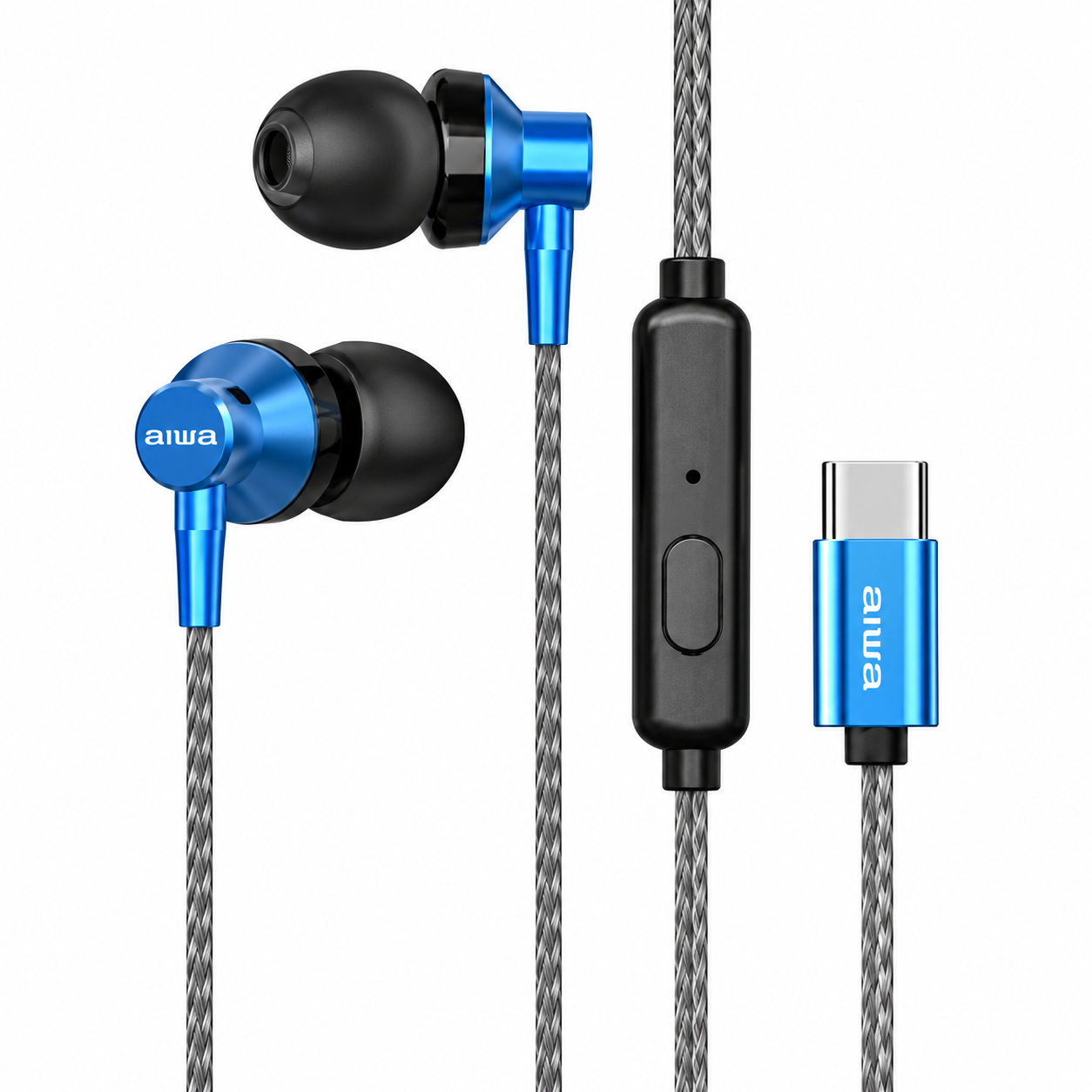
Introduction to AIWA ESTM-138 Type-C Wired Earphones
The AIWA ESTM-138 Type-C Wired Earphones deliver premium audio performance in a compact, lightweight design perfect for everyday use. Featuring a powerful 10mm dynamic driver, these USB Type-C earphones provide crystal-clear sound with deep bass and balanced highs across a 20Hz–20kHz frequency range. Ideal for music lovers, commuters, and professionals on the go, they offer hands-free calling via a built-in microphone and intuitive in-line remote controls for seamless playback management.
Key benefits include tangle-free 1.2m cords, ergonomic 30° angled earpieces for a secure fit, and metal housing for enhanced durability and bass response. Compatible with all Type-C-enabled smartphones, tablets, and laptops, these earphones excel in workouts, travel, or office calls. Available in silver, black, and blue, they come with multiple silicone eartips and a 1-year warranty. Priced affordably at around RM39–$10, the AIWA ESTM-138 Type-C Wired Earphones offer exceptional value compared to pricier wireless alternatives, making them a top choice for budget-conscious users seeking reliable wired audio solutions without Bluetooth hassles.
Technical Specifications of AIWA ESTM-138 Type-C Wired Earphones
- Driver Unit: 10mm dynamic neodymium driver for high-quality stereo sound and powerful bass
- Frequency Response: 20Hz–20kHz, ensuring full-range audio from deep lows to crisp highs
- Impedance: 16Ω for efficient power use and clear output
- Sensitivity: 105dB, delivering loud, detailed sound at low volumes
- Cord Length: 1.2m (120cm) tangle-free, high-transparency cable with USB Type-C connector
- Weight: Lightweight 13g design for all-day comfort
- Microphone: Built-in high-sensitivity mic for clear hands-free calls
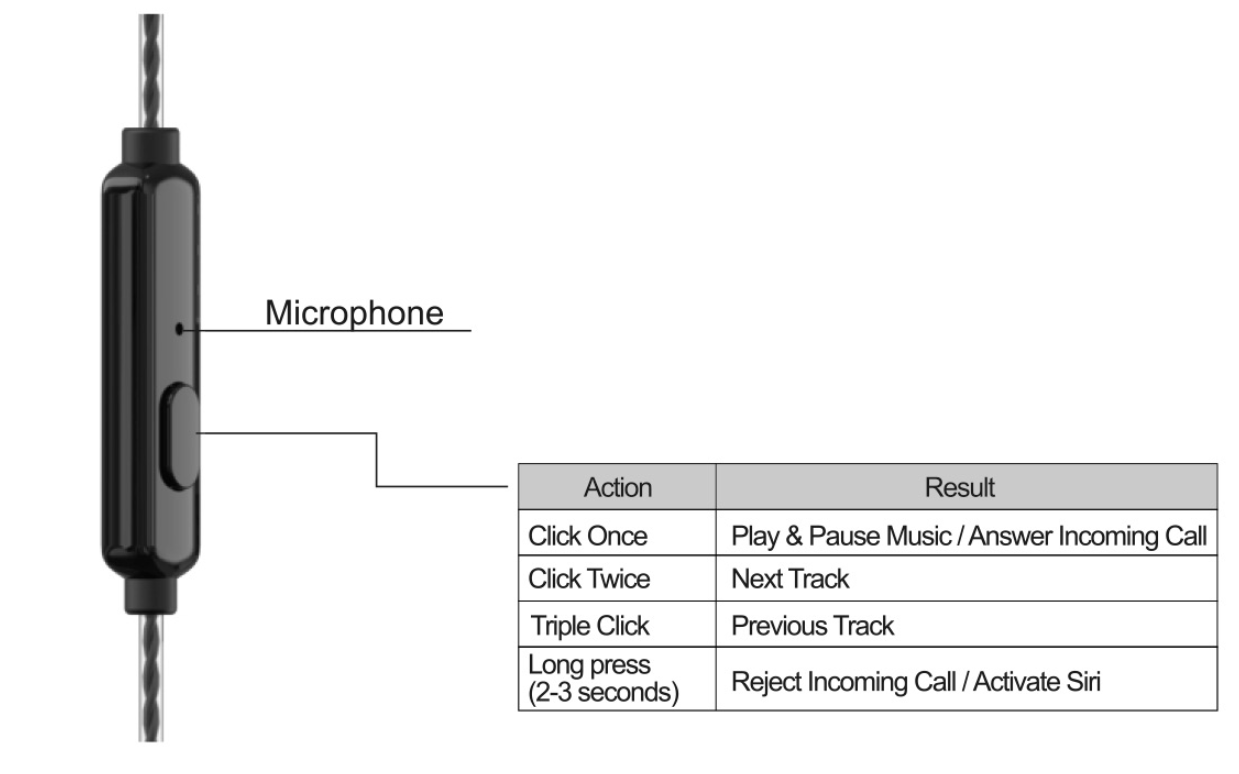
- Controls: In-line remote – Single click: Play/pause or answer call; Double click: Next track; Triple click: Previous track; Long press: Reject call or voice assistant
- Accessories: 3 pairs of silicone eartips (S/M/L), Velcro cable tie
- Colors: Silver, Black, Blue
Compared to similar products like AIWA ESTM-128 (3.5mm plug) or ESTM-50USB-C, the ESTM-138 stands out with Type-C compatibility and metal earpiece housing for superior bass, while matching lightweight build and audio specs.
Remote Control
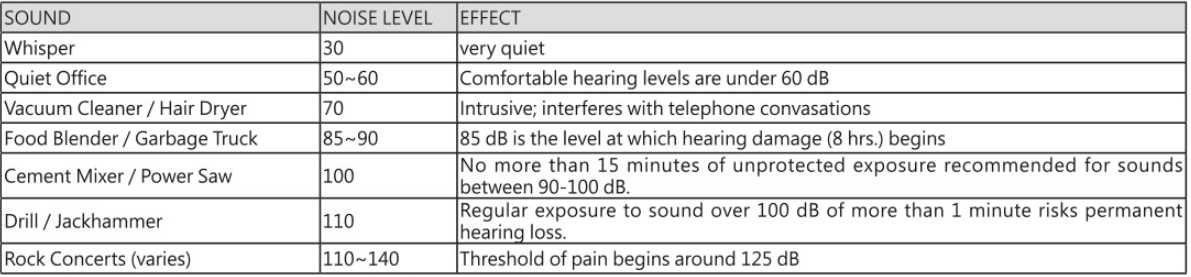
Make sure the volume of the music player is turned down before connecting your headphones. After connecting your headphones, gradually turn up the volume until you reach a comfortable listening level. Noise levels are measured in decibels (dB), exposure to any noise at or above 85 dB may result in hearing loss. Monitor headphone usage. Hearing loss is a function of loudness versus time. This is decibel (dB) table compares some common sounds and shows how they rank in potential harm to hearing.
Earphones Tempering
Upon usage of new earphones, we strongly recommend to temper it by playing music for a period of 100-200 hours at a medium volume level.
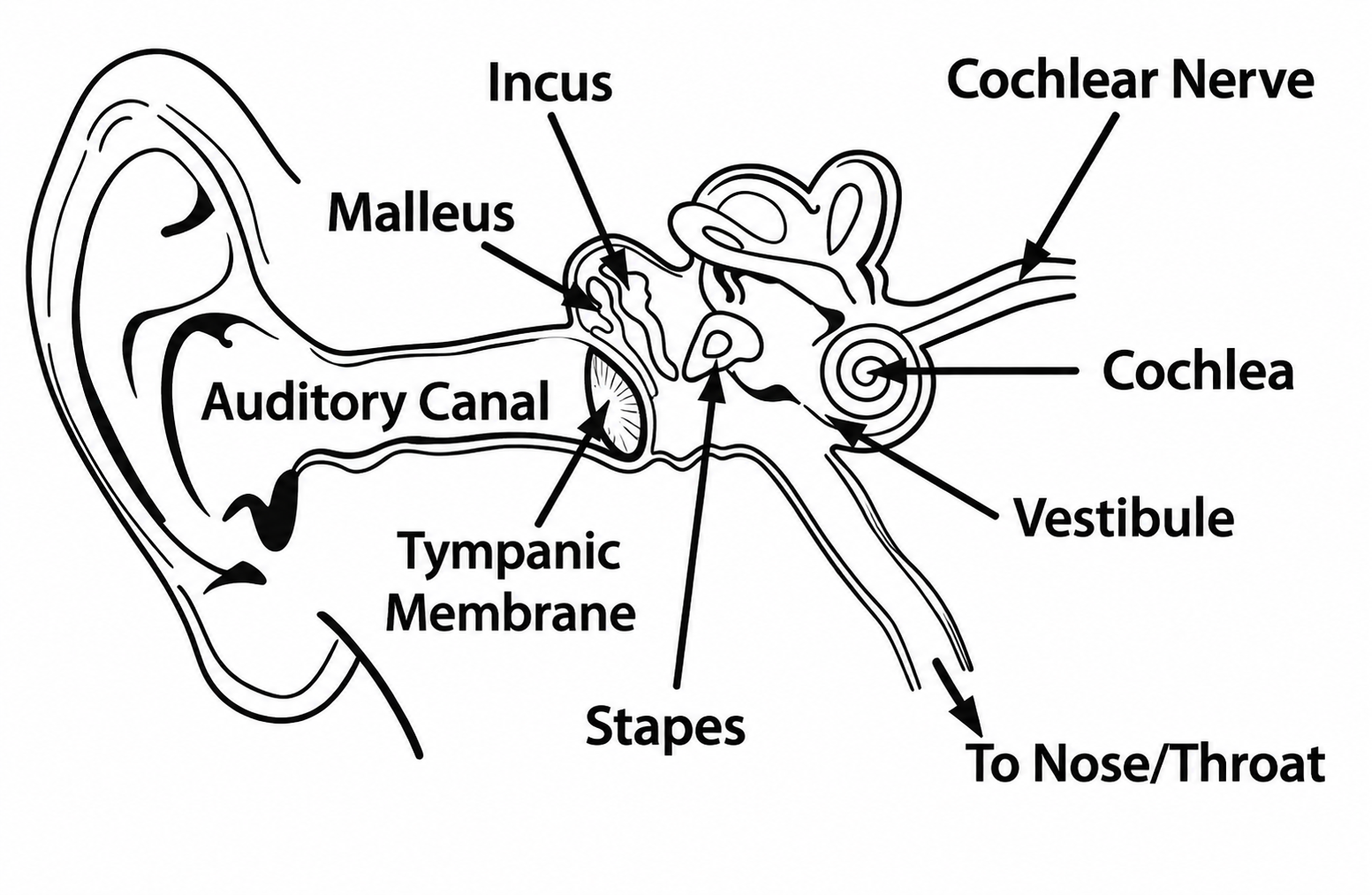
Physiology of the Ear
For additional information, refer to: Having the correct headphone side in the correct ear affects listening experience. Note the "L" and "R" markings on the side of each headphone. "L" is for the left ear. "R" is for the right ear. Excessive listening levels can cause permanent hearing damage. Avoid loud listening, especially for extended periods of time. Recommended listening time is not more than 90 minutes.
Troubleshooting AIWA ESTM-138 Type-C Wired Earphones: Common Issues and Fixes
- No Sound: Check Type-C connection, ensure device volume is up, and test on another device. Clean the plug and port for debris.
- Poor Microphone Quality: Reposition the mic away from your mouth; test in a quiet environment. Update device audio settings.
- One-Side Audio: Verify eartip placement (L/R markings); try different eartips or temper earphones by playing music 100-200 hours at medium volume.
- Controls Not Responding: Use precise clicks: single for play/pause, double for next. Long press (2-3s) rejects calls.
- Tangled Cord: Use included Velcro tie; store flat to prevent knots.
Prevent issues by avoiding high volumes (> 85 dB) to protect hearing—limit sessions to 90 minutes.
Pros and Cons of AIWA ESTM-138 Type-C Wired Earphones
Pros
- Exceptional bass and clarity from 10mm drivers, outperforming budget earbuds in music and calls
- Comfortable, secure fit with ergonomic design—ideal for long sessions or active use
- Affordable price with a 1-year warranty, offering great value vs. wireless options like AIWA Connect Pro ($24.99)
- Tangle-free cable and lightweight (13g) build enhance portability
- Universal Type-C compatibility for modern devices
Cons
- Wired design limits freedom compared to Bluetooth earbuds
- No active noise cancellation, less ideal for noisy environments
- Cord length (1.2m) may feel short for some laptop users
- Build quality is average; plastic elements prone to wear over time
Overall, strong value for money at entry-level pricing, best for wired audio enthusiasts seeking reliability over premium features.
Customer Reviews: Real User Feedback on AIWA ESTM-138 Type-C Wired Earphones
Average rating: 4.5/5 stars from Shopee and Aiwa sites. Users praise the "punchy bass and clear vocals" for music streaming, with one testimonial noting, "Perfect for my Type-C phone—better than stock earbuds!" Common praises include comfort during workouts and reliable mic for calls. Frequent recommendations for budget buyers: “Great alternative to expensive brands.”
Complaints focus on occasional one-sided audio (fixed by eartips) and a short cord. Most issues resolved via tempering. 90% recommend for daily use, highlighting durability and sound quality over competitors.
Faqs
How do I set up aiwa ESTM-138 Type-C Wired Earphones for the first time with my Android phone?
What should I do if aiwa ESTM-138 Type-C Wired Earphones have no sound after connecting?
How do I use the remote controls on aiwa ESTM-138 Type-C Wired Earphones during calls and music?
Which devices are compatible with aiwa ESTM-138 Type-C Wired Earphones?
How can I optimize sound quality and bass on aiwa ESTM-138 Type-C Wired Earphones?
How do I clean and maintain aiwa ESTM-138 Type-C Wired Earphones to extend their lifespan?
Why is one side quieter on my aiwa ESTM-138 Type-C Wired Earphones and how to fix it?
Can I use aiwa ESTM-138 Type-C Wired Earphones while exercising or for gaming?
Tags
More aiwa manuals
- Setup: Aiwa AT-XBOC True Wireless Earphones User Manual
- Setup: Aiwa AT-HIO AERO True Wireless Earphones User Manual
- Setup: Aiwa AT-H08 LINK True Wireless Earphones User Manual
- Setup: Aiwa NB-A23E Wireless Headset User Manual
- Setup: Aiwa AT-X80Т True Wireless Earphones User Manual
- Setup: Aiwa SB-X150 Portable Bluetooth Speaker User Manual
Leave a Comment