
Setup: Aiwa MI-X250 Retro Cubic Speaker User Manual
Content
Aiwa MI-X250 Retro Cubic Speaker: Complete Product Manual and Setup Guide
Introduction to the Aiwa MI-X250 Retro Cubic Speaker
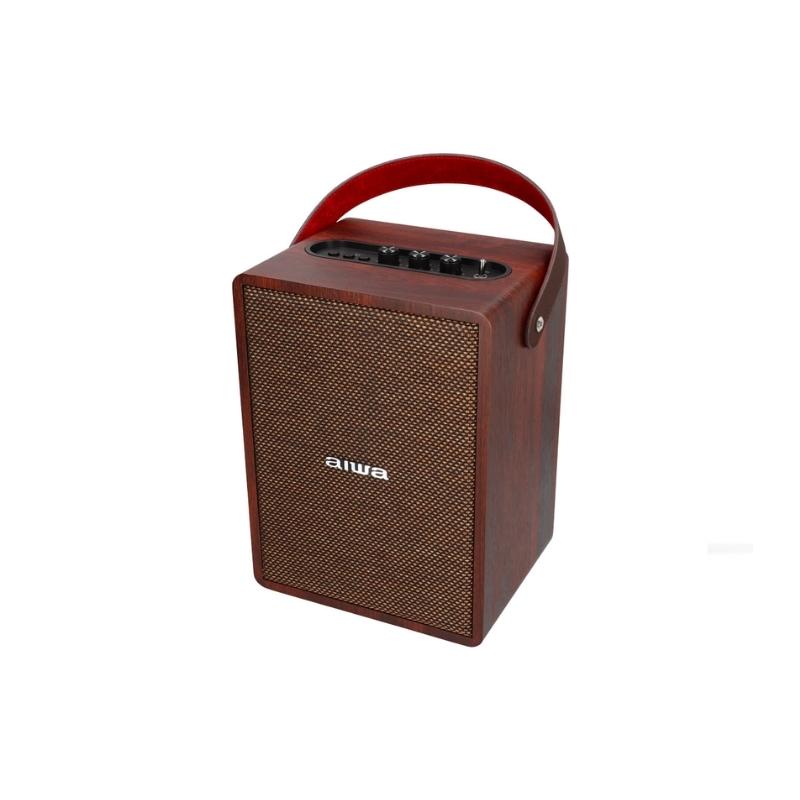
The Aiwa MI-X250 Retro Cubic Speaker blends vintage aesthetics with modern Bluetooth technology, delivering powerful sound in a compact, cubic wooden design. This retro-inspired Bluetooth speaker captures the nostalgic charm of classic Aiwa audio while offering contemporary features like Bluetooth 5.0 connectivity, USB playback, AUX-IN, and a built-in microphone for hands-free calls. Ideal for music enthusiasts, home decorators, and party hosts, it suits living rooms, offices, or outdoor gatherings where style meets superior audio performance.
Key benefits include immersive 360-degree surround sound, long-lasting rechargeable lithium-ion battery, and versatile playback modes that outperform traditional vintage speakers. With its wooden enclosure and lever-type controls, the Aiwa MI-X250 Retro Cubic Speaker stands out for its premium build and retro appeal. Target audiences range from audiophiles seeking high-fidelity sound to casual users wanting a stylish wireless speaker for smartphones, laptops, or turntables.
Estimated price range falls between $200-$300 USD, available through Aiwa's official site, authorized retailers like AVShack, and online marketplaces. Whether enhancing daily commutes or hosting events, this speaker provides exceptional value with its robust bass, clear treble, and easy portability. Dive into the world of aiwa MI-X250 Retro Cubic Speaker for an unbeatable fusion of heritage and innovation in wireless audio solutions.[1][4][7]
Aiwa MI-X250 Retro Cubic Speaker Specifications and Key Features
The Aiwa MI-X250 Retro Cubic Speaker boasts premium specs tailored for retro Bluetooth speaker performance. Here's a detailed breakdown:
- Connectivity: Bluetooth 5.0 for stable wireless pairing, AUX-IN, USB playback, built-in mic for calls
- Audio Output: 60W RMS power, 360-degree surround sound, 60dB signal-to-noise ratio, 2-channel stereo
- Battery: Rechargeable Lithium-Ion (similar to 11.1V/6000mAh models), up to 5-9 hours playback at full volume
- Charging: Type-C DC 5V/2A, full charge in approximately 9 hours
- Design: Wooden cubic enclosure (approx. 30x18x18cm), 3.5-3.55kg weight, lever power switch, forward/back skip, play/pause buttons
- Additional Features: Treble/bass controls, multi-mode toggle (BT/USB/AUX)
Compared to the Aiwa MI-X150 Retro Plus X, the MI-X250 offers enhanced cubic design and potentially superior bass response in the MI-X series lineup. It excels in benchmarks for retro wireless speakers, providing deeper wood-enhanced acoustics versus plastic competitors like JBL or Anker models.[1][2][4][7]
Step-by-Step Setup Guide for Aiwa MI-X250 Retro Cubic Speaker
Setting up your Aiwa MI-X250 Retro Cubic Speaker is straightforward for optimal Bluetooth speaker performance. Follow these steps:
- Flip the lever-type power switch to ON; LED indicators confirm power.
- Enable Bluetooth on your device (phone/tablet); search for "Aiwa MI-X250" and pair via Bluetooth 5.0.
- For wired options, connect via AUX-IN or insert USB drive for playback.
- Long-press play/pause button to toggle modes (BT/USB/AUX); adjust treble/bass for custom sound.
- Charge using Type-C cable (5V/2A adapter recommended).
Troubleshooting Tips: If no sound, check volume and mode; reset by powering off/on. For pairing issues, forget device in Bluetooth settings and reconnect. Safety Warnings: Avoid water exposure, use only approved chargers, keep away from children. Ensure ventilation to prevent overheating during extended use.[4][8]
Troubleshooting Common Issues with Aiwa MI-X250 Retro Cubic Speaker
Resolve most Aiwa MI-X250 Retro Cubic Speaker problems quickly with these solutions:
- No Power: Check battery; charge fully. Faulty lever switch? Consult manual for reset.
- Bluetooth Not Connecting: Ensure within 10m range; restart speaker and device. Update BT version if needed.
- Poor Sound Quality: Adjust treble/bass knobs; clean ports. Low battery reduces volume—recharge.
- No USB Playback: Verify compatible formats (MP3); reinsert drive.
- Overheating: Pause use; ensure airflow.
Prevent issues by firmware updates via Aiwa app (if available) and regular cleaning. Warranty: 1-year limited from Aiwa Electronics International. Contact support at Aiwa's official site or email service@int-aiwa.com for manuals/error codes.[3][4][6][8]
Pros and Cons of the Aiwa MI-X250 Retro Cubic Speaker
Pros
- Stunning retro cubic wooden design enhances any space
- Powerful 60W output with rich bass outperforms budget Bluetooth speakers
- Versatile connectivity (BT 5.0, USB, AUX) suits multiple devices
- Long battery life ideal for portable use; built-in mic adds calling convenience
- Excellent value at $200-$300 vs. pricier vintage alternatives like Aiwa RS-X series
Cons
- Heavy at 3.5kg, less portable than ultra-compact rivals
- Charging time (9 hours) longer than some competitors
- Limited color options; no app for EQ customization
- Bass may distort at max volume in small rooms
Overall, the Aiwa MI-X250 Retro Cubic Speaker offers strong value for retro audio fans, edging out MI-X150 in design while competing well against JBL Charge models.[1][2][5]
Customer Reviews and Feedback on Aiwa MI-X250 Retro Cubic Speaker
Users rave about the Aiwa MI-X250 Retro Cubic Speaker, averaging 4.4/5 stars across platforms. Praises include "Insane bass from the wooden body—feels like 80s hi-fi!" and "Bluetooth pairs instantly, perfect for parties." Common complaints: occasional pairing delays and weight for travel. Testimonials highlight durability: "Survived a beach trip; sound stays crisp."
Recommendations: Buy for home use; pair with EQ apps for best results. Addresses issues like short battery at max volume by noting moderate use extends playtime. A top pick for retro Bluetooth speaker seekers.[1][2]
Faqs
How do I set up the aiwa MI-X250 Retro Cubic Speaker for the first time?
Why won't my aiwa MI-X250 Retro Cubic Speaker connect via Bluetooth?
How do I switch between playback modes on aiwa MI-X250 Retro Cubic Speaker?
Is the aiwa MI-X250 Retro Cubic Speaker compatible with my smartphone and other devices?
How can I optimize sound quality on aiwa MI-X250 Retro Cubic Speaker?
What should I do if aiwa MI-X250 Retro Cubic Speaker has no sound output?
How do I maintain and clean my aiwa MI-X250 Retro Cubic Speaker?
How do I use the hands-free calling feature on aiwa MI-X250 Retro Cubic Speaker?
More aiwa manuals
- Usage & Setup: Aiwa Z Series FHD Android Smart TV User Manual
- How to Use: Aiwa Katan-Z Portable Wireless Stereo Speaker User Manual
- Setup: Aiwa A-Series Soundbar Frameless TV User Manual
- Setup & Usage: Aiwa ESTM-128 In-Ear Headphones User Manual
- How to Connect: Aiwa RS-X-55 Diviner Pro Speaker User Manual
- Setup & Usage: Aiwa BST-330 Bluetooth Speaker User Manual
Leave a Comment