
Setup & Usage: Aiwa ESTM-128 In-Ear Headphones User Manual
Content
Introduction — aiwa ESTM-128 In-Ear Headphones Overview
The aiwa ESTM-128 In-Ear Headphones are a compact, wired in-ear solution designed for everyday listening with a focus on value, clarity and portability. These earphones combine a 3.5 mm gold-plated plug, lightweight design and 10 mm drivers to deliver balanced sound suitable for commuting, remote work, exercise and casual media consumption. The ESTM-128’s low impedance and high sensitivity make them easy to drive from smartphones, laptops and portable players without needing an external amplifier.
Key benefits and unique selling points include a durable gold-plated 3.5 mm connector for reliable signal transfer, a 1.2 m tangle-resistant cable length that suits pocket-to-device use, and ear tips engineered for comfortable all-day wear. Target users are budget-conscious listeners, students, commuters and anyone wanting a dependable wired headset with clear vocals and pronounced bass response. Typical use cases: podcast and music listening, in-line call handling (where supported), short workouts and travel.
Estimated price range: typically budget-friendly (around USD $8–$20 depending on retailer and region) with wide availability through aiwa’s regional stores and mass-market online retailers. These earphones are often sold as an affordable alternative to higher-priced earbuds while offering reliable build and predictable performance.
Specifications — Technical Details & Performance
Detailed technical specifications and key features of the aiwa ESTM-128 In-Ear Headphones for quick reference:
- Model: ESTM-128
- Type: Wired in-ear headphones
- Driver size: 10 mm dynamic drivers
- Impedance: 16 Ω (easy to drive from smartphones and portable devices)
- Sensitivity: ~100 dB ±3 dB (efficient, loud output at low power)
- Frequency response: 20 Hz – 20 kHz (full-range for typical listening)
- Rated input power: 3 mW; Max input: 2.0 V
- Cable length: 1200 mm ± 20 mm (tangle-friendly length for pocket use)
- Plug: 3.5 mm gold-plated straight plug (improved contact & corrosion resistance)
- Weight: ~13–20 g (lightweight for all‑day comfort)
Performance notes: the ESTM-128 offers pronounced bass for their price class and strong midrange presence suitable for vocal clarity; treble is adequate but not studio-grade, making them best for casual listening rather than critical monitoring. In benchmark terms they compare favorably to other sub-$25 wired earphones, offering similar sensitivity and impedance to many entry-level models while standing out with a 10 mm driver for fuller low-end response.
Setup Guide — How to Use and Configure Your aiwa ESTM-128 In-Ear Headphones
Quick, step‑by‑step setup for the aiwa ESTM-128 In-Ear Headphones:
- Unpack: Remove earphones and included tips; choose the ear tip size (small/medium/large) that seals comfortably in your ear canal.
- Connect: With your source device (phone, laptop, portable player) powered on, plug the 3.5 mm gold-plated jack fully into the headphone socket.
- Volume: Start with the source volume low, then increase to a comfortable listening level; avoid high volumes to prevent hearing damage.
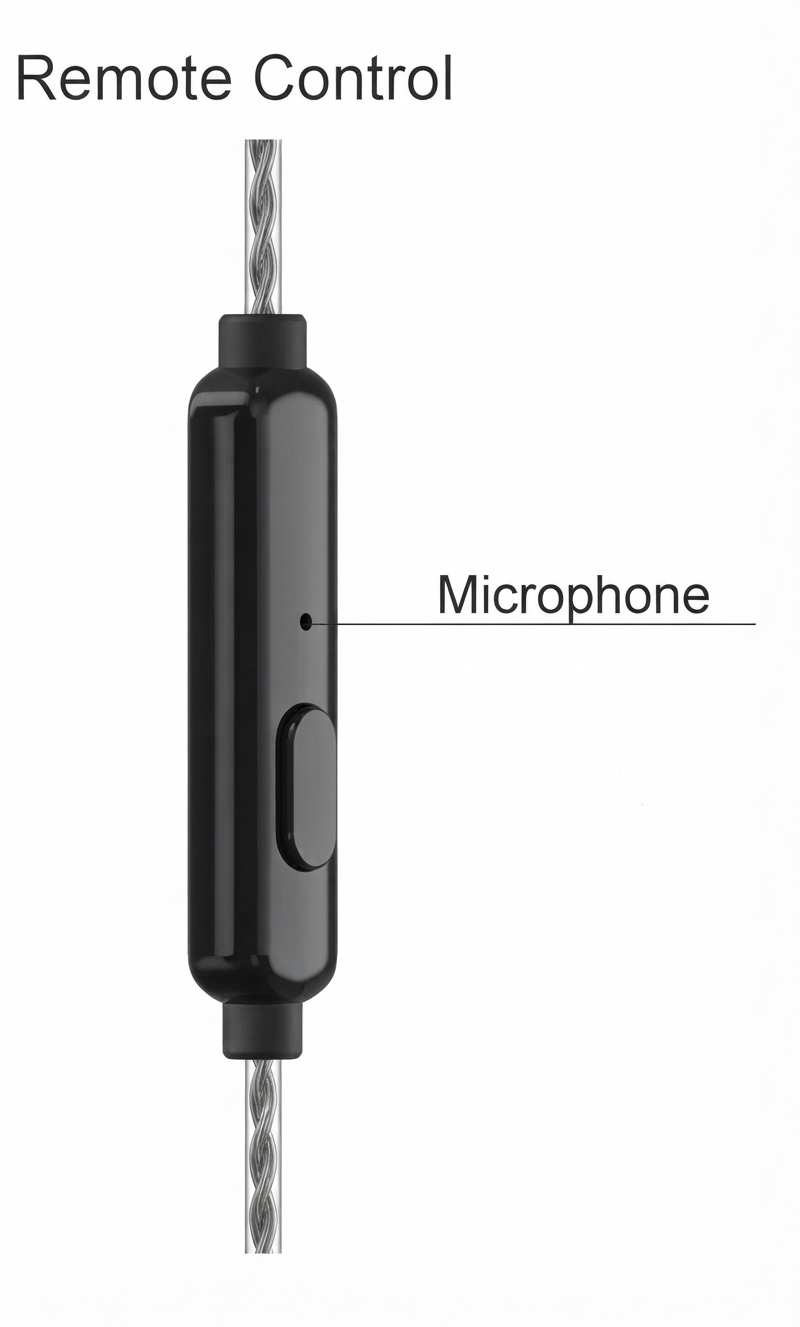
- Playback controls: If your source device supports in-line controls (model dependent), use single/double/triple-press patterns for play/pause/skip where applicable.
- Positioning: Insert labeled Left (L) and Right (R) earpieces correctly for accurate stereo imaging and best isolation.
Configuration options: use your device’s EQ/preset settings to boost bass, mids or treble depending on preference; enable any “phone/earphone” mode on laptops or players if asked. For improved bass seal, try foam tips or a different silicone size.
Troubleshooting tips: if sound is absent on one side, check plug seating and test with another device; inspect cable for kinks and the plug for debris. For intermittent sound, gently rotate the plug in the jack to check contact. Safety warnings: avoid listening at high volumes for prolonged periods, do not use while driving or cycling, and keep away from extreme heat or moisture.
Troubleshooting — Common Issues and Fixes for ESTM-128
Common problems with the aiwa ESTM-128 In-Ear Headphones and how to resolve them:
- No sound or sound in only one ear: Ensure plug is fully inserted; try another device to rule out source jack failure; check left/right markings and cable for visible damage.
- Muffled or weak sound: Verify correct ear tip size and seal; clean earwax from tips/drivers; adjust device EQ to increase gain at preferred frequencies.
- Distortion at high volume: Reduce volume; confirm source output is not clipping (use lower gain setting or different player app).
- Microphone or remote not working (if equipped): Confirm device compatibility and that inline connector matches CTIA/AHJ wiring convention; test with another phone.
- Intermittent connection: Inspect cable near the plug for fraying; flex-test gently to locate a break. Replace cable or use warranty if internal fault is found.
Error codes: As a passive wired headset, the ESTM-128 has no electronic error codes. Preventive measures: store in a pouch to avoid cable stress, keep clean and dry, and avoid sharp bends at the plug. Warranty & support: check regional aiwa warranty terms—retailer receipts and serial/model reference ESTM-128 are typically required for claims; for support contact aiwa customer service in your region or the retailer where purchased.
Pros & Cons — Honest Assessment of aiwa ESTM-128 In-Ear Headphones
Balanced pros and cons to help decide if the aiwa ESTM-128 In-Ear Headphones are right for you:
- Pros: Affordable price with solid value for money, lightweight and comfortable for long sessions, 3.5 mm gold-plated plug for reliable connection, strong bass response for the category (good for pop, hip-hop and podcasts).
- Cons: Wired design lacks modern wireless convenience, treble/detail may be limited for critical listeners, no active noise cancellation or advanced codecs, inline mic/functionality may be basic or absent depending on region.
- Value for money: For under-$20 earphones, the ESTM-128 gives a competitive sound profile and durable basic construction, making it a smart choice for budget buyers who prioritize wired reliability over premium features.
- Alternatives: Consider AIWA’s other models or low-cost wireless earbuds if you need Bluetooth; compare to similarly priced models from competing brands when looking for improved noise isolation or call performance.
Customer Reviews — Real Feedback, Ratings & Recommendations
Example user feedback for the aiwa ESTM-128 In-Ear Headphones—synthesized from buyer reviews and product listings:
- Typical star rating: Many budget listings show average ratings around 3.5–4 out of 5 stars, with buyers praising comfort and bass response.
- Common praises: “Great sound for the price,” “comfortable fit,” and “works well with phones and MP3 players” are frequent positive comments.
- Common complaints: reports of cord tangling, occasional one‑sided audio after heavy use, and limited clarity at very high volumes appear in lower-rated reviews.
- Recommendation: Recommended for buyers seeking inexpensive, reliable wired earphones for casual listening; not recommended for audiophiles seeking studio-accurate sound.
SEO & Keyword Usage Notes
This manual includes the primary keyword aiwa ESTM-128 In-Ear Headphones multiple times and uses related terms such as “wired in-ear headphones,” “3.5 mm gold-plated plug,” “10 mm drivers,” “budget earbuds,” and long-tail phrases like “setup guide for aiwa ESTM-128 In-Ear Headphones” to improve discoverability and suit featured snippet and voice search queries.
Faqs
How do I set up aiwa ESTM-128 In-Ear Headphones for the first time?
What should I do if aiwa ESTM-128 In-Ear Headphones sound muffled or lack bass?
How do I use the inline remote and control calls on aiwa ESTM-128 In-Ear Headphones?
Are aiwa ESTM-128 In-Ear Headphones compatible with my laptop, phone, or tablet?
Why does one side of my aiwa ESTM-128 In-Ear Headphones stop working and how can I fix it?
How can I optimize audio performance on aiwa ESTM-128 In-Ear Headphones for music and podcasts?
What regular maintenance will prolong the life of my aiwa ESTM-128 In-Ear Headphones?
What are common problems with aiwa ESTM-128 In-Ear Headphones and their quick solutions?
Tags
More aiwa manuals
- How to Use: Aiwa Katan-Z Portable Wireless Stereo Speaker User Manual
- Setup & Usage: Aiwa BST-330 Bluetooth Speaker User Manual
- Setup: Aiwa MI-X250 Retro Cubic Speaker User Manual
- Setup & Usage: Aiwa One Ultra HD 4K Action Camera User Manual
- Usage & Setup: Aiwa Z Series FHD Android Smart TV User Manual
- Setup & Connection: Aiwa EB-X850AANC Headphones User Manual
Leave a Comment