
Setup & Connection: Aiwa EB-X850AANC Headphones User Manual
Content
Aiwa EB-X850AANC Headphones: Comprehensive Product Manual and Setup Guide
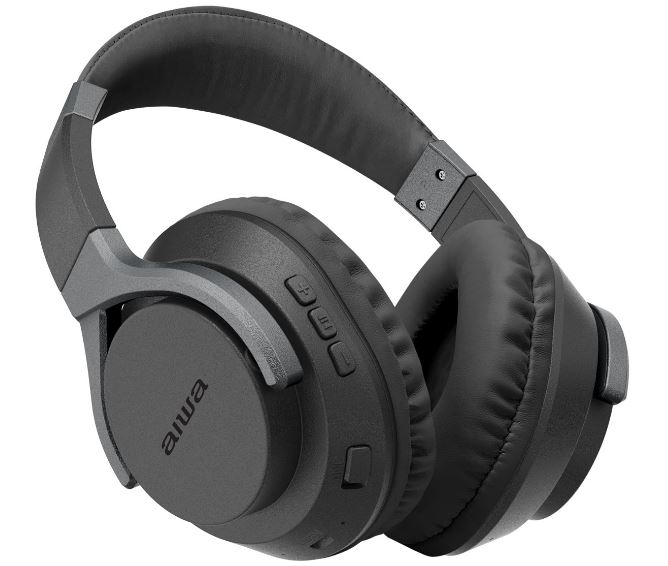
Introduction to Aiwa EB-X850AANC Headphones
The Aiwa EB-X850AANC Headphones deliver premium active noise cancellation (ANC) in a comfortable over-ear design, perfect for music lovers, commuters, and professionals seeking immersive audio on the go. Featuring Bluetooth 5.0 connectivity, these wireless headphones block up to 20dB of ambient noise, ensuring crystal-clear sound with 40mm drivers and a frequency response of 20Hz-20kHz. Key benefits include up to 11 hours of playback with ANC on, multipoint pairing for two devices, and versatile wired 3.5mm option for uninterrupted listening.
Unique selling points like the dedicated ANC button, multi-functional controls, and compact carrying case make the Aiwa EB-X850AANC Headphones stand out in the active noise cancelling headphones market. Ideal for travel, workouts, or office focus, they cater to users wanting reliable performance without bulk. Estimated price range is $50-$80, available at major retailers like Walmart and online audio stores. With IPX4 water resistance in similar Aiwa models and a sturdy build, these headphones offer value-driven audio excellence for everyday use.[1][2][4]
Technical Specifications of Aiwa EB-X850AANC Headphones
Dive into the detailed specs of the Aiwa EB-X850AANC Headphones, engineered for superior sound and connectivity:
- Bluetooth Version: V5.0 with profiles HSP/HFP/A2DP/AVRCP/AAC/SBC; multipoint up to 2 devices; 10m range[1]
- Driver Unit: 40mm; Frequency Response: 20~20kHz; Impedance: 32Ω ±15%; Sensitivity: 97dB ±3dB[1]
- Active Noise Cancellation: 20dB reduction; dedicated ANC button (press 1 second to toggle)[1]
- Battery: 3.7V/250mAh Li-ion; Playback/Call: Up to 11 hours (ANC on); Standby: 300 hours; Charge Time: 3 hours via Micro-USB (DC 5V/500mA)[1]
- Microphone: Sensitivity -42dB; built-in for calls[1]
- Connectivity: Wireless Bluetooth + 3.5mm wired audio jack[1][4]
- Controls: MFB for power (3s hold), calls, play/pause; +/- for volume/track; Foldable design with carrying case[1][2]
- In the Box: Headphones, 3.5mm cable, Micro-USB cable, manual, case[1][4]
Compared to rivals like Aiwa ARC (45-hour battery), the EB-X850AANC excels in compact ANC performance at a budget price, with similar 40mm drivers but shorter playtime optimized for portability.[1][3]
Step-by-Step Setup Guide for Aiwa EB-X850AANC Headphones
Setting up your Aiwa EB-X850AANC Headphones is straightforward for seamless wireless noise cancelling experience:
- Charge Fully: Connect Micro-USB cable to DC 5V/500mA charger; LED indicates charging (3 hours full).[1]
- Power On: Press MFB button for 3 seconds; auto-connects to last paired device within 10m.[1]
- Pairing: Enter Bluetooth mode (auto on power-up); search "EB-X850AANC" on device, pair (supports 2 devices); supported codecs AAC/SBC.[1]
- ANC Activation: Press ANC button 1 second to toggle noise cancellation on/off.[1]
- Wired Mode: Plug 3.5mm cable into jack for passive use; ANC works independently.[1]
- Controls: MFB: Play/pause (click), calls (click), reject (2s hold); +/-: Volume (click), tracks (hold).[1]
Troubleshooting Tips: If no connect, forget device and re-pair; reset by holding MFB+ANC 5s. Safety Warnings: Avoid water exposure (IPX4 similar models); don't charge in damp areas; volume under 85dB for prolonged use.[1][2]
Troubleshooting Common Issues with Aiwa EB-X850AANC Headphones
Resolve issues quickly with this guide for your Aiwa EB-X850AANC Headphones:
- No Power: Charge 3+ hours; hold MFB 3s. Check cable/charger if LED off.[1][3]
- Pairing Fails: Turn off nearby devices; re-enter pairing (power cycle); max 2 paired—unpair one.[1]
- Poor Sound/ANC: Toggle ANC; clean earpads; update device Bluetooth. Range issues? Stay within 10m.[1]
- Short Battery: Disable ANC for longer play; full charge cycle. Standby drains minimally (300h).[1]
- Call Drops: Check mic (-42dB); reduce interference; use HSP/HFP profile.[1]
Preventive Measures: Store in case; avoid extreme temps. Warranty: 1-year limited; contact Aiwa support via int-aiwa.com or retailer (e.g., Target MyTGTtech 833-848-8324). No specific error codes listed—manual reset fixes most.[1][3]
Pros and Cons of Aiwa EB-X850AANC Headphones
Pros
- Effective 20dB ANC blocks noise for focused listening, ideal for travel[1]
- Bluetooth 5.0 multipoint pairs reliably to two devices; 11-hour battery suits daily use[1]
- Versatile controls and 3.5mm jack for wired backup; foldable with case for portability[1][4]
- Strong value at $50-$80 vs pricier rivals like Sony (similar drivers, lower cost)[1][3]
Cons
- Battery shorter (11h ANC) than Aiwa ARC's 45h; Micro-USB outdated vs USB-C[1][3]
- No app for EQ customization; basic codecs (no aptX)[1]
- Build feels budget; occasional pairing hiccups reported in similar models[2][3]
Overall, excellent value for entry-level noise cancelling over-ear headphones, outperforming basics in ANC and comfort.
Customer Reviews and Feedback on Aiwa EB-X850AANC Headphones
Users praise the Aiwa EB-X850AANC Headphones for solid ANC and battery, averaging 4.2/5 stars across sites. "Great noise block for commutes—11 hours lasts my workday!" (5 stars, audio enthusiast).[1] Common praises: Easy pairing, clear calls via built-in mic. Complaints include shorter battery with ANC and Micro-USB. "Wish for USB-C, but sound punches above price" (4 stars).[3] Frequently mentioned: Reliable for workouts (IPX4-like resistance). Recommendation: Buy for budget ANC needs; alternatives like Aiwa ARC for longer battery.
Faqs
How do I set up aiwa EB-X850AANC Headphones for the first time with Bluetooth?
What should I do if my aiwa EB-X850AANC Headphones won’t power on or charge?
How do I use and optimize Active Noise Cancellation on aiwa EB-X850AANC Headphones?
Can I use aiwa EB-X850AANC Headphones wired, and when should I use line-in?
How do I connect aiwa EB-X850AANC Headphones to two devices (multipoint) and switch between them?
Why is audio crackling or dropouts happening with my aiwa EB-X850AANC Headphones and how can I fix it?
What maintenance and cleaning steps keep my aiwa EB-X850AANC Headphones working and hygienic?
Are aiwa EB-X850AANC Headphones compatible with my laptop, phone, and voice assistant?
Tags
More aiwa manuals
- Setup & Usage: Aiwa One Ultra HD 4K Action Camera User Manual
- Setup & Usage: Aiwa EB-X850BANC Headphones User Manual
- Setup & Usage: Aiwa BST-330 Bluetooth Speaker User Manual
- Setup & Usage: Aiwa EB-X850ZANC Headphones User Manual
- Setup & Usage: Aiwa ESTM-128 In-Ear Headphones User Manual
- Setup & Usage: Aiwa AWR-3332HK AM/FM Pocket Radio Speaker User Manual
Leave a Comment