
Setup & Usage: Aiwa EB-X850BANC Headphones User Manual
Content
Introduction — aiwa EB-X850BANC Headphones Overview
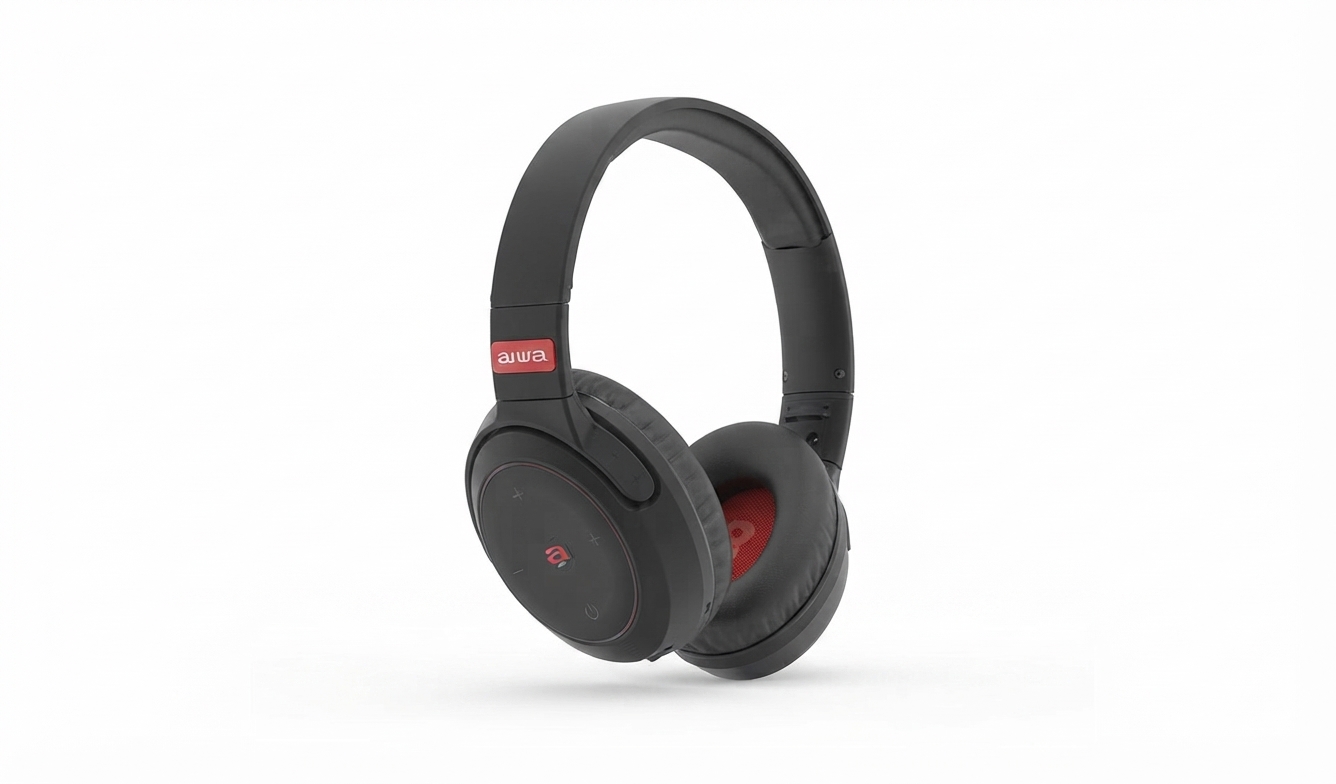
The aiwa EB-X850BANC Headphones are over-ear Bluetooth headphones with active noise cancellation (ANC) designed for commuters, remote workers, frequent travelers and casual listeners who want balanced sound, comfort and modern connectivity in an affordable package. These headphones combine a 40mm driver, ANC rated around 20–25 dB in low frequencies, and Bluetooth 5.0 for stable wireless playback and hands‑free calling, delivering a clear midrange and enhanced bass for streaming music, podcasts and video content.* The design targets long listening sessions with soft ear cushions, an adjustable headband and foldable hinges for portability.
Key benefits and unique selling points include effective low‑frequency noise reduction for airplane or subway noise, a versatile wired option for lossless listening on long flights, and simple touch/button controls for playback and calls. Typical use cases are commuting, focused work (noise reduction), in‑flight entertainment and home media listening. Estimated retail pricing has ranged in budget ANC headphone territory (commonly between approximately $40–$90 depending on retailer, promotions and region), with availability through online marketplaces and select electronics retailers.
Specifications — Technical Details & Features
- Model: aiwa EB-X850BANC Headphones
- Driver unit: 40 mm dynamic drivers for full-range sound reproduction
- Frequency response: 20 Hz–20 kHz (typical consumer headphone range)
- Bluetooth: Bluetooth v5.0 with SBC codec (stable wireless range ~10 m)
- Active Noise Cancellation (ANC): Approx. 20–25 dB reduction in 100–150 Hz band (optimized for low-frequency ambient noise)
- Battery & playback: Typical battery life varies by mode — wireless playback around 15–30 hours depending on ANC usage and volume; wired use available when battery is depleted
- Inputs/Controls: On‑ear buttons for power, ANC, volume and track control; 3.5 mm auxiliary input; USB‑C charging (where present)
- Microphone: Built‑in mic for calls and voice assistant
- Comfort: Over‑ear (supra‑aural) cushioned cups, adjustable headband, foldable for travel
- Build & color options: Typically available in black/neutral finishes
- Included accessories: 3.5 mm audio cable, USB charging cable, carrying pouch/manual
Performance notes: the ANC targets low-frequency noise (engines, HVAC) rather than high-frequency speech; sound signature favors balanced mids with boosted bass for consumer appeal. Compared with similar budget ANC models (from brands in the $50–100 range), the EB-X850BANC emphasizes value with wired fallback and comfortable fit, though audiophile-level codecs (aptX/LDAC) are typically absent.
Setup Guide — How to Configure aiwa EB-X850BANC Headphones
Follow these steps for first-time setup and daily use:
- Charge the headphones fully before first use using the supplied USB‑C cable; a full charge typically requires 2–3 hours.
- Power on: press and hold the power button for ~2–4 seconds until the LED indicator lights and the headphones announce power on.
- Enter pairing mode: after powering on, press/hold the Bluetooth button (or follow LED blink pattern) until the indicator flashes rapidly and the voice prompt indicates “pairing.”
- On your phone or device enable Bluetooth, scan for new devices and select “EB‑X850BANC” (or similar). Confirm pairing when prompted. Once paired, the LED will show a steady light and an audible confirmation.
- ANC modes: toggle ANC on/off with the dedicated ANC button. Use ANC for noisy environments and turn it off to maximize battery life or when you need awareness (ambient/pass‑through if available).
- Wired mode: plug the 3.5 mm audio cable into the headphone jack and device — headphones will typically operate in wired mode even if battery is low; ANC may be disabled in wired mode depending on model.
- Controls: use on‑ear buttons for play/pause, skip tracks, answer/hang up calls and volume adjust. Long press patterns typically change tracks; short press adjusts volume.
Troubleshooting quick tips: if pairing fails, restart both the headphones and your device and delete previous “EB‑X850BANC” pairing entries; ensure charge level is adequate; keep devices within 1 m during initial pairing. Safety warnings: avoid high volume for prolonged periods to prevent hearing damage, keep away from water unless rated, and only use the supplied charger or an equivalent USB‑C power source.
Troubleshooting — Common Problems & Fixes for aiwa EB-X850BANC Headphones
- No power / won’t turn on: Charge for at least 15–30 minutes, then attempt power-on. If still unresponsive, try a different USB outlet/cable.
- Pairing issues: Remove existing pairing entry from your device, restart Bluetooth, reset the headphones by holding power + volume (refer to manual) and re-enter pairing mode.
- Intermittent audio/dropouts: Ensure distance to source is within ~10 m, remove obstacles, disable other nearby Bluetooth devices, and confirm battery is charged.
- ANC not effective: Ensure ANC is enabled; ANC performance is strongest against low-frequency noise. Reposition ear cups for a good seal and replace worn earpads if necessary.
- Microphone or call issues: Check that the EB‑X850BANC is the active audio device during calls, update phone OS, and test on another device to isolate the problem.
- Error codes / LED signals: Rapid flashing LED during pairing = ready to pair; slow flashing = low battery; no light after charge indicates possible charging fault—try alternate cable/charger.
Preventive measures: keep firmware updated (if updates available), store in the pouch to protect cushions, avoid extreme temperatures and moisture. Warranty and support: check retailer and aiwa warranty terms—most sellers provide a limited warranty (commonly 1 year) and customer support through aiwa’s support channels or authorized retailers. For product help, contact aiwa support via the official support portal or the retailer where purchased.
Pros & Cons — Honest Assessment of aiwa EB-X850BANC Headphones
Pros
- Effective low-frequency ANC: Reduces engine and background hum, useful for travel and commuting.
- Value for money: Offers ANC, wired fallback and comfortable design at a budget-friendly price point.
- Comfortable for long use: Plush ear pads and adjustable headband make extended listening sessions comfortable.
- Simple connectivity: Bluetooth 5.0 provides reliable pairing and reasonable wireless range.
Cons
- Limited codec support: Lacks higher‑quality Bluetooth codecs (aptX/LDAC) found in higher‑end models, which can affect hi‑res streaming.
- ANC scope: ANC is tuned for low frequencies and may not fully block mid/high-frequency noise like close speech.
- Build quality: While portable, materials are typical of budget headphones and may wear sooner than premium alternatives.
- Feature depth: Advanced app-based EQ or firmware update ecosystem may be limited or absent.
Overall value: the aiwa EB-X850BANC Headphones present a strong value proposition for budget-conscious buyers seeking ANC and comfort; for audiophiles or users needing advanced codecs and premium materials, higher-tier alternatives may be a better fit.
Customer Reviews & Ratings — Real User Feedback for aiwa EB-X850BANC Headphones
Based on user feedback across retail and review listings, common praises focus on comfort, affordability and noticeable ANC performance for travel and commuting, often earning average ratings in the 4/5 star range from budget‑category buyers.
Frequent complaints include occasional Bluetooth dropouts in crowded RF environments, the absence of high‑resolution codec support, and wearing‑in durability concerns after extended daily use. Representative testimonial: “Great value — comfy, solid ANC for the price, and the wired option saved me on long flights.” (4/5). Another typical review: “Good noise reduction on buses and planes but misses some mid‑range noises; battery life is decent.” (3.5/5).
Purchase recommendation: Recommended for travelers and commuters seeking affordable ANC headphones with wired fallback; consider higher‑end models if you require superior materials or advanced codec support.
SEO & Keywords (used naturally)
This manual includes the primary keyword aiwa EB-X850BANC Headphones several times, plus related phrases: ANC headphones, Bluetooth 5.0 headphones, budget noise cancelling headphones, over‑ear wireless headphones, wired fallback headphones, long battery life ANC headphones, and long‑tail headings such as “How to set up aiwa EB-X850BANC Headphones” to optimize for featured snippets and voice search.
Faqs
How do I set up aiwa EB-X850BANC Headphones for the first time with Bluetooth pairing?
How do I enable and control active noise cancelling on aiwa EB-X850BANC Headphones?
What should I do if aiwa EB-X850BANC Headphones won't pair via Bluetooth?
Are aiwa EB-X850BANC Headphones compatible with iPhone, Android, and TV devices?
How do I optimize battery life and performance on aiwa EB-X850BANC Headphones?
How do I troubleshoot one side not working on aiwa EB-X850BANC Headphones?
How do I clean and maintain aiwa EB-X850BANC Headphones for longevity?
How do I use touch controls on aiwa EB-X850BANC Headphones for calls and music?
More aiwa manuals
- Setup & Connection: Aiwa EB-X850AANC Headphones User Manual
- Setup & Usage: Aiwa EB-X850ZANC Headphones User Manual
- Setup & Usage: Aiwa One Ultra HD 4K Action Camera User Manual
- Setup & Usage: Aiwa AWR-3332HK AM/FM Pocket Radio Speaker User Manual
- Setup & Usage: Aiwa BST-330 Bluetooth Speaker User Manual
- How to Connect: Aiwa MI-X-30 KATANA X Wireless Speaker User Manual
Leave a Comment