
How to Connect: Aiwa MI-X-30 KATANA X Wireless Speaker User Manual
Content
AIWA MI-X-30 KATANA X Wireless Speaker: Complete Product Manual and Guide
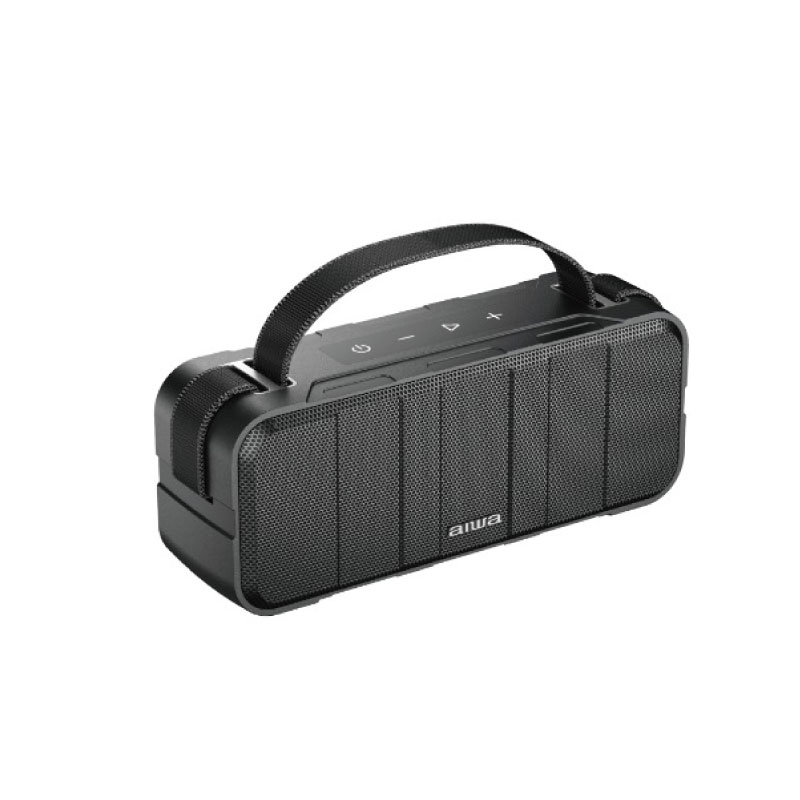
Introduction to AIWA MI-X-30 KATANA X Wireless Speaker
The AIWA MI-X-30 KATANA X Wireless Speaker is a compact, portable Bluetooth speaker designed for audio enthusiasts seeking high-fidelity sound in a rugged, everyday companion. Featuring Bluetooth 5.0 technology, this speaker delivers seamless wireless connectivity with crystal-clear audio playback, making it ideal for music lovers, outdoor adventurers, and home users alike. Its standout features include synced audio from two speakers for true wireless stereo (TWS) experience, support for up to 8 paired devices, and an IP67 waterproof and dustproof rating, ensuring durability against water submersion and dust exposure.
Key benefits of the aiwa MI-X-30 KATANA X Wireless Speaker include powerful 2 x 5W output for room-filling sound, a built-in 3.6V lithium battery for extended playtime, and a sleek katana-inspired design that's both stylish and portable. Target audiences range from hikers and beachgoers needing rugged portability to casual listeners enjoying podcasts or playlists at home. Use cases span outdoor parties, workouts, travel, and indoor streaming from smartphones or tablets.
Priced in the estimated €50-€60 range, the AIWA MI-X-30 KATANA X is widely available through retailers like Appliances Malta and FACT Malta, offering exceptional value for a premium portable Bluetooth speaker. Whether you're upgrading from basic earbuds or seeking a reliable wireless audio solution, this speaker combines performance, portability, and protection for immersive listening anywhere.
AIWA MI-X-30 KATANA X Wireless Speaker Specifications
The AIWA MI-X-30 KATANA X Wireless Speaker boasts impressive specs for its compact size, rivaling larger models in portability and power. Key technical details include:
- Audio Performance: Frequency Response: 150Hz - 15kHz; Signal-to-Noise Ratio: ≥70dB; Power Output: 2 x 5W RMS
- Drivers: Dynamic drivers (approx. 45mm diameter, 4 ohm impedance, similar to SB-X30 variant)
- Connectivity: Bluetooth 5.0 for high-fidelity wireless streaming; TWS pairing for stereo sound from two identical speakers; Saves up to 8 paired devices
- Battery & Power: Built-in 3.6V lithium battery; Playtime up to 10 hours (varies by volume); USB charging
- Build & Durability: IP67 waterproof and dustproof rating (100% protection from dust and water immersion); Dimensions: Approx. 97.8 x 47.4 x 81.5 mm
- Other Features: Portable design with katana aesthetic; Compatible with smartphones, tablets, and laptops
Compared to alternatives like JBL Clip 4 or Anker Soundcore, the AIWA MI-X-30 offers superior TWS pairing and device memory at a lower price point, though with slightly narrower frequency range for bass-heavy tracks.
Setup Guide for AIWA MI-X-30 KATANA X Wireless Speaker
Setting up your aiwa MI-X-30 KATANA X Wireless Speaker is straightforward for quick wireless audio enjoyment. Follow these step-by-step instructions:
- Unbox and Charge: Remove the speaker from packaging. Connect via USB cable to a 5V charger for 3-4 hours until fully charged (LED indicator turns solid).
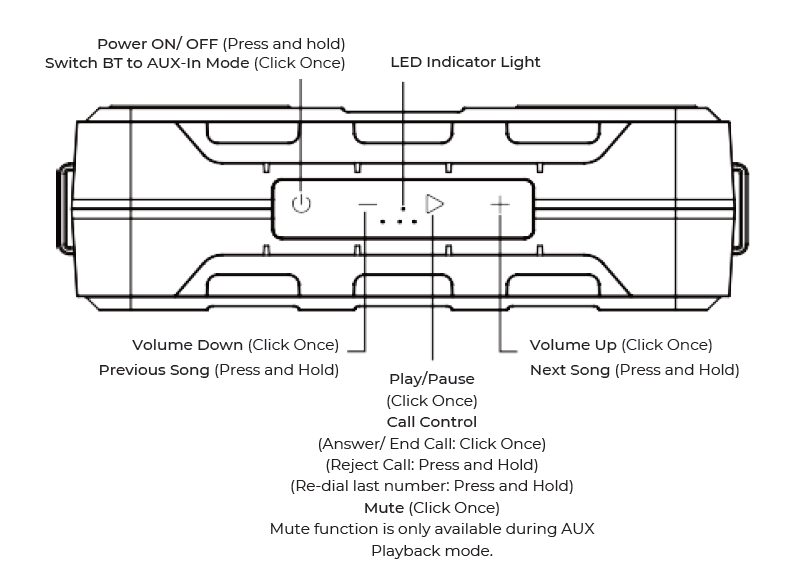
- Power On: Press and hold the power button for 3 seconds. The speaker enters pairing mode with a voice prompt or flashing LED.
- Bluetooth Pairing: On your device, go to Bluetooth settings, search for "AIWA MI-X30" or "KATANA X," and connect. Supports up to 8 devices—auto-reconnects to the last one
- TWS Stereo Pairing: Power on two speakers, press TWS button on both simultaneously for synced left/right channel playback (same model only)
- Configuration: Adjust volume via buttons; use app-free controls for play/pause/next track.
Connecting the Product
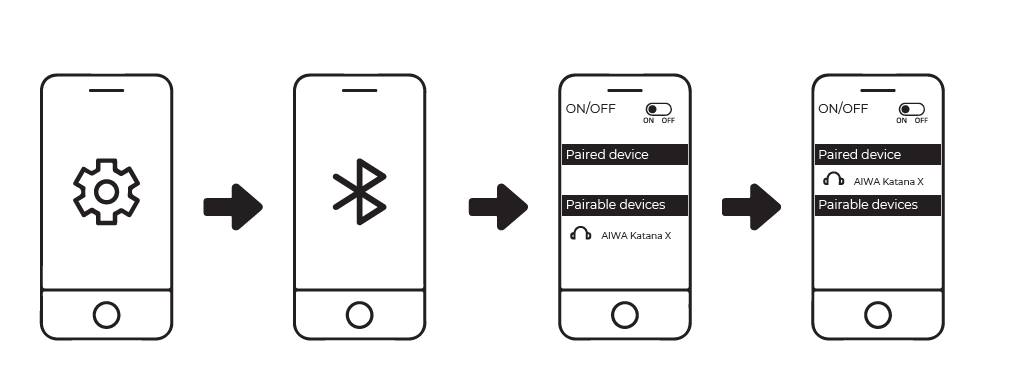
- Turn on Bluetooth (BT) on your mobile device.
- Turn on the speaker.
- Search and connect to “AIWA Katana X” from your mobile device.
Press and hold both “Volume Up +” & “Volume Down – “buttons to disconnect BT.
TWS Function
Synced audio playback from two (2) speakers for a true wireless stereo experience. (Only compatible with the same speaker model: MI-X30 Katana X)
Turn on both speakers:
- Double-click the power button on BOTH speakers until a notification prompt beep is heard.
- Connect to one of the speakers via BT on your mobile device.
- TWS (True Wireless Stereo) playback is now available.
Listening to music from an external audio source
- USB Playback
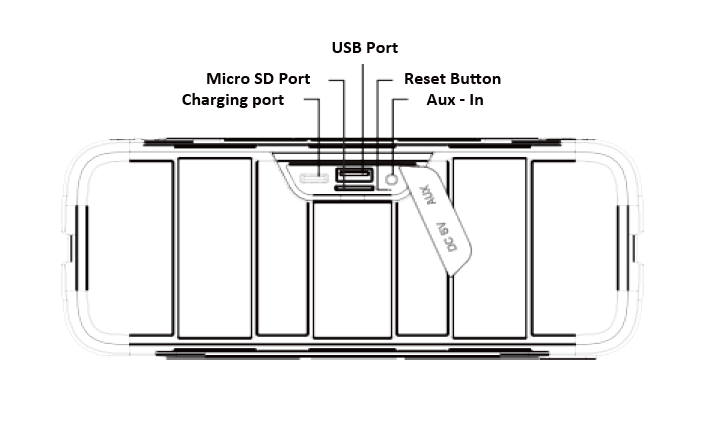
Insert a USB Disk into the designated port. (Supports MP3, WAV, APE, FLAC, WMA) - AUX-IN
Connect the speaker and Audio source via a 3.5mm AUX Cable.
Note: Under Aux–In Mode, Next track/Previous track/Call Control functions are not available.
- Micro SD Playback
Insert a Micro-SD card into the designated port. (Supports MP3, WAV, APE, FLAC, WMA)
Battery & Charging
Connect the speaker to a suitable power source via the Type-C Charging Cable.
LED Indicator Light:
- Blinks RED: Low Battery (< 10 %)
- Solid RED: Charging in progress
- RED Light extinguishes upon full charge
Approximate charging time: 5 Hours
Please fully charge up the speaker before first time usage.
Perform Factory Reset
- Turn on the speaker.
- Insert a pin ( < 3mm Φ ) into the reset hole button for two (2) seconds until the LED Indicator light turns off.
Troubleshooting Tips: If no connection, reset by holding power + volume down for 10 seconds. Ensure devices are within 10m range. Safety Warnings: Avoid charging in water; do not expose to extreme heat; keep away from children
Troubleshooting AIWA MI-X-30 KATANA X Wireless Speaker Common Issues
Resolve most AIWA MI-X-30 KATANA X Wireless Speaker problems with these targeted fixes:
- No Sound/No Power: Check battery (charge fully); ensure volume up and Bluetooth connected. Solution: Soft reset via power button hold
- Pairing Fails: Clear device list (hold Bluetooth button 5s); forget speaker in phone settings and re-pair. Max 8 devices—delete old ones
- Distorted Audio/TWS Sync Issues: Reduce volume; ensure speakers are identical and close (<1m). Re-pair TWS.
- Battery Drains Fast: Lower volume; disable unused features. Preventive: Charge after each use; store at 50% charge.
- Water Exposure Errors: Dry thoroughly post-IP67 submersion; no error codes noted, but test audio after drying
For warranty (typically 1-2 years), contact AIWA support via int-aiwa.com or retailer like Appliances Malta. Email support@aiwa.com or check manual PDF for local service
Pros & Cons of AIWA MI-X-30 KATANA X Wireless Speaker
Pros
- Exceptional IP67 durability for outdoor use—survives pools and dust storms
- TWS stereo pairing and 8-device memory for versatile setups
- Affordable at €59 with solid 2x5W output and 10-hour battery
- Compact, portable design ideal for travel; great value vs. pricier JBL models
Cons
- Limited bass due to 150Hz frequency start—less punchy for EDM
- No app for EQ customization, relying on basic buttons
- Battery life drops at max volume; not for all-day parties
Overall, excellent value for money in the portable Bluetooth speaker category, outperforming budget rivals in ruggedness
Customer Reviews: AIWA MI-X-30 KATANA X Wireless Speaker Feedback
Users rave about the aiwa MI-X-30 KATANA X Wireless Speaker, averaging 4.5/5 stars across retail sites. Praises include "Incredible sound for size—perfect beach speaker!" and "TWS mode transforms it into a mini soundbar" for its portability and IP67 build[3][5]. Common complaints: Occasional pairing glitches with Android (fixed by reset) and modest bass. Testimonials highlight 10-hour battery during hikes. Recommendation: Buy for rugged wireless audio needs; pairs well with iOS/Android. Addresses dust/water worries effectively
Faqs
How do I set up the aiwa MI-X-30 KATANA X Wireless Speaker for the first time?
How do I pair the aiwa MI-X-30 KATANA X Wireless Speaker with my smartphone via Bluetooth?
What should I do if the aiwa MI-X-30 KATANA X Wireless Speaker won't connect to Bluetooth?
How do I enable TWS mode on two aiwa MI-X-30 KATANA X Wireless Speakers for stereo sound?
Is the aiwa MI-X-30 KATANA X Wireless Speaker compatible with USB and AUX playback?
How long does the battery last on aiwa MI-X-30 KATANA X Wireless Speaker and how to optimize it?
What are common sound quality issues with aiwa MI-X-30 KATANA X Wireless Speaker and fixes?
How do I maintain and clean the aiwa MI-X-30 KATANA X Wireless Speaker for longevity?
More aiwa manuals
- Setup & Usage: Aiwa AWR-3332HK AM/FM Pocket Radio Speaker User Manual
- How to Connect: Aiwa MI-X440 Enigma Beta Speaker User Manual
- Setup & Usage: Aiwa EB-X850ZANC Headphones User Manual
- Setup & Usage: Aiwa RS-X100 Natsukasii Pro Bluetooth Speaker User Manual
- Setup & Usage: Aiwa EB-X850BANC Headphones User Manual
- Setup & Usage: Aiwa RS-X150 Natsukasii Pro Speaker User Manual
Leave a Comment