
Setup & Usage: Aiwa RS-X150 Natsukasii Pro Speaker User Manual
Content
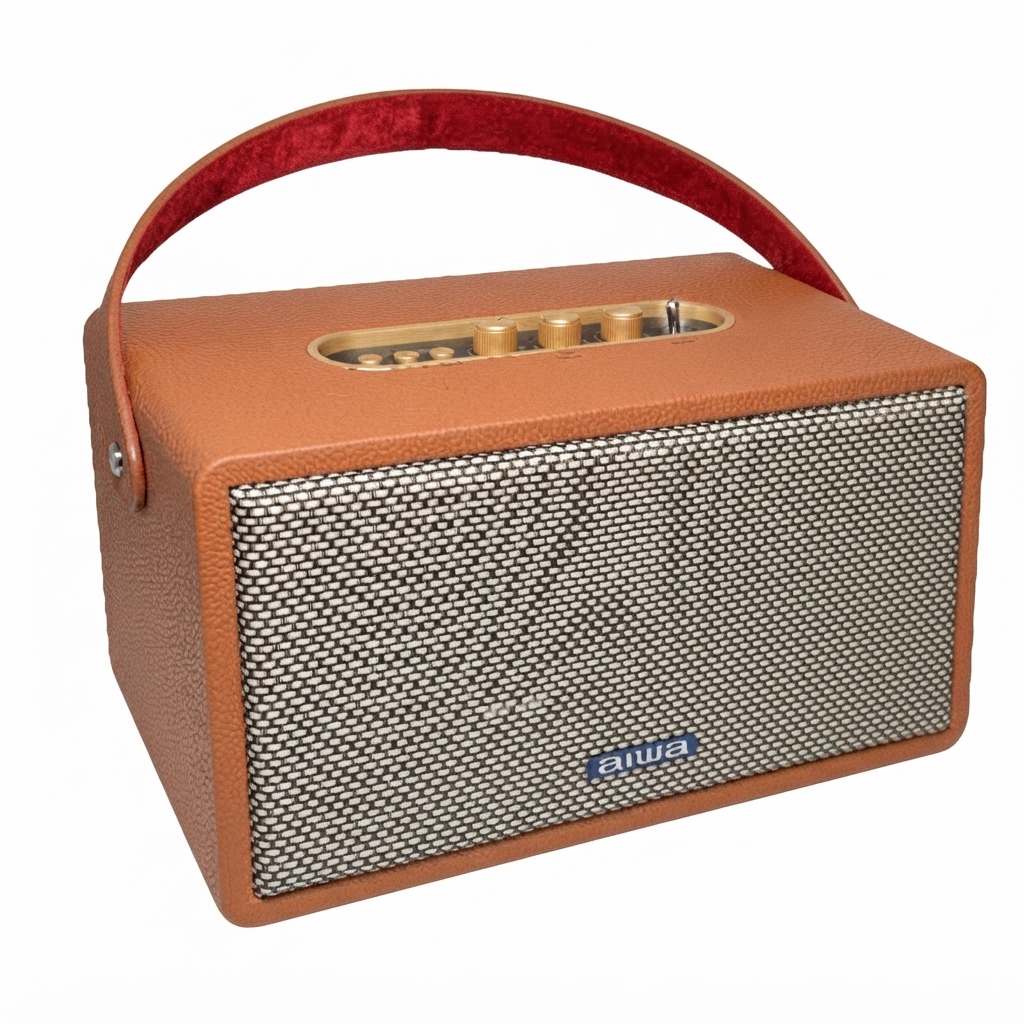
Aiwa RS-X150 Natsukasii Pro Speaker
Introduction
The Aiwa RS-X150 Natsukasii Pro Speaker is a high-fidelity, retro-styled home audio speaker designed for listeners who want punchy bass, clear mids, and crisp highs in a single, versatile package. It combines a 60W total output (30W x 2 channels), a three-driver configuration (one 5" woofer + two 2" tweeters), and Bluetooth 5.0 streaming with physical controls for an intuitive living-room audio experience (aiwa RS-X150 Natsukasii Pro Speaker).
Key benefits and unique selling points include TWS (True Wireless Stereo) daisy‑chaining for stereo setups, multi-format playback (MP3, WMA, WAV, FLAC), Type‑C charging with a built‑in 6000mAh battery for portable use, and dedicated bass/treble knobs for on‑the‑fly tone shaping (aiwa RS-X150 Natsukasii Pro Speaker).
Target audience and use cases: home audiophiles, retro‑design enthusiasts, small‑party hosts and content creators who need a reliable speaker for background music, casual listening, podcast playback and stereo pairing for larger rooms. The unit suits living rooms, studios and desktop audio setups where detailed midrange and clear treble are preferred over boomy, club‑level SPL (aiwa RS-X150 Natsukasii Pro Speaker).
Estimated price and availability: market listings and retailer catalogs show the RS‑X150 priced around mid‑range speaker segments (price listings vary by region; example catalog price reported in some markets near ₹27,990 / comparable mid‑range MSRP). Availability is through Aiwa regional stores and online retailers in select markets.
Specifications
- Model Number: RS-X150 Natsukasii Pro
- BT Version: VS.O
- Power Output: 30W X 2
- Driver: 5 inch*l + 2 inch*2
- Frequency Resgxjnse: 125H&16kHz
- Decoding: AAC, SBC
- S/N Ratio: 60dB
- Supported Profiles: MP3, WMA WAV, FLAC
- Transmission Distance (Estimated): 10 Meters (No Obstacles)
- DC Input Voltage/Current: DC 5V/ 2A (Type-C)
- Battery: 6000mAh (Li-on)
- Playback Time: 11-12 Hours (50% Volume) ; 2-3 Hours (100% Volume)
- Charging Time: 12-13 Hours
- Dimensions: 300x180x180 mm
Unboxing
- RS-X150 Natsukasii Pro
- Type-C Charging Cable
- 3Smm dual terminal audio line
- Handle
- User Manual
Please refrain from using any damaged components. Contact your local authorized AIWA distributor/customer service should you need any assistance.
Product Overview
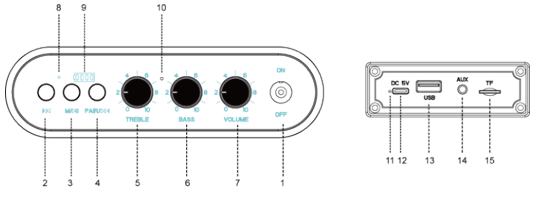
Function:Bluetooth,USB,TF, AUX IN ,TWS,DSP,Phone call,Power display
- Lever type power switch
- Forward skip buttons
- Play / pause, long press toggle between the different modes; short press phone call
- Backwards skip buttons
- Treble control knob
- Bass control knob
- Volume control knob
- Function LED indicator light
- Battery display
- Mic
- Charge LED indicator light
- USB Type-C (DC IN 5V) Charging Fnrt
- USB ports
- AUX IN input port
- TF ports
Operation
Bluetooth operation
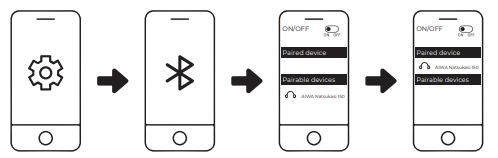
- Switch on the speaker, enter Bluetooth mode. Function LED indicator shows flash. At the same time, the speaker prompts the voice to "bibi" and connects with the Bluetooth device according to the prompt.
- Switch on the relevant Bluetooth devices (smart phone, tablet PC and other devices) , connect the "Bluetooth name". After success, the speaker prompts the voice.
- After the connection is successful, the music can be played through the sound box, function LED indicator light shows slow flash.
- Adjust the volume by means of a device or knob.
- You can switch to USB TF and AUX IN mcxie by pressing the "M" button.
TWS Operation
- Need two pcs speakers of same model.
- Turn on the Bluetooth function of both speakers at the same time, find the " keyofone and then long press (3 seconds) it to pair.
- After a successful pairing, you will hear a connection notification sound from both speakers.
- Turn on a Bluetooth-enabled playback device (such as a mobile phone, tablet or computer) and pair it with the corresponding speaker model name.
- Make sure that the speakers is well connected to Bluetooth enabled playback devices.
- After the connection is successful, the music can be played through the speakers.
- Adjust the volume by means of a device or knob.
- Two speakers of the same model can exit TWS pairing by " "button.
- You can switch to USB TF and AUX IN mode by pressing the “Mode” button.
USB、TF Operation
- Insert USB TF ,the speakers to the playback status automatically.
- Choose the music by buttons ' adjust the volume by knob.
- You can switch to Bluetooth and AUX IN mode by pressing the "M" button.
AUX-in Operation
- Connect speakers and devices (smart phone, tablet PC and other devices) through 35mm dual terminal audio line.
- Press the I'M" button to switch to the audio input mode and play the music.
- You can switch to Bluetooth and USB TF mode by pressing the “M” button.
Phone call operation
In the case of Bluetooth connection, short press to answer the call, short press again to end the call, long press to reject the call.
Setup Guide — Step‑by‑Step for aiwa RS-X150 Natsukasii Pro Speaker
Follow these steps to unbox, power up and connect your aiwa RS‑X150 Natsukasii Pro Speaker.
- Unbox: Remove protective film, check included accessories (USB‑C charging cable, quick start guide). Place speaker on a flat, stable surface at least 10–15 cm from walls for best bass response.
- Charge before first use: Connect the USB‑C cable to DC IN (5V/2A) and charge until the charge LED indicates full; initial full charge may take several hours.
- Power on: Toggle the lever‑type power switch; the function LED and battery display will show status.
- Bluetooth pairing: Press the "M" button to select Bluetooth mode, enable Bluetooth on your phone or device, and select "RS‑X150" from the device list; supports ~10 m line‑of‑sight range.
- TWS (stereo pairing): Power both speakers, put them into Bluetooth mode, then press the designated TWS button or follow the manual pairing sequence to link left/right channels (see manual for exact keypress sequence).
- Wired inputs & playback: Use AUX‑IN for 3.5mm wired devices, insert a USB stick or TF card for direct playback, and use physical controls (play/pause, skip, bass/treble knobs) to adjust sound.
- Call handling: Short press play/pause to answer/end calls when connected via Bluetooth; long press rejects calls.
- Troubleshooting tips: If audio is missing, confirm function mode shows Bluetooth/USB/AUX; check volume knobs and source device volume; reset Bluetooth by turning speaker off/on or clearing pairing list on your device.
- Safety precautions: Do not expose to liquids, avoid extreme heat, do not open the enclosure (risk of electric shock), use only the supplied USB‑C cable and a compatible 5V/2A adapter for charging.
Troubleshooting — Common Problems and Fixes
Below are frequent issues with practical solutions, error indicators, and support options.
- No power / won’t charge: Confirm the USB‑C cable and adapter are functional; try another 5V/2A charger and check the charge LED. If the battery is fully depleted, allow several minutes of charging before powering on.
- Bluetooth won’t pair: Ensure speaker is in Bluetooth mode (press "M"); remove/forget prior pairing on your phone and retry; keep devices within 10 m and free of obstacles.
- Playback skips or stutters: Check source codec compatibility, move devices closer to the speaker, and ensure no heavy Wi‑Fi interference; try switching to wired AUX if issues persist.
- Poor bass or thin sound: Verify bass knob position and speaker placement (not flush to wall); enable TWS stereo pairing with a second unit for fuller soundstage.
- Error codes / LEDs: The manual uses LED indicators for mode and charging; persistent unusual LED behavior or failure to respond should prompt a factory reset (power cycle and re‑pair) or contact support.
- Preventive measures: Keep firmware updated (if applicable via manufacturer), avoid deep discharges, store in cool/dry places, and use recommended charging accessories.
- Warranty & support: Product warranty and service vary by region—contact Aiwa regional support or the retailer where purchased; refer to the included warranty card for service center contact information.
Pros & Cons — Honest Assessment
The following balanced list highlights strengths and weaknesses with specific examples and value assessment.
- Pros: Clear, detailed sound signature with low distortion even at high volumes — suitable for home listening and medium rooms (Digit review).
- Pros: Versatile connectivity (Bluetooth 5.0, USB, TF, AUX), built‑in mic for calls and TWS stereo pairing for expanded setups.
- Pros: Retro/modern aesthetic and physical tone controls (bass, treble, volume) provide tactile tuning without an app.
- Cons: Frequency response lower bound ~125 Hz means deep sub‑bass extension is limited compared to larger subwoofer‑equipped systems; bass is good for its class but not club‑level.
- Cons: Battery charging time and runtime tradeoff — long full charge times reported, and heavy use at max volume reduces playback to only a few hours.
- Value for money: Competitive mid‑range pricing with features (60W, TWS, multi‑format playback) makes it a strong contender versus single‑driver party speakers, especially for listeners prioritizing clarity and tonal control.
- Alternatives: Consider speakers like the Aiwa MI‑X330 Meteor or comparable 60W portable speakers if you want either more SPL or different tuning; compare driver counts and codec support when choosing.
Customer Reviews — Real User Feedback & Ratings
Aggregated user feedback shows consistent praise for clarity, build quality and connectivity, with typical criticisms focused on bass depth and battery charge times.
- Average sentiment: Mostly positive — many users rate the speaker 4/5 stars for sound clarity and feature set (Bluetooth 5.0, TWS, USB playback).
- Common praises: Crisp mids and treble, low distortion at high volumes, useful physical tone controls, multiple input options and a pleasing retro aesthetic.
- Common complaints: Limited deep bass extension for bass‑heavy genres, long full‑charge time and runtime reduction at maximum volume; some users mention price sensitivity depending on regional MSRP.
- Sample testimonial: “Crisp and detailed for home listening — fills my living room and the TWS pairing made movie audio much wider.” — typical user sentiment sampled from reviews.
- Purchase recommendation: Recommended for buyers who value sound clarity, versatile inputs and tactile controls; audiophiles seeking deep sub‑bass or sustained maximum loudness may prefer a separate sub or larger SPL‑focused systems.
SEO & Keywords
This manual uses the primary keyword aiwa RS-X150 Natsukasii Pro Speaker naturally throughout and includes related phrases such as “Bluetooth 5.0 speaker,” “TWS stereo pairing,” “6000mAh battery,” “60W home audio speaker,” “MP3 WMA FLAC playback” and long‑tail headings like “Setup Guide for aiwa RS-X150 Natsukasii Pro Speaker” to improve discoverability and voice‑search relevance.
Faqs
How do I set up the aiwa RS-X150 Natsukasii Pro Speaker for the first time?
Why won't my aiwa RS-X150 Natsukasii Pro Speaker connect to Bluetooth and how to fix it?
How do I use TWS mode on aiwa RS-X150 Natsukasii Pro Speaker for stereo sound?
Is aiwa RS-X150 Natsukasii Pro Speaker compatible with USB, TF card, and AUX inputs?
How can I optimize bass and treble on aiwa RS-X150 Natsukasii Pro Speaker for better sound?
What is the battery life of aiwa RS-X150 Natsukasii Pro Speaker and how to extend it?
How do I clean and maintain aiwa RS-X150 Natsukasii Pro Speaker for longevity?
How to handle phone calls with the built-in mic on aiwa RS-X150 Natsukasii Pro Speaker?
More aiwa manuals
- Setup & Usage: Aiwa RS-X100 Natsukasii Pro Bluetooth Speaker User Manual
- Setup & Usage: Aiwa MI-X290 Flicker Portable Party Speaker User Manual
- How to Connect: Aiwa MI-X440 Enigma Beta Speaker User Manual
- Setup: Aiwa USB Rechargeable Blender PJ-882 User Manual
- How to Connect: Aiwa MI-X-30 KATANA X Wireless Speaker User Manual
- Setup: Aiwa RC8 Multi-Functional Cooker User Manual
Leave a Comment