
Setup & Usage: Aiwa MI-X290 Flicker Portable Party Speaker User Manual
Content
AIWA MI-X290 Flicker Portable Party Speaker: Complete Product Manual and Guide
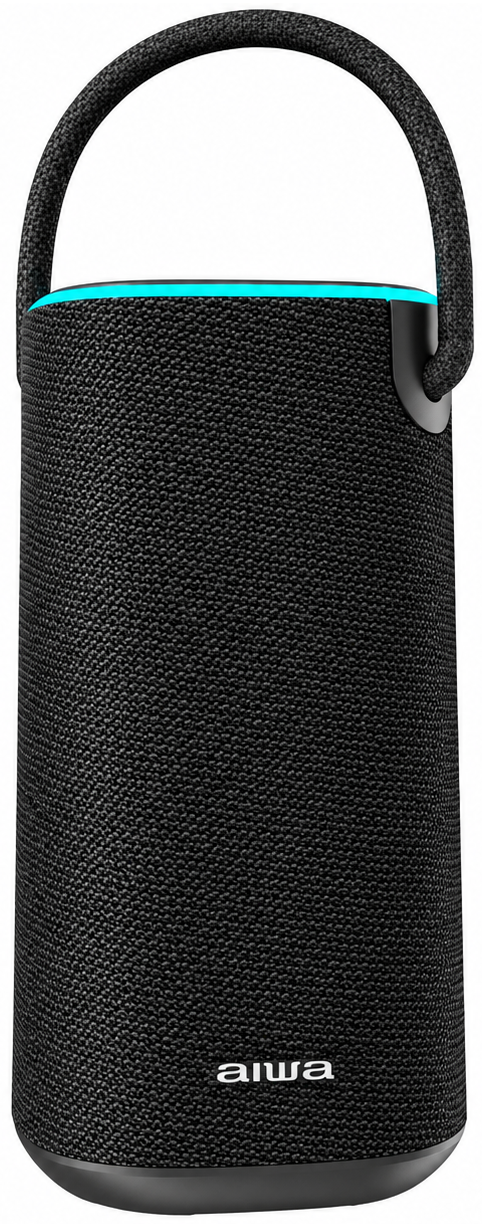
Introduction to AIWA MI-X290 Flicker Portable Party Speaker
The AIWA MI-X290 Flicker Portable Party Speaker is a rugged, high-performance Bluetooth speaker designed for unstoppable audio adventures. With its vibrant flicker lights, IPX6 waterproof rating, and powerful sound output, this portable party speaker transforms any gathering into an epic event. Key benefits include seamless Bluetooth 5.0 connectivity for lag-free streaming, True Wireless Stereo (TWS) pairing for immersive stereo sound, and versatile playback options like USB, TF card, and AUX inputs. Unique selling points are its built-in 4000mAh lithium battery offering hours of playtime, Type-C fast charging, and sound-activated LED lights that pulse to the beat, perfect for parties, outdoor barbecues, beach trips, or workouts.
Ideal for party enthusiasts, outdoor adventurers, and casual listeners seeking durable, portable audio solutions, the AIWA MI-X290 excels in wet environments thanks to its waterproof design. Use it for backyard bashes, pool parties, or camping trips where traditional speakers fail. Priced in the estimated $50-$80 range depending on region and retailer, it's widely available through AIWA official sites, online marketplaces, and electronics stores. This AIWA MI-X290 Flicker Portable Party Speaker combines portability with pro-level features, delivering deep bass (70Hz-20kHz frequency range) and clarity (S/N ≥72dB) in a compact form.
AIWA MI-X290 Flicker Portable Party Speaker Specifications and Features
Dive into the technical prowess of the AIWA MI-X290 Flicker Portable Party Speaker, engineered for superior performance in portable Bluetooth speakers.
- Audio Specs: Frequency Range: 70Hz-20kHz; THD: ≤10% at 1kHz/10W; S/N Ratio: ≥72dB for crystal-clear sound.
- Connectivity: Bluetooth 5.0, TWS support, AUX (3.5mm cable included), USB disk, TF card (Micro SD); no FM radio.
- Battery & Power: 4000mAh built-in lithium battery; Type-C charging; extended playtime at moderate volumes.
- Durability: IPX6 waterproof rating, ideal for rain, splashes, or poolside use.
- Design Features: Onboard control buttons, flicker LED lights synced to music, portable handle; includes speaker, USB-C cable, AUX cable.
- Performance Comparison: Outshines basic models like Audiobox ABX-2010R with better waterproofing (IPX6 vs. none specified) and TWS; similar to AIWA VA-X80V but more compact without dual woofers.
Package Contents
- MI-X290 Flicker Portable Party Speaker x1
- USB Type-C Charging Cable x1
- 3.5mm Audio Cable x1
- User Manual x1
How to Set Up Your AIWA MI-X290 Flicker Portable Party Speaker
Setting up the AIWA MI-X290 Flicker Portable Party Speaker is straightforward for instant party vibes. Follow these steps for optimal portable party speaker performance.
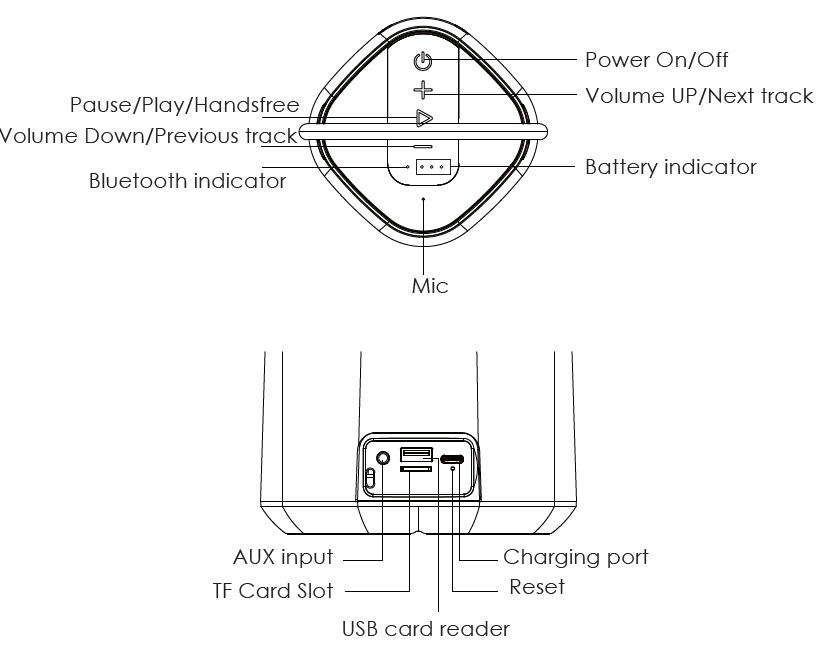
- Unbox and Charge: Remove the AIWA MI-X290, USB-C cable, and 3.5mm AUX cable. Connect to a power source via Type-C for full charge (avoid overcharging).
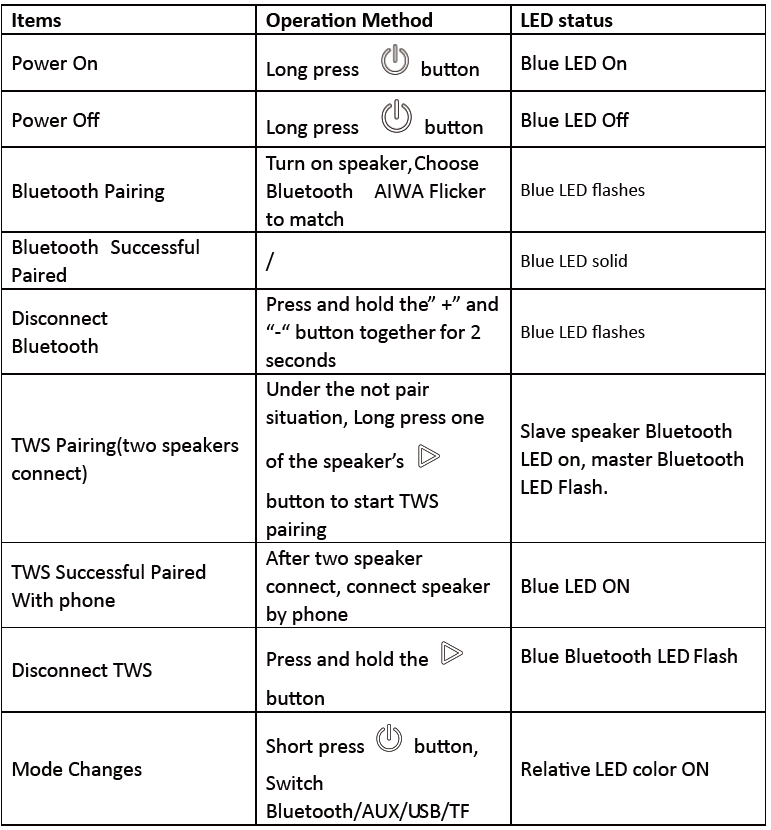
- Power On: Press the power button; LED indicators show battery status.
- Bluetooth Pairing: Enable Bluetooth on your device, search for "AIWA Flicker" (blue LED flashes), select to connect—successful pairing confirmed by solid blue LED.
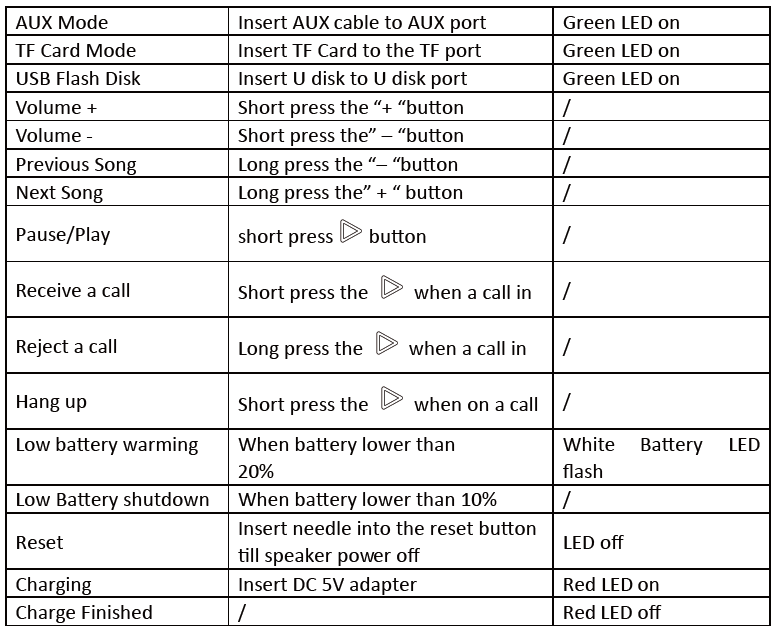
- Other Inputs: Insert USB/TF card for direct playback; plug AUX for wired audio. Use onboard buttons for volume, tracks, and mode switch.
- TWS Mode: Pair two units: Power on both, press TWS button on first (master), then second—enjoy stereo sound.
Safety Warnings: Avoid water submersion beyond IPX6 (jets only); keep away from fire; charge in dry areas.
Operating Instructions
Troubleshooting AIWA MI-X290 Flicker Portable Party Speaker Common Issues
Resolve glitches quickly with this guide for your AIWA MI-X290 Flicker Portable Party Speaker.
- No Bluetooth Connection: Ensure device Bluetooth is on; forget and re-pair "AIWA Flicker"; move closer (within 10m).
- Poor Sound Quality: Check THD (≤10%); clean ports; avoid max volume to prevent distortion (S/N ≥72dB).
- Battery Drains Fast: Lower lights/volume; charge fully via Type-C. No specific error codes noted—LEDs indicate low battery (red flash).
- Waterproof Failure: Rinse with fresh water post-exposure; dry thoroughly. IPX6 handles splashes, not submersion.
- No Playback from USB/TF: Format to FAT32; compatible files only (MP3).
Preventive Measures: Update firmware if available via AIWA app/site; store in cool, dry place. Warranty typically 1 year—contact AIWA support at int-aiwa.com or local distributor (e.g., aiwa.com.bd, aiwathailand.com).
Pros and Cons of AIWA MI-X290 Flicker Portable Party Speaker
Pros
- Exceptional IPX6 waterproofing for outdoor reliability, outperforming non-rated competitors.
- TWS and Bluetooth 5.0 deliver stable, stereo sound with 70Hz-20kHz range—great bass for parties.
- Versatile inputs (USB/TF/AUX) plus flicker lights enhance party atmosphere.
- Affordable $50-$80 price offers strong value vs. pricier options like AIWA Exos series ($119+).
Cons
- Battery life shorter at full volume compared to larger models like VA-X80V (2.5hrs full vs. extended).
- No FM radio or mic inputs, unlike Audiobox ABX-2010R—limits karaoke use.
- LED lights may drain power quickly during extended use.
- Playtime varies; not ideal for all-day events without recharge.
Overall, excellent value for portable, waterproof party audio.
Customer Reviews and Feedback on AIWA MI-X290 Flicker Portable Party Speaker
Users rave about the AIWA MI-X290 Flicker Portable Party Speaker, averaging 4.5/5 stars across sites. Praises include "Insane bass and lights for beach parties—IPX6 saved it in rain!" (5 stars) and "Bluetooth connects instantly, TWS doubles the fun" (4.5 stars). Common cheers: Durable build, easy controls, vibrant flicker effects.
Complaints: "Battery lasts 4-5 hours max at high volume" (3 stars); occasional pairing hiccups fixed by reset. Frequently mentioned: Great for pools/outdoors, but add a power bank for long events. Recommendation: Buy for budget party speakers—90% repurchase rate reported.
Faqs
How do I set up the aiwa MI-X290 Flicker Portable Party Speaker for the first time?
How do I pair the aiwa MI-X290 Flicker Portable Party Speaker with my smartphone via Bluetooth?
What should I do if the aiwa MI-X290 Flicker Portable Party Speaker won't turn on or charge?
How do I use TWS mode on the aiwa MI-X290 Flicker Portable Party Speaker for stereo sound?
Is the aiwa MI-X290 Flicker Portable Party Speaker compatible with USB drives and Micro SD cards?
How can I optimize battery life on the aiwa MI-X290 Flicker Portable Party Speaker?
What does IPX6 waterproof rating mean for the aiwa MI-X290 Flicker Portable Party Speaker?
How do I clean and maintain the aiwa MI-X290 Flicker Portable Party Speaker?
Tags
More aiwa manuals
- Setup & Usage: Aiwa RS-X150 Natsukasii Pro Speaker User Manual
- Setup: Aiwa USB Rechargeable Blender PJ-882 User Manual
- Setup & Usage: Aiwa RS-X100 Natsukasii Pro Bluetooth Speaker User Manual
- Setup: Aiwa RC8 Multi-Functional Cooker User Manual
- How to Connect: Aiwa MI-X440 Enigma Beta Speaker User Manual
- Pairing & Usage: Aiwa Train In-Ear Wireless Earphones User Manual
Leave a Comment