
Pairing & Usage: Aiwa Train In-Ear Wireless Earphones User Manual
Content
AIWA Train In-Ear Wireless Earphones
Introduction
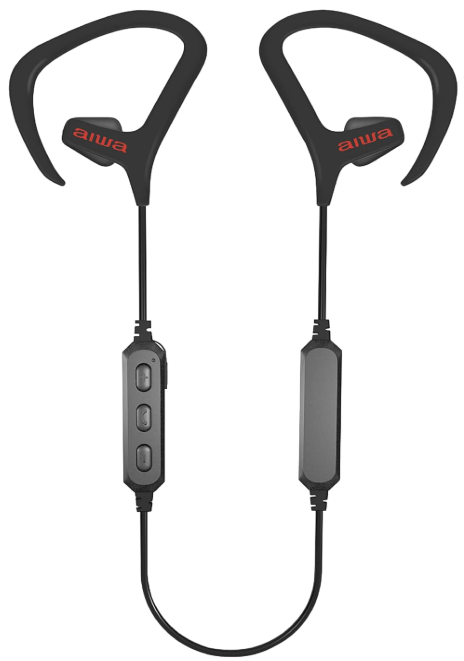
The AIWA Train In-Ear Wireless Earphones are designed for those seeking a reliable and comfortable listening experience, particularly during active lifestyles. These earphones offer up to 10 hours of playtime, IPX4 sweat and water resistance, and a secure fit with wing tips to ensure they stay in place during vigorous workouts. With in-line controls built into the earbuds, users can easily manage music playback and take calls without needing to reach for their device. The earphones are available in a range of colors, including black, and are priced attractively at around $14.99, making them an excellent choice for those on a budget.
Ideal for fitness enthusiasts and commuters alike, these earphones provide a seamless listening experience with their Bluetooth 5.0 connectivity. Whether you're running, cycling, or simply enjoying music on the go, the AIWA Train In-Ear Wireless Earphones are a great companion for your active lifestyle.
WHAT’S INCLUDED

Specifications
Below are the key specifications of the AIWA Train In-Ear Wireless Earphones:
- Playtime: Up to 10 hours per charge
- Water Resistance: IPX4 for sweat and water protection
- Fit: Secure around the ear fit with wing tips
- Controls: In-line controls for easy music and call management
- Connectivity: Bluetooth 5.0 for reliable wireless connection
- Color Options: Available in black
Compared to similar products like the AIWA Train Sport True Wireless Earphones, these in-ear earphones offer a longer playtime and a more secure fit, making them ideal for extended use during workouts.
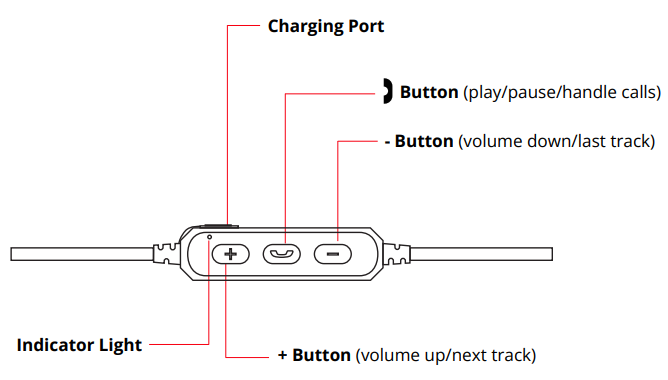
A CLOSER LOOK
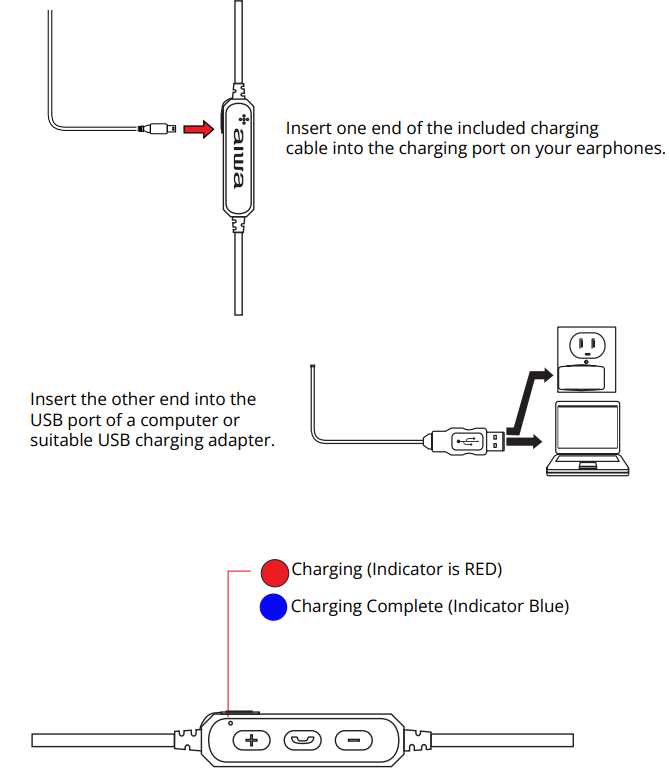
CHARGING
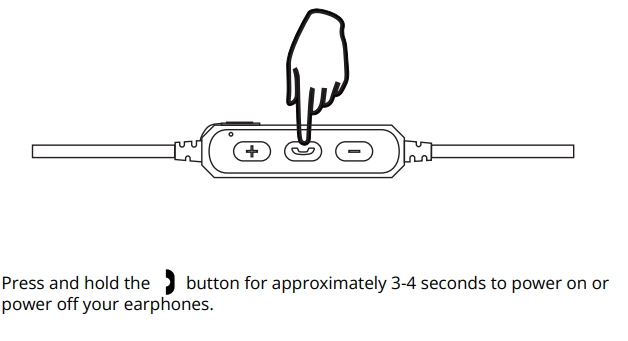
POWERING ON/OFF
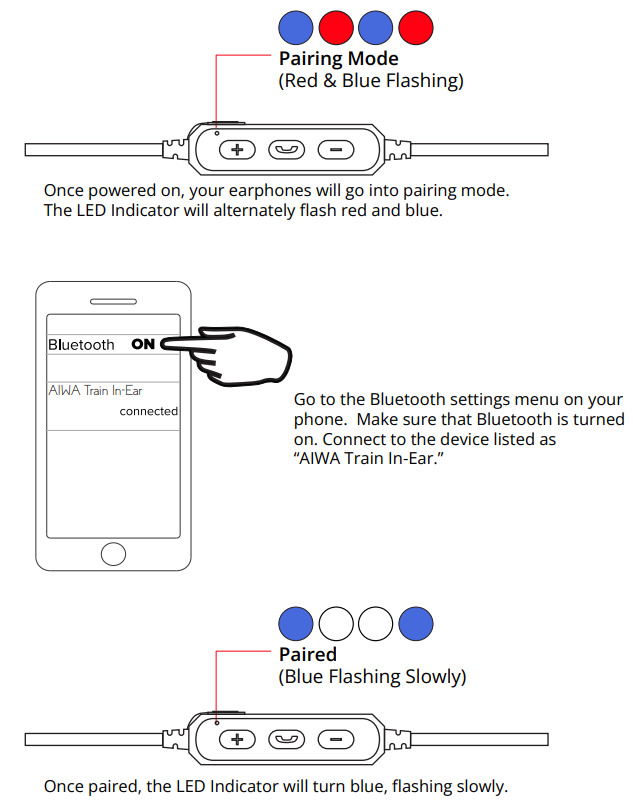
BLUETOOTH PAIRING
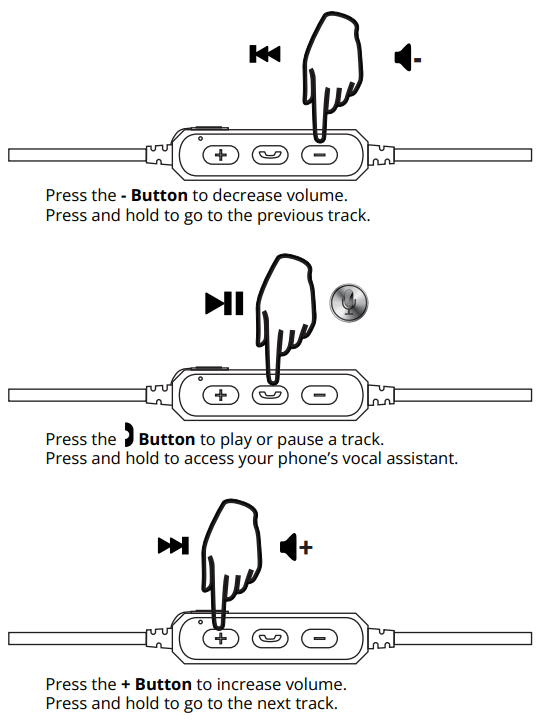
LISTENING TO MUSIC
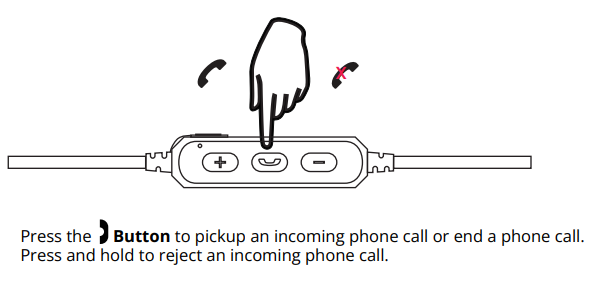
HANDLING CALLS
SAFETY PRECAUTIONS
When using your earphones, basic safety precautions should always be followed,, including:
- READ ALL INSTRUCTIONS BEFORE USING YOUR EARPHONES.
- Do not use the product near water. Do not put on wet surfaces.
- Only clean using a clean cloth.
- Do not allow children to play with this product. This product contains small pieces that can be a choking hazard. Parental supervision is advised.
- Do not expose this product to excessive heat or fire.
- Do not expose this product to temperatures above 100°F. Keep out of direct sunlight.
- Do not attempt to repair this product yourself. Contact a qualified service center if the product is in need of service.
- Do not drop, crush, or expose this product to excessive physical force.
- This product is not intended for commercial use.
- When charging, keep all charging cables well ventilated. Do not keep your charging cable in contact with flammable materials such as bedding, linens, or synthetic fabrics.
Maintenance and Care
- Use a soft cloth or paper towel to clean your earphones. Never use any harsh chemicals or detergents for cleaning. Make sure your earphones are dry before charging.
- When your earphones are not in use, they should be stored in a cool, dry place.
- Never tug or yank on a cable while it is connected to your earphones. Connect and disconnect cables as carefully as possible.
- Never expose your earphones to high temperatures, extreme cold.
- Please recycle or dispose of your earphones properly based on the laws and rules of your municipality. Contact local recycling facilities and/or the manufacturer of of your earphones for further information.
Troubleshooting
Here are common issues and solutions for the AIWA Train In-Ear Wireless Earphones:
- Earbuds Not Pairing:
- Ensure Bluetooth is enabled on your device.
- Restart both earbuds and the device.
- Forget the device in your phone's Bluetooth settings and re-pair.
- No Sound or Low Volume:
- Check volume levels on both earbuds and the device.
- Ensure proper pairing and connection.
For warranty and support, please refer to the documentation included with your purchase or visit the official Aiwa website. Keep your proof of purchase for any warranty claims.
WARRANTY
This warranty covers the original consumer purchaser only and is not transferable.
This warranty covers products that fail to function properly UNDER NORMAL USAGE, due to defects in material or workmanship. Your product will be repaired or replaced at no charge for parts or labor for a period of one year.
What Is Not Covered By Warranty
Damages or malfunctions not resulting from defects in material or workmanship and damages or malfunctions from other than normal use, including but not limited to, repair by unauthorized parties, tampering, modification,, or accident.
To Obtain Warranty Service and Troubleshooting Information:
Call (877) 397-8200 or visit our website at www.aiwa.co.
To receive Warranty service along with the name and address of an authorized product service center, the original consumer purchaser must contact us for problem determination and service procedures. Proof of purchase in the form of a bill of sale or receipted invoice, evidencing that the product is within the applicable Warranty period(s), MUST be presented to obtain the requested service. It is your responsibility to properly package and send any defective products along with a dated copy of proof of purchase, a written explanation of the problem, and a valid return address of the authorized service center at your expense. Do not include any other items or accessories with the defective product. Any products received by the authorized service center that are not covered by warranty will be returned unrepaired.
Pros & Cons
Pros
- Long Playtime: Enjoy up to 10 hours of uninterrupted music.
- Sweat and Water Resistance: IPX4 rating ensures durability during workouts.
- Value for Money: Affordable price point with quality features.
Cons
- Fit Issues: Some users may find the wing tips uncomfortable.
- No Noise Cancellation: Lack of active noise cancellation may be a drawback for some users.
Customer Reviews
Users generally praise the AIWA Train In-Ear Wireless Earphones for their durability and long battery life. Common praises include the secure fit and ease of use during workouts. However, some users mention issues with the fit and lack of noise cancellation. Overall, these earphones are rated highly for their value and performance.
For those considering purchasing, these earphones are a great option for fitness enthusiasts and commuters looking for a reliable, affordable wireless audio solution.
Faqs
How do I pair aiwa Train In-Ear Wireless Earphones with my smartphone for the first time?
What should I do if my aiwa Train In-Ear Wireless Earphones won’t charge or the indicator light doesn’t change?
How do I control music playback and calls using the in-line controls on aiwa Train In-Ear Wireless Earphones?
Are aiwa Train In-Ear Wireless Earphones compatible with both Android and iOS devices?
What is the battery life of aiwa Train In-Ear Wireless Earphones on a single charge?
How do I clean and maintain my aiwa Train In-Ear Wireless Earphones to ensure longevity?
Why is there no sound or very low volume coming from my aiwa Train In-Ear Wireless Earphones?
Can I use aiwa Train In-Ear Wireless Earphones for sports and outdoor activities?
Tags
More aiwa manuals
- Setup: Aiwa RC8 Multi-Functional Cooker User Manual
- Setup & Pairing: Aiwa Exos-3 Wireless Speaker User Manual
- Setup: Aiwa USB Rechargeable Blender PJ-882 User Manual
- Setup & Pairing: Aiwa Exos Go Wireless Speaker User Manual
- Setup & Usage: Aiwa MI-X290 Flicker Portable Party Speaker User Manual
- Setup: Aiwa Portable CD Player AI7003 User Manual
Leave a Comment