
Setup & Pairing: Aiwa Exos Go Wireless Speaker User Manual
Content
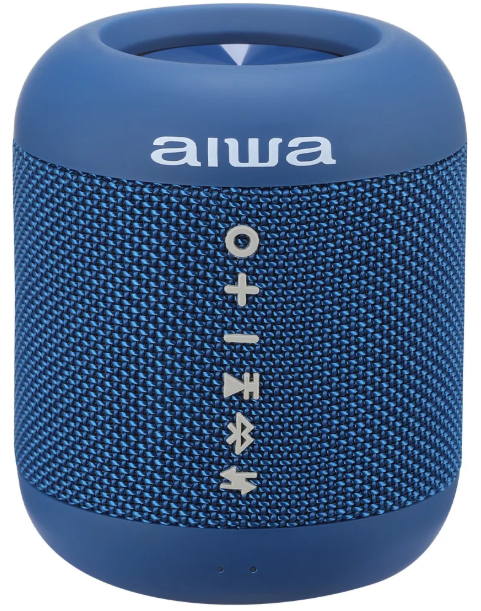
Aiwa Exos Go Wireless Speaker
Introduction
The aiwa Exos Go Wireless Speaker is a compact, powerful Bluetooth speaker designed to deliver immersive, omnidirectional sound whether you're at home or on the move. Featuring an IPX5 waterproof rating, it is perfectly suited for outdoor adventures, pool parties, or simply enjoying music without worry about splashes or light rain. Its sleek design encompasses a robust 40mm speaker unit, providing clear audio output with a signal-to-noise ratio of 80dB for crisp sound quality.
With up to 6 hours of continuous playback powered by a 1500mAh rechargeable battery, the Exos Go balances portability with endurance. The speaker supports multiple audio formats,,s including MP3, WMA, and WAV, ensuring compatibility with a wide range of audio files. Fast charging via USB-C lets you get back to your music quicker, while the True Wireless Stereo (TWS) functionality allows pairing two Exos Go units for an enhanced stereo sound experience. Weighing just 370 grams and sized at 85x85x103mm, it’s easy to carry and perfect for users who demand quality sound on the go.
Targeted at music lovers, outdoor enthusiasts, and casual listeners seeking an affordable yet reliable wireless speaker, the aiwa Exos Go offers excellent value. It is available in multiple colors, including Black, Navy, and Green Marble, with an estimated price range of around $20 to $40, making it a competitive choice for budget-conscious consumers. Whether you're camping, hosting a backyard gathering, or just enjoying your favorite playlist, this speaker fits seamlessly into any lifestyle.
SPECIFICATIONS
- BLUETOOTH VERSION: 5.0
- WORKING DISTANCE: UP TO 10 METERS
- CHANNEL: SINGLE
- PLAY TIME: UP TO 6 HOURS
- NET WEIGHT: 370g
- BATTERY: 1500mAH Lithium Ion Battery
- SIZE:85 x 85 x 103mm
- CHARGING VOLTAGE: 5V DC
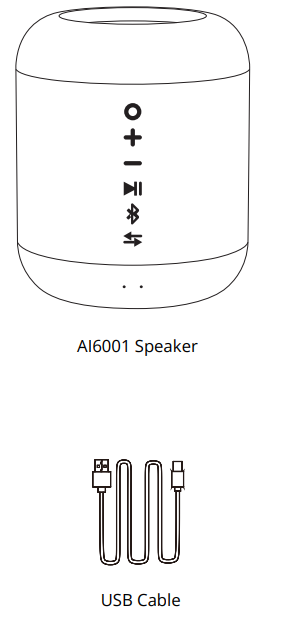
WHAT’S INCLUDED
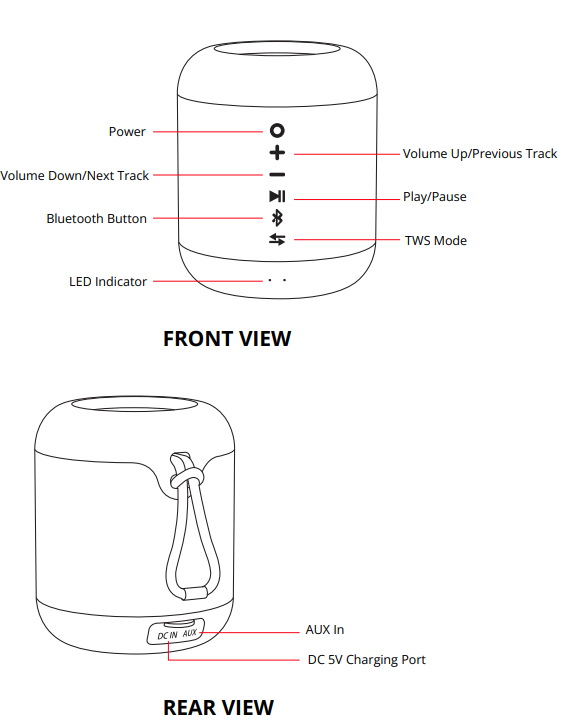
A CLOSER LOOK
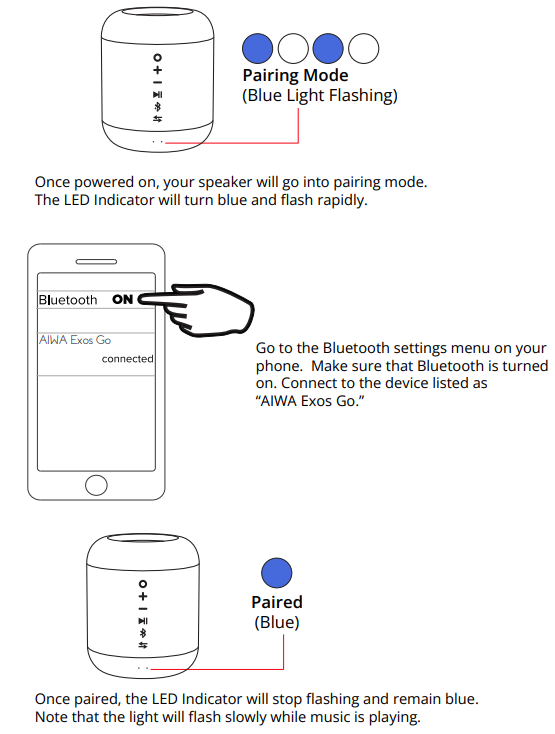
BLUETOOTH PAIRING
LISTENING TO MUSIC
- Press the + button to skip to the next track in a playlist. Press and hold the + button to increase volume.
- Press the - button to go back to the last track in a playlist. Press and hold the - button to decrease volume.
- Press the play/pause button to play or pause a track.
- If your connection is slow, press the Bluetooth button twice to refresh the connection. You can also try powering off the speaker and then powering it on again.


WARRANTY
- This warranty covers the original consumer purchaser only and is not transferable.
- This warranty covers products that fail to function properly UNDER NORMAL USAGE, due to defects in material or workmanship. Your product will be repaired or replaced at no charge for parts or labor for a period of one year.
What Is Not Covered By Warranty
- Damages or malfunctions not resulting from defects in material or craftsmanship and damages or malfunctions from other than normal use, including but not limited to, repair by unauthorized parties, tampering, modification,, or accident.
- To Obtain Warranty Service and Troubleshooting Information:
- Call (877) 397-8200 or visit our website
- To receive Warranty service along with the name and address of an authorized product service center, the original consumer purchaser must contact us for problem determination and service procedures. Proof of purchase in the form of a bill of sale or receipted invoice, evidencing that the product is within the applicable Warranty period(s), MUST be presented to obtain the requested service. It is your responsibility to properly package and send any defective products along with a dated copy of proof of purchase, a written explanation of the problem, and a valid return address of the authorized service center at your expense. Do not include any other items or accessories with the defective product. Any products received by the authorized service center that are not covered by warranty will be returned unrepaired.
Troubleshooting Common Issues with the Aiwa Exos Go Wireless Speaker
If you experience connectivity issues, first ensure the device is within the 10-meter Bluetooth range and that the speaker’s blue light indicator blinks rapidly, indicating it is ready to pair. If pairing fails, try turning the speaker off and on again or pressing the Bluetooth button twice to reset the connection. For TWS pairing, ensure both speakers are powered on and that you pair the speakers together before connecting your phone.
In case of audio distortion or low volume, check the speaker’s battery level and recharge if necessary. The orange light indicates charging status: solid means charging, off means fully charged. Avoid charging in temperatures outside 5°C to 40°C to extend battery life and prevent damage. If the speaker does not turn on, verify the battery status and try a full charge with the USB-C cable provided.
Preventive measures include regular charging cycles, keeping the speaker clean and dry, and avoiding exposure to extreme temperatures. The Aiwa Exos Go comes with a warranty covering manufacturing. For defects — for SupAiwaa, contact Aiwaaaa customer service via their official website or the point of purchase. For detailed help, consult the included user manual. Visit Aiwa’s online support page.
Pros & Cons of tAiwaiwa Exos Go Wireless. The compact and lightweight design makes it highly portable.
- IPX5 waterproof rating allows safe use near water.
- Omnidirectional sound delivers consistent audio from any angle.
- True WiWireless features pair two speakers for stereo sound.
- Affordable price point provides excellent value for casual users.
- Fast USB-C charging reduces downtime between uses.
- Cons:
- Battery life of approximately 6 hours may be short for longer outings.
- Single-channel audio may not satisfy audiophiles seeking deep bass.
- Limited Bluetooth range of 10 meters compared to some competitors.
- Plastic construction may feel less durable than premium metal alternatives.
Compared to similar budget wireless AiwAiwakers, the aiwa Exos Go balances sound quality and ruggedness but falls slightly behind higher-end models like the Ultimate Ears Wonderboom in battery longevity and bass depth. Nonetheless, for its price, it offers a solid feature set for everyday listening and outdoor use.
Customer Reviews and Feedback on the Aiwa Exos Go Wireless Speaker
Users commonly praise the AIWA Exos Go Wireless Speaker for its clear sound quality and waterproof design, highlighting its convenience for outdoor use. Positive reviews frequently mention the ease of pairing and the fun factor of linking two speakers to create stereo sound. Many appreciate the fast USB-C charging and the speaker’s compact size, making it ideal for travel.
On the downside, some customers report battery life shorter than expected, especially at higher volumes, and occasional difficulty with Bluetooth connectivity that is typically resolved by resetting the device. Star ratings average around 4 out of 5, reflecting overall customer satisfaction. Buyers recommend the speaker as a budget-friendly option for casual listening rather than a premium audiophile device.
More aiwa manuals
- Setup & Pairing: Aiwa Exos-3 Wireless Speaker User Manual
- Setup: Aiwa Portable CD Player AI7003 User Manual
- Pairing & Usage: Aiwa Train In-Ear Wireless Earphones User Manual
- Setup & Pairing: Aiwa Exos-5 Wireless Speaker User Manual
- Setup: Aiwa RC8 Multi-Functional Cooker User Manual
- Setup: Aiwa Prodigy Clear Plus Earphones User Manual
Leave a Comment