
Setup & Pairing: Aiwa Exos-5 Wireless Speaker User Manual
Content
Meet the AIWA Exos-5 Wireless Speaker
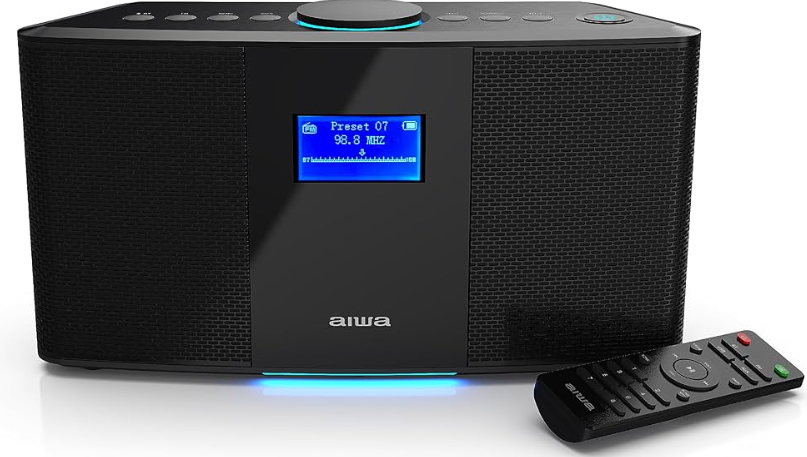
Introduction
Experience the perfect blend of classic audio heritage and modern wireless convenience with the AIWA Exos-5 Wireless Speaker. Designed for music lovers who demand both style and substance, the Exos-5 delivers powerful, room-filling sound with a robust 20W RMS (40W peak) output—ideal for audiophiles and casual listeners alike. Its sleek, retro-inspired design, available in black, marble, green, and rose gold, complements any home décor while offering a feature set that goes far beyond a typical Bluetooth speaker.
What sets the AIWA Exos-5 apart is its versatility. Enjoy seamless Bluetooth streaming from smartphones, tablets, or laptops, or connect via USB, AUX, or even analog FM radio for maximum flexibility. The built-in LCD shows the time and supports up to four alarms, making it a practical addition to your bedside or kitchen counter. With up to 6 hours of battery life and the option to run on wall power, your music never has to stop, whether you’re hosting a party, relaxing at home, or enjoying a picnic outdoors.
The Exos-5 is especially appealing to users who want a single device for music, radio, alarms, and even as a bedside clock. Its intuitive controls, remote access, and multiple playback options make it accessible for all ages and tech skill levels. You can expect to find the AIWA Exos-5 Wireless Speaker at major retailers like Walmart and Target, with an estimated price range in the mid-tier segment for premium home audio, offering excellent value for its feature set and sound performance.
WHAT'S INCLUDED
- Al6008 Exos Wireless speaker
- USB-C Power Adapter
- FM Antenna Cable
- 3. SMMM AUX Cable
- Remote Control
- 2 AAA Batteries
- User Manual
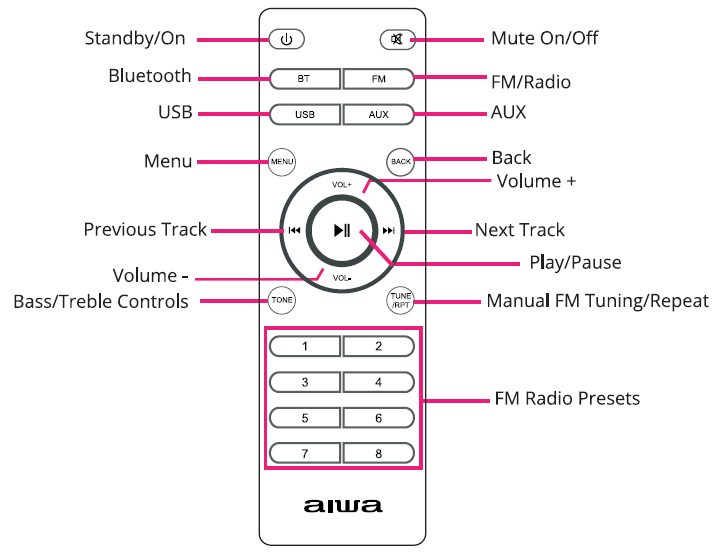
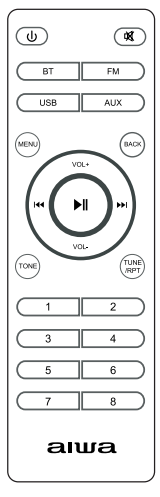
YOUR REMOTE
BUTTON FUNCTIONS
Inserting Batteries
- Your remote control takes 2 AAA batteries ( {included).
- Open the battery compartment on the rear of your remote.
- Insert batteries with the correct polarity (+,-).
- Close the battery compartment.
BATTERY WARNING:
- Do not mix old and new batteries.
- Do not mix alkaline, standard (carbon-zinc), or rechargeable (nickel-cadmium) batteries.
- Batteries are not to be inserted with the wrong polarity.
- Exhausted batteries are to be removed.
- The supply terminals are not to be short-circuited.
YOUR SPEAKER
BUTTON FUNCTIONS AND CONNECTIONS
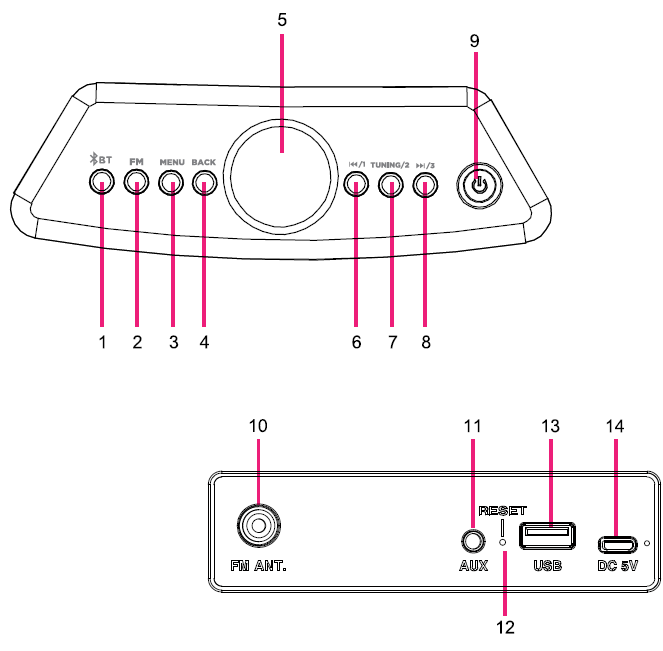
- Bluetooth
- FM/Radio
- Menu
- Back
- Play/Pause VolumeKnob
- FM Preset 1 /Previous
- FM Preset 2/Manual Tuning Mode
- FM Preset 3/Next
- Standby/On
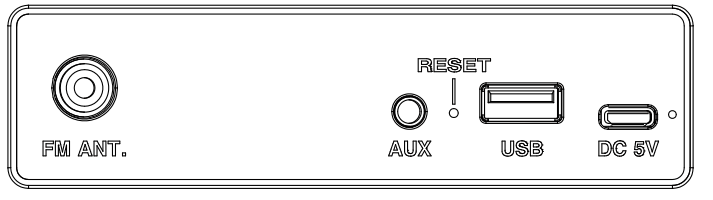
- FM Antenna (connect the included antenna)
- AUXIN
- Reset Button
- USB Port
- Power input
POWER
- Insert the included USB-C power adapter into the power input located at the back of your speaker.
- Plug the other end of the power adapter into a suitable power outlet.
USING YOUR REMOTE
- Press the Standby/On button to go between Standby mode and On.
- Press the Mute button to mute sound/music.
- Press the AUX, Bluetooth, ,, and USB buttons to choose mode.
- Press the MENU button to enter the menu.
- Press the BACK button to return to the previous menu.
- Press the ►II button to pause or play in Bluetooth or USB playback mode.
- Press the VOL- button to lower the volume.
- Press the VOL+ button to raise the volume.
- Press the
 button to go to the next song.
 - Press the
 button to go to the previous song.
 - Press the TONE button to adjust the Bass & Treble.
- Press the TUNE/RPT button to enter analog style manual tuning in FM mode or to repeat the track in USB mode.
- Press the 1-8 buttons to choose the corresponding radio preset.
QUICK GUIDE TO CONTROLS
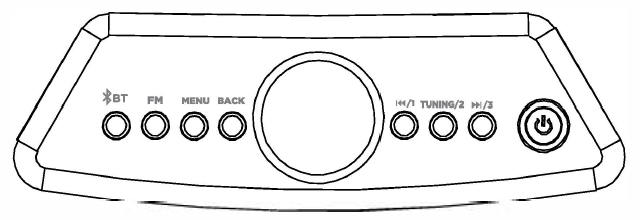
- Press the Bluetooth button to turn on Bluetooth mode.
- Press the FM button to turn on FM mode.
- Press the MENU button to enter the menu.
- Press the BACK button to return to the previous menu.
- Press the Play/Pause Volume knob to:
- Pause or play the track in Bluetooth or USB mode. Mute sound on AUX or FM mode. Confirm in menus.
- Rotate the PlaPause Volume Knob to control volume.
- Press the 1 />I, 21 ,, Tune or 3/> I buttons to select the first 3 presets in FM mode.
- Press and hold the 1 /> I or 21 Tune buttons to scan backwards/forwards in FM Mode.
- Press and hold the 21 Tune button to enter analog-style manual tuning in FM mode.
- Press the 1 /> I or 3/> I buttons to skip back/forwards in Bluetooth or USB mode.
CARE AND MAINTENANCE
- Do not subject the unit to excessive force, shock, dust,, or extreme temperatures.
- To prevent fire or shock hazard, disconnect your unit from the power source when cleaning.
- Do not tamper with the internal components of the unit.
- Clean your unit with a dry cloth. Solvents or detergents should never be used.
- Avoid leaving your unit in direct sunlight or in hothumidid,,d or dusty places.
- Keep your unit away from heating appliances and sources of electrical noise,e, such as fluorescent lamps or motors.
CAUTION: Never allow any water or other liquids to get inside the unit while cleaning.
Technical Specifications and Key Features
- Audio Output: 20W RMS, 40W peak power for dynamic, Hi-Fi sound
- Playback Options: Bluetooth, USB, AUX, FM radio with analog-style tuning and presets
- Battery Life: Up to 6 hours on a full charge; USB-C rechargeable
- Display: Built-in LCD with time and four programmable alarms
- Connectivity: Bluetooth (wireless), USB-C (charging), 3.5mm AUX, FM antenna input
- Controls: Physical dials and buttons for volume, mode, tuning; included IR remote for convenience
- Design: Classic tabletop form factor with a built-in handle for portability
- Weight: 2.49 kg (5.5 lbs)
- Accessories: Remote control, AUX cable, FM antenna, USB-C power adapter, user manual
The AIWA Exos-5 Wireless Speaker stands out among Bluetooth tabletop radios for its combination of strong audio performance, flexible connectivity, and practical features like alarms and a clear display. Compared to competitors, it offers a more premium build, longer battery life, and a wider range of playback options, making it a versatile choice for home use.
WARRANTY
- This warranty covers the original consumer purchaser only and is not transferable.
- This warranty covers products that fail to function properly UNDER NORMAL USAGE, due to defects in material or workmanship. Your product will be repaired or replaced at no charge for parts or labor for a period of one year.
- What Is Not Covered By Warranty
- Damages or malfunctions not resulting from defects in material or
workmanship and damages or malfunctions from other than normal use, including but not limited to, repair by unauthorized parties, tampering, modification,, or accident. - To Obtain Warranty Service and Troubleshooting Information:
- Call (877) 397-8200
- To receive Warranty service along with the name and address of an authorized product service center, the original consumer purchaser must contact us for problem determination and service procedures. Proof of purchase in the form of a bill of sale or receipted invoice, evidencing that the product is within the applicable Warranty period(s), MUST be presented to obtain the requested service. It is your responsibility to properly package and send any defective products along with a dated copy of proof of purchase, a written explanation of the problem, and a valid return address of the authorized service center at your expense. Do not include any other items or accessories with the defective product. Any products received by the authorized service center that are not covered by warranty will be returned unrepaired.
Troubleshooting and Support
Common Issues and Solutions
- Bluetooth Pairing Issues: Ensure your device’s Bluetooth is on and within range. Restart both the speaker and your device if pairing fails.
- No Sound from AUX/USB: Check cable connections and ensure the correct input mode is selected. Try a different cable if issues persist.
- FM Radio Reception Problems: Extend the FM antenna fully and reposition the speaker for a better signal. Avoid placing near electronic interference.
- Battery Not Charging: Use the included USB-C cable and adapter. Ensure the charger and outlet are working. If the battery life drops significantly, consider replacing the battery.
- Display Not Working: Reset the device using the rear reset button. If the issue continues, contact support.
Preventive Measures
Keep your AIWA Exos-5 Wireless Speaker clean and dry. Avoid exposing it to extreme temperatures. Regularly update firmware if updates are available.
Pros and Cons
Strengths
- Powerful, Room-Filling Sound: Delivers clear, immersive audio suitable for parties and everyday listening
- Versatile Playback Options: Bluetooth, USB, AUX, and FM radio cater to all music sources.
- Long Battery Life: Up to 6 hours of playback on a single charge
- Practical Features: LCD clock, four alarms, and remote control add everyday convenience.
- Stylish Design: Retro-modern look with multiple color options to match any décor.
Weaknesses
- Weight: At 2.49 kg, it’s heavier than many portable Bluetooth speakers, making it less ideal for frequent travel.
- Battery Life: While decent, 6 hours may fall short for all-day outdoor events compared to some competitors.
- No Play/Pause on Speaker: Lack of dedicated transport controls may be inconvenient for some users.
- FM Antenna Required: Optimal radio reception depends on using and properly positioning the included antenna.
Overall, the AIWA Exos-5 Wireless Speaker offers excellent value for those seeking a feature-rich, stylish tabletop audio solution with robust sound and everyday practicality. It’s a compelling alternative to basic Bluetooth speakers and traditional alarm clocks, especially for users who appreciate both form and function.
Customer Reviews and Testimonials
Users consistently praise the AIWA Exos-5 Wireless Speaker for its impressive sound quality, stylish design, and versatile features. Many highlight the clarity and depth of the audio, making it suitable for both music and radio enthusiasts. The convenience of multiple input options—especially for older devices via AUX—is frequently mentioned as a major plus.
Common compliments include the easy-to-read LCD, reliable alarm functions, and the inclusion of a remote control for effortless operation. Some users note the speaker’s weight and size make it better suited for tabletop use rather than true portability. A few have mentioned that battery life, while adequate, could be longer for extended outdoor use.
Star ratings typically range from 4 to 5 stars, with users recommending the Exos-5 for home, office, or small gatherings. It’s especially recommended for those seeking a multifunctional device that combines a wireless speaker, radio, and alarm clock in one attractive package.
“The sound quality is so good—I wish I had this for more parties. The built-in handle makes it easy to move around the house.” — User testimonial
If you value clear audio, flexible connectivity, and practical features, the AIWA Exos-5 Wireless Speaker is a top choice in its category and well worth considering for your next audio purchase.
Faqs
How do I set up the aiwa Exos-5 Wireless Speaker for the first time?
What should I do if my aiwa Exos-5 Wireless Speaker is not connecting via Bluetooth?
Can I use the aiwa Exos-5 Wireless Speaker to listen to FM radio, and how do I tune stations?
What devices are compatible with the aiwa Exos-5 Wireless Speaker?
How long does the battery last on the aiwa Exos-5 Wireless Speaker, and how do I charge it?
How do I optimize sound quality on the aiwa Exos-5 Wireless Speaker?
What maintenance is required to keep my aiwa Exos-5 Wireless Speaker in good condition?
How do I set alarms on the aiwa Exos-5 Wireless Speaker’s LCD display?
More aiwa manuals
- Setup: Aiwa Portable CD Player AI7003 User Manual
- Setup: Aiwa Prodigy Clear Plus Earphones User Manual
- Setup & Pairing: Aiwa Exos Go Wireless Speaker User Manual
- Setup & Usage: Aiwa BB-X50 Wireless Boombox AI7002-BLK User Manual
- Setup & Pairing: Aiwa Exos-3 Wireless Speaker User Manual
- Setup & Usage: Aiwa Toaster Oven WTO1-1004-BLK User Manual
Leave a Comment