
Setup & Usage: Aiwa BB-X50 Wireless Boombox AI7002-BLK User Manual
Content
naiwa BB-X50 Wireless Boombox AI7002-BLK
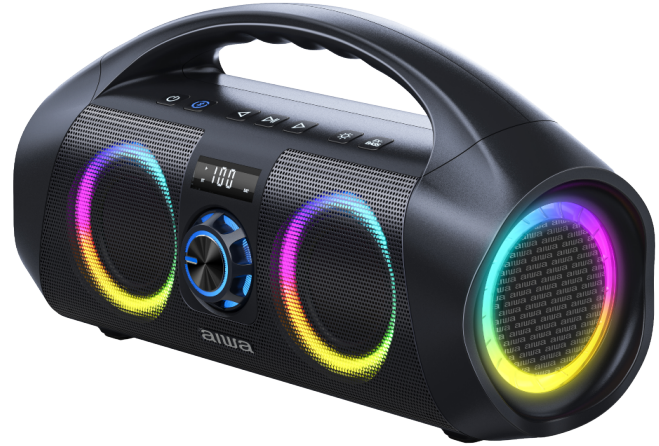
Introductio
The Aiwa BB-X50 Wireless Boombox AI7002-BLK is a versatile and powerful portable speaker designed to deliver high-quality audio with convenience and style. Featuring a robust 120W peak power output with deep bass and crisp highs, this boombox is perfect for music lovers who demand clear, loud sound, whether at home, outdoors, or on the go. Its dynamic 203.2 mm driver and IPX7 waterproof rating ensure durability and immersive audio performance in various environments.
This boombox includes seven multi-colored LED light modes and a digital display that shows battery life, volume, and connectivity status, adding a vibrant visual element to your listening experience. Compatible with both iOS and Android devices via Bluetooth, and equipped with an AUX input for wired connections, it offers flexible playback options.
Designed with portability in mind, the Aiwa BB-X50 features a built-in handle and a rechargeable 4000mAh battery that provides up to 15 hours of continuous playtime—ideal for camping, tailgating, parties, or casual listening. Its compact dimensions (359 mm x 210 mm x 168 mm) and lightweight construction make it easy to carry wherever music is needed.
Targeted at outdoor enthusiasts, party hosts, and anyone seeking a robust wireless audio solution, this boombox blends functionality with eye-catching design. The estimated price range is approximately $120 to $170, making it a competitive choice for a high-performance waterproof Bluetooth speaker. Available through major retailers and online outlets, the Aiwa BB-X50 Wireless Boombox AI7002-BLK stands out as a reliable, feature-rich audio companion.
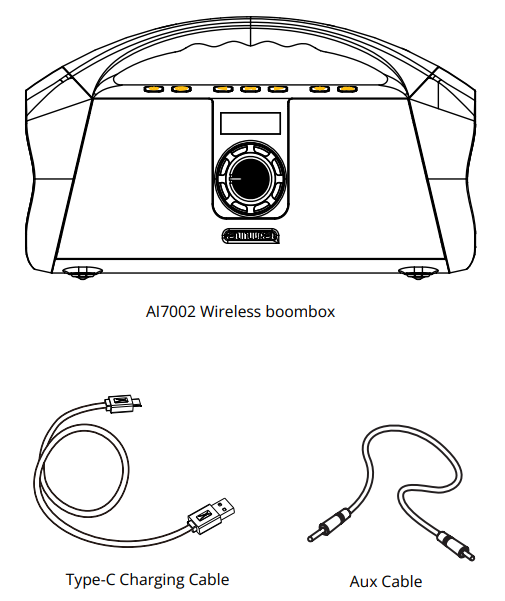
WHAT’S INCLUDED
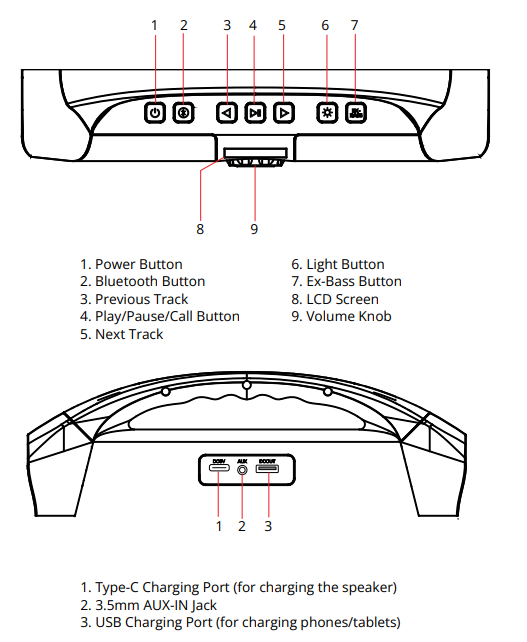
Controls and ports
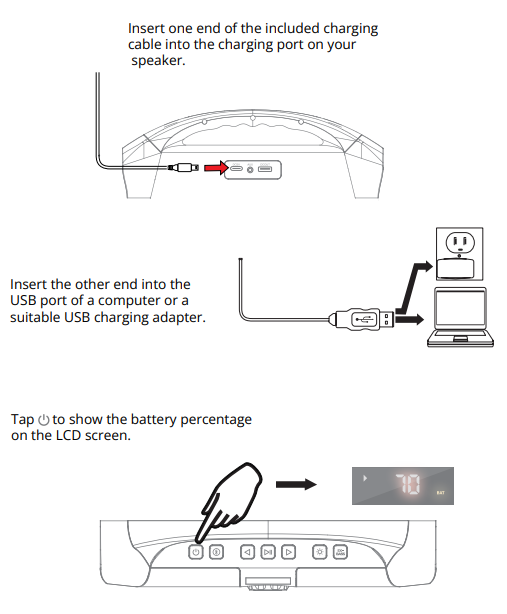
CHARGING
Getting Started
Charge the speaker before starting it up.
- To POWER ON,press until the power indicator turns white.
- To POWER OFF press until all indicators turn off.
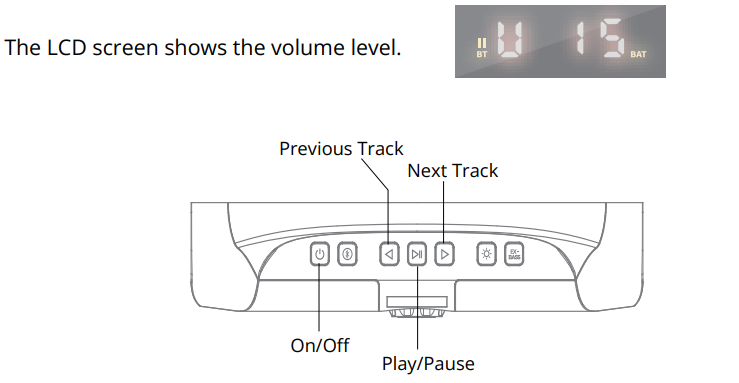
- To PLAY MUSIC, tap .

- To PAUSE MUSIC tap again.
- To CHANGE TRACK, press
 to go to the next track
  and to go to the previous track
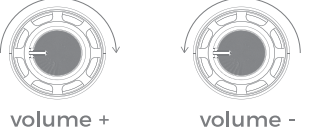
 - To ADJUST VOLUME turn the volume knob clockwise to increase volume or counterclockwise to decrease volume.
BLUETOOTH PAIRING
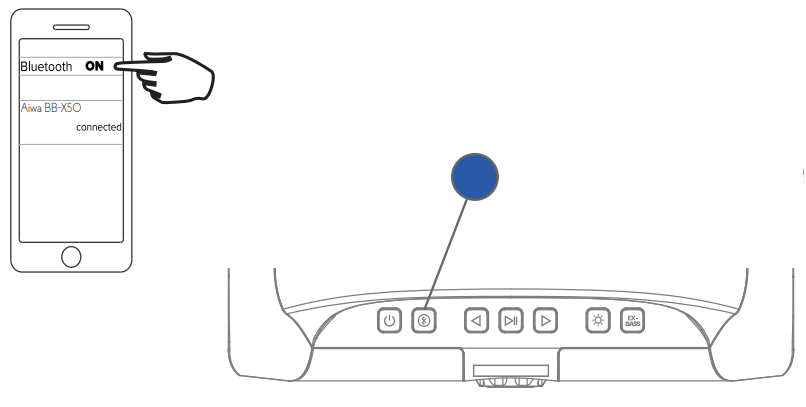
Once the speaker is turned on, it will enter pairing mode.
To pair the ith device, turn on Bluetooth and find the speaker listed as Aiwa BB-X50 under the Bluetooth menu in settings. Then press connect.
The Bluetooth indicator will light solid blue after successfully pairing with device
- Speaker reconnects automatically to the previously paired device.
- To connect a new device, disconnect the existing Bluetooth device.
- To disconnect Bluetooth, press and hold the Bluetooth indicator.
- The indicator will flash blue after successfully disconnecting from the device..
SPECIFICATIONS
- BLUETOOTH VERSION: 5.3
- WORKING DISTANCE: 30 METERS
- MULTI-SYNC RANGE: 20 METERS
- SNR: 85dB
- BATTERY: 4000mAh x 3 (12000mAh total capacity)
- CHARGING INPUT: DC 5V/2A
- OUTPUT POWER: 60W
- SOUND OUTPUT: 120W (peak power)
WARRANTY
This warranty covers the original consumer purchaser only and is not
Transferable.
- This warranty covers products that fail to function properly UNDER NORMAL USAGE, due to defects in material or workmanship. Your product will be repaired or replaced at no charge for parts or labor for a period of one year.
What Is Not Covered By Warranty
- Damages or malfunctions not resulting from defects in material or workmanship and damages or malfunctions from other than normal use, including but not limited to, repair by unauthorized parties, tampering, modification, or accident.
To Obtain Warranty Service and Troubleshooting Information:
- Call (877) 397-8200 or visit our website
- To receive Warranty service along with the name and address of an authorized product service center, the original consumer purchaser must contact us for problem determination and service procedures. Proof of purchase in the form of a bill of sale or receipted invoice, evidencing that the product is within the applicable Warranty period(s), MUST be presented to obtain the requested service. It is your responsibility to properly package and send any defective products along with a dated copy of proof of purchase, a written explanation of the problem, and a valid return address of the authorized service center at your expense. Do not include any other items or accessories with the defective product. Any products received by the authorized service center that are not covered by warranty will be returned unrepaired.
Troubleshooting the Aiwa BB-X50 Wireless Boombox AI7002-BLK
Users may occasionally encounter common issues with the Aiwa BB-X50 Wireless Boombox, such as connectivity problems, battery charging errors, or sound distortion. Below are typical problems and solutions to help maintain optimal performance:
- Bluetooth Connection Issues: If the speaker fails to pair, ensure Bluetooth is enabled on your device and the speaker is in pairing mode. Restart both devices and clear previous pairing lists if needed.
- Battery Does Not Charge or Drains Quickly: Use the included USB Type-C cable and a compatible power source for charging. Avoid using low-quality chargers. If battery life significantly decreases, the battery may require replacement under warranty.
- No Sound or Distorted Audio: Check volume levels on both the speaker and connected device. Verify AUX cable connections if using wired input. Reset the boombox to factory settings if persistent audio distortion occurs.
- Error Codes: While the AI7002-BLK does not typically display error codes, the digital display will indicate low battery or connectivity status—address these by charging or reconnecting the device.
Preventive measures include keeping the speaker clean, avoiding exposure to extreme temperatures, and charging fully before extended use. The product comes with a warranty covering manufacturing defects, with customer support accessible via the official Aiwa website or retailer contact points.
For further assistance, users should contact AIWA customer service through their official channels or refer to the included user manual for detailed guidance.
Pros & Cons of the Aiwa BB-X50 Wireless Boombox AI7002-BLK
Pros
- Powerful Audio Performance: Delivers 120W peak power with clear highs, mids, and deep bass suitable for both indoor and outdoor use.
- Waterproof Design: IPX7 rating allows safe use near water or in rainy conditions.
- Long Battery Life: Up to 15 hours of continuous playback on a single charge supports extended outings.
- Versatile Connectivity: Bluetooth and AUX input compatibility ensure broad device support.
- Attractive LED Lighting: Seven multi-color LED modes enhance the ambiance at parties or gatherings.
- Portable Build: Compact size with a built-in handle for easy transport.
Cons
- Battery Performance Variability: Some users report shorter battery life over time or charging inconsistencies.
- Limited Advanced Features: Lacks smartphone app integration or customizable equalizer settings.
- Weight: At around 5 pounds, it is heavier than some ultra-portable speakers.
- Price Point: Slightly higher than basic boombox models but justified by enhanced features and audio quality.
Compared to alternatives in the same category, the Aiwa BB-X50 balances loud, crisp sound with durability and aesthetics, offering excellent value for users seeking a rugged, visually appealing Bluetooth boombox.
Customer Reviews of AIWA BB-X50 Wireless Boombox AI7002-BLK
The Aiwa BB-X50 Wireless Boombox AI7002-BLK has received generally positive feedback from users, with many praising its loud, clear sound and impressive bass response. Customers highlight the long battery life and waterproof design as key benefits, especially for outdoor use.
Common praises include the convenience of the multi-colored LED lights and the informative digital display that enhances user experience. The built-in handle is also frequently appreciated for portability.
However, some users have reported issues with battery longevity, noting that over time, the battery may not hold a charge as well, with complaints about reduced playtime and occasional charging failures. A few users also noted the speaker’s weight as a minor drawback when carrying it for extended periods.
Overall, the product typically earns ratings around 4 out of 5 stars, with recommendations for buyers looking for a feature-rich, waterproof Bluetooth boombox with strong audio performance. It is especially suited for parties, camping, and travel, where durability and sound clarity are essential.
Faqs
How do I set up the aiwa BB-X50 Wireless Boombox AI7002-BLK for Bluetooth pairing?
What should I do if the aiwa BB-X50 Wireless Boombox AI7002-BLK is not charging properly?
Can the aiwa BB-X50 Wireless Boombox AI7002-BLK be used outdoors in wet conditions?
How do the multi-color LED lighting modes enhance the aiwa BB-X50 Wireless Boombox AI7002-BLK experience?
Is the aiwa BB-X50 Wireless Boombox AI7002-BLK compatible with devices without Bluetooth?
What is the expected battery life of the aiwa BB-X50 Wireless Boombox AI7002-BLK and how do I optimize it?
How can I connect two aiwa BB-X50 Wireless Boombox AI7002-BLK speakers for stereo sound?
What maintenance tips help prolong the life of the aiwa BB-X50 Wireless Boombox AI7002-BLK?
Tags
More aiwa manuals
- Setup: Aiwa Prodigy Clear Plus Earphones User Manual
- Setup & Usage: Aiwa Toaster Oven WTO1-1004-BLK User Manual
- Setup & Pairing: Aiwa Exos-5 Wireless Speaker User Manual
- Setup & Pairing: Aiwa Get Fit Wireless Earphones User Manual
- Setup: Aiwa Portable CD Player AI7003 User Manual
- Setup & Pairing: Aiwa Exos Go Wireless Speaker User Manual
Leave a Comment