
Setup: Aiwa Portable CD Player AI7003 User Manual
Content
Aiwa Portable CD Player AI7003
Introduction
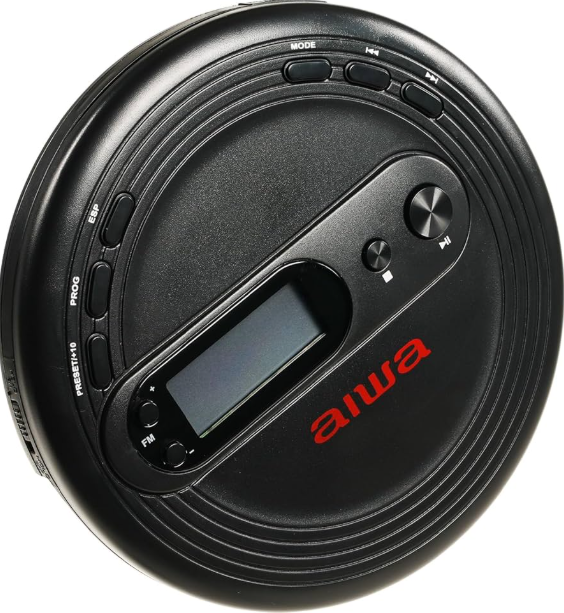
The Aiwa Portable CD Player AI7003 is a versatile and portable music solution that combines the nostalgia of CDs with the convenience of MP3 playback and FM radio. This device is perfect for music enthusiasts who want to enjoy their favorite albums without relying on digital streaming services. With its anti-skip protection, you can enjoy uninterrupted music even while moving. The player is designed for both casual listeners and dedicated music fans, offering a unique way to experience music by supporting full album listening and direct artist support.
The Aiwa AI7003 is available in a sleek black design and is priced affordably, typically within the range of $30 to $50, making it an excellent value for those looking to rediscover the joy of physical media. It is widely available across various online marketplaces and electronics stores.
WHAT’S INCLUDED
- AI7003 Portable CD Player
- Wired Earbuds
- 2x AA Batteries
- User Manual
YOUR CD player
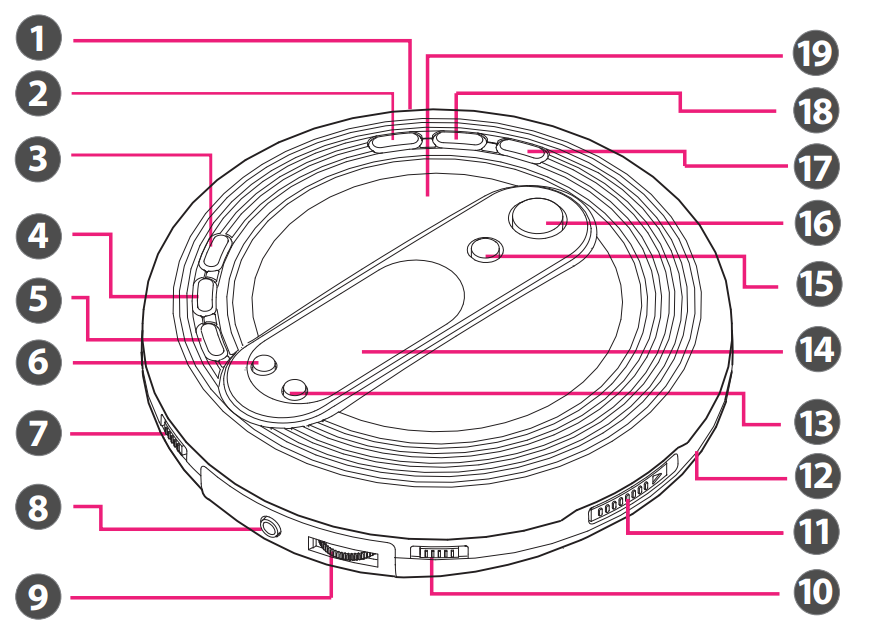
- Micro USB Port
- Mode Button
- ESP Button (Anti-Shock Protection)
- Program Button
- Preset Button
- Channel Up
- Hold Switch
- 3.5mm Headphone Jack
- Volume Control
- CD/Radio Switch
- CD Door Switch
- Battery Compartment (located at the rear)
- Channel Down
- Display Screen
- Stop/Power Off Button
- Play/Pause/Power On Button
- Next/Forward Button
- Back/Rewind Button
- CD Compartment
power sources
Inserting Batteries
Your CD Player takes 2 AA batteries (included).
- Open the battery compartment at the rear of your CD player.
- Insert batteries with the correct polarity (+,-).
- Close the battery compartment.
BATTERY WARNING:
- Do not mix old and new batteries.
- Do not mix alkaline, standard (carbon-zinc), or rechargeable nickel-cadmium) batteries.
- Batteries are not to be inserted with the wrong polarity.
- Exhausted batteries are to be removed.
- The supply terminals are not to be short-circuited. Please recycle or dispose of the battery properly.
- Contact local recycling facilities and/or the manufacturer of your battery for further information.
Micro USB Cable
Your CD Player can also be powered by a Micro USB cable (not included).
- Remove both AA batteries from the battery compartment.
- Plug in a Micro USB connector into the Micro USB port located on the side of your CD player.
- Plug the other side of the Micro USB cable into a suitable USB port.
Low Battery Warning
When your CD player is running low on battery, a Low Battery Icon will appear on the display screen.n
CD function
Inserting a CD
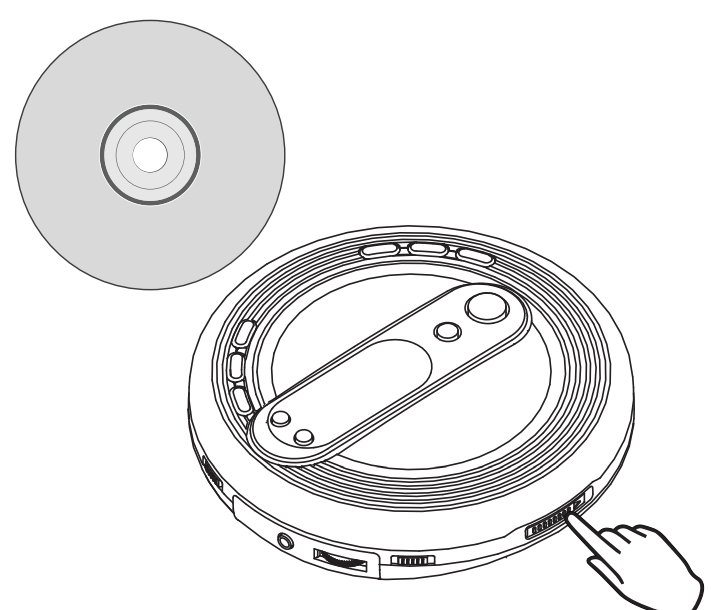
- Open the CD compartment by sliding the CD door switch to the OPEN position. After the CD compartment door opens, insert a CD. Once the CD is loaded in, press the Play/Pause Button to start playing.
- Note: The CD will not play if the disc is damaged, scratched, or if the CD is blank and has no audio/music encoded into it.
Playing music
Music Controls
- Press the Play/Pause/Power On button to play/pause music from the CD.
- To raise and lower the volume, push the Volume Control wheel back and forth.
- Press the Next/Forward and Back/Rewind buttons to select the next or previous song.
- Press and hold the Next/Forward and Back/Rewind buttons to fast forward and rewind through any songs on the disk.
- Slide the Hold Switch back and forth to disable and enable the CD player buttons (the Volume Control wheel and CD Door switch will still be operational).
- Note: As each song plays, the song number and elapsed time will show on the display screen.
Music Modes
- To play one track on loop, press the Mode Button while the selected track is playing. To stop looping, press the Stop/Power Off Button.
- To play all songs on loop, press the Mode Button twice while the desired playlist/album is playing. To stop looping, press the Stop/Power Off Button.
- To play 10-second intros of each song, press the Mode Button three times, and “INTRO” will appear on the display screen. Press the Stop/Power Off Button to turn off mode.
- To shuffle your playlist, press the mode button four times,s and“RAND” will appear on the display screen. Press the Stop/Power Off Button to turn off mode.
Creating a Music Program
To create a playback order,r press the Stop/Power Off button. Then, press the Program Button to begin setting the playlist order.
- You will see two numbers on the display screen. The left number represents the song number, er and the right number represents the track slot.
- Once the ”Prog” and the song number will start flashing, press the Next/Forward and Back/Rewind buttons to change the song number. Press the Program Button to save the track in the track slot.
- Repeat this process to save up to 20 songs. Press the Play/Pause/ Power On button to stop programming.
- To play a song from this list, press the Program Button. Use the Next/Forward and Back/Rewind Buttons to navigate to a song on your list, then press the Play/Pause/Power On Button to play.
FM radio Function
FM Radio Mode
To turn on FM Radio mode, slide the CD/Radio switch to the FM position to turn on the radio.
Auto Tuning:
Press and hold the Channel Up or Channel Down Button to tune automatically to a random higher or lower radio channel.
Manual Tuning:
Press the Channel Up or Channel Down button to manually switch radio channels.
Save 10 Radio Presets:
Save 10 of your favorite radio stations using the preset feature.
- Press and hold the Preset Button to create a preset for the current station playing. A “P” followed by the preset number will flash on the display screen.
- Press the Channel Up and Channel Down buttons to select a preset slot from 01-10.
- Press the Preset Button again to confirm the setting, and the station will be saved. Repeat these steps for up to 10 preset stations.
- To play a preset station, press the Preset Button. Then press the Channel up and Channel Down buttons until the desired preset number appears on the display screen.
Connecting your earbuds
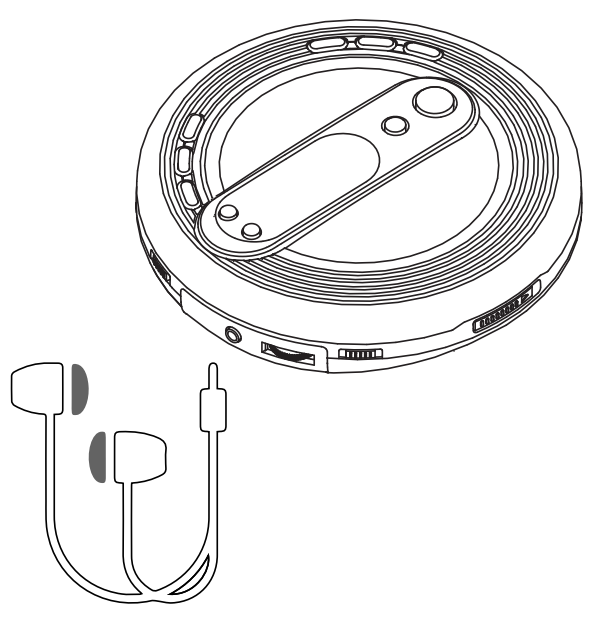
- Insert the wired earbuds (included) into the 3.5mm Headphone Jack located at the side of your music player to listen to your music or audio.
- Note: This CD player is not equipped with an internal speaker. Wired headphones are required for audio output.
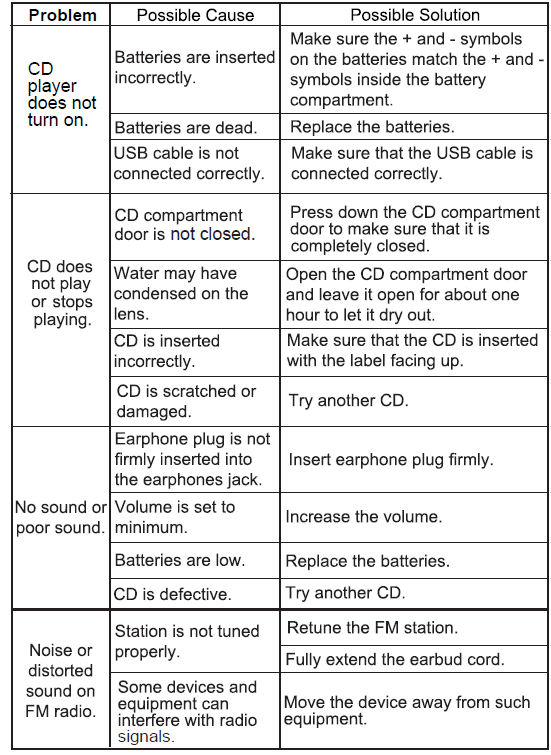
Troubleshooting
CARE AND MAINTENANCE
- Do not subject the unit to excessive force, shock, dust,t or extreme temperatures.
- To prevent fire or shock hazard, disconnect your unit from the AC power source when cleaning.
- Do not tamper with the internal components of the unit.
- Clean your unit with a dry cloth. Solvents or detergents should never be used.
- Avoid leaving your unit in direct sunlight or in hot, humid, id or dusty places.
- Keep your unit away from heating appliances and sources of electrical noise such as fluorescent lamps or motors.
- If interruptions or stops occur in the music during CD play, or if the CD fails to play at all, the disc’s bottom surface may require cleaning. Before playing, wipe the disc from the center outwards with a soft cleaning cloth.
- If the front panel becomes dirty or smudged with fingerpri,nts it may be cleaned with a soft cloth slightly dampened with a mild soap and water solution. Never use abrasive cloths or polishes as these will damage the finish of your device. CAUTION: Never allow any water or other liquids to get inside the unit while cleaning.

Key Features and Benefits
Some of the key features include: - **CD and MP3 Playback**: Supports both standard CDs and MP3 CDs. - **FM Tuner**: Allows you to listen to your favorite radio stations with up to 10 presets. - **Anti-Skip Protection**: Ensures smooth playback even during movement. - **3.5mm Headphone Jack**: For private listening. - **Hold Switch**: Prevents accidental button presses. - **Playback Controls**: Easily navigate through tracks. - **Power Source**: Uses 2 AA batteries or can be powered via a micro USB cable (not included).
WARRANTY
- This warranty covers the original consumer purchaser only and is not transferable.
- This warranty covers products that fail to function properly UNDER NORMAL USAGE, due to defects in material or workmanship. Your product will be repaired or replaced at no charge for parts or labor for a period of one year.
- What Is Not Covered By Warranty
- Damages or malfunctions not resulting from defects in material or
workmanship and damages or malfunctions from other than normal use, including but not limited to, repair by unauthorized parties, tampering, modification, or accident. - To Obtain Warranty Service and Troubleshooting Information:
- Call (877) 397-8200 or visit our website
- To receive Warranty service along with the name and address of an authorized product service center, the original consumer purchaser must contact us for problem determination and service procedures. Proof of purchase in the form of a bill of sale or receipted invoice, evidencing that the product is within the applicable Warranty period(s), MUST be presented to obtain the requested service. It is your responsibility to properly package and send any defective products along with a dated copy of proof of purchase, a written explanation of the problem, and a valid return address of the authorized service center at your expense. Do not include any other items or accessories with the defective product. Any products received by the authorized service center that are not covered by warranty will be returned unrepaired.
Pros & Cons of the Aiwa Portable CD Player AI7003
Pros
- Portability and Durability: Lightweight and designed for on-the-go use.
- Anti-Skip Technology: Reduces skips during movement.
- FM Tuner: Convenient for listening to radio stations.
- Value for Money: Offers a good balance of features at an affordable price.
Cons
- Limited Media Support: Does not support more advanced formats like DVDs or streaming services.
- Power Options: Micro USB cable not included.
- Dimensions: May be slightly larger than some other portable players.
Customer Reviews and Feedback
Users have praised the Aiwa AI7003 for its good sound quality and value for money. Some reviewers noted that it is well-designed and suitable for casual music listening. However, a few users wished for more advanced features like Bluetooth connectivity. Overall, it has received positive ratings, with many users recommending it for its simplicity and effectiveness.
The product typically receives a 4-star rating, with users appreciating its reliability and ease of use. For those interested in purchasing, it is recommended to check for availability at popular electronics retailers or online marketplaces.
Faqs
How do I set up my aiwa Portable CD Player AI7003 for the first time?
What should I do if my aiwa Portable CD Player AI7003 is not working properly?
Can I use the aiwa Portable CD Player AI7003 with other devices?
What are the key features that make the aiwa Portable CD Player AI7003 different?
How do I maintain and care for my aiwa Portable CD Player AI7003?
What are the dimensions of the aiwa Portable CD Player AI7003, and how portable is it?
Can I use the aiwa Portable CD Player AI7003 with different types of CDs?
How does the anti-skip protection feature work on the aiwa Portable CD Player AI7003?
More aiwa manuals
- Setup & Pairing: Aiwa Exos Go Wireless Speaker User Manual
- Setup & Pairing: Aiwa Exos-5 Wireless Speaker User Manual
- Setup & Pairing: Aiwa Exos-3 Wireless Speaker User Manual
- Setup: Aiwa Prodigy Clear Plus Earphones User Manual
- Pairing & Usage: Aiwa Train In-Ear Wireless Earphones User Manual
- Setup & Usage: Aiwa BB-X50 Wireless Boombox AI7002-BLK User Manual
Leave a Comment