
Setup & Pairing: Aiwa Exos-3 Wireless Speaker User Manual
Content
Aiwa Exos-3 Wireless Speaker
Introduction
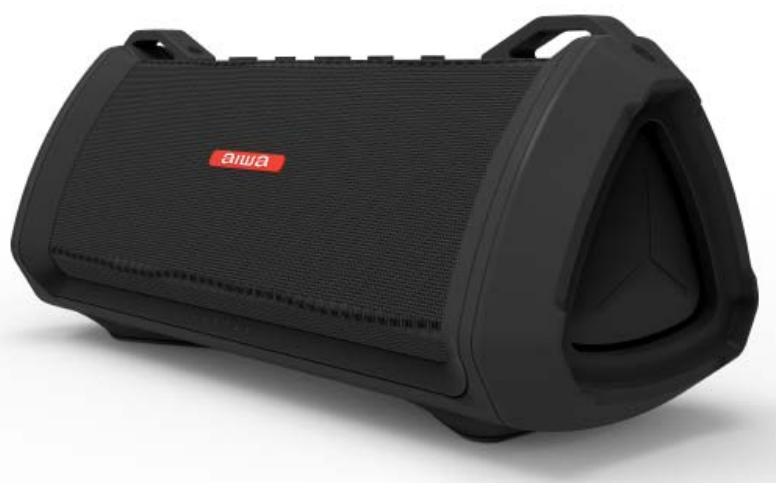
The Aiwa Exos-3 Wireless Speaker is a high-performance portable Bluetooth speaker designed to deliver powerful, distortion-free sound in a rugged, waterproof package. With a peak power output of 60 watts, this speaker is engineered to provide rich bass, clear mids, and crisp trebles, making it ideal for music lovers seeking premium audio quality on the go. Featuring five drivers, including two large subwoofer radiators, the Exos-3 offers immersive stereo sound that suits both indoor and outdoor environments.
Its IP67 waterproof rating ensures durability against water exposure, allowing users to enjoy music at the beach, poolside, or even in the rain without worry. The speaker supports Bluetooth 5.0 for seamless wireless connectivity with a range up to 80 feet, plus it includes a 3.5mm AUX input for wired connections. Additional features like onboard DSP (Digital Signal Processing), stereo pairing with another Exos-3 speaker, and USB power bank functionality add versatility and convenience.
Targeted at outdoor enthusiasts, party hosts, and audiophiles who need robust, portable sound, the aiwa Exos-3 fits perfectly into active lifestyles. It offers up to 20 hours of continuous playtime on a single charge, ensuring long-lasting entertainment. The price range typically falls between $99.99 and $130, making it a competitively priced option in the wireless speaker market with broad availability online and in retail outlets.
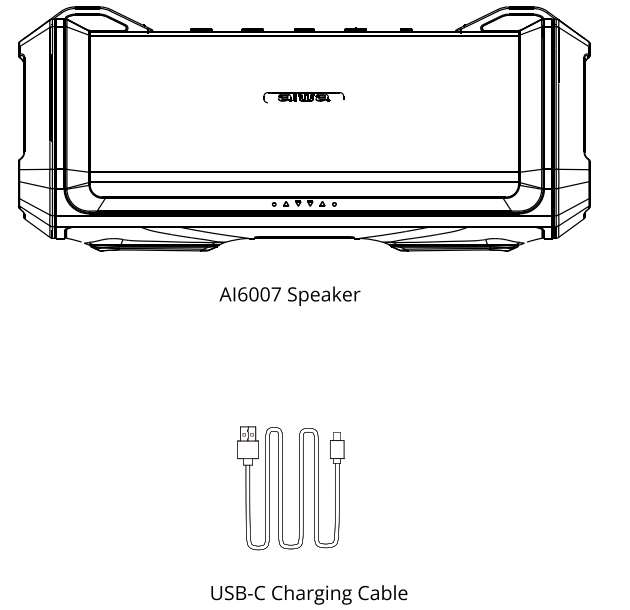
WHAT'S INCLUDED
SPECIFICATIONS
- BLUETOOTH VERSION: 5.2
- BLUETOOTH RANGE: 1 Om
- CHARGING TIME: Approximately 5.5 hours
- MUSIC PLAY TIME: Approximately 20 hours
When volume is played under 50% - BATTERY: 7.4V/3600mAh Lithium Ion Battery
- SIZE: 287*119*123mm
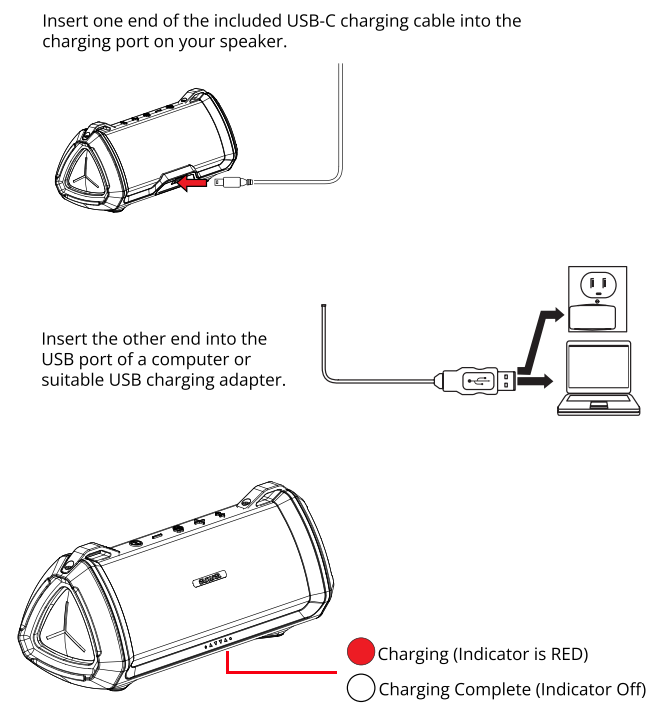
- CHARGING VOLTAGE: 5V/2A
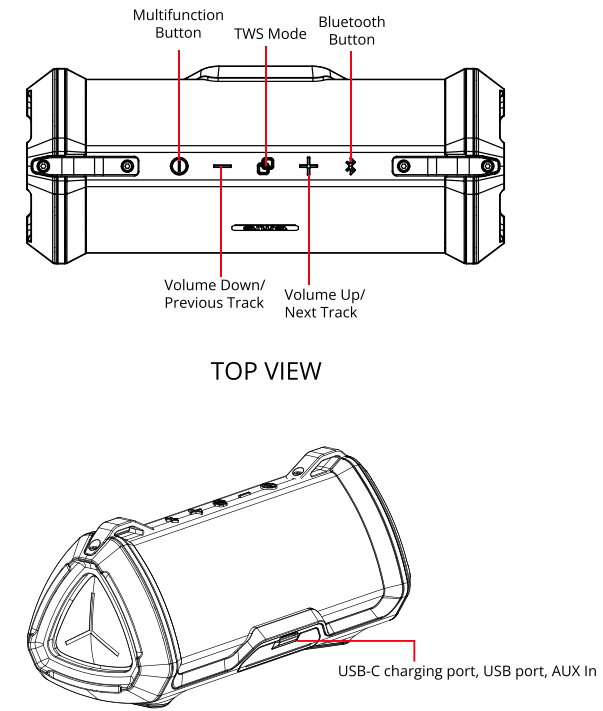
A CLOSER LOOK
CHARGING
ADDITIONAL FEATURES
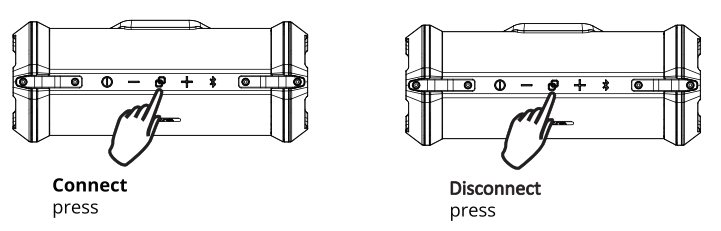
TWS Function
If you have two Exos 3 speakers, enjoy high-quality sound by using the TWS pairing function.
Power on both speakers and press the TWS Mode button on one speaker. You will hear a short tone, and then the two speakers will pair together. You will hear another tone once the two speakers are paired together.
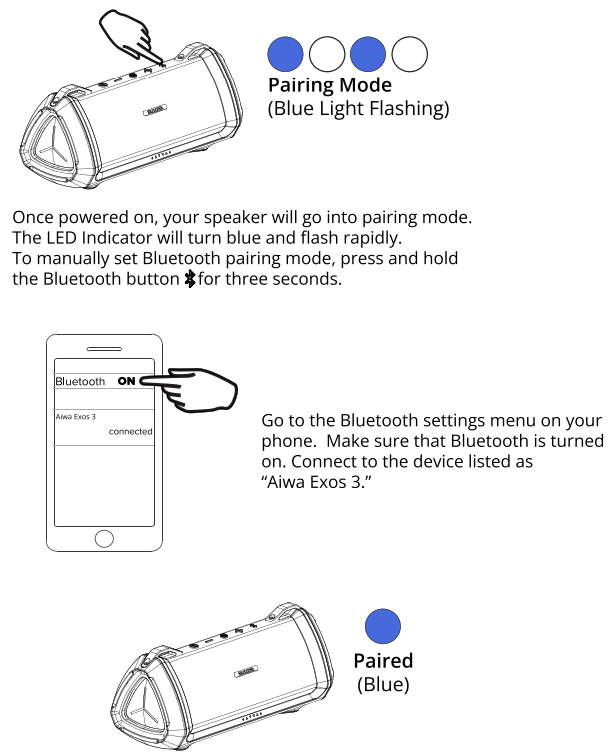
You can then go to the Bluetooth settings menu on your phone. Make sure that Bluetooth is turned on. Connect to the device listed as "Aiwa Exos 3."
To disconnect TWS pairing, press the TWS Mode button
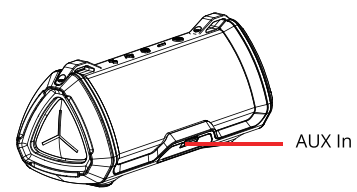
AUX IN Port
Connect one end of a 3.5mm Aux cable (not included) to the Aux In port on your speaker. Connect the other end to the headphone jack on your audio device in order to listen to music using a wired connection.
BLUETOOTH PAIRING
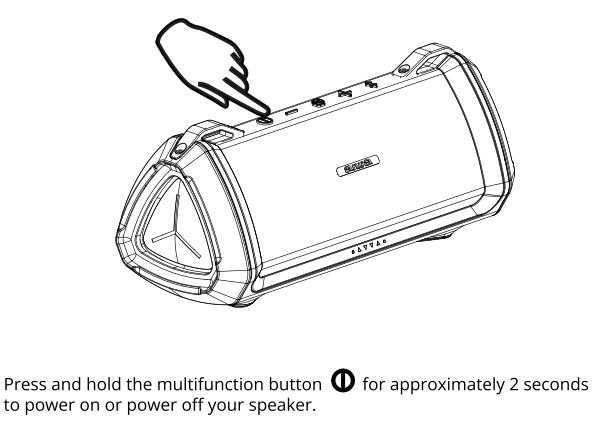
POWERING ON/OFF
SAFETY PRECAUTIONS
When using your speaker, basic safety precautions should always be followed,, including:
- READ ALL INSTRUCTIONS BEFORE USING YOUR SPEAKER.
- Do not submerge your speaker in water.
- Only clean using a clean cloth.
- Do not allow children to play with this product. This product contains small pieces that can be a choking hazard. Parental supervision is advised.
- Do not expose this product to excessive heat or fire.
- Do not expose this product to temperatures above 100°F. Keep out of direct sunlight.
- Do not attempt to repair this product yourself. Contact a qualified service center if the product is in need of service.
- Do not drop, crush, or expose this product to excessive physical force.
- This product is not intended for commercial use.
- When charging, keep all charging cables well ventilated. Do not keep your charging cable in contact with flammable materials such as bedding, linens,, or synthetic fabrics.
Maintenance and Care
- Use a soft cloth or paper towel to clean your speaker. Never use any harsh chemicals or detergents for cleaning. Make sure your speaker is dry before charging.
- When your speaker is not in use, it should be stored in a cool, dry place.
- Never tug or yank on a cable while it is connected to your speaker. Connect and disconnect cables as carefully as possible.
- Never expose your speaker to high temperatures, extreme cold.
- Please recycle or dispose of your speaker properly based on the laws and rules of your municipality. Contact local recycling facilities and/or the manufacturer of your speaker for further information.
Troubleshooting Your Aiwa Exos-3 Wireless Speaker
While the Aiwa Exos-3 Wireless Speaker is designed for user-friendly operation, some common issues may arise. If the speaker does not power on, ensure the battery is charged using the supplied USB-C cable and adapter. For Bluetooth connectivity problems, reset the speaker by holding the power button for 10 seconds, then try re-pairing with your device within the 80-foot supported Bluetooth range.
If audio playback is distorted or weak, confirm that the volume on both the speaker and your paired device is properly adjusted. The LED indicators provide status information—blinking blue means pairing mode, while steady blue indicates connection. In AUX mode, if sound is absent, check that the 3.5mm cable is securely connected and the light green LED is lit. No skip or play/pause control is possible via the speaker in AUX mode; control music directly from your device.
To prevent issues, avoid exposing the speaker to extreme temperatures and always secure the rubber flap protecting the ports to maintain the waterproof seal. The product comes with a standard warranty covering manufacturing defects; for support, contact Aiwa customer service through their official website or the retailer from which you purchased the unit.
WARRANTY
This warranty covers the original consumer purchaser only and is not transferable.
This warranty covers products that fail to function properly UNDER NORMAL USAGE, due to defects in material or workmanship. Your product will be repaired or replaced at no charge for parts or labor for a period of one year.
What Is Not Covered By Warranty
Damages or malfunctions not resulting from defects in material or workmanship ,, and damages or malfunctions from other than normal use, including but not limited to, repair by unauthorized parties, tampering, modification,, or accident.
To Obtain Warranty Service and Troubleshooting Information:
Call (877) 397-8200 or visit our website at www.aiwa.co.
To receive Warranty service along with the name and address of an authorized product service center, the original consumer purchaser must contact us for problem determination and service procedures. Proof of purchase in the form of a bill of sale or receipted invoice, evidencing that the product is within the applicable Warranty period(s), MUST be presented to obtain the requested service. It is your responsibility to properly package and send any defective products along with a dated copy of proof of purchase, a written explanation of the problem, and a valid return address of the authorized service center at your expense. Do not include any other items or accessories with the defective product. Any products received by the authorized service center that are not covered by warranty will be returned unrepaired.
Pros & Cons of the Aiwa Exos-3 Wireless Speaker
- Pros:
- Exceptional sound quality with 60W peak power and five drivers delivering deep bass and clear mids.
- Long battery life offering up to 20 hours of continuous playback for extended use.
- Robust IP67 waterproof and dustproof rating, ideal for outdoor and wet environments.
- Stereo pairing capability with another Exos-3 speaker for enhanced soundstage.
- USB power bank feature allows charging smartphones and other devices on the go.
- Multiple connectivity options,, including Bluetooth 5.0 and AUX input.
- Cons:
- Relatively bulky and heavier than some competitors, which may affect portability.
- Controls can be confusing initially, especially in AUX mode, where track skipping is disabled.
- No integrated microphone for hands-free calling, limiting its use for calls.
- Some users report a learning curve with pairing and volume controls.
- Price is moderate but slightly higher than budget alternatives with fewer features.
Customer Reviews of tAiwaiwa Exos-3 Wireless Speaker
Users generally praise the Aiwa Exos-3 Wireless Speaker for its powerful sound and durability. Many highlight the speaker’s ability to deliver rich, distortion-free audio at high volumes, making it perfect for outdoor gatherings. The long battery life and waterproof design receive frequent commendation, with users appreciating the convenience of using the speaker in various weather conditions and environments.
Common complaints include the speaker’s bulkiness and occasional difficulty with Bluetooth pairing. Some users also note that the control buttons can be unintuitive, particularly in AUX mode. Despite these minor drawbacks, the majority of reviews award the speaker 4 to 4.5 stars out of 5, recommending it as a solid investment for those seeking a premium wireless speaker with rugged features and versatile connectivity.
Faqs
How do I set up the aiwa Exos-3 Wireless Speaker for the first time?
What should I do if the aiwa Exos-3 Wireless Speaker is not connecting to Bluetooth?
Can I use the aiwa Exos-3 Wireless Speaker with my smartphone to charge it?
How do I maintain and care for the aiwa Exos-3 Wireless Speaker?
What are the key features that make the aiwa Exos-3 Wireless Speaker different?
How do I troubleshoot poor sound quality on the aiwa Exos-3 Wireless Speaker?
Can I pair two aiwa Exos-3 Wireless Speakers for stereo sound?
What devices are compatible with the aiwa Exos-3 Wireless Speaker?
More aiwa manuals
- Pairing & Usage: Aiwa Train In-Ear Wireless Earphones User Manual
- Setup & Pairing: Aiwa Exos Go Wireless Speaker User Manual
- Setup: Aiwa RC8 Multi-Functional Cooker User Manual
- Setup: Aiwa Portable CD Player AI7003 User Manual
- Setup: Aiwa USB Rechargeable Blender PJ-882 User Manual
- Setup & Pairing: Aiwa Exos-5 Wireless Speaker User Manual
Leave a Comment