
Setup & Usage: Aiwa Toaster Oven WTO1-1004-BLK User Manual
Content
Aiwa Toaster Oven WTO1-1004-BLK
Introduction
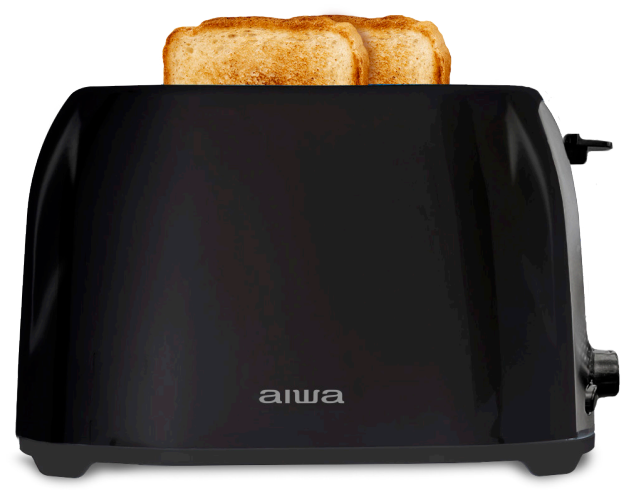
The Aiwa Toaster Oven WTO1-1004-BLK offers a versatile cooking solution for home cooks and bakers. This model, though not explicitly marketed as a toaster oven but rather a toaster, provides essential features like reheat and defrost functions, making it a valuable addition to any kitchen. With its compact design and variable heat settings, it's ideal for toasting a variety of bread types, from bagels to muffins. The Aiwa Toaster is available in a wide range of retailers, including Walmart and Home Depot, with an estimated price range of $30 to $50, depending on the seller and any promotions.
Targeted at busy households seeking convenience and efficiency, the Aiwa Toaster's 800W power ensures quick cooking times. Whether you're warming leftovers or toasting bread for breakfast, this toaster fits well in small kitchens due to its dimensions of 10.1 x 6.5 x 6.5 inches.
Specifications of the Aiwa Toaster
Here are the key specifications of the Aiwa Toaster:
- Brand and Model: Aiwa, WTO1-1004-BLK
- Power Consumption: 800W
- Voltage: 120V
- Dimensions: 10.1 x 6.5 x 6.5 inches
- Features: 6 Browning Settings, Reheat/Defrost Functions, Cancel Button, Auto-Shutoff
- Material: Includes stainless steel accents for durability and style
Compared to similar toasters like the JEWJIO Slim Space Saving Long Slot Toaster, the Aiwa offers a more compact design and a slightly lower wattage, which might be beneficial for energy-conscious users.
OPERATION
- Place the toaster on a stable, level, and heat-resistant surface.
- Plug the oaster into a wall power outlet and adjust the dial to the desired number.
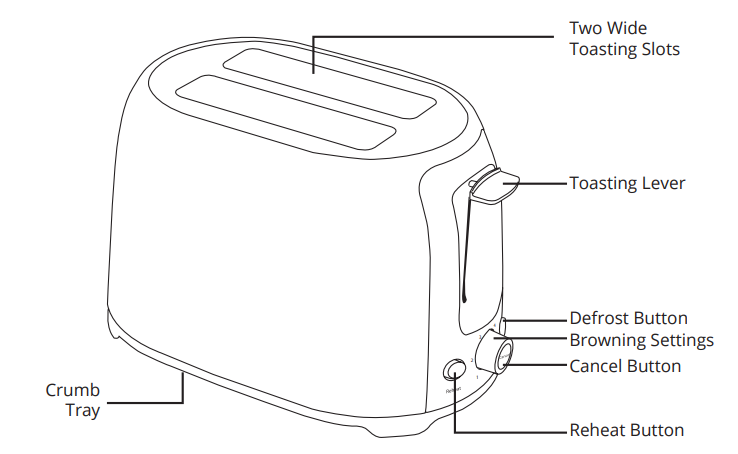
- Put the bread into the openings and press the start control down.
- It remains down until the bread is the toasted.
- Once toasted, the slices appear in the openings, and the start lever returns to its original position. The toaster switches “OFF” automatically.
- Press the “CANCEL” button to release the start lever if you wish to stop the toaster. This switches the toaster to “OFF”.
- The end of the bread sticks in the toaster, unplug it, wait for it to cool, and remove the bread. Take care not to touch the heating elements.
- REHEAT: The Reheat button will reheat your bread without browning it. This is a low temperature setting.
- DEFROST: The Defrost button will first defrost your bread before toasting it. This is an extended cycle setting
TOASTING TIPS
- Dry and thin slices toast quicker than moist or thick slices.
- If the toast starts to smoke, stop the toasting cycle.
- Do not heat a toaster that has bread applied with butter or other spreads.
- Use a lower setting when toasting a single bread slice or slightly dry bread.
- Use a higher setting when toasting fresh or whole wheat bread.
- When toasting raisin or other fruit breads, remove any loose raisins from the surface of the bread before placing it into the toaster.
- Cut bread into standard size (3.94 x 3.94 x 0.39 inch) to avoid uneven toast.
DIAGRAM
CLEANING INSTRUCTION
- Ensure that the toaster is unplugged before cleaning it.
- Never place it in the water or any other liquid.
- To clean, UNPLUG THE TOASTER AND ALLOW TO COOL.
- Do not insert any object, including bread, in the toaster.
- Wipe outside with a soft dry cloth when the toaster is cold; never use metal polish.
- Open the crumb tray at the bottom of the toaster and brush out crumbs. If the toaster is used frequently. Accumulated bread crumbs should be removed at least once a week. Make sure the crumb tray is completely closed before using the toaster again.
- Never attempt to remove bread that has jammed in the slots without unplugging the toaster from the electrical outlet first. Be sure, not to damage the internal mechanism or heating elements when removing bread.
ONE-YEAR WARRANTY
- AIWA warrants its products for one year against defects in manufacturing under regular consumer use with original receipt of retail purchase. We believe in our products and want to provide you with a replacement, if needed, but we have to know about the problem while the product is still under warranty. If you discover a defect covered by this warranty, please contact us to receive a replacement. To use the product's warranty,y the customer must provide proof of the retailer's receipt.
- Any customers outside of the U.S. will be responsible for shipping and handling charges if a replacement is required that is not due to a manufacturing defect. If there is no manufacturing defect, shipping and handling will be applied.
- AIWA’s warranty is limited to our products only. Our warranty does not cover the replacement or repair cost of any third-party accessory, electronic device, or personal property.
- For instructions about how to obtain warranty service for your product and product support, please contact Customer Service: 833-902-2335.
- Content is subject to change without prior notice. Some content may differ from how the product works with your specific device.
- ©2023 Aiwa Acquisitions LLC. AIWA and associated marks are owned by Aiwa Acquisitions and used under license.
- Licensed and Manufactured by Xtreme Connected Home, Inc.
- Please call for customer support: 833-902-2335.
- Includes:
- Toaster, User Manual
Troubleshooting and Support
Common issues and their solutions:
- Toaster Not Turning On: Check if the power cord is properly connected and ensure the outlet is working.
- Uneven Toasting: Adjust the browning settings or clean the toaster slots.
Aiwa offers a one-year warranty for manufacturing defects. For assistance, contact customer service at 833-902-2335
Pros and Cons of the Aiwa Toaster
Pros
- Compact Design: Ideal for small kitchens
- Multiple Browning Settings: Offers flexibility in toasting preferences
- Reheat/Defrost Functions: Convenient for warming leftovers or thawing frozen bread
Cons
- Limited Power: May not be as fast as higher-wattage toasters
- Specific Use Case: Designed primarily for bread toasting
Customer Reviews and Recommendations
Customers have praised the Aiwa Toaster for its ease of use and compact design. Some reviewers noted that the toaster performs well for its price but may not be as powerful as other models. Common complaints include slight uneven toasting and a lack of advanced features like a built-in timer.
Star Rating: 4/5 stars
For those looking for a simple, affordable toaster with basic functionalities, the Aiwa Toaster is a solid choice. However, users seeking more advanced features might want to explore other options.
Conclusion
The Aiwa Toaster Oven WTO1-1004-BLK is a reliable and cost-effective option for those seeking a basic toaster with reheat and defrost capabilities. While it may not offer the full range of features found in a dedicated toaster oven, it provides excellent value for its price and is suitable for everyday toasting needs.
Faqs
How do I properly set up the aiwa Toaster Oven WTO1-1004-BLK for first use?
What should I do if the aiwa Toaster Oven WTO1-1004-BLK is not heating evenly?
Can I use the aiwa Toaster Oven WTO1-1004-BLK to toast frozen bread or bagels?
How do the 6 browning settings on the aiwa Toaster Oven WTO1-1004-BLK affect performance?
Is the aiwa Toaster Oven WTO1-1004-BLK compatible with standard kitchen outlets?
What are the recommended cleaning and maintenance tips for the aiwa Toaster Oven WTO1-1004-BLK?
How can I optimize the performance of the aiwa Toaster Oven WTO1-1004-BLK for different types of bread?
What troubleshooting steps can I take if the cancel button on the aiwa Toaster Oven WTO1-1004-BLK is unresponsive?
More aiwa manuals
- Setup & Usage: Aiwa BB-X50 Wireless Boombox AI7002-BLK User Manual
- Setup & Pairing: Aiwa Get Fit Wireless Earphones User Manual
- Setup: Aiwa Prodigy Clear Plus Earphones User Manual
- Setup & Pairing: Aiwa Exos-5 Wireless Speaker User Manual
- Setup: Aiwa Portable CD Player AI7003 User Manual
- Setup & Pairing: Aiwa Exos Go Wireless Speaker User Manual
Leave a Comment