
Setup: Alen BreatheSmart HEPA Air Purifier User Manual
Content
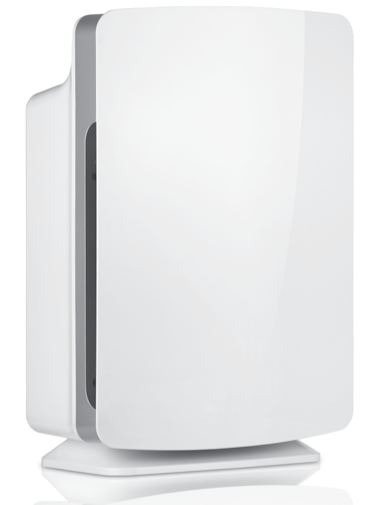
Alen BreatheSmart HEPA Air Purifier
Introduction
The ALEEN BreatheSmart HEPA Air Purifier is a premium air purification solution designed to deliver clean, fresh air in medium to large indoor spaces. Utilizing advanced True HEPA H13 filtration technology, it effectively captures 99.99% of airborne particles as small as 0.1 microns, including dust, pollen, pet dander, smoke, mold, and allergens. This purifier is ideal for allergy sufferers, asthma patients, and anyone seeking to reduce indoor air pollution and odors.
Unique selling points include whisper-quiet operation with noise levels as low as 29 decibels, smart air quality monitoring with a color-coded AQI indicator, and seamless control via the Alen smartphone app. The device features customizable design panels to complement any home or office décor, making it both functional and aesthetically pleasing. It is particularly suited for bedrooms, living rooms, and office spaces up to 1,900 square feet, depending on the model variant.
Priced approximately between $350 and $600, depending on the model and filter options, the Alen BreatheSmart series is widely available through Alen’s official website and major retailers. Its combination of advanced filtration, smart technology, and quiet performance positions it as a top choice for users seeking high-quality air purification tailored to everyday living environments.
Specifications of the Alen BreatheSmart HEPA Air Purifier
- Filtration Technology: True HEPA H13 filter capturing 99.99% of particles ≥0.1 microns
- Coverage Area: Models cover between 700 sq ft (Flex) to 1,900 sq ft (45i) and up to 2,800 sq ft (75i variant) per hour
- CADR (Clean Air Delivery Rate): Up to 375 CFM on the 75i model, 245 CFM on the 45i
- Noise Levels: Quiet operation ranging from 29 dB (lowest fan speed) to 49 dB (maximum)
- Smart Features: Color-coded Air Quality Indicator (AQI) wheel, auto mode (45i/75i), Wi-Fi, and Bluetooth app control
- Filters Available: Pure (allergens), Fresh (allergens + smoke), Odor (allergens + smoke + odor elimination with activated carbon)
- Filter Life: Up to 15 months,s depending on usage and filter type
- Additional Features: Ionizer can be turned on or off, programmable timer, customizable exterior panels
Compared with similar air purifiers, Alenen BreatheSmart offers superior filtration with medical-grade HEPA H13 filters and larger coverage areas, outpacing many competitors that often use lower-grade HEPA or cover smaller rooms. Its app integration and auto mode add convenience and efficiency not always present in comparable units.
USING YOUR AIR PURIFIER
Operating Your Unit:
- Plug your air purifier into a grounded outlet.
- Press the
 Power Button in the center to start the air purifier. When your unit is on, the lights will light up. To turn off the lights on your unit, press the Power Button. To turn off the air purifier, press the Power Button again after the lights have turned off.
 The Colored Light around the
Power Button indicates the air quality being measured by the particle sensor.
- Press ION to activate the ozone-safe ionizer. Activation of ION enhances your unit’s ability to remove airborne particles (similar to the way dust is attracted to a TV screen). Press ION again to turn off.
- FILTER LIFE Indicator — The Filter Life indicator has 3 lights: Green, Yellow, and Red. The Green light will be illuminated for most of the life of the filter. The Yellow light will come on shortly before your filter should be replaced. This is the ideal time to order a new filter. The Red light will be illuminated when it is time to replace the filter.
- After changing the filter, hold the FILTER LIFE button down for 5 seconds. The Red light will be reset to Green.
- Press TIMER to have the air purifier run for a set amount of hours (either 4, 8,, or 12) before turning off.
- Press SPEED and watch the indicator lights until the desired fan speed is achieved. Most users prefer to use the air purifier on speed 2 or 3 to balance cleaning speed and noise. If you suspect the air is particularly dirty, you should set the speed to T (Turbo).
- Press AUTO to set the unit on Automatic Mode. Automatic Mode will use the SmartSensor Technology to adjust the speed of the unit depending on the amount of particles present in the air.
Identification of Parts
(numbers correspond with directions on the previous page):
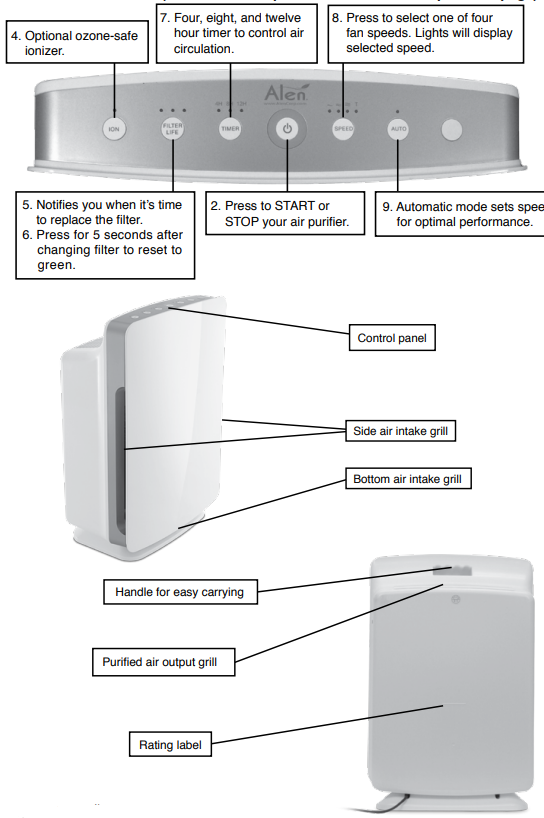
KNOW YOUR AIR PURIFIER
When using the air purifier for the first time in a room, we recommend that you use a higher fan speed, like speed three (3) or Turbo (T), for at least two hours to clean the room’s air initially. Then, we recommend that the air purifier run continuously on speed two (2) or three (3) or be set on automatic mode.
Features
- HEPA-type filtration captures dust, allergens, and airborne pollutants
- Ionizer charges smaller particles, causing them to clump together for improved filtration
- 4 fan speeds with a 4, 8, & 12-hour timer to control air circulation
- Automatic mode sets speed for optimal performance
- Filter change indicator light keeps replacements on schedule
- Simple and intuitive touch button controls
- Auto-off safety feature when the front cover is removed
- Filter designed for easy replacement
Care & Maintenance
Turn The Lights Off/On
To turn the lights off on your unit, press the Power Button. The lights will go out,, but the unit will not turn off. Press any button to turn the lights back on, or press the Power Button a 2nd time to turn the unit off completely.
Replacing the filter
- The Filter Life Indicator has 3 lights: Green, Yellow,, and Red. The Green light will be illuminated for most of the life of the filter. The yellow light will come on shortly before your filter should be replaced. This is the ideal time to order a new filter. You may order a new filter at www.alencorp. Com/filters or by calling 1-800-630-2396. The Red light will be illuminated when it is time to replace the filter.
- The filters used in Alen HEPA Air Purifiers are not designed to be washed, cleaned, or otherwise reused. Over time, the filters become overloaded with particles, decreasing their filtration performance. We recommend regular filter replacements to extend the life of your air purifier and maximize performance.
- The black foam layer of the filter, known as the Pre-Filter, captures large dust and hair. This layer is held on with Velcro®. Once removed, the Alen Pre-Filter can be washed or vacuumed to maintain efficient operation of the unit.
Reset the filter Life Indicator.
After replacing the filter, hold the FILTER LIFE button down for 5 seconds. The Red light will be reset to Green.
Why You Should Replace Your Filter
- Fulfills the terms of Alen’s Lifetime Limited Warranty,, which states that the filters are required to be changed on a regular basis in order to prevent excessive stress on the unit.
- You have bought an Alen HEPA Air Purifier to improve the quality of your indoor air. Changing your filters will maintain the level of air quality you require. Excessively dirty filters can compromise the level of clean air your air purifier can provide.
Alen’s AutoShip filter Plan Convenience, Pure Air, and Savings
Regular replacement of your filter will extend the life of your air purifier and keep your air pure. Alen filters provide efficient filtration for 6 months of heavy usage, and 8 months of moderate usage. With Alen’s convenient AutoShip Filter Plan,, your filters will be shipped FREE right to your door, exactly when needed.
Save Get FREE SHIPPING on every filter.
Convenience: Your filters are delivered right to your door exactly when needed.
Choose your desired monthly frequency and cancel at any time.
Lifetime Limited Warranty: An Alen Auto Ship plan is the convenient way to extend the life of your air purifier and benefit from the Lifetime Limited Warranty.
To sign up and save,, just visit AlenCorp.com/filters or call 1-800-630-2396.
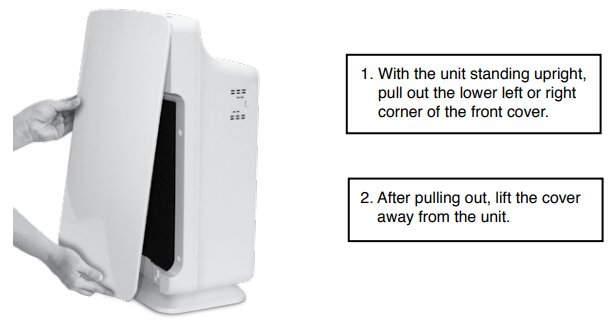
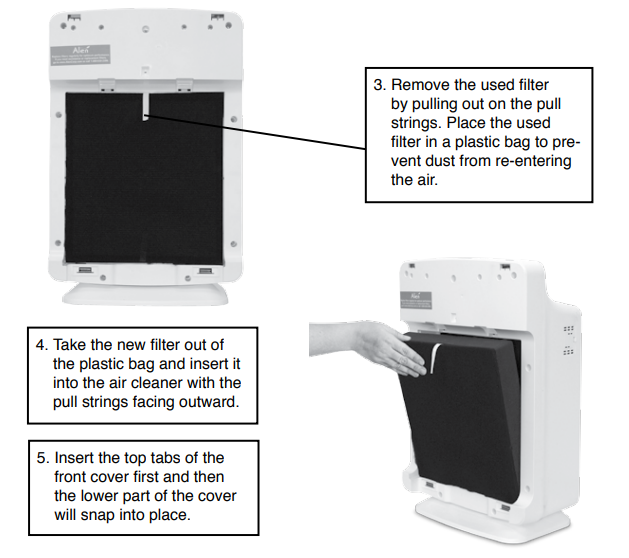
How to Replace the Filter
- Always unplug the unit when installing a filter.
- Distinguish the front side from the back side of the filter. The front side has a foam-like Pre-Filter attached with Velcro®.
- Place the used filter in a plastic bag to prevent dust from re-entering the air.
How To Clean The SmartSensor
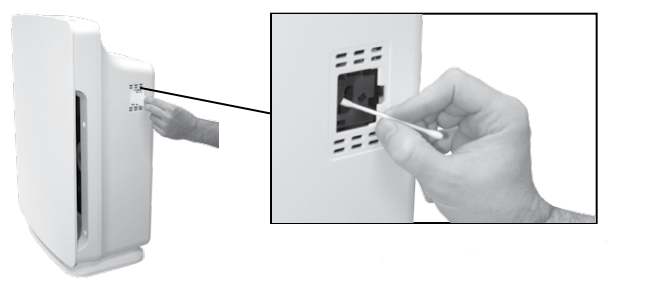
The SmartSensor uses an infrared light to detect airborne particles. After prolonged periods of use, dust can accumulate on the glass lens and affect the sensitivity of the sensor. If this occurs, your unit will run on the highest speeds when set in Automatic mode and will not come down to the lower speeds even after cleaning the air. To clean the sensor lens, first turn your unit off. Wet the end of a cotton swab with water and wipe the lens with it. Dry the lens with the other end of the cotton swab. For best performance, clean the SmartSensor lens each time you replace your filter.
TROUBLESHOOTING TIPS
- How do I reset the filter indicator lights? I put in a new filter, but the red or yellow lights are still illuminated.
After changing the filter, RESET the filter indicator by holding down the FILTER LIFE button for 5 seconds while the unit is ON. The light above the FILTER LIFE button should reset to green. - My BreatheSmart always runs at the highest speeds when in Automatic Mode.
The BreatheSmart unit may not come down from the highest speeds when in Automatic Mode for two reasons: Your air is dirty and still needs to be cleaned, or the SmartSensor lens has dust on it and must be cleaned. See “How To Clean The SmartSensor” on page 9. - How do I find out what electrical specifications my unit needs?
Please refer to the rating label on the back of the unit. Here you will find your unit’s voltage, hertz, amps, and outlet requirements. - Can I clean the filter?
The black foam layer of the filter, known as the Pre-Filter, captures large dust and hair. This layer is held on with Velcro®. Once removed, the Pre-Filter can be washed or vacuumed to maintain efficient operation of the unit. No other layers or parts of the filter can be washed, cleaned, or otherwise reused. Please replace the filter regularly to maintain optimal performance. - I have an issue not listed in this manual.
Please visit www.AlenCorp.com and send us a message or call 1-800-630-2396during business hours. A customer service representative will respond to your inquiry in a timely manner. - What information do I need when I contact customer service for warranty?
Please refer to the rating label on the back of the unit. This rating label has your unit’s lot code and other important information we need to assist you.
LIFETIME LIMITED WARRANTY
- What is covered?
Alen offers the industry’s first LIFETIME LIMITED WARRANTY program for all our air purifiers. We warrant your Alen HEPA Air Purifier to be free from defects in materials or workmanship for as long as you own it. Register your Alen HEPA Air Purifier at www.alencorp.com/register. - What will Alen do?
Alen will, at its option, either furnish a replacement part or replace your air purifier, provided the product is determined by Alen to be defective as a result of faulty material or workmanship while in normal use. Replacement parts or units will, at Alen’s option, be either new or refurbished. Alen’s sole obligation under this warranty is to replace defective parts or replace your air purifier free of charge. All parts or units that are replaced become the property of Alen. - How to get service?
This warranty will be valid only for units in possession of the original purchaser. Proof of purchase must be presented to Alen’s warranty service representative. To help us validate our warranty, we encourage you to register your Alen HEPA Air Purifier at www.alencorp.com/register.To obtain warranty service, complete our online form or call 1-800-630-2396. The defective product or part must be shipped or delivered to Alen’s authorized service center. All postage, insurance , and shipping charges are the responsibility of Alen and included in this warranty.
Your Lifetime Limited Warranty program remains in effect only if:
- Your Alen HEPA Air Purifier is operated in accordance with the instructions provided in the Alen ser manual. This includes replacing the filter at least once a year to prevent excessive stress on he motor.
- Your Alen HEPA Air Purifier is connected to a proper power supply (see voltage label on unit).
- Your Alen HEPA Air Purifier shows no evidence of tampering, mishandling, neglect, accidental damage, modification, and/or repair by anyone other than authorized Alen service personnel.
- Ownership of the air purifier has never been transferred.
Pros & Cons of the ALEEN BreatheSmart HEPA Air Purifier
Pros
- Effective Filtration: Captures ultra-fine particles, including allergens, viruses, smoke, and VOCs, ensuring cleaner air for sensitive users.
- Quiet Operation: Whisper-quiet fan speeds allow for undisturbed sleep and work environments.
- Smart Controls: Intuitive app control and real-time air quality feedback enhance usability and convenience.
- Long Filter Life: Filters last up to 15 months, reducing maintenance frequency and running costs.
- Customizable Aesthetics: Changeable panels help the purifier blend with various interior designs.
Cons
- Price Point: Higher initial cost compared to budget air purifiers, though justified by performance.
- Size : A Larger footprint may not be ideal for very small spaces.
- Filter Replacement Cost: Genuine Alen filters can be pricey, and timely replacement is critical for performance.
- Limited Auto Mode on Some Models: For instance, the FLEX model lacks an auto mode, requiring manual fan speed adjustments.
Overall, the ALEEN BreatheSmart HEPA Air Purifier offers excellent value for money for users prioritizing air quality and smart features over entry-level pricing. Its performance and design stand out compared to alternatives like Dyson or Coway in similar price brackets.
Customer Reviews of the Alen BreatheSmart HEPA Air Purifier
Many users praise the ALEEN BreatheSmart HEPA Air Purifier for its effective allergen and smoke removal, highlighting improved sleep quality and reduced allergy symptoms. The smart AQI indicator and app controls are frequently noted as user-friendly and helpful for monitoring indoor air quality remotely. Typical reviews give the product a rating of 4.5 out of 5 stars, emphasizing its quiet operation and robust filtration.
Common complaints include the relatively high price of replacement filters and the size of the unit, which some users find bulky for smaller rooms. A few users also mention that models without auto mode require manual fan adjustments, which can be less convenient. Despite these minor issues, the majority recommend the Alennn BreatheSmart for anyone serious about maintaining a healthier indoor environment, especially for allergy or asthma sufferers.
Faqs
How do I properly set up the alen BreatheSmart HEPA Air Purifier for optimal air cleaning performance?
What should I do if my alen BreatheSmart HEPA Air Purifier is making unusual noises or not operating quietly?
How does the air quality indicator on the alen BreatheSmart HEPA Air Purifier work and how can I use it effectively?
Can I control the alen BreatheSmart HEPA Air Purifier remotely via smartphone or smart home devices?
What types of filters are available for the alen BreatheSmart HEPA Air Purifier and how do I choose the right one?
How often should I replace or maintain the filters in my alen BreatheSmart HEPA Air Purifier to ensure peak performance?
What room size is the alen BreatheSmart HEPA Air Purifier designed to cover, and how does this affect its efficiency?
Why is my alen BreatheSmart HEPA Air Purifier not improving air quality as expected, and how can I optimize its performance?
More alen manuals
- Setup: Alen Air Purifier FLEX User Manual
- Setup: Alen BreatheSmart FIT50 HEPA Air Purifier User Guide
- How to Use: Alen BreatheSmart FLEX HEPA Air Purifier Instruction Guide
- Usage & Setup: Alen T500 HEPA Air Purifier Instruction Guide
- Alen BreatheSmart 75i HEPA Air Purifier User Manual | Operations
- How to Use: Alen BreatheSmart 45i HEPA Air Purifier User Manual
Leave a Comment