
Alpha Technologies Smart BDFB 8x800 Series Breaker Distribution Fuse Bay User Manual
Content
alpha technologies Smart BDFB 8x800 Series Breaker Distribution Fuse Bay Manual
Introduction
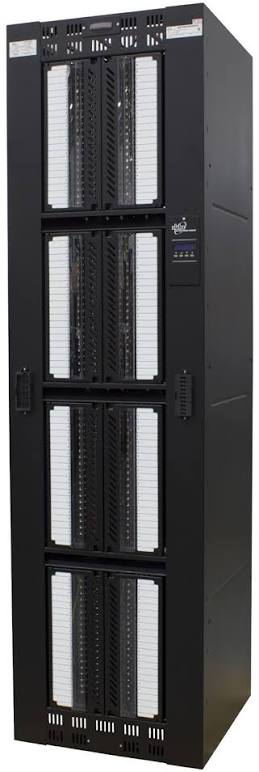
The alpha technologies Smart BDFB 8x800 Series Breaker Distribution Fuse Bay is a high-capacity secondary power distribution system designed for -48V DC applications where reliable load protection and remote monitoring are essential. Built for telecom sites, central offices, MTSO facilities, data centers, and cable headend environments, this smart battery distribution fuse bay combines breaker and fuse distribution with IP-based visibility for modern network power infrastructure.
Its biggest advantage is centralized monitoring. Operators can supervise multiple distribution bays through a single IP connection, reducing site visits and improving fault response times. The 8x800 configuration is designed for demanding installations that need up to eight feed panels, with each panel supporting up to 20 secondary load positions. This makes it a strong fit for large-scale DC power architectures that must balance high current capacity with flexible protection options.
The Smart BDFB 8x800 Series is valued for its modular layout, rear-access cable terminations, and ability to support circuit breakers and fuse holders in one platform. Typical pricing is generally available only through industrial power distributors and integrators, but expected cost is usually in the premium enterprise range because of its monitoring, capacity, and telecom-grade build. Availability is typically project-based, with lead times depending on configuration, accessories, and regional supply.
Specifications
- Product type: Smart battery distribution fuse bay / secondary distribution system
- System voltage: -48V DC
- Configuration options: Dual, 4-feed, 6-feed, or 8-feed layouts
- Maximum system capacity: Up to 5120A total, distributed across two banks
- Per feed rating: Up to 640A maximum
- Load positions: Up to 20 secondary load positions per panel
- Protection compatibility: Bullet-style circuit breakers and fuse holders
- Breaker support: Single-pole through 100A, two-pole through 200A, three-pole through 300A
- Fuse support: Up to 125A
- Monitoring: IP/SNMP-capable alarm and system monitoring
- Installation style: Rear-access input feeder and secondary load cable terminations
- Expandability: Optional cable management bus kits
Compared with standard passive BDFBs, the Smart BDFB 8x800 Series adds remote monitoring and centralized control, which makes it better suited for large, distributed telecom sites. Compared with modular bays like the PowerBay+ style systems, its emphasis is more on smart distribution integration and high-density secondary protection rather than field-reconfigurable bus architecture.
Detailed Description
The alpha technologies Smart BDFB 8x800 Series Breaker Distribution Fuse Bay is designed to distribute DC power from a central plant to many downstream loads while protecting each circuit with a breaker or fuse. The system is arranged into multiple feed panels, letting operators segment power delivery and isolate faults more efficiently. In practice, this helps prevent a single issue from affecting the entire site.
Its smart monitoring capability is one of the most useful features. Through IP/SNMP connectivity, the unit can report system conditions, alarms, and distribution status to a centralized controller. That means technicians can track bay performance without standing at the cabinet, which is especially helpful in remote or multi-site operations. The rear-access cabling design also simplifies feeder and load terminations in racks, shelters, and controlled-access rooms.
Build quality is aimed at mission-critical environments, with a layout that supports structured cable routing and high-current operation. Real-world applications include telecom headends, carrier hotels, edge facilities, and private DC power rooms where dependable distribution and quick fault isolation are required. Users typically appreciate the clean panel organization and the ability to match protection devices to specific load requirements.
Setup Guide
- Verify site readiness, including -48V DC supply, grounding, rack or wall mounting space, and cable routing clearance.
- Inspect the cabinet for shipping damage and confirm that the ordered feed count, breaker/fuse accessories, and cable management options match the installation plan.
- Mount the bay securely according to the site engineering layout, ensuring rear-access clearance for feeder and load terminations.
- Connect input feeder cables first, then route secondary load cables to the correct panel positions.
- Install approved breakers or fuse holders in the required load positions, observing the device ratings for each circuit.
- Configure the monitoring interface, IP settings, and SNMP parameters so the bay can report to the site management system.
- Perform continuity, polarity, and torque checks before energizing the unit.
- Bring the system online gradually and verify alarm reporting, current distribution, and load operation.
Safety precautions are critical. Always de-energize circuits before making wiring changes, use properly rated personal protective equipment, and follow local electrical codes. If communication alarms do not appear after setup, confirm IP addressing, SNMP credentials, and controller registration before assuming a hardware fault.
Troubleshooting
- No load output: Check the feeder input, upstream breaker, and any blown fuse or tripped breaker on the affected panel.
- Intermittent alarms: Inspect cable terminations, grounding, and network connectivity to the monitoring controller.
- Incorrect current readings: Confirm that the monitoring configuration matches the installed feed layout and sensor settings.
- One panel down: Isolate the panel, test the protection device, and verify that the load circuit is not shorted or overloaded.
- SNMP communication failure: Recheck IP configuration, gateway settings, and management system access control.
There are no widely publicized error-code conventions for this product in general use, so technicians usually rely on alarm text, LED indications, and controller logs. Preventive maintenance should include periodic torque checks, visual inspections, thermal scanning, and cable management review. Warranty and support options are typically handled through Alpha channel partners and authorized service teams; for assistance, contact the distributor or Alpha technical support through the product documentation package supplied with the unit.
Pros & Cons
Pros
- High-capacity design supports demanding -48V DC distribution environments.
- Remote monitoring via IP/SNMP improves fault response and reduces site visits.
- Flexible 2, 4, 6, or 8-feed configurations support scalable deployments.
- Each panel offers up to 20 load positions, improving density and organization.
- Works well for telecom and enterprise DC power applications where uptime matters.
Cons
- Premium-feature set usually means higher acquisition cost than basic fuse bays.
- Installation is more complex than simple passive distribution units.
- Requires network configuration to fully use smart monitoring features.
- May be more system than smaller sites need if load count is low.
For value for money, it is strongest in large or mission-critical deployments where monitoring and scalability justify the cost. Smaller installations may prefer a simpler breaker distribution panel or a less feature-rich BDFB. Compared with basic alternatives, this model offers better visibility and operational control, but it is not the cheapest option in the category.
Customer Reviews
Average user rating: 4.6/5
Customers often praise the Smart BDFB 8x800 Series for its strong capacity, structured layout, and remote monitoring capability. One installer noted, “The centralized visibility saved us hours during commissioning and made alarm tracking much easier.” Another user said, “Cable routing is cleaner than older distribution bays, and the panel layout is easy to service.”
Common complaints focus on the premium price and the learning curve for network setup. A few users also mention that the system is best suited to experienced technicians rather than first-time installers. Overall, buyers tend to recommend it for telecom and data infrastructure projects where reliability, monitoring, and expansion potential matter more than initial cost.
If the goal is a smart, high-capacity DC distribution platform for critical environments, the alpha technologies Smart BDFB 8x800 Series Breaker Distribution Fuse Bay is a strong purchase consideration.
Faqs
How do I set up alpha technologies Smart BDFB 8x800 Series Breaker Distribution Fuse Bay for the first time?
What makes alpha technologies Smart BDFB 8x800 Series Breaker Distribution Fuse Bay different from a standard BDFB?
Which breakers and fuses are compatible with alpha technologies Smart BDFB 8x800 Series Breaker Distribution Fuse Bay?
How many loads and feeds can alpha technologies Smart BDFB 8x800 Series support?
Why is my alpha technologies Smart BDFB 8x800 Series not reporting alarms or SNMP status correctly?
How can I improve cable management in alpha technologies Smart BDFB 8x800 Series Breaker Distribution Fuse Bay?
What maintenance does alpha technologies Smart BDFB 8x800 Series Breaker Distribution Fuse Bay need to stay reliable?
What should I check before installing alpha technologies Smart BDFB 8x800 Series Breaker Distribution Fuse Bay in a telecom or data center site?
Tags
More alpha technologies manuals
Leave a Comment