
Setup: Ariete 6233 Eco Power Steam Iron User Manual
Content
Ariete 6233 Eco Power Steam Iron
Introduction
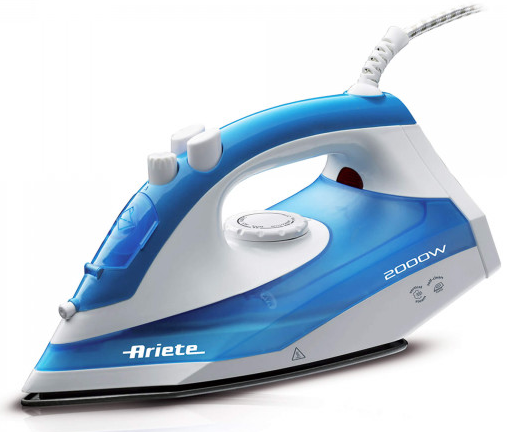
The Ariete 6233 Eco Power Steam Iron is a modern, energy-efficient solution for effortless ironing at home or on the go. Designed with advanced steam technology and a sleek, ergonomic build, this iron delivers powerful performance while minimising energy consumption. Its ceramic soleplate glides smoothly over fabrics, reducing friction and preventing snagging, making it ideal for delicate materials as well as heavy-duty garments.
Key benefits include a removable water tank for easy refilling, vertical steam function for quick touch-ups, and an eco mode that reduces power usage without sacrificing results. The Ariete 6233 Eco Power Steam Iron is perfect for busy households, frequent travellers, and anyone seeking a reliable, low-maintenance ironing solution. With a competitive price range of $40–$60, it offers excellent value for money and is widely available in major appliance retailers and online stores.
Specifications of the Ariete 6233 Eco Power Steam Iron
- Iron Power: 2200 W
- Maximum Steam Pressure: 6 bar
- Water Tank Capacity: 1.8 L (removable)
- Steam Boost Performance: 480 g/min
- Continuous Steam Performance: 100 g/min
- Vertical Steam Function: Yes
- Soleplate Type: Ceramic
- Non-Stick Coating: Yes
- Auto Shut-Off: Yes
- ECO Mode: Yes
- LED Indicators: Power
- Empty Tank Detector: Yes
- Weight: 4.15 kg
- Dimensions: 390 mm depth
Compared to similar models like the Ariete Steam Power 6423 and Eco Power 6422, the 6233 stands out with its high steam output, eco-friendly features, and user-friendly design.
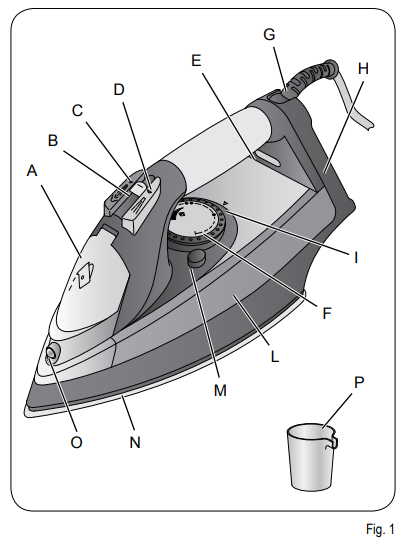
DESCRIPTION OF THE APPLIANCE
- Water tank filling cover
- Steam adjustment selector
- Steam button
- Spray button
- Iron temperature control lamp
- Temperature adjustment knob
- Power cord protection
- Iron stand
- Reference for temperature setting
- Tank
- SELF CLEAN button
- Soleplate
- Spray nozzle
- Water measuring cup
INSTRUCTIONS FOR USE
Filling the tank before use
Warning
- Make sure the iron is unplugged from the supply mains before filling the tank with water.
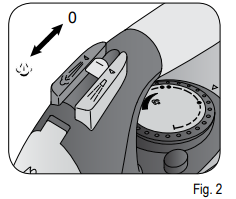
- Set the steam control knob (B) to "0" (Fig. 2).
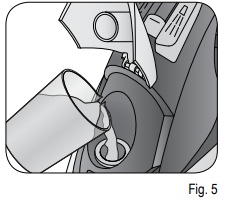
- Open the door (A) by pushing it upwards and, holding the iron horizontally, fill the water tank up to the maximum level using the measuring cup (P) provided (Fig. 5).
- Close the cover (A) again. If your tap water is very hard, use natural demineralised water.
NEVER exceed the MAX mark when filling the tank.
- Do not pour vinegar, descalers or other scented substances into the tank; under penalty of immediate cancellation of the warranty.
- If it proves necessary to add water while ironing, always turn off the iron and unplug the power cord before filling the tank with water.
- Open the water filling cover and turn the iron upside down to empty the tank.
Turning on the appliance
It is possible that there is white powder that leaks from the soleplate the first time the iron is used; this is normal, and the effect will disappear after a few jets of steam.
You may notice a delay in the formation of steam the first time the iron is used; this is normal, and is because the water starts to circulate inside the iron. It may be necessary to press the steam and spray button a few times for it to operate correctly.
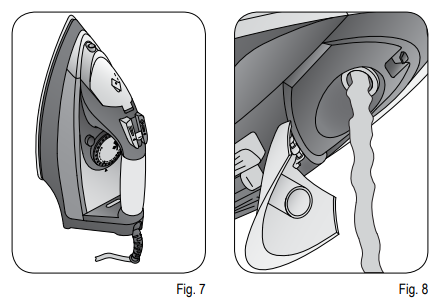
- Rest the iron upright on the iron stand (H) (Fig. 7).
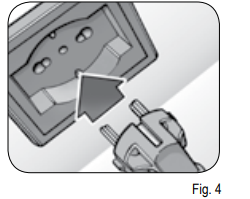
- Plug it into the socket. The temperature control lamp (E) turns on.
- Select the desired temperature by turning the temperature adjustment knob (F), lining it up with the reference (i) on the iron.
- When the iron reaches the selected temperature, the lamp (E) turns off (the temperature lamp turns off and on while ironing, indicating that the iron is maintaining the right temperature).
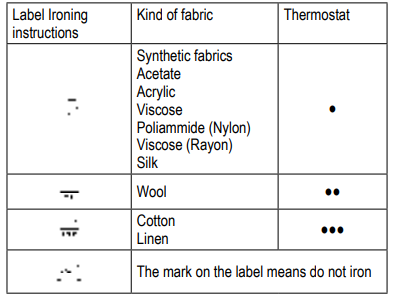
- Follow the instructions on the care label of the garment to be ironed so that the dots shown on the iron correspond to those shown on the label.
SUGGESTIONS
- Divide the articles to be ironed according to the types of material: wool with wool, cotton with cotton, etc…
- Because the iron heats up much more quickly than it cools down, it is advisable to start with those fabrics which require lower temperatures and move on to those which require progressively higher temperatures.
- If the material is made up of more than one type of fibre, always set the temperature to the fibre which requires less heat.
- For example, if the material is made up of 70% synthetics and 30% cotton, set the temperature control to position (see table) without steam, that is, the temperature for synthetic fabrics.
- If you do not know the composition of the article to be ironed, choose a part of the article which will not be seen. Do a test ironing on this part to establish the appropriate temperature (always start with a relatively low temperature and work up until the ideal temperature is reached).
- Pure (100%) wool articles can be ironed with the iron set to one of the steam positions. To avoid pure wool, silk and synthetic materials becoming shiny, it makes good sense to iron them on the reverse side. For other materials, especially velvet,
which can become shiny very easily, cover them with a cloth and iron in one direction only, using light pressure. The iron must be kept constantly moving over the fabric.
STEAM IRONING
- Steam ironing is only possible at high temperatures.
- Ensure that there is enough water in the water tank.
- Rest the iron upright on the iron stand (H).
- Insert the plug into the wall socket.
- Position the temperature adjustment knob (F) on position (•••) or higher.
- When the temperature control lamp (E) turns off, move the steam adjustment selector (B) to the desired position. You get maximum steam dispensing by moving the selector to the "MAX" position.
- Steam is not dispensed when it is moved to (Fig. 2).
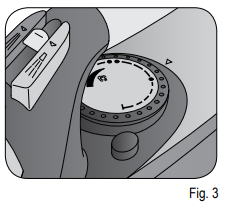
Shot of steam
If there is water in the tank and the temperature is set on (•••) or on a higher level, all you have to do is press the steam button (C).
Spray button
- Make sure the steam adjustment selector is set on "0" and that there is water in the tank. Press the spray button (D).
- It may be necessary to press the spray button repeatedly to activate this function.
DRY IRONING
- Insert the plug into the wall socket. Move the steam adjusting knob (B) to "O".
- Set the temperature control knob (F) according to the type of fabric to be ironed.
- Wait a few minutes for the soleplate to reach the set temperature.
VERTICAL IRONING
This special ironing procedure serves to remove creases from curtains, fabrics, etc. Set the ironing temperature by turning the adjustment knob (F) past the symbol (•••). Put the curtain or fabric in the position you want to iron it vertically and press the steam button. If the temperature lamp is on, do not press the steam button more than three times in a row.
Warning
Do not iron fabrics held by other people
AFTER IRONING
- Turn the temperature control knob (F) to "MIN".
- Disconnect the plug from the wall socket.
- Put the iron in a vertical position and let it cool down.
- Empty the tank: open the water filling cover (A), turn the iron upside-down and let the water pour out (Fig. 8).
Warning!
- Let the iron cool down before emptying the tank: danger of burns.
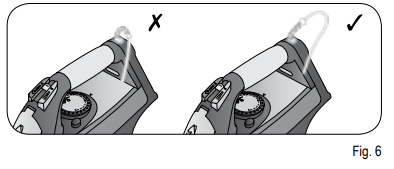
- Wrap the power cord around the iron without pulling it too tight (Fig. 6). Store the iron in a vertical position (Fig. 7).
CLEANING THE APPLIANCE
Warning!
Before cleaning, always disconnect the plug from the power point and allow the iron to cool down.
Warning!
Never immerse the appliance in water or other liquids.
Warning!
Check the state of the power cable of your iron regularly before using it, and if it is damaged, take it to the
service centre closest to you to have it replaced only by specialised personnel.
SELF CLEAN system
To prolong the life of your iron, we recommend that this procedure be carried out at regular intervals (once or twice a month).
- Fill the tank one-fourth full with water using the measuring cup (P) provided (Fig. 5).
- Fill the tank up to the level marked MAX.
- Set the iron on a stable surface in a vertical position on the iron stand (H). Plug it into the socket. Make sure the steam adjustment selector is set on "0".
- Position the temperature adjustment knob on "MAX".
- Heat the iron until the lamp (E) turns off a second time.
- Position the temperature adjustment knob on "MIN".
- Unplug the iron and keep the iron in a horizontal position on a sink.
- Press the SELF CLEAN button (M) and keep the iron in a horizontal position. Steam and boiling water will come out of the holes of the soleplate. They will remove the lime deposits and impurities that have accumulated inside the soleplate.
- Gently move the iron back and forth until the tank is completely emptied.
- Put the steam adjustment selector back on minimum "O" at the end of the self-cleaning procedure.
- Put the iron in a vertical position on its stand and wait for the soleplate to cool down completely.
- Make sure that the soleplate is completely dry before storing the iron.
Before using the iron again, try it on an old piece of cloth to make sure that the soleplate and tank are clean and to allow residual water to vaporise.
THE WARRANTY DOES NOT COVER DAMAGE CAUSED BY CLOGGING DUE TO LIME
Cleaning the soleplate and shell
Warning!
- Do not use abrasives for cleaning the soleplate. Try and keep the soleplate smooth: avoid contact with metal objects.
- Deposits and other residues on the soleplate can be removed with a rough cloth soaked in a vinegar/water solution.
- Clean plastic parts with a damp, non-abrasive cloth and dry them with a dry cloth.
Troubleshooting Common Issues
- No Steam Output: Check water level and ensure the tank is properly seated.
- Iron Not Heating: Verify the power connection and reset the auto shut-off by moving the iron.
- Leaking Water: Do not overfill the tank, and avoid using the steam boost function at low temperatures.
- Calc Build-Up: Use the calc-clean function regularly and refill with distilled water.
For persistent issues, consult the user manual or contact Ariete customer support. The product comes with a 2-year warranty and dedicated technical assistance.
Pros & Cons of the Ariete 6233 Eco Power Steam Iron
Pros
- High steam output for quick ironing
- Eco mode saves energy
- Removable water tank for easy cleaning
- Ceramic soleplate prevents fabric damage
- Auto shut-off enhances safety
Cons
- Heavier than compact travel irons
- Limited colour options
- Requires regular descaling for best performance
The Ariete 6233 Eco Power Steam Iron offers excellent value for money, especially for users prioritising performance and durability over portability.
Customer Reviews of the Ariete 6233 Eco Power Steam Iron
Customers consistently rate the Ariete 6233 Eco Power Steam Iron 4.5 out of 5 stars, praising its powerful steam, ease of use, and reliable results. Many users highlight the removable water tank and eco mode as standout features. Common complaints include the weight and the need for frequent descaling. Overall, buyers recommend this iron for home use and frequent ironing tasks, noting its durability and consistent performance.
Faqs
How do I set up the Ariete 6233 Eco Power Steam Iron for the first time?
What should I do if my Ariete 6233 Eco Power Steam Iron is not producing steam?
Can I use the Ariete 6233 Eco Power Steam Iron for vertical steaming?
How often should I descale my Ariete 6233 Eco Power Steam Iron?
Is the water tank on the Ariete 6233 Eco Power Steam Iron removable for easy refilling?
What fabrics can I safely iron with the Ariete 6233 Eco Power Steam Iron?
Does the Ariete 6233 Eco Power Steam Iron have an auto shut-off feature for safety?
How do I clean and maintain the ceramic soleplate of my Ariete 6233 Eco Power Steam Iron?
More ariete manuals
- Setup: Ariete Travel Chic Steam Iron 6224 User Manual
- Setup: Ariete Eco Power Smooth Steam Generator Iron 6422 User Manual
- Setup: Ariete Steam Iron 6214 User Manual
- How to Use: Ariete Freestyle Cordless Steam Iron 6236 User Manual
- Setup: Ariete Steam Iron 6207 User Manual
- Setup: Ariete Single Electric Hot Plate 993 User Manual
Leave a Comment