
Setup: Asrock B450 Steel Legend Owner Manual
Content
Asrock B450 Steel Legend
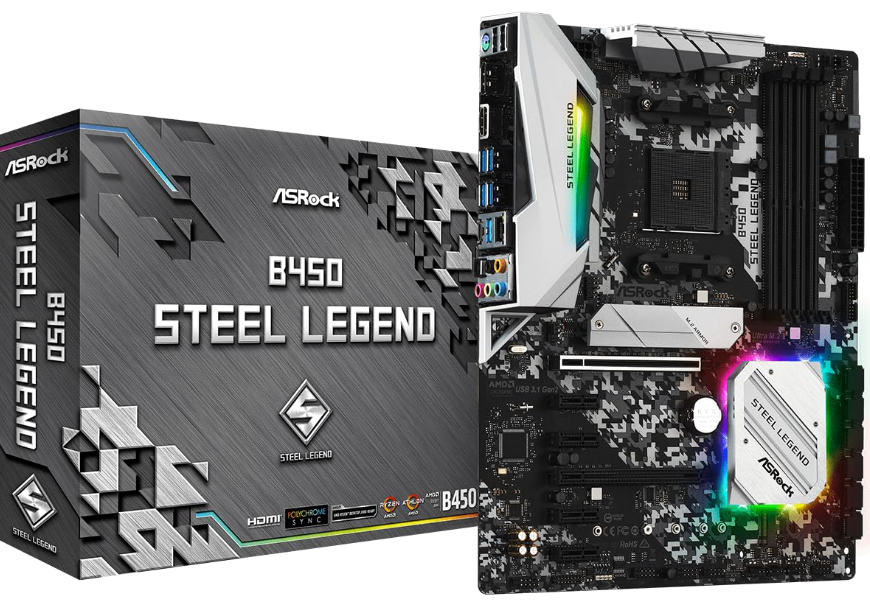
Introduction
The ASRock B450 Steel Legend is a robust and feature-rich motherboard designed for AMD Ryzen processors, offering a perfect blend of performance and affordability. This ATX motherboard supports a wide range of AMD Ryzen CPUs, including 5000, 3000, and 2000 series, ensuring compatibility with the latest generation processors. It features a six-phase power delivery system, four DDR4 memory slots supporting up to 64GB of RAM, and a variety of expansion slots for graphics cards and storage devices.
Key benefits of the ASRock B450 Steel Legend include its high-quality audio solution via the Realtek ALC892 codec, Gigabit Ethernet connectivity, and comprehensive USB options, including USB 3.1 Gen2 Type-A and Type-C ports. The motherboard is ideal for gamers and content creators seeking a reliable platform without breaking the bank. Estimated price ranges typically fall between $100 to $150, depending on the retailer and availability.
Targeted at DIY enthusiasts and budget-conscious buyers, the ASRock B450 Steel Legend is available through major online retailers and local electronics stores. Its affordability and feature set make it an attractive option for those looking to build a powerful system without overspending.
Package Contents
- ASRock B450 Steel Legend Motherboard (ATX Form Factor)
- ASRock B450 Steel Legend Quick Installation Guide
- ASRock B450 Steel Legend Support CD
- 1 x I/O Panel Shield
- 2 x Serial ATA (SATA) Data Cables (Optional)
- 2 x Screws for M.2 Sockets (Optional)
- 1 x Standoff for M.2 Socket (Optional)
Specifications
Platform
- ATX Form Factor
CPU
- AMD AM4 Socket
- Digi Power design
- 6 Power Phase design
Chipset
- AMD Promontory B450
Memory
- Dual Channel DDR4 Memory Technology
- 4 x DDR4 DIMM Slots
- AMD Ryzen series CPUs (Matisse) support DDR4 3200/2933/2667/2400/2133 ECC & non-ECC, un-buffered memory
- AMD Ryzen series CPUs (Pinnacle Ridge) support DDR4 3533+(OC)/3200(OC)/2933(OC)/2667/2400/2133 ECC & non- ECC, un-buffered memory
- AMD Ryzen series CPUs (Picasso) support DDR4 2933/2667/2400/2133 non-ECC, un-buffered memory
- AMD Ryzen series CPUs (Summit Ridge) support DDR4 3466+(OC)/3200(OC)/2933(OC)/2667/2400/2133 ECC & non-ECC, un-buffered memory
- AMD Ryzen series CPUs (Raven Ridge) support DDR4 3466+(OC)/3200(OC)/2933/2667/2400/2133 non-ECC, unbuffered memory
- For Ryzen Series CPUs (Picasso and Raven Ridge), ECC is only supported with PRO CPUs.
- Please refer to the Memory Support List on ASRock’s website for more information. (http://www.asrock.com/)
- Please refer to page 22 for the table for AMD non-XMP memory frequency support. For more details, please refer to the QVL on ASRock’s website.
- Max. capacity of system memory: 64GB
- Supports Extreme Memory Profile (XMP) memory modules
- 15μ Gold Contact in DIMM Slots
Expansion Slot
- AMD Ryzen series CPUs (Matisse, Summit Ri,dge and Pinnacle Ridge)
- 2 x PCI Express 3.0 x16 Slots (PCIE1: x16 mode; PCIE4: x4 mode)
- AMD Ryzen series CPUs (Picasso, Raven Ridge)
- 2 x PCI Express 3.0 x16 Slots (PCIE1: x8 mode; PCIE4: x4 mode)
- AMD Athlon series CPUs
- 2 x PCI Express 3.0 x16 Slots (PCIE1: x4 mode; PCIE4: x2 mode)
- Supports NVMe SSD as boot disks
- If M2_1 is occupied, PCIE4 will be disabled.
- 4 x PCI Express 2.0 x1 Slots
- Supports AMD Quad CrossFireXTM and CrossFireXTM
- This feature is only supported with Ryzen Series CPUs (Matisse, Summit Ridge, Pinnacle Ridge, Picasso,, and Raven Ridge).
Graphics
- Integrated AMD RadeonTM Vega Series Graphics in Ryzen Series APU
- Actual support may vary by CPU
- DirectX 12, Pixel Shader 5.0
- Shared memory defaults to 2 GB. Max Shared memory supports up to 16GB.
- The Max shared memory 16GB requires 32GB of system memory installed.
- Dual graphics output: Support HDMI and DisplayPort 1.2 ports by independent display controllers
- Supports HDMI 1.4 with max. resolution up to 4K x 2K (4096x2160) @ 24Hz / (3840x2160) @ 30Hz
- Supports DisplayPort 1.2 with max. resolution up to 4K x 2K (4096x2160) @ 60Hz
- Supports Auto Lip Sync, Deep Color (12bpc), xvYCC, and HBR (High Bit Rate Audio) with HDMI 1.4 Port (Compliant HDMI monitor is required)
- Supports HDCP 1.4 with HDMI 1.4 and DisplayPort 1.2 Ports
- Supports 4K Ultra HD (UHD) playback with HDMI 1.4 and DisplayPort 1.2 Ports
Audio
- 1 CH HD Audio with Content Protection (Realtek ALC892/897 Audio Codec)
- Supports Surge Protection
- PCB Isolate Shielding
- Individual PCB Layers for R/L Audio Channel
- Gold Audio Jacks
LAN
- PCIE x1 Gigabit LAN 10/100/1000 Mb/s
- Realtek RTL8111H
- Supports Wake-On-LAN
- Supports Lightning/ESD Protection
- Supports Energy Efficient Ethernet 802.3az
- Supports PXE
Rear Panel I/O
- 1 x PS/2 Mouse/Keyboard Port
- 1 x HDMI Port
- 1 x DisplayPort 1.2
- 1 x Optical SPDIF Out Port
- 2 x USB 2.0 Ports (Supports ESD Protection)
- 1 x USB 3.2 Gen2 Type-A Port (10 Gb/s) (Supports ESD Pro-tection)
- 1 x USB 3.2 Gen2 Type-C Port (10 Gb/s) (Supports ESD Pro-tection)
- 4 x USB 3.2 Gen1 Ports (Supports ESD Protection)
- Ultra USB Power is supported on USB3_34 ports.
- ACPI wake-up function is not supported on USB3_34 ports.
- 1 x RJ-45 LAN Port with LED (ACT/LINK LED and SPEED LED)
- HD Audio Jacks: Rear Speaker / Central / Bass / Line in / Front Speaker / Microphone (Gold Audio Jacks)
Storage
- 4 x SATA3 6.0 Gb/s Connectors, support RAID (RAID 0, RAID 1,, and RAID 10), NCQ, AH, CI,, and Hot Plug
- 2 x SATA3 6.0 Gb/s Connectors by ASMedia ASM1061, sup-port NCQ, AHCI and Hot Plug
- M2_2, SAT,,A3_3 and SATA3_4 share lanes. If either one of them is in use, the others will be disabled.
BIOS Feature
- AMI UEFI Legal BIOS with multilingual GUI support
- Supports “Plug and Play”
- ACPI 5.1 complwake-upake up events
- Supports jumperfree
- SMBIOS 2.3 support
- DRAM Voltage Multi-Adjustment
Hardware Monitor
- Temperature Sensing: CPU, MB
- Fan Tachometer: CPU, CPU/Water Pump, Chassis/Water
- Pump Fans
- Quiet Fan (Auto-adjust chassis fan speed by CPU temperature):
- CPU, CPU/Water Pump, Chassis/Water Pump Fans
- Fan Multi-Speed Control: CPU, CPU/Water Pump, Chassis/ Water Pump Fans
- Voltage monitoring: +12V, +5V, +3.3V, Vcore
OS
- Microsoft® Windows® 10 64-bit
Certifications
- FCC, CE
- ErP/EuP ready (ErP/EuP-ready power supply is required.
For detailed product information, please visit our website: http://www.asrock.com
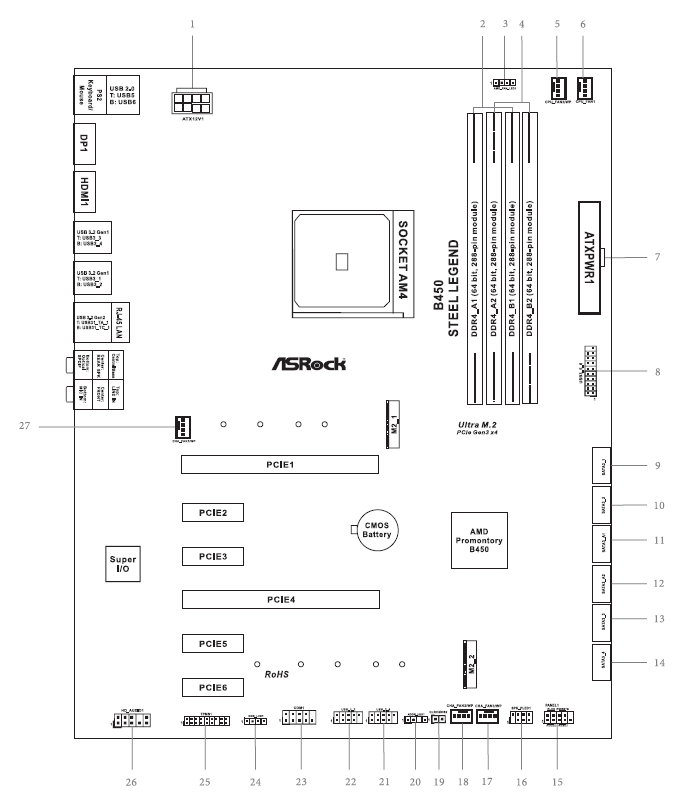
Motherboard Layout
I/O Panel
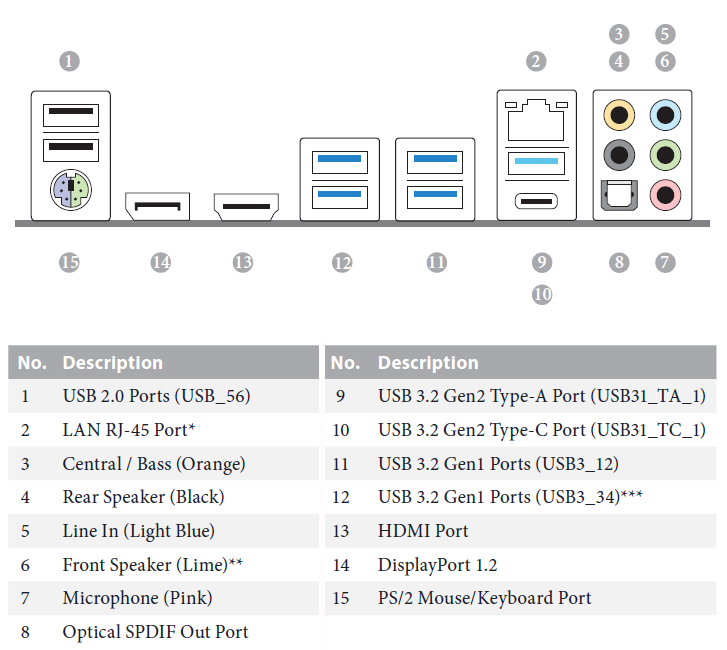
There are two LEDs on each LAN port. Please refer to the table below for the LAN port LED indications
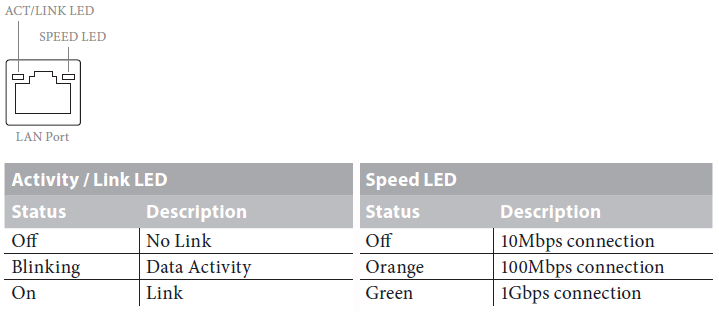
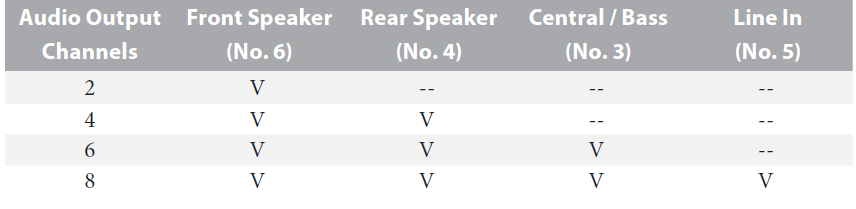
If you use a 2-channel speaker, please connect the speaker’s plug to “Front Speaker Jack”. See the table below for connection details in accordance with the type of speaker you use.
Installation
This is an ATX form factor motherboard. Before you install the motherboard, study the configuration of your chassis to ensure that the motherboard fits into it.
Pre-installation Precautions
Take note of the following precautions before you install motherboard components or change any motherboard settings.
- Make sure to unplug the power cord before installing or removing the motherboard. Failure to do so may cause physical injuries to you and damage to motherboard components.
- To ad damage from static electricity to the motherboard’s components, NEVER place your motherboard directly on a carpet. Also,, remember to use a grounded wrist strap or touch a safety grounded object before you handle the components.
- Hold components by the edges and do not touch the ICs.
- Whenever you uninstall any components, place them on a grounded anti-static pad or in the bag that comes with the components.
- When placing screws to secure the motherboard to the chassis, please do not over-tighten the screws! Doing so may damage the motherboard.
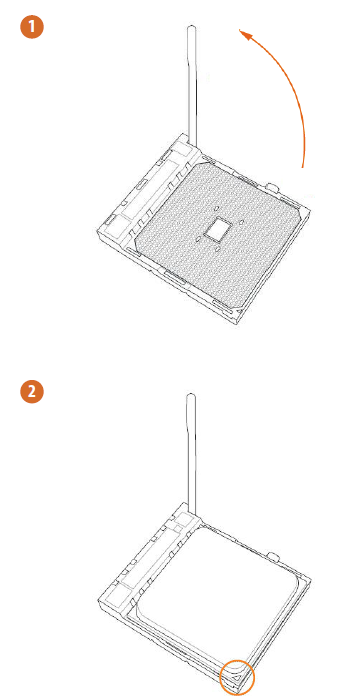
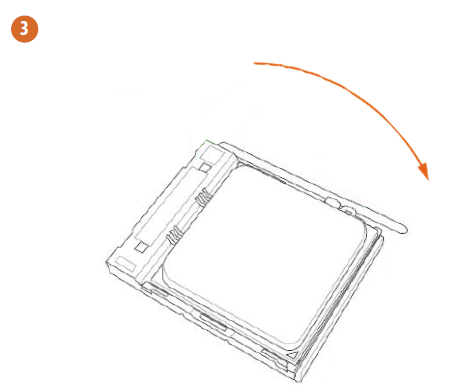
Installing the CPU
Unplug all power cables before installing the CPU.
Installing the CPU Fan and Heatsink
After you install the CPU into this motherboard, it is necessary to install a larger heatsink and cooling fan to dissipate heat. You also need to spray thermal grease between the CPU and the heatsink to improve heat dissipation. Make sure that the CPU and the heatsink are securely fastened and in good contact with each other.
Please turn off the power or remove the power cord before changing a CPU or heatsink.
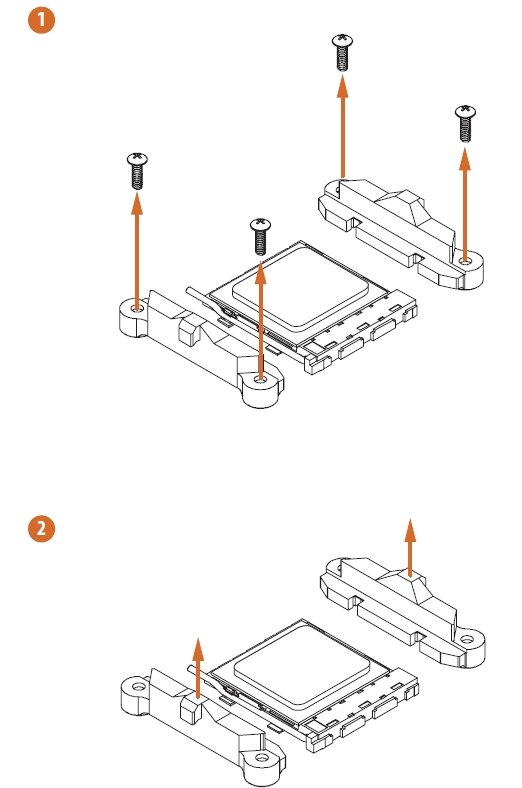
Installing the CPU Box Cooler SR1
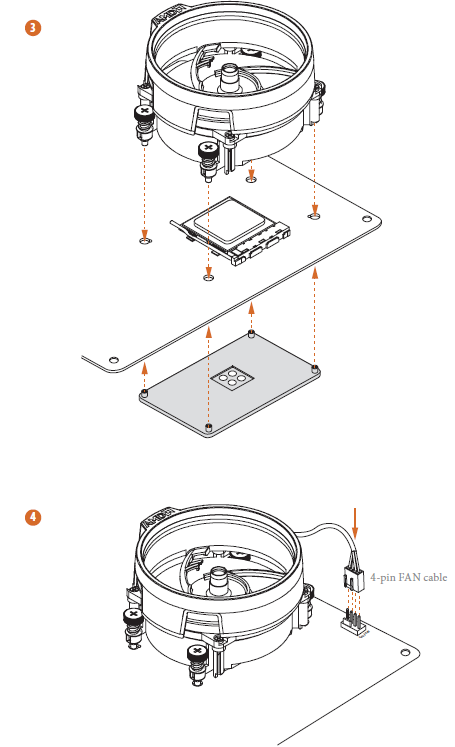
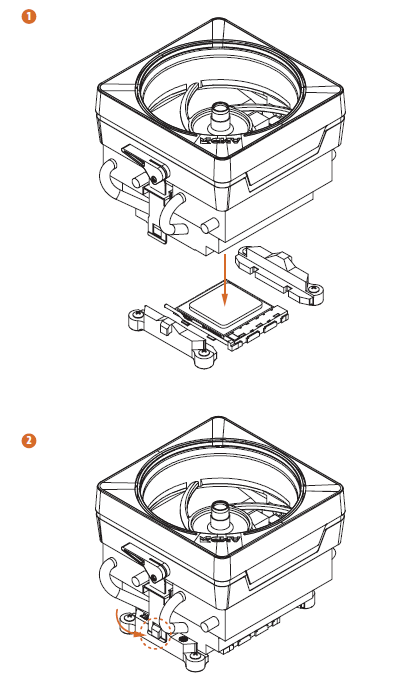
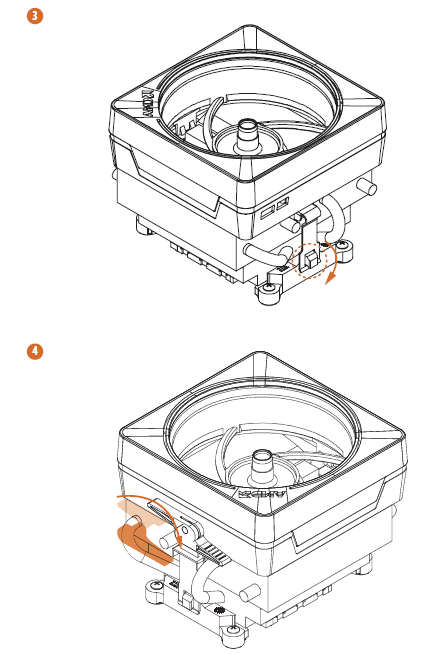
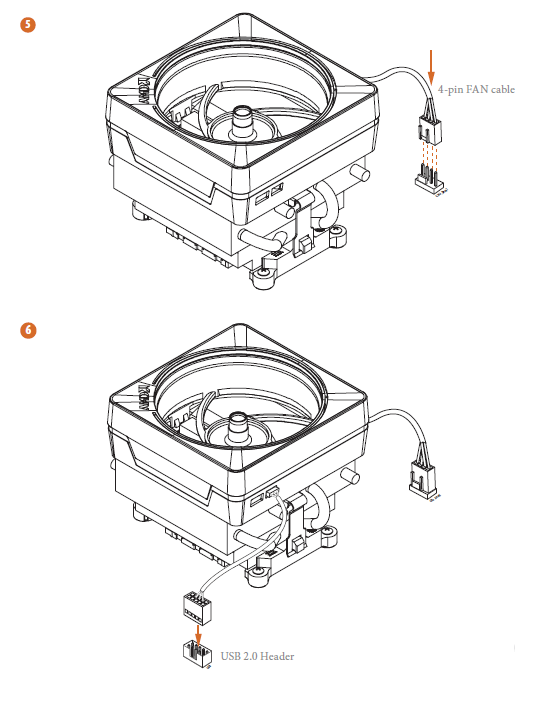
Installing the AM4 Box Cooler SR2
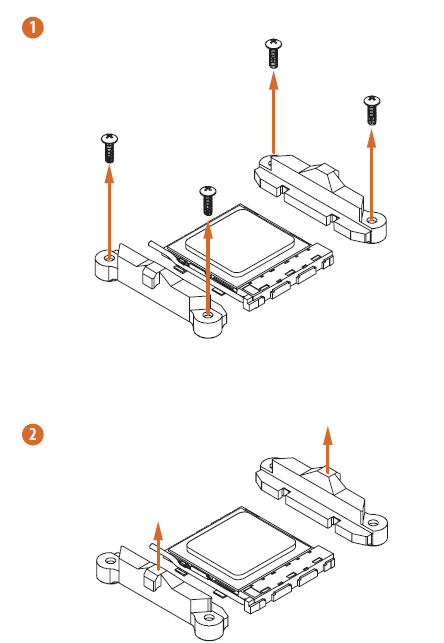
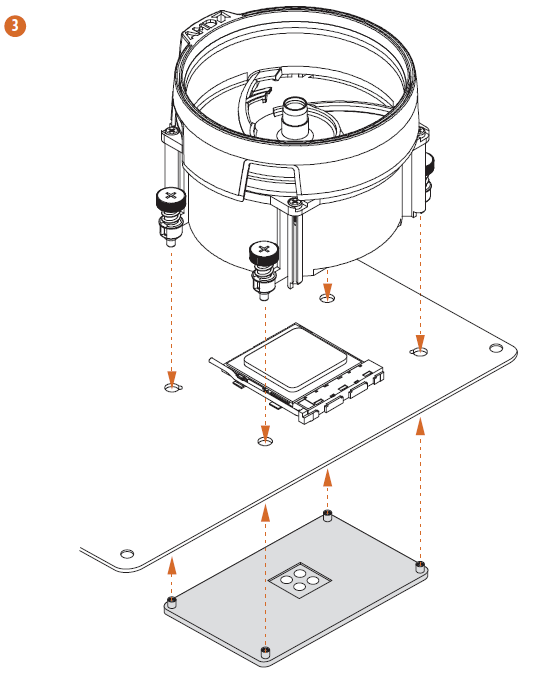
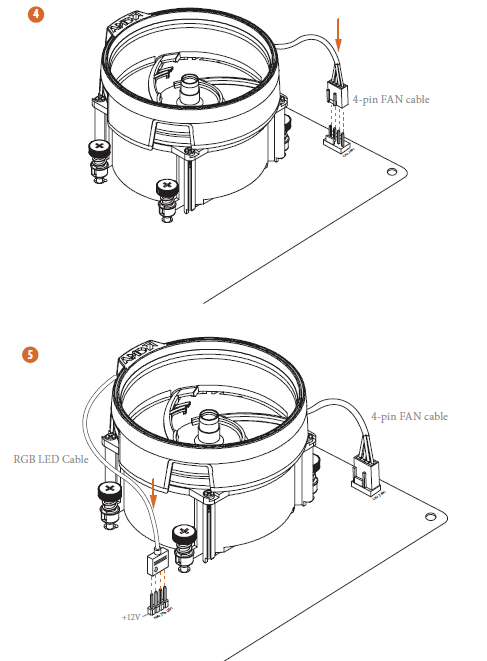
The diagrams shown here are for reference only. The headers might be in a different position on your motherboard. Please refer to page 32 for the orientation othe f the AMD Fan LED Header (AMD_FAN_LED1).
Installing the AM4 Box Cooler SR3
Troubleshooting the ASRock B450 Steel Legend
Common issues with the ASRock B450 Steel Legend include boot failures, memory compatibility problems, and network connectivity drops. Here are some troubleshooting steps:
- Boot Failure: Ensure proper CPU and RAM installation. Check for any loose connections or faulty power supply.
- Memory Compatibility: Verify that your RAM is compatible with the motherboard's specifications. Try different RAM slots if necessary.
- Network Connectivity: Update Ethernet drivers or reset the network settings using the BIOS.
For more complex issues, refer to the ASRock Support website for detailed guides and FAQs. The ASRock B450 Steel Legend comes with a standard warranty; contact ASRock support for assistance.
Pros & Cons of the ASRock B450 Steel Legend
Pros
- High-Quality Audio: Realtek ALC892 codec provides excellent sound quality.
- Extensive Expansion Options: Supports multiple graphics cards via CrossFireX and ample storage options.
- Affordable: Offers great value for its price, making it ideal for budget builds.
Cons
- No Wi-Fi: Requires a separate Wi-Fi adapter for wireless connectivity.
- Basic BIOS Interface: Not as visually appealing or feature-rich as some competitors.
Overall, the ASRock B450 Steel Legend is a solid choice for those prioritizing performance and affordability over advanced features like Wi-Fi.
Customer Reviews and Feedback
Users of the ASRock B450 Steel Legend praise its reliability, ease of overclocking, and comprehensive feature set for the price. Common complaints include the lack of Wi-Fi and a somewhat basic BIOS interface. Many reviewers rate it highly for its value, with an average rating of 4 out of 5 stars. For those seeking a straightforward, budget-friendly build, the ASRock B450 Steel Legend is a recommended choice.
Tags
More asrock manuals
Leave a Comment