
Setup: At and T Cordless Telephone CL84107 User Manual
Content
AT&T Cordless Telephone CL84107
Introduction
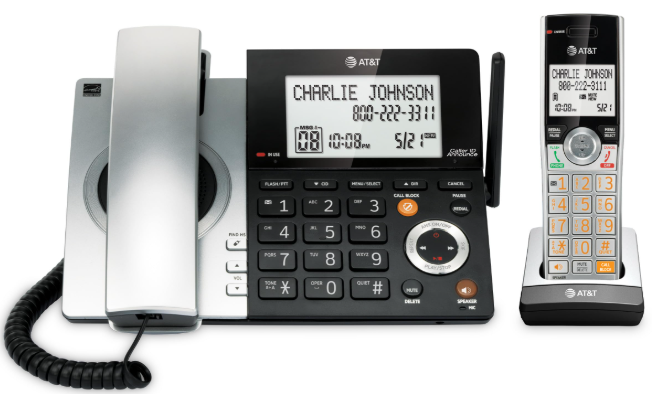
The AT&T Cordless Telephone CL84107 is a versatile and feature-rich cordless phone designed to meet the communication needs of both home and office users. Launched in recent years, this model has quickly gained popularity for its reliability, clarity, and user-friendly interface. The estimated price of the CL84107 is around $50-$70, making it an affordable option for those seeking a high-quality cordless phone.
This phone is intended for users who require clear and reliable communication without the constraints of a wired connection. It features advanced noise reduction technology, ensuring crystal-clear calls and minimizing background interference. The CL84107 also comes with a digital answering system, allowing users to record and play back messages with ease.
One of the standout features of the CL84107 is its expandability; it supports up to 12 handsets, making it ideal for larger households or small businesses. Additionally, it includes a backlit display and keypad, making it easy to use in various lighting conditions.
Specifications
- RF frequency band: 1921.536MHz - 1928.448MHz
- Channels: 5
- Telephone base voltage: (AC voltage, 60Hz) 96Vrms - 130Vrms
- Telephone base voltage: (AC adapter output) 6VDC @ 600mA
- Handset voltage: 2.4V 400mAh, 2 x AAA Ni-MH
- Charger voltage: (AC adapter output)6VDC @ 100mA
Parts checklist
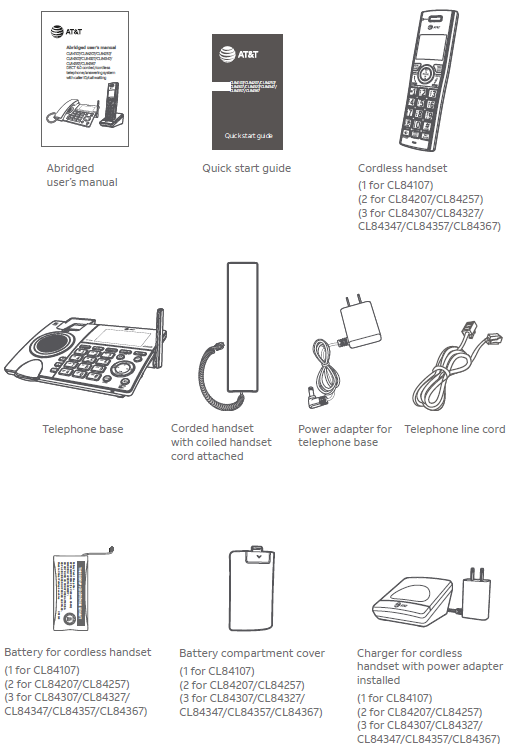
Your telephone package contains the following items. Save your sales receipt and original packaging in the event that warranty service is necessary.
Installation
You must install and charge the battery before using the telephone. See pages 10-11 for easy instructions.
Install the telephone base close to a telephone jack and a power outlet not controlled by a wall switch. The telephone base can be placed on a flat surface or vertically mounted on the wall (see page 14). For optimum range and better reception, place the telephone base in a central and open location.
If you subscribe to high-speed Internet service (DSL - digital subscriber line) through your telephone line, you must install a DSL filter between the telephone line cord and the telephone wall jack (see the following page). The filter prevents noise and caller ID problems caused by DSL interference. Please contact your DSL service provider for more information about DSL filters.
Your product may be shipped with protective stickers covering the handset and telephone base displays - remove them before use.
For customer service or product information, visit our website at www.telephones.att.com or call 1 (800) 222-3111. In Canada, dial 1 (866) 288-4268.
Avoid placing the telephone base and charger too close to:
- Communication devices such as television sets, VCRs, or other cordless telephones.
- Excessive heat sources.
- Noise sources such as a window with traffic outside, motors, microwave ovens, refrigerators, or fluorescent lighting.
- Excessive dust sources, such as a workshop or garage.
- Excessive moisture.
- Extremely low temperature.
- Mechanical vibration or shock,k such as on top of a washing machine or workbench.
Telephone base and charger installation
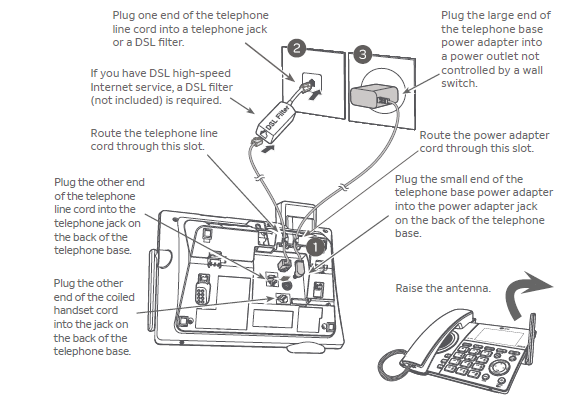
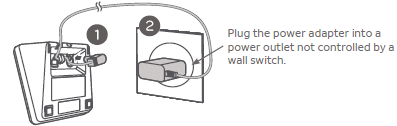
Install the telephone base and charger, as shown below.
The telephone base is ready for tabletop use. If you want to change to wall-mounting, see Installation options on page 14 for details.
Telephone base installation
Charger installation
Battery installation and charging
Install the battery, as shown below. Once you have installed the battery, the screen indicates the battery status (see the following table). If necessary, place the handset in its charger to charge the battery. For best performance, keep the handset in the charger when not in use. The battery is fully charged after 10 hours of continuous charging. See the table on page 150 for battery operating times.
If the screen shows Place in charger a flashes, you need to charge the handset without interruption for at least 30 minutes to give the handset enough charge to use the telephone for a short time. The following table summarizes the battery charge indicators and actions to take.

Note: If you are on a phone call in low battery mode, you hear four short beeps every minute.
Step 1
Plug the battery connector securely into the socket inside the handset battery compartment. Insert the supplied battery with the label THIS SIDE UP facing up, as indicated.

Step 2
Align the cover flat against the battery compartment, then slide it upwards until it clicks into place.

Step 3
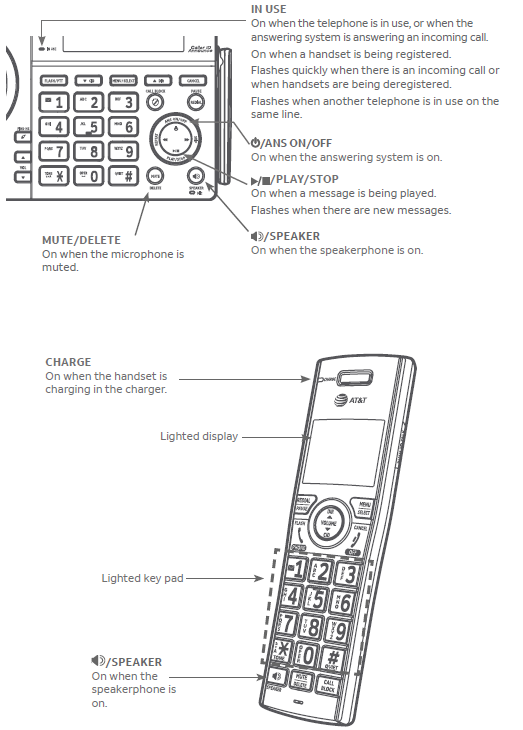
Charge the handset by placing it face forward in the charger. The CHARGE light on the top of the handset is on during charging.

Battery installation and charging
After you install your telephone or power returns following a power outage, the handset and base will prompt you to set the date and time. For instructions on setting the date and time using a cordless handset or the telephone base, see Set date/time on page 20 and page 31, respectively. To skip setting the date and time, press
OFF/CANCEL on a cordless handset or CANCEL on the telephone base.

After the date and time setting is done or skipped, the telephone base then prompts if you want to set Smart call blocker. Press MENU/SELECT to start the Smart call blocker setup via voice guide. For more details, see the Voice guide to set Smart call blocker on page 94. To skip the setup, press CANCEL on the telephone base.

After the Smart call blocker setting is done or skipped, the telephone base will then prompt if you want to set up the answering system. Press MENU/SELECT to start the answering system setup via voice guide. For more details, see the Voice guide to set the Answering system on page 109. To skip the setup, press CANCEL on the telephone base.

Note: Voice guides to set Smart call blocker and answering system are only available on the telephone base.
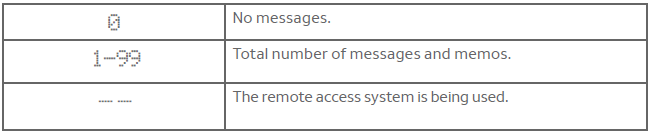
Base message counter displays
The base message counter shows the total number of answering system messages. See the following table for other message counter displays.
Message counter displays
Remote access
You can reach your answering system remotely by dialing your home telephone number from any touch-tone telephone.
To remotely reach your answering system:
- Dial your telephone number from any touch-tone telephone.
- When the system answers, enter the two-digit remote access code (19 is the default code. See page 112 to change it).
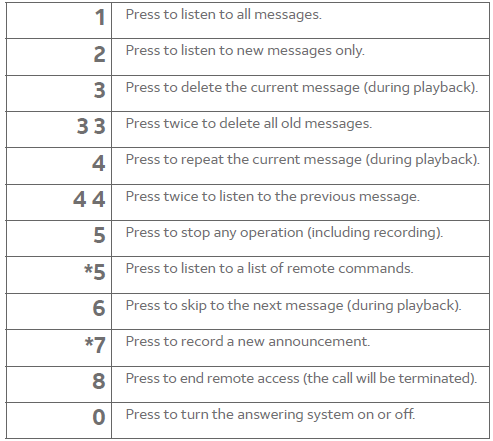
The system automatically announces the number of new or old messages (if any), and then begins to play them. - You can also enter the following remote commands:
Remote commands
Alert tones and lights
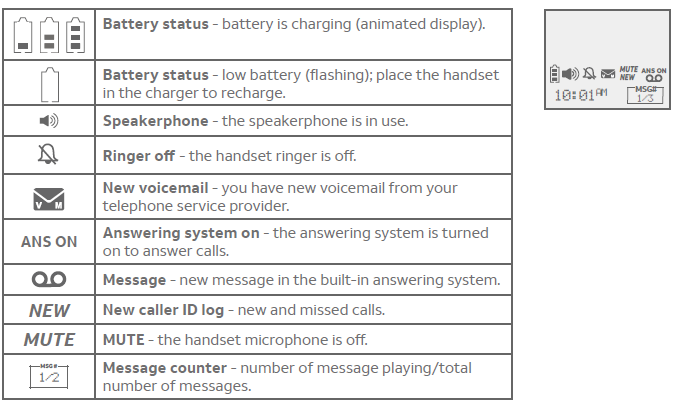
Handset screen icons
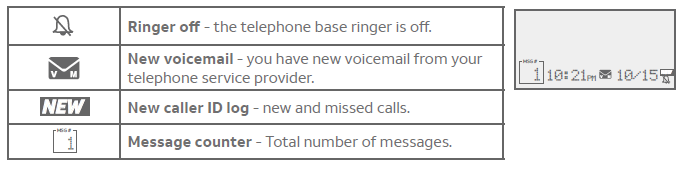
Telephone base screen icons
Alert tones and lights
Lights
Troubleshooting
My telephone doesn’t work at all.
- Make sure the power cord is securely plugged in.
- Make sure you plug the battery connector securely into the cordless handset.
- Make sure you plug the telephone line cord securely and firmly into the telephone base and the telephone wall jack.
- Charge the battery in the cordless handset for at least 10 hours. For optimum daily performance, return the cordless handset to the charger when not in use.
- If the battery is depleted, it may take approximately 30 minutes to charge the handset before it shows Low battery. See page 10 for details.
- Reset the telephone base. Unplug the electrical power. Wait for approximately 15 seconds, then plug it back in. Allow up to one minute for the cordless handset and telephone base to reset.
- You may need to purchase a new battery. Please refer to
- Battery installation and charging are discussed in this user’s manual on pages 10-11.
The display shows no line. I cannot get a dial tone.
- Try all the suggestions, as mentioned above.
- If the previous suggestions do not work, disconnect the telephone line cord from your telephone and connect the telephone line cord to another telephone.
- If there is no dial tone on that other telephone either, your telephone line ord may be defective. Install a new telephone line cord.
- If changing the telephone line cord does not help, the wall jack (or the wiring to this wall jack) may be defective. Try using a different wall jack in your home to connect your CL84107/CL84207/CL84257/CL84307/CL84327/CL84347/CL84357/CL84367 telephone, or contact your telephone service provider (charges may apply).
I cannot dial out.
- Try all the suggestions, as mentioned above.
- Make sure you have a dial tone before dialing. The cordless handset may take a second or two to find the telephone base and produce a dial tone. This is normal. Wait an extra second before dialing.
- Eliminate any background noise. Noise from a television, radio o, or other appliances may cause the phone to not dial out properly.
- If you cannot eliminate the background noise, first try muting the cordless handset before dialing, or dialing from another room with less background noise. If other phones in your home are having the same problem, contact your telephone service provider (charges may apply).
- Charge the battery in the cordless handset for at least 10 hours. For optimum daily performance, return the cordless handset to the charger when not in use.
- You may have too many extension phones on your telephone line to allow all of them to ring simultaneously. Try unplugging some of the other phones.
- The layout of your home or office may be limiting the operating range. Try moving the telephone base to another location, preferably to a higher location.
- If other phones in your home are having the same problem, contact your telephone service provider (charges may apply).
- Test a working phone at the phone jack. If another phone has the same problem, contact your telephone service provider (charges may apply).
- Other electronic products can cause interference with your cordless phone. Try installing your phone as far away as possible from electronic devices such as television sets, VCRs, or other cordless telephones.
- Remove the battery. Install the battery again and place the cordless handset in the charger. Wait for the cordless handset to reestablish its connection with the telephone base. Allow up to one minute for this to take place.
- Your line cord may be defective. Try installing a new line cord.
My calls cut in and out while I’m using my cordless handset.
- Other electronic products, such as HAM radios and other DECT phones, can cause interference with your cordless phone. Try installing your phone as far away as possible from these types of electronic devices.
- Do not install this phone near a microwave oven or on the same electrical outlet. You may experience decreased performance while the microwave oven is operating.
- If you plug your phone in with a modem or surge protector, plug the phone (or modem/surge protector) into a different location. If this does not solve the problem, relocate your phone or modem farther apart from one another, or use a different surge protector.
- Move your telephone base to a higher location. The phone may have better reception when installed in a high area.
- If other phones in your home are having the same problem, contact your telephone service provider (charges may apply).
The system does not respond to remote commands.
- Make sure to enter your remote access code correctly (page 112).
- Make sure you are calling from a touch-tone phone. When you dial a number, you should hear tones. If you hear clicks, the phone is not a touch-tone telephone and cannot activate the answering system.
- The answering system may not detect the remote access code while your announcement is playing. Try waiting until the announcement is over before entering the code.
- There may be interference on the phone line you are using. Press dialing keys firmly.
I subscribe to a nontraditional telephone service that uses my computer to establish connections, and my telephone doesn’t work.
- Make sure your computer is powered on.
- Make sure your Internet connection is working properly.
- Make sure that the software is installed and running for your nontraditional telephone service.
- Make sure to plug your USB telephone adapter into a dedicated USB port on your computer. Do not plug it into a multiple-port USB hub (USB splitter) that is not powered.
- In a few rare instances, the USB port on your computer may not have enough power. Try using a USB hub with its own external power supply.
- If you are using a firewall, it may prevent access to your nontraditional telephone service provider. Contact your service provider for more information.
A common cure for electronic equipment.
If the telephone does not seem to be responding normally, try putting the cordless handset in the charger. If it does not fix the problem, do the following (in the order listed):
- Disconnect the power to the telephone base.
- Disconnect the cordless handset battery.
- Wait a few minutes.
- Connect the power to the telephone base.
- Remove the battery. Replace the battery and place the cordless handset into the charger.
- Wait for the cordless handset to reestablish its connection with the telephone base. Allow up to one minute for this to take place.
Maintenance
Taking care of your telephone
- Your cordless telephone contains sophisticated electronic parts, so you must treat it with care.
- Avoid rough treatment.
- Place the handset down gently.
- Save the original packing materials to protect your telephone if you ever need to ship it.
Avoid water
- You can damage your telephone if it gets wet. Do not use the handset in the rain, or handle it with wet hands. Do not install the telephone base near a sink, bathtub, or shower.
Electrical storms
- Electrical storms can sometimes cause power surges harmful to electronic equipment. For your own safety, take caution when using electric appliances during storms.
Cleaning your telephone
- Your telephone has a durable plastic casing that should retain its luster for many years. Clean it only with a soft cloth slightly dampened with water or mild soap.
- Do not use excess water or cleaning solvents of any kind.
Remember that electrical appliances can cause serious injury if used when you are wet or standing in water. If the telephone base should fall into water, DO NOT RETRIEVE IT UNTIL YOU UNPLUG THE POWER CORD AND TELEPHONE LINE CORDS FROM THE WALL. Pull the unit out by the unplugged cords.
Important safety information
This symbol is to alert you to important operating or servicing instructions that may appear in this user’s manual. Always follow basic safety precautions when using this product to reduce the risk of injury, fire, or electric shock.
Safety information
- Read and understand all instructions in the user’s manual. Observe all markings on the product.
- Avoid using a telephone during a thunderstorm. There may be a slight chance of electric shock from lightning.
- Do not use a telephone in the vicinity of a gas leak. Under certain circumstances, a spark may be created when the adapter is plugged into the power outlet, or when the handset is replaced in its cradle. This is a common event associated with the closing of any electrical circuit. In an inadequately ventilated environment, the user should not plug the phone into a power outlet, nor put a charged handset into the cradle where there are concentrations of flammable or flame-supporting gases. A spark in such an environment could create a fire or explosion. Such environments may include: medical use of oxygen without adequate ventilation; industrial gases (cleaning solvents; gasoline vapors, etc.); a leak of natural wgas, etc.
- Do not use this product near water or when you are wet. For example, do not use it in a wet basement or shower, nor next to a swimming pool, bathtub, kitchen sink, or laundry tub. Do not use liquids or aerosol sprays for cleaning. If the product comes in contact with any liquid, unplug any line or power cord immediately. Do not plug the product back in until it has dried thoroughly.
- Install this product in a protected location where no one can trip over any line or power cords. Protect cords from damage or abrasion.
- If this product does not operate normally, see the Troubleshooting section on pages 133-141 of this user’s manual. If you cannot solve the problem, or if the product is damaged, refer to the Limited warranty section on pages 148-149. Do not open this product except as directed in your user’s manual. Opening the product or reassembling it incorrectly may expose you to hazardous voltages or other risks.
- Replace batteries only as described in your user’s manual (pages 10-11). Do not burn or puncture batteries — they contain caustic chemicals.
- The power adapters are intended to be correctly oriented in a vertical or floor mount position. The prongs are not designed to hold the plug in place if it is plugged into a ceiling, under-the-table o, or cabinet outlet.
- For pluggable equipment, the socket-outlet shall be installed near the equipment and shall be easily accessible.
Limited warranty
The AT&T brand is used under license - any repair, replacement, or warranty service, and all questions about this product should be directed to our website at www.telephones.att.com or call 1 (800) 222-3111. In Canada, dial 1 (866) 288-4268.
- What does this limited warranty cover?
The manufacturer of this AT&T branded product warrants to the holder of a valid proof of purchase (“CONSUMER” or “you”) that the product and all accessories provided in the sales package (“PRODUCT”) are free from defects in material and workmanship, pursuant to the following terms and conditions, when installed and used normally and in accordance with the PRODUCT operating instructions. This limited warranty extends only to the CONSUMER for products purchased and used in the United States of America and Canada. - What will be done if the PRODUCT is not free from defects in materials and workmanship during the limited warranty period (“materially defective PRODUCT”)?
During the limited warranty period, the manufacturer’s authorized service representative will repair or replace at the manufacturer’s option, without charge, a materially defective PRODUCT. If the manufacturer repairs the PRODUCT, they may use new or refurbished replacement parts. If the manufacturer chooses to replace the PRODUCT, they may replace it with a new or refurbished PRODUCT of the same or similar design. The manufacturer will retain defective parts, modules, or equipment. Repair or replacement of the PRODUCT, at the manufacturer’s option, is your exclusive remedy. The manufacturer will return repaired or replacement products to you in working condition. You should expect the repair or replacement to take approximately 30 days. - How long is the limited warranty period?
The limited warranty period for the PRODUCT extends for ONE (1) YEAR from the date of purchase. If the manufacturer repairs or replaces a materially defective PRODUCT under the terms of this limited warranty, this limited warranty also applies to the repaired or replacement PRODUCT for a period of either (a) 90 days from the date the repaired or replacement PRODUCT is shipped to you or (b) the time remaining on the original one-year limited warranty; whichever is longer. - What is not covered by this limited warranty?
This limited warranty does not cover:- PRODUCT that has been subjected to misuse, accident, shipping, or other physical damage, improper installation, abnormal operation or handling, neglect, inundation, fire, water, or other liquid intrusion; or
- PRODUCT that has been damaged due to repair, alteration, or modification by anyone other than an authorized service representative of the manufacturer; or
- PRODUCT to the extent that the problem experienced is caused by signal conditions, network reliability,y or cable or antenna systems; or
- PRODUCT to the extent that the problem is caused by use with non-AT&T accessories; or
- PRODUCT whose warranty/quality stickers, PRODUCT serial number plates, or electronic serial numbers have been removed, altered, damaged, or rendered illegible; or
- PRODUCT purchased, used, serviced, or shipped for repair from outside the United States of America or Canada, or used for commercial or institutional purposes (including but not limited to products used for rental purposes); or
- PRODUCT returned without valid proof of purchase (see item 6); or
- Charges for installation or setup, adjustment of customer controls, and installation or repair of systems outside the unit.
- How do you get warranty service?
To obtain warranty service, visit our website at www.telephones.att.com or call 1 (800) 222-3111. In Canada, dial 1 (866) 288-4268.
NOTE: Before calling for service, please review the user’s manual; a check of the PRODUCT controls and features may save you a service call.
Except as provided by applicable law, you assume the risk of loss or damage during transit and transportation and are responsible for delivery or handling charges incurred in the transport of the PRODUCT(s) to the service location. The manufacturer will return repaired or replaced PRODUCT under this limited warranty to you. Transportation, delivery,y or handling charges are prepaid. The manufacturer assumes no risk for damage or loss of the PRODUCT in transit. If the PRODUCT failure is not covered by this limited warranty, or if your proof of purchase does not meet the terms of this limited warranty, the manufacturer will notify you and will request that you authorize the cost of repair before any further repair activity. You must pay for the cost of repair and return shipping costs for the repair of products that are not covered by this limited warranty. - What must you return with the PRODUCT to get warranty service?
You must:- Return the entire original package and contents, including the PRODUCT, to the service location along with a description of the malfunction or difficulty; and
- Include a “valid proof of purchase” (sales receipt) identifying the PRODUCT purchased (PRODUCT model) and the date of purchase or receipt; and
- Provide your name, complete and correct mailing address, and telephone number.
- Other limitations
- This warranty is the complete and exclusive agreement between you and the manufacturer of AT&T-branded PRODUCT. It supersedes all other written or oral communications related to this PRODUCT. The manufacturer provides no other warranties for this PRODUCT.
- The warranty exclusively describes all of the manufacturer’s responsibilities regarding the PRODUCT. There are no other express warranties. No one is authorized to make modifications to this limited warranty, and you should not rely on any such modification.
State/Provincial Law rights: This warranty gives you specific legal rights, and you may also have other rights which vary from state to state or province to province. - Limitations: Implied warranties, including those of fitness for a particular purpose and merchantability (an unwritten warranty that the PRODUCT is fit for ordinary use), are limited to one year from the date of purchase. Some states/provinces do not allow limitations on how long an implied warranty lasts, so the above limitation may not apply to you. In no event shall the manufacturer be liable for any indirect, special, incidental, consequential, or similar damages (including, but not limited to, lost profits or revenue, inability to use the PRODUCT or other associated equipment, the cost of substitute equipment, and claims by third parties) resulting from the use of this PRODUCT. Some states/provinces do not allow the exclusion or limitation of incidental or consequential damages, so the above limitation or exclusion may not apply to you.
Please retain your original sales receipt as proof of purchase.
Pros & Cons
Pros:
- Clear call quality with advanced noise reduction
- Expandable up to 12 handsets
- Digital answering system with ample recording time
- Backlit display and keypad for ease of use
- Intercom and conference call capabilities
- Affordable price point
Cons:
- Some users report issues with battery life over time
- No Bluetooth connectivity for hands-free use
- Limited customization options for ringtones and display settings
Customer Reviews
Customers generally praise the AT&T Cordless Telephone CL84107 for its clear call quality and robust feature set. Many appreciate the ease of setup and the convenience of having multiple handsets. However, some users have reported issues with battery life and the lack of Bluetooth connectivity.
Faqs
How do I pair additional handsets with the base unit?
Why am I experiencing static or interference during calls?
How do I set up the digital answering system?
Can I use the AT&T Cordless Telephone CL84107 with multiple phone lines?
How long does the battery last on a fully charged handset?
Is the AT&T Cordless Telephone CL84107 compatible with VoIP services?
How do I reset the base unit and handsets?
Can I use the intercom feature between different rooms?
How many messages can the answering machine record?
Is the AT&T Cordless Telephone CL84107 wall mountable?
More at and t manuals
- At and T Dect 6.0 Cordless Telephone EL52213 User Guide
- Setup: At and T Dect 6.0 Cordless Telephones EL51103 User Guide
- Operation: At and T Cordless Telephone Caller ID CRL81112 User Manual
- At and T Two-Line Corded Telephone ML17929 User Manual
- Setup: At and T Dect 6.0 Cordless Telephone EL52200 User Guide
Leave a Comment