
Audio-Technica 3000 Series Wireless Microphone System User Manual
Content
Audio-Technica 3000 Series Wireless Microphone System: Comprehensive Product Manual
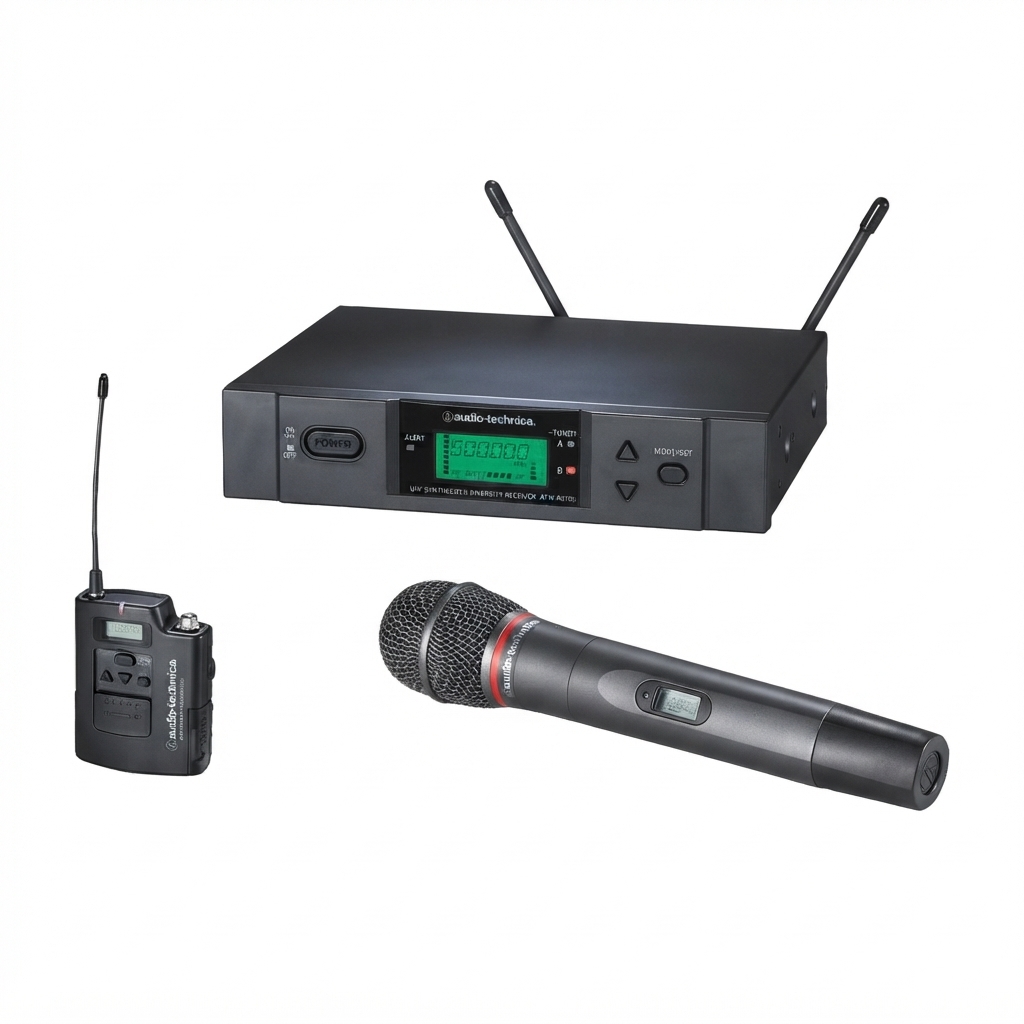
The Audio-Technica 3000 Series Wireless Microphone System is a professional UHF wireless solution designed for reliable speech, live performance, houses of worship, educational environments, and corporate presentations. It is built for users who need clear audio, stable RF performance, and flexible transmitter options in a compact, easy-to-manage system. The series is known for true diversity operation, IR sync setup, automatic squelch, and OLED displays that make monitoring settings straightforward during setup and on stage.
One of the biggest advantages of the Audio-Technica 3000 Series Wireless Microphone System is its balance of pro-level features and practical usability. Depending on the model, it supports handheld and body-pack transmitters, interchangeable microphone capsules, balanced XLR and unbalanced output options, and network control on select receivers. The system is especially well suited for users who need dependable wireless microphones for sermons, lectures, concerts, interviews, and multi-channel installations.
Typical pricing varies by configuration, but a single-channel receiver with handheld transmitter is commonly positioned in the mid-range professional category, with street pricing often around the $500 to $700 range depending on retailer, capsule, and transmitter type. Availability is broad through authorized Audio-Technica dealers and professional AV suppliers, with regional frequency-band options available in different markets. For buyers searching for a dependable wireless mic system with strong range and solid sound quality, the 3000 Series remains a strong value choice.
How to Use the Audio-Technica 3000 Series Wireless Microphone System
Quick Setup Overview
- Connect the receiver to power and audio input equipment such as a mixer, speaker system, or audio interface.
- Attach the antennas securely and place the receiver in a clear line of sight when possible.
- Turn on the transmitter and receiver, then use frequency scan and IR sync to match channels.
- Set output levels to match the connected device and avoid distortion or clipping.
- Perform a sound check before the live event to confirm RF stability and clean audio output.
For best performance, keep the transmitter and receiver within a practical operating range and avoid sources of RF interference such as Wi-Fi routers, lighting controllers, and heavy metal obstructions. The system’s true diversity design helps reduce dropouts, while auto squelch and selectable frequencies improve reliability in busy wireless environments.
Troubleshooting the Audio-Technica 3000 Series Wireless Microphone System
If there is no audio output, confirm that the receiver and transmitter are powered on, the antennas are properly connected, and the output cable is seated correctly. If audio is weak or missing, verify that the transmitter and receiver are on the same channel and that the mixer or speaker input gain is not set too low. For distorted sound, reduce the output level on the receiver or lower the connected device’s input gain.
Common warning messages and fault conditions usually point to setup issues rather than hardware failure. If the display shows a channel mismatch, IR sync failure, or a frequency-related alert, rescan for a clear channel and repeat synchronization. If you hear noise or dropouts, move the receiver away from fluorescent lights, wireless routers, and other RF sources, then reposition the antennas for a cleaner signal path.
Preventive care matters: store transmitters with fresh batteries or charged packs, inspect cables regularly, and verify frequency coordination before each event. Audio-Technica wireless systems purchased in the U.S. are covered by a limited warranty, and repair support is available through authorized service centers. For assistance, contact Audio-Technica U.S., Inc. at 1221 Commerce Drive, Stow, Ohio 44224, or call 330-686-2600 for product and service guidance.
Pros & Cons of the Audio-Technica 3000 Series Wireless Microphone System
Pros
- Reliable true diversity reception helps reduce signal dropouts in live environments.
- IR sync and frequency scan simplify setup for first-time users and AV teams.
- Selectable outputs, including balanced and unbalanced connections, make integration easy.
- Handheld transmitters support interchangeable capsules for flexible vocal applications.
- Strong value for money compared with many premium wireless microphone systems.
Cons
- Higher cost than entry-level wireless microphone kits.
- Some configurations may require more careful frequency coordination in crowded RF spaces.
- Advanced users may prefer newer digital systems for networked control and expanded feature sets.
- Battery management is still important for long events, especially with body-pack transmitters.
Compared with budget wireless microphones, the 3000 Series delivers more stable performance and cleaner audio. Compared with newer digital alternatives, it may feel less advanced, but it remains a dependable professional choice for users who prioritize simplicity, robustness, and consistent sound quality.
Customer Reviews of the Audio-Technica 3000 Series Wireless Microphone System
Customer feedback for the Audio-Technica 3000 Series Wireless Microphone System is generally positive, with many users praising its clear audio, dependable range, and easy setup. Typical ratings cluster around 4 to 5 stars for live speech and venue use, especially among churches, schools, and event organizers.
Common praise includes “solid RF performance,” “easy IR sync,” and “excellent vocal clarity.” One frequent recommendation is that the system feels like a professional upgrade over entry-level wireless kits without becoming overly complicated. Common complaints usually focus on price, the need for careful channel management in busy environments, and occasional setup confusion for first-time users.
Overall, buyers who need a durable, proven wireless microphone system tend to recommend it, while casual users on a tight budget may prefer simpler alternatives. For most professional speech and performance applications, the Audio-Technica 3000 Series Wireless Microphone System remains a strong purchase.
Frequently Asked Questions
What is the Audio-Technica 3000 Series Wireless Microphone System best for?
It is best for live vocals, public speaking, houses of worship, classrooms, corporate events, and installations that need dependable wireless audio.
Does it support handheld and body-pack transmitters?
Yes, the series supports both handheld and body-pack configurations depending on the model and package.
How do you reduce interference?
Use frequency scan, keep antennas clear, avoid nearby RF devices, and coordinate channels before use.
Is it worth the price?
Yes, for users who want professional-grade reliability, flexible setup, and strong audio quality, it offers solid value.
Faqs
How do I set up the audio-technica 3000 Series Wireless Microphone System for the first time?
Why is my audio-technica 3000 Series Wireless Microphone System cutting out or dropping signal during use?
What is the best way to choose frequencies on the audio-technica 3000 Series Wireless Microphone System to avoid interference?
Can the audio-technica 3000 Series Wireless Microphone System work with mixers, PA speakers, and recording interfaces?
How do I optimize sound quality and gain on the audio-technica 3000 Series Wireless Microphone System?
What should I check if the audio-technica 3000 Series Wireless Microphone System powers on but there is no audio?
How often should I maintain the audio-technica 3000 Series Wireless Microphone System for reliable performance?
What accessories improve the performance of the audio-technica 3000 Series Wireless Microphone System in live events?
More audio-technica manuals
- Audio-Technica AT-LP60X Automatic Belt-Drive Turntable User Manual
- Setup: Audio-Technica AT-LPW50PB Belt-Drive Turntable User Manual
- Setup: Audio-Technica AT-LP5X Direct-Drive Turntable User Manual
- Audio-Technica ATH-ANC9 QuietPoint Noise-Cancelling Headphones User Manual
- Audio-Technica UHF Wireless System ATW-R1 User Manual
- How to Use: Audio-Technica ATH-SQ1TW Wireless Headphones User Manual
Leave a Comment