
Audio-Technica ATH-S220BT Wireless Headphones User Manual
Content
Audio-Technica ATH-S220BT Wireless Headphones Review and User Manual
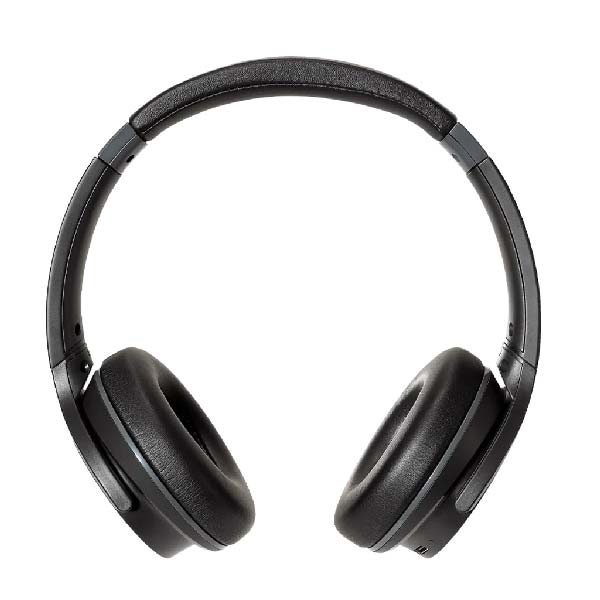
The Audio-Technica ATH-S220BT Wireless Headphones are a lightweight, budget-friendly on-ear model designed for everyday listening, work calls, and portable use. Built around 40 mm closed-back dynamic drivers, they deliver a broad frequency response of 5 Hz to 32,000 Hz, making them a strong option for users who want clear detail without paying premium wireless-headphone prices. With Bluetooth 5.0, a built-in microphone, and up to 60 hours of battery life, these headphones are especially appealing for students, commuters, remote workers, and casual listeners who need long playtime and simple, reliable performance.
One of the biggest selling points of the Audio-Technica ATH-S220BT Wireless Headphones is battery endurance. The advertised 60-hour battery life is excellent for this category, and the quick-charge feature adds convenience when you need a fast top-up before leaving home. The included 1.2 m detachable cable also gives you a wired backup option, which is useful when the battery runs low or when you want a direct connection to a compatible device. At about 180 g, the headphones stay relatively light, which helps reduce fatigue during long listening sessions.
These headphones are best suited for users who value practicality over premium extras. They work well for music streaming, video calls, online classes, and daily travel use. Typical availability is strong through major electronics retailers and online marketplaces, with pricing commonly around the budget range of about $59 to $69 in the US and roughly £60 in the UK, though regional prices may vary. If you want affordable wireless on-ear headphones with strong battery life and a trusted brand name, the ATH-S220BT is worth considering.
Pros and Cons of the Audio-Technica ATH-S220BT Wireless Headphones
Pros
- Exceptional battery life: Up to 60 hours of playback is a standout feature for long trips, workweeks, and everyday commuting.
- Lightweight design: At about 180 g, they are easy to wear for extended periods without feeling bulky.
- Good everyday sound: The 40 mm drivers and closed-back design provide solid clarity for music, podcasts, and calls.
- Wired backup included: The detachable cable makes the headphones usable even when the battery is empty.
- Strong value for money: The feature set compares well with other entry-level wireless headphones in the same price bracket.
Cons
- On-ear fit may not suit everyone: Some listeners prefer over-ear cushions for better passive isolation and comfort.
- Limited premium features: Competing models may offer active noise cancellation, app support, or more advanced codecs.
- Best for casual use: These are not ideal if you want studio-grade monitoring or deep bass-heavy performance.
- Microphone is functional, not exceptional: Fine for calls and meetings, but not the best choice for noisy environments.
Overall, the ATH-S220BT offers impressive value for users who want dependable wireless headphones without spending on features they may not need. Compared with more expensive alternatives, it trades away noise canceling and advanced controls in exchange for simplicity, long battery life, and a lower price.
Customer Reviews and Real-World Feedback on the Audio-Technica ATH-S220BT
Customer feedback for the Audio-Technica ATH-S220BT Wireless Headphones is generally positive, with many buyers praising the long battery life, lightweight feel, and simple setup. Common ratings typically fall around 4 out of 5 stars, especially among users who want affordable daily-use headphones for music, calls, and streaming.
- “Great battery life and very easy to use.” Many users highlight that the headphones last for days of normal use without frequent charging.
- “Good sound for the price.” Buyers often describe the sound as clean and balanced for podcasts, videos, and casual listening.
- “Comfort is decent, but on-ear pressure can build up.” This is one of the most common complaints, especially during longer sessions.
- “Calls work well, but the mic is not studio quality.” Users usually find the microphone acceptable for work calls and online classes.
If you want budget wireless headphones with reliable battery life and a trusted brand, this is a smart purchase. If comfort, noise isolation, or premium call quality are top priorities, it may be better to compare it with higher-end over-ear alternatives.
Audio-Technica ATH-S220BT Wireless Headphones Specifications
- Type: Closed-back dynamic, on-ear wireless headphones
- Driver size: 40 mm
- Bluetooth version: 5.0
- Operating range: About 10 m line of sight
- Frequency response: 5 Hz to 32,000 Hz
- Impedance: 32 ohms
- Sensitivity: 105 dB/mW
- Battery life: Up to 60 hours
- Charging time: About 4 hours
- Weight: About 180 g
- Cable: Detachable 1.2 m cable with in-line mic and controls
Who Should Buy the ATH-S220BT?
The Audio-Technica ATH-S220BT Wireless Headphones are ideal for commuters, students, remote workers, and anyone looking for affordable wireless headphones with outstanding battery life. They are a practical choice for everyday listening, online meetings, and travel. Users who want active noise cancellation, plush over-ear comfort, or more advanced sound customization should consider higher-tier alternatives instead.
Faqs
How do I set up audio-technica ATH-S220BT Wireless Headphones for the first time?
Why are my audio-technica ATH-S220BT Wireless Headphones not pairing with my device?
How can I improve the Bluetooth connection stability on audio-technica ATH-S220BT Wireless Headphones?
Are audio-technica ATH-S220BT Wireless Headphones compatible with Windows, Mac, iPhone, and Android?
How do I get the best sound quality from audio-technica ATH-S220BT Wireless Headphones?
What should I do if the microphone on audio-technica ATH-S220BT Wireless Headphones sounds quiet or unclear?
How long does the battery last on audio-technica ATH-S220BT Wireless Headphones, and how can I extend it?
How should I clean and store audio-technica ATH-S220BT Wireless Headphones to keep them in good condition?
More audio-technica manuals
- Audio-Technica AT-LP70X Automatic Belt-Drive Turntable User Manual
- Audio-Technica AT-SP65XBT Wireless Speaker User Manual
- Audio-Technica AT2040USB Hypercardioid Dynamic USB Microphone User Manual
- Audio-Technica ATH-G1WL Wireless Gaming Headset User Manual
- Audio-Technica System 10 PRO Digital Wireless System ATW-1301 User Manual
- Audio-Technica UHF Wireless System ATW-R1 User Manual
Leave a Comment