
Audio-Technica AT-SP65XBT Wireless Speaker User Manual
Content
Audio-Technica AT-SP65XBT Wireless Speaker Manual and Review
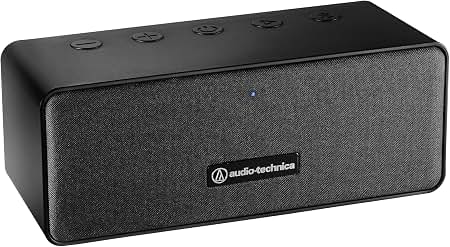
Introduction
The audio-technica AT-SP65XBT Wireless Speaker is a compact Bluetooth stereo speaker designed for listeners who want clear, room-filling sound in a portable form factor. Built with two full-range drivers, a passive radiator, and Bluetooth 5.0 connectivity, it delivers a practical balance of sound quality, convenience, and everyday usability. With a maximum output of 12 W, this speaker is well suited for bedrooms, offices, kitchens, study spaces, and casual listening at home or on the go.
One of its biggest strengths is versatility. The speaker supports wireless playback over Bluetooth, wired input through a 3.5 mm stereo mini-jack, and hands-free calling thanks to its built-in microphone. It also offers up to 12 hours of battery-powered music playback, making it a solid option for travel, remote work, and small gatherings. The compact build and moderate weight make it easy to move from room to room without sacrificing stability.
The audio-technica AT-SP65XBT Wireless Speaker typically sits in the budget-to-mid-range category, with an estimated price range of about $65 to $79 depending on the retailer and current stock. Availability is generally good through major electronics and music retailers, though pricing can vary. This model is a strong fit for users who want a reliable portable Bluetooth speaker with Audio-Technica’s clean, functional design and a focus on practical everyday performance.
Key Specifications at a Glance
- Type: Bluetooth stereo speaker
- Driver size: 73 mm full-range units
- Maximum output: 12 W total
- Frequency response: 90 Hz to 18,000 Hz
- Bluetooth version: 5.0
- Battery life: up to 12 hours
- Charging time: approximately 3 hours
- Input: 3.5 mm stereo mini-jack
- Built-in microphone for calls
Pros and Cons of the Audio-Technica AT-SP65XBT Wireless Speaker
Pros
- Clear, balanced sound for music, podcasts, and voice content, especially in small to medium rooms.
- Bluetooth 5.0 provides stable wireless connectivity and easy pairing with phones, tablets, and laptops.
- Built-in microphone supports hands-free calls, which is useful for work-from-home setups.
- Aux input adds flexibility for wired playback from older devices and media players.
- Up to 12 hours of battery life makes it practical for daily use and short trips.
- Good value for money compared with many portable Bluetooth speakers in the same price range.
Cons
- 12 W output is adequate, but it will not match the loudness of larger premium speakers.
- Sound is optimized for clarity rather than deep bass, so bass-heavy listeners may want alternatives.
- At around 1.42 kg, it is portable but not ultra-light.
- It does not appear to offer advanced features like multi-speaker pairing or smart assistant integration.
For buyers comparing portable Bluetooth speakers, this model is best viewed as a dependable everyday option rather than a party speaker. It competes well against similarly priced compact speakers, especially if you value a wired input, built-in microphone, and Audio-Technica branding over extra wireless features.
Customer Reviews and Real-World Feedback
Customer feedback for the audio-technica AT-SP65XBT Wireless Speaker is generally positive, with many users giving it around 4 out of 5 stars. Reviewers frequently praise its clean sound, simple setup, and useful battery life. Many buyers also like the compact design and the fact that it works well for both music and conference calls.
Common complaints focus on limited bass depth and the absence of premium extras found on competing speakers. Some users also mention that the volume is fine for personal listening, but not ideal for large outdoor spaces or loud parties. A typical testimonial style summary is: “Easy to use, sounds clear, and does exactly what I needed for my desk and bedroom.”
Overall, this speaker is recommended for students, remote workers, and casual listeners who want a straightforward portable Bluetooth speaker with reliable everyday performance. Buyers looking for stronger bass or higher volume may want to compare it with larger JBL, Sony, or Bose alternatives before purchasing.
Frequently Asked Questions
- How long does the battery last? Up to approximately 12 hours of continuous music playback.
- Does it support wired connections? Yes, it includes a 3.5 mm stereo mini-jack input.
- Can it be used for phone calls? Yes, it has a built-in microphone for hands-free calling.
- Is it suitable for travel? Yes, but it is best for light travel and everyday portability rather than ultra-compact packing.
- Is the audio-technica AT-SP65XBT Wireless Speaker good for bass? It offers respectable sound balance, but bass performance is moderate rather than powerful.
Faqs
How do I set up the audio-technica AT-SP65XBT Wireless Speaker for the first time?
Why is my audio-technica AT-SP65XBT Wireless Speaker not pairing with my phone?
What devices are compatible with the audio-technica AT-SP65XBT Wireless Speaker?
How can I improve sound quality on the audio-technica AT-SP65XBT Wireless Speaker?
What should I do if the audio-technica AT-SP65XBT Wireless Speaker keeps disconnecting?
Does the audio-technica AT-SP65XBT Wireless Speaker work well for TV and video playback?
How do I clean and maintain the audio-technica AT-SP65XBT Wireless Speaker safely?
What troubleshooting steps help if the audio-technica AT-SP65XBT Wireless Speaker has low volume or distorted sound?
More audio-technica manuals
- Audio-Technica ATH-S220BT Wireless Headphones User Manual
- Audio-Technica ATH-G1WL Wireless Gaming Headset User Manual
- Audio-Technica AT-LP70X Automatic Belt-Drive Turntable User Manual
- Audio-Technica UHF Wireless System ATW-R1 User Manual
- Audio-Technica AT2040USB Hypercardioid Dynamic USB Microphone User Manual
- Setup: Audio-Technica AT-LP5X Direct-Drive Turntable User Manual
Leave a Comment