
How to Use: Benq Digital Projector GS50 User Manual
Content
BenQ GS50 Product Manual: Portable 1080p Outdoor Projector for Home Entertainment
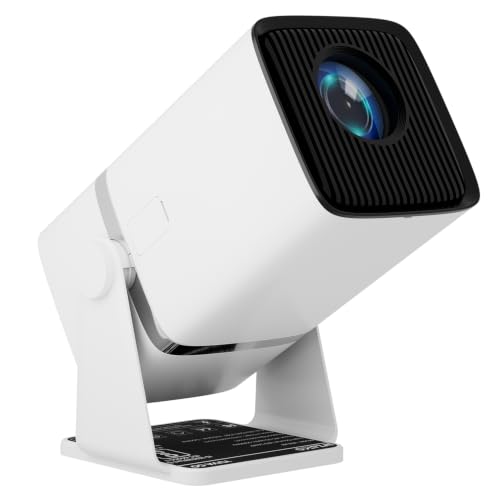
The BenQ GS50 is a rugged, portable Full HD projector built for outdoor movie nights, casual gaming, and flexible home entertainment. With 1080p native resolution, 500 ANSI lumens, a 100,000:1 contrast ratio, and an LED light source rated for up to 20,000 hours in normal mode and 30,000 hours in ECO mode, the GS50 is designed to deliver bright, sharp visuals in a compact, travel-friendly form factor. It also includes a 2.1-channel speaker system, smart auto setup features, and Android TV support through an included dongle, making it a strong all-in-one entertainment solution.
This portable projector is especially well suited for users who want a backyard cinema, dorm-room big screen, or easy grab-and-go projector for trips and camping. The rugged design includes IPX2 splash resistance, which adds peace of mind for outdoor use. Wireless connectivity, HDMI input, USB-C display support, and broad resolution compatibility up to 4K UHD make it highly versatile for streaming devices, game consoles, laptops, and media players. The BenQ GS50 typically falls in the mid-range portable projector price segment, often seen around the $600 to $800 range depending on retailer, promotions, and bundle options. Availability remains strongest through major electronics retailers and BenQ channels, with stock varying by region.
Specifications of the BenQ GS50 Portable Projector
- Display technology: DLP with LED light source
- Native resolution: 1080p Full HD (1920 x 1080)
- Brightness: 500 ANSI lumens
- Contrast ratio: 100,000:1
- Color support: 24-bit, 16.7 million colors
- Throw ratio: 1.21:1
- Image size: Approximately 30 to 112 inches depending on throw distance
- Input lag: Around 22.7 ms at 1080p/60Hz, suitable for casual gaming
- Resolution support: VGA up to 4K UHD (3840 x 2160)
- Audio: 2.1-channel system with dual 5W speakers and a 10W woofer
- Ports: HDMI 2.0b, USB-A, USB-C with DisplayPort/45W input support, 3.5mm audio out
- Wireless: Wi-Fi and Bluetooth connectivity for streaming and audio pairing
- Dimensions: 186 x 154 x 146 mm
- Weight: About 2.3 kg
- Noise level: Approximately 29 dBA in normal mode and 27 dBA in ECO mode
Compared with many compact portable projectors, the GS50 stands out for stronger audio, better outdoor durability, and richer smart features. It is less bright than high-lumen home theater projectors, but more feature-complete than many basic mini projectors in its class.
How to Set Up the BenQ GS50 Projector Step by Step
Start by placing the projector on a stable surface with enough distance for your desired screen size. Connect the power adapter and press the power button. The GS50 supports automatic setup functions such as focus assistance and keystone correction, which can help speed up alignment. If the image is off-center, use the projector menu to fine-tune geometry and picture mode.
For streaming, insert the Android TV dongle in the internal HDMI port if your package includes it, then pair the included remote and connect to Wi-Fi. For wired devices, use the HDMI input for laptops, consoles, and media players. USB-C display support is useful for compatible phones and laptops, while USB-A works for media playback or power supply. Bluetooth pairing is available for wireless speakers or headphones.
Keep the ventilation openings unobstructed and avoid using the unit in heavy rain or direct moisture, even though it includes splash resistance. Do not cover the projector during operation, and allow it to cool before moving it after long viewing sessions. If the projector does not detect a source, check the cable, input selection, and device output settings first.
Troubleshooting the BenQ GS50 Portable Projector
If the image is dim, first confirm that the projector is in the correct picture mode and that ambient light is reduced. The GS50 performs best in dark or semi-dark environments because of its 500-lumen brightness. If colors look inaccurate, reset picture settings or switch to a preset like Cinema, HDR10, or Game mode.
For no signal issues, verify HDMI or USB-C compatibility and make sure the source device is outputting to the projector. If the unit appears frozen, perform a restart by powering it off, disconnecting it briefly, and turning it back on. For wireless issues, reconnect to Wi-Fi and re-pair Bluetooth devices if needed.
Common error-style issues are usually related to source input, overheating, or battery management rather than complex codes. Prevent problems by keeping the projector clean, allowing airflow, and updating software when available. BenQ typically offers a three-year limited warranty on the GS50 in many regions, with support available through the official BenQ support portal and local service channels. For help, use the BenQ support website, retailer customer service, or the contact details listed in your regional warranty documentation.
Pros and Cons of the BenQ GS50
Pros
- Portable 1080p projection with sharp image quality for movies and streaming
- Strong 2.1-channel audio system that reduces the need for external speakers
- Useful outdoor-friendly design with IPX2 splash resistance
- Android TV support adds easy access to popular apps and streaming services
- Low input lag makes it a solid choice for casual gaming
- Multiple connectivity options, including HDMI, USB-C, USB-A, Wi-Fi, and Bluetooth
Cons
- 500 ANSI lumens is limited for bright rooms or daytime viewing
- Not as bright as larger home theater or office projectors
- Best performance depends on controlled lighting conditions
- Higher price than some basic portable projectors with fewer features
For value for money, the GS50 is strongest for users who want an all-in-one portable projector with better audio and durability than entry-level alternatives. If brightness is the top priority, a higher-lumen model may be a better fit, but those options often sacrifice portability and integrated sound quality.
Customer Reviews of the BenQ GS50 Projector
Customer feedback for the BenQ GS50 is generally positive, with many buyers praising its compact build, strong audio, and easy setup. A common rating pattern is around 4 to 4.5 stars out of 5 among portable projector owners. One typical comment is: “Perfect for backyard movie night, and the speakers are loud enough without extra gear.”
Frequent praise focuses on the crisp 1080p image, convenient smart features, and travel-friendly design. Common complaints mention that brightness is not ideal in daylight and that the price can feel high compared with simpler mini projectors. Another typical user-style remark is: “Great in the evening, but you need darker surroundings for the best picture.”
For buyers who want a premium portable projector for movies, gaming, and weekend trips, the GS50 is an easy recommendation. Users who need strong daylight performance or business presentation use should consider a brighter alternative instead.
Faqs
How do I set up benq Digital Projector GS50 for the first time?
Why is my benq Digital Projector GS50 image blurry or not filling the screen correctly?
Can benq Digital Projector GS50 connect to phones, laptops, and game consoles?
What should I do if benq Digital Projector GS50 has no sound or low Bluetooth volume?
How can I improve brightness and picture quality on benq Digital Projector GS50 outdoors?
How long does the benq Digital Projector GS50 battery last during movie playback?
How do I clean and maintain benq Digital Projector GS50 safely?
What causes benq Digital Projector GS50 wireless casting or streaming apps to stop working?
Tags
More benq manuals
- Setup: Benq MH5005 Digital Projector User Manual
- Setup & Features: Benq EW Series LCD Monitor Entertainment Monitor User Manual
- Benq LU960UST Digital Projector User Manual
- How to Use: Benq Projector User Manual
- Setup & Features: Benq Digital Projector Home Entertainment Series TK860i User Manual
- Benq Display Pilot LCD Monitor Software Instruction Manual
Leave a Comment