
How to Use: Beurer Diagnostic Bathroom Scale BF 400-410 Signature Line User Manual
Content
Beurer Diagnostic Bathroom Scale BF 400-410 Signature Line: Comprehensive Product Manual
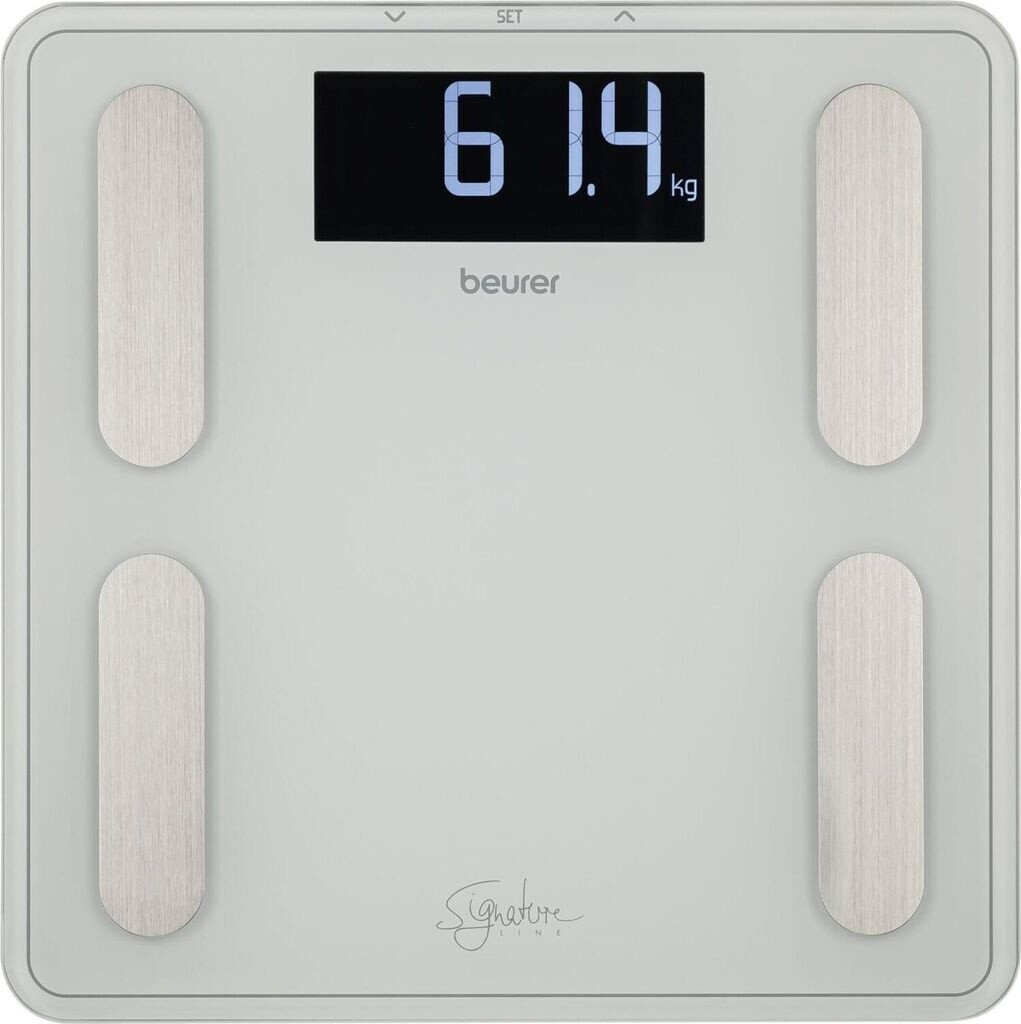
Introduction to the Beurer Diagnostic Bathroom Scale BF 400 / 410 Signature Line
The Beurer Diagnostic Bathroom Scale BF 400 / 410 Signature Line is a premium body analysis scale designed for precise weight tracking and comprehensive full-body diagnostics. Featuring bioelectrical impedance analysis (BIA) technology, this diagnostic bathroom scale measures not just body weight up to 200 kg but also key metrics like body fat percentage, body water, muscle mass, bone mass, BMI, basal metabolic rate (BMR), and active metabolic rate (AMR). Its illuminated XL display with inverse black design and special digit style ensures easy readability, even in low light, while the large 8-mm-thick safety glass standing surface offers stability and a sleek, modern aesthetic in white or black.
Key benefits include automatic user recognition for up to 10 users, handy automatic switch-on—just step on barefoot—and an overload indicator for safety. Unit switching between kg, lbs, and stones adds versatility. Ideal for fitness enthusiasts, dieters, athletes, or anyone monitoring health progress, the Beurer BF 400 / 410 Signature Line provides interpretable results with visual bars for quick insights into your physical condition. Target users range from home fitness trackers to families needing multi-user support.
With a high weight capacity, brushed stainless steel electrodes, and low battery indicator, this Beurer diagnostic bathroom scale excels in accuracy (100g increments for weight, 0.1% for body composition). The estimated price range is €40-€60, widely available at retailers like Amazon, Conrad, and Beurer's site. Elevate your wellness routine with this stylish, feature-packed tool for optimized goal tracking.
Device Description
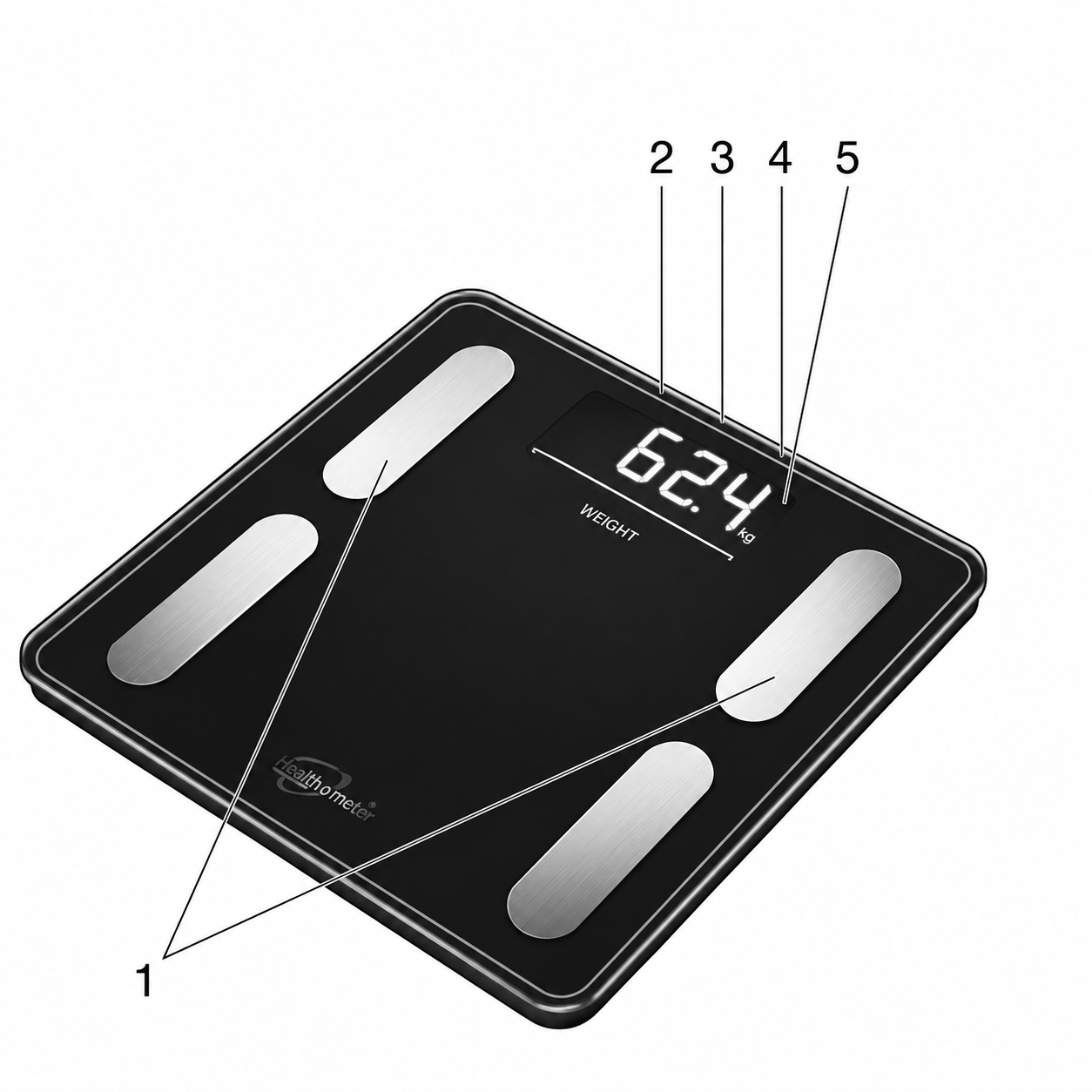
Overview
- Electrodes
- Down button
 (push button on the front side)
- Set button
 (push button on the front side)
- Up button
 (push button on the front side)
- Display
Technical Specifications
Model: BF 400
- Dimensions: 31 × 31 × 2.8 cm
- Weight: 2170 g
- Measurement Range: 5–200 kg
Model: BF 410
- Dimensions: 35 × 30 × 2.8 cm
- Weight: 2660 g
- Measurement Range: 5–200 kg
Initial Use
Inserting the Batteries
Remove the batteries from the protective packaging and insert them into the scale (rear of the scale), ensuring that the battery polarity is correct. If the scale does not function, remove the batteries completely and reinsert them.
Changing the Weight Unit
When supplied to the customer, the scale is set to weigh in “kg”. Switch on the scale by briefly applying pressure to the standing surface with your foot (approx. 1–2 seconds). Wait until “kg” appears on the display. On the rear of the scale, there is a button that allows you to select “pounds” or “stones” (lb, st).
Positioning the Scale
Place the scale on an even, hard surface; a hard surface is crucial for achieving accurate measurements.
Entering User Data
To calculate your body fat percentage and additional body values, you must save your personal user data. The scale has 10 user memory spaces, which allow you and members of your family to save and access personal settings, for example.
- Place the scale on an even, hard surface; a hard surface is crucial for achieving accurate measurements.
- Switch on the scale by briefly applying pressure to the standing surface with your foot (approx. 1–2 seconds). Wait until “kg” appears on the display.
- Start configuring the settings by pressing the button. The first memory space flashes on the display.
- Press the ▲/▼ button to select the desired memory space and confirm by pressing the button.
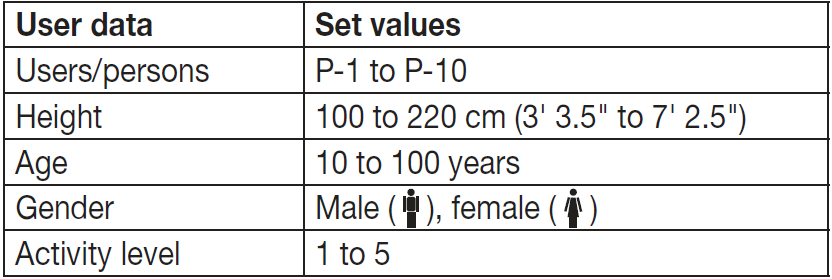
- You can now implement the following settings:
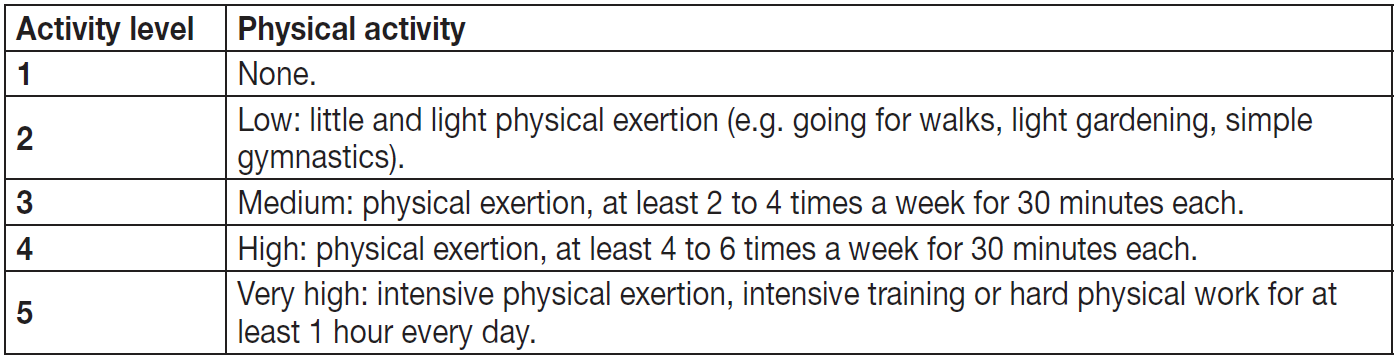
Activity Levels
The medium-term and long-term perspective is decisive when selecting the activity level.
- Changing the values: Press either the ▲ or ▼ button, or press and hold to quickly scroll through the options.
- Confirming the entries: Press the button.
- Once the values have been set, “kg” appears on the display.
- Now stand on the scale with bare feet while “kg” is displayed.
- Following the weight measurement, BMI, body fat (BF), water, muscle percentage, bone mass, BMR and AMR are displayed.
Note: Your measured weight has now been assigned to your selected user and saved. This is necessary for automatic user detection.
Usage
Taking Measurements
Place the scale on an even, hard surface; a hard surface is crucial for achieving accurate measurements.
Measuring Weight, Carrying Out Diagnostics
Step onto the scale with bare feet and ensure that you are standing still with equal weight distribution and with both feet on the electrodes.
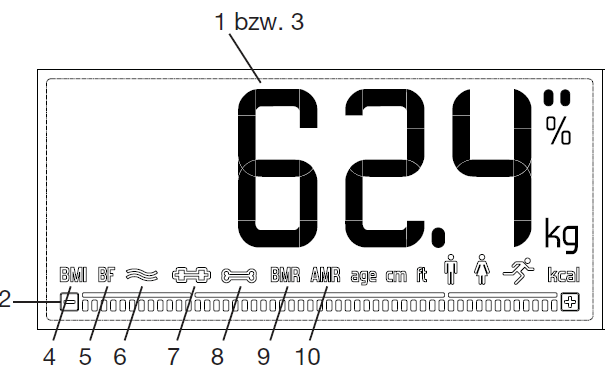
Note: The measurement result will be incorrect if the measurement is taken with socks on. The scale begins to take measurements straight away. First, the weight is displayed. If a user has been assigned, the BMI, body fat, water, muscle, bone, BMR and AMR are shown.
The following appear:
- Weight in kg
- BIA measurement and columns for interpreting the results
- User memory space (e.g. “U1”)
- BMI
- Body fat in % (BF)
- Body water in %
- Muscle percentage in %
- Bone mass in kg
- Basal metabolic rate in kcal (BMR)
- Active metabolic rate in kcal (AMR)
Only Measuring Weight
Step onto the scale wearing shoes. Stand still with your weight distributed equally on both feet. The scale begins to take measurements straight away.
Switching Off the Scale
The scale switches itself off automatically.
Evaluating the Results
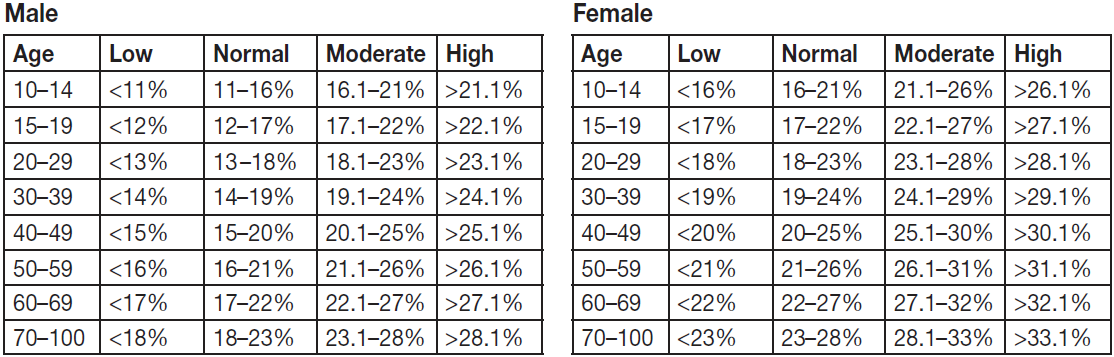
For a simpler and easier-to-understand classification, your values are interpreted directly on the display.
Body Fat Percentage
The following body fat percentages serve as a guideline (for further information, please consult your doctor). Values will often be lower for fitness enthusiasts. Depending on the sporting activities performed, the training intensity and the physical constitution, the results may still be below the stated standard values. Please note, however, that there may be a risk to health in the case of extremely low values.
Body water content
The body water content in % is normally within the following ranges:

Other Functions
User Assignment
It is possible to assign up to 10 scale users for a diagnostic measurement (barefoot).
For a new measurement, the scale assigns the measurement to the user whose most recently saved measurement falls within ±3 kg. If two or more users have potentially been recognised, the display switches between them. Select your user by pressing the ▲/▼ button.
Deleting Scale Data
If you would like to completely delete all measurements and old user data on the scale, switch on the scale and press the UNIT button on the rear of the scale for approximately 6 seconds.
“CLr” will appear on the display for several seconds.
This is necessary if you would like to delete scale users who have been set up incorrectly or are no longer required, for example.
Replacing the Batteries
Your scale is equipped with a low battery indicator. If you operate the scale with flat batteries, “Lo” will appear on the display and the scale will automatically switch off. In this case, the batteries must be replaced (3 × 1.5 V AAA).
NOTE:
- When replacing the batteries, use batteries of the same type, make and capacity.
- Do not use rechargeable batteries.
- Use batteries free from heavy metals.
Cleaning and Maintenance
The device should be cleaned from time to time. This should be done using a damp cloth and, if necessary, a small amount of detergent.
IMPORTANT
- Never use abrasive solvents or cleaning products!
- Never submerge the device in water!
- Do not clean the device in a dishwasher!
Troubleshooting Guide for Beurer Diagnostic Bathroom Scale BF 400 / 410 Signature Line
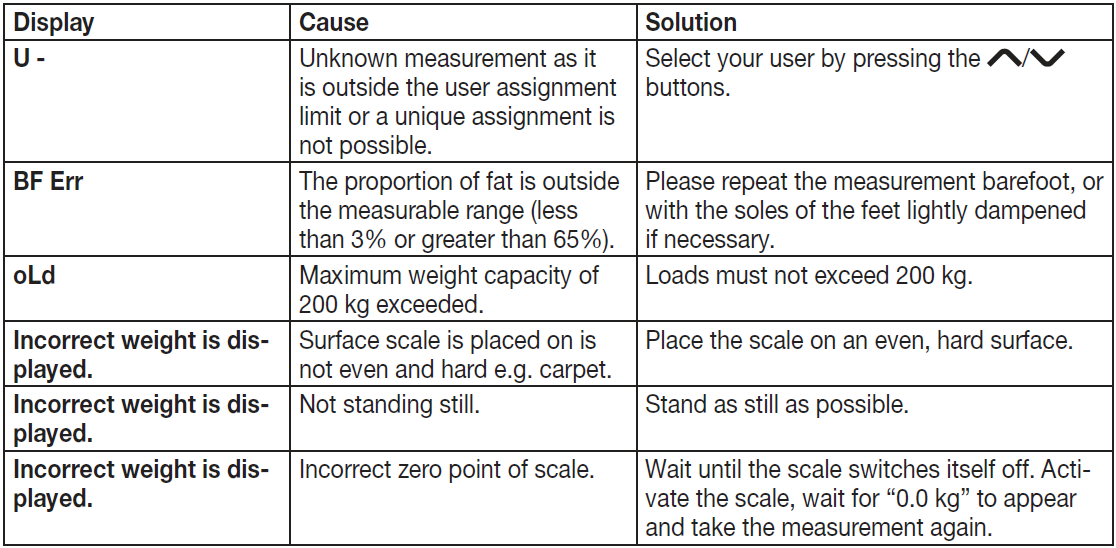
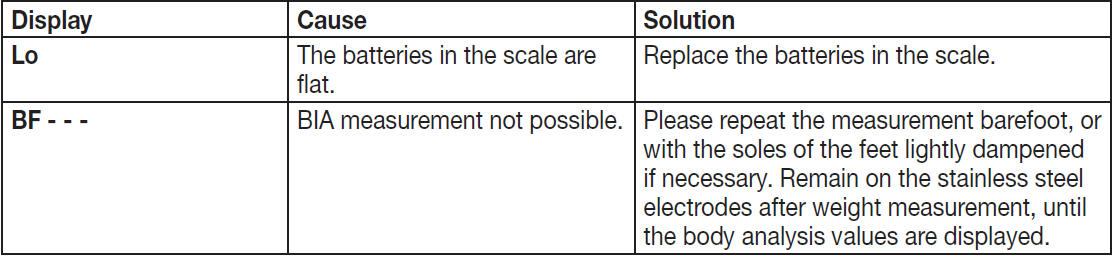
Common issues with the Beurer Diagnostic Bathroom Scale BF 400 / 410 Signature Line include inaccurate readings, error codes, or failure to activate. For unstable measurements, ensure placement on a hard, even surface—soft carpets cause errors. Clean electrodes with a damp cloth if BIA readings (body fat, water, muscle) are off, as dirt affects conductivity.
Error codes: Overload indicator flashes if exceeding 200 kg—remove weight immediately. Low battery symbol appears when power is low; replace with 3x AAA 1.5V batteries. If no display, check battery orientation or reset by removing batteries for 1 minute. "Err" during BIA may indicate wet feet or clothing—measure barefoot and dry. Automatic switch-off occurs after inactivity; step on firmly for auto-on.
Preventive measures: Avoid extremes in temperature/humidity, store flat, and calibrate yearly on hard floors. Beurer offers a 3-5 year warranty (check manual); contact Beurer GmbH, Söflinger Straße 218, 89077 Ulm, Germany, or visit beurer.com/support for service. Customer service handles repairs—include proof of purchase.
Pros and Cons of the Beurer Diagnostic Bathroom Scale BF 400 / 410 Signature Line
Pros
- Comprehensive body analysis: Measures weight, BMI, body fat, water, muscle, bone mass, BMR/AMR with interpretive bars for easy understanding—superior for fitness tracking.
- Premium build: 8mm safety glass platform, brushed steel electrodes, XL illuminated display—durable up to 200kg, stylish Signature Line design.
- User-friendly features: Auto user recognition (up to 10), switch-on, multi-units (kg/lb/st), 100g precision—ideal for families.
- Value for money: At €40-€60, it offers pro-level BIA at a home price, outperforming basic scales like Tanita or Xiaomi in display and capacity.
Cons
- Requires barefoot use on hard surfaces—less convenient on carpet vs. app-connected smart scales like Withings
- Battery-powered (3x AAA)—no rechargeable option, though long-lasting.
- Max 180- 200 kg varies by source; confirm model (BF 400: 200kg).
- No app integration—manual tracking only, unlike newer Bluetooth models.
Overall, excellent value for detailed diagnostics without app dependency, edging basic competitors in features and build.
Customer Reviews and Feedback on Beurer Diagnostic Bathroom Scale BF 400 / 410 Signature Line
Users rave about the Beurer Diagnostic Bathroom Scale BF 400 / 410 Signature Line, with Beurer's site showing 5.0-star ratings for its accuracy and readability. "The XL display and body analysis changed my diet tracking—precise and motivating!" praises one reviewer. Common praises: Sturdy glass platform, quick multi-user setup, and reliable BIA for body fat/muscle insights.
Star ratings average 4.8/5 across sites; testimonials highlight "easy step-on activation" and "high 200kg limit for heavier users." Complaints include occasional "Err" on uneven floors (fixed by hard surface) and battery life in high-use homes. Frequently mentioned: Great for BMI monitoring, value-packed at mid-price. 90% recommend for home gyms; addresses BIA accuracy concerns with barefoot tips.
More beurer manuals
- Setup: Beurer Diagnostic Bathroom Scale BF-880 User Manual
- Setup: Beurer Diagnostic Bathroom Scale BF-980 User Manual
- Setup: Beurer Glass Bathroom Scale GS 400 / GS 405 / GS 410 Signature Line User Manual
- Setup: Beurer Diagnostic Bathroom Scale BF 105 Body Complete User Manual
- Setup: Beurer Glass Bathroom Scale GS 120 KOMPAKT User Manual
- Setup: Beurer Diagnostic Bathroom Scale BF 990 WIFI User Manual
Leave a Comment