
Setup: Beurer Diagnostic Bathroom Scale BF-980 User Manual
Content
Beurer Diagnostic Bathroom Scale BF-980 WIFI: Complete Product Manual & Guide
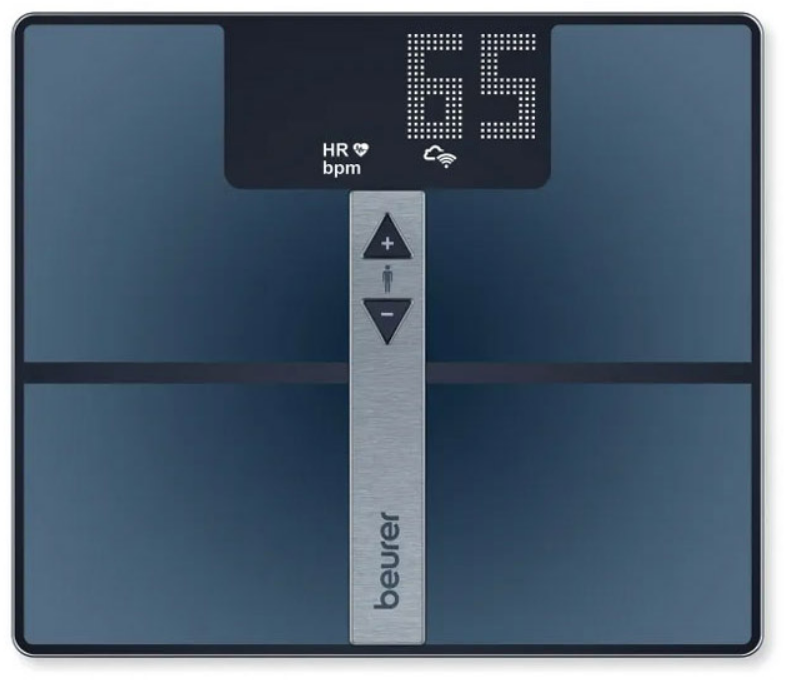
Introduction to the Beurer BF 980 Diagnostic Scale
The Beurer Diagnostic Bathroom Scale BF 980 WIFI represents a significant advancement in personal health monitoring technology, combining precision measurement capabilities with modern smart connectivity features. This comprehensive body analysis scale goes far beyond simple weight measurement, offering users detailed insights into their overall health metrics through an intuitive interface and seamless app integration.
Designed for health-conscious individuals, fitness enthusiasts, and anyone seeking to track their wellness journey, the Beurer BF 980 WIFI diagnostic bathroom scale measures essential body composition metrics including weight, body fat percentage, muscle mass, BMI (Body Mass Index), and heart rate. The device features an exceptionally large 35 x 30 cm weighing surface constructed from 6-mm-thick safety glass with ITO (Indium Tin Oxide) coating, ensuring durability and accurate readings. With a maximum weight capacity of 180 kg (approximately 397 lbs), this diagnostic scale accommodates a wide range of users.
The standout feature of this Beurer diagnostic bathroom scale is its WIFI and Bluetooth connectivity. Users can automatically synchronize their measurement data with the free "beurer HealthManager Pro" app, enabling comprehensive health tracking, graphical evaluations, and long-term wellness analysis. The scale's magic LED display showcases measurements in a modern dot matrix style with impressive 48-mm digit height, making readings easily visible even from a distance.
Typically priced between € 150 and € 200, the Beurer BF 980 WIFI is widely available through major retailers and online platforms. The scale includes an integrated rechargeable battery with a USB-C charging cable, automatic user recognition for up to 8 users, and convenient features like automatic power-on and overload indicators. This makes it an excellent investment for households seeking professional-grade body composition analysis in their home environment.
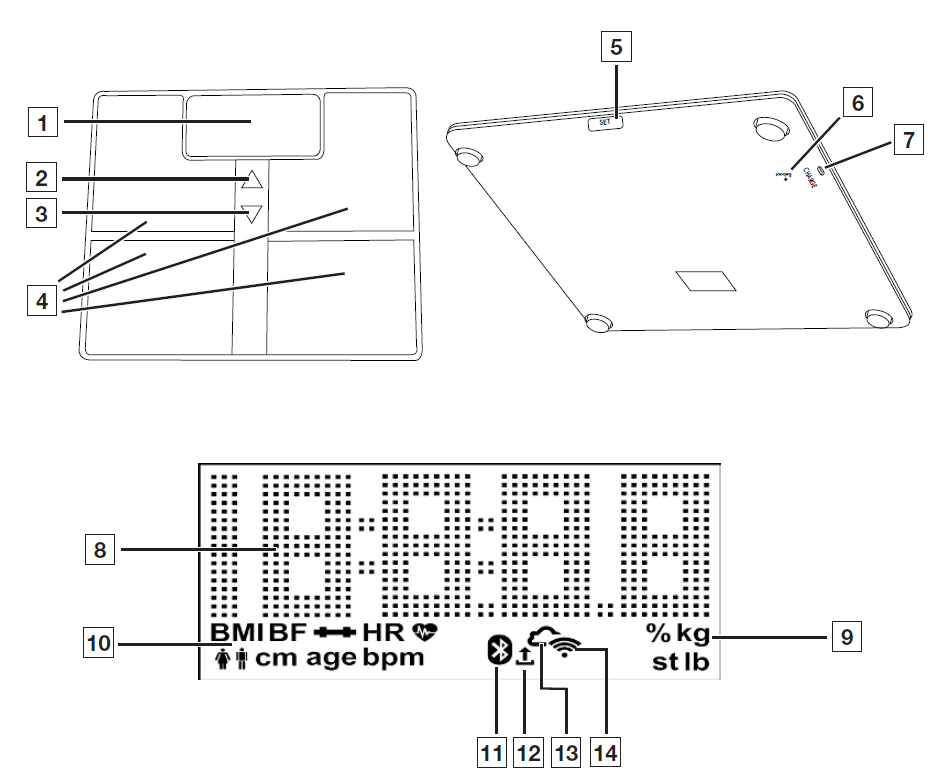
DEVICE DESCRIPTION
- Display
- Button: For selecting a user measurement.
- Button: For calling up stored values after the user is selected.
- Electrodes
- SET Button
- Reboot Button
- Charging Socket
- Measured Value
- Measurement Unit
- Body Data
- Bluetooth® Connection: Scale connected to Bluetooth®.
- Measurement Data Transfer
- Cloud/Server Connection: Scale connected to cloud/server.
- WIFI Connection: Scale connected to WIFI.
TECHNICAL SPECIFICATIONS
- Model: BF 980
- Dimensions: 350 x 300 x 26 mm
- Weight: 2200 g
- Measurement Range: 180 kg / 396 lb / 28 st
- Scale Interval (d):
- kg: 0.1 kg
- lb: 0.2 lb
- st: 0–19 st = 0.2 lb; 20–28 st = 1 lb
- Body Fat/Other Percentage Measurements: 0.1%
- Heart Rate: 1 bpm
- Repetition Accuracy: Max. ±0.4 kg
- Absolute Precision: Max. ±(0.5% + 0.1 kg), e.g., for 80 kg: max. ±0.5 kg
- Battery: Li-ion polymer, 3.7 V / 1500 mAh
- Battery Charging: USB-C cable to standard USB-A socket with 5 V, minimum 1 A
- Charging Time: Approx. 3 hours
- Battery Life:
- Approx. 6 months with 3 measurements per day
- Approx. 15 months with 1 measurement per day
- Connectivity:
- Setup and settings via Bluetooth® Low Energy technology
- Data transfer preferably via WIFI or alternatively via Bluetooth® Low Energy technology
- WIFI System Requirement: IEEE 802.11 b/g/n (2.4 GHz)
- Encryption System Requirement: WPA-PSK, WPA2-PSK, WPA3-PSK
- WIFI Frequency Band: 2412–2472 MHz
- WIFI Transmission Power: Max. 15.03 dBm
- Bluetooth® Frequency Band: 2402–2480 MHz
- Bluetooth® Transmission Power: Max. 8.52 dBm
Key Features and Benefits of the Beurer BF 980
The Beurer BF 980 WIFI diagnostic bathroom scale delivers comprehensive body analysis capabilities that transform your daily weighing routine into meaningful health insights. The device automatically calculates multiple health metrics with each measurement, providing a holistic view of your physical wellness.
- Comprehensive Body Composition Analysis: Beyond basic weight measurement, this diagnostic scale determines body fat percentage, muscle mass percentage, BMI, and heart rate. When connected to the beurer HealthManager Pro app, users gain access to additional advanced metrics including metabolic age, body water percentage, calorie requirements, BMR/AMR (Basal and Active Metabolic Rate), and bone mineral content. These expanded measurements enable more informed health decisions and personalized fitness planning.
- Smart Connectivity and Data Synchronization: The Beurer BF 980 WIFI combines Bluetooth technology for initial setup with WIFI for automatic data transfer. After each weighing session, your measurements automatically upload to the beurer HealthManager Pro app, eliminating manual data entry and ensuring your health records remain current. This seamless synchronization supports long-term health tracking and enables identification of trends in your body composition changes.
- User-Friendly Design: The magic LED display activates only during measurements, reducing power consumption while maintaining visual clarity. The modern touch-sensor operation eliminates mechanical buttons, providing a sleek, maintenance-free interface. Automatic user recognition identifies up to 8 different users, allowing entire families to track their individual health metrics on a single device.
- Activity Level Customization: The scale permits configuration of 5 different activity levels based on weekly movement patterns, enabling more accurate calorie requirement calculations tailored to individual lifestyles. Unit measurements can be toggled between kilograms, pounds, and stones, accommodating users worldwide.
USAGE
Charging the Scale
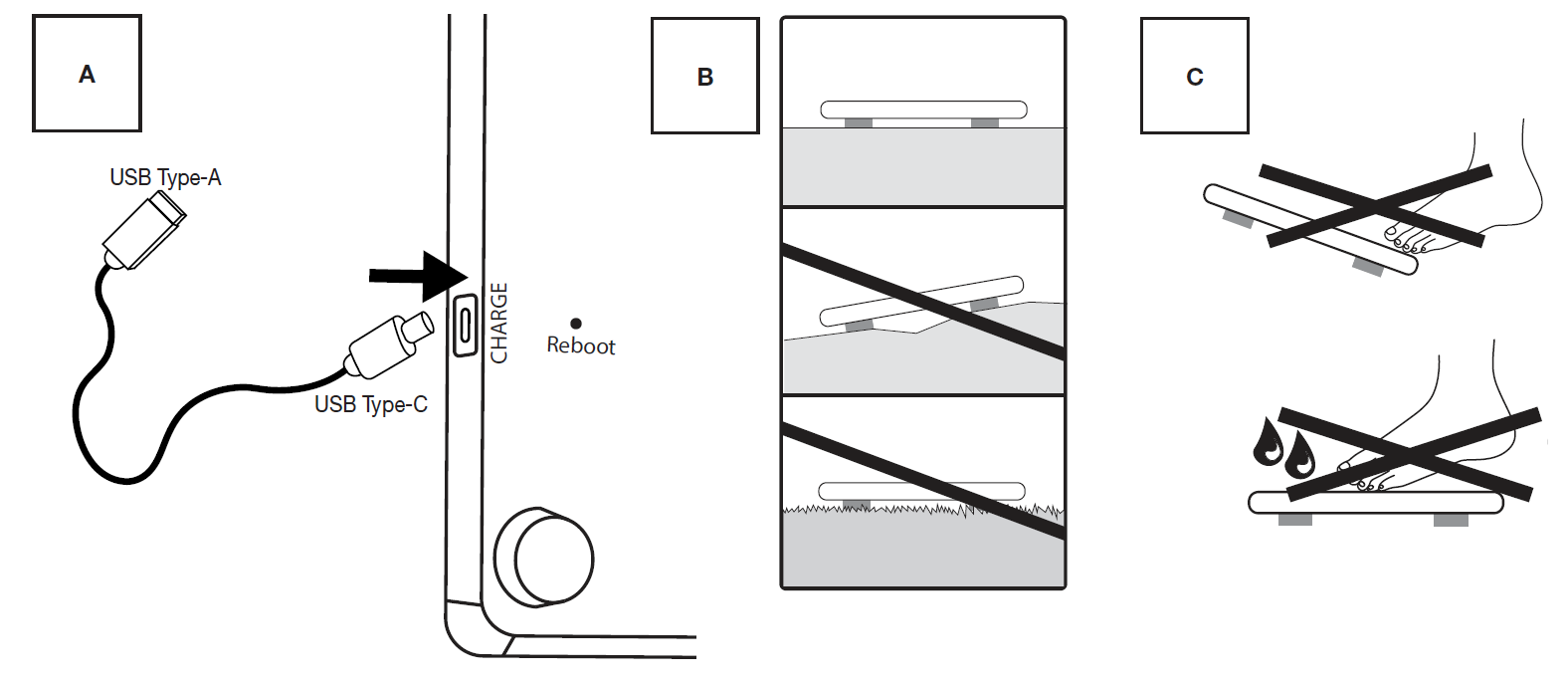
If “BAt” and “Lo” appear on the display 1 one after the other, you must charge the scale. We recommend that you fully charge the scale before initial use. Connect the scale to a USB power supply using the supplied USB-C cable (see Figure A). The scale cannot be used during charging. As soon as the scale is fully charged, “BAt” and “FuLL” appear on the display 1. Remove the USB-C cable from the scale. The current charge level is shown on the display 1 when the USB-C cable is removed.
Prerequisites for Taking Measurements Correctly
- Place the scale on a flat and stable surface.
- Wherever possible, weigh yourself at the same time every day (ideally in the morning), after having been to the toilet, on an empty stomach and without clothing.
- To determine your body fat and heart rate/pulse, always stand barefoot on the 4 electrodes on the scale.
- Stand upright and still throughout, from when the weight measurement is being carried out until the heart rate measurement/pulse measurement is complete. Ensure that your weight is evenly distributed.
Creating Scale Users in the “beurer HealthManager Pro” App
The “beurer HealthManager Pro” app makes it easier for you to create user data, is required to transfer measured values, and to display additional values (body water content, bone mineral mass, BMR/AMR, metabolic age). The scale has 8 memory spaces for different scale users, enabling you to save the various members of your family, for example. You can use the “beurer HealthManager Pro” app to conveniently set up the individual app users and their corresponding scale user via your smartphone. To do so, proceed as follows:
- Download the free “beurer HealthManager Pro” app from the Apple App Store (iOS) or from Google Play (Android™).
- Start the app and follow the instructions.
- Select BF 980 in the app and press the SET button 5.
- Select the Wi-Fi network (SSID) and enter the password (network key) to enable data transfer to scale via WIFI. If successful, the cloud 13 and WIFI 14 icons will appear on the display.
- Set up scale user: if the display 1 shows the scale user (e.g. “U: 1”) and “0.0”, carry out the initial measurement (for subsequent automatic personal recognition if within +/- 3 kg of the last measurement of this scale user).
Weighing Yourself
- Step onto the scale barefoot. Stand still on the electrodes 4 with both legs, making sure to distribute your weight evenly. The scale switches on automatically.
- Your body weight appears on the display 1. The scale user detected (e.g. “U: 1” for scale user 1) should then appear automatically.
- If the scale has detected several possible scale users or the last weight is more than 3 kg apart, use the button 2 to select the correct scale user and wait 3 seconds.
- If a Bluetooth® or WIFI connection has been established and the user measurements have been successfully taken (e.g. for U: 1), the values will be transferred to the “beurer HealthManager Pro” app. This is indicated by the measurement data transfer symbol 12. If the data cannot be transferred, up to 30 values will be stored per user. As soon as a connection is established, they are transferred with the next measurements.
- After measuring the heart rate, step off the scale. The scale switches itself off automatically.
Note:
- If the automatic scale user detection function is not working, briefly press the scale with your foot, press the button 2 repeatedly until your scale user is displayed, and wait 3 seconds. Then take the diagnostic measurement.
- To display your most recent diagnostic measurement, briefly press the scale with your foot, press the button 2 repeatedly until your scale user is displayed, and wait 3 seconds. Then press the button 3 to display the most recent diagnostic measurement. To display further measurements, press the button 3 again. Up to 30 measurements can be shown on the display 1.
- If the measurement is carried out with shoes or socks on, then only the weight is displayed (when the scale user is recognised, the weight and BMI are displayed and saved).
ALTERNATIVE METHOD: Creating Scale Users Without the App
Alternatively, you can also create a scale user directly on the scale without using the app. This process is not required if the scale has already been connected to the app.
- Press and hold the SET button 5 for 4 seconds. “unit” appears on the display.
- Press the SET button 5 repeatedly until “on” appears on the display 1.
- Use the button 2 to select the scale user you need (you can select from U: 1 to 8). Confirm your selection with the SET button 5.
- “170” flashes on the display. Use the buttons 2 and 3 to set the height. Confirm with the SET button 5.
- “30” flashes on the display. Use the buttons 2 and 3 to set the age. Confirm with the SET button 5.
- The gender symbol flashes on the display. Use the buttons 2 and 3 to set the gender. Confirm with the SET button 5.
- “Act3” flashes on the display. Use the buttons 2 and 3 to set your activity level based on how much you exercise (considered over the long term). (Act1 = none, Act2 = low, Act3 = medium, Act4 = high, Act5 = very high/athletic). Confirm with the SET button 5.
- “End” appears in the display. Confirm with the SET button 5. The scale user has been created successfully.
- “0.0” and the user symbol appear on the display. Take the initial measurement.
Deleting Scale Users
You can delete individual scale users in the “beurer HealthManager Pro” app. Alternatively, you can also delete scale users directly on the scale. To do so, proceed as follows:
- Press and hold the SET button 5 for 4 seconds. “unit” flashes on the display.
- Press the SET button 5 twice until “USEr” flashes on the display.
- Use the button 2 to select the scale user to be deleted. Confirm your selection with the SET button.
- Press the SET button 5 repeatedly until “End” appears. Then press the button 2 within 5 seconds.
- “dEL” appears on the display. Confirm with the SET button 5. The scale user has now been deleted.
Changing the Weight Unit
You can change the weight unit either using the “beurer HealthManager Pro” app or directly on the scale:
- Press and hold the SET button 5 for 4 seconds. “unit” appears on the display 1.
- Use the button 2 or button 3 to select the desired weight unit (kg, lb or stlb). kg = kilograms, lb = pounds, stlb = stones.
- To confirm, press the SET button 5 repeatedly until the display 1 switches off.
Deactivating Bluetooth® and WIFI
To deactivate Bluetooth® and WIFI, proceed as follows:
- Press and hold the SET button 5 for 4 seconds.
- Press the SET button 5 repeatedly until “on” appears on the display 1.
- Select “OFF” with the button 2 or the button 3.
- To confirm, press the SET button 5 repeatedly until the display 1 switches off.
Note: Please note that the Bluetooth® and WIFI function is then NO longer possible. To reactivate it, set it from “oFF” to “on”.
Restarting Scale
If it is necessary to restart the scale (e.g., scale software freezes), briefly press the reboot button 6. In this case, the power supply is briefly interrupted.
Resetting the Scale to Factory Settings
To reset the scale to the factory settings, press and hold the SET button 5 and briefly press the reboot button 6. Press and hold the SET button 5 until “rSt” appears on the display.
Updating Scale Software
The app will inform you when a new software update is available.
- Briefly press on the scale to switch it on.
- Press and hold the button 3 for 15 seconds. The scale automatically checks for an update and downloads it. This may take a few minutes. If the update is successful, “PASS” will be displayed. If the scale is already up to date with the latest software version, “utd” appears.
Troubleshooting Guide for Common Issues
- Scale Not Turning On: If your Beurer diagnostic bathroom scale fails to activate, first verify that the battery has sufficient charge. Connect the USB-C charging cable to the scale and allow it to charge for at least 2-3 hours. Ensure the charging cable is fully inserted into the port. If the scale still doesn't respond, try pressing the touch sensor firmly for 3 seconds, as the device may be in deep sleep mode.
- WIFI Connection Failures: If the Beurer BF 980 WIFI cannot connect to your home network, ensure your router is functioning properly and within range (typically 10 meters or closer). Restart both the scale and your router by powering them off for 30 seconds. Verify that your WIFI network name and password are correctly entered in the beurer HealthManager Pro app. Some users experience connection issues with 5GHz networks; try switching to a 2.4GHz network band if available.
- Inconsistent or Fluctuating Measurements: The Beurer diagnostic bathroom scale requires a completely level, hard surface for accurate readings. Avoid placing it on carpet, rugs, or uneven flooring. Ensure your feet remain dry and that the scale's glass surface is clean and free from moisture. Stand still on the scale for at least 5-10 seconds to allow the device to stabilize measurements. Fluctuating readings may also indicate low battery; recharge the device fully.
- App Synchronization Issues: If measurements aren't uploading to the beurer HealthManager Pro app, confirm that Bluetooth connectivity was successfully established during initial setup. Check that the app has permission to access your device's location and network settings. Update the beurer HealthManager Pro app to the latest version through your device's app store. If problems persist, uninstall and reinstall the application.
- Overload Indicator Activation: If the overload indicator appears on your Beurer BF 980 WIFI display, you have exceeded the maximum weight capacity of 180 kg. The scale is designed to protect itself from damage under excessive weight. Remove the user immediately and do not attempt to use the scale beyond its specified capacity.
Warranty and Support: The Beurer diagnostic bathroom scale includes manufacturer warranty coverage. For technical support, contact Beurer GmbH at Söflinger Straße 218, 89077 Ulm, Germany. Detailed troubleshooting documentation is available through the official Beurer website and the beurer HealthManager Pro app help section.
Advantages and Disadvantages of the Beurer BF 980 WIFI
Advantages:
The Beurer Diagnostic Bathroom Scale BF 980 WIFI delivers exceptional value for users seeking comprehensive body composition analysis. The device's primary strength lies in its multi-metric measurement capability—simultaneously measuring weight, body fat, muscle percentage, BMI, and heart rate provides a complete wellness picture that simple bathroom scales cannot offer. The large 35 x 30 cm weighing surface accommodates users of varying body sizes comfortably, and the high 180 kg weight capacity ensures suitability for most household members.
The WIFI and Bluetooth connectivity represents a significant technological advantage, enabling automatic data synchronization without manual intervention. The beurer HealthManager Pro app provides sophisticated analytics, including graphical trend analysis, metabolic age tracking, and personalized calorie calculations. The magic LED display with 48-mm digits offers excellent readability, while the modern dot matrix design integrates seamlessly with contemporary bathroom aesthetics.
Practical features enhance daily usability: automatic user recognition for 8 users, customizable activity levels, flexible unit conversion (kg/lb/st), and automatic power-on functionality. The rechargeable battery with USB-C charging eliminates constant battery replacement costs. The touch-sensor interface provides a maintenance-free operation without mechanical buttons prone to failure.
Disadvantages:
The Beurer BF 980 WIFI's primary limitation is its dependence on the beurer HealthManager Pro app for accessing advanced metrics. While the scale displays basic measurements directly, features like metabolic age, body water percentage, and detailed calorie analysis require app connectivity. Users preferring standalone operation without smartphone integration may find this restrictive.
The device's WIFI connectivity, while convenient, introduces complexity compared to traditional scales. Users must configure network settings during setup, and ongoing WIFI stability affects automatic synchronization. Some users report occasional connection drops requiring manual reconnection.
The price point of €150-€200 positions this diagnostic scale at the premium end of the market. While the advanced features justify the cost for serious health enthusiasts, budget-conscious consumers may find standard body fat scales at half the price adequate for basic body composition tracking.
The maximum weight capacity of 180 kg, while accommodating most users, may be limiting for individuals requiring higher capacity scales. Additionally, the scale's body composition calculations rely on bioelectrical impedance analysis, which can be affected by hydration levels, recent meals, and exercise, potentially causing measurement variations between sessions.
Customer Reviews and User Feedback
The Beurer Diagnostic Bathroom Scale BF 980 WIFI has garnered positive feedback from health-conscious users and fitness professionals. Users consistently praise the device's accuracy in measuring body composition metrics, with many reporting that the data aligns closely with professional body composition analysis performed at fitness facilities. The large, easy-to-read display receives frequent commendation, particularly from older users and individuals with visual sensitivities.
The beurer HealthManager Pro app integration emerges as a standout feature in user testimonials, with customers appreciating the graphical trend tracking and comprehensive health analytics. Users particularly value the automatic data synchronization, eliminating the need for manual record-keeping. The multi-user recognition capability makes the scale popular for families and shared households.
Common user praise highlights include the premium build quality, sleek modern design, and reliability over extended use periods. Customers appreciate the rechargeable battery system and USB-C charging compatibility with modern devices.
Occasional user concerns mention WIFI connectivity inconsistencies requiring periodic reconnection and the learning curve associated with app setup for less tech-savvy users. Some customers note measurement variations depending on hydration status and meal timing, though users recognize this as inherent to bioelectrical impedance technology rather than a device deficiency.
Recommendation: The Beurer BF 980 WIFI diagnostic bathroom scale is highly recommended for individuals committed to comprehensive health tracking, fitness enthusiasts, and families seeking a shared wellness monitoring solution. The device delivers professional-grade body composition analysis with user-friendly technology integration, making it an excellent investment for long-term health management.
Setup and Initial Configuration
Setting up your Beurer Diagnostic Bathroom Scale BF 980 WIFI requires only a few straightforward steps. First, ensure the device's rechargeable battery is adequately charged by connecting the included USB-C cable to a power source for 2-3 hours. Place the scale on a completely level, hard surface—avoid carpet, rugs, or uneven flooring, as these compromise measurement accuracy.
Download the free beurer HealthManager Pro app from your device's app store (available for iOS and Android platforms). Launch the application and follow the on-screen setup wizard. The app will guide you through creating a user profile, including entering your age, height, gender, and activity level. Select your preferred unit of measurement (kg, lb, or st) and configure your WIFI network details.
Activate Bluetooth on your smartphone and place it near the scale during the initial connection process. The app will search for and connect to your Beurer BF 980 WIFI. Once Bluetooth pairing is complete, configure your home WIFI network credentials to enable automatic data synchronization. The scale will remember your WIFI settings and automatically upload measurements after each weighing session.
To add additional users to your Beurer diagnostic bathroom scale, repeat the profile creation process within the beurer HealthManager Pro app. The scale automatically recognizes up to 8 different users based on weight patterns and measurement sequences. Customize activity levels for each user (ranging from 1-5 based on weekly movement) to receive personalized calorie requirement calculations.
Maintenance and Care Guidelines
Proper maintenance ensures your Beurer BF 980 WIFI diagnostic bathroom scale continues delivering accurate measurements throughout its operational lifespan. Clean the weighing surface regularly using a soft, damp cloth to remove dust, moisture, and residue. Avoid abrasive cleaners or excessive water that could damage the ITO coating or internal components. Never submerge the scale or apply liquid directly to the device.
Store the scale in a dry environment away from extreme temperature fluctuations, direct sunlight, or high humidity. Maintain the device on a level, stable surface during use and storage. Periodically check that the scale remains level using a spirit level; uneven surfaces compromise measurement accuracy. Keep the USB-C charging port clean and dry, removing any debris or lint that might impede charging connections.
Charge the rechargeable battery fully at least once monthly, even during periods of non-use, to maintain battery health and longevity. If you plan extended storage lasting several months, charge the battery before storing the device. Update the beurer HealthManager Pro app regularly to access new features and ensure optimal compatibility with your Beurer diagnostic scale.
```
Faqs
How do I set up the beurer Diagnostic Bathroom Scale BF 980 for the first time?
Why is my beurer Diagnostic Bathroom Scale BF 980 not connecting to WiFi?
How do I interpret body fat and muscle measurements on beurer Diagnostic Bathroom Scale BF 980?
What should I do if beurer Diagnostic Bathroom Scale BF 980 shows inaccurate weight readings?
Is the beurer Diagnostic Bathroom Scale BF 980 compatible with iOS and Android devices?
How do I maintain and clean my beurer Diagnostic Bathroom Scale BF 980 properly?
Why won't the display appear on my beurer Diagnostic Bathroom Scale BF 980?
How do I optimize battery life and performance on beurer Diagnostic Bathroom Scale BF 980?
More beurer manuals
- How to Use: Beurer Diagnostic Bathroom Scale BF 400-410 Signature Line User Manual
- Setup: Beurer Diagnostic Bathroom Scale BF 105 Body Complete User Manual
- Setup: Beurer Diagnostic Bathroom Scale BF-880 User Manual
- Setup: Beurer Diagnostic Bathroom Scale BF 990 WIFI User Manual
- Setup: Beurer Glass Bathroom Scale GS 400 / GS 405 / GS 410 Signature Line User Manual
- Usage: Beurer Digital TENS/EMS Device with Heat Function EM 89 Heat User Manual
Leave a Comment