
Usage: Beurer Digital TENS/EMS Device with Heat Function EM 89 Heat User Manual
Content
Beurer Digital TENS/EMS Device with Heat Function EM 89 Heat: Complete Product Manual
Introduction to Beurer Digital TENS/EMS Device with Heat Function EM 89 Heat
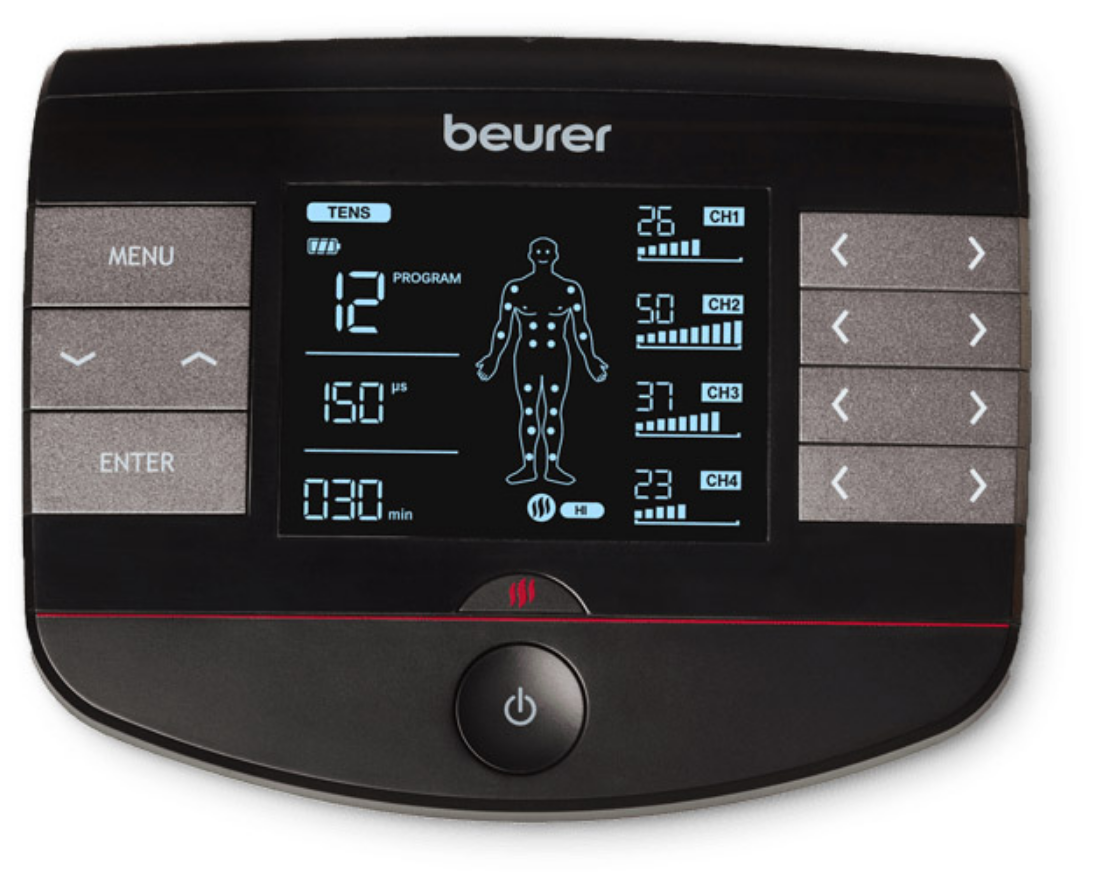
The Beurer Digital TENS/EMS Device with Heat Function EM 89 Heat is a premium 4-in-1 medical device designed for effective pain relief, muscle stimulation, relaxation, and recovery at home. Combining transcutaneous electrical nerve stimulation (TENS), electrical muscle stimulation (EMS), massage, and soothing heat therapy, this innovative TENS EMS device with heat delivers versatile treatment options through 64 pre-programmed applications and 6 customizable programs. With 4 separately adjustable channels, 8 self-adhesive electrodes, and 2 heat settings (low and high), users can tailor intensity levels individually for targeted pain management or muscle training.
Key benefits include drug-free pain relief for back pain, joint issues, or sports injuries; enhanced muscle regeneration; and relaxation via massage modes. The heat function can be used simultaneously or separately, amplifying therapy effectiveness. Ideal for athletes, individuals with chronic pain, or those seeking post-workout recovery, the Beurer EM 89 Heat features a user-friendly display showing electrode positions, a favorites program for quick access, timer function, and safety switch-off. Powered by a rechargeable lithium-ion battery, it's portable and certified for safety.
Priced in the $185–$300 range depending on retailers, the Beurer Digital TENS/EMS Device with Heat Function EM 89 Heat is widely available online and in stores, made in Germany by Beurer GmbH. Whether for daily pain therapy or muscle conditioning, this heated TENS EMS unit offers comprehensive, customizable relief in a compact black and red design (15.9 x 5.3 x 14.2 cm, 341g).
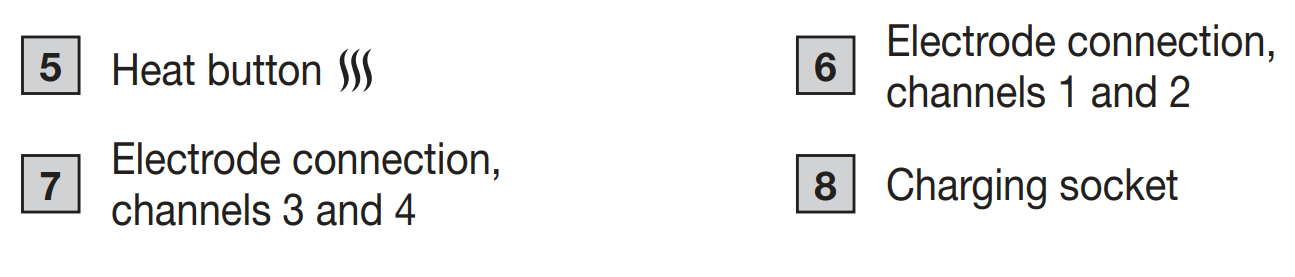
DEVICE DESCRIPTION

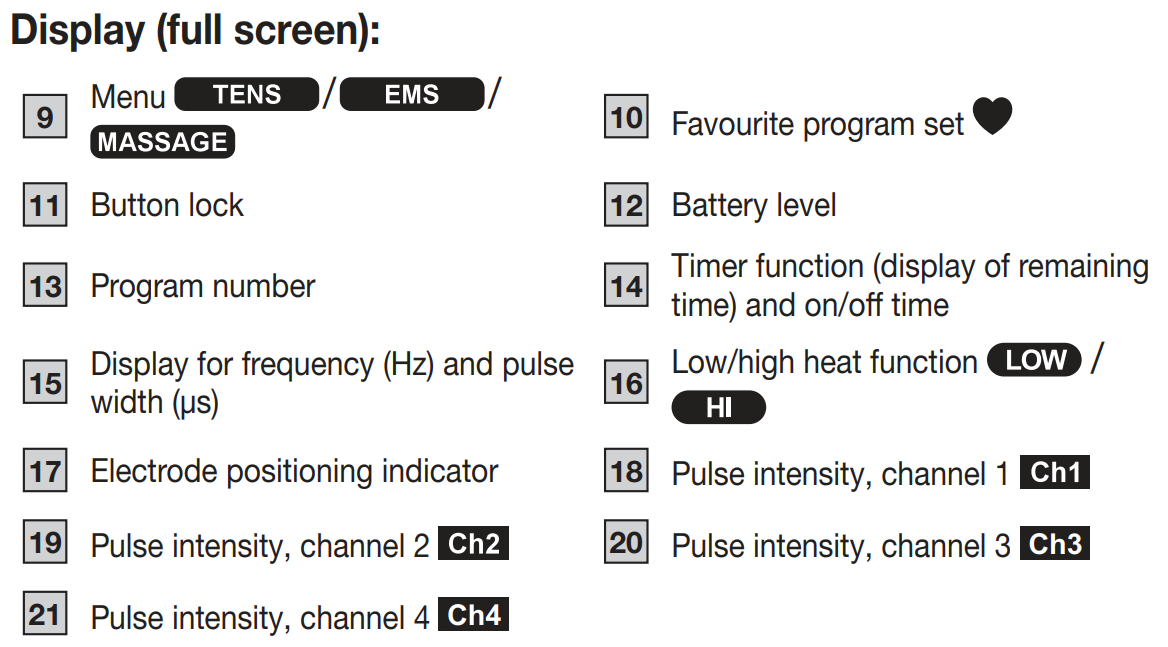
Display (full screen)
INTENDED USE
TENS/EMS/massage purpose
The device is intended to treat pain using TENS technology (transcutaneous electrical nerve stimulation). This pain relief can be applied to different areas of the human body as identified in the following eight indication areas. For non-medical purposes, the device can also be used with EMS technology (electrical muscle stimulation) to strengthen the muscles, and for regeneration and relaxing massages.
TENS/EMS/massage target group
This device is intended for self-treatment in the home, and not in professional healthcare facilities. Suitable for use by all adults suffering from pain as indicated in the indications below.
Clinical benefits
Treatment of pain due to various causes.
Non-clinical benefits
- Muscle training to increase endurance and/or
- Training to support the strengthening of specific muscles or muscle groups, and to achieve the desired changes to physical proportions.
- Acceleration of muscle regeneration after intense muscular output (e.g. after a marathon).
- Improving symptoms of muscular fatigue.
- Muscle relaxation for easing muscle tension.
Indications
Use of the device is advised for:
- Back pain – pain at rest and on exertion.
- Joint pain – pain at rest and on exertion.
- Neuralgia, including phantom pain.
- Menstrual cramps.
- Pain due to circulatory disorders – pain at rest and on exertion.
- Headaches.
- Pain after musculoskeletal injuries – pain at rest and on exertion.
- Chronic pain due to various causes – pain at rest and on exertion.
Contraindications
The device must never be used near to the heart. The stimulation electrodes must not be placed on any part of the front ribcage (where the ribs and breastbone are located), and especially not on the two large pectorals. This can increase the risk of ventricular fibrillation and induce cardiac arrest (see “General warnings” section). Do NOT use the device:
- On the skeletal skull structure, or around the mouth, throat, or larynx.
- In the neck/carotid artery area.
- In the genital area.
- If you have implanted electrical devices (e.g., a pacemaker).
- If you have metal or electrical implants.
- If you use an insulin pump.
- If you have a high temperature (e.g. > 39°C).
- If you have a known or acute cardiac arrhythmia or disorders of the heart’s conduction system.
- On acutely or chronically diseased (injured or irritated) skin (e.g. inflamed skin – whether painful or not, reddened skin, rashes (e.g. allergies), burns, bruises, swellings, both open and healing wounds, or post-operative scars that are healing).
- If you suffer from a seizure disorder (e.g., epilepsy).
- If you are pregnant.
- If you have cancer.
- After an operation, if strong muscle contractions could affect the healing process.
- If you are connected to a high-frequency surgical device.
- If you have an acute or chronic disease of the gastrointestinal tract.
- In the case of a known allergy to the electrode material.
- On acutely or chronically affected (by injury or irritation) skin (e.g. inflamed skin – whether painful or not; reddened skin; rashes, e.g. due to allergies; burns; bruising; swelling; open and healing wounds and post-operative scars where the healing process could be impaired).
WARNING
Undesirable side effects
- Skin irritation.
- Feeling of pressure at the electrode location.
- Slight redness, burning and pain of the skin after treatment.
- Paraesthesia.
- Discomfort.
- Sleepiness.
- Vibration of muscles.
- Tension.
- Headaches.
- Increased menstrual bleeding.
- Allergic reactions to components.
GENERAL WARNINGS
WARNING
The device is not a substitute for medical consultation and treatment. Always consult your doctor first in the event of pain or illness. Before using the device, consult your doctor if any of the following apply to you:
- If you suffer from an acute medical condition, in particular if you suspect or have been diagnosed with high blood pressure, a blood coagulation disorder, propensity to thrombo-embolic conditions or recurrent malignant growths.
- If you have any skin conditions.
- If you have unexplained chronic pain in any part of the body.
- If you suffer from diabetes.
- If you have any sensory impairment that reduces the feeling of pain (e.g. metabolic disorders).
- If you are receiving medical treatment.
- In the event of complaints linked to the stimulation treatment.
- If you suffer from persistently irritated skin due to long-term stimulation at the same electrode site.
- Stimulation should not be carried out:
- On or through the head.
- Directly on the eyes.
- Over the mouth.
- On the front of the neck (particularly not the carotid sinus).
- With the electrode surfaces placed on the chest, upper back or across the heart.
ONLY USE DIGITAL TENS/EMS DEVICE:
- On people.
- For the intended purpose and as specified in these instructions for use. Any form of improper use can be dangerous.
- For external use only.
Damage
- If the device is damaged, do not use it and contact your retailer or the specified Customer Services address.
- To ensure that the device functions effectively, do not drop it or dismantle it.
- Check the device for signs of wear and tear or damage. If there are such signs of wear and tear or damage or if the device was used improperly, it must be returned to the manufacturer or retailer before further use.
- Switch the device off immediately if it is faulty or not working properly.
- Never attempt to open and/or repair the device yourself. Repairs may only be carried out by Customer Services or authorised retailers. Failure to observe this will void the guarantee.
- The manufacturer is not liable for damage resulting from improper or incorrect use.
INITIAL USE
You must fully charge the EM 89 Heat before you use it for the first time. To do so, proceed as follows:
- Connect the USB charging cable to a suitable mains adapter (output voltage max. 5V/2A); see the “Replacement parts and wearing parts” section and the EM 89 Heat (mains adapter not included, available as a servicing item).
- Then insert the mains adapter into a suitable socket. You cannot use the device while it is being charged.
- Do not pull, twist, or sharply bend the cables B 2.
- After the charging process is complete, apply the provided gel pads to the electrodes. To do this, carefully remove one of the protective films B 3.
- Carefully attach the gel pad to the electrode and gently peel off the protective film B 4. Ensure that the edge of the gel pad does not protrude over the electrode. Applying gel pads slightly askew will not affect their function.
HOW TO USE
Starting use
- Step 1: Find a suitable program in the program tables (see “Program overview” section).
- Step 2: Place the electrodes on your target area (for positioning suggestions, see page 5 “Information on electrode positioning”) and connect them to the device.
- Step 3: Hold the ON/OFF button pressed for at least one second to switch on the device.
- Step 4: Press the MENU button to navigate through the TENS/EMS/Massage menus and confirm your choice by pressing the ENTER button.
- Step 5: Use the adjustment buttons to select the program number you want and press the ENTER button to confirm your selection. At the start of the stimulation treatment, the pulse intensity of channels 1, 2, 3 and 4 is set to “00” by default. No pulses are sent to the electrodes yet.
- Step 6: Use the intensity adjustment buttons on the right-hand side as relevant for channels 1, 2, 3 and 4 to select your preferred pulse intensity. The indicator for pulse intensity in the display changes accordingly. The grey electrodes belong to channels 1 and 3, the red electrodes to channels 2 and 4.
- Step 7: You can activate the heat function using the Heat button. The first press of the button activates the low heat level, the second button press activates the high heat level, and the third button press deactivates the heat function.
Notes on use
- After 30 seconds of inactivity, the device’s illuminated display switches off automatically. You can reactivate it by pressing any button (except the ON/OFF button).
- The device switches itself off automatically if you do not use it for one minute (automatic switch-off). When switched on again, the LCD screen of the menu selection appears with the most recently used menu flashing.
- A brief acoustic signal is output when a valid button is pressed. Two brief acoustic signals are output when an invalid button is pressed.
HEAT
In addition to the TENS/EMS/Massage programs, the EM 89 Heat also offers two heat levels which can be activated as required for all programs; see “Starting use” section. The heat supplied via the gel pads relaxes the muscle and improves circulation. You can activate the first level of the heat function by pressing the Heat button. Then wait a moment until the temperature stops increasing. If the temperature is too low for you, you can activate the second level of the heat function by pressing the Heat button again. If you would like to deactivate the heat function, you can do so by pressing the Heat button again. If you want to use the heat function separately, without additional stimulation, proceed as follows:
- Step 1: Position the electrodes in your preferred target area (see “Information on electrode positioning” section for positioning suggestions) and connect them to the device. To use the heat function, always apply both electrodes of the channel being used. The channels used are shown on the display.
- Step 2: Press and hold the ON/OFF button for at least one second to switch on the device.
- Step 3: Press the Heat button to access heat function adjustment.
- Step 4: Use the adjustment buttons to select your preferred treatment time and press the ENTER button to confirm your selection.
- Step 5: The first level of the heat function is set, and the symbol lights up. Then wait a moment until the temperature stops increasing. If the temperature is too low for you, you can activate the second level of the heat function by pressing the Heat button again. The symbol appears. Pressing the Heat button again switches the device back to the lower heat level.
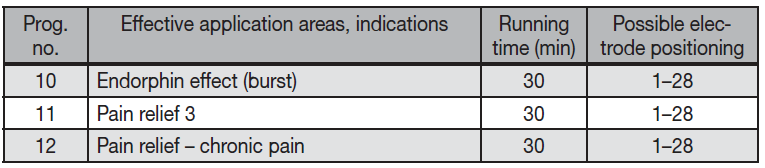
TENS program table
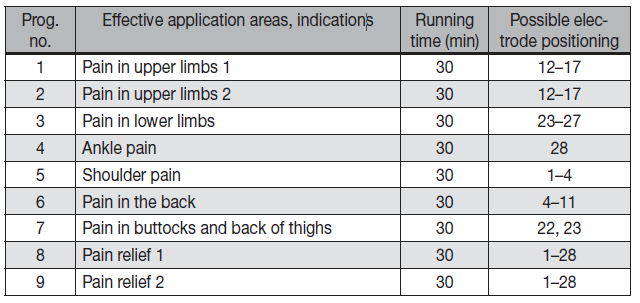
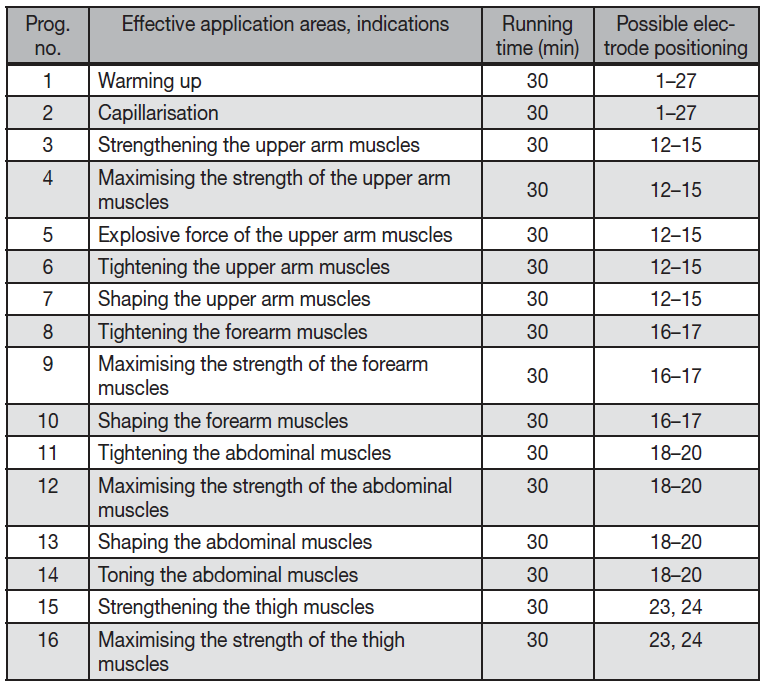
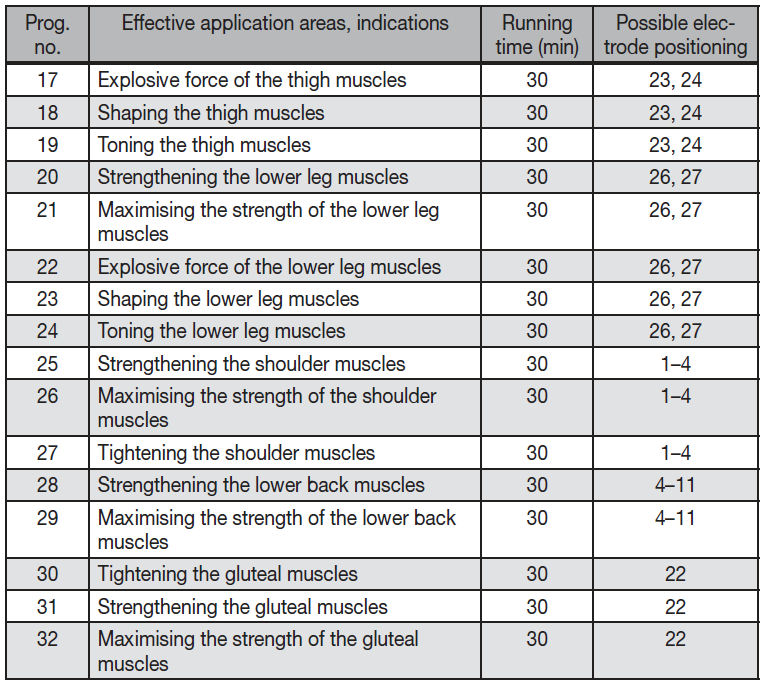
EMS program table
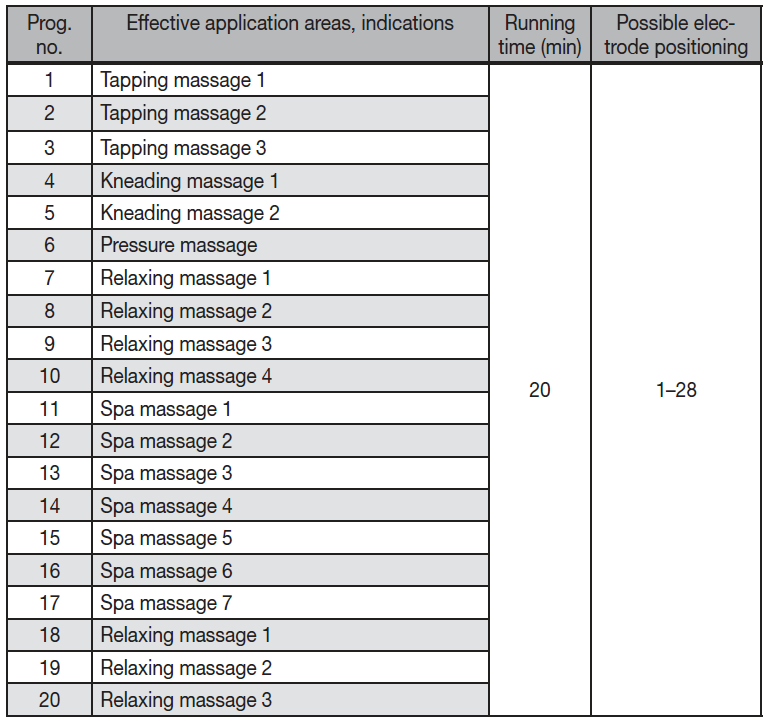
MASSAGE program table
THERAPY MEMORY
Your device records the treatment time in the therapy memory. This allows you to record how long you have been using the device in total or for a specific period of time for your treatments. This may be helpful when consulting your doctor.
Accessing the therapy memory
To access the therapy memory, switch the device on using the ON/OFF button and press and hold the button for 3 seconds. The elapsed treatment time appears in the display. The top two numbers stand for hours; the minutes are shown below.
Resetting the therapy memory
To reset the treatment time memory (therapy memory), press and hold the button for 3 seconds. Press the Menu button to return to selecting a program, or switch the device off using the ON/OFF button. The treatment time memory cannot be accessed if a favourite program is activated.
ELECTRIC CURRENT PARAMETERS
Electrostimulation devices operate with the following electrical current parameters, which may affect the stimulation results differently depending on the setting:
Pulse shape
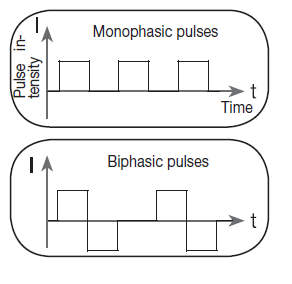
This describes the time function of the stimulating current. A distinction is made between monophasic and biphasic pulse currents. In monophasic pulse currents, the current flows in one direction, and in biphasic pulse currents, the electrical pulse alternates its direction.
The Digital TENS/EMS device only provides biphasic pulse currents as these relieve muscles, cause little muscle fatigue, and offer safer use.
Pulse frequency
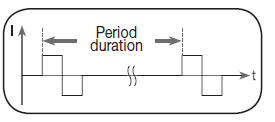
The frequency indicates the number of individual pulses per second and is displayed in Hz (Hertz). It can be calculated by determining the cyclic value for the time period. The relevant frequency determines which types of muscle fibres react most favourably. Slow-reaction fibres react more easily to lower pulse frequencies of up to 15 Hz, whereas rapid-reaction fibres only respond from approximately 35 Hz up. Pulses of approx. 45–70 Hz are linked with constant tension in the muscles and quicker fatigue. Higher pulse frequencies are therefore better to use for speed strength and maximum power training.
Pulse width
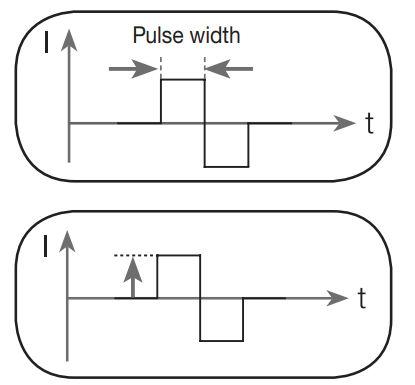
This indicates the duration of an individual pulse in microseconds. Among other aspects, the pulse width therefore determines the penetration depth of the electricity, where usually larger muscle mass requires a larger pulse width.
Pulse intensity
Adjusting the intensity level depends on the individual sensitivity of each user and is determined by a variety of variables, such as site of application, blood supply to the skin, skin thickness and the quality of the electrode contact. The setting should be effective but must never cause any unpleasant sensation, such as pain at the site of application. While a gentle tingling indicates sufficient stimulation energy levels, any setting that causes pain should be avoided. If using the device over an extended period, you may need to adjust the intensity level as your muscles start to adapt to the pulse intensity.
Cycled pulse parameter variation
In many cases, it is necessary to cover the overall tissue structure at the site of application by applying several pulse parameters. In the Digital TENS/EMS device, this is achieved by the provided programs, which automatically make a cyclical pulse parameter change. This also prevents individual muscle groups at the site of application from being affected by fatigue. The Digital TENS/EMS device provides useful preset current parameters. You can change the pulse intensity at any time during use. In 6 programs, you can also set various parameters for stimulation yourself.
CLEANING AND STORAGE
Gel pads
To ensure that the gel pads remain adhesive for as long as possible, clean them carefully with a damp, lint-free cloth under lukewarm running water, and pat dry with a lint-free cloth. Before cleaning with water, remove the connection cable from the device. Following treatment, stick the electrodes back onto the carrier foil on the gel pad.
Cleaning the device
Clean the device after use with a soft, slightly damp cloth. If it is very dirty, you can also moisten the cloth with a mild soapy solution. Do not use any chemical or abrasive cleaning agents for cleaning. Ensure that no water enters the device.
Reuse of the device
Once it has been properly prepared, the device can be used again. Preparation includes cleaning of the surface of the device using a cloth moistened with a mild soapy solution.
Storage
- Do not make sharp bends in the connection cables or the electrodes.
- After use, stick the electrodes back onto the carrier foil for the gel pads.
- Store the device in a cool, well-ventilated location.
- Never place any heavy objects on the device.
- In order to achieve as long a battery service life as possible, fully charge the battery at least every 6 months.
Troubleshooting Beurer EM 89 Heat TENS/EMS Device Common Issues
Encountering problems with your Beurer Digital TENS/EMS Device with Heat Function EM 89 Heat? Start by checking the rechargeable battery charge and electrode connections. Common issues include no stimulation: ensure electrodes are properly attached, skin is clean and dry, and intensity is above zero. If the device doesn't power on, recharge via USB and verify the safety switch-off hasn't activated.
- Low battery indicator or sudden shut-off: Fully charge the lithium-ion battery; it supports extended sessions. Clean contacts if charging fails.
- Weak pulses or no heat: Replace self-adhesive electrodes after 20–30 uses; poor adhesion reduces effectiveness. Select the correct program and adjust channels individually.
- Error codes on display: No specific codes listed, but flashing lights may indicate overload—reset by powering off for 5 minutes. Consult the manual for electrode positioning display errors.
- Overheating: Use low heat setting first; allow cooling between sessions.
Prevent issues by storing in a dry place, avoiding water exposure, and replacing electrodes regularly. Beurer offers a standard 3-year warranty; contact support at Beurer GmbH, Söflinger Straße 218, 89077 Ulm, Germany, or via their website for replacements or service. Email support@beurer.com or check FAQs for heated TENS EMS troubleshooting.
Pros and Cons of Beurer Digital TENS/EMS Device with Heat Function EM 89 Heat
Pros
- Versatile 4-in-1 functionality (TENS, EMS, massage, heat) with 64 programs and 6 customizable options for personalized pain relief and muscle stimulation.
- 4 independent channels allow multi-area treatment simultaneously, ideal for back or leg therapy.
- Rechargeable battery and portable design enhance usability for home or travel recovery sessions.
- Heat function boosts circulation and comfort, outperforming basic TENS units.
- Excellent value at $185–$300, with German engineering and safety certification—superior to cheaper alternatives like single-function devices.
Cons
- Replacement electrodes add ongoing costs (packs around $20–$30).
- Learning curve for programming custom settings and electrode placement via display.
- Bulkier than minimalist TENS devices, though still compact at 341g.
- Limited color options (black/red/gray), no app integration for tracking.
Overall, the Beurer EM 89 Heat excels in features and durability, offering strong value compared to competitors like basic Omron models lacking heat.
Customer Reviews: Real User Feedback on Beurer EM 89 Heat
Users praise the Beurer Digital TENS/EMS Device with Heat Function EM 89 Heat for its powerful relief, averaging 4.5/5 stars across sites. "The heat combined with TENS transformed my chronic back pain—64 programs fit every need!" says one reviewer. Athletes highlight EMS for recovery: "Muscle stimulation post-workout is game-changing with adjustable channels."
Common praises: Effective heat therapy, long battery life, easy display. Complaints include electrode wear ("Replace often for best results") and initial setup complexity. 80% recommend for pain management, with testimonials noting "Better than meds" for joint issues. Addresses stickiness issues with proper skin prep. Great for heated TENS EMS users seeking advanced options.
More beurer manuals
- Setup: Beurer Diagnostic Bathroom Scale BF 990 WIFI User Manual
- Usage: Beurer Digital TENS/EMS Unit with Heat Function EM 59 Heat User Manual
- Setup: Beurer Diagnostic Bathroom Scale BF 105 Body Complete User Manual
- Setup: Beurer Glass Bathroom Scale GS 225 Instruction Guide
- Setup: Beurer Diagnostic Bathroom Scale BF-980 User Manual
- Usage: Beurer Glass Bathroom Scale GS-14 User Manual
Leave a Comment