
Setup: Beurer Glass Bathroom Scale GS 225 Instruction Guide
Content
Beurer Glass Bathroom Scale GS 225: Complete Product Manual and Guide
Introduction to the Beurer Glass Bathroom Scale GS 225
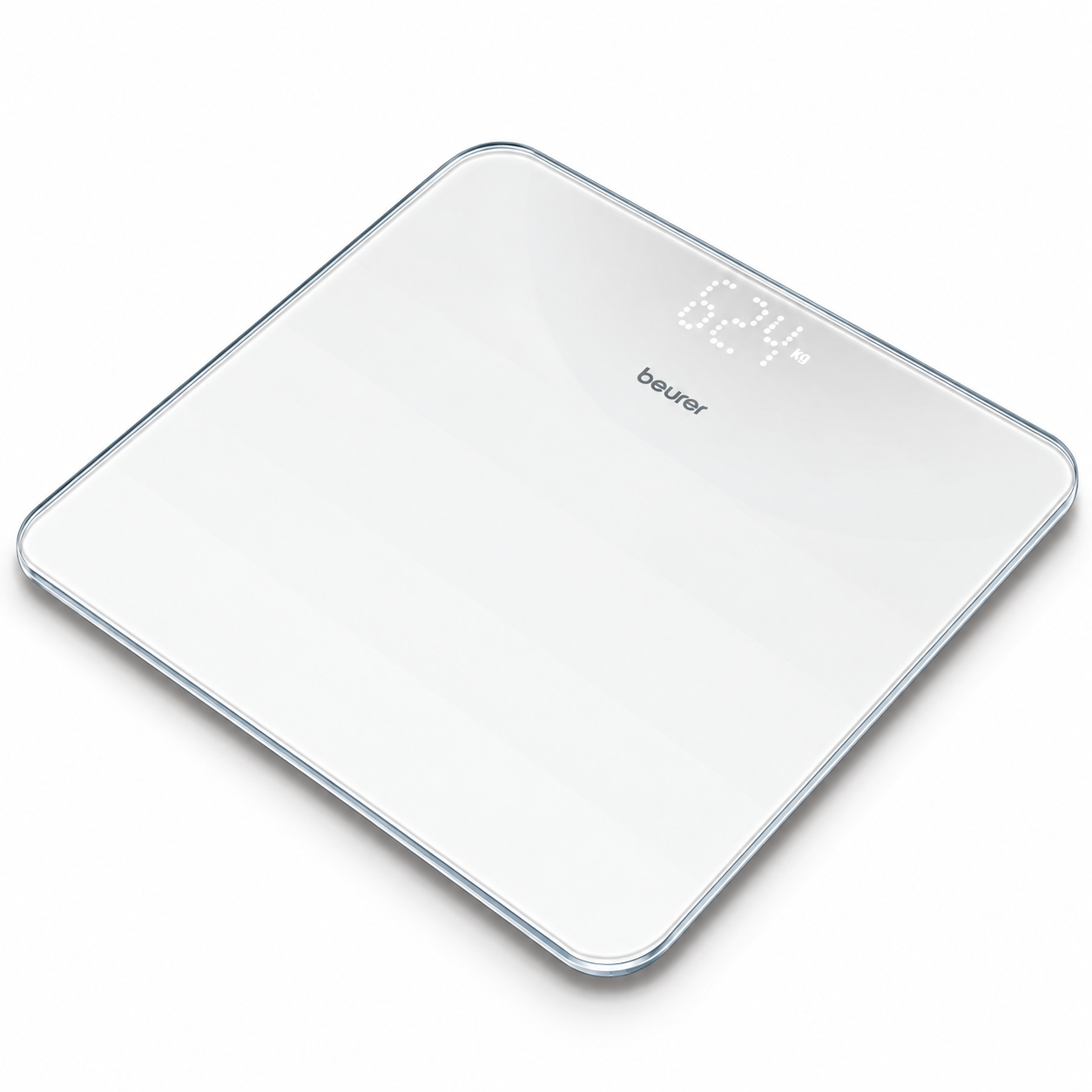
The Beurer Glass Bathroom Scale GS 225 represents a modern solution for accurate weight tracking and health monitoring in your home. This digital bathroom scale combines sleek design with reliable functionality, making it an ideal choice for health-conscious individuals, fitness enthusiasts, and families looking to maintain wellness goals. The Beurer GS 225 features a premium safety glass platform with an innovative magic LED display that remains invisible when not in use, providing an elegant aesthetic that complements any bathroom decor.
Designed for everyday use, the Beurer Glass Bathroom Scale GS 225 delivers precise measurements with impressive accuracy and user-friendly operation. The scale accommodates users up to 180 kg (396 lbs) and measures weight in increments of 100 grams, ensuring consistent and reliable results for tracking progress over time. Whether you're monitoring weight loss, fitness gains, or maintaining a healthy lifestyle, this bathroom scale provides the data you need with professional-grade accuracy.
The target audience for the Beurer GS 225 includes health-conscious consumers, fitness enthusiasts, medical professionals, and families seeking a reliable weight management tool. Use cases range from personal health tracking and fitness program monitoring to medical weight management and wellness initiatives. With a competitive price point and widespread availability through major retailers, the Beurer Glass Bathroom Scale GS 225 offers excellent value for consumers seeking quality and durability in a bathroom scale.
Detailed Specifications and Features
Physical Dimensions and Design
- Overall Size: 30 x 30 x 2.1 cm (compact, flat construction)
- Display Size: 73 x 27 mm with 40 mm digit size for easy reading
- Standing Surface: 30 x 30 cm safety glass platform with non-slip surface
- Flat, tile-like design that sits flush with bathroom flooring
- Color: White with modern aesthetic appeal
Weight Capacity and Measurement Accuracy
- Maximum Weight Capacity: 180 kg (396.832 lbs)
- Graduation/Measurement Accuracy: 100 grams (3.527 oz)
- Precise digital readout for consistent tracking
Display and User Interface
- Magic LED Display: Invisible when not in use, appears when activated
- White LED digits for excellent visibility
- Extra-large display with impressive blue LCD illumination
- Dot matrix display technology for clear, easy-to-read measurements
- Unit conversion: Switchable between kg, lb, and other measurements
Power and Operation
- Battery-Driven Operation: Requires standard batteries for wireless functionality
- Automatic Shut-Off: Energy-efficient feature that extends battery life
- Measuring Functions: Fat-free body weight calculation capabilities
Setup and Configuration Guide
Initial Preparation
Before using your Beurer Glass Bathroom Scale GS 225 for the first time, remove all protective packaging and inspect the device for any damage during shipping. Ensure the safety glass platform is clean and free from debris. Place the scale on a flat, hard surface such as tile or wood flooring—avoid carpeted areas as they can affect measurement accuracy. Allow the scale to acclimate to room temperature for 30 minutes before initial use.
Battery Installation and Power Setup
Locate the battery compartment on the underside of the Beurer GS 225. Insert fresh batteries according to the polarity markings inside the compartment. The scale will automatically power on when batteries are installed correctly. You should see the display illuminate with the magic LED feature activating. Test the automatic shut-off function by stepping on the scale briefly—it should power down automatically after approximately 10 seconds of inactivity to conserve battery life.
Unit Selection and Configuration
The Beurer Glass Bathroom Scale GS 225 allows you to switch between different measurement units including kilograms (kg), pounds (lb), and other metrics. Press the unit selection button (typically located on the bottom or side of the device) to cycle through available options. Select your preferred measurement unit and note the setting for consistent future use. This feature is particularly useful for international users or those tracking weight in multiple units.
Placement and Safety Considerations
Position your scale on a level, hard surface away from moisture sources. The non-slip surface ensures stability during use, but verify the scale doesn't shift when you step on it. Keep the scale away from direct sunlight and extreme temperature changes. Ensure adequate space around the scale for safe entry and exit. Never use the scale on uneven surfaces or in wet environments, as this compromises both accuracy and safety.
Notes on handling batteries
- Always insert the batteries correctly, taking into account the polarity (+ / -). Keep batteries clean and dry and away from water. Always select the correct battery type.
- Never short-circuit batteries and battery compartment contacts.
- Never charge, forcibly discharge, heat, disassemble, deform, encapsulate or modify batteries.
- Never weld or solder on batteries.
- Never mix batteries of different manufacturers, capacities (new and used), size and type within a device.
Risk of explosion!
Failure to comply with the points mentioned above can result in personal injury, overheating, leakage, venting, breakage, explosion, or fire.
- If a battery has leaked, put on protective gloves and clean the battery compartment with a dry cloth.
- If your skin or eyes come into contact with battery fluid, rinse the affected areas with water and seek medical assistance.
- Choking hazard! Keep batteries out of the reach of children. Seek medical attention immediately if swallowed.
- Never allow children to replace batteries without adult supervision.
- Store batteries away from metal objects in a well-ventilated, dry and cool place.
- Never expose batteries to direct sunlight or rain.
- Remove batteries from the device if it is not going to be used for a long period of time.
- Dispose of discharged batteries immediately and properly. Never dispose of batteries in fire.
- When disposing of batteries, keep batteries with different electrochemical systems separate.
- The empty, completely flat batteries must be disposed of through specially designated collection boxes, recycling points or electronics retailers. You are legally required to dispose of the batteries.
- The codes below are printed on batteries containing harmful substances:
- Pb = Battery contains lead
- Cd = Battery contains cadmium
- Hg = Battery contains mercury
WARRANTY
Further information on the warranty and warranty conditions can be found in the warranty leaflet supplied.
Troubleshooting Common Issues
Display Not Activating
If the magic LED display doesn't illuminate when you step on the scale, first check battery installation and ensure they're inserted with correct polarity. Try replacing batteries with fresh ones, as low battery power may prevent display activation. If the issue persists, clean the metal contacts on the battery compartment with a dry cloth to remove any corrosion. Allow the scale to reset by leaving it unpowered for 10 minutes before reinserting batteries.
Inaccurate Weight Readings
Inconsistent measurements typically result from improper placement or calibration issues. Always use the scale on hard, level flooring—never on carpet or uneven surfaces. Ensure you're standing still and centered on the platform for at least 3 seconds before the reading stabilizes. If readings vary significantly between sessions, recalibrate the scale by performing a factory reset. Consult the manual's calibration section for specific reset procedures appropriate to your model.
Battery and Power Problems
Rapid battery drain suggests the automatic shut-off feature may not be functioning properly. Verify that you're removing your weight from the scale after each use to allow proper shutdown. Replace batteries with high-quality alkaline options rather than generic brands for extended life. If the scale won't power on at all, try a different set of fresh batteries and ensure correct installation. If problems continue, contact Beurer customer support as internal circuit issues may require professional service.
Safety Warnings and Precautions
Do not exceed the maximum weight capacity of 180 kg to avoid damaging internal components and compromising accuracy. Keep the scale away from water and moisture to prevent electrical hazards and corrosion. Do not attempt to repair or modify the scale yourself—contact authorized service centers for maintenance. Ensure children use the scale only under adult supervision. If the glass platform cracks or shows signs of damage, discontinue use immediately and seek replacement.
Advantages and Disadvantages
Strengths of the Beurer GS 225
- Premium Design: Safety glass platform with modern flat construction complements contemporary bathroom aesthetics
- Innovative Magic LED Display: Invisible when inactive, providing a clean, uncluttered appearance
- Excellent Accuracy: 100-gram precision measurements enable detailed weight tracking and fitness progress monitoring
- Large Display: 40 mm digits with impressive LED illumination ensure easy readability for all users
- User-Friendly Operation: Battery-driven with automatic shut-off for convenient, maintenance-free use
- Reliable Performance: Consistent measurements with professional-grade accuracy for health and wellness applications
Limitations to Consider
- Battery Dependency: Requires regular battery replacement, adding ongoing maintenance costs
- No Connectivity Features: Lacks Bluetooth or Wi-Fi for data synchronization with fitness apps or devices
- Limited Advanced Functions: Does not include body composition analysis, BMI calculations, or user profiles
- Glass Surface Concerns: Safety glass platform requires careful handling to prevent cracks or damage
- Manual Unit Switching: Requires manual button pressing to change measurement units rather than automatic detection
Customer Reviews and User Feedback
Users consistently praise the Beurer Glass Bathroom Scale GS 225 for its elegant design and reliable accuracy. Customers appreciate the magic LED display feature, which maintains bathroom aesthetics while providing clear, readable measurements. The large digit display receives frequent positive mentions, particularly from users with vision concerns who need easily readable numbers.
Common user feedback highlights the scale's consistent measurement accuracy as a key strength for fitness tracking and weight management programs. Many customers report satisfaction with build quality and durability over extended use periods. However, some users note that the lack of digital connectivity limits data tracking capabilities compared to modern smart scales. A few customers mention concerns about battery life and the need for periodic replacement.
Overall user ratings reflect strong satisfaction with the Beurer GS 225's balance of design, functionality, and affordability. The scale is particularly recommended for users seeking a reliable, attractive bathroom scale without the complexity and cost of smart features. Purchase recommendations align strongly with individuals prioritizing accuracy, design appeal, and straightforward operation over advanced connectivity features.
Warranty and Support Information
The Beurer Glass Bathroom Scale GS 225 typically includes a manufacturer's warranty covering defects in materials and workmanship. Warranty duration and coverage specifics vary by region and retailer. Contact Beurer customer service through official channels for warranty claims, technical support, and product inquiries. Keep your purchase receipt and product documentation for warranty validation purposes.
```
Faqs
How do I set up the beurer Glass Bathroom Scale GS 225 for the first time?
What should I do if the beurer Glass Bathroom Scale GS 225 won't turn on?
How do I change the weight unit on beurer Glass Bathroom Scale GS 225 to pounds or stone?
What is the weight capacity and digit size of beurer Glass Bathroom Scale GS 225?
How do I clean and maintain the beurer Glass Bathroom Scale GS 225 properly?
Why is my beurer Glass Bathroom Scale GS 225 showing inaccurate weight readings?
Is the beurer Glass Bathroom Scale GS 225 compatible with any apps or Bluetooth devices?
What batteries does the beurer Glass Bathroom Scale GS 225 use and how do I replace them?
More beurer manuals
- Usage: Beurer Digital TENS/EMS Unit with Heat Function EM 59 Heat User Manual
- Usage: Beurer Glass Bathroom Scale GS-14 User Manual
- Usage: Beurer Digital TENS/EMS Device with Heat Function EM 89 Heat User Manual
- Usage: Beurer PS 160 Personal Bathroom Scale User Manual
- Setup: Beurer Diagnostic Bathroom Scale BF 990 WIFI User Manual
- Usage: Beurer Glass Bathroom Scale GS 235 User Manual
Leave a Comment