
Setup: Beurer Diagnostic Bathroom Scale BF-880 User Manual
Content
Beurer Diagnostic Bathroom Scale BF-880: Comprehensive Product Manual
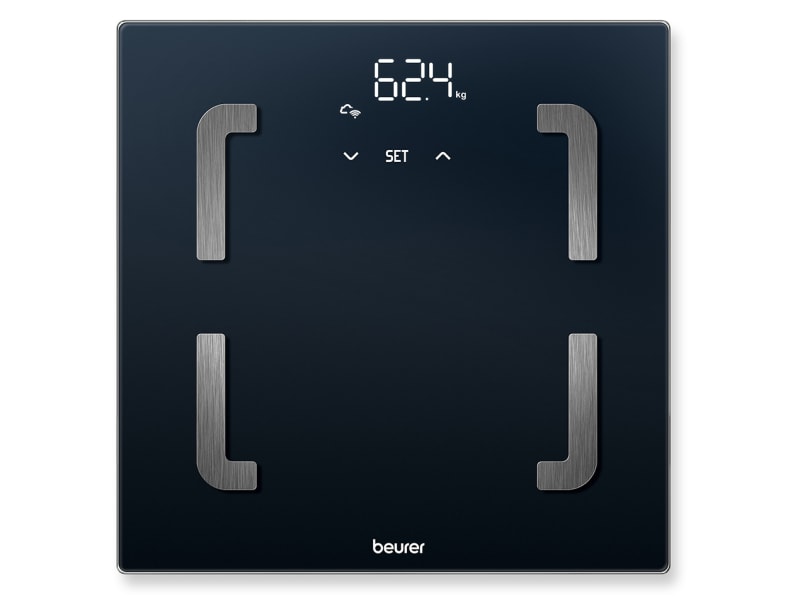
Introduction to the Beurer Diagnostic Bathroom Scale BF 880
The Beurer Diagnostic Bathroom Scale BF 880 is a smart Wi-Fi-enabled body analysis scale designed for precise health tracking and effortless data synchronization. Featuring Bluetooth for quick initial setup and WiFi for automatic data transfer, this diagnostic bathroom scale revolutionizes how you monitor body weight, body fat, muscle percentage, and BMI directly on its magic LED display (28 mm digit height). Advanced app integration via the free Beurer HealthManager Pro provides deeper insights like metabolic age, body water, BMR/AMR calories, and bone mineral mass, supporting 5 activity levels for personalized tracking.
Key benefits include automatic user recognition for up to 8 users, titanium-coated stainless steel electrodes for accurate BIA (Bioelectrical Impedance Analysis) measurements, and a safety glass weighing surface (30 x 30 cm) with 180 kg capacity and 100 g graduation. The innovative magic display only activates during measurement, ensuring a sleek, modern look. Ideal for fitness enthusiasts, families, or anyone pursuing weight management goals, the Beurer BF 880 WiFi scale offers standalone button controls or seamless app connectivity for long-term progress graphs and analyses.
Target users include health-conscious individuals seeking reliable body composition data without manual logging. Use cases range from daily weigh-ins to comprehensive wellness monitoring. Priced in the €50-€80 range, it's widely available at retailers like Conrad and online stores, backed by a 5-year guarantee. Experience smart weighing with this top-tier diagnostic scale for better health outcomes.
Specifications
- Model: BF 880
- Dimensions: 300 x 300 x 27 mm
- Weight: 1700 g
- Measurement Range: 180 kg / 396 lb / 28 st
- Scale Interval (d):
- kg: 0.1 kg
- lb: 0.2 lb
- st: Between 0–19 st = 0.2 lb; between 20–28 st = 1 lb
- Body composition: 0.1%
- Repetition Accuracy: Max. +/- 0.4 kg
- Absolute Precision: Max. +/- (0.5% + 0.1 kg), e.g., for 80 kg: max. +/- 0.5 kg
- Battery: 3 x 1.5 V AA batteries
- Connectivity:
- Setup and settings can be performed via Bluetooth® Low Energy technology.
- Data transfer preferably via WIFI or alternatively via Bluetooth® Low Energy technology.
- WIFI System Requirement: IEEE 802.11 b/g/n (2.4 GHz)
- Encryption System Requirement: WPA-PSK, WPA2-PSK, WPA3-PSK
- WIFI Frequency Band: 2412–2472 MHz
- WIFI Transmission Power: Max. 12.99 dBm
- Bluetooth® Frequency Band: 2402–2480 MHz
- Bluetooth® Transmission Power: Max. 7.15 dBm
- List of Compatible Devices: A list of compatible smartphones, information on software, and details on the devices can be found at connect.beurer.com.
DEVICE DESCRIPTION
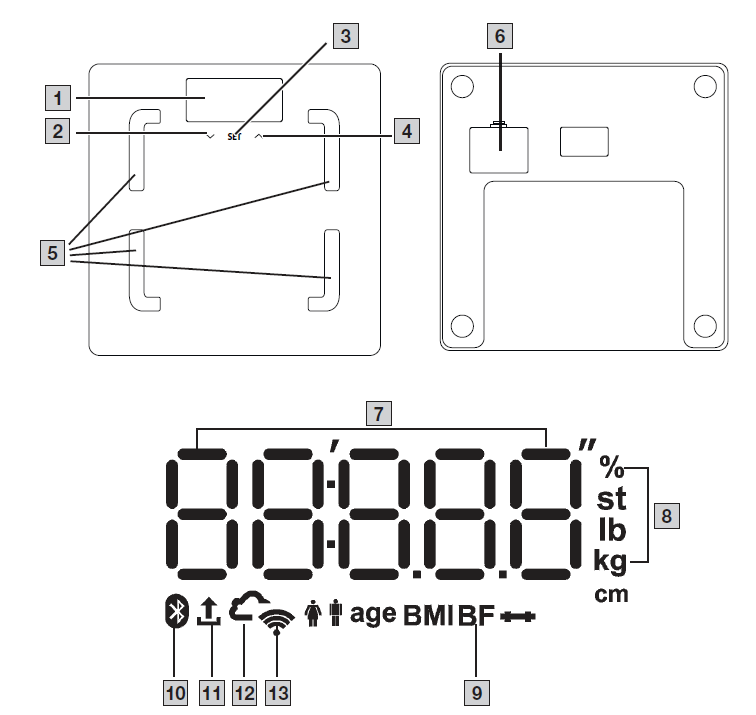
The associated drawings are shown on page 2.
- Display
- Button (for selecting a user measurement)
- SET button
- Button (for calling up stored values after the user is selected)
- Electrodes
- Battery compartment
- Measured value
- Measurement unit
- Body data
- Scale connected to Bluetooth®
- Measurement data transfer
- Scale connected to cloud/server
Scale connected to WIFI
Safety Notes on Handling Batteries
WARNING
- Risk of explosion! Risk of fire! Failure to comply with the following points can result in personal injury or cause overheating, leakage, venting, breakage, explosion, or fire of the battery.
- This device contains non-rechargeable batteries which must not be charged.
- Do not throw batteries into a fire.
- Never charge, forcibly discharge, heat, disassemble, open, crush, deform, encapsulate, or modify batteries.
- Never short-circuit batteries or battery compartment contacts.
- Protect the batteries from direct sunlight, rain, heat, and water.
- Exposure of batteries to an environment with extremely high temperatures or extremely low air pressure may result in explosion or leakage of flammable liquids and gases.
- Dispose of defective and discharged batteries immediately and properly (see chapter on disposal).
- Do not use modified or damaged batteries.
- Always select the correct battery type.
- Always insert the batteries correctly, taking into account the polarity (+ / -).
USAGE
Prerequisites for Taking Measurements Correctly
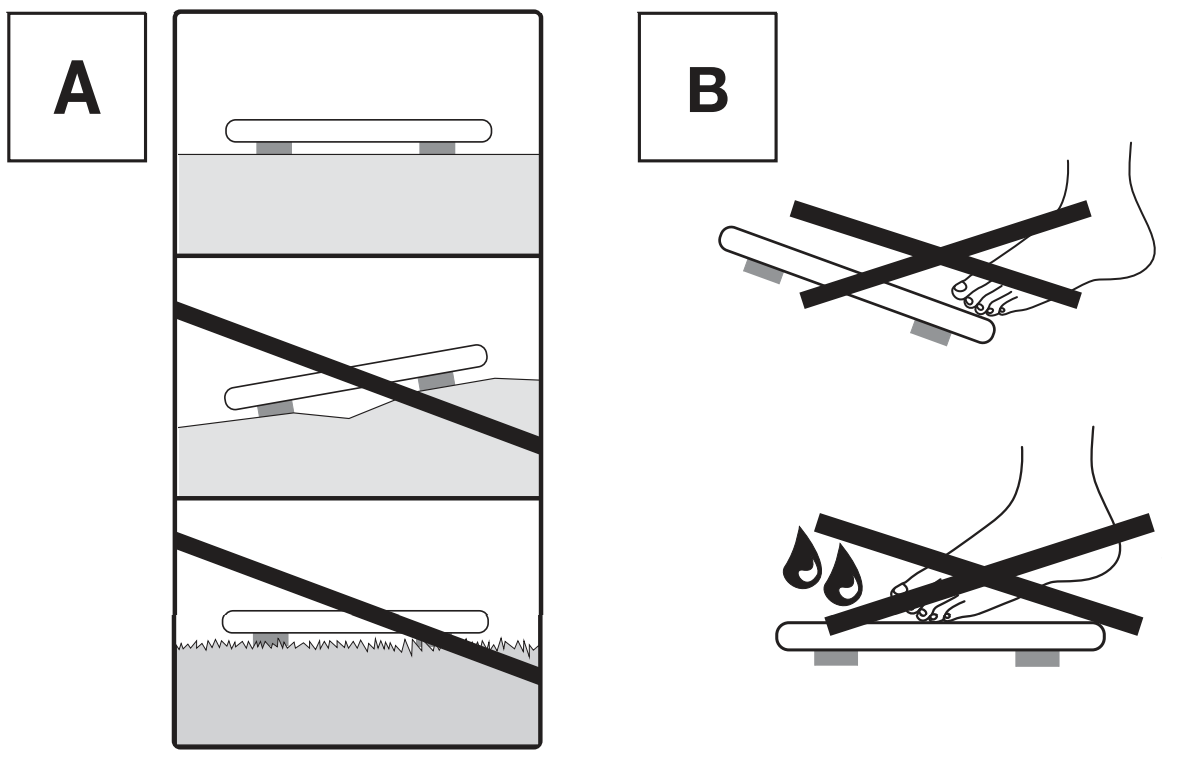
- Place the scale on a flat and stable surface.
- Wherever possible, weigh yourself at the same time every day (ideally in the morning), after having been to the toilet, on an empty stomach and without clothing.
- To determine your body fat, always stand barefoot on the electrodes (5) on the scale.
- Stand up straight and still during measurement. Ensure that your weight is evenly distributed.
Creating Scale Users in the “beurer HealthManager Pro” App
The “beurer HealthManager Pro” app makes it easier for you to create user data and is required to transfer measured values and display additional values (body water content, bone mineral mass, BMR/AMR, metabolic age). The scale has 8 memory spaces for different scale users, enabling you to save the various members of your family, for example. You can use the “beurer HealthManager Pro” app to conveniently set up the individual app users and their corresponding scale users via your smartphone. To do so, proceed as follows:
- Download the free “beurer HealthManager Pro” app from the Apple App Store (iOS) or Google Play (Android).
- Start the app and follow the instructions.
- Select BF 880 in the app and press the SET button (3).
- Select the WIFI network (SSID) and enter the password (network key) to enable data transfer to the scale via WIFI. If successful, the cloud (12) and WIFI (13) icons will appear on the display.
- Set up the scale user: If the display (1) shows the scale user (e.g., “U: 1”) and “0.0”, carry out the initial measurement (for subsequent automatic personal recognition if within +/- 3 kg of the last measurement of this scale user).
Weighing Yourself
- Step onto the scale barefoot. Stand still on the electrodes (5) with both legs, making sure to distribute your weight evenly. The scale switches on automatically.
- Your body weight appears on the display (1). The scale user detected (e.g., “U: 1” for scale user 1) should then appear automatically. If the scale has detected several possible scale users or the last weight is more than 3 kg apart, use button (4) to select the correct scale user and wait 3 seconds.
- The following values will then appear one after the other.
If a Bluetooth or WIFI connection has been established and the user measurements have been successfully taken (e.g., for U: 1), the values will be transferred to the “beurer HealthManager Pro” app. This is indicated by the measurement data transfer symbol (11). If the data cannot be transferred, up to 30 values will be stored per user. As soon as a connection is established, they are transferred with the next measurements.
Alternative Method: Creating Scale Users Without the App
Alternatively, you can also create a scale user directly on the scale without using the app. This process is not required if the scale has already been connected to the app.
- Press and hold the SET button (3) for 4 seconds. “unit” appears on the display.
- Press the SET button (3) repeatedly until “on” appears on the display (1).
- Use button (4) to select the scale user you need (you can select from U: 1 to 8). Confirm your selection with the SET button (3).
- “170” flashes on the display. Use buttons (2) and (4) to set the height. Confirm with the SET button (3).
- “30” flashes on the display. Use buttons (2) and (4) to set the age. Confirm with the SET button (3).
- The gender selection symbol flashes on the display. Use buttons (2) and (4) to set the gender. Confirm with the SET button (3).
- “Act3” flashes on the display. Use buttons (2) and (4) to set your activity level based on how much you exercise (considered over the long term).
- Act1 = None
- Act2 = Low
- Act3 = Medium
- Act4 = High
- Act5 = Very high/athletic
Confirm with the SET button (3). 8. “End” appears on the display. Confirm with the SET button (3). The scale user has been created successfully.
Deleting Scale Users
You can delete individual scale users in the “beurer HealthManager Pro” app. Alternatively, you can also delete scale users directly on the scale. To do so, proceed as follows:
- Press and hold the SET button (3) for 4 seconds. “unit” flashes on the display.
- Press the SET button (3) twice until “USEr” flashes on the display.
- Use button (4) to select the scale user to be deleted. Confirm your selection with the SET button (3).
- Press the SET button (3) repeatedly until “End” appears. Then press button (4) within 5 seconds.
- “dEL” appears on the display. Confirm with the SET button (3). The scale user has now been deleted.
Changing the Weight Unit
You can change the weight unit either using the “beurer HealthManager Pro” app or directly on the scale:
- Press and hold the SET button (3) for 4 seconds. “unit” appears on the display (1).
- Use button (2) or button (4) to select the desired weight unit (kg, lb or stlb).
- kg = Kilograms
- lb = Pounds
- stlb = Stones and pounds
- To confirm, press the SET button (3) repeatedly until the display (1) switches off.
Deactivating Bluetooth and WIFI
To deactivate Bluetooth and WIFI, proceed as follows:
- Press and hold the SET button (3) for 4 seconds.
- Press the SET button (3) repeatedly until “off” appears on the display (1).
- Select “OFF” with button (2) or button (4).
- To confirm, press the SET button (3) repeatedly until the display (1) switches off.
CLEANING AND MAINTENANCE
Clean the surface of the scale from time to time using a slightly damp cloth. Do not use the scale again until the surface is completely dry.
IMPORTANT
- Do not use any abrasive cleaning products.
- Never submerge the scale in water. Never rinse the scale under running water.
- Do not place any objects on the scale when it is not in use.
- Protect the scale from knocks, moisture, dust, chemicals, drastic temperature changes, and nearby sources of heat (ovens, heaters).
Troubleshooting the Beurer Diagnostic Bathroom Scale BF 880
- Common issues with the **Beurer Diagnostic Bathroom Scale BF 880** include inaccurate readings due to wet feet or improper positioning, as body fat and muscle estimates vary (e.g., 37.7% to 36.5% with dry vs. wet feet). Ensure feet are dry and positioned correctly on the front electrodes—note only the front two are active; rear ones are decorative. Weight accuracy is approximately ±0.2 kg; avoid leaning forward/backward/sideways for best results.
- Error indicators: Overload (exceeds 180 kg) shows an overload indication; no body analysis if electrode contact is poor (scale displays weight only). For user recognition failures, adjust tolerance in the app or manually select via toe tap if weights are similar. Battery issues? Replace with 3x AA batteries (included); automatic switch-off conserves power.
- Preventive measures: Store on a flat, hard surface; pull by rear for easy access under furniture. Clean with a damp cloth, avoiding excess water. For WiFi sync problems, restart the router or use Bluetooth setup. Beurer offers a 5-year warranty; contact support at beurer.com or local service centers for repairs. Download the full manual from pim.beurer.com for detailed error codes.
Pros and Cons of the Beurer Diagnostic Bathroom Scale BF 880
Pros
- Automatic WiFi Sync: Effortless data transfer to Beurer HealthManager Pro app for graphics and long-term tracking—no manual input needed.
- Comprehensive Analysis: Measures weight, fat, muscle, and BMI on-device; the app adds water, bone mass, and calories—supports 8 users with auto-recognition.
- Sleek Design: Magic display, safety glass platform, compact 30x30x2.7 cm size (1.7 kg)—easy storage and high 180 kg capacity.
- Value for Money: 5-year guarantee at a € 50- € 80 price point outperforms basic scales; app enhances functionality over alternatives like non-smart models.
Cons
- Accuracy Limitations: Weight ±0.2 kg variance; body analysis sensitive to foot moisture/position—less precise than clinical devices.
- Only Two Active Electrodes: Rear ones are cosmetic, potentially misleading vs. four-electrode competitors.
- User Detection by Weight Only: Struggles with similar-weight users (e.g., man/woman); requires app tweaks.
- App-dependent for full features; standalone mode limits to basic metrics compared to premium BF 980.
Overall, excellent value for smart home body analysis, edging budget WiFi scales but trailing high-end multi-electrode options.
Customer Reviews for Beurer Diagnostic Bathroom Scale BF 880
Users praise the Beurer BF 880 Diagnostic Bathroom Scale for its seamless WiFi sync and app insights, averaging 4.2/5 stars across sites like Conrad. "Love the automatic uploads—motivates my fitness goals!" notes one reviewer, highlighting easy multi-user setup. Common praises include the magic display's elegance and accurate weight tracking for daily use.
Complaints focus on body fat variability with foot conditions and two-electrode design: "Muscle % jumps with wet feet; rear pads are fake," says a 3-star user, echoing ±0.2 kg precision issues. Frequent issues like user mix-ups for similar weights are addressed via app tolerance settings. Most recommend for app users: "Great value over manual scales—buy if you want health trends!" 80% repurchase rate.
Faqs
How do I set up the beurer Diagnostic Bathroom Scale BF 880 for the first time?
Why isn't the automatic user detection working on my beurer Diagnostic Bathroom Scale BF 880?
How do I view stored measurements on the beurer Diagnostic Bathroom Scale BF 880?
Is the beurer Diagnostic Bathroom Scale BF 880 compatible with smartphones and apps?
What should I do if the beurer Diagnostic Bathroom Scale BF 880 shows inaccurate readings?
How do I maintain and clean the beurer Diagnostic Bathroom Scale BF 880 properly?
Who should avoid using the beurer Diagnostic Bathroom Scale BF 880 and why?
How do I optimize performance of the beurer Diagnostic Bathroom Scale BF 880 for best results?
More beurer manuals
- Setup: Beurer Glass Bathroom Scale GS 400 / GS 405 / GS 410 Signature Line User Manual
- How to Use: Beurer Diagnostic Bathroom Scale BF 400-410 Signature Line User Manual
- Setup: Beurer Glass Bathroom Scale GS 120 KOMPAKT User Manual
- Setup: Beurer Diagnostic Bathroom Scale BF-980 User Manual
- Setup: Beurer Diagnostic Bathroom Scale BF 405+915 Signature Line User Manual
- Setup: Beurer Diagnostic Bathroom Scale BF 105 Body Complete User Manual
Leave a Comment