
Setup: Beurer Table Fan LV 50 Fresh Breeze User Manual
Content
Introduction — beurer Table Fan LV 50 Fresh Breeze (200–300 words)
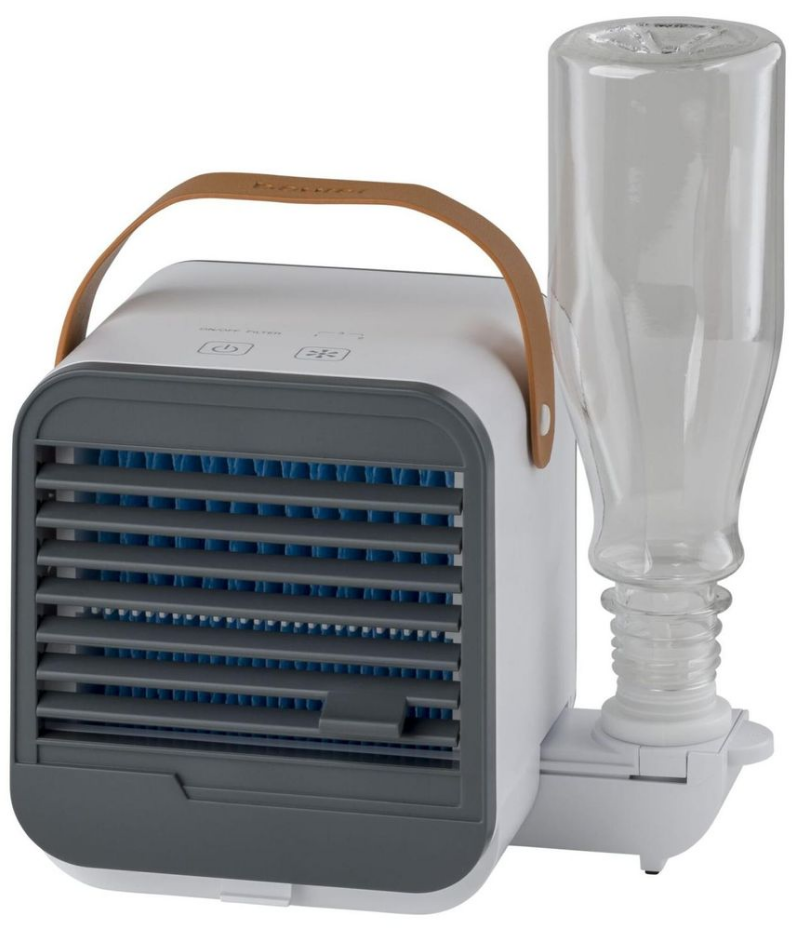
beurer Table Fan LV 50 Fresh Breeze is a compact, USB-powered personal air fan that combines evaporative cooling and humidification to deliver a noticeably fresher indoor climate for desks, bedside tables, small offices or travel use. The LV 50 uses the evaporation principle: warm ambient air is drawn through a damp evaporation filter so that water evaporates and the airstream is cooled naturally — no refrigerants required, making it energy-efficient and portable.
Key benefits include a removable 0.25 L water bottle that doubles as a visible water tank, a replaceable evaporation filter for hygienic operation, and three adjustable fan speeds to tailor airflow and cooling intensity. Its compact footprint (approx. 14.0 × 14.0 × 11.7 cm) and integrated carrying handle make the LV 50 ideal for home workers, students, commuters who use battery packs or USB outlets, and anyone seeking a small, quiet personal cooler.
Typical use cases: cooling and light humidification at a desk, bedside comfort on dry summer nights, travel or caravan use when mains power isn’t convenient, and short-term spot cooling in small rooms. Performance: up to about four hours of cooling at the highest setting from a full tank (varies with ambient humidity and temperature). Technical highlights include USB 5 V DC input (0.5 A), low noise levels (approx. 40–50 dB depending on speed) and a lightweight design (~427–460 g).
Estimated price range: mid‑range personal cooler segment — typically found around the mid‑€ price bracket on official and retail sites (prices fluctuate by retailer and region) and sold through Beurer’s online store and authorized retailers.
USAGE
Removing the Table Fan
- Open the cardboard packaging.
- Remove the table fan from the cardboard packaging.
- Remove all plastic films.
- Check the table fan and cable for damage. If you notice damage, contact Customer Services at www.beurer.com.
Setting Up the Table Fan
Important
- Place the table fan on a firm and level surface to prevent vibrations and noise.
- For an optimum cooling effect, place the table fan in your immediate surroundings. Make sure that there is a clearance of at least 15 cm on all sides around the table fan. Make sure that the air inlet and air outlet are never blocked.
Operating the Table Fan
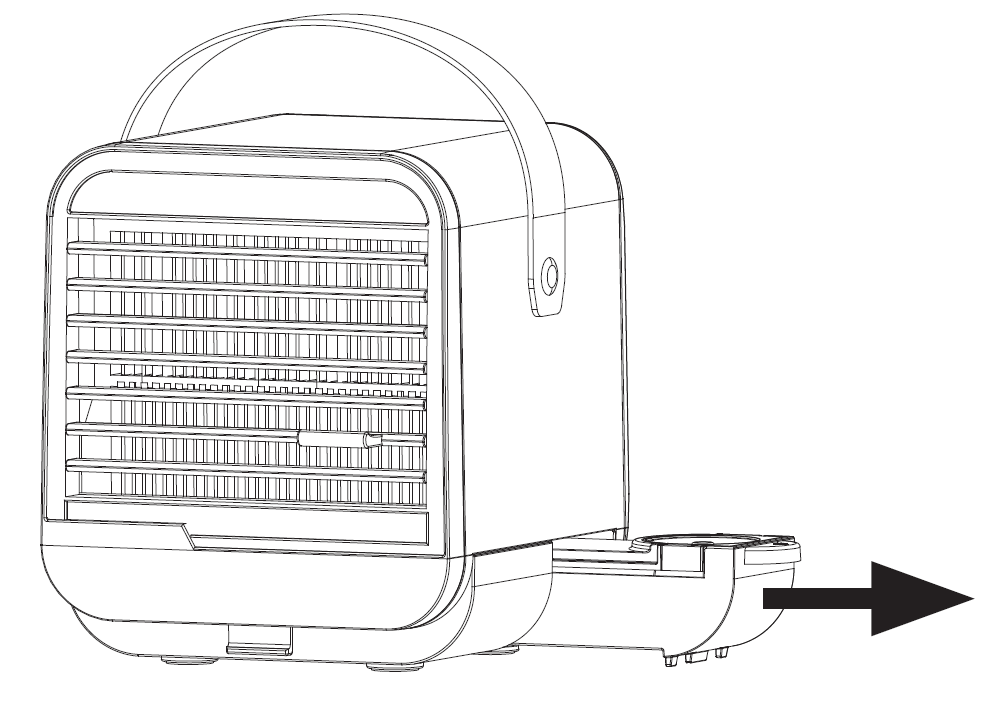
- Pull the bottle holder out of the side of the table fan.
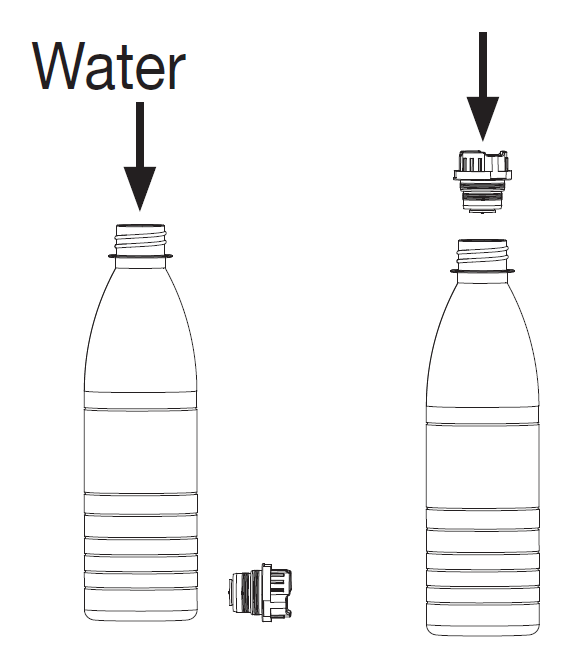
- Fill the supplied PET bottle with cold drinking water. The colder the drinking water, the better the cooling effect. Make sure that the drinking water is clean, not carbonated, and no warmer than 40°C. If the drinking water is very hard, use distilled water. Do not use any other liquids. Use a plastic bottle no larger than 0.5 litres, or fill a bottle with a maximum of 0.5 litres. Otherwise, the increased water pressure could cause the table fan to overflow. Firmly press the bottle adapter included in delivery onto the PET bottle from above. Make sure that the bottle adapter is pressed into the bottle as far as possible, so that no water can leak out. For optimal cooling performance, the filled PET bottle can also be stored in the fridge before use.
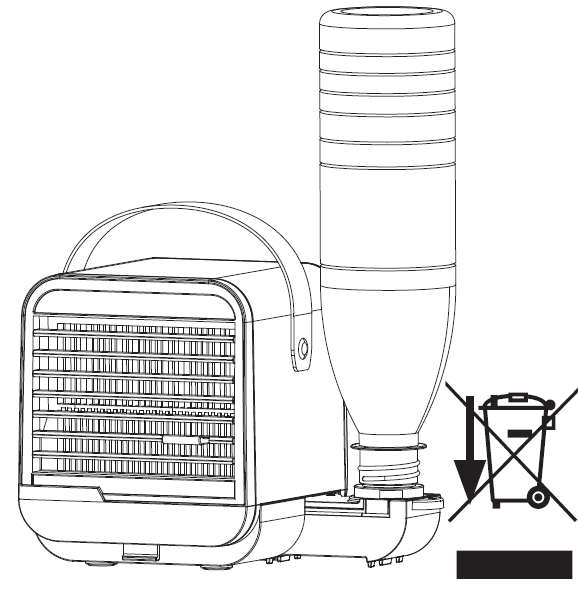
- Place the PET bottle onto the bottle holder of the table fan as shown. After installing the PET bottle, wait approx. 3–4 minutes before turning on the table fan, so that the evaporation filter can absorb enough water.
- Connect the micro USB cable provided to a USB mains adapter (output: max. 5 V DC / 0.5 A, not included in delivery).
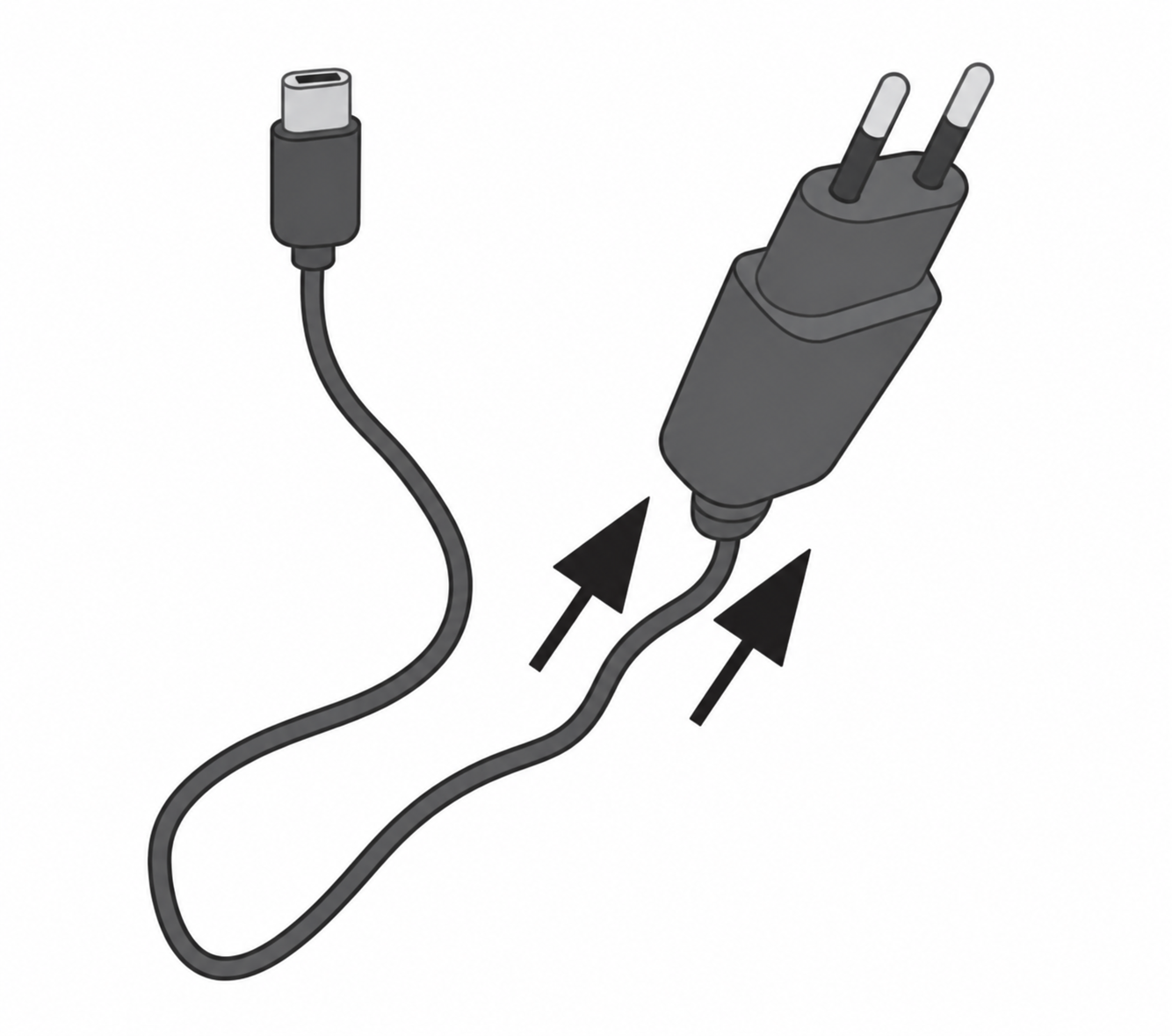
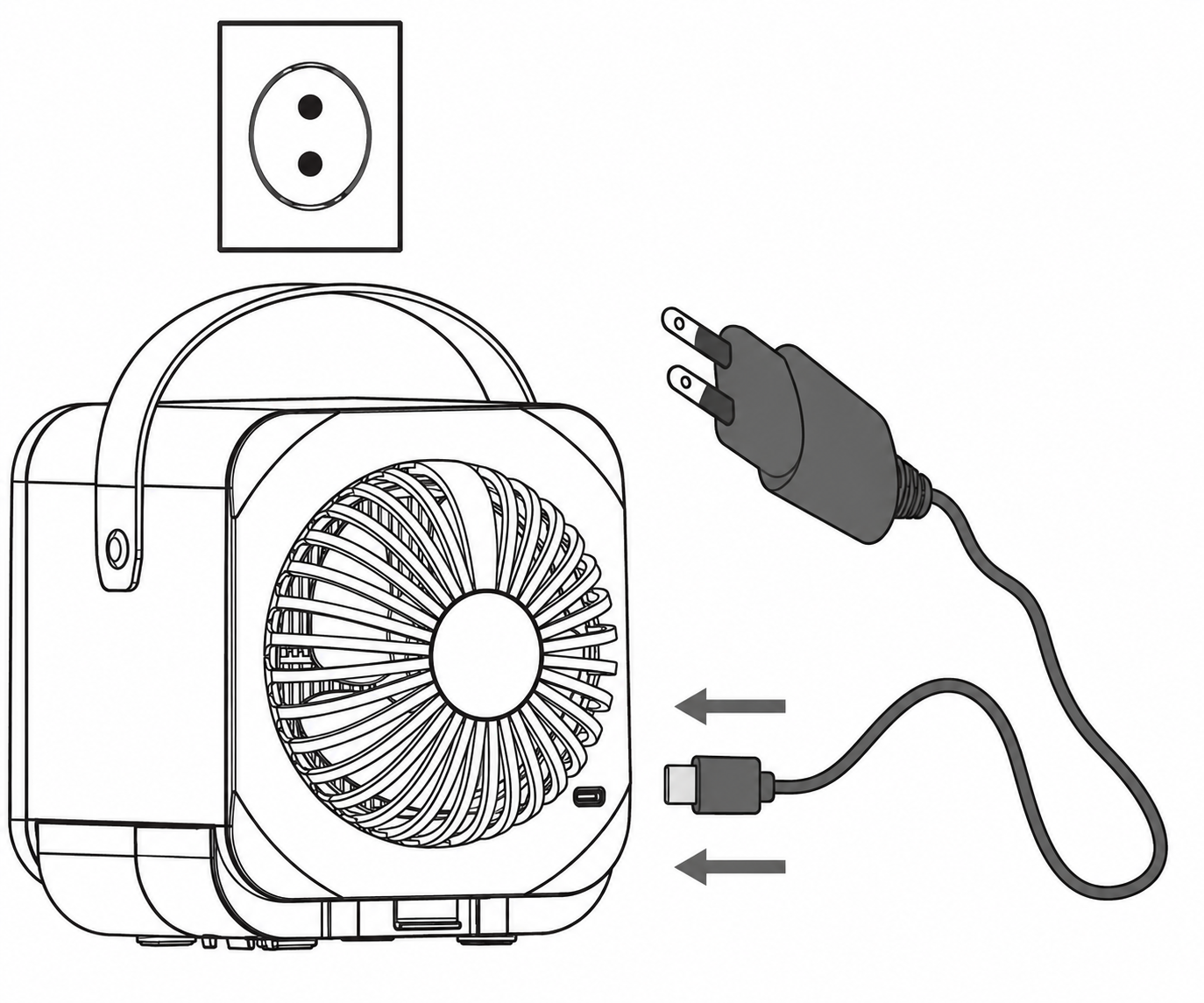
- Insert the micro USB cable into the micro USB port on the rear of the table fan. Then plug the USB mains adapter (USB mains adapter not included in delivery) into a suitable wall socket. Arrange the micro USB cable such that it does not pose a trip hazard.
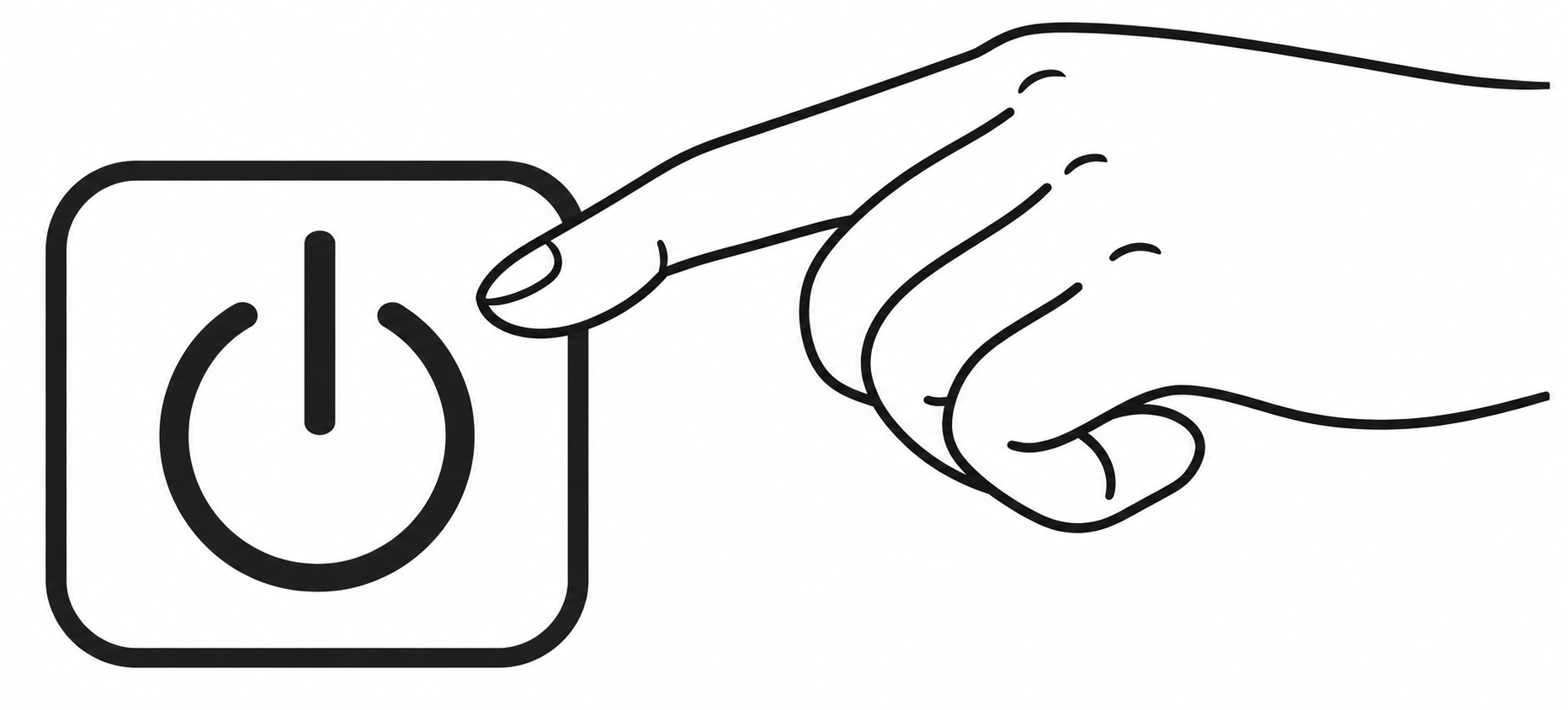
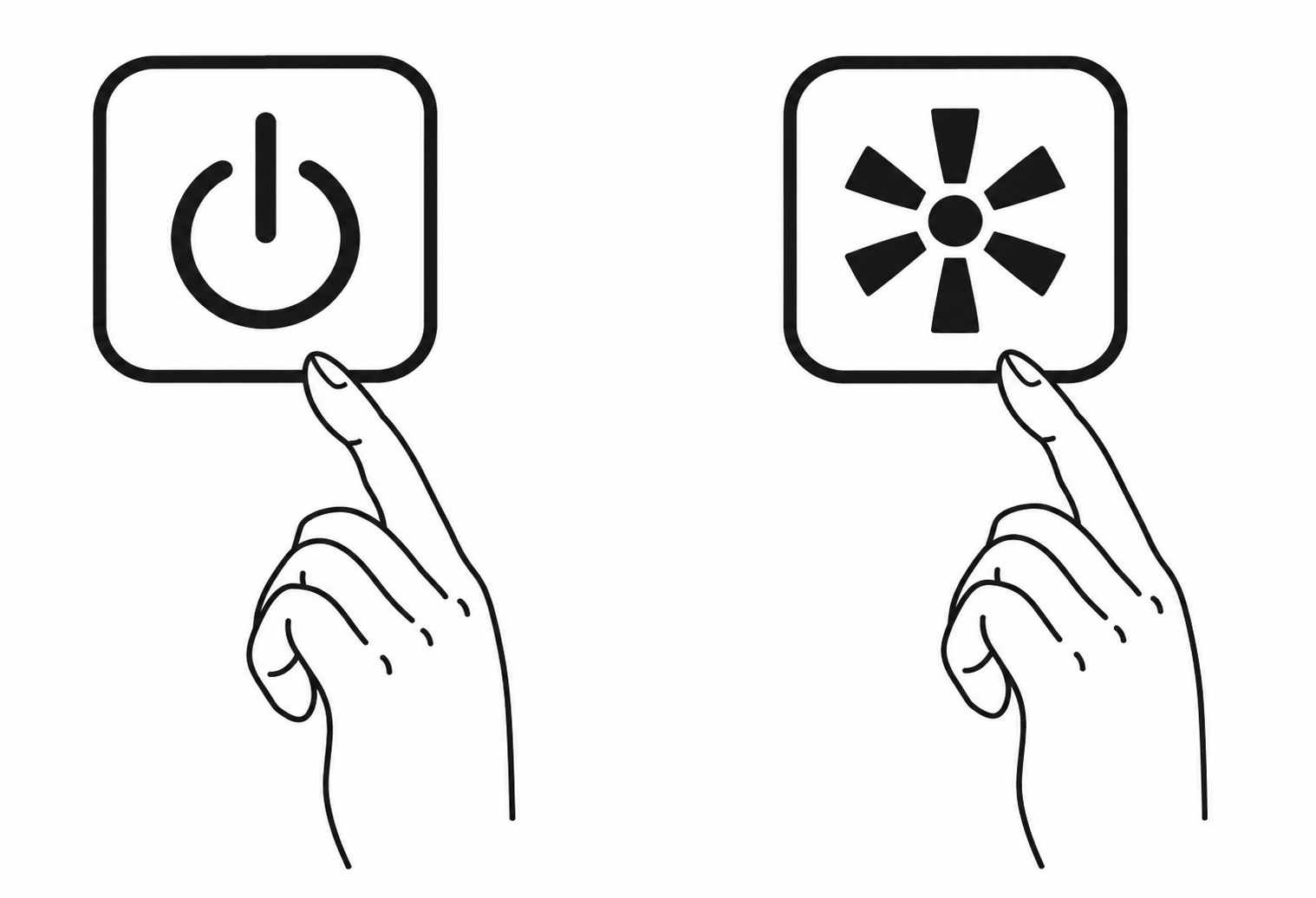
- Press the ON/OFF button to switch on the table fan. A blue indicator light below “ON/OFF” will light up.
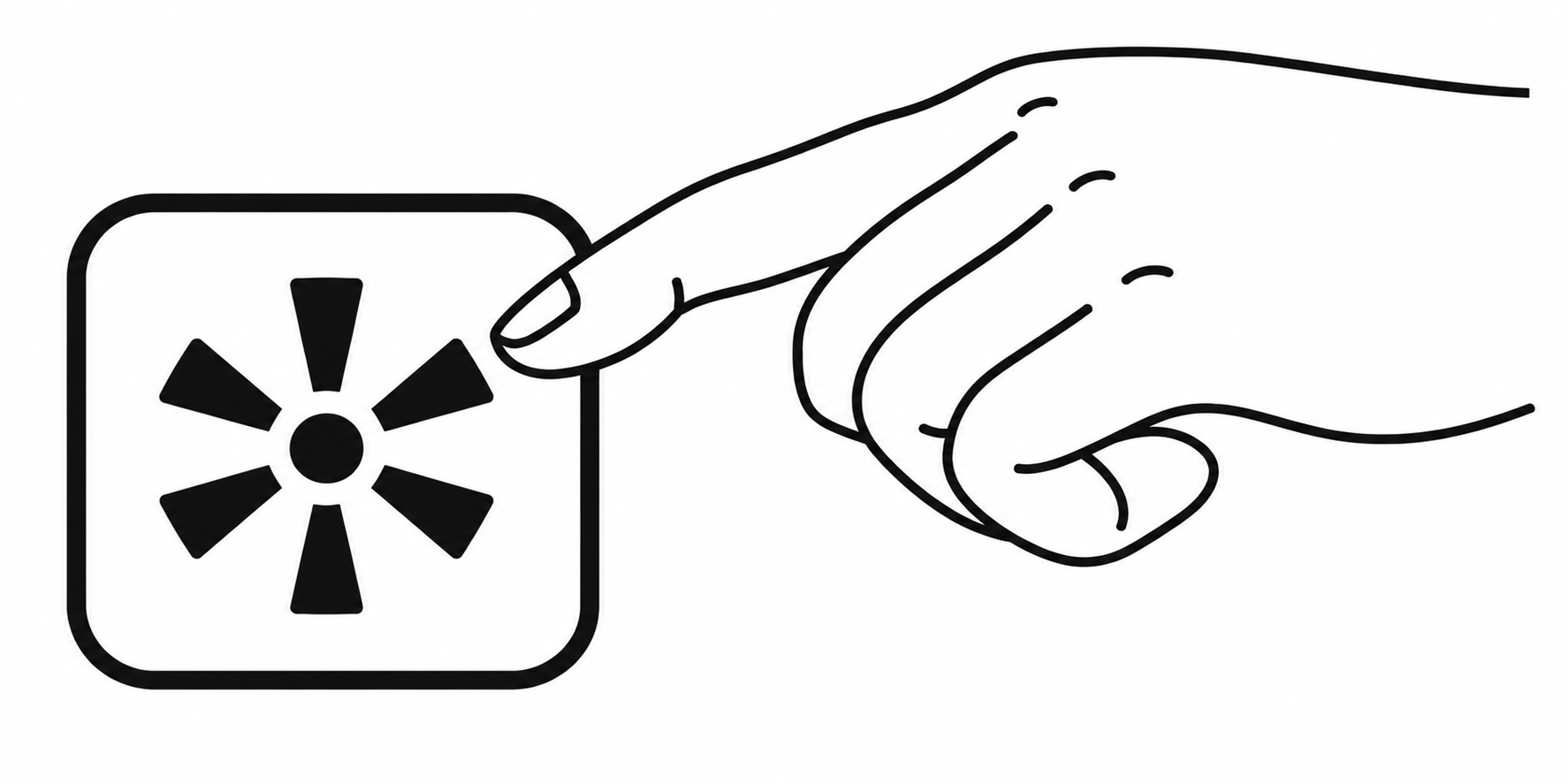
- The table fan has three speeds. Use the FAN button to select your desired speed.
- Low speed
- Medium speed
- High speed
- Press the ON/OFF button to switch the table fan off again. The blue indicator light below “ON/OFF” will disappear. If you do not intend to use the table fan for an extended period of time, unplug the mains adapter from the wall socket/unplug the micro USB cable from the computer.
- After each use, remove the residual water from the water basin, so that no water can escape in the event of accidental impacts. To remove the residual water from the water basin, proceed as follows:
- Make sure that the table fan is unplugged.
- Pull the PET bottle and bottle adapter straight up and off.
- Press the front and rear housing release latches.
- Carefully lift the housing straight up and off.
- Empty any residual water from the water basin into the sink.
- Allow all parts of the table fan to dry completely.
- Change the drinking water in the PET bottle daily.
Replacing the Evaporation Filter
The evaporation filter should be replaced with a new one after 1000 operating hours. After 1000 operating hours have elapsed, the FILTER indicator will light up on the display. To replace the evaporation filter, proceed as follows:
- Ensure that the table fan is switched off. Disconnect the table fan from the wall socket or computer. Pull the PET bottle and bottle adapter straight up and off.
- Press the front and rear housing release latches to release the housing. Then carefully pull the housing upwards to remove it, as there may still be residual water in the water basin.
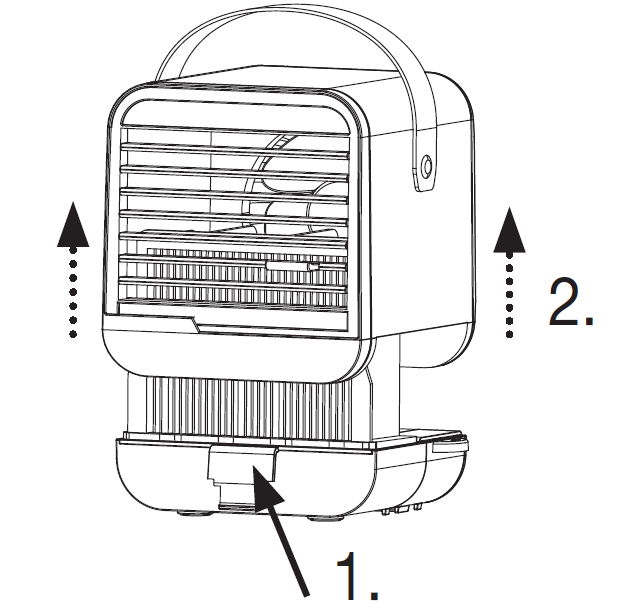
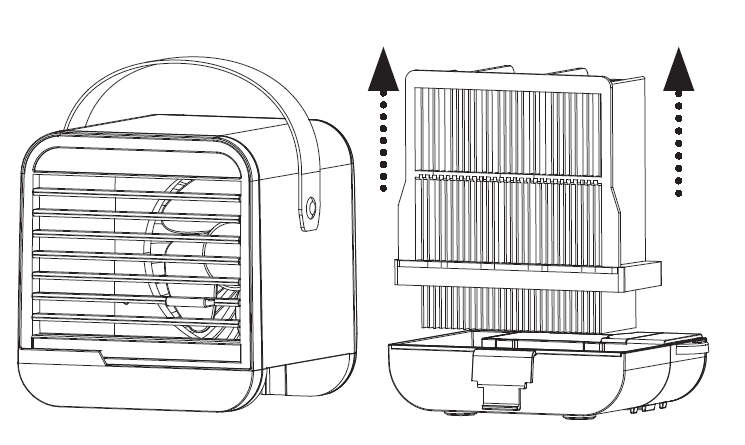
- Pull the filter cartridge up and off.
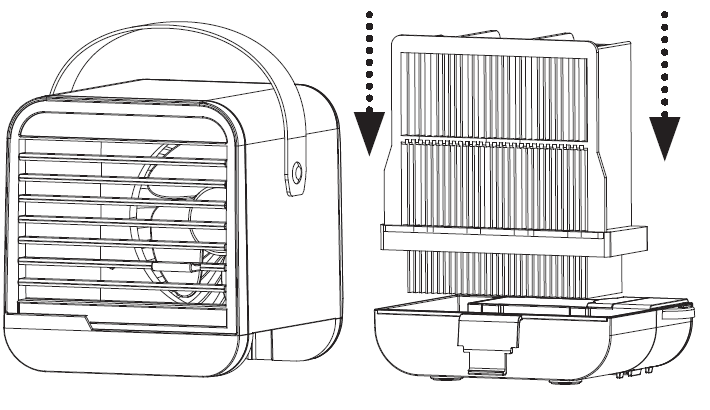
- Place the new filter cartridge into the water basin from above.
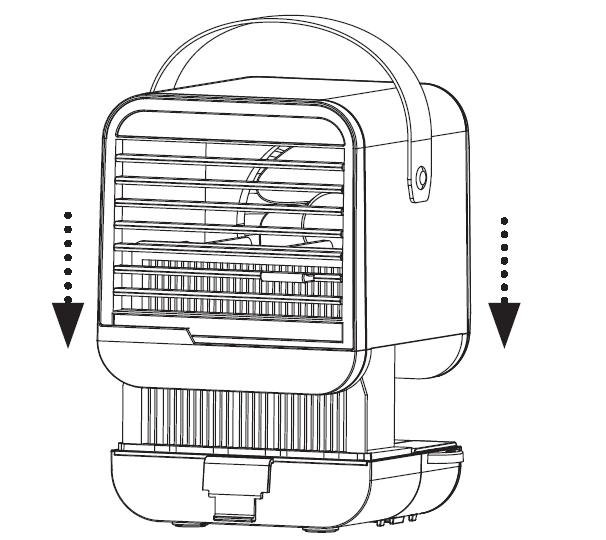
- Place the housing onto the water basin from above until you hear and feel it click into place.
- To turn off the FILTER indicator after replacing the filter, press and hold the ON/OFF button and the FAN button simultaneously for 10 seconds. If you want to replace the filter before the 1000 operating hours expire, proceed as follows: press and hold the ON/OFF button and the FAN button simultaneously for 10 seconds, even if the red filter indicator is not illuminated. The filter indicator will flash red for 3 seconds. Once the flashing has stopped, it means the counter has reset.
CLEANING AND MAINTENANCE
Ensure that the table fan is switched off before any cleaning operation!
Replacing the Evaporation Filter
The evaporation filter should be replaced after 1000 operating hours (see “Replacing the Evaporation Filter” chapter). If the evaporation filter becomes very dirty before the 1000 operating hours have elapsed, replace it beforehand. The evaporation filter cannot be washed. To ensure optimum cooling performance, replace the evaporation filter every 6 months.
Cleaning the Housing
Clean the housing and water basin once a week with a slightly damp cloth (water or mild cleaning solution). Do not use solvents, other aggressive cleaning/scrubbing agents or alcohol, as these could damage the surface. Do not use any abrasive or hard objects for cleaning.
Storage
If you do not plan to use the device for an extended period of time, we recommend that you clean it and store it in the original packaging in a dry environment, ensuring it is not weighed down by other items.
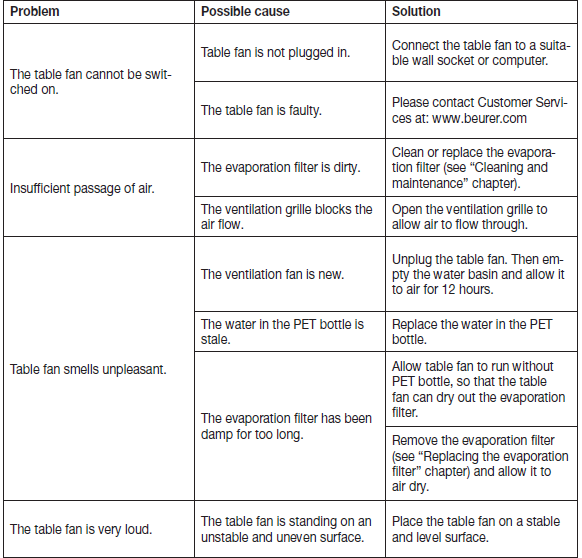
Troubleshooting
Pros & Cons — Honest assessment of the beurer Table Fan LV 50 Fresh Breeze (150–250 words)
Pros
- Portable & USB powered: Small footprint and micro‑USB power make it easy to use at a desk, in a car with a USB adapter, or with a power bank for travel.
- 2‑in‑1 cooling & humidification: Evaporative cooling lowers perceived temperature while adding moisture — useful in dry, warm conditions.
- Hygienic & serviceable: Removable water bottle and replaceable evaporation filter simplify cleaning and maintenance.
- Quiet operation: Noise levels rated ~40–50 dB across speeds are acceptable for office/bedside use.
- Good value for personal use: Offers multi‑function utility (fan + humidifier) at a consumer price point.
Cons
- Limited cooling area: Designed for personal spot cooling only — not a substitute for room air conditioners or large fans.
- Dependent on humidity: Evaporative cooling is most effective in low–moderate humidity; performance drops in very humid climates.
- Short runtime per fill: Up to ~4 hours at highest setting; frequent refills needed for extended use.
- USB power only: No mains adapter included in some packages — may require separate USB supply or power bank for continuous operation.
- Alternatives may offer stronger airflow: For larger areas consider pedestal/table fans or small portable air conditioners if more powerful cooling is required.
Customer Reviews & Ratings — Real user perspective (100–200 words)
Overall user feedback for the beurer Table Fan LV 50 Fresh Breeze is strongly positive on official channels and retailers, with many reviewers praising its compact design, visible water tank and the pleasant, slightly humidified breeze for desk or bedside use[2][3]. Typical star ratings on the manufacturer page are high, reflecting satisfaction with build quality and ease of use.
Common praises: portability and quiet operation, effective personal cooling when used with the water bottle, and simple maintenance thanks to the replaceable filter and removable bottle. Typical complaints: limited cooling range (only effective for 1–2 persons in close proximity), reduced effectiveness in high-humidity environments, and the need to refill water every few hours at high speed.
Sample testimonial (paraphrased): “Great for my home office — small, quiet and gives a cool, humidified breeze for a few hours; perfect for close‑range use.” Average recommendation: recommended for buyers seeking a portable, energy‑efficient personal cooler rather than whole‑room cooling.
Technical Specifications & Practical Tips (long-tail heading for SEO: "beurer Table Fan LV 50 Fresh Breeze technical specs and maintenance tips")
- Technical specs (key): Input 5 V DC, 0.5 A; three speed settings; removable 0.25 L water bottle; runtime up to ~4 hours at highest level (depending on ambient conditions); dimensions ~14.0 × 14.0 × 11.7 cm; weight ~427–460 g; noise approx. 40–50 dB; CE marked; 3‑year warranty.
- Maintenance tips: Replace the evaporation filter periodically (replacement part 684.02) and the water bottle if damaged (replacement bottle 684.03) to keep performance and hygiene optimal[4]. Use distilled or clean tap water to reduce mineral buildup, empty and dry the tank between uses if storing the unit, and clean removable parts per the manual to prevent odors or microbial growth.
- Best‑use recommendations: Use the LV 50 close to the user (desk or bedside), operate with the water bottle filled for maximum cooling, and prefer dry, warm conditions for best evaporative effect. For larger spaces, pair with room circulation (open window or larger fan) or consider a higher‑capacity cooling solution.
SEO & Purchase Guidance — Where it fits and related search phrases
Primary product keyword used naturally: beurer Table Fan LV 50 Fresh Breeze (appears throughout). Related and semantic keywords included: personal air fan, evaporative cooler, USB table fan, portable humidifying fan, LV 50 Fresh Breeze technical specs, replacement filter LV 50, 0.25L water tank fan.
Long‑tail queries this manual targets: "beurer Table Fan LV 50 Fresh Breeze technical specs and maintenance", "how to use beurer LV 50 Fresh Breeze for desk cooling", "replacement filter for beurer LV 50 Fresh Breeze". For voice search optimization, useful short answers include: "What is the beurer LV 50? — A compact USB personal fan that cools by evaporation and humidifies simultaneously" and “How long does the LV 50 run? — Up to about 4 hours on the highest setting depending on conditions”.
Quick Buyer Checklist
- Want portable spot cooling for a desk or bedside? — Good fit.
- Need whole‑room air conditioning? — Choose a larger fan or AC instead.
- Living in high humidity? — Expect reduced evaporative cooling performance.
- Prefer low maintenance and hygienic operation? — Keep replacement filters and bottle on hand.
Faqs
How do I set up beurer Table Fan LV 50 Fresh Breeze for the first time?
What should I do if my beurer Table Fan LV 50 Fresh Breeze doesn't produce cooling when the water bottle is fitted?
Can I use the beurer Table Fan LV 50 Fresh Breeze as a regular desk fan without water or the evaporation filter?
What power source and compatibility requirements does the beurer Table Fan LV 50 Fresh Breeze need?
How do I optimize performance and runtime on the beurer Table Fan LV 50 Fresh Breeze for up to 4 hours?
How should I clean and maintain the beurer Table Fan LV 50 Fresh Breeze to prevent odors and performance issues?
What are common problems with the beurer Table Fan LV 50 Fresh Breeze and quick solutions?
How do I replace the evaporation filter or water bottle for the beurer Table Fan LV 50 Fresh Breeze and where can I find compatible parts?
More beurer manuals
- Setup: Beurer LB 200 Air Humidifier User Manual
- Setup: Beurer Aroma Diffuser LA 40 User Manual
- Setup: Beurer Hygrometer HM 16 User Manual
- beurer: Beurer Air humidifier LB 300 Plus User Manual
- Setup: Beurer App-controlled Air Purifier LR 400 / LR 401 User Manual
- Setup: Beurer Infrared Percussion Massager MG 100 User Manual
Leave a Comment