
Setup: Beurer App-controlled Air Purifier LR 400 / LR 401 User Manual
Content
Introduction — beurer App-controlled Air Purifier LR 400/LR 401
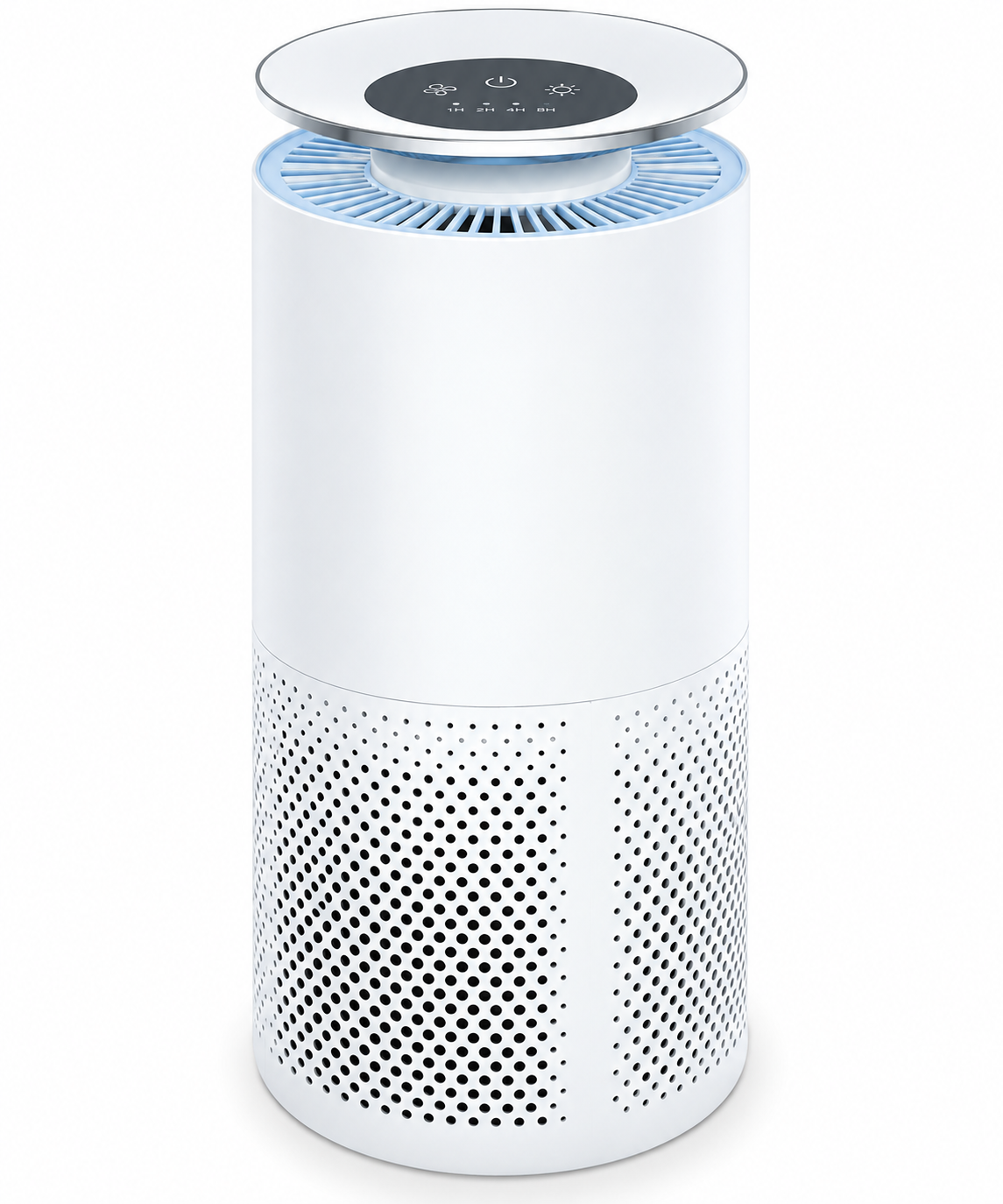
The beurer App-controlled Air Purifier LR 400 / LR 401 is a compact, app-enabled air cleaning solution designed for homes and small offices up to 69 m² that combines a three-layer filtration system (pre-filter, activated carbon, HEPA H13) with intelligent sensors and Wi‑Fi/Bluetooth control via the beurer FreshHome app. The LR 400 and LR 401 models offer automatic air-quality detection, four fan speeds plus turbo, a colour-coded ambient air indicator, night mode for near-silent operation, and optional ultraviolet light for additional disinfection capability, making them suitable for allergy sufferers, pet owners, and households seeking improved indoor air quality.
Key benefits and unique selling points include a HEPA H13 stage that captures very fine particles (manufacturer states up to 99.95% efficiency for typical particulate sizes), a CADR of approximately 266 m³/h for fast circulation in mid-sized rooms, intelligent automatic mode that adapts fan speed to measured particulate levels (PM2.5), and remote monitoring and control through the FreshHome app for scheduling and status checks while you're away. Typical use cases cover living rooms, bedrooms, home offices, and shared family spaces where pollen, dust, pet dander, odors and airborne microbes are a concern.
Target audience: allergy and asthma sufferers, parents of young children, pet owners, home office users, and people looking to improve general indoor air quality. Estimated price range (street/retail) for these app-controlled units is generally in the mid-range for consumer HEPA purifiers—expect retail prices to vary by market and retailer; official listings and resellers typically position the LR 400 / LR 401 as a value proposition given its HEPA H13 filtration, smart controls and room coverage. Availability: sold through Beurer’s official channels and major retailers in many regions; replacement filters (model 693.09) and optional UV accessories are available separately.
Quick technical specifications & examples
- Model: LR 400 / LR 401 — App-controlled units with fabric-covered design and ambient colour indicator.
- Filtration: Pre-filter + Activated carbon + HEPA H13 (manufacturer states up to 99.95% filter performance for applicable particle sizes).
- Sensor: Smart sensor detecting fine dust (PM2.5) for automatic mode.
- CADR: Approx. 266 m³/h — suitable for rooms up to ~69 m².
- Fan settings: 4 speeds + turbo; timer 1–24 h; night mode; filter-change indicator.
- Noise: < 30 dB in night mode; up to ~52 dB in turbo.
- Power: ~50 W; dimensions: H 50.5 cm x Ø 21.5 cm; weight ~3.7 kg.
- Replacement filter: Part number 693.09; estimated filter lifetime ~4,320 hours (manufacturer guidance).
Initial Use
- Open the cardboard packaging.
- Remove the device from the top of the box without opening the film bag.
- Remove all plastic films. Remove the filter 8 from the device (see “Replacing the Filter” section) and take it out of the plastic film. Then re-insert the filter 8 into the device.
- Check the device, mains plug, and cable for damage.
- Place the air purifier on a firm, level surface to prevent vibrations and noise.
- If you want to reposition the air purifier, always use both hands to carry it upright.
- Set up the air purifier in such a way that provides 30 cm clearance on all sides.
- Make sure that the air intake 6 and air outlet 3 are never blocked.
Connecting the Air Purifier to the “beurer FreshHome” App
You can also use the basic functions of the air purifier without the “beurer FreshHome” app. The additional features, such as recording the ambient air values and setting a cleaning schedule, as well as controlling and monitoring your device when you are on the go, are only available in conjunction with the “beurer FreshHome” app.
- Ensure that your smartphone is connected to your Wi-Fi network.
- Activate Bluetooth® on your smartphone.
- Download the free “beurer FreshHome” app from the Apple App Store (iOS) or Google Play (Android™). Depending on the settings for your smartphone, additional charges may be incurred for connecting to the internet or transferring data.
- Start the “beurer FreshHome” app and follow the instructions.
- If you want to use the air purifier without Wi-Fi, briefly press the Wi-Fi button 17. The Wi-Fi display 18 goes out, and Wi-Fi is now switched off. To switch on Wi-Fi again, briefly press the Wi-Fi button 17 again. The Wi-Fi display 18 lights up, and Wi-Fi is now switched on again.
Switching On the Air Purifier
- Follow the instructions in the “Initial Use” section.
- Insert the mains plug into a suitable socket. Ensure that the cable does not pose a trip hazard.
- Press the ON/OFF button 21 to switch on the air purifier. When the air purifier is used for the first time, it starts on the lowest fan speed setting I.
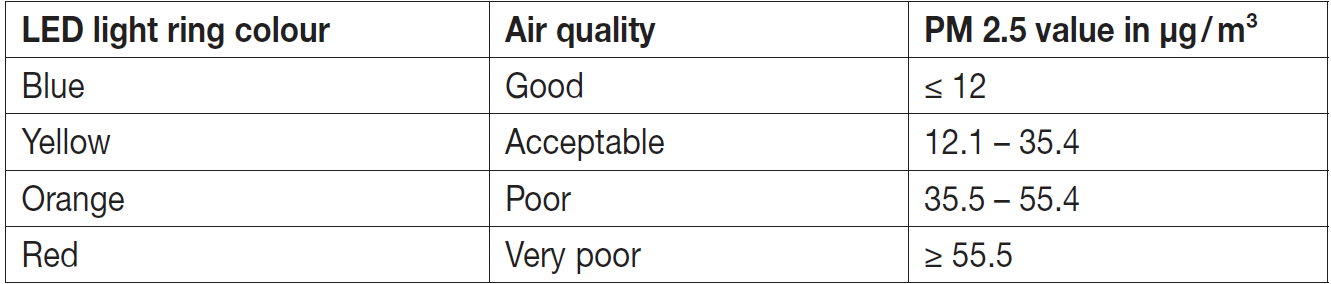
- The LED light ring 2 switches on automatically. After approximately 30 seconds, the colour of the LED light ring 2 will indicate the current air quality, which corresponds to the concentration of particles in the ambient air around the device.
Selecting the Fan Speed and Mode
The air purifier has a total of four fan speeds (I, II, III, IV) and three modes (TURBO mode, AUTO mode, NIGHT mode).
- Switch on the air purifier using the ON/OFF button 21.
- Select your desired fan speed by pressing the fan speed button 10. The fan speed indicator 11 shows the fan speed that is currently set.
UVC Light
The UVC light eliminates germs in the air. When this happens, the UVC light activates titanium oxides that break down foul-smelling odour molecules (caused by tobacco smoke, cooking smells, or animals).
- To switch on the UVC light, briefly press the UVC/sleep button 12 while the air purifier is switched on. The UVC indicator 13 lights up as soon as the UVC light is active.
- To switch off the UVC light, briefly press the UVC/sleep button 12 again. The UVC indicator 13 goes out.
Timer Function
The air purifier features a timer function that you can use to determine the number of hours the air purifier should run for before it automatically switches itself off. You can set three different timer times (2, 4, or 8 hours) on the control panel of the air purifier 1.
- Use the timer button 15 to select your desired timer (2, 4, or 8 hours). The timer that is currently set lights up in the timer indicator 16.
- To switch off the timer, press the timer button 15 repeatedly until all the LEDs are off in the timer indicator 16.
Replacing the Filter
We recommend replacing the filter 8 with a new one after 4320 operating hours. The filter indicator 23 will light up automatically after 4320 operating hours.
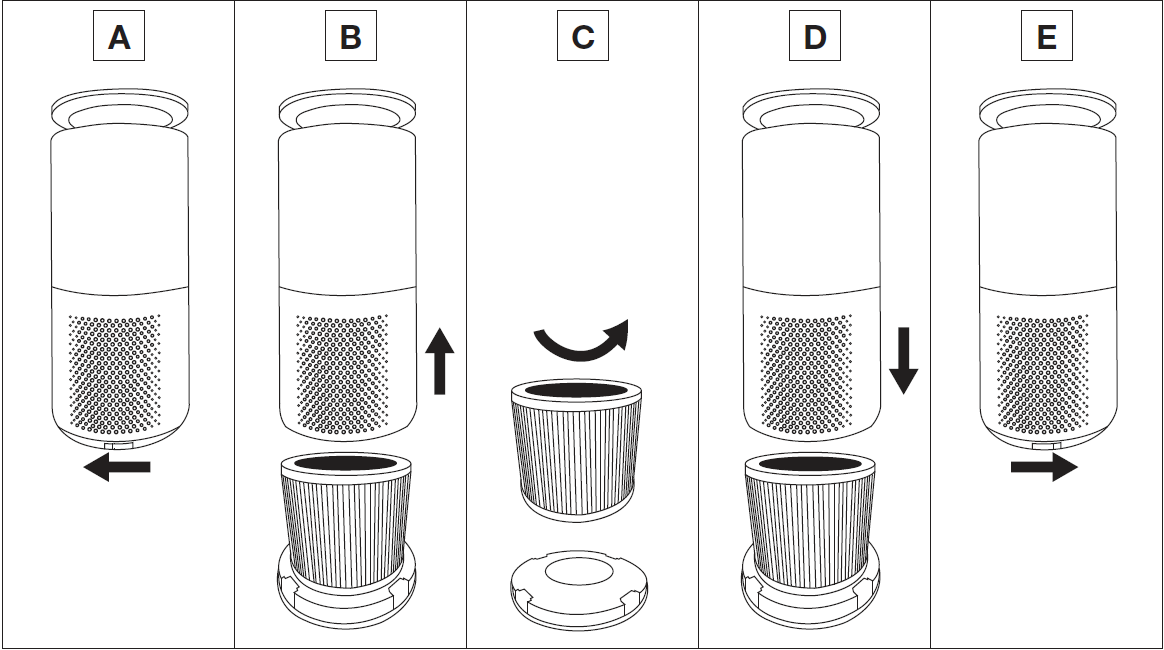
To change the filter, proceed as follows:
- Press the ON/OFF button 21 to switch off the air purifier. Disconnect the air purifier from the socket.
- Open the device using the slider at the side of the housing base (Figure A).
- Lift the device up and off (Figure B).
- Remove the old filter 8. Dispose of the old filter properly (see chapter “Disposal”).
- Insert a new filter in the designated position on the housing base (Figure C).
- Re-insert the housing base (Figure D). Close the device again using the slider at the side (Figure E).
- Press and hold the ON/OFF button on the activated air purifier for 10 seconds until the filter indicator 23 goes out.
Cleaning and Maintenance
Warning: Before cleaning, always ensure that the mains plug of the air purifier has been properly disconnected.
Cleaning the Filter
Regular cleaning of the filter 8 (once a month) is required to ensure hygienic and fault-free operation. Clean the outside of the filter with the brush attachment of a vacuum cleaner or a dry cloth.
Cleaning the Housing
Clean the housing of the air purifier with a slightly damp cloth (water or a mild cleaning solution). Do not use solvents, other aggressive cleaning/scrubbing agents, or alcohol, as these could damage the surface.
Cleaning the PM 2.5 Dust Sensor
Regular cleaning of the dust sensor and its associated channel (once a month) is required to ensure fault-free operation. To do this, open the sensor flap 5 on the side of the device. Use a dry cotton bud to remove coarse dust from the open channel. For even better cleaning results, you can now also run the device at the highest setting to clear the loose dust. Close the sensor flap once cleaning is complete..
Storage
If you do not plan to use the device for a long period of time, we recommend that you clean it and store it in the original packaging in a dry environment, ensuring it is not weighed down by additional items.
Troubleshooting
Pros & Cons — Honest assessment of beurer App-controlled Air Purifier LR 400 / LR 401
Pros — Effective filtration and smart control
The three-layer filter with HEPA H13 captures a high proportion of fine particles and allergens, while the activated carbon layer helps reduce odors; the device is controllable via the beurer FreshHome app for remote monitoring, scheduling and automatic mode operation
Pros — Room coverage and CADR
With a CADR around 266 m³/h and suitability for rooms up to 69 m², the LR 400 / LR 401 handles medium-to-large living spaces more effectively than many compact purifiers in the same price band.
Pros — Low noise and practical features
Night mode reduces noise below 30 dB for bedrooms, and the unit includes timer, filter-change indicator and a colour-coded air-quality LED for quick status checks.
Cons — Ongoing filter cost and maintenance
Replacement filters (693.09) are sold separately and filters have an estimated lifetime (manufacturer cites ~4,320 operating hours), so owners should budget for recurring filter replacement costs.
Cons — Optional UV and feature trade-offs
UV cleaning is optional rather than standard; users seeking built-in UV sterilization must confirm model/configuration and understand UV adds maintenance and safety considerations.
Cons — Smart setup and dependency on app
Full functionality requires the beurer FreshHome app (Bluetooth setup, Wi‑Fi control); users who prefer fully manual devices or who avoid connected devices may find this inconvenient.
Value for money
Compared with small HEPA-only portable units, the LR 400 / LR 401 offers stronger room coverage, HEPA H13 performance and smart features that make it a competitive mid-range choice; compared to premium whole-room systems it is more affordable but lacks some advanced sensors or integrated HVAC compatibility.
Customer Reviews & Real-user Feedback for beurer App-controlled Air Purifier LR 400 / LR 401
Average user feedback for the beurer App-controlled Air Purifier LR 400 / LR 401 tends toward positive ratings for cleaning performance, quiet night operation and app convenience, with many users noting visible reductions in dust and pollen and appreciation for the device’s automatic mode and colour-coded air-quality indicator[3][1]. Common praises include effective HEPA filtration, easy app setup for scheduling, and solid coverage for medium-sized rooms.
Frequently mentioned complaints are the recurring cost of replacement filters, occasional connectivity/setup hiccups with Wi‑Fi or Bluetooth during install, and that the optional UV accessory adds complexity and is not included by default. Typical star-rating summary from retailer pages and reviews: many users give 4–5 stars for performance and quietness, with 3-star reviews citing app connectivity or lifetime cost concerns. Purchase recommendation: recommended for allergy sufferers and households needing wide coverage and smart control; prospective buyers who prioritize entirely offline/manual units or who want integrated HVAC-grade purification may want to compare alternatives first.
SEO & Keyword integration (for featured snippet and voice search)
This manual references the primary keyword beurer App-controlled Air Purifier LR 400 / LR 401 naturally across headings and body text to support discoverability, and includes related and semantic keywords such as: HEPA H13 air purifier, CADR 266 m³/h, FreshHome app, PM2.5 sensor, three-layer filter, replacement filter 693.09, night mode quiet air purifier, app-controlled home air purifier, UV air cleaning optional, and room coverage 69 m².
Buying tips & recommended use
- Place the purifier centrally in the room or where airflow is not obstructed for best CADR performance; avoid tight corners that block intake or outlet.
- Enable automatic mode for continuous air-quality management—this uses the PM2.5 smart sensor to adapt fan speeds as needed.
- Budget for replacement filters (693.09) when calculating lifetime cost; follow the filter-change indicator and manufacturer replacement intervals to maintain performance.
- Use night mode for bedrooms to keep noise under 30 dB while maintaining background filtration overnight.
- If UV disinfection is desired, verify the specific model/configuration and follow safety instructions for UV module use and maintenance.
Alternatives to consider (comparison)
- Smaller portable HEPA purifiers — cheaper but lower CADR and smaller room coverage; suited for single rooms or desks.
- Premium smart purifiers from other brands — may offer multi-sensor arrays (VOC, CO2), integrated HVAC compatibility or higher CADR at a higher price point.
- Whole-home HVAC filters or in-duct purifiers — better for whole-house solutions but require professional installation and larger budgets.
Final purchase guidance
If you want a mid-range, app-controlled purifier with HEPA H13 filtration, reliable room coverage (up to ~69 m²), quiet night operation and automatic PM2.5-based control, the beurer App-controlled Air Purifier LR 400 / LR 401 is a strong candidate—particularly for allergy sufferers, pet owners and home-office users who value app monitoring and scheduling; compare replacement filter costs and confirm any required UV accessory options before purchase to ensure the unit meets your long-term needs.
Faqs
How do I set up the beurer App-controlled Air Purifier LR 400 / LR 401 with the beurer FreshHome app for first-time use?
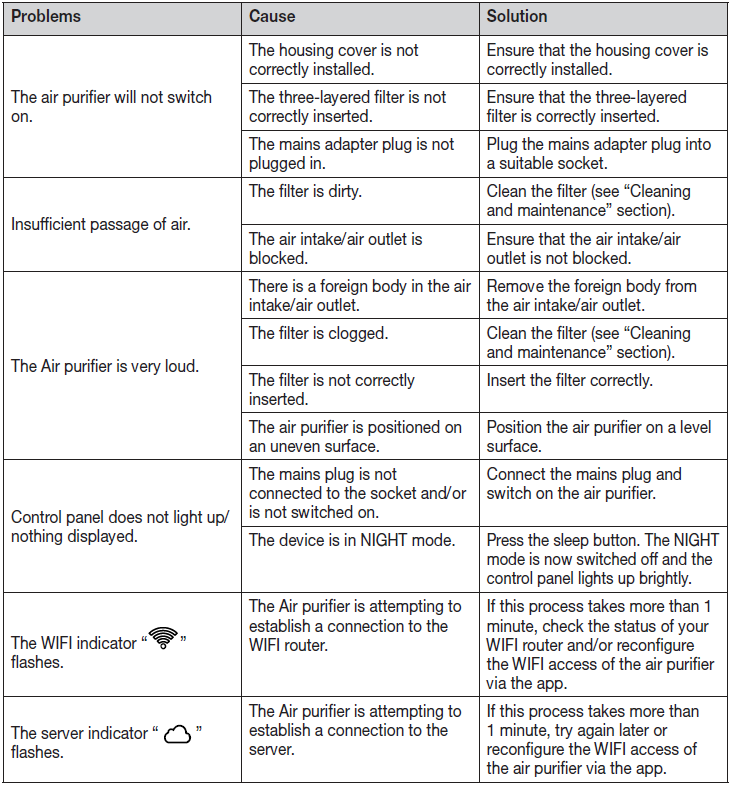
What should I do if the beurer App-controlled Air Purifier LR 400 / LR 401 won't turn on?
How do I replace the filter in the beurer App-controlled Air Purifier LR 400 / LR 401 when the indicator lights up?
Is the beurer App-controlled Air Purifier LR 400 / LR 401 compatible with specific smartphones and what are the requirements?
How does the automatic mode work on the beurer App-controlled Air Purifier LR 400 / LR 401?
How can I optimize performance of the beurer App-controlled Air Purifier LR 400 / LR 401 in a large room?
What maintenance is required for the beurer App-controlled Air Purifier LR 400 / LR 401 to keep it running efficiently?
How do I enable the UVC light feature on the beurer App-controlled Air Purifier LR 400 / LR 401 for better purification?
More beurer manuals
Leave a Comment