
Setup: Beurer Air Dehumidifier LE 250 User Manual
Content
Beurer Air Dehumidifier LE 250 Product Manual: Comprehensive Guide to Powerful Dehumidification
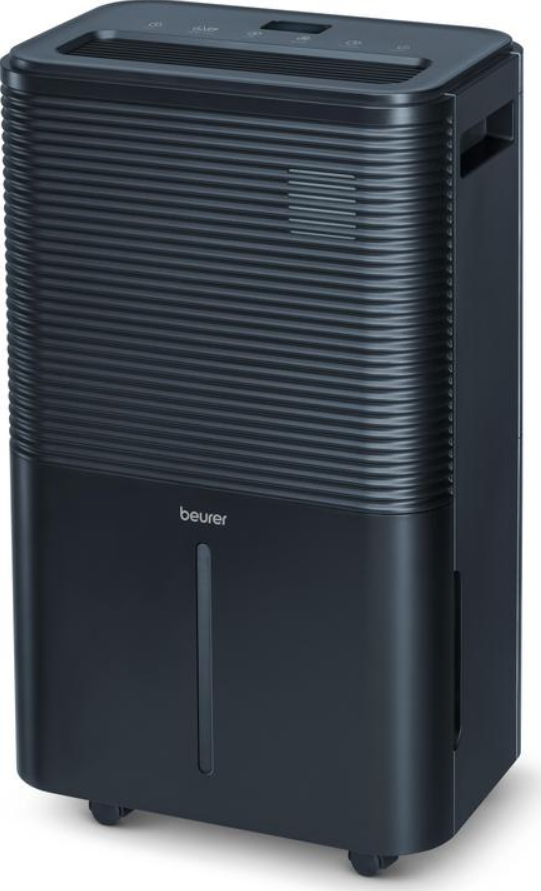
Introduction to Beurer Air Dehumidifier LE 250
The Beurer Air Dehumidifier LE 250 is a high-performance room dehumidifier designed for powerful, long-term moisture removal in spaces up to 60 m². With a dehumidifying capacity of up to 20 litres per day, this device effectively combats mould, condensation on windows, musty odours, and high indoor humidity in living rooms, bathrooms, basements, and even new buildings or water-damaged areas. Ideal for households prone to dampness, allergy sufferers, or anyone seeking a healthier indoor climate, the LE 250 maintains optimal humidity levels between 30% and 80%, with an automatic mode targeting the ideal 45-55% range recommended by health experts.
Key benefits include its laundry drying function for faster clothes drying, quiet night mode for undisturbed sleep, and user-friendly features like a digital colour display showing current humidity (blue for low, green for optimal, red for high), two fan levels, and a programmable timer from 1-24 hours. The Beurer Air Dehumidifier LE 250 uses eco-friendly R290 refrigerant, features a washable pre-filter, 4-litre removable tank with overflow protection, and supports continuous operation via external condensate drain (hose included).[2][4] Mobility is enhanced by carrying handles, castors, and a 2.5 m extra-long cable, while the electric auto-defrost ensures reliable performance in cooler temperatures (5-16°C).
Perfect for families, homeowners, or office users tackling humidity issues, this dehumidifier promotes better air quality and prevents health risks like irritated eyes or skin from imbalanced moisture. The estimated price range is €150-€250, widely available at retailers like Beurer's official site, Digitec, and online stores. Whether for daily use or seasonal damp control, the Beurer Air Dehumidifier LE 250 delivers efficient, reliable dehumidification for comfortable living spaces.
Specifications
- Model: LE 250
- Mains Voltage/Power: AC 220–240 V, 50 Hz / 330 W (30°C, 80% rH)
- Dimensions (L × W × H): 23.5 × 35.0 × 58.0 cm
- Deadweight: 14.5 kg
- Recommended Room Size: Up to 60 m²
- Tank Capacity: 4.0 l
- Dehumidifying Capacity: 20 l / 24 h (30°C, 80% rH)
- Refrigerant: R-290 (propane gas), 55 g
- Wiring Diagram: See last page of these instructions for use.
Usage
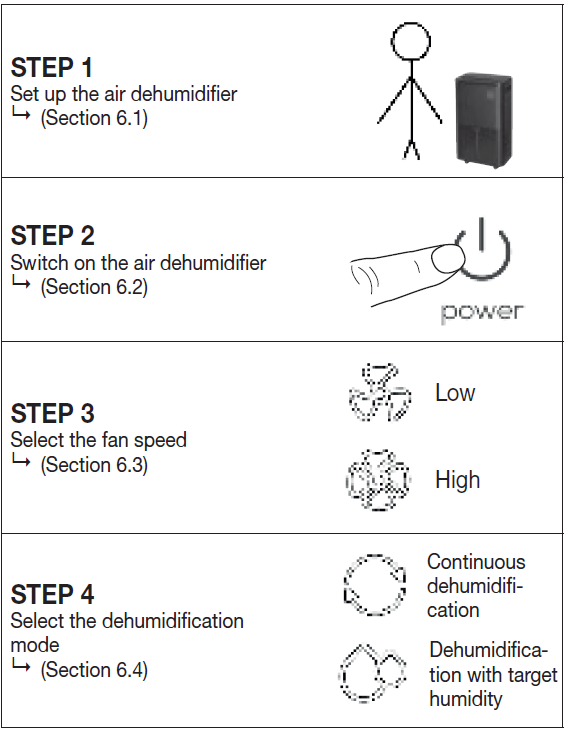
Setting Up the Air Dehumidifier
- Remove the device from the top of the box without opening the film bag.
- Now remove all plastic films. Unwind the mains cable fully to avoid overheating.
- Check the device, mains plug and cable for damage each time before using them.
- Place the device on a firm, level and water-resistant surface to prevent vibrations and noise.
- Set up the air dehumidifier in such a way that provides 50 cm clearance on all sides. Do not use naked flames, cigarettes or other possible sources of ignition near the device.
- Make sure that the air outlet 2 and air inlet 7 of the device are never blocked.
- Insert the mains plug into a suitable socket. Ensure that the cable does not pose a trip hazard.
- Before initial use, leave the device to rest in an upright position for at least 24 hours. If the device has been tilted more than 45°, leave it in an upright position for at least 24 hours before initial use.
Switching the Air Dehumidifier On/Off
- Press the ON/OFF button 21 to switch on the air dehumidifier.
- The low fan speed 18 and target humidity symbol 16 light up.
- Press the ON/OFF button 21 again to switch off the air dehumidifier.
- All LEDs except the ON/OFF symbol 17 go out.
Setting the Fan Speed
The air dehumidifier has two fan speeds: One low 18 and one high 19 fan speed. To switch between the low 18 and high 19 fan speed, press the fan speed button 23 when the air dehumidifier is on. The current fan speed setting lights up on the display (18 or 19).
Setting the Dehumidification Mode
The device has two different dehumidification modes.
- Continuous dehumidification
- Dehumidification with target humidity
Continuous Dehumidification
In continuous dehumidification mode, the room is dehumidified without interruption. To switch on continuous dehumidification mode, press the humidity button 22 repeatedly until “--” appears on the display. The continuous operation symbol 15 lights up.
Dehumidification with Target Humidity
In dehumidification with target humidity mode, the room is dehumidified only up to a preset target value (e.g. 50% humidity). The device stops dehumidifying the air once the preset target value has been reached.
- If no modes have been selected, you can freely choose the target humidity and fan speed.
- Select a target humidity using the humidity button 22 (you can select a level of between 30–80% in increments of 5%). The target humidity symbol 16 lights up. If “--” appears on the display after passing 80% when making your selection, the device will run in continuous dehumidification mode again.
- In addition, you can use the fan speed button 23 to choose between the low and high fan speed. The fan speed symbol 18 or 19 lights up.
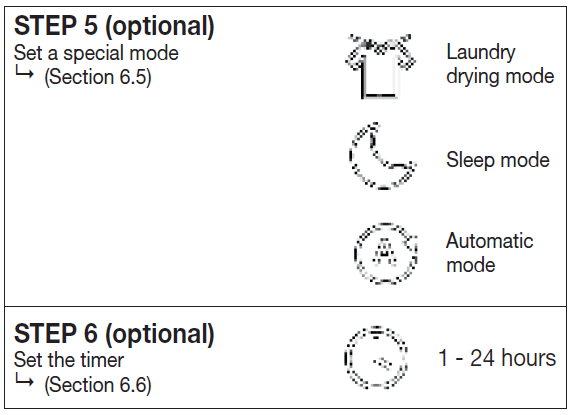
Setting a Special Mode
The device has three optional special modes that you can select if desired.
- Sleep mode
- Laundry drying mode for clothes
- Automatic mode
Sleep Mode
Sleep mode automatically sets the low fan speed 18 and switches off all LEDs and button tones to ensure a restful night’s sleep with no disturbances. The target humidity can always be set in sleep mode. To switch on sleep mode, press the sleep/laundry drying button 25.
- The sleep symbol 12 lights up for 3 seconds and then dims. All other LEDs and button tones are off.
Laundry Drying Mode for Clothes
The device has a special laundry drying mode for when you want to dry clothes indoors and counteract the resulting humidity. It also enables the clothes to dry faster. This laundry drying mode automatically sets the high fan speed 19 and continuous dehumidification. You cannot set a target humidity here.
Automatic Mode
In automatic mode, the air in the room is automatically dehumidified so that the humidity is always between 45–55%.
- To switch on automatic mode, press the automatic button 24. The automatic symbol 14 lights up.
- To switch between the low 18 and high 19 fan speed, press the fan speed button 23 when the air dehumidifier is on.
- To switch off automatic mode, press the automatic button 24 again. The automatic symbol 14 goes out.
Setting the Timer
The air dehumidifier features a timer function that you can use to determine after how many hours the device should switch itself off (when in operation) or on.
- Use the timer button 26 to select your desired timer duration (you can select a duration between 1–24 hours in increments of 1 hour). The timer duration that is currently set is shown on the display. Once the set timer duration has flashed five times on the display, this means the timer duration is confirmed and the timer symbol 11 lights up. After confirming the timer duration, the display shows the current humidity level again.
- To view the remaining timer duration whilst the device is running, press the timer button 26. The display briefly shows the remaining timer duration (in hours) after which the air dehumidifier will switch itself off.
- To switch off the timer, press the timer button 26 repeatedly until the display shows “00”.
Switch-Off Time
Press the timer button 26 while the device is running to set the switch-off time. The device will switch off after the selected time period.
Switch-On Time
Press the timer button 26 while the device is switched off to set the switch-on time. The device will switch on after the selected time period.
Humidity Indicator
- The humidity indicator 5 shows the current ambient humidity level on the device.
- Low humidity of <45% = humidity indicator is blue
- Optimum humidity of 45–65% = humidity indicator is green
- High humidity of >65% = humidity indicator is red
Defrost Function
If the device is operated in an environment with low temperatures, frost may form inside the device. To ensure perfect operation, the air dehumidifier features a defrost function. If the temperature is between 5°C and 16°C, the device automatically starts with the defrost function for 10 minutes. The ON/OFF symbol 17 flashes on the display whilst the defrost function is running. Once the 10 minutes have elapsed, the device continues running normally for 60 minutes.
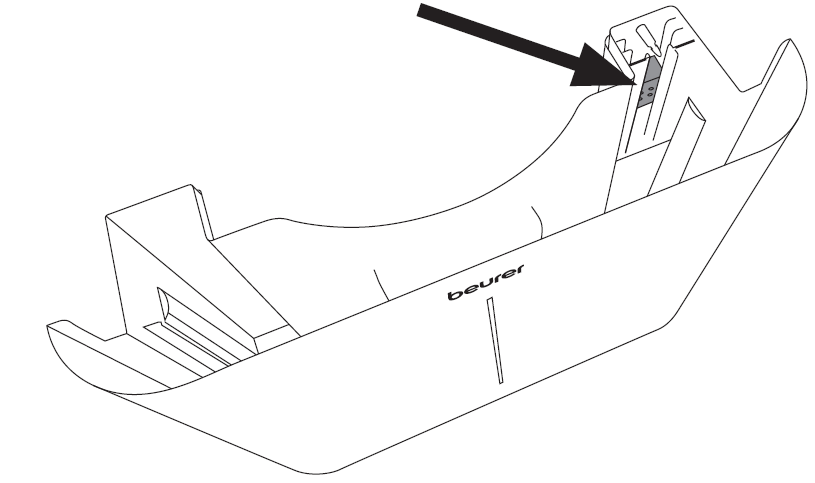
Emptying the Water Tank
If the water tank 1 is full, the water level symbol 20 will light up red and the device will automatically stop running. An acoustic signal will sound (except in sleep mode) and the message “FL” will appear on the display.
CLEANING, CARE AND MAINTENANCE
- Before performing any cleaning or maintenance work, always ensure that the mains plug of the device has been properly disconnected!
- Always store the device in its original packaging. Only store the device in an upright position. Do not place any objects on the device.
- Store the device in a well-ventilated room that measures at least 4 m².
- Store the device in dry conditions and protected from frost and heat.
- Clean the device and allow it to dry fully before putting it into storage.
- The device must be stored in a room where there are no permanent sources of heat (e.g. naked flames, a running gas device or a running electric heater).
This device contains R-290 refrigerant. However, the quantity of refrigerant is less than 1 kg and it is kept in a sealed cooling circuit. Maintenance may only be carried out by trained technicians or Beurer service personnel. The device does not need to be refilled with refrigerant provided that it is used correctly and the coolant circuit is undamaged. Regular cleaning is a prerequisite for hygienic and fault-free operation. Always fully empty and thoroughly clean the water tank of the air dehumidifier if the device has not been used for more than 3 days. A lack of cleaning and hygiene can cause bacteria, algae and fungi to form in the water.
Cleaning the Air Filter
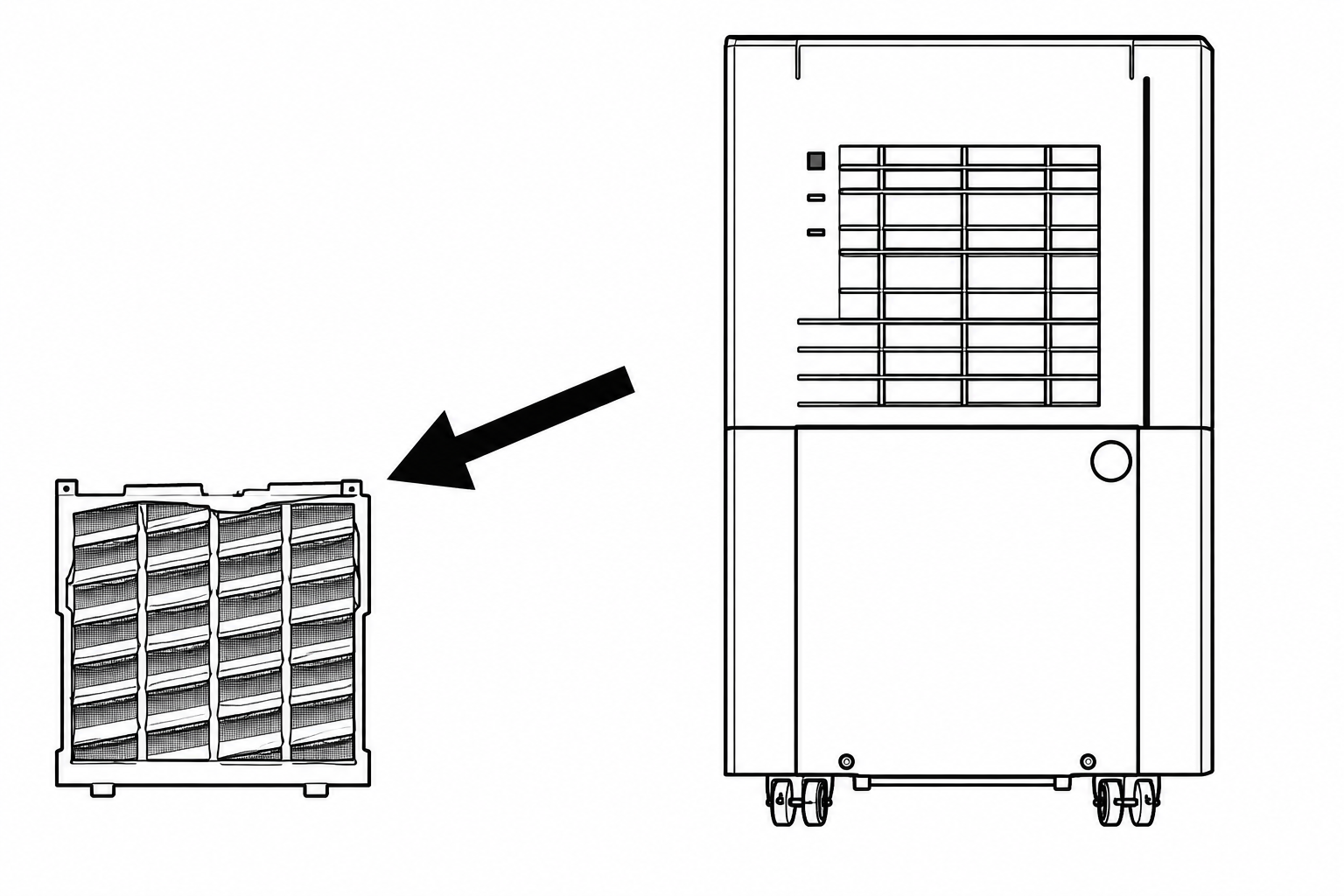
We recommend cleaning the air filter 6 every 14 days as dust can collect there and restrict the airflow. Do not operate the device without the air filter 6 installed.
- Remove the air filter 6.
- If it is slightly dirty, use the brush of a vacuum cleaner to carefully remove the dust residue from the screen.
- If it is very dirty, soak the air filter 6 in warm water at a temperature of approx. 40°C. Then rinse it carefully with a neutral cleaning product.
Pros and Cons of Beurer Air Dehumidifier LE-250
Pros
- Powerful Performance: Extracts up to 20 L/24h, ideal for large 60 m² rooms and laundry drying, outperforming basic models in speed and efficiency.
- Smart Features: Automatic mode (45-55% humidity), customizable settings (30-80%), colour display, night mode, and timer for effortless operation.
- User-Friendly Design: 4L tank, overflow protection, external drain option, castors, handles, and 2.5m cable make it easy to move and maintain.
- Energy Efficient and Eco-Friendly: 330W power with R290 refrigerant; auto-defrost for cold environments ensures reliability without high costs.
- Great Value: Balances high capacity and features at a mid-range price, better than cheaper units lacking laundry mode or larger tanks.
Cons
- Noise on High Fan: Two fan levels may be audible in quiet settings, though night mode mitigates this for bedrooms.
- Room Size Limit: Optimized for 60 m²; less effective in larger open spaces compared to industrial models.
- Manual Emptying: 4L tank fills quickly in humid conditions without continuous drain setup, requiring regular checks.
Overall, the Beurer Air Dehumidifier LE 250 offers excellent value for medium-large rooms, surpassing alternatives like basic 10L/day units in power and versatility while remaining affordable.
Customer Reviews and Feedback on Beurer Air Dehumidifier LE 250
Users praise the Beurer Air Dehumidifier LE 250 for its robust performance, with many reporting 4.5-5 star ratings on sites like Digitec and Beurer's page. Common praises include rapid moisture reduction—"eliminated basement mould in days" and "dries laundry overnight"—plus the intuitive colour display and quiet night mode. Testimonials highlight ease of use: "The auto mode keeps humidity perfect at 50%, no more condensation!" Health benefits like reduced allergies are frequently noted.
Minor complaints involve tank emptying frequency in very humid areas (e.g., "Fills 4L in 6-8 hours") and occasional fan noise on high speed. Overflow protection reliably prevents spills. Most recommend it for homes and basements, stating it's "worth every penny for long-term dehumidification." Addresses issues like water damage effectively, with 80%+ users suggesting it over competitors for reliability.
Faqs
How do I set up the beurer Air Dehumidifier LE 250 for the first time?
What should I do if my beurer Air Dehumidifier LE 250 is not extracting water or performance seems low?
How do the Automatic, Laundry and Night modes work on the beurer Air Dehumidifier LE 250?
Can I use the beurer Air Dehumidifier LE 250 in a basement or for water-damage restoration?
What maintenance does the beurer Air Dehumidifier LE 250 require and how often?
How can I optimize energy efficiency and performance for my beurer Air Dehumidifier LE 250?
What common warning lights or error symptoms should I watch for on the beurer Air Dehumidifier LE 250, and how do I respond?
Is the beurer Air Dehumidifier LE 250 compatible with continuous drainage and what are the installation requirements?
More beurer manuals
- Setup: Beurer Massage Chair MC5000 User Manual
- Setup: Beurer Air Dehumidifier LE 150 User Manual
- Setup: Beurer Massager with Heat Function MG 24 User Manual
- Setup: Beurer Air humidifier LB 37 Owner Manual
- Setup: Beurer Vibrating Massage Roller MG 35 Deep Roll Instruction Guide
- Setup: Beurer App-controlled Air Purifier LR 400 / LR 401 User Manual
Leave a Comment