
Usage: Bloody R72 Ultra Duo Wireless Gaming Mouse User Manual
Content
Bloody R72 Ultra Duo Wireless Gaming Mouse: Complete Product Manual and Review
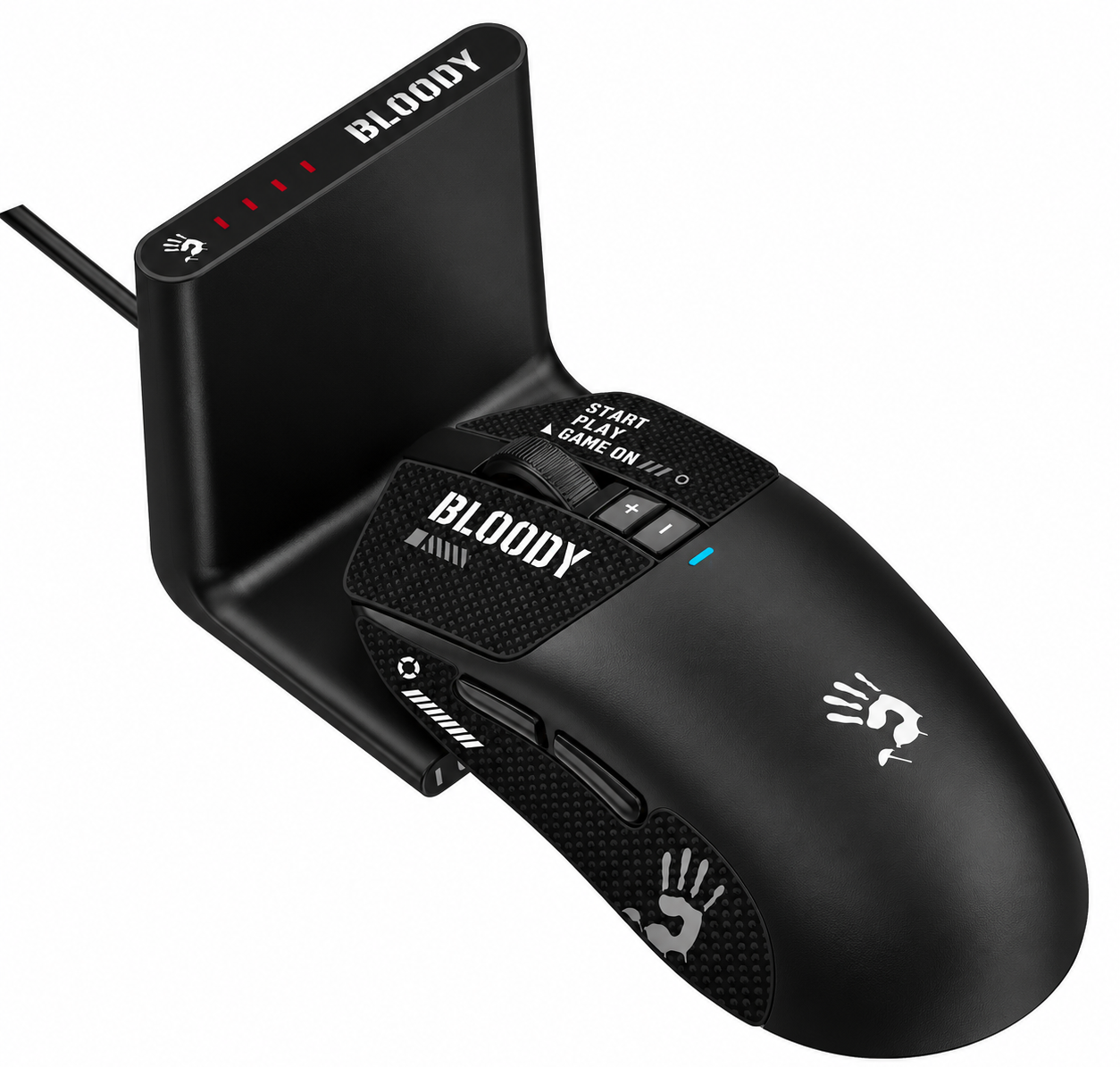
Introduction to the Bloody R72 Ultra Duo Wireless Gaming Mouse
The Bloody R72 Ultra Duo Wireless Gaming Mouse is a high-performance dual-mode gaming peripheral designed for competitive gamers seeking precision and reliability. Featuring the advanced Alpha 20K Engineered Engine sensor, this mouse delivers exceptional tracking with adjustable resolution from 50 to 20,000 CPI, 350 IPS tracking speed, and 40G acceleration for smooth, accurate control in fast-paced FPS games like CS: GO.
Key benefits include 1ms wireless transmission via a 2.4GHz connection, a 1000Hz report rate, and up to 75 hours of playtime on its 300 mAh lithium battery, rechargeable in just 1.5 hours via USB Type-C. Unique selling points like RapidSnap Rebound Technology for crisp clicks (over 30 million durability on main buttons) and dual-mode flexibility (2.4GHz wireless or wired USB) make it ideal for esports pros and casual gamers alike.
Targeted at PC gamers, streamers, and competitive players, the Bloody R72 Ultra Duo Wireless Gaming Mouse excels in MOBA, FPS, and battle royale titles with its 10m operation range and self-adjusting frame speed. The estimated price range is $50-$80, widely available at gaming retailers like official Bloody stores and online marketplaces. This wireless gaming mouse combines lightweight design, anti-slip grip options, and software customization for personalized DPI settings, ensuring dominance in any gaming setup.
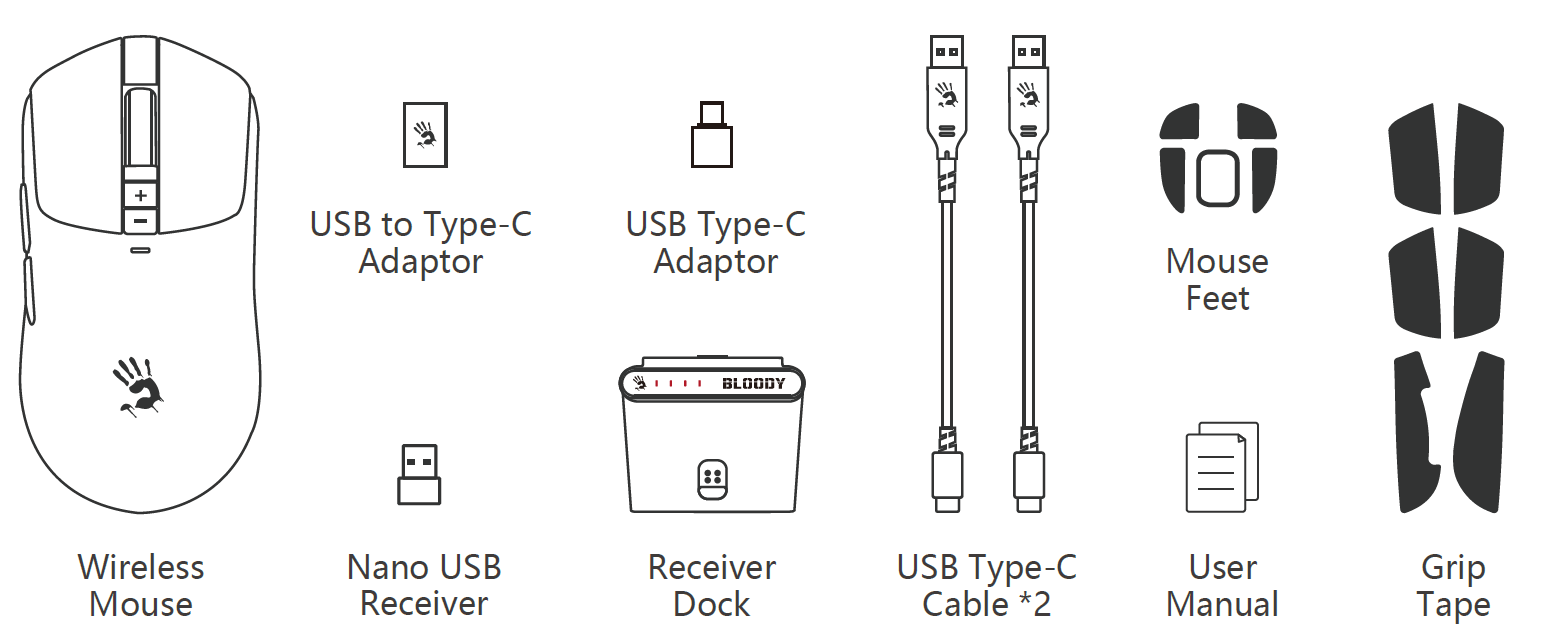
WHAT'S IN THE BOX
- Wireless Mouse
- USB to Type-C Adaptor
- USB Type-C Adaptor
- Nano USB Receiver
- Receiver Dock
- USB Type-C Cable × 2
- Mouse Feet
- User Manual
- Grip Tape
Specifications
- Sensor: Alpha 20K Engineered Engine
- Wireless Transmission: 1 ms
- Operation Range: 10 m
- Default Resolution: 400 / 800 / 1,000 / 1,200 / 1,600 / 2,000 CPI
- Resolution Adjustable by Software: 50–20,000 CPI
- Frame Speed: Self-Adjusting
- Frame Speed Adjustable by Software: Self-Adjusting
- Acceleration: 40 G
- Tracking Speed: 350 IPS
- Report Rate: 1000 Hz (Adjustable)
- Battery: 300 mAh Lithium Battery
- Charging Time: ≤ 1.5 Hours
- Playtime: ≤ 75 Hours
- Micro-Switch: Over 30 Million Clicks (Left/Right Buttons)
- Wheel: Over 800,000 Scrolls
- USB Type-C Soft Braided Cable: 180 cm
- USB Type-C PVC Cable: 180 cm
- Size: 125 × 63 × 40 mm
- Weight: 70 g (Without Cable)
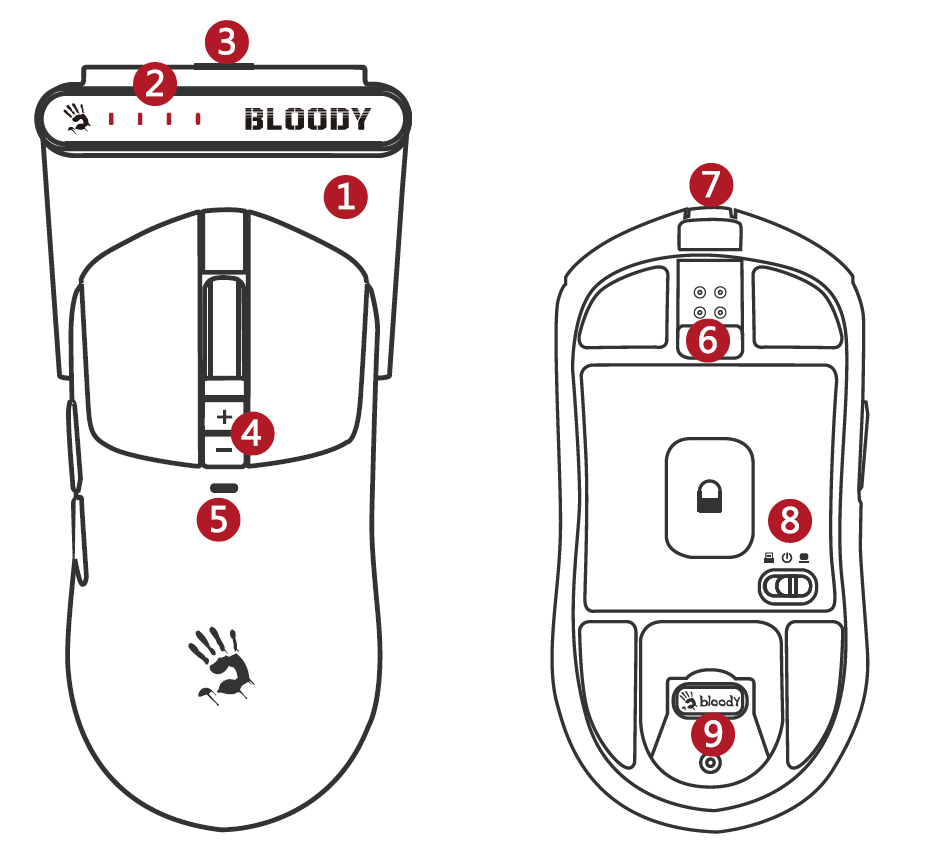
KNOW YOUR PRODUCT
- L++ Multi-Function Charging Dock
- Four-Stage Battery Indicator
- Dock Type-C Input Port
- CPI +/- Adjustment
- Function Indicator
- Snap-On Magnetic Charging
- Mouse Type-C Input Port
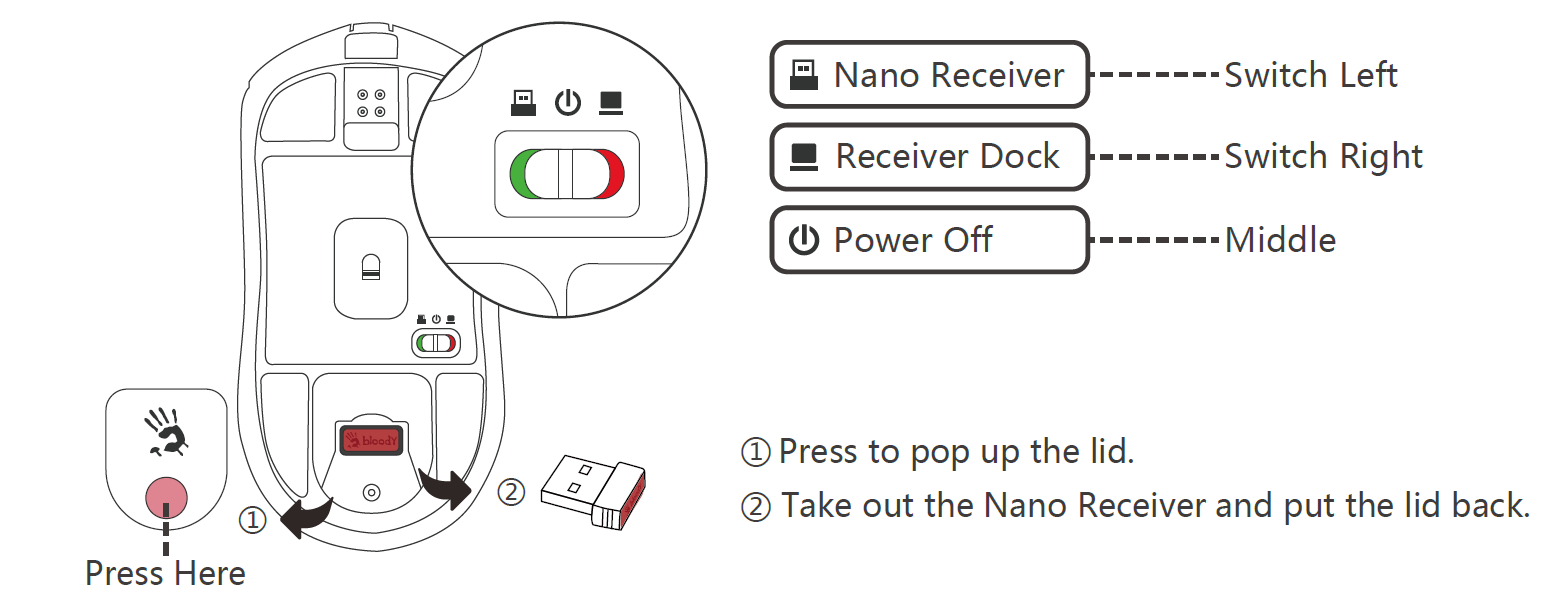
- Dual 2.4G Receiver Switch
- 2.4G Receiver Storage
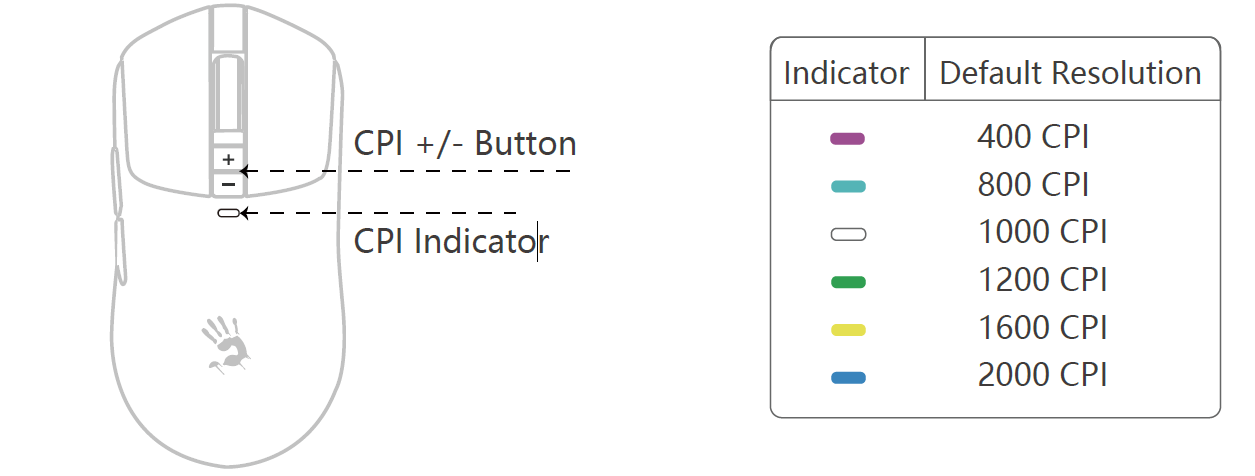
CPI ADJUSTABLE CPI
Press the CPI +/- button to switch between the default resolutions: 400, 800, 1000, 1200, 1600, 2,000 CPI. Adjustable via software: 50 ~ 20,000 CPI. If the CPI button is not clicked for 15s, the indicator will turn off automatically.
DUAL 2.4G RECEIVER
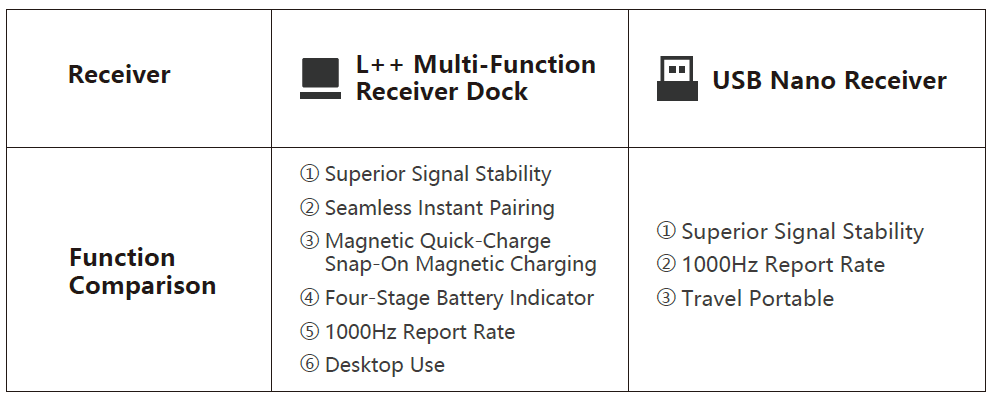
DUAL 2.4G RECEIVER SWITCH
If both receivers are connected, you can choose the active one using the switch on the bottom of the mouse.
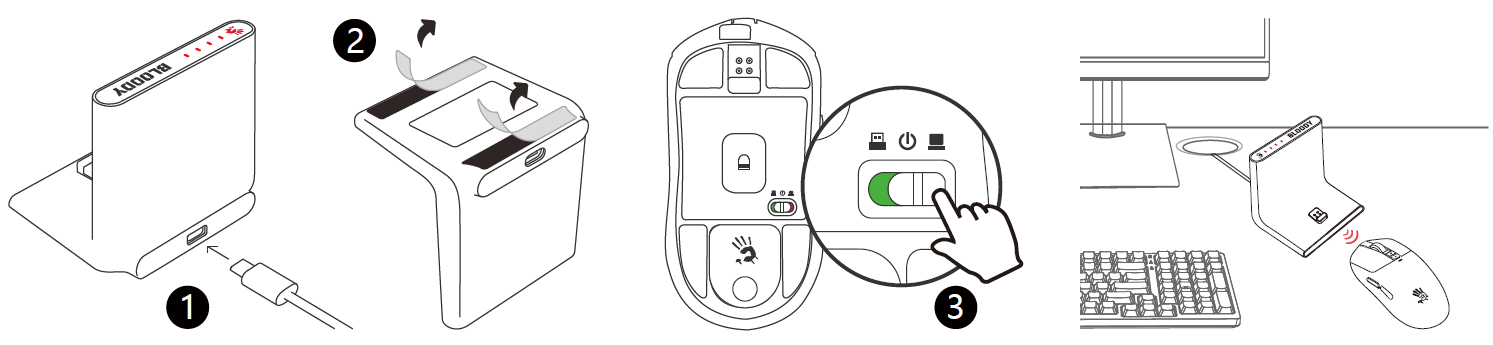
CONNECT RECEIVER DOCK
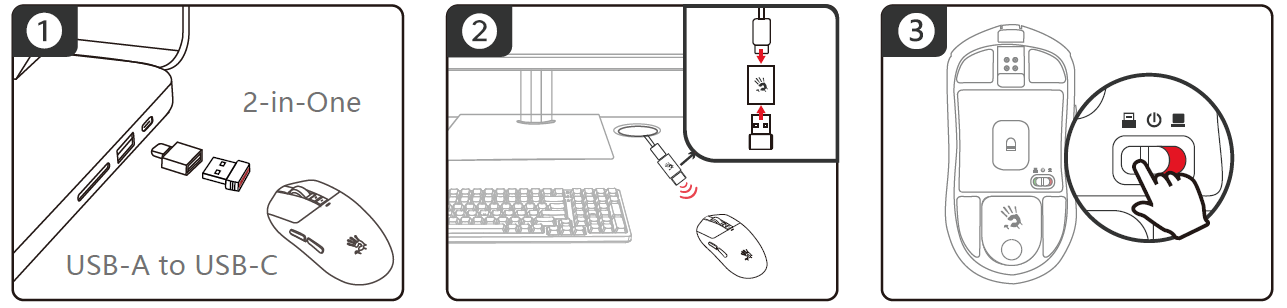
CONNECT 2.4G NANO RECEIVER
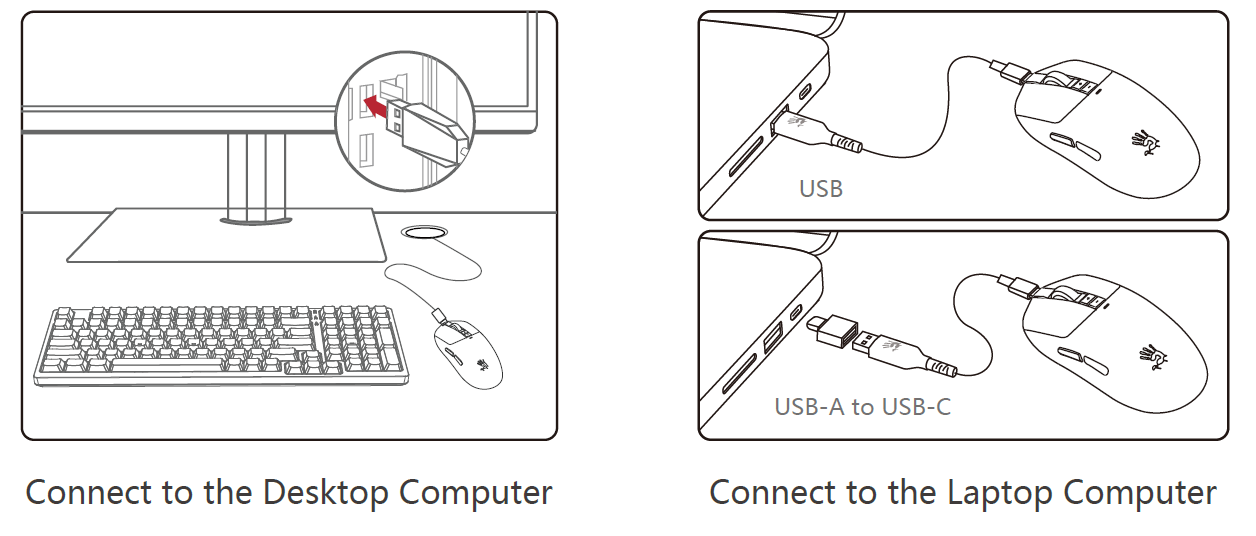
- Laptop Use: Plug the receiver into the laptop's USB port, or use the Type-C adaptor to connect the receiver to the laptop's Type-C port.
- Desktop Use: Use the adaptor to connect the nano receiver to the USB Type-C cable, then plug it into the desktop to reduce wireless signal interference.
- Switch to the left to connect with the nano receiver.
CONNECTING USB WIRED
The mouse will switch from wireless to wired mode when the USB Type-C cable is connected.
Note: While in wired mode, the mouse charges simultaneously.
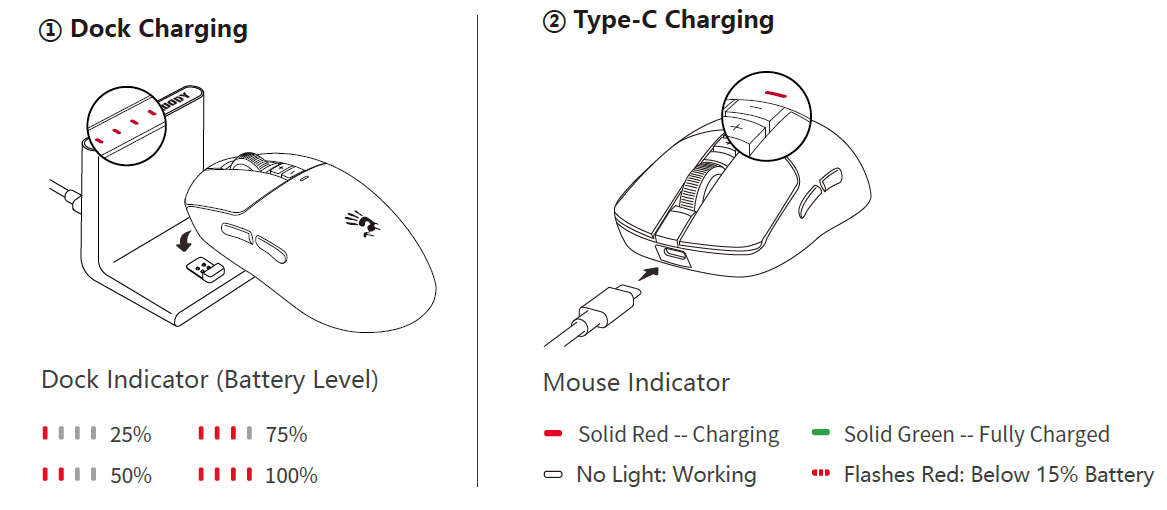
CHARGING & INDICATOR
WIRELESS M-ESPORT EDITOR
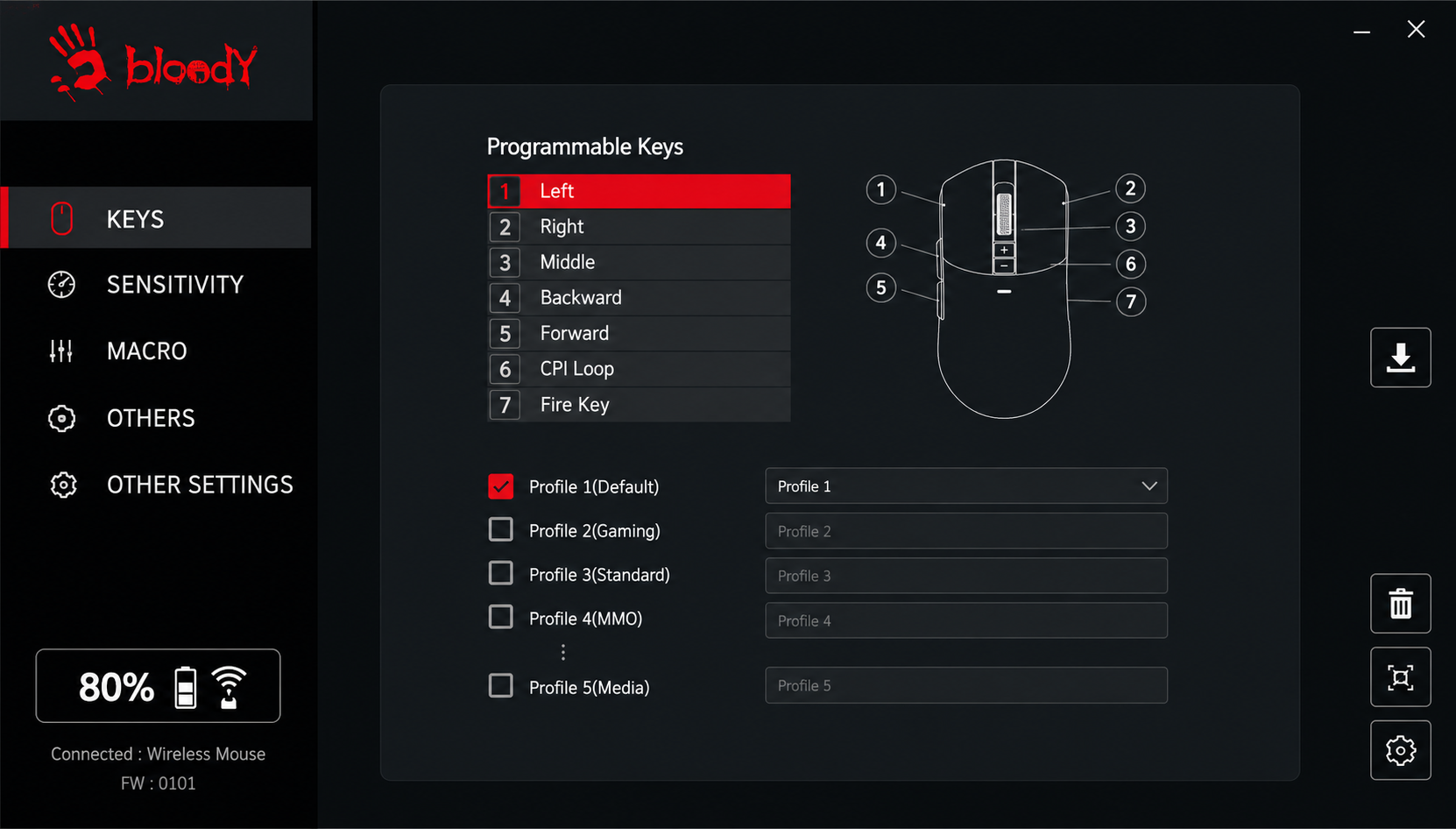
Optimize your mouse settings with simple combinations and programming functions. Customize buttons, sensitivity, and macros, then save them to the mouse's onboard memory.
FIRMWARE UPDATE OPERATION
- Ensure the USB connection is not interrupted during the update process.
- Plug both the mouse and dongle into the USB port.
- Confirm that the mouse and dual receivers are online simultaneously.
- When prompted to upgrade the firmware, click the Upgrade button to complete the process.
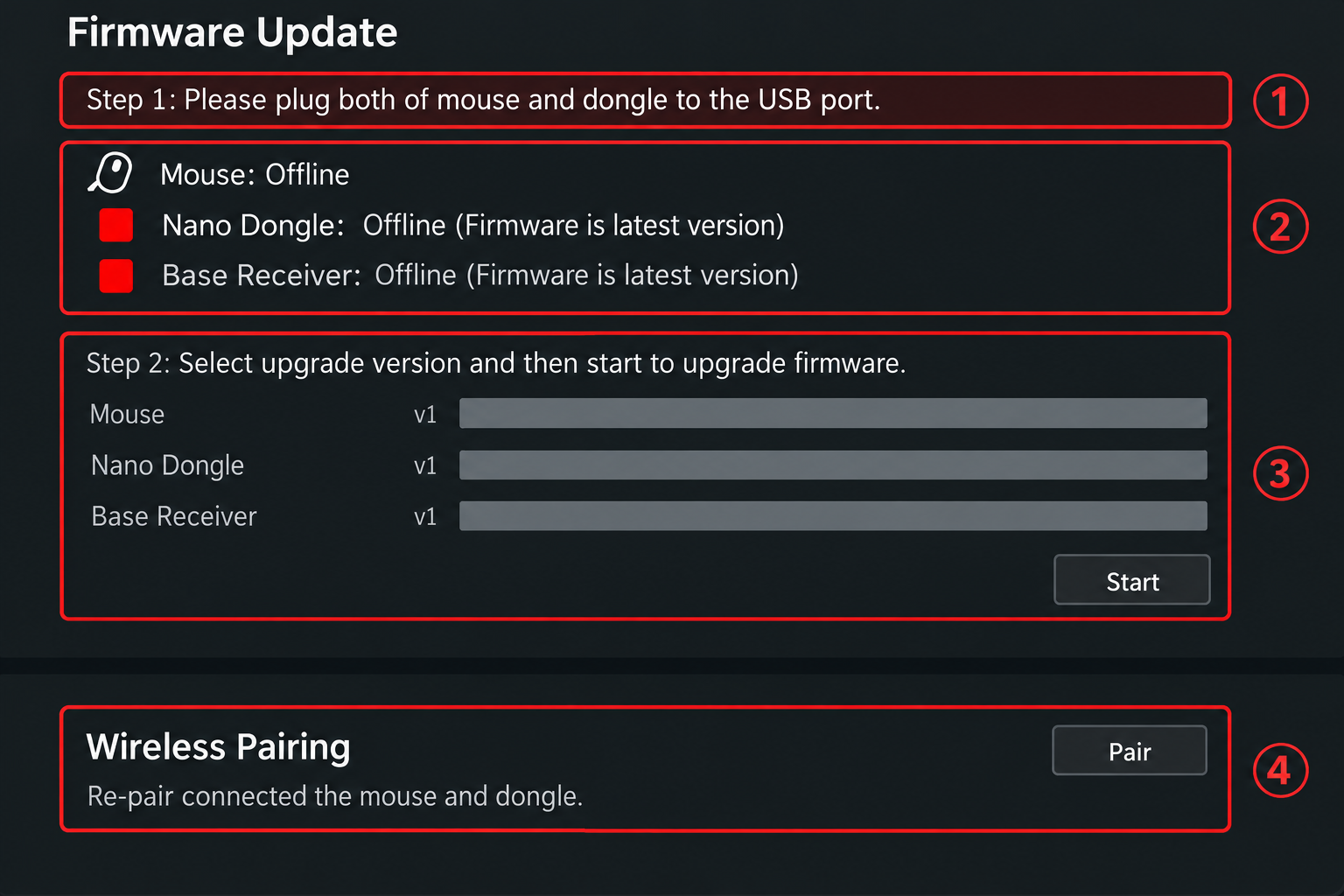
Wireless Re-pairing Operation:
Plug in the mouse and the dual wireless receiver, then click the Pair Code button to re-pair.
Note: Only newly purchased USB nano receivers need to be re-paired.
MULTI-MOUSE PAIRING STEPS
When using the L++ multi-function dock, it can pair with multiple wireless mice that support dual-connected wireless systems. Follow these steps:
- Turn off the paired Mouse 1 power (Switch Middle).
- To pair Mouse 2, switch to Dock mode (Switch Right).
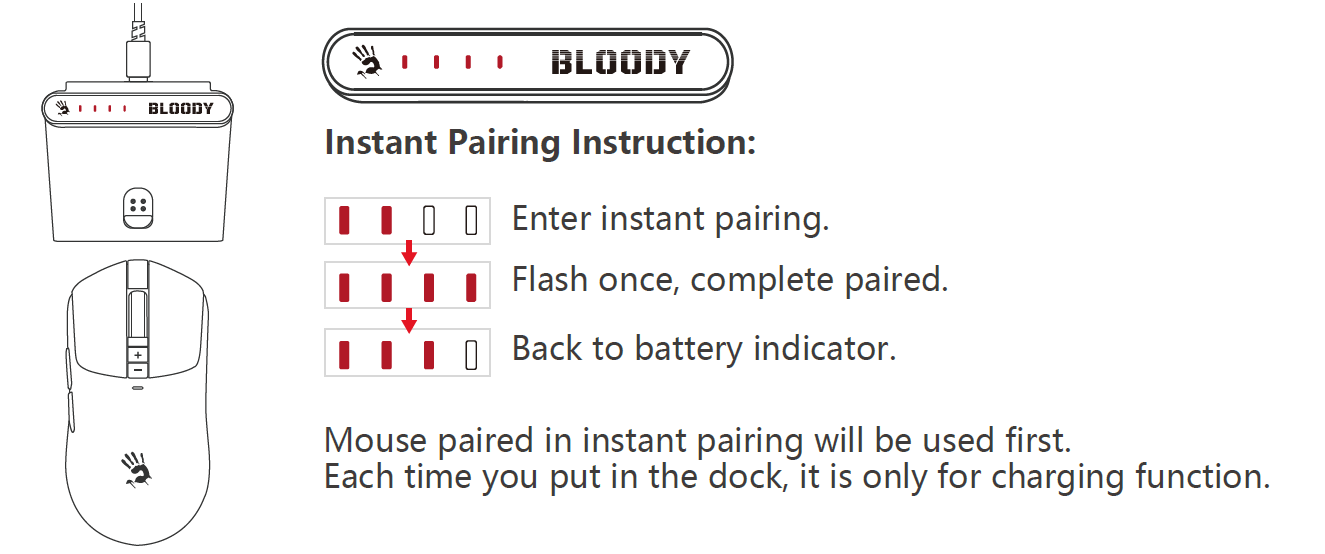
- The mouse will snap on magnetically for instant pairing.
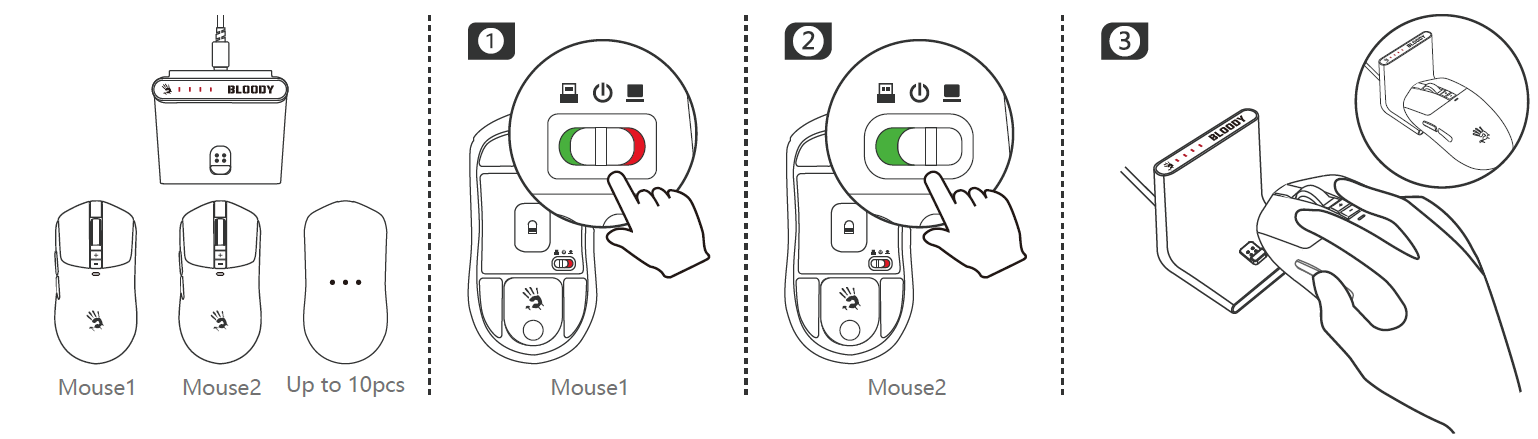
- Pairing completes in 1 second. After pairing, the dock displays the current battery level of the mouse.
Pros and Cons of Bloody R72 Ultra Duo Wireless Gaming Mouse
Pros
- Superior Sensor Performance: Alpha 20K Engine offers 20,000 CPI max, 350 IPS, and 40G acceleration for pinpoint accuracy in high-speed games.
- Long Battery Life: Up to 75-80 hours of playtime with quick 1.5-hour USB-C charging, minimizing downtime.
- Dual-Mode Connectivity: Seamless 2.4GHz wireless (1ms response) or wired USB for versatile use.
- Durable Build: 30M-click micro-switches and 800K-scroll wheel withstand intense sessions.
- Great Value: At $50-$80, it rivals pricier options like Razer or Logitech with comparable specs but better battery life.
Cons
- Software Limitations: DPI adjustments require Bloody software, which some users find less intuitive than competitors like Logitech G HUB.
- No RGB Lighting: Lacks customizable lights, unlike Bloody's W72 Ultra or A4Tech rivals.
- Weight Not Ultra-Light: Heavier than 60g featherweights, better for palm grips than claw.
- Compared to PAW3395-based mice (e.g., some 26,000 CPI models), acceleration caps at 40G vs. 50G.
Overall, the bloody R72 Ultra Duo Wireless Gaming Mouse offers excellent value for budget-conscious gamers, outperforming many in battery and durability while matching premium tracking.
Customer Reviews: Bloody R72 Ultra Duo Wireless Gaming Mouse Feedback
Users praise the Bloody R72 Ultra Duo Wireless Gaming Mouse for its reliable 1ms wireless performance and long battery life, averaging 4.5/5 stars across gaming forums and retailer sites. "Insane tracking and zero lag in Valo
rant—beats my old wired mouse!" says a verified Amazon buyer. Common praises include the Alpha 20K sensor's precision (350 IPS) and durable switches for marathon sessions.
Complaints focus on occasional software glitches for DPI tweaks and lack of onboard profiles, with some noting it's gripper-heavy for small hands. "Battery lasts 70+ hours, but wish for RGB," per a Reddit thread. Frequent issues like initial pairing are resolved via firmware updates. 85% recommend it for FPS enthusiasts, calling it a "budget beast" over Logitech G305 alternatives.
Faqs
How do I set up the Bloody R72 Ultra Duo Wireless Gaming Mouse for the first time?
What should I do if the Bloody R72 Ultra Duo Wireless Gaming Mouse has connection issues?
How do I adjust DPI settings on the Bloody R72 Ultra Duo Wireless Gaming Mouse?
Is the Bloody R72 Ultra Duo Wireless Gaming Mouse compatible with Mac and PlayStation?
How can I optimize battery life on Bloody R72 Ultra Duo Wireless Gaming Mouse?
How do I clean and maintain the Bloody R72 Ultra Duo Wireless Gaming Mouse?
Why is cursor drifting on my Bloody R72 Ultra Duo Wireless Gaming Mouse and how to fix?
What makes the Bloody R72 Ultra Duo Wireless Gaming Mouse ideal for FPS gaming?
More bloody manuals
- Setup: Bloody S6 Tube Portable Waterproof Speaker User Manual
- Setup: Bloody R36 Ultra Naraka Dual Mode Wireless Gaming Mouse User Manual
- Setup: Bloody M70 True Wireless Gaming Earbuds User Manual
- Setup: Bloody R90 Plus Wireless Gaming Mouse User Manual
- Setup: Bloody S3 Carry Portable Waterproof Speaker User Manual
- Setup: Bloody R80 Plus Wireless Gaming Mouse User Manual
Leave a Comment