
Setup: Bloody R36 Ultra Naraka Dual Mode Wireless Gaming Mouse User Manual
Content
Bloody R36 Ultra Naraka Dual Mode Wireless Gaming Mouse - Complete Product Manual
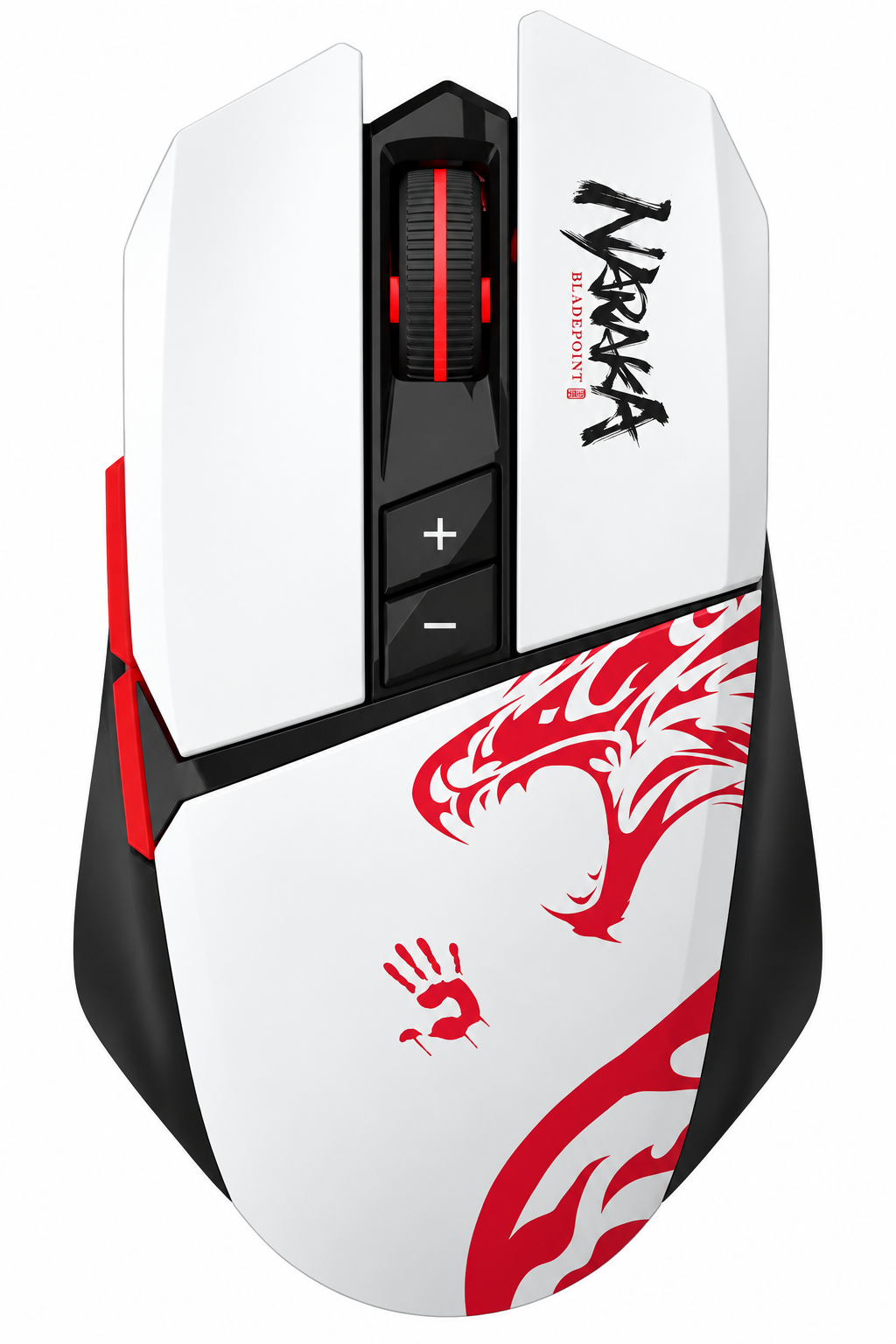
Introduction to the Bloody R36 Ultra Naraka Gaming Mouse
The Bloody R36 Ultra Naraka Dual Mode Wireless Gaming Mouse represents a significant advancement in wireless gaming peripherals, delivering esports-grade performance without the limitations of traditional wired connections. This high-performance gaming mouse combines cutting-edge wireless technology with precision tracking capabilities, making it an ideal choice for competitive gamers, esports enthusiasts, and content creators who demand reliability and speed.
The Bloody R36 Ultra Naraka features dual-mode connectivity, allowing seamless switching between 2.4GHz wireless and USB Type-C wired modes. With its Alpha 12K gaming engine and ultra-responsive 1ms wireless transmission, this gaming mouse eliminates the 2-8ms latency typical of conventional wireless mice. The lightweight 89g design combined with exceptional battery life of up to 75 hours per charge makes this mouse perfect for marathon gaming sessions and competitive tournaments.
Designed for gamers who refuse to compromise on performance, the Bloody R36 Ultra Naraka gaming mouse delivers the precision, speed, and reliability needed for fast-paced shooters, MOBAs, and real-time strategy games. The mouse features customizable RGB lighting, programmable buttons, and onboard memory for storing custom profiles. Whether you're a professional esports player or an ambitious amateur, this wireless gaming mouse provides the tools necessary for competitive excellence.
The Bloody R36 Ultra Naraka is typically priced in the mid-to-premium gaming mouse segment, offering exceptional value for the advanced features and performance it delivers. Availability varies by region, with the mouse currently stocked through major gaming retailers and online marketplaces globally.
Technical Specifications of the Bloody R36 Ultra Naraka
Sensor and Tracking Performance
- Tracking Sensor: Alpha 12K Gaming Engine
- DPI Resolution: 100-12,000 CPI (adjustable)
- Tracking Speed: 300 inches per second (ips)
- Maximum Acceleration: 35g
- Frame Speed: Adjustable
Connectivity and Response Rate
- Dual Mode Connectivity: 2.4GHz wireless + USB Type-C wired
- Wireless Transmission: 1ms response time
- Report Rate: 125-1000 Hz (adjustable)
- Key Response: 1ms
- Polling Rate: Up to 1000Hz for full-speed stability
Physical Specifications and Battery
- Weight: 89g (lightweight ergonomic design)
- Battery Life: Up to 75 hours per charge
- Power Management: On/off switch for energy conservation
- Connection Type: USB Type-C charging
Durability and Build Quality
- Micro-Switch Durability: Over 20 million clicks (left and right buttons)
- Scroll Wheel Durability: Over 800,000 scrolls
- Warranty: 1-year brand warranty
Software and Customization
- Software: Wireless M-Esport Editor
- Customization: Macro assignment, sensitivity modification, button remapping
- Memory: Onboard storage for profile saving
- RGB Lighting: Customizable per user preferences
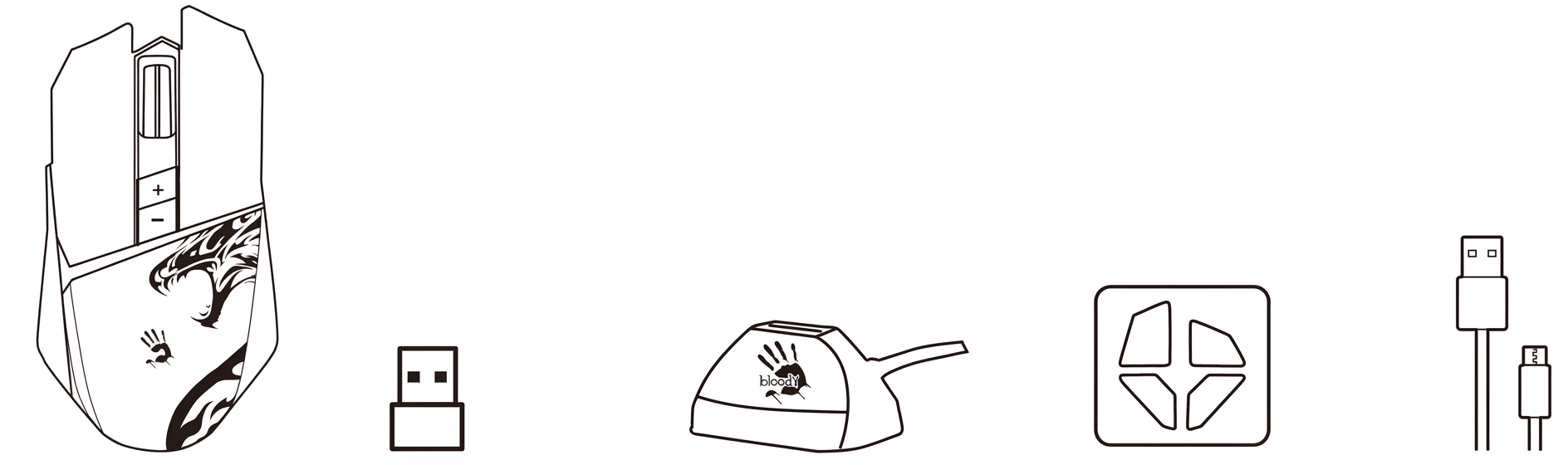
What's In The Box
- Wireless Mouse
- Nano USB Receiver
- Anti-Interference Extension Dock
- Teflon Boot
- USB Type-C Cable
- User Manual
KNOW YOUR PRODUCT
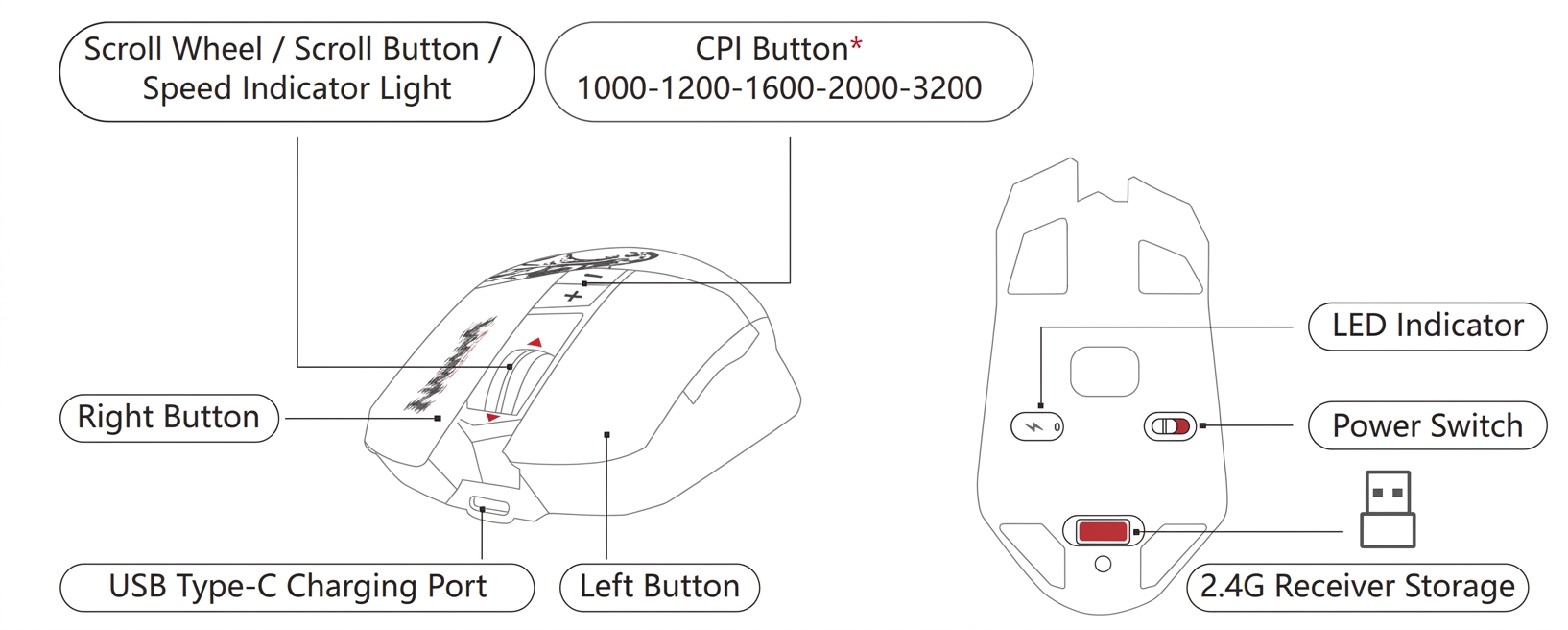
Key Features and Technologies
- RapidSnap Rebound Technology: The Bloody R36 Ultra Naraka incorporates RapidSnap Rebound technology, ensuring consistent and responsive button feedback during intense gaming sessions. This technology maintains uniform click response across millions of actuations, critical for maintaining a competitive edge in fast-paced games.
- WaveLink Connectivity: WaveLink connectivity provides stable, interference-free wireless communication between the mouse and receiver. This advanced wireless protocol ensures reliable data transmission without the typical latency issues associated with standard 2.4GHz wireless mice.
- Full Speed Dual Mode: The dual-mode capability of the Bloody R36 Ultra Naraka gaming mouse allows instant switching between wireless and wired modes without performance degradation. Whether wireless or wired, the mouse maintains consistent 1ms response time and 1000Hz polling rate for seamless gameplay.
- Esports-Grade Performance: Every component of this wireless gaming mouse has been engineered to meet professional esports standards. The combination of high-precision tracking, minimal latency, and durable construction makes the Bloody R36 Ultra Naraka suitable for competitive tournaments and professional gaming environments.
Setup and Installation Guide
Initial Setup
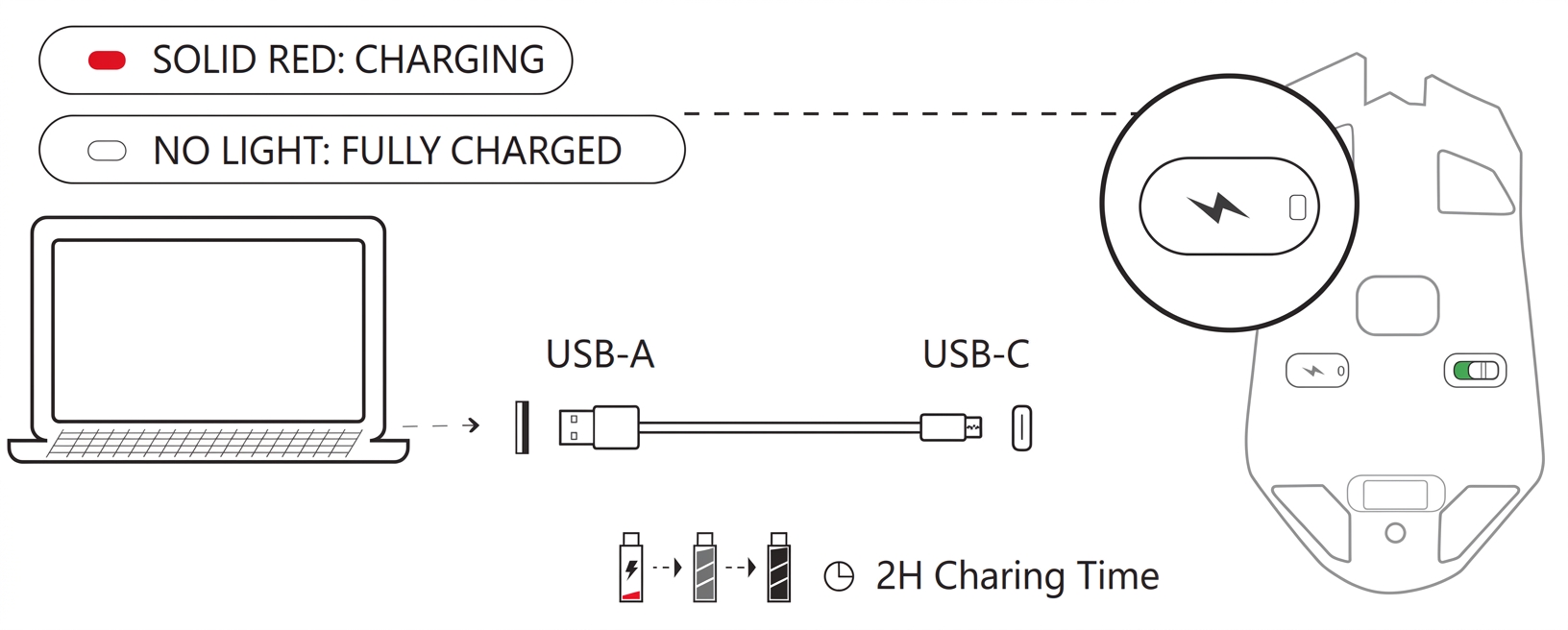
Remove the Bloody R36 Ultra Naraka gaming mouse from its packaging and charge the device fully using the provided USB Type-C cable. Connect the wireless receiver to an available USB port on your computer. The receiver will automatically pair with the mouse upon power-on. For wired mode, simply connect the USB Type-C cable directly to your computer.
Software Installation
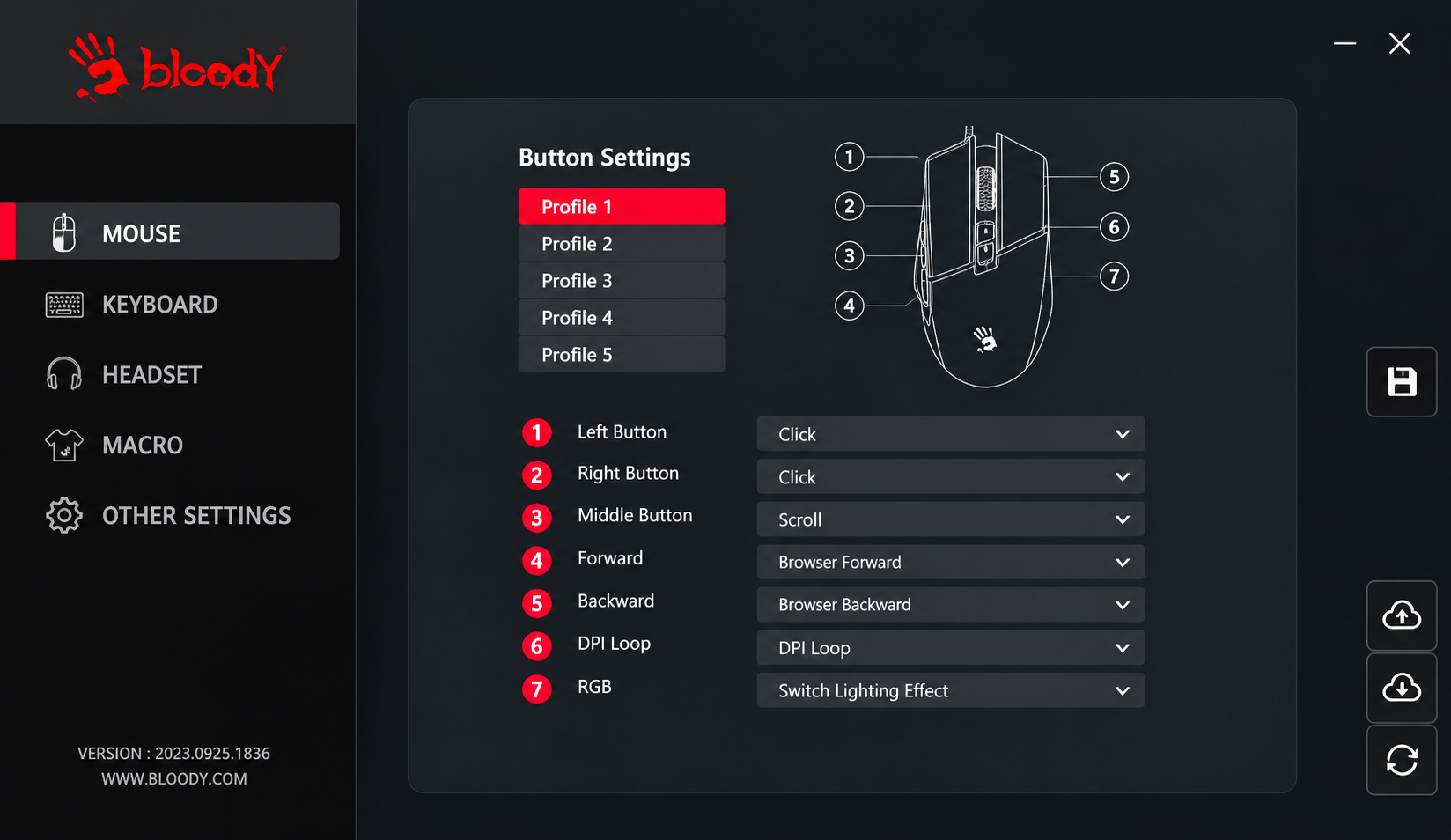
Download the Wireless M-Esport Editor software from the official Bloody website. Install the application on your computer to access advanced customization features. The software allows you to adjust DPI settings, assign macros, remap buttons, and configure RGB lighting. All custom profiles can be saved directly to the mouse's onboard memory, ensuring your settings persist across different computers.
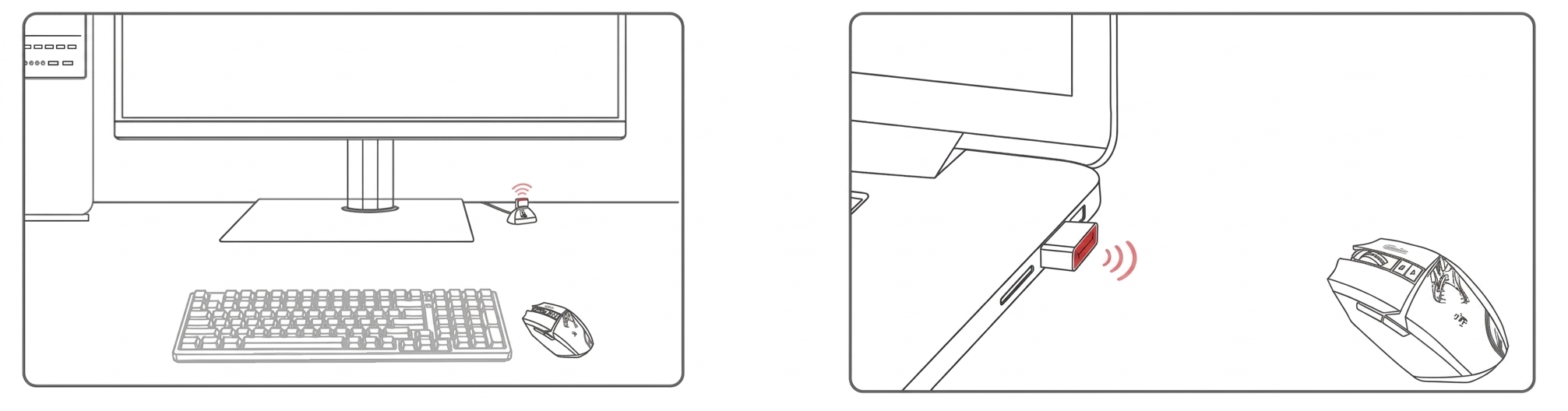
CONNECTING 2.4G DEVICE
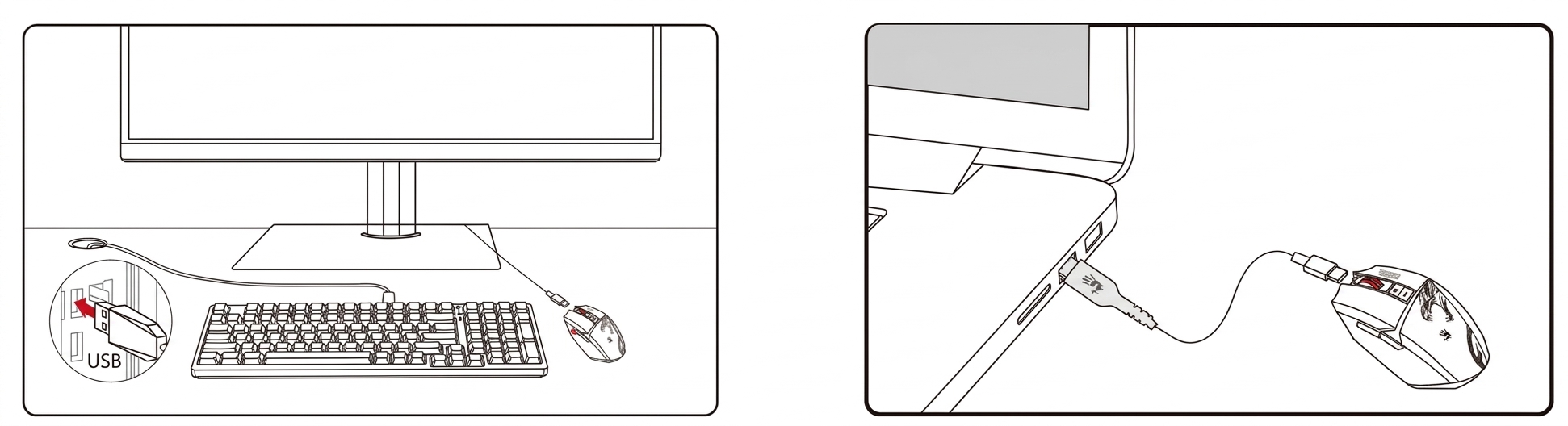
- Connect to the Desktop Computer
Connect to the Desktop Computer. Connect to the Laptop Computer. The mouse switches from wireless mode to wired mode when the USB Type-C cable is plugged in. Provide the mouse with simple combination settings and programming functions. Players can optimize the most suitable game configuration by buttons, sensitivity, and combination macros, then save it to the mouse on-board memory. Connect the extension dock to the host computer, and plug the nano receiver into the extension cord. Place it in front of the mouse, with no obstructions between it. - Connect to the Laptop Computer
Connect the nano receiver to the laptop computer with no obstructions between the mouse
CONNECTING USB WIRED
The mouse switches from wireless mode to wired model when the USB Type-C cable is plugged in
- Connect to the Desktop Computer
- Connect to the Laptop Computer
WIRELESS M-ESPORT EDITOR
Provide the mouse with simple combination settings and programming functions. Players can optimize the most suitable game configuration by buttons, sensitivity, and combination macros, then save it to the mouse on-board memory
CHARGING & INDICATOR
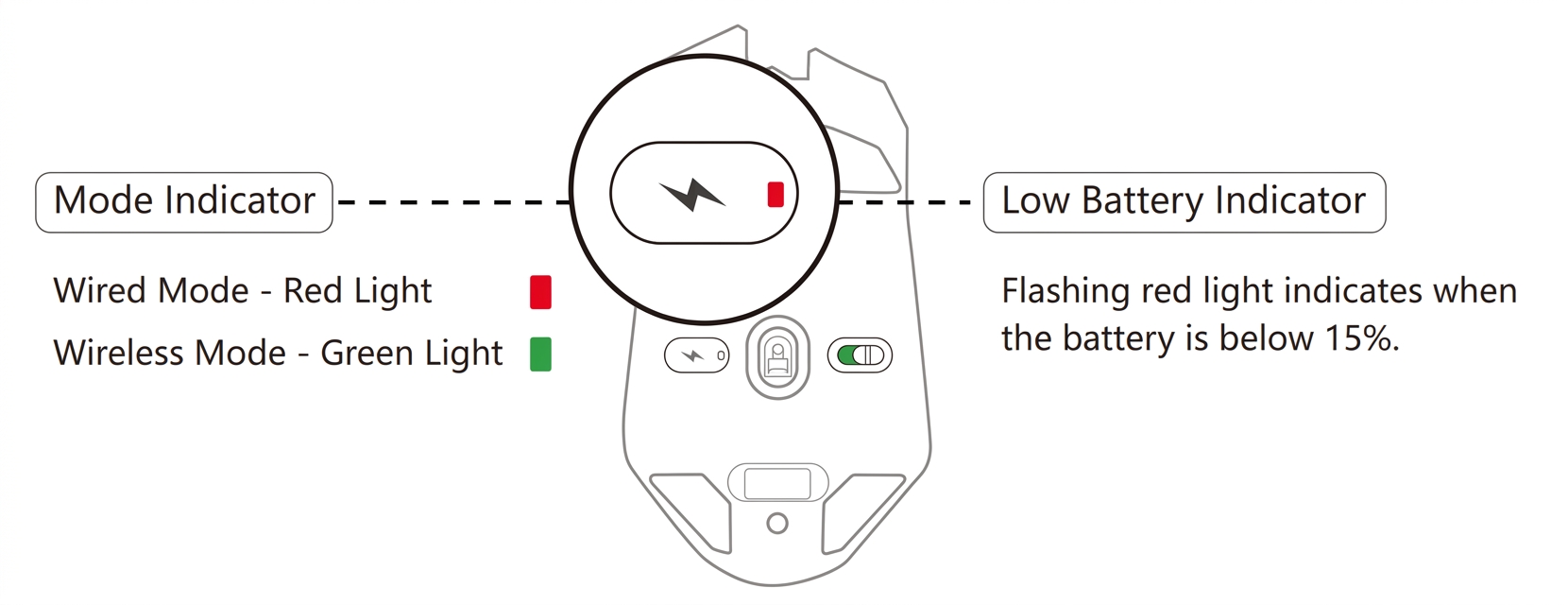
INDICATOR
Troubleshooting Common Issues
Wireless Connection Problems
Issue: The Bloody R36 Ultra Naraka wireless gaming mouse fails to connect to the receiver.
Solution: Ensure the wireless receiver is properly connected to a USB port. Power cycle both the mouse and receiver by turning them off and back on. Check that the mouse battery is not depleted by charging it for at least 30 minutes. If the problem persists, try re-pairing the mouse by holding the pairing button for 3 seconds until the LED blinks.
High Latency or Input Lag
Issue: The mouse experiences noticeable lag or delayed cursor movement.
Solution: Verify that the polling rate is set to 1000Hz in the M-Esport Editor software. Move the wireless receiver closer to the mouse (within 6 feet). Check for wireless interference from other 2.4GHz devices such as routers, microwaves, or cordless phones. Switch to wired mode via USB Type-C to test if the issue is wireless-specific. Update the mouse firmware through the software.
Battery Draining Quickly
Issue: The Bloody R36 Ultra Naraka gaming mouse battery depletes faster than the advertised 75 hours.
Solution: Reduce the polling rate from 1000Hz to 500Hz or 250Hz if maximum responsiveness is not required. Disable RGB lighting or set it to a static color rather than dynamic effects. Use the power switch to turn off the mouse when not in use for extended periods. Check that the mouse is not constantly reconnecting by keeping the receiver within proper range.
Button Responsiveness Issues
Issue: Mouse buttons feel unresponsive or require double-clicking to register.
Solution: Clean the mouse buttons and surrounding areas with a dry cloth to remove dust and debris. Test the mouse in wired mode to determine if the issue is wireless-related. Update the mouse firmware and software to the latest version. If the problem persists, contact Bloody customer support within the 1-year warranty period for potential replacement or repair.
Warranty and Support
The Bloody R36 Ultra Naraka includes a 1-year brand warranty covering manufacturing defects and hardware failures. Contact Bloody customer support through their official website or authorized retailers for warranty claims. Keep your proof of purchase and product serial number for warranty registration.
Advantages of the Bloody R36 Ultra Naraka Gaming Mouse
Performance Strengths
- Ultra-Fast 1ms Wireless Response: Matches wired mouse performance, eliminating the traditional 2-8ms wireless latency that compromises competitive gameplay
- High-Precision Alpha 12K Sensor: Delivers accurate tracking up to 12,000 CPI with minimal jitter, ideal for precision-demanding games like CS:GO and Valorant
- 1000Hz Polling Rate: Full-speed stability ensures every movement and click is registered with maximum precision
- Exceptional Battery Life: Up to 75 hours of wireless gameplay per charge eliminates frequent recharging interruptions
Design and Usability
- Lightweight 89g Construction: Reduces hand fatigue during extended gaming sessions and allows for faster, more agile movements
- Dual Mode Flexibility: Switch seamlessly between wireless and wired modes without performance loss
- Durable Micro-Switches: Over 20 million clicks durability ensures long-term reliability for competitive gamers
- Onboard Memory: Save custom profiles directly to the mouse for consistent settings across different computers
Customization and Control
- Comprehensive M-Esport Editor Software: Advanced customization including macro assignment, button remapping, and sensitivity modification
- Customizable RGB Lighting: Personalize the mouse appearance to match your gaming setup
- Adjustable DPI and Polling Rate: Fine-tune performance settings for specific games and playstyles
Limitations and Considerations
Design Considerations
- Specific Ergonomic Fit: The 89g lightweight design and shape may not suit all hand sizes; users with larger hands might prefer heavier mice
- Learning Curve: Advanced customization features require time to master through the M-Esport Editor software
Performance Caveats
- Wireless Range Limitations: Optimal performance requires the receiver within approximately 6 feet; distance increases latency
- 2.4GHz Interference: Performance can degrade in environments with multiple 2.4GHz devices (routers, microwaves, cordless phones)
- Software Dependency: Full customization requires downloading and installing the Wireless M-Esport Editor
Practical Limitations
- Price Point: Mid-to-premium pricing may be higher than entry-level gaming mice with similar basic functionality
- Battery Monitoring: Users must actively monitor battery status to avoid unexpected disconnections during important matches
Customer Reviews and User Feedback
The Bloody R36 Ultra Naraka gaming mouse has received positive feedback from competitive gamers and esports enthusiasts. Users consistently praise the 1ms wireless response time, noting that it delivers performance comparable to wired gaming mice without the cable restrictions. The exceptional 75-hour battery life is frequently mentioned as a significant advantage, allowing extended gaming marathons without charging interruptions.
Gamers highlight the lightweight 89g design as beneficial for reducing hand fatigue and enabling faster mouse movements during intense competitive play. The Alpha 12K sensor's precision tracking receives particular acclaim from players in precision-demanding titles like CS:GO, Valorant, and Overwatch. The dual-mode functionality is appreciated for its flexibility, allowing instant switching between wireless and wired modes based on preference or situation.
Common user praise includes the responsive RapidSnap Rebound technology, which maintains consistent button feedback across millions of clicks. The onboard memory feature for saving custom profiles is valued by players who use multiple computers or attend LAN events. The customizable RGB lighting adds aesthetic appeal for gaming setups.
Some users mention that the software interface requires initial setup time, but once configured, the settings integrate seamlessly. A few users note that the lightweight design may not suit everyone's preferences, and those accustomed to heavier mice might need an adjustment period. Overall, the Bloody R36 Ultra Naraka gaming mouse receives strong recommendations for competitive gamers prioritizing wireless performance without latency compromises.
Who Should Buy the Bloody R36 Ultra Naraka?
- Ideal for Competitive Gamers: The Bloody R36 Ultra Naraka dual-mode wireless gaming mouse is perfect for esports competitors and serious gamers who demand professional-grade equipment. The 1ms wireless response time eliminates performance concerns, while the high-precision Alpha 12K sensor provides the accuracy necessary for competitive shooters and strategy games.
- Content Creators and Streamers: The lightweight design and exceptional battery life make this gaming mouse suitable for content creators who stream or record extended gaming sessions. The wireless functionality reduces cable clutter in streaming setups.
- LAN Event Participants: The dual-mode capability and onboard profile storage make the Bloody R36 Ultra Naraka ideal for gamers attending LAN tournaments, allowing quick switching between wireless and wired modes and maintaining consistent settings across different computers.
- Not Ideal For: Users seeking budget-friendly options or those with larger hands who prefer heavier mice might want to explore alternative options. Players in interference-heavy environments may prefer wired mice to avoid potential connectivity issues.
Comparison with Similar Gaming Mice
When compared to other premium wireless gaming mice, the Bloody R36 Ultra Naraka stands out with its combination of ultra-fast 1ms wireless response, exceptional battery life, and competitive pricing. While some premium alternatives offer similar sensor specifications, few match the R36 Ultra Naraka's battery longevity and wireless reliability. The mouse represents excellent value in the mid-to-premium gaming mouse category, offering professional esports-grade performance without the premium pricing of flagship models from other manufacturers.
Maintenance and Care Tips
- Regular Cleaning: Gently wipe the mouse exterior with a dry cloth weekly to remove dust and debris. Clean the sensor lens with a soft, lint-free cloth to maintain tracking accuracy. Avoid using liquids or harsh chemicals that could damage the electronics.
- Battery Maintenance: Allow the mouse to fully charge before first use. Avoid completely draining the battery regularly; charge when battery reaches 20% capacity. Store the mouse with adequate battery charge if not using for extended periods.
- Receiver Care: Keep the wireless receiver connected to a USB port that provides stable power. Position the receiver away from other 2.4GHz devices for optimal connectivity. Avoid exposing the receiver to excessive heat or moisture.
- Software Updates: Regularly check for firmware updates through the M-Esport Editor software. Updates often include performance improvements, bug fixes, and enhanced compatibility.
Conclusion
The Bloody R36 Ultra Naraka Dual Mode Wireless Gaming Mouse delivers professional esports-grade performance with the convenience and freedom of wireless connectivity. Its combination of ultra-responsive 1ms wireless transmission, high-precision Alpha 12K tracking sensor, lightweight design, and exceptional 75-hour battery life makes it an excellent choice for competitive gamers who refuse to compromise on performance. The dual-mode flexibility, comprehensive customization options, and durable construction justify its position in the mid-to-premium gaming mouse category. Whether you're a professional esports player or an ambitious competitive gamer, the Bloody R36 Ultra Naraka gaming mouse provides the precision, speed, and reliability needed to achieve gaming excellence without the limitations of traditional wireless technology.
```
Faqs
How do I set up the bloody R36 Ultra Naraka Dual Mode Wireless Gaming Mouse for the first time?
What should I do if the bloody R36 Ultra Naraka Dual Mode Wireless Gaming Mouse has connectivity issues?
How do I adjust DPI settings on the bloody R36 Ultra Naraka Dual Mode Wireless Gaming Mouse?
Is the bloody R36 Ultra Naraka Dual Mode Wireless Gaming Mouse compatible with Mac and PlayStation?
How can I optimize performance of the bloody R36 Ultra Naraka Dual Mode Wireless Gaming Mouse for FPS games?
How do I maintain and clean the bloody R36 Ultra Naraka Dual Mode Wireless Gaming Mouse?
What is the battery life and charging process for bloody R36 Ultra Naraka Dual Mode Wireless Gaming Mouse?
How does RapidSnap Rebound Technology work in the bloody R36 Ultra Naraka Dual Mode Wireless Gaming Mouse?
More bloody manuals
- Usage: Bloody R72 Ultra Duo Wireless Gaming Mouse User Manual
- Setup: Bloody R90 Plus Wireless Gaming Mouse User Manual
- Setup: Bloody S6 Tube Portable Waterproof Speaker User Manual
- Setup: Bloody R80 Plus Wireless Gaming Mouse User Manual
- Setup: Bloody M70 True Wireless Gaming Earbuds User Manual
- Setup: Bloody ES9 Pro RGB Esports Gaming Mouse User Manual
Leave a Comment