
Setup: Bloody ES9 Pro RGB Esports Gaming Mouse User Manual
Content
Bloody ES9 Pro RGB Esports Gaming Mouse: Complete Product Manual & Guide
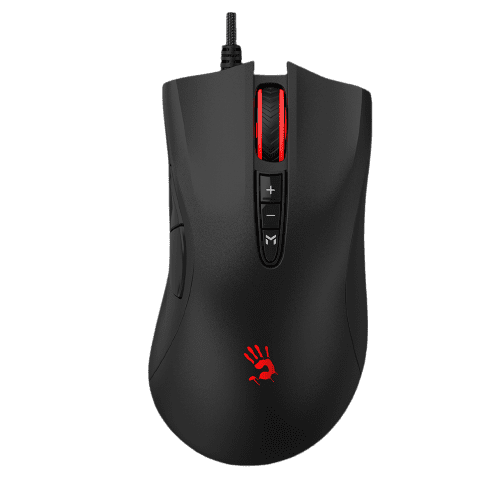
Introduction to the Bloody ES9 Pro Gaming Mouse
The Bloody ES9 Pro RGB Esports Gaming Mouse represents a professional-grade gaming peripheral designed for competitive esports players and serious gaming enthusiasts. This wired gaming mouse combines cutting-edge sensor technology with ergonomic design to deliver precision performance in fast-paced gaming environments. The Bloody ES9 Pro RGB Esports Gaming Mouse features advanced tracking capabilities, customizable RGB lighting, and programmable buttons that cater to both FPS and MOBA gaming genres.
This gaming mouse is engineered for players who demand accuracy, responsiveness, and durability in their peripherals. Whether you're competing in professional tournaments or enjoying casual gaming sessions, the Bloody ES9 Pro delivers consistent performance with its 16,000 CPI resolution and 12,000 FPS frame speed. The device is particularly suited for esports athletes, professional gamers, streaming content creators, and gaming enthusiasts seeking premium gaming equipment without breaking the bank.
Key benefits of the Bloody ES9 Pro RGB Esports Gaming Mouse include ultra-low latency response times, customizable macro functions, and durable construction built to withstand intensive gaming sessions. The mouse features 15-zone RGB animation effects, allowing users to personalize their gaming setup according to their preferences. With 4MB of onboard memory and fully programmable buttons, this gaming mouse adapts to your specific gaming needs and playstyle.
The Bloody ES9 Pro is available at competitive price points ranging from approximately $29 to $47 USD, making it an accessible option for budget-conscious gamers seeking professional-grade performance. The mouse is widely available through major online retailers including Amazon, AliExpress, and specialized gaming peripheral retailers worldwide.
Technical Specifications & Performance Metrics
The Bloody ES9 Pro RGB Esports Gaming Mouse incorporates professional-grade components and specifications that position it among top gaming mice in its price category. Understanding these technical details helps users maximize their gaming performance and ensure compatibility with their gaming setup.
Sensor & Tracking Performance
- Tracking Sensor: PMW3389 16K Optical Sensor.
- Resolution (CPI): 50-16,000 CPI adjustable in 5 levels (1000/1200/1600/2000/16000 CPI).
- Frame Speed: 12,000 FPS.
- Tracking Speed: 400 IPS (inches per second).
- Acceleration: 50G maximum acceleration.
Response & Connectivity
- Report Rate: 125 Hz, 500 Hz, 1000 Hz, 2000 Hz (switchable).
- Key Response: 1ms (adjustable).
- Connectivity: Wired USB 1.1/2.0/3.0.
- Cable Length: 1.9 meters with braided soft cable.
- Polling Rate: Up to 2000 Hz for enhanced precision.
Physical Specifications
- Dimensions: 126 x 68 x 43 mm.
- Weight: 151g with cable, 108g without cable.
- Button Configuration: 10 total buttons with 8 programmable buttons.
- Grip Type: Ergonomic design with ultra-fine textured plastic for fingerprint resistance.
- Scroll Wheel: Dual-injection rubber wheel for enhanced durability.
Durability & Build Quality
- Button Lifetime: Over 50 million clicks (left/right buttons).
- Wheel Lifetime: Over 500,000 scrolls.
- Armor Boot: Metal X'Glide Armor Boot rated for over 300 km of use.
- Micro-Switches: Premium micro-switches ensuring reliable performance.
Features & Customization
- RGB Lighting: 15-zone RGB animation with default 5 RGB lighting effects.
- Gaming Modes: 7 dedicated gaming mode presets.
- Onboard Memory: 4MB memory for storing custom profiles and macros.
- LOD Settings: 4 selectable Lift-Off Distance options (1.5mm, 2mm, 3mm).
- Axis Adjustment: Adjustable X/Y axis sensitivity.
PERFORMANCE FEATURES
- 15-Zone RGB Animation
- Default 5 RGB Lighting Effects
- 7 Gaming Modes
- Adjustable X/Y Axis
- 512K Onboard Memory
- 2000 Hz Report Rate
- 8 Programmable Buttons
- Dual-Injection Rubber Wheel
- Metal X'Glide Armor Boot
- Durable Braided Soft Cable
SYSTEM REQUIREMENTS
- Windows 7 / 8 / 8.1 / 10 / 11
TRACKING
- Sensor: BC3332-A Gaming Engine
- Resolution: CPI
- Frame Speed: 8000 fps
- Acceleration: 35 g
- Tracking Speed: 250 ips
RESPONSE
- Report Rate: 125–1,000 Hz
- Key Response: 1 ms
DURABILITY
- Micro-Switch: Over 50 Million Clicks (Left / Right Button)
- Wheel: Over 500,000 Scrolls
- Metal X'Glide Armor Boot: Over 300 Kms
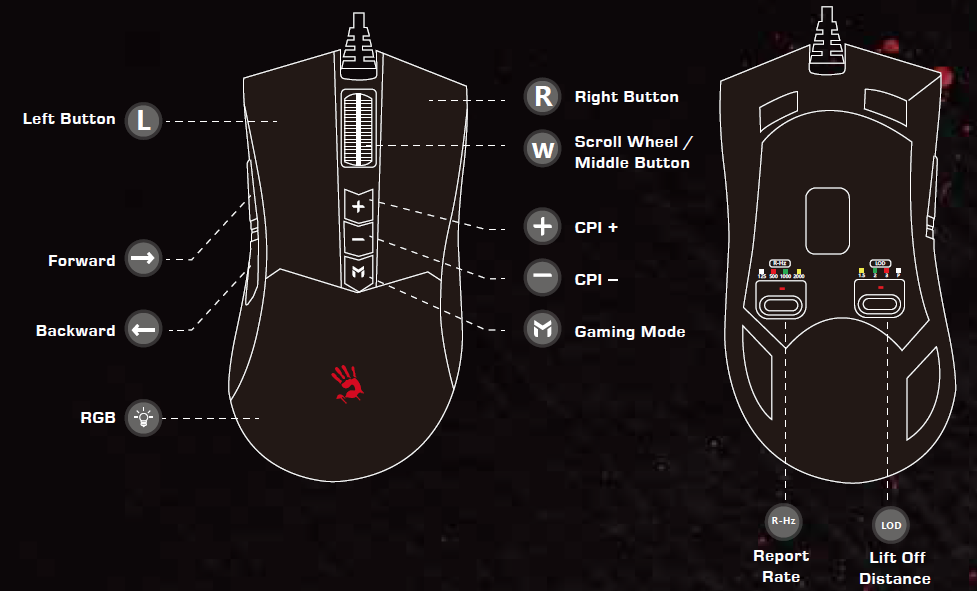
Getting Started with Your Bloody ES9 Pro Gaming Mouse
Setting up your Bloody ES9 Pro RGB Esports Gaming Mouse is straightforward and requires minimal configuration. Simply connect the USB cable to your computer's USB port, and the mouse will be immediately recognized by your operating system. The mouse features plug-and-play functionality, meaning you can start using it right away without installing drivers for basic functionality.
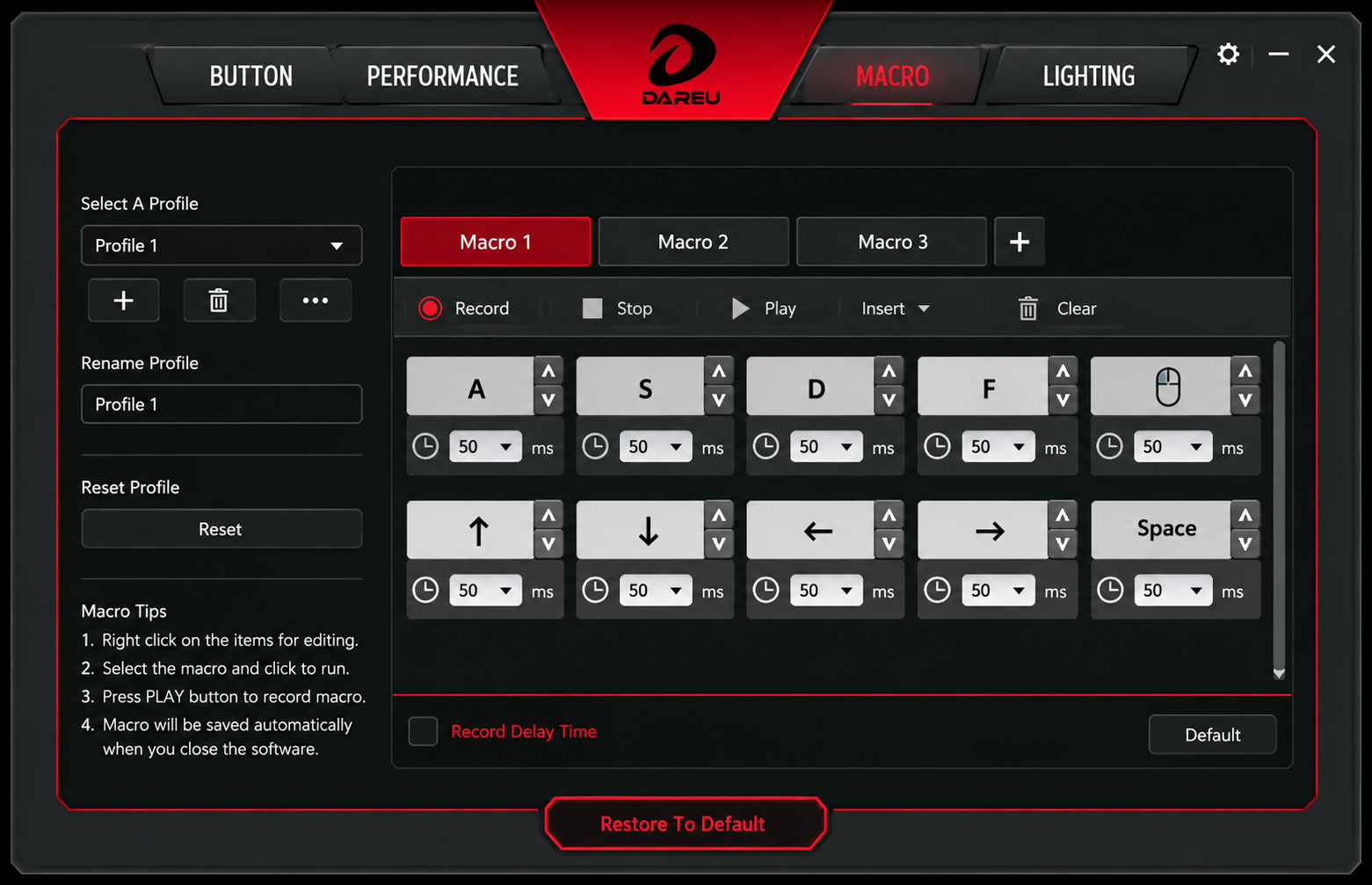
For advanced customization including RGB lighting effects, macro programming, and gaming mode profiles, download the Bloody Esports Software from software.bloody.com. This multifunctional gaming mouse editing software allows you to optimize button configuration, adjust sensitivity settings, create custom macros, and personalize RGB lighting effects to match your gaming preferences and setup aesthetics.
INSTALLATION
CONNECTION
Plug the USB cable into the computer's USB port.
DEFAULT FUNCTION KEYS
10,000 CPI 5-LEVEL ADJUSTABLE
Press the [+] / [-] buttons to switch the resolution between 1000 / 1200 / 1600 / 2000 / 10000 CPI. You can customize the 5-level CPI between 100–10000 through the software.
MACRO BUTTON
Click the [M] button to switch RGB lighting effects. The [M] key can be customized for other macro functions through the software.
BLOODY ESPORTS SOFTWARE
Bloody Esports Software is a set of multifunctional gaming mouse editing software. Optimize the most suitable game configuration through buttons, sensitivity, macro, RGB lighting, etc.
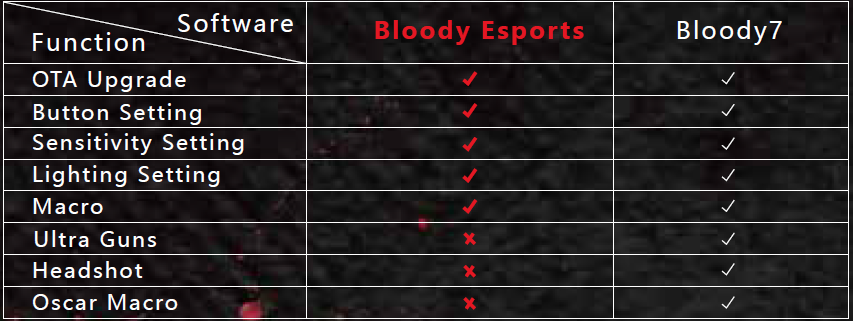
BLOODY ESPORTS VS BLOODY7
Troubleshooting Common Issues
While the Bloody ES9 Pro RGB Esports Gaming Mouse is engineered for reliability, users may occasionally encounter minor issues. Here are common problems and their solutions.
Mouse Not Recognized by Computer
Problem: Your computer doesn't detect the Bloody ES9 Pro when connected. Solution: Try connecting the mouse to a different USB port, preferably a USB 2.0 or 3.0 port. Restart your computer and check if the device appears in your system settings. Update your USB drivers through your operating system's device manager. If the issue persists, test the mouse on another computer to determine if the problem is hardware-related.
Cursor Lag or Tracking Issues
Problem: The cursor movement feels sluggish or doesn't accurately track your hand movements. Solution: Increase the report rate to 2000 Hz using the Bloody Esports Software or the onboard polling rate button. Clean the mouse sensor and the mousepad surface to remove dust and debris affecting optical tracking. Adjust the CPI settings to a level appropriate for your gaming sensitivity preferences. Ensure your USB cable is fully inserted and not damaged. Check if another USB device is causing interference by disconnecting other peripherals temporarily.
RGB Lighting Not Working
Problem: The RGB lighting effects are not illuminating or responding to changes. Solution: Press the M button to cycle through RGB lighting effects. Ensure the Bloody Esports Software is properly installed and updated. Reinstall the software and reconfigure your RGB preferences. Check if your USB port provides sufficient power by connecting to a powered USB hub. If lighting fails to respond, the LED module may require professional service.
Programmable Buttons Not Functioning
Problem: Custom macro buttons or side buttons aren't executing programmed commands. Solution: Reinstall the Bloody Esports Software and reconfigure your macro settings. Ensure your macro profiles are saved to the onboard 4MB memory. Test different gaming applications to determine if the issue is application-specific. Reset the mouse to factory settings by holding the reset button (if available) for 10 seconds. Contact Bloody Gaming support if problems persist.
Cable Damage or Connection Issues
Problem: The braided cable shows signs of damage or the connection is intermittent. Solution: Inspect the 1.9-meter cable for visible damage, fraying, or kinks. Avoid bending the cable excessively near the USB connector. Test with a different USB cable if available. The braided soft cable is designed for durability, but excessive tension can compromise the connection. Contact Bloody Gaming support for warranty replacement if the cable is defective.
Warranty & Support
The Bloody ES9 Pro RGB Esports Gaming Mouse includes comprehensive warranty coverage and customer support. Items shipped from official Bloody retailers can typically be returned within 30 days of receipt in most cases. For technical support, contact Bloody Gaming through their official website or email support channels. User manuals and software downloads are available on the official Bloody website at bloody.com.
Advantages & Disadvantages
Pros of the Bloody ES9 Pro Gaming Mouse
- Professional-Grade Sensor: The PMW3389 16K optical sensor is recognized as one of the best sensors used in top gaming mice, providing exceptional tracking accuracy and responsiveness.
- High Performance Specifications: With 16,000 CPI, 12,000 FPS, 400 IPS tracking speed, and 50G acceleration, the Bloody ES9 Pro delivers professional esports performance.
- Customizable RGB Lighting: 15-zone RGB animation with 5 default effects allows personalization without additional software requirements.
- Programmable Buttons: 8 programmable buttons with 4MB onboard memory enable custom macro creation for game-specific advantages.
- Affordable Price Point: At $29-$47 USD, the Bloody ES9 Pro offers exceptional value compared to gaming mice from premium brands costing significantly more.
- Excellent Durability: Over 50 million click lifetime, 500,000 scroll cycles, and 300 km armor boot rating ensure long-term reliability.
- Low Latency Response: 1ms key response time and up to 2000 Hz polling rate provide competitive edge in fast-paced gaming.
- Ergonomic Design: Ultra-fine textured plastic construction is fingerprint-resistant and provides comfortable grip during extended gaming sessions.
Cons of the Bloody ES9 Pro Gaming Mouse
- Wired Connection Only: The 1.9-meter braided cable may limit flexibility in gaming setup positioning compared to wireless alternatives
- Glossy Button Material: The middle buttons feature glossy plastic construction that may attract fingerprints and could feel less premium than matte finishes.
- Plastic Build: While durable, the overall plastic construction may feel less premium than mice featuring metal components or hybrid materials.
- Learning Curve for Software: Accessing advanced features like custom macros and RGB customization requires downloading and learning the Bloody Esports Software
- Limited Design Aesthetics: The gaming mouse design, while functional, may not appeal to users preferring minimalist or modern aesthetic profiles
Value for Money Assessment
The Bloody ES9 Pro RGB Esports Gaming Mouse represents exceptional value in the budget-to-mid-range gaming peripheral category. For gamers seeking professional-grade sensor technology, customizable features, and reliable performance without premium pricing, this gaming mouse delivers impressive specifications at an accessible price point. Competitive alternatives in the same price range often compromise on sensor quality or lack customization options that the Bloody ES9 Pro provides.
Customer Reviews & User Feedback
Users consistently praise the Bloody ES9 Pro RGB Esports Gaming Mouse for delivering professional performance at an affordable price. The PMW3389 sensor receives particular acclaim for accurate tracking in competitive FPS games including CS:GO, Valorant, and Overwatch. Gamers report that the 16,000 CPI resolution provides sufficient sensitivity range for both low-DPI precision plays and high-sensitivity quick-reaction scenarios.
Common positive feedback highlights include smooth cursor movement, responsive button clicks, and vibrant RGB lighting effects that enhance gaming setup aesthetics. The programmable buttons and onboard memory functionality enable users to create game-specific macros without relying solely on software, which proves valuable during tournaments or LAN events where software may not be available.
Some users mention that the wired connection, while ensuring stable connectivity and eliminating latency concerns, reduces mobility compared to wireless alternatives. A few reviewers note that the plastic construction, though durable and fingerprint-resistant, doesn't feel as premium as metal-based competitors. However, these concerns are generally outweighed by the exceptional performance-to-price ratio.
The Bloody ES9 Pro receives strong recommendations for esports players transitioning from budget mice seeking professional-grade upgrades, gaming enthusiasts building competitive setups, and streamers requiring reliable equipment with customizable RGB features. Purchase recommendations are particularly strong for FPS game enthusiasts and competitive gamers prioritizing sensor quality and low-latency response over aesthetic premium materials.
Comparison with Similar Gaming Mice
The Bloody ES9 Pro competes favorably against gaming mice in its price category. Compared to the standard Bloody ES9 RGB model, the Pro version features superior sensor technology (PMW3389 vs PMW3327), higher maximum CPI (16,000 vs 6,200), improved frame speed (12,000 vs 8,000 FPS), and greater acceleration (50G vs 30G). The Pro model also includes 4MB onboard memory compared to 512K in the standard version, and supports higher polling rates up to 2000 Hz.
Conclusion
The Bloody ES9 Pro RGB Esports Gaming Mouse represents a compelling choice for gamers seeking professional-grade performance without premium pricing. With its PMW3389 16K sensor, customizable RGB lighting, programmable buttons, and exceptional durability ratings, this gaming mouse delivers competitive advantages in esports environments and casual gaming contexts alike. Whether you're a professional esports competitor, streaming content creator, or gaming enthusiast, the Bloody ES9 Pro offers the performance, customization, and reliability necessary for serious gaming pursuits.
```
Faqs
How do I set up the bloody ES9 Pro RGB Esports Gaming Mouse for the first time?
What should I do if the bloody ES9 Pro RGB Esports Gaming Mouse DPI is not changing?
How do I customize RGB lighting on bloody ES9 Pro RGB Esports Gaming Mouse?
Is bloody ES9 Pro RGB Esports Gaming Mouse compatible with Mac or console systems?
How can I optimize bloody ES9 Pro RGB Esports Gaming Mouse performance for FPS games?
Why is bloody ES9 Pro RGB Esports Gaming Mouse not tracking smoothly and how to fix it?
How do I maintain bloody ES9 Pro RGB Esports Gaming Mouse for long-term durability?
How do I program macros on bloody ES9 Pro RGB Esports Gaming Mouse side buttons?
More bloody manuals
- Setup: Bloody R80 Plus Wireless Gaming Mouse User Manual
- Setup: Bloody ES9 Plus RGB Esports Gaming Mouse User Manual
- Setup: Bloody R90 Plus Wireless Gaming Mouse User Manual
- Setup: Bloody WS98 Dual-Core Wireless Mechanical Gaming Keyboard User Manual
- Setup: Bloody R36 Ultra Naraka Dual Mode Wireless Gaming Mouse User Manual
- Setup: Bloody WS87 Dual-Core Wireless Mechanical Keyboard User Manual
Leave a Comment